fsmo roles active directory
FSMOROLES
Stands for Flexible Single Master Operation
There are 5 types of FSMO roles :
• Schema master
Forest Wide role
• Domain Naming master
• RID master
• PDC emulator Domain Wide Role
• Infrastructure master
SCHEMAMASTERFSMOROLE
• The schema master FSMO role holder is the DC responsible for performing
updates to the directory schema .
• This DC is the only one that can process updates to the directory schema.
• Once the Schema update is complete, it is replicated from the schema master
to all other DCs in the directory.
• There is only one schema master per forest.
DOMAINNAMINGMASTERFSMOROLE
• The domain naming master FSMO role holder is the DC responsible for making
changes to the forest-wide domain name space of the directory.
• This DC is the only one that can add or remove a domain from the directory.
• It can also add or remove cross references to domains in external directories.
PDCEMULATORFSMOROLE
• The PDC emulator is necessary to synchronize time in an enterprise.
• Responsible for Password changes performed by other DCs in the domain .
• Account lockout is processed on the PDC emulator.
INFRASTRUCTUREFSMOROLE
• When an object in one domain is referenced by another object in another
domain, it represents the reference by the GUID
• The infrastructure FSMO role holder is the DC responsible for updating an
object's SID and distinguished name in a cross-domain object reference.
• The Infrastructure Master (IM) role should be held by a domain controller that is
not a Global Catalog server(GC).
• If the Infrastructure Master runs on a Global Catalog server it will stop updating
object information because it does not contain any references to objects that it
does not hold.
TRANSFERINGFSMOROLES
• Schema master Active Directory Schema
• Domain Naming master Active Directory Domain and trust
• RID master
• PDC emulator Active Directory Users and computer
• Infrastructure master
STEP1: TRANSFERDOMAINNAMINGMASTERROLE
1. Click on Server Manager > Tools > Active Directory Domains and
Trusts
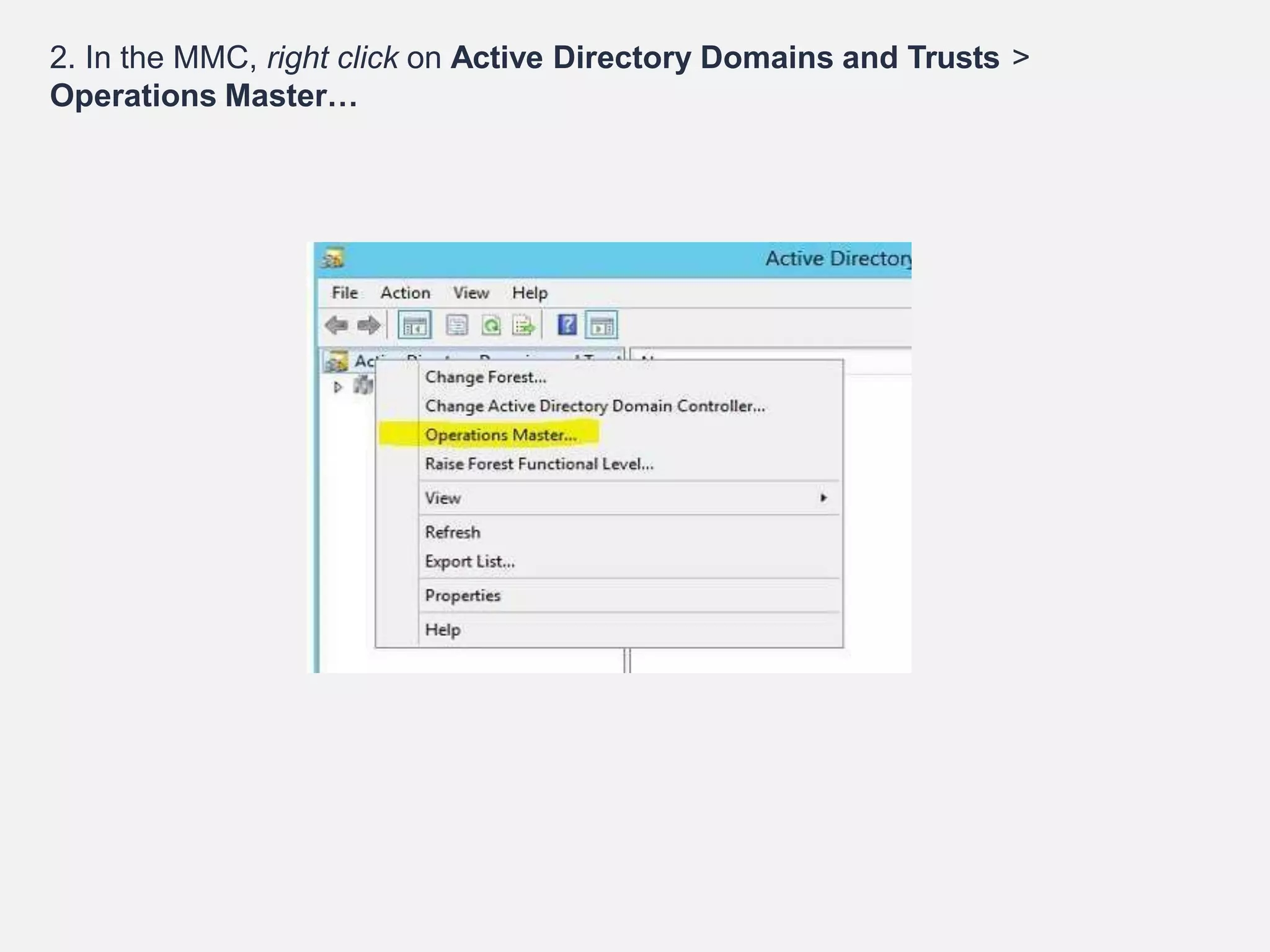
2. In the MMC, right click on Active Directory Domains and Trusts >
Operations Master…
3. In here it shows the current domain naming master role holder
(networkingbit.networkingbit.com) and its asking if we need to move it to
windows server 2012 R2 (server2.networkingbit.com). Click on change to
move the role over
4. Click Yes to continue. Once its confirm about task completion we can
see current domain naming master is windows server 2012 R2
(server2.networkingbit.com)
STEP2:TRANSFERRINGTHERIDMASTER,PDCEMULATOR
ANDINFRASTRUCTUREMASTERROLES
As the first step let’s look how we can transfer these 3 roles over to new server.
1. Log in to the windows 2012 R2 server as domain administrator
2. Click on Server Manager > Tools > Active Directory Users and
Computers
3. In MMC, right click on the domain name then click on Change Domain
controller
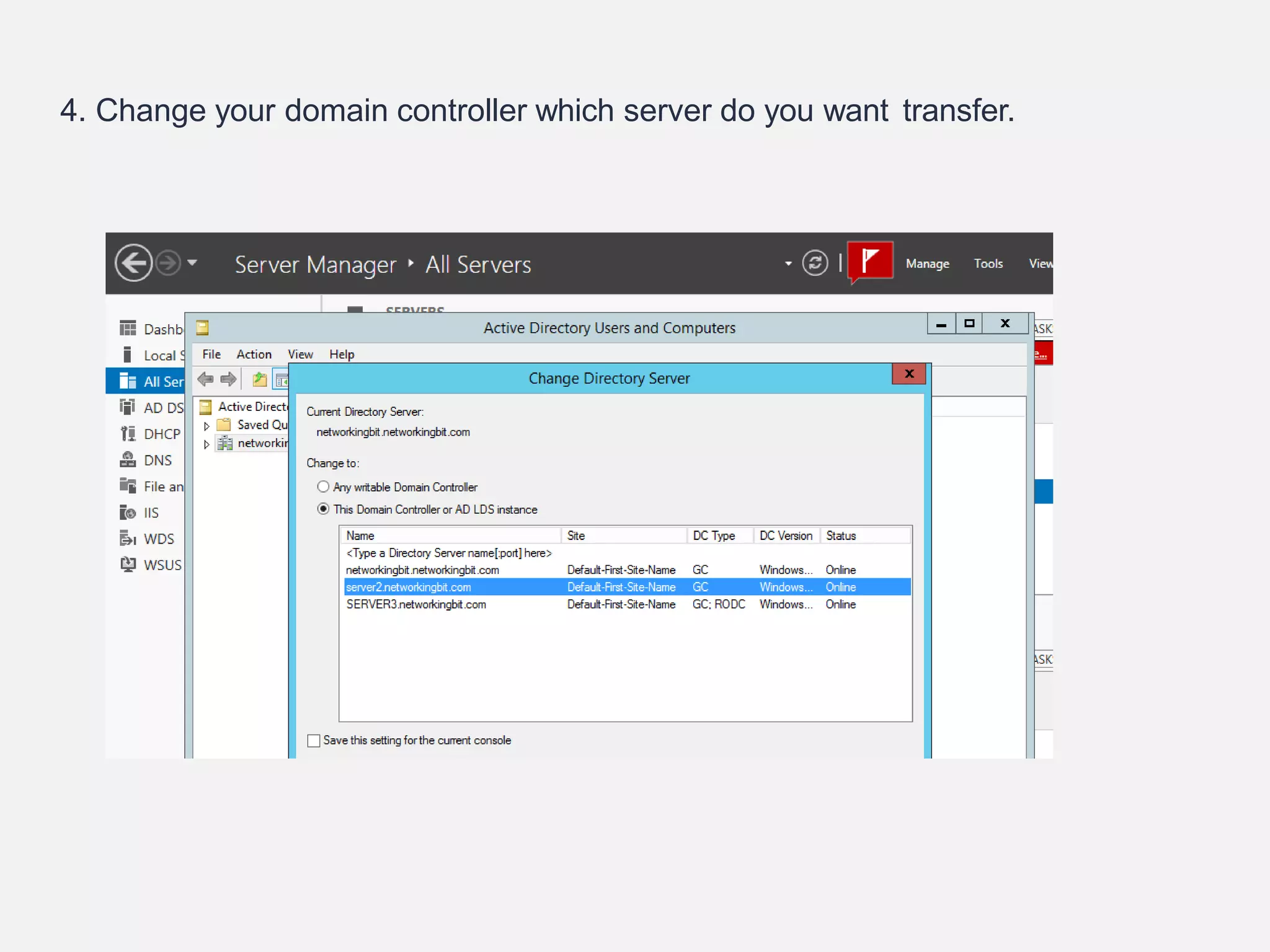
4. Change your domain controller which server do you want transfer.
5. In MMC, right click on the domain name then click on Operation Masters
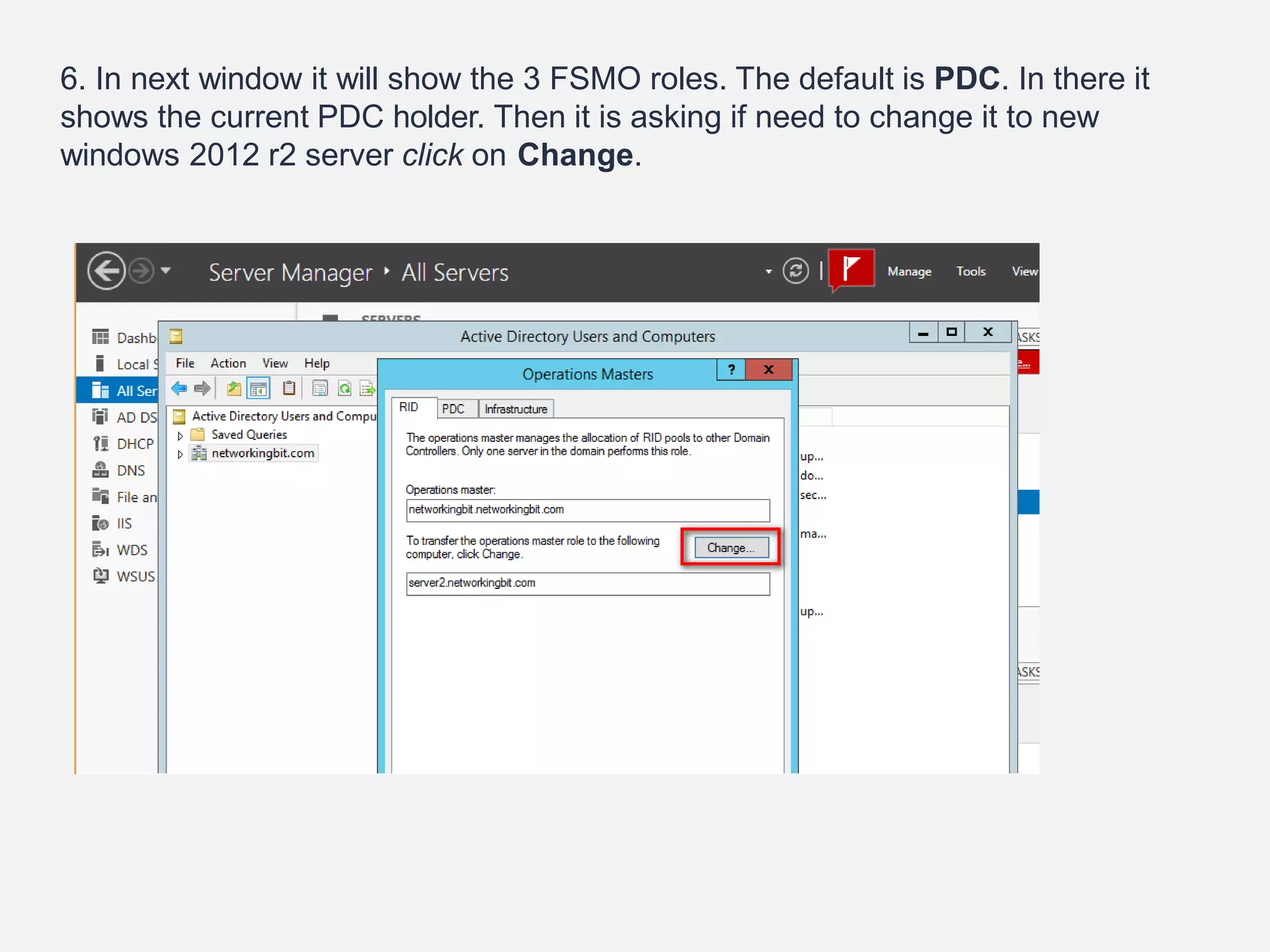
6. In next window it will show the 3 FSMO roles. The default is PDC. In there it
shows the current PDC holder. Then it is asking if need to change it to new
windows 2012 r2 server click on Change.
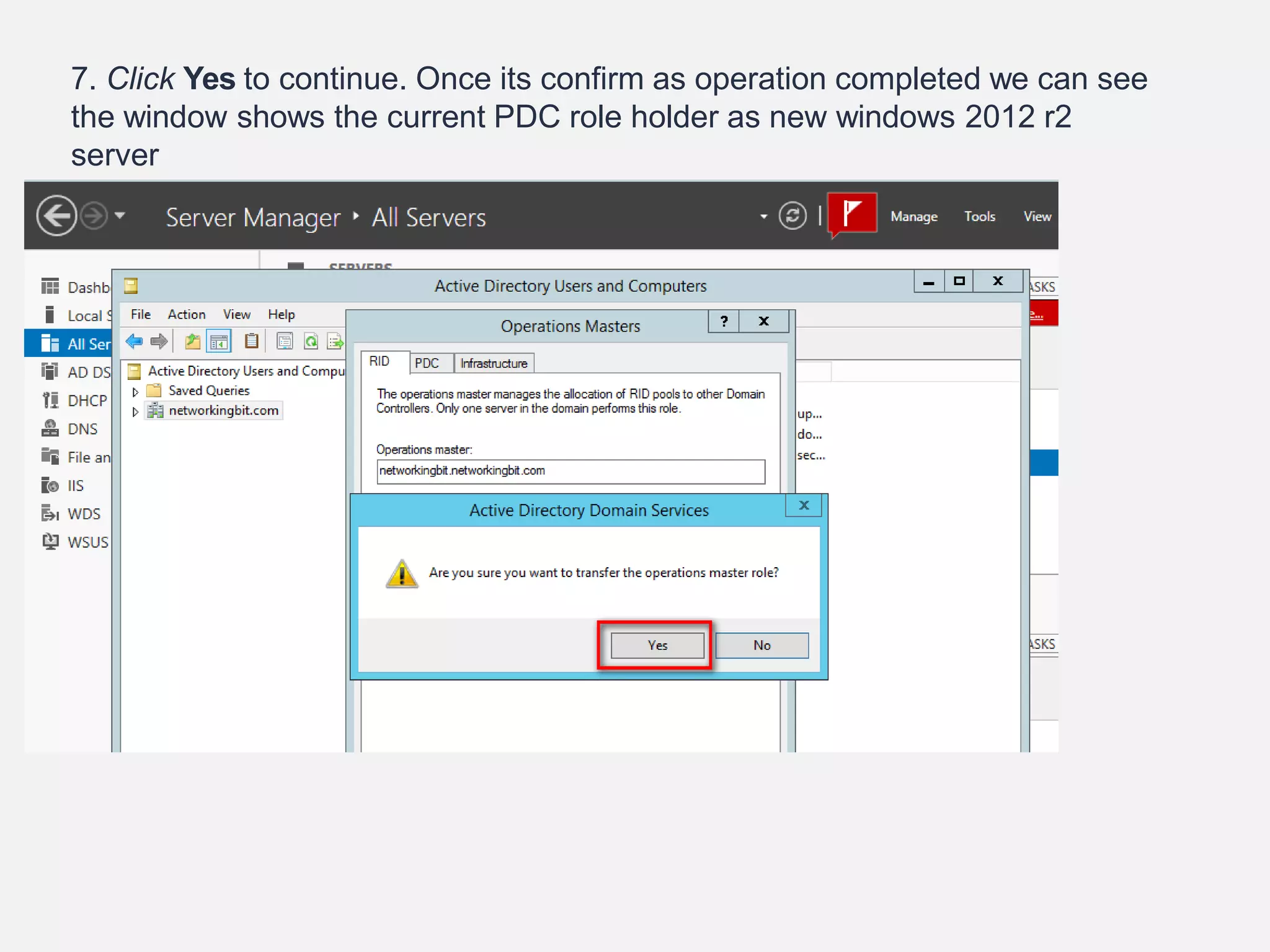
7. Click Yes to continue. Once its confirm as operation completed we can see
the window shows the current PDC role holder as new windows 2012 r2
server
PLEASE REPEAT THE SAME
STEPS TO TRANSFER THE
RID MASTER AND
INFRASTRUCTURE MASTER
ROLES
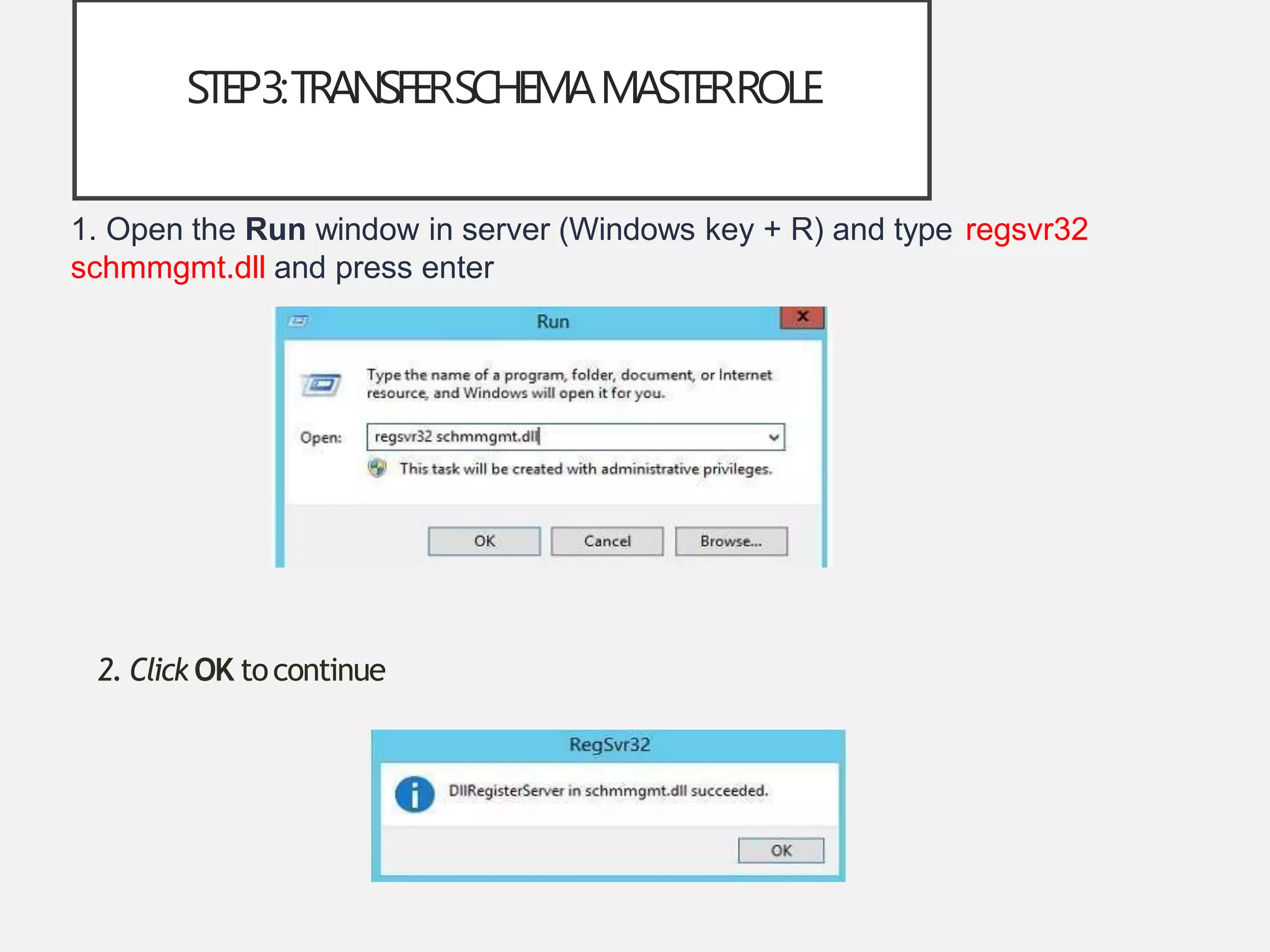
STEP3:TRANSFERSCHEMAMASTERROLE
1. Open the Run window in server (Windows key + R) and type regsvr32
schmmgmt.dll and press enter
2. Click OK tocontinue
3. OPEN THE RUN WINDOW AGAIN, TYPE MMC
AND CLICK OK
4.Then in mmc window click on File> Add-Remove Snap-in…
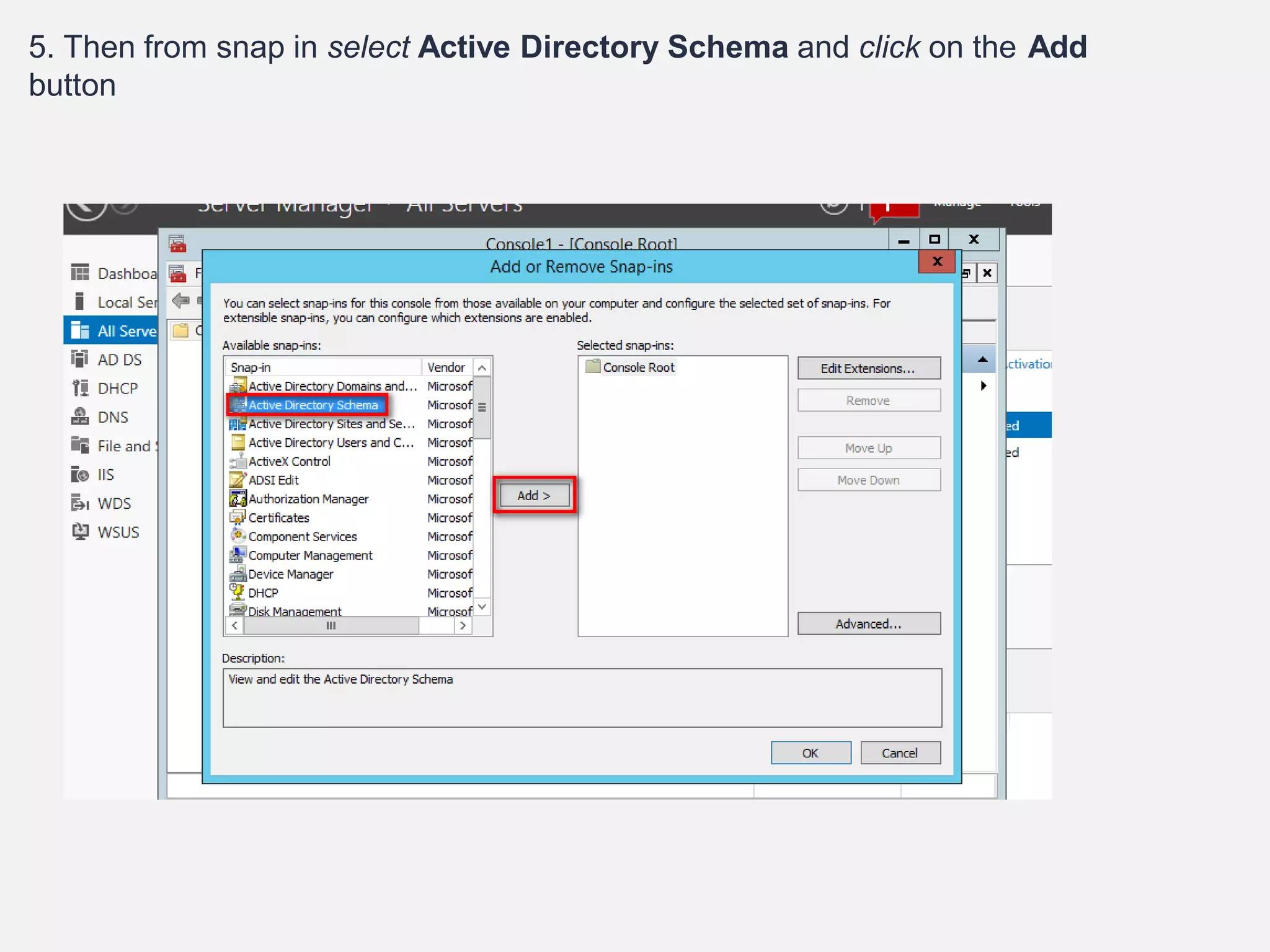
5. Then from snap in select Active Directory Schema and click on the Add
button
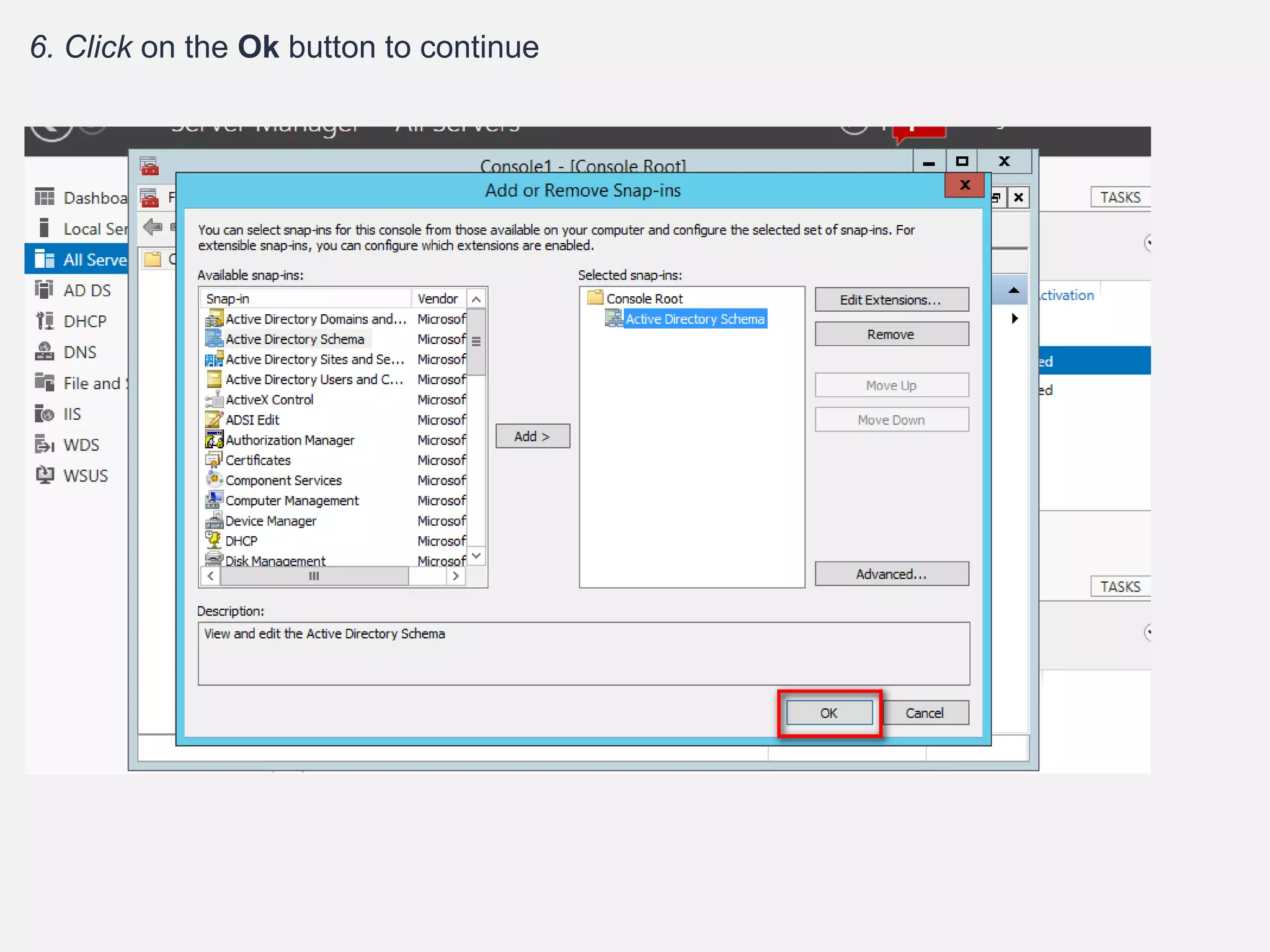
6. Click on the Ok button to continue
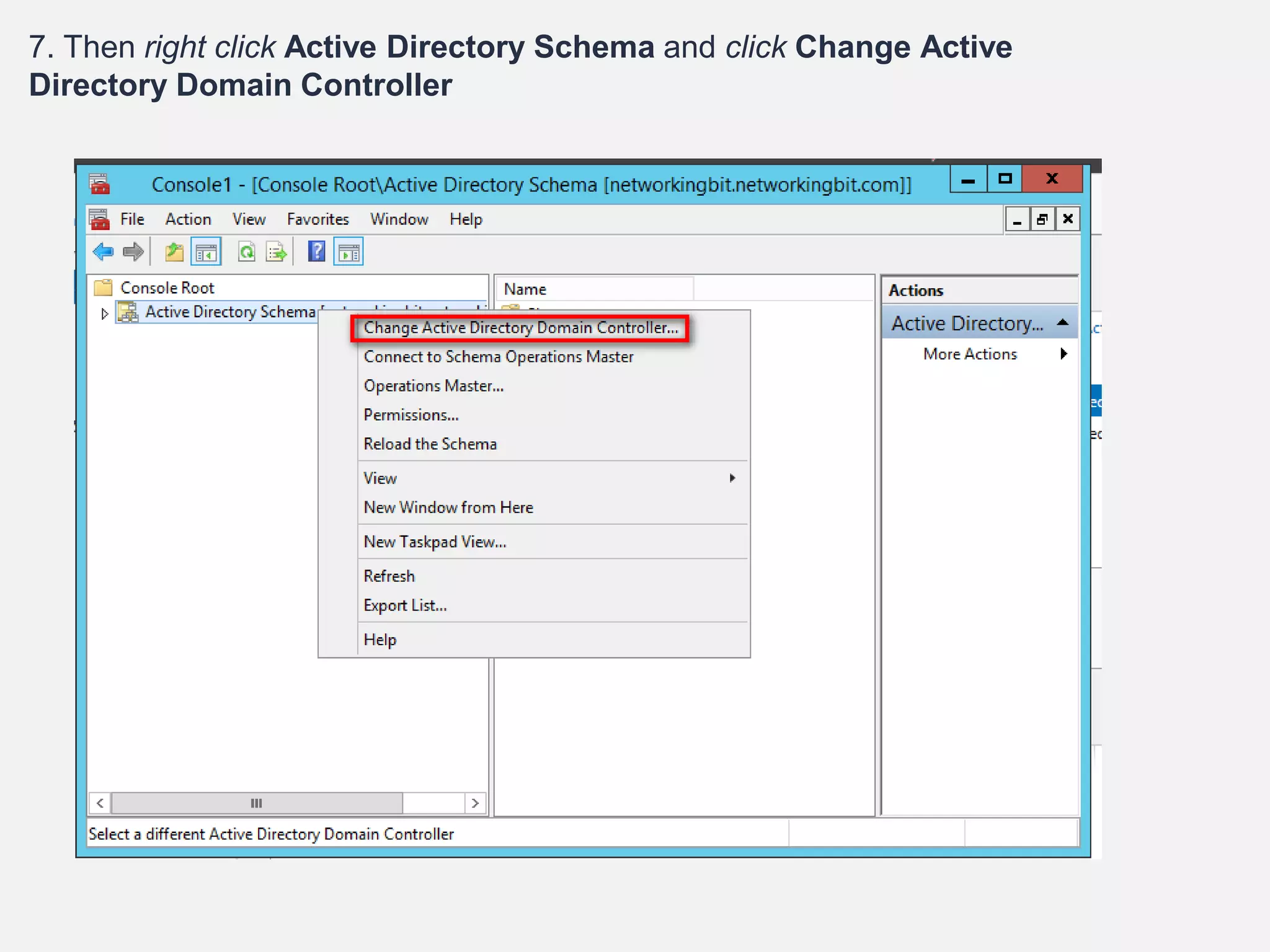
7. Then right click Active Directory Schema and click Change Active
Directory Domain Controller
8. In Next window select the windows server 2012 R2 DC
(server2.networkingbit.com) and click ok
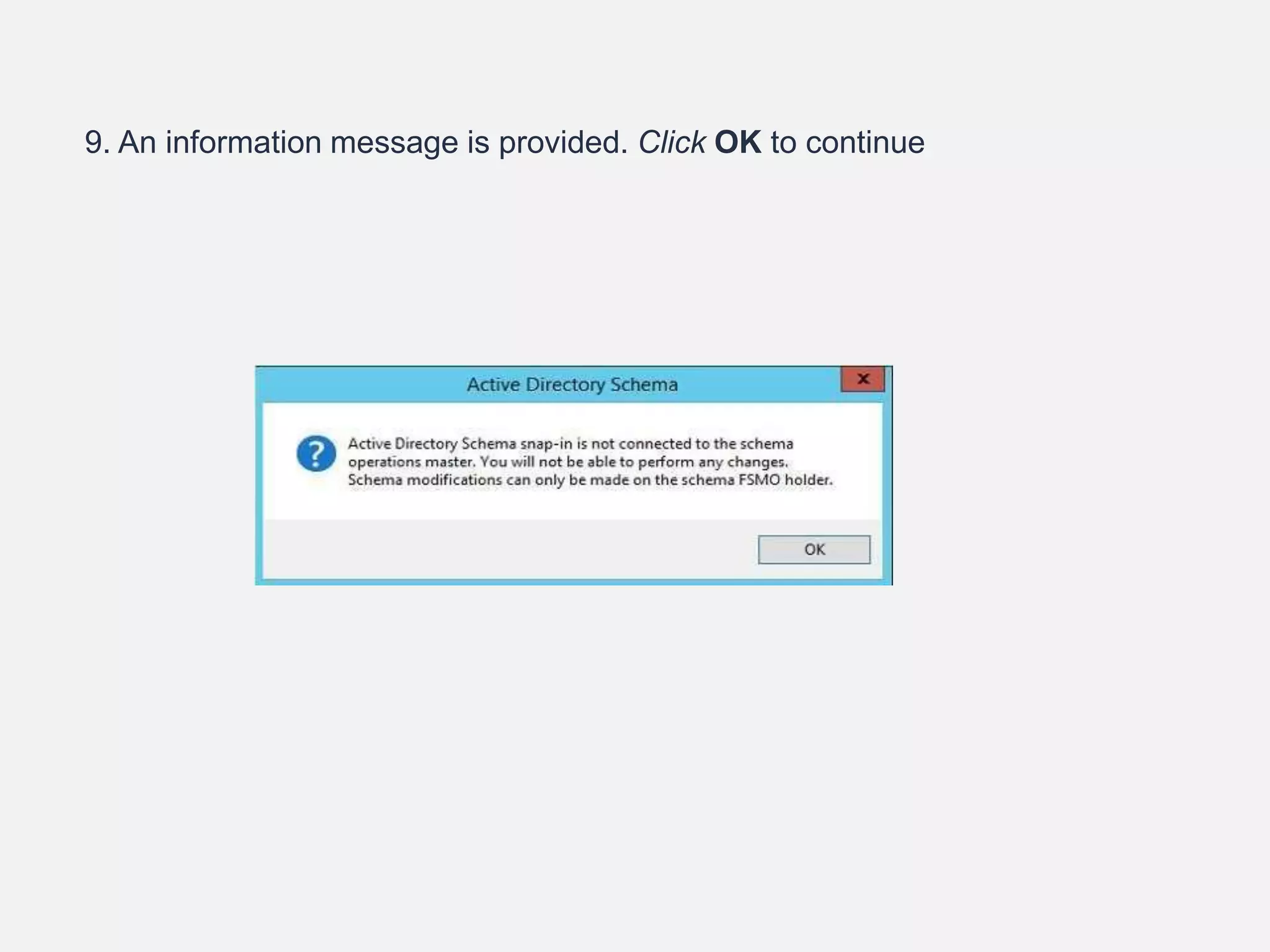
9. An information message is provided. Click OK to continue
10. Right click Active Directory Schema > Operation Master> In
here it shows the current schema master role holder
(networkingbit.networkingbit.com) and its asking if we need to move it
to windows server 2012 R2 (server2.networkingbit.com). Click
Change to move the role over
11. CLICK YES TO
CONTINUE
12. Once it’s confirmed, the current schema master will now display windows
server 2012 R2(server2.networkingbit.com)
13. Now we successfully move all . To confirm all 5 FSMO roles have been
moved over to the new windows server 2012 R2, open command prompt in said
server and type command “get-addomain” “Get-ADForest” and press enter.

fsmo in active directory

  • 1.
  • 2.
    FSMOROLES Stands for FlexibleSingle Master Operation There are 5 types of FSMO roles : • Schema master Forest Wide role • Domain Naming master • RID master • PDC emulator Domain Wide Role • Infrastructure master
  • 3.
    SCHEMAMASTERFSMOROLE • The schemamaster FSMO role holder is the DC responsible for performing updates to the directory schema . • This DC is the only one that can process updates to the directory schema. • Once the Schema update is complete, it is replicated from the schema master to all other DCs in the directory. • There is only one schema master per forest.
  • 4.
    DOMAINNAMINGMASTERFSMOROLE • The domainnaming master FSMO role holder is the DC responsible for making changes to the forest-wide domain name space of the directory. • This DC is the only one that can add or remove a domain from the directory. • It can also add or remove cross references to domains in external directories.
  • 5.
    PDCEMULATORFSMOROLE • The PDCemulator is necessary to synchronize time in an enterprise. • Responsible for Password changes performed by other DCs in the domain . • Account lockout is processed on the PDC emulator.
  • 6.
    INFRASTRUCTUREFSMOROLE • When anobject in one domain is referenced by another object in another domain, it represents the reference by the GUID • The infrastructure FSMO role holder is the DC responsible for updating an object's SID and distinguished name in a cross-domain object reference. • The Infrastructure Master (IM) role should be held by a domain controller that is not a Global Catalog server(GC). • If the Infrastructure Master runs on a Global Catalog server it will stop updating object information because it does not contain any references to objects that it does not hold.
  • 7.
    TRANSFERINGFSMOROLES • Schema masterActive Directory Schema • Domain Naming master Active Directory Domain and trust • RID master • PDC emulator Active Directory Users and computer • Infrastructure master
  • 8.
    STEP1: TRANSFERDOMAINNAMINGMASTERROLE 1. Clickon Server Manager > Tools > Active Directory Domains and Trusts
  • 9.
    2. In theMMC, right click on Active Directory Domains and Trusts > Operations Master…
  • 10.
    3. In hereit shows the current domain naming master role holder (networkingbit.networkingbit.com) and its asking if we need to move it to windows server 2012 R2 (server2.networkingbit.com). Click on change to move the role over
  • 11.
    4. Click Yesto continue. Once its confirm about task completion we can see current domain naming master is windows server 2012 R2 (server2.networkingbit.com)
  • 12.
    STEP2:TRANSFERRINGTHERIDMASTER,PDCEMULATOR ANDINFRASTRUCTUREMASTERROLES As the firststep let’s look how we can transfer these 3 roles over to new server. 1. Log in to the windows 2012 R2 server as domain administrator 2. Click on Server Manager > Tools > Active Directory Users and Computers
  • 13.
    3. In MMC,right click on the domain name then click on Change Domain controller
  • 14.
    4. Change yourdomain controller which server do you want transfer.
  • 15.
    5. In MMC,right click on the domain name then click on Operation Masters
  • 16.
    6. In nextwindow it will show the 3 FSMO roles. The default is PDC. In there it shows the current PDC holder. Then it is asking if need to change it to new windows 2012 r2 server click on Change.
  • 17.
    7. Click Yesto continue. Once its confirm as operation completed we can see the window shows the current PDC role holder as new windows 2012 r2 server
  • 18.
    PLEASE REPEAT THESAME STEPS TO TRANSFER THE RID MASTER AND INFRASTRUCTURE MASTER ROLES
  • 19.
    STEP3:TRANSFERSCHEMAMASTERROLE 1. Open theRun window in server (Windows key + R) and type regsvr32 schmmgmt.dll and press enter 2. Click OK tocontinue
  • 20.
    3. OPEN THERUN WINDOW AGAIN, TYPE MMC AND CLICK OK 4.Then in mmc window click on File> Add-Remove Snap-in…
  • 21.
    5. Then fromsnap in select Active Directory Schema and click on the Add button
  • 22.
    6. Click onthe Ok button to continue
  • 23.
    7. Then rightclick Active Directory Schema and click Change Active Directory Domain Controller
  • 24.
    8. In Nextwindow select the windows server 2012 R2 DC (server2.networkingbit.com) and click ok
  • 25.
    9. An informationmessage is provided. Click OK to continue
  • 26.
    10. Right clickActive Directory Schema > Operation Master> In here it shows the current schema master role holder (networkingbit.networkingbit.com) and its asking if we need to move it to windows server 2012 R2 (server2.networkingbit.com). Click Change to move the role over
  • 27.
    11. CLICK YESTO CONTINUE 12. Once it’s confirmed, the current schema master will now display windows server 2012 R2(server2.networkingbit.com)
  • 28.
    13. Now wesuccessfully move all . To confirm all 5 FSMO roles have been moved over to the new windows server 2012 R2, open command prompt in said server and type command “get-addomain” “Get-ADForest” and press enter.