Encryption Technology
Karve Nagar, Pune -52
SYLLABUS FOR MS SQL SERVER .Net by SHASHANK SIR
02065000957/8087155500
Visit us at www.encryptiontechnology.in
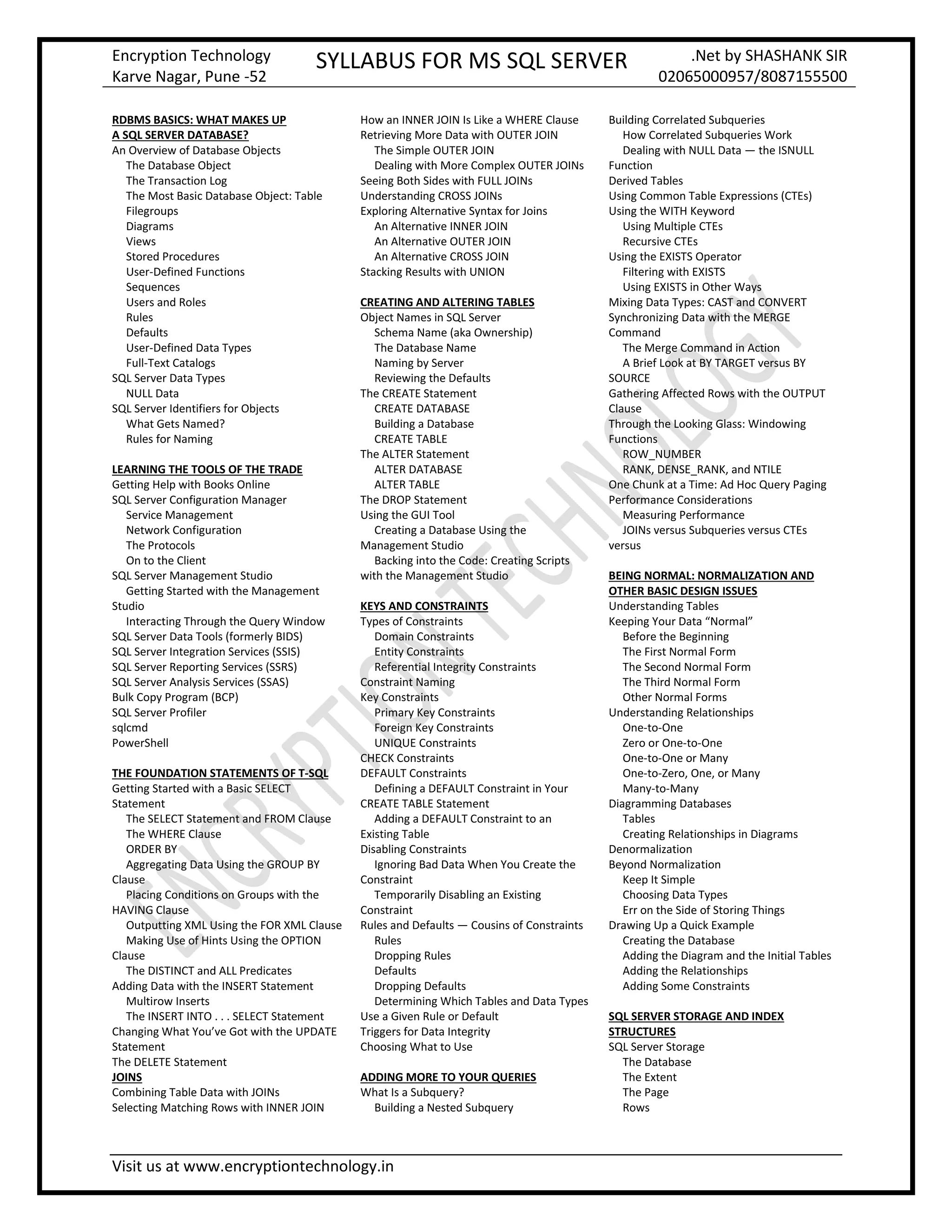
RDBMS BASICS: WHAT MAKES UP
A SQL SERVER DATABASE?
An Overview of Database Objects
The Database Object
The Transaction Log
The Most Basic Database Object: Table
Filegroups
Diagrams
Views
Stored Procedures
User-Defined Functions
Sequences
Users and Roles
Rules
Defaults
User-Defined Data Types
Full-Text Catalogs
SQL Server Data Types
NULL Data
SQL Server Identifiers for Objects
What Gets Named?
Rules for Naming
LEARNING THE TOOLS OF THE TRADE
Getting Help with Books Online
SQL Server Configuration Manager
Service Management
Network Configuration
The Protocols
On to the Client
SQL Server Management Studio
Getting Started with the Management
Studio
Interacting Through the Query Window
SQL Server Data Tools (formerly BIDS)
SQL Server Integration Services (SSIS)
SQL Server Reporting Services (SSRS)
SQL Server Analysis Services (SSAS)
Bulk Copy Program (BCP)
SQL Server Profiler
sqlcmd
PowerShell
THE FOUNDATION STATEMENTS OF T-SQL
Getting Started with a Basic SELECT
Statement
The SELECT Statement and FROM Clause
The WHERE Clause
ORDER BY
Aggregating Data Using the GROUP BY
Clause
Placing Conditions on Groups with the
HAVING Clause
Outputting XML Using the FOR XML Clause
Making Use of Hints Using the OPTION
Clause
The DISTINCT and ALL Predicates
Adding Data with the INSERT Statement
Multirow Inserts
The INSERT INTO . . . SELECT Statement
Changing What You’ve Got with the UPDATE
Statement
The DELETE Statement
JOINS
Combining Table Data with JOINs
Selecting Matching Rows with INNER JOIN
How an INNER JOIN Is Like a WHERE Clause
Retrieving More Data with OUTER JOIN
The Simple OUTER JOIN
Dealing with More Complex OUTER JOINs
Seeing Both Sides with FULL JOINs
Understanding CROSS JOINs
Exploring Alternative Syntax for Joins
An Alternative INNER JOIN
An Alternative OUTER JOIN
An Alternative CROSS JOIN
Stacking Results with UNION
CREATING AND ALTERING TABLES
Object Names in SQL Server
Schema Name (aka Ownership)
The Database Name
Naming by Server
Reviewing the Defaults
The CREATE Statement
CREATE DATABASE
Building a Database
CREATE TABLE
The ALTER Statement
ALTER DATABASE
ALTER TABLE
The DROP Statement
Using the GUI Tool
Creating a Database Using the
Management Studio
Backing into the Code: Creating Scripts
with the Management Studio
KEYS AND CONSTRAINTS
Types of Constraints
Domain Constraints
Entity Constraints
Referential Integrity Constraints
Constraint Naming
Key Constraints
Primary Key Constraints
Foreign Key Constraints
UNIQUE Constraints
CHECK Constraints
DEFAULT Constraints
Defining a DEFAULT Constraint in Your
CREATE TABLE Statement
Adding a DEFAULT Constraint to an
Existing Table
Disabling Constraints
Ignoring Bad Data When You Create the
Constraint
Temporarily Disabling an Existing
Constraint
Rules and Defaults — Cousins of Constraints
Rules
Dropping Rules
Defaults
Dropping Defaults
Determining Which Tables and Data Types
Use a Given Rule or Default
Triggers for Data Integrity
Choosing What to Use
ADDING MORE TO YOUR QUERIES
What Is a Subquery?
Building a Nested Subquery
Building Correlated Subqueries
How Correlated Subqueries Work
Dealing with NULL Data — the ISNULL
Function
Derived Tables
Using Common Table Expressions (CTEs)
Using the WITH Keyword
Using Multiple CTEs
Recursive CTEs
Using the EXISTS Operator
Filtering with EXISTS
Using EXISTS in Other Ways
Mixing Data Types: CAST and CONVERT
Synchronizing Data with the MERGE
Command
The Merge Command in Action
A Brief Look at BY TARGET versus BY
SOURCE
Gathering Affected Rows with the OUTPUT
Clause
Through the Looking Glass: Windowing
Functions
ROW_NUMBER
RANK, DENSE_RANK, and NTILE
One Chunk at a Time: Ad Hoc Query Paging
Performance Considerations
Measuring Performance
JOINs versus Subqueries versus CTEs
versus
BEING NORMAL: NORMALIZATION AND
OTHER BASIC DESIGN ISSUES
Understanding Tables
Keeping Your Data “Normal”
Before the Beginning
The First Normal Form
The Second Normal Form
The Third Normal Form
Other Normal Forms
Understanding Relationships
One-to-One
Zero or One-to-One
One-to-One or Many
One-to-Zero, One, or Many
Many-to-Many
Diagramming Databases
Tables
Creating Relationships in Diagrams
Denormalization
Beyond Normalization
Keep It Simple
Choosing Data Types
Err on the Side of Storing Things
Drawing Up a Quick Example
Creating the Database
Adding the Diagram and the Initial Tables
Adding the Relationships
Adding Some Constraints
SQL SERVER STORAGE AND INDEX
STRUCTURES
SQL Server Storage
The Database
The Extent
The Page
Rows
Encryption Technology
Karve Nagar, Pune -52
SYLLABUS FOR MS SQL SERVER .Net by SHASHANK SIR
02065000957/8087155500
Visit us at www.encryptiontechnology.in
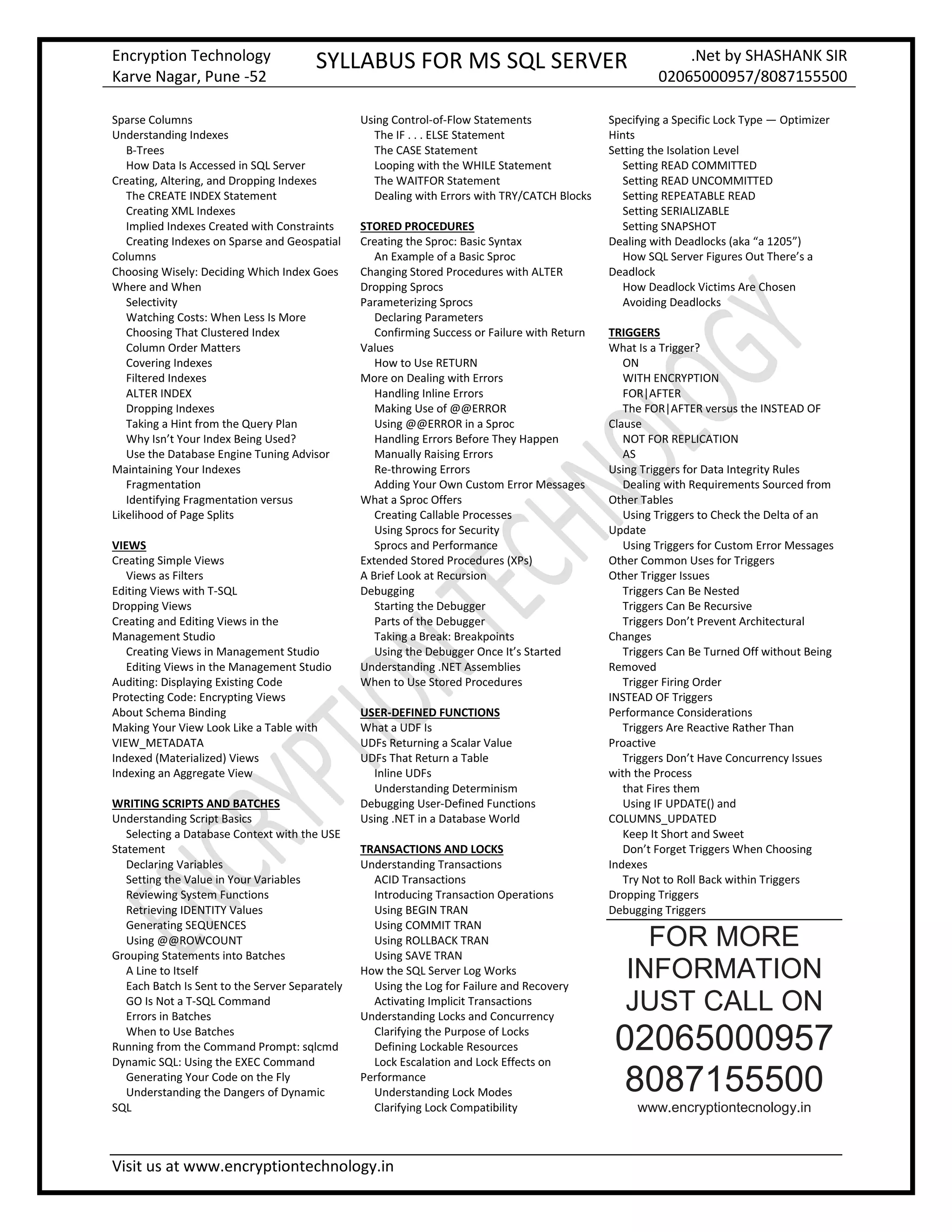
Sparse Columns
Understanding Indexes
B-Trees
How Data Is Accessed in SQL Server
Creating, Altering, and Dropping Indexes
The CREATE INDEX Statement
Creating XML Indexes
Implied Indexes Created with Constraints
Creating Indexes on Sparse and Geospatial
Columns
Choosing Wisely: Deciding Which Index Goes
Where and When
Selectivity
Watching Costs: When Less Is More
Choosing That Clustered Index
Column Order Matters
Covering Indexes
Filtered Indexes
ALTER INDEX
Dropping Indexes
Taking a Hint from the Query Plan
Why Isn’t Your Index Being Used?
Use the Database Engine Tuning Advisor
Maintaining Your Indexes
Fragmentation
Identifying Fragmentation versus
Likelihood of Page Splits
VIEWS
Creating Simple Views
Views as Filters
Editing Views with T-SQL
Dropping Views
Creating and Editing Views in the
Management Studio
Creating Views in Management Studio
Editing Views in the Management Studio
Auditing: Displaying Existing Code
Protecting Code: Encrypting Views
About Schema Binding
Making Your View Look Like a Table with
VIEW_METADATA
Indexed (Materialized) Views
Indexing an Aggregate View
WRITING SCRIPTS AND BATCHES
Understanding Script Basics
Selecting a Database Context with the USE
Statement
Declaring Variables
Setting the Value in Your Variables
Reviewing System Functions
Retrieving IDENTITY Values
Generating SEQUENCES
Using @@ROWCOUNT
Grouping Statements into Batches
A Line to Itself
Each Batch Is Sent to the Server Separately
GO Is Not a T-SQL Command
Errors in Batches
When to Use Batches
Running from the Command Prompt: sqlcmd
Dynamic SQL: Using the EXEC Command
Generating Your Code on the Fly
Understanding the Dangers of Dynamic
SQL
Using Control-of-Flow Statements
The IF . . . ELSE Statement
The CASE Statement
Looping with the WHILE Statement
The WAITFOR Statement
Dealing with Errors with TRY/CATCH Blocks
STORED PROCEDURES
Creating the Sproc: Basic Syntax
An Example of a Basic Sproc
Changing Stored Procedures with ALTER
Dropping Sprocs
Parameterizing Sprocs
Declaring Parameters
Confirming Success or Failure with Return
Values
How to Use RETURN
More on Dealing with Errors
Handling Inline Errors
Making Use of @@ERROR
Using @@ERROR in a Sproc
Handling Errors Before They Happen
Manually Raising Errors
Re-throwing Errors
Adding Your Own Custom Error Messages
What a Sproc Offers
Creating Callable Processes
Using Sprocs for Security
Sprocs and Performance
Extended Stored Procedures (XPs)
A Brief Look at Recursion
Debugging
Starting the Debugger
Parts of the Debugger
Taking a Break: Breakpoints
Using the Debugger Once It’s Started
Understanding .NET Assemblies
When to Use Stored Procedures
USER-DEFINED FUNCTIONS
What a UDF Is
UDFs Returning a Scalar Value
UDFs That Return a Table
Inline UDFs
Understanding Determinism
Debugging User-Defined Functions
Using .NET in a Database World
TRANSACTIONS AND LOCKS
Understanding Transactions
ACID Transactions
Introducing Transaction Operations
Using BEGIN TRAN
Using COMMIT TRAN
Using ROLLBACK TRAN
Using SAVE TRAN
How the SQL Server Log Works
Using the Log for Failure and Recovery
Activating Implicit Transactions
Understanding Locks and Concurrency
Clarifying the Purpose of Locks
Defining Lockable Resources
Lock Escalation and Lock Effects on
Performance
Understanding Lock Modes
Clarifying Lock Compatibility
Specifying a Specific Lock Type — Optimizer
Hints
Setting the Isolation Level
Setting READ COMMITTED
Setting READ UNCOMMITTED
Setting REPEATABLE READ
Setting SERIALIZABLE
Setting SNAPSHOT
Dealing with Deadlocks (aka “a 1205”)
How SQL Server Figures Out There’s a
Deadlock
How Deadlock Victims Are Chosen
Avoiding Deadlocks
TRIGGERS
What Is a Trigger?
ON
WITH ENCRYPTION
FOR|AFTER
The FOR|AFTER versus the INSTEAD OF
Clause
NOT FOR REPLICATION
AS
Using Triggers for Data Integrity Rules
Dealing with Requirements Sourced from
Other Tables
Using Triggers to Check the Delta of an
Update
Using Triggers for Custom Error Messages
Other Common Uses for Triggers
Other Trigger Issues
Triggers Can Be Nested
Triggers Can Be Recursive
Triggers Don’t Prevent Architectural
Changes
Triggers Can Be Turned Off without Being
Removed
Trigger Firing Order
INSTEAD OF Triggers
Performance Considerations
Triggers Are Reactive Rather Than
Proactive
Triggers Don’t Have Concurrency Issues
with the Process
that Fires them
Using IF UPDATE() and
COLUMNS_UPDATED
Keep It Short and Sweet
Don’t Forget Triggers When Choosing
Indexes
Try Not to Roll Back within Triggers
Dropping Triggers
Debugging Triggers
FOR MORE
INFORMATION
JUST CALL ON
02065000957
8087155500
www.encryptiontecnology.in

FREE Sql Server syllabus

  • 1.
    Encryption Technology Karve Nagar,Pune -52 SYLLABUS FOR MS SQL SERVER .Net by SHASHANK SIR 02065000957/8087155500 Visit us at www.encryptiontechnology.in RDBMS BASICS: WHAT MAKES UP A SQL SERVER DATABASE? An Overview of Database Objects The Database Object The Transaction Log The Most Basic Database Object: Table Filegroups Diagrams Views Stored Procedures User-Defined Functions Sequences Users and Roles Rules Defaults User-Defined Data Types Full-Text Catalogs SQL Server Data Types NULL Data SQL Server Identifiers for Objects What Gets Named? Rules for Naming LEARNING THE TOOLS OF THE TRADE Getting Help with Books Online SQL Server Configuration Manager Service Management Network Configuration The Protocols On to the Client SQL Server Management Studio Getting Started with the Management Studio Interacting Through the Query Window SQL Server Data Tools (formerly BIDS) SQL Server Integration Services (SSIS) SQL Server Reporting Services (SSRS) SQL Server Analysis Services (SSAS) Bulk Copy Program (BCP) SQL Server Profiler sqlcmd PowerShell THE FOUNDATION STATEMENTS OF T-SQL Getting Started with a Basic SELECT Statement The SELECT Statement and FROM Clause The WHERE Clause ORDER BY Aggregating Data Using the GROUP BY Clause Placing Conditions on Groups with the HAVING Clause Outputting XML Using the FOR XML Clause Making Use of Hints Using the OPTION Clause The DISTINCT and ALL Predicates Adding Data with the INSERT Statement Multirow Inserts The INSERT INTO . . . SELECT Statement Changing What You’ve Got with the UPDATE Statement The DELETE Statement JOINS Combining Table Data with JOINs Selecting Matching Rows with INNER JOIN How an INNER JOIN Is Like a WHERE Clause Retrieving More Data with OUTER JOIN The Simple OUTER JOIN Dealing with More Complex OUTER JOINs Seeing Both Sides with FULL JOINs Understanding CROSS JOINs Exploring Alternative Syntax for Joins An Alternative INNER JOIN An Alternative OUTER JOIN An Alternative CROSS JOIN Stacking Results with UNION CREATING AND ALTERING TABLES Object Names in SQL Server Schema Name (aka Ownership) The Database Name Naming by Server Reviewing the Defaults The CREATE Statement CREATE DATABASE Building a Database CREATE TABLE The ALTER Statement ALTER DATABASE ALTER TABLE The DROP Statement Using the GUI Tool Creating a Database Using the Management Studio Backing into the Code: Creating Scripts with the Management Studio KEYS AND CONSTRAINTS Types of Constraints Domain Constraints Entity Constraints Referential Integrity Constraints Constraint Naming Key Constraints Primary Key Constraints Foreign Key Constraints UNIQUE Constraints CHECK Constraints DEFAULT Constraints Defining a DEFAULT Constraint in Your CREATE TABLE Statement Adding a DEFAULT Constraint to an Existing Table Disabling Constraints Ignoring Bad Data When You Create the Constraint Temporarily Disabling an Existing Constraint Rules and Defaults — Cousins of Constraints Rules Dropping Rules Defaults Dropping Defaults Determining Which Tables and Data Types Use a Given Rule or Default Triggers for Data Integrity Choosing What to Use ADDING MORE TO YOUR QUERIES What Is a Subquery? Building a Nested Subquery Building Correlated Subqueries How Correlated Subqueries Work Dealing with NULL Data — the ISNULL Function Derived Tables Using Common Table Expressions (CTEs) Using the WITH Keyword Using Multiple CTEs Recursive CTEs Using the EXISTS Operator Filtering with EXISTS Using EXISTS in Other Ways Mixing Data Types: CAST and CONVERT Synchronizing Data with the MERGE Command The Merge Command in Action A Brief Look at BY TARGET versus BY SOURCE Gathering Affected Rows with the OUTPUT Clause Through the Looking Glass: Windowing Functions ROW_NUMBER RANK, DENSE_RANK, and NTILE One Chunk at a Time: Ad Hoc Query Paging Performance Considerations Measuring Performance JOINs versus Subqueries versus CTEs versus BEING NORMAL: NORMALIZATION AND OTHER BASIC DESIGN ISSUES Understanding Tables Keeping Your Data “Normal” Before the Beginning The First Normal Form The Second Normal Form The Third Normal Form Other Normal Forms Understanding Relationships One-to-One Zero or One-to-One One-to-One or Many One-to-Zero, One, or Many Many-to-Many Diagramming Databases Tables Creating Relationships in Diagrams Denormalization Beyond Normalization Keep It Simple Choosing Data Types Err on the Side of Storing Things Drawing Up a Quick Example Creating the Database Adding the Diagram and the Initial Tables Adding the Relationships Adding Some Constraints SQL SERVER STORAGE AND INDEX STRUCTURES SQL Server Storage The Database The Extent The Page Rows
  • 2.
    Encryption Technology Karve Nagar,Pune -52 SYLLABUS FOR MS SQL SERVER .Net by SHASHANK SIR 02065000957/8087155500 Visit us at www.encryptiontechnology.in Sparse Columns Understanding Indexes B-Trees How Data Is Accessed in SQL Server Creating, Altering, and Dropping Indexes The CREATE INDEX Statement Creating XML Indexes Implied Indexes Created with Constraints Creating Indexes on Sparse and Geospatial Columns Choosing Wisely: Deciding Which Index Goes Where and When Selectivity Watching Costs: When Less Is More Choosing That Clustered Index Column Order Matters Covering Indexes Filtered Indexes ALTER INDEX Dropping Indexes Taking a Hint from the Query Plan Why Isn’t Your Index Being Used? Use the Database Engine Tuning Advisor Maintaining Your Indexes Fragmentation Identifying Fragmentation versus Likelihood of Page Splits VIEWS Creating Simple Views Views as Filters Editing Views with T-SQL Dropping Views Creating and Editing Views in the Management Studio Creating Views in Management Studio Editing Views in the Management Studio Auditing: Displaying Existing Code Protecting Code: Encrypting Views About Schema Binding Making Your View Look Like a Table with VIEW_METADATA Indexed (Materialized) Views Indexing an Aggregate View WRITING SCRIPTS AND BATCHES Understanding Script Basics Selecting a Database Context with the USE Statement Declaring Variables Setting the Value in Your Variables Reviewing System Functions Retrieving IDENTITY Values Generating SEQUENCES Using @@ROWCOUNT Grouping Statements into Batches A Line to Itself Each Batch Is Sent to the Server Separately GO Is Not a T-SQL Command Errors in Batches When to Use Batches Running from the Command Prompt: sqlcmd Dynamic SQL: Using the EXEC Command Generating Your Code on the Fly Understanding the Dangers of Dynamic SQL Using Control-of-Flow Statements The IF . . . ELSE Statement The CASE Statement Looping with the WHILE Statement The WAITFOR Statement Dealing with Errors with TRY/CATCH Blocks STORED PROCEDURES Creating the Sproc: Basic Syntax An Example of a Basic Sproc Changing Stored Procedures with ALTER Dropping Sprocs Parameterizing Sprocs Declaring Parameters Confirming Success or Failure with Return Values How to Use RETURN More on Dealing with Errors Handling Inline Errors Making Use of @@ERROR Using @@ERROR in a Sproc Handling Errors Before They Happen Manually Raising Errors Re-throwing Errors Adding Your Own Custom Error Messages What a Sproc Offers Creating Callable Processes Using Sprocs for Security Sprocs and Performance Extended Stored Procedures (XPs) A Brief Look at Recursion Debugging Starting the Debugger Parts of the Debugger Taking a Break: Breakpoints Using the Debugger Once It’s Started Understanding .NET Assemblies When to Use Stored Procedures USER-DEFINED FUNCTIONS What a UDF Is UDFs Returning a Scalar Value UDFs That Return a Table Inline UDFs Understanding Determinism Debugging User-Defined Functions Using .NET in a Database World TRANSACTIONS AND LOCKS Understanding Transactions ACID Transactions Introducing Transaction Operations Using BEGIN TRAN Using COMMIT TRAN Using ROLLBACK TRAN Using SAVE TRAN How the SQL Server Log Works Using the Log for Failure and Recovery Activating Implicit Transactions Understanding Locks and Concurrency Clarifying the Purpose of Locks Defining Lockable Resources Lock Escalation and Lock Effects on Performance Understanding Lock Modes Clarifying Lock Compatibility Specifying a Specific Lock Type — Optimizer Hints Setting the Isolation Level Setting READ COMMITTED Setting READ UNCOMMITTED Setting REPEATABLE READ Setting SERIALIZABLE Setting SNAPSHOT Dealing with Deadlocks (aka “a 1205”) How SQL Server Figures Out There’s a Deadlock How Deadlock Victims Are Chosen Avoiding Deadlocks TRIGGERS What Is a Trigger? ON WITH ENCRYPTION FOR|AFTER The FOR|AFTER versus the INSTEAD OF Clause NOT FOR REPLICATION AS Using Triggers for Data Integrity Rules Dealing with Requirements Sourced from Other Tables Using Triggers to Check the Delta of an Update Using Triggers for Custom Error Messages Other Common Uses for Triggers Other Trigger Issues Triggers Can Be Nested Triggers Can Be Recursive Triggers Don’t Prevent Architectural Changes Triggers Can Be Turned Off without Being Removed Trigger Firing Order INSTEAD OF Triggers Performance Considerations Triggers Are Reactive Rather Than Proactive Triggers Don’t Have Concurrency Issues with the Process that Fires them Using IF UPDATE() and COLUMNS_UPDATED Keep It Short and Sweet Don’t Forget Triggers When Choosing Indexes Try Not to Roll Back within Triggers Dropping Triggers Debugging Triggers FOR MORE INFORMATION JUST CALL ON 02065000957 8087155500 www.encryptiontecnology.in