Company
LOGO
1
Database Creation and Maintenance
Jorge G. Martinez
2
Agenda
1. Overview of MS SQL 2005
2. Managing Databases
3. DDL: Create, Alter, Drop
4. DML: Select, Insert, Delete, Update
5. SSMS: Demos
3
Overview of MS SQL 2005 (Structured Query Language)
 SQL server is relatively easy to manage
 SQL server scales from a mobile laptop to symmetric
multiprocessor (SMP) systems.
 SQL server provides business intelligence features that
until now have only been available in Oracle.
 Different editions of SQL 2005: Express, Workgroup,
Standard, and Enterprise Edition.
 SQL Server 2005 Express Edition allows you to run
database applications on desktop and small servers. It is
the updated version of MSDE and it is free.
4
Managing Databases
 Transact-SQL or T-SQL
 (SSMS) SQL Server
Management Studio and its
component Object Explorer
5
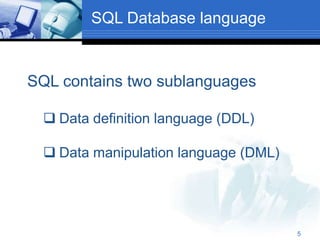
SQL Database language
SQL contains two sublanguages
 Data definition language (DDL)
 Data manipulation language (DML)
6
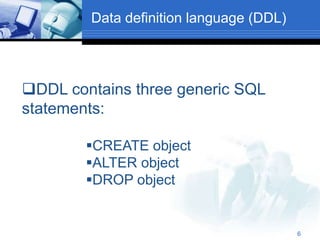
Data definition language (DDL)
DDL contains three generic SQL
statements:
CREATE object
ALTER object
DROP object
7
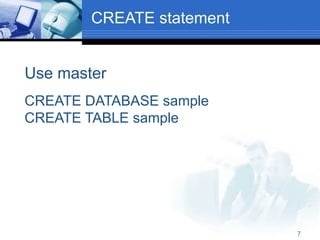
CREATE statement
Use master
CREATE DATABASE sample
CREATE TABLE sample
8
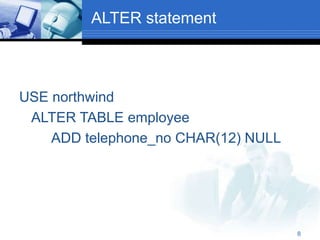
ALTER statement
USE northwind
ALTER TABLE employee
ADD telephone_no CHAR(12) NULL
9
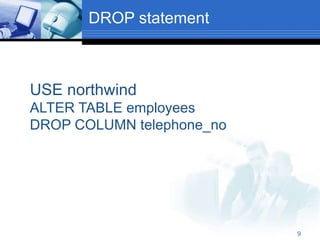
DROP statement
USE northwind
ALTER TABLE employees
DROP COLUMN telephone_no
10
Data manipulation language
(DML)
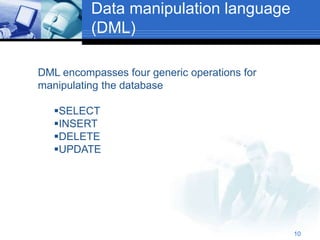
DML encompasses four generic operations for
manipulating the database
SELECT
INSERT
DELETE
UPDATE
11
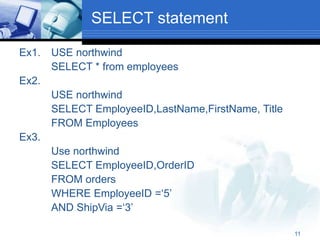
SELECT statement
Ex1. USE northwind
SELECT * from employees
Ex2.
USE northwind
SELECT EmployeeID,LastName,FirstName, Title
FROM Employees
Ex3.
Use northwind
SELECT EmployeeID,OrderID
FROM orders
WHERE EmployeeID =‘5’
AND ShipVia =‘3’
12
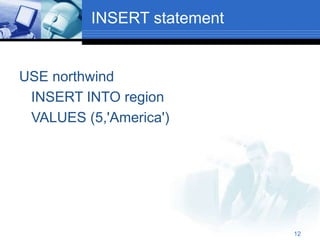
INSERT statement
USE northwind
INSERT INTO region
VALUES (5,'America')
13
DELETE statement
 Deletes any employee with last name king
in the employees table from the database
name northwind.
USE northwind
DELETE FROM Employees
WHERE LastName= 'King'
14
UPDATE statement
USE northwind
UPDATE Employees
SET Title= 'District Manager'
WHERE LastName ='Buchanan'
15
Creating Database Objects Using T-SQL
DDL (Data Definition Language)
 A database is the main container for tables, views,
indexes stored procedures, and other database objects.
 Using the CREATE DATABASE statement, you can
create a new database along with the files used to store
the database.
 You can create 32,767 databases on an instance of SQL
server.
 CREATE DATABASE MyNewDatabase
16
Cont.
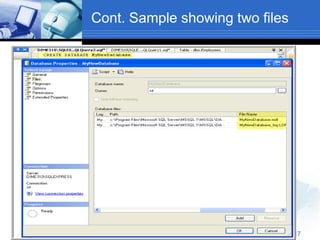
 When the database is created, two files are also
created: a primary file (an .mdf file) and a
transaction log file (an .ldf file).
 Its is recommended to keep these files in
different drives to simplify recovering the
database in case of corruption.
Two Files
 MyNewDatabase.mdf
 MyNewDatabase.ldf
17
Cont. Sample showing two files
18
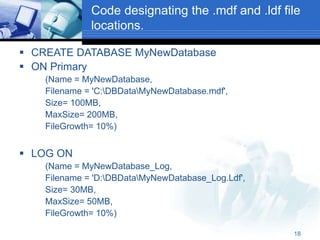
Code designating the .mdf and .ldf file
locations.
 CREATE DATABASE MyNewDatabase
 ON Primary
(Name = MyNewDatabase,
Filename = 'C:DBDataMyNewDatabase.mdf',
Size= 100MB,
MaxSize= 200MB,
FileGrowth= 10%)
 LOG ON
(Name = MyNewDatabase_Log,
Filename = 'D:DBDataMyNewDatabase_Log.Ldf',
Size= 30MB,
MaxSize= 50MB,
FileGrowth= 10%)
19
Removing Database Objects
 All Transact-SQL statements to remove a
database object have the general form:
 DROP object object_name
 DROP DATABASE database1 {,database2…}
 It remove one or more databases.
 One or more tables can be removed from
a database with the following statement:
 DROP TABLE table_name1 {,table_name2…}
20
Tables
 Tables are objects that contain data.
 In SQL server 2005, you can create up to
two billion tables per database
 CREATE TABLE statement creates a
database table
CREATE TABLE WAREHOUSE
(HouseID INT PRIMARY KEY,
HouseName char (50))
21
Tables Cont.
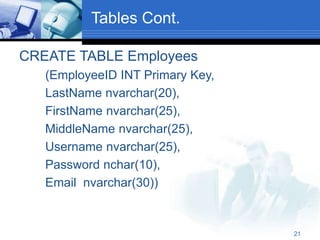
CREATE TABLE Employees
(EmployeeID INT Primary Key,
LastName nvarchar(20),
FirstName nvarchar(25),
MiddleName nvarchar(25),
Username nvarchar(25),
Password nchar(10),
Email nvarchar(30))
22
Tables Cont.
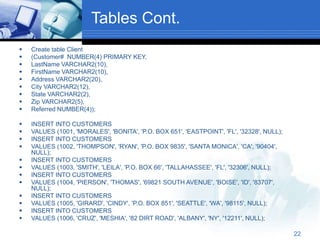
 Create table Client
 (Customer# NUMBER(4) PRIMARY KEY,
 LastName VARCHAR2(10),
 FirstName VARCHAR2(10),
 Address VARCHAR2(20),
 City VARCHAR2(12),
 State VARCHAR2(2),
 Zip VARCHAR2(5),
 Referred NUMBER(4));
 INSERT INTO CUSTOMERS
 VALUES (1001, 'MORALES', 'BONITA', 'P.O. BOX 651', 'EASTPOINT', 'FL', '32328', NULL);
 INSERT INTO CUSTOMERS
 VALUES (1002, 'THOMPSON', 'RYAN', 'P.O. BOX 9835', 'SANTA MONICA', 'CA', '90404',
NULL);
 INSERT INTO CUSTOMERS
 VALUES (1003, 'SMITH', 'LEILA', 'P.O. BOX 66', 'TALLAHASSEE', 'FL', '32306', NULL);
 INSERT INTO CUSTOMERS
 VALUES (1004, 'PIERSON', 'THOMAS', '69821 SOUTH AVENUE', 'BOISE', 'ID', '83707',
NULL);
 INSERT INTO CUSTOMERS
 VALUES (1005, 'GIRARD', 'CINDY', 'P.O. BOX 851', 'SEATTLE', 'WA', '98115', NULL);
 INSERT INTO CUSTOMERS
 VALUES (1006, 'CRUZ', 'MESHIA', '82 DIRT ROAD', 'ALBANY', 'NY', '12211', NULL);
23
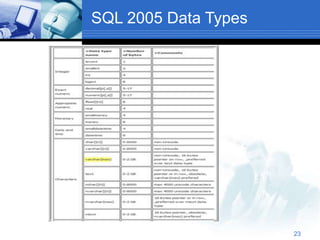
SQL 2005 Data Types
24
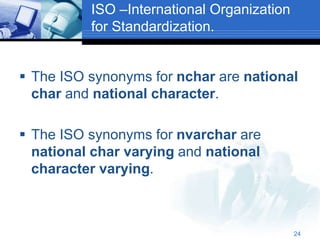
ISO –International Organization
for Standardization.
 The ISO synonyms for nchar are national
char and national character.
 The ISO synonyms for nvarchar are
national char varying and national
character varying.
25
(SSMS) SQL Server Management
Studio
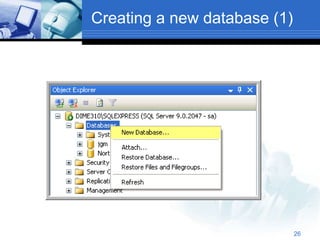
 From Database choose
 New Database
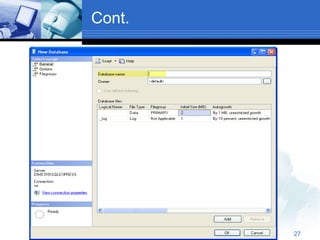
 Choose a name for the new database
Optional
 Change the settings for the data file and the
log file
Autogrowth, etc
 Change the general database options
Auto create statistics, etc
26
Creating a new database (1)
27
Cont.
28
Creating a new database (2)
 After creating the new database you can
 Set the authorizations for the system users
 Create Tables
 Create Views
 Create Trigger
29
SSMS Creating tables
 You can create new tables using
 The GUI wizard (similar to Access)
 Choose the name of the fields
 Set the type of the fields
 Set possible constraints (“allow nulls”)
 Define the primary key
 Define possible foreign keys
 A SQL script
 Allows batch processing
30
DEMO USING SSMS
31
Database Maintenance
32
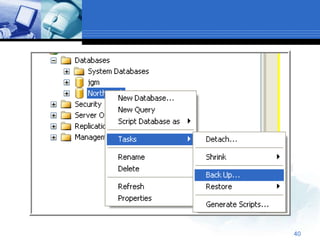
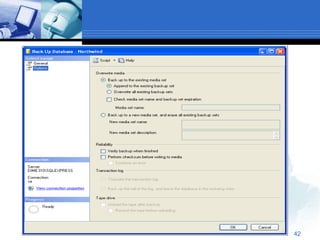
 You can perform backup operations using.
 SQL Server Management Studio
 Transact-SQL statment
33
Backup and Recovery
 Backup determines how a copy of the
databases or transaction logs is made and
which media are used for this process.
 SQL server provides static and dynamic
backups. Dynamic backup means that a
database backup can be performed while
users are working on data.
34
SQL Server provides four different
backup methods:
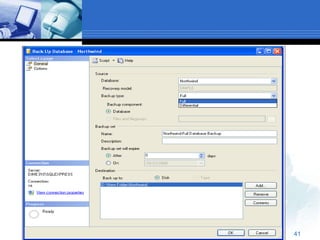
 Full database backup
 Differential database backup
 Transaction log backup
 Database file (or filegroup) backup
35
Full Database Backup
 Captures the state of the database at the time
the backup started.
 During the full database backup, the system
copies the data as well as the schema of all
tables of the database and the corresponding
file structures.
 (all uncommitted transactions in the transaction log are written to the
backup media)
36
Differential Backup
 As the name implies, only the parts of the
database that have changed since the last
full database backup are read and then
written to the copy.
37
Transaction Log Backup
 This backup considers only the changes
recorded in the log. For example logical
operations that is, change executed using
the DML statements INSERT, UPDATE,
and DELETE.
38
Backup Using T-SQL Statement
 BACKUP DATABASE
 BACKUP LOG
BACKUP DATABASE {db_name}
TO device_list
39
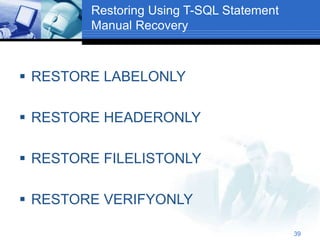
Restoring Using T-SQL Statement
Manual Recovery
 RESTORE LABELONLY
 RESTORE HEADERONLY
 RESTORE FILELISTONLY
 RESTORE VERIFYONLY
40
41
42
43
DEMO WITH SSMS
 BACKUP DEMO
 ATTACH & DETACH
44
QUESTIONS
 MSDN Virtual Labs
http://msdn.microsoft.com/enus/virtuallabs
/default.aspx

database.ppt

  • 1.
    Company LOGO 1 Database Creation andMaintenance Jorge G. Martinez
  • 2.
    2 Agenda 1. Overview ofMS SQL 2005 2. Managing Databases 3. DDL: Create, Alter, Drop 4. DML: Select, Insert, Delete, Update 5. SSMS: Demos
  • 3.
    3 Overview of MSSQL 2005 (Structured Query Language)  SQL server is relatively easy to manage  SQL server scales from a mobile laptop to symmetric multiprocessor (SMP) systems.  SQL server provides business intelligence features that until now have only been available in Oracle.  Different editions of SQL 2005: Express, Workgroup, Standard, and Enterprise Edition.  SQL Server 2005 Express Edition allows you to run database applications on desktop and small servers. It is the updated version of MSDE and it is free.
  • 4.
    4 Managing Databases  Transact-SQLor T-SQL  (SSMS) SQL Server Management Studio and its component Object Explorer
  • 5.
    5 SQL Database language SQLcontains two sublanguages  Data definition language (DDL)  Data manipulation language (DML)
  • 6.
    6 Data definition language(DDL) DDL contains three generic SQL statements: CREATE object ALTER object DROP object
  • 7.
    7 CREATE statement Use master CREATEDATABASE sample CREATE TABLE sample
  • 8.
    8 ALTER statement USE northwind ALTERTABLE employee ADD telephone_no CHAR(12) NULL
  • 9.
    9 DROP statement USE northwind ALTERTABLE employees DROP COLUMN telephone_no
  • 10.
    10 Data manipulation language (DML) DMLencompasses four generic operations for manipulating the database SELECT INSERT DELETE UPDATE
  • 11.
    11 SELECT statement Ex1. USEnorthwind SELECT * from employees Ex2. USE northwind SELECT EmployeeID,LastName,FirstName, Title FROM Employees Ex3. Use northwind SELECT EmployeeID,OrderID FROM orders WHERE EmployeeID =‘5’ AND ShipVia =‘3’
  • 12.
    12 INSERT statement USE northwind INSERTINTO region VALUES (5,'America')
  • 13.
    13 DELETE statement  Deletesany employee with last name king in the employees table from the database name northwind. USE northwind DELETE FROM Employees WHERE LastName= 'King'
  • 14.
    14 UPDATE statement USE northwind UPDATEEmployees SET Title= 'District Manager' WHERE LastName ='Buchanan'
  • 15.
    15 Creating Database ObjectsUsing T-SQL DDL (Data Definition Language)  A database is the main container for tables, views, indexes stored procedures, and other database objects.  Using the CREATE DATABASE statement, you can create a new database along with the files used to store the database.  You can create 32,767 databases on an instance of SQL server.  CREATE DATABASE MyNewDatabase
  • 16.
    16 Cont.  When thedatabase is created, two files are also created: a primary file (an .mdf file) and a transaction log file (an .ldf file).  Its is recommended to keep these files in different drives to simplify recovering the database in case of corruption. Two Files  MyNewDatabase.mdf  MyNewDatabase.ldf
  • 17.
  • 18.
    18 Code designating the.mdf and .ldf file locations.  CREATE DATABASE MyNewDatabase  ON Primary (Name = MyNewDatabase, Filename = 'C:DBDataMyNewDatabase.mdf', Size= 100MB, MaxSize= 200MB, FileGrowth= 10%)  LOG ON (Name = MyNewDatabase_Log, Filename = 'D:DBDataMyNewDatabase_Log.Ldf', Size= 30MB, MaxSize= 50MB, FileGrowth= 10%)
  • 19.
    19 Removing Database Objects All Transact-SQL statements to remove a database object have the general form:  DROP object object_name  DROP DATABASE database1 {,database2…}  It remove one or more databases.  One or more tables can be removed from a database with the following statement:  DROP TABLE table_name1 {,table_name2…}
  • 20.
    20 Tables  Tables areobjects that contain data.  In SQL server 2005, you can create up to two billion tables per database  CREATE TABLE statement creates a database table CREATE TABLE WAREHOUSE (HouseID INT PRIMARY KEY, HouseName char (50))
  • 21.
    21 Tables Cont. CREATE TABLEEmployees (EmployeeID INT Primary Key, LastName nvarchar(20), FirstName nvarchar(25), MiddleName nvarchar(25), Username nvarchar(25), Password nchar(10), Email nvarchar(30))
  • 22.
    22 Tables Cont.  Createtable Client  (Customer# NUMBER(4) PRIMARY KEY,  LastName VARCHAR2(10),  FirstName VARCHAR2(10),  Address VARCHAR2(20),  City VARCHAR2(12),  State VARCHAR2(2),  Zip VARCHAR2(5),  Referred NUMBER(4));  INSERT INTO CUSTOMERS  VALUES (1001, 'MORALES', 'BONITA', 'P.O. BOX 651', 'EASTPOINT', 'FL', '32328', NULL);  INSERT INTO CUSTOMERS  VALUES (1002, 'THOMPSON', 'RYAN', 'P.O. BOX 9835', 'SANTA MONICA', 'CA', '90404', NULL);  INSERT INTO CUSTOMERS  VALUES (1003, 'SMITH', 'LEILA', 'P.O. BOX 66', 'TALLAHASSEE', 'FL', '32306', NULL);  INSERT INTO CUSTOMERS  VALUES (1004, 'PIERSON', 'THOMAS', '69821 SOUTH AVENUE', 'BOISE', 'ID', '83707', NULL);  INSERT INTO CUSTOMERS  VALUES (1005, 'GIRARD', 'CINDY', 'P.O. BOX 851', 'SEATTLE', 'WA', '98115', NULL);  INSERT INTO CUSTOMERS  VALUES (1006, 'CRUZ', 'MESHIA', '82 DIRT ROAD', 'ALBANY', 'NY', '12211', NULL);
  • 23.
  • 24.
    24 ISO –International Organization forStandardization.  The ISO synonyms for nchar are national char and national character.  The ISO synonyms for nvarchar are national char varying and national character varying.
  • 25.
    25 (SSMS) SQL ServerManagement Studio  From Database choose  New Database  Choose a name for the new database Optional  Change the settings for the data file and the log file Autogrowth, etc  Change the general database options Auto create statistics, etc
  • 26.
    26 Creating a newdatabase (1)
  • 27.
  • 28.
    28 Creating a newdatabase (2)  After creating the new database you can  Set the authorizations for the system users  Create Tables  Create Views  Create Trigger
  • 29.
    29 SSMS Creating tables You can create new tables using  The GUI wizard (similar to Access)  Choose the name of the fields  Set the type of the fields  Set possible constraints (“allow nulls”)  Define the primary key  Define possible foreign keys  A SQL script  Allows batch processing
  • 30.
  • 31.
  • 32.
    32  You canperform backup operations using.  SQL Server Management Studio  Transact-SQL statment
  • 33.
    33 Backup and Recovery Backup determines how a copy of the databases or transaction logs is made and which media are used for this process.  SQL server provides static and dynamic backups. Dynamic backup means that a database backup can be performed while users are working on data.
  • 34.
    34 SQL Server providesfour different backup methods:  Full database backup  Differential database backup  Transaction log backup  Database file (or filegroup) backup
  • 35.
    35 Full Database Backup Captures the state of the database at the time the backup started.  During the full database backup, the system copies the data as well as the schema of all tables of the database and the corresponding file structures.  (all uncommitted transactions in the transaction log are written to the backup media)
  • 36.
    36 Differential Backup  Asthe name implies, only the parts of the database that have changed since the last full database backup are read and then written to the copy.
  • 37.
    37 Transaction Log Backup This backup considers only the changes recorded in the log. For example logical operations that is, change executed using the DML statements INSERT, UPDATE, and DELETE.
  • 38.
    38 Backup Using T-SQLStatement  BACKUP DATABASE  BACKUP LOG BACKUP DATABASE {db_name} TO device_list
  • 39.
    39 Restoring Using T-SQLStatement Manual Recovery  RESTORE LABELONLY  RESTORE HEADERONLY  RESTORE FILELISTONLY  RESTORE VERIFYONLY
  • 40.
  • 41.
  • 42.
  • 43.
    43 DEMO WITH SSMS BACKUP DEMO  ATTACH & DETACH
  • 44.
    44 QUESTIONS  MSDN VirtualLabs http://msdn.microsoft.com/enus/virtuallabs /default.aspx