www.fp-tools.eu
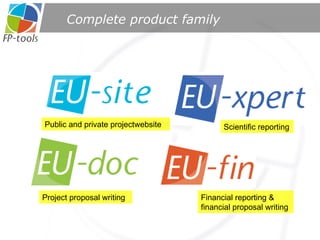
Complete product family Scientific reporting Financial reporting & financial proposal writing Public and private projectwebsite Project proposal writing
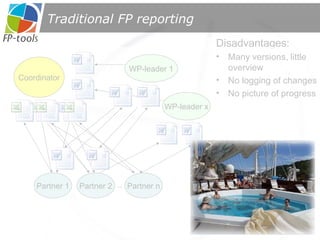
Traditional FP reporting Coordinator WP-leader x WP-leader 1 Disadvantages: Many versions, little overview No logging of changes No picture of progress Partner 1 Partner 2 Partner n ..
Why tools are needed Large recurrent reporting effort Many scientists, many locations Word/Excel does not scale for reporting Exponential management nightmare!
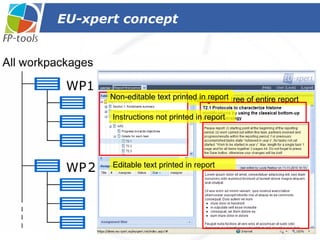
EU-xpert concept Workpackage leader  Participants  Navigation tree of entire report Non-editable text printed in report Editable text printed in report Instructions not printed in report
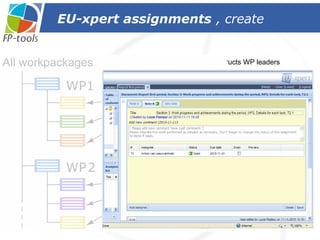
EU-xpert assignments , create Coordinator instructs WP leaders Assigning  EU-xpert assignments Assigning  EU-xpert assignments Title assignment Instruction for assignee select assignee(s) Default assignment status = open Due date for assignment Send email with deeplink to assignee Save & send assignment
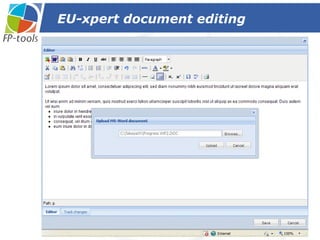
EU-xpert document editing Partner can enter text by typing … …  or pasting Word document In mailbox assignee
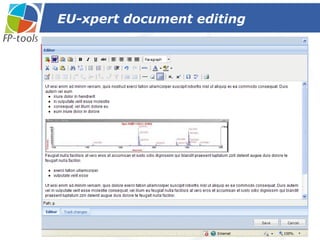
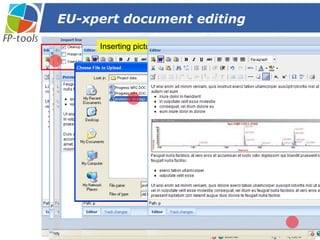
EU-xpert document editing Inserting picture from desktop adjust import settings if needed before importing
EU-xpert document editing Partner can enter text by typing … or pasting Word document Inserting picture from desktop In mailbox assignee adjust import settings if needed before importing
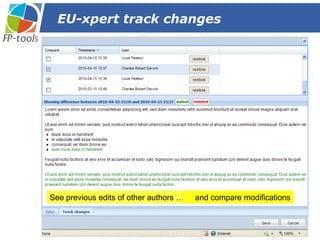
EU-xpert track changes See previous edits of other authors … and compare modifications
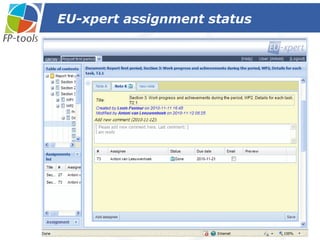
EU-xpert assignment status Inform assigner that work is done … … and change the assignment status to Done
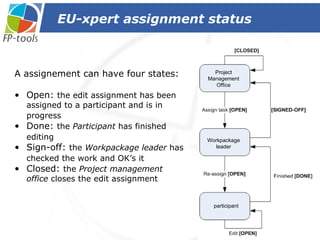
EU-xpert assignment status A assignement can have four states: Open:  the edit assignment has been assigned to a participant and is in progress   Done:  the  Participant  has finished editing   Sign-off:  the  Workpackage leader  has checked the work and OK’s it   Closed:  the  Project management office  closes the edit assignment  Project Management Office Workpackage leader participant
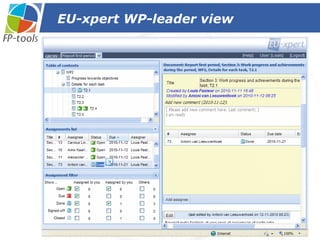
EU-xpert WP-leader view
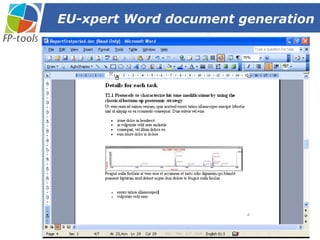
EU-xpert Word document generation
EU-xpert benefits  Ease to use, easy to navigate Only one version of content: No version control needed One click  report  creation, no layout troubles Significant reduction of logistical handling for all users  According to customers:  Saves time, reduces stress
Financial management  and  Monitoring with EU-fin EU-fin
Support coordinator responsibilities: Financial planning Project cost reporting Distribute EC-contribution Financial management EU-fin goal
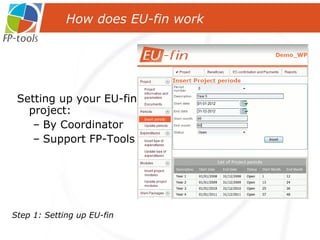
Setting up your EU-fin project: By Coordinator Support FP-Tools How does EU-fin work Step 1: Setting up EU-fin
Settings & Parameters  Flexible Parameters: ●  Project type  ● Work Packages ●  Periods    ● Beneficiaries ●  Type of  ● Link Beneficiaries & WP’s  Expenditures  ● Requested Contribution Fixed Parameters (Linked to funding scheme) ●  Activity types ●  Funding rates Step 1: Setting up   EU-fin
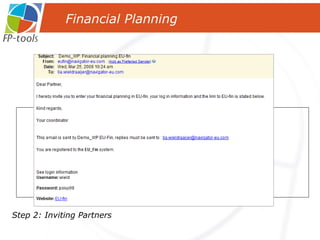
Coordinator invites beneficiaries to EU-fin (financial contact persons) Financial Planning Step 2: Inviting Partners EU-fin
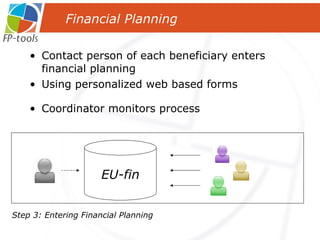
Contact person of each beneficiary enters financial planning Using personalized web based forms Financial Planning Step 3: Entering Financial Planning EU-fin Coordinator monitors process
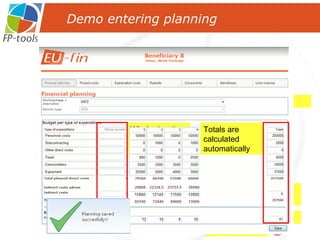
Demo entering planning Choose WP Click < Save > Enter planning Indirect cost are calculated automatically Enter person months Whole duration column: open or closed Totals are calculated automatically
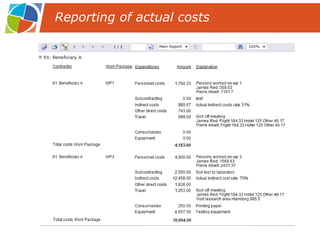
After each reporting period the actual costs have to be reported in EU-fin Per work package & type of expenditure On the basis of own financial administration of beneficiary Explanation is very important, part of periodic report Periodic reporting
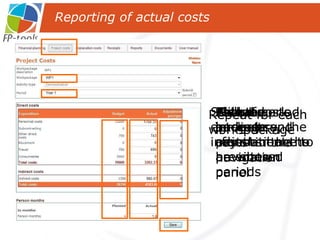
Click on ‘project costs’ in the navigation panel Select work package Select period Planned budgets and person months are shown Actual costs and person months have to be entered And, if necessary, the adjustments to previous periods Save the entered information  Repeat for each work package Reporting of actual costs
Click on ‘Explanation costs’ in the navigation panel Select WP Select period Actual costs appear Enter explanation of the actual costs Click on <Save> to save the entered explanation Repeat for each work package Reporting of actual costs
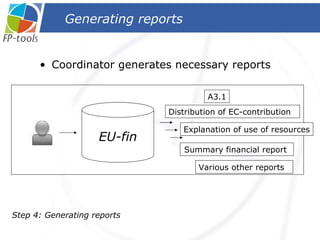
Coordinator generates necessary reports Generating reports A3.1 Various other reports  Distribution of EC-contribution  Explanation of use of resources Summary financial report  Step 4: Generating reports EU-fin
Form C calculations are generated by EU-fin Form C now submitted with FORCE EU-fin and FORCE are complementary,  no overlap! Form C and FORCE
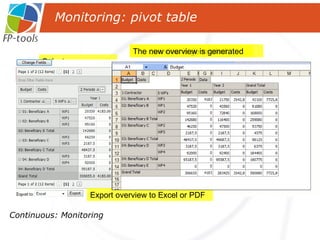
Coordinator can generate overview queries at any moment Using PivotTable Continuous: Monitoring Monitoring
Continuous: Monitoring Select parameters and location in table  The overview is generated The new overview is generated Hide parameters Export overview to Excel or PDF Monitoring: pivot table Select page Change columns shown Select the relevant periods The overview adjusts automatically Change the location of the parameter
EU-fin is flexible:  Project interface can always be modified EU-fin is complete:  Project interface can be used in each project phase EU-fin is accurate:  Up-to-date data is available for all users anytime anywhere EU-fin benefits
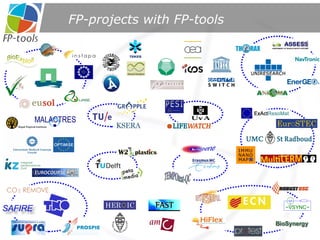
FP-projects with FP-tools
making Science possible www.fp-tools.eu

Fp tools 2010-11-29

  • 1.
  • 2.
    Complete product familyScientific reporting Financial reporting & financial proposal writing Public and private projectwebsite Project proposal writing
  • 3.
    Traditional FP reportingCoordinator WP-leader x WP-leader 1 Disadvantages: Many versions, little overview No logging of changes No picture of progress Partner 1 Partner 2 Partner n ..
  • 4.
    Why tools areneeded Large recurrent reporting effort Many scientists, many locations Word/Excel does not scale for reporting Exponential management nightmare!
  • 5.
    EU-xpert concept Workpackageleader Participants Navigation tree of entire report Non-editable text printed in report Editable text printed in report Instructions not printed in report
  • 6.
    EU-xpert assignments ,create Coordinator instructs WP leaders Assigning EU-xpert assignments Assigning EU-xpert assignments Title assignment Instruction for assignee select assignee(s) Default assignment status = open Due date for assignment Send email with deeplink to assignee Save & send assignment
  • 7.
    EU-xpert document editingPartner can enter text by typing … … or pasting Word document In mailbox assignee
  • 8.
    EU-xpert document editingInserting picture from desktop adjust import settings if needed before importing
  • 9.
    EU-xpert document editingPartner can enter text by typing … or pasting Word document Inserting picture from desktop In mailbox assignee adjust import settings if needed before importing
  • 10.
    EU-xpert track changesSee previous edits of other authors … and compare modifications
  • 11.
    EU-xpert assignment statusInform assigner that work is done … … and change the assignment status to Done
  • 12.
    EU-xpert assignment statusA assignement can have four states: Open: the edit assignment has been assigned to a participant and is in progress Done: the Participant has finished editing Sign-off: the Workpackage leader has checked the work and OK’s it Closed: the Project management office closes the edit assignment Project Management Office Workpackage leader participant
  • 13.
  • 14.
  • 15.
    EU-xpert benefits Ease to use, easy to navigate Only one version of content: No version control needed One click report creation, no layout troubles Significant reduction of logistical handling for all users According to customers: Saves time, reduces stress
  • 16.
    Financial management and Monitoring with EU-fin EU-fin
  • 17.
    Support coordinator responsibilities:Financial planning Project cost reporting Distribute EC-contribution Financial management EU-fin goal
  • 18.
    Setting up yourEU-fin project: By Coordinator Support FP-Tools How does EU-fin work Step 1: Setting up EU-fin
  • 19.
    Settings & Parameters Flexible Parameters: ● Project type ● Work Packages ● Periods ● Beneficiaries ● Type of ● Link Beneficiaries & WP’s Expenditures ● Requested Contribution Fixed Parameters (Linked to funding scheme) ● Activity types ● Funding rates Step 1: Setting up EU-fin
  • 20.
    Coordinator invites beneficiariesto EU-fin (financial contact persons) Financial Planning Step 2: Inviting Partners EU-fin
  • 21.
    Contact person ofeach beneficiary enters financial planning Using personalized web based forms Financial Planning Step 3: Entering Financial Planning EU-fin Coordinator monitors process
  • 22.
    Demo entering planningChoose WP Click < Save > Enter planning Indirect cost are calculated automatically Enter person months Whole duration column: open or closed Totals are calculated automatically
  • 23.
    After each reportingperiod the actual costs have to be reported in EU-fin Per work package & type of expenditure On the basis of own financial administration of beneficiary Explanation is very important, part of periodic report Periodic reporting
  • 24.
    Click on ‘projectcosts’ in the navigation panel Select work package Select period Planned budgets and person months are shown Actual costs and person months have to be entered And, if necessary, the adjustments to previous periods Save the entered information Repeat for each work package Reporting of actual costs
  • 25.
    Click on ‘Explanationcosts’ in the navigation panel Select WP Select period Actual costs appear Enter explanation of the actual costs Click on <Save> to save the entered explanation Repeat for each work package Reporting of actual costs
  • 26.
    Coordinator generates necessaryreports Generating reports A3.1 Various other reports Distribution of EC-contribution Explanation of use of resources Summary financial report Step 4: Generating reports EU-fin
  • 27.
    Form C calculationsare generated by EU-fin Form C now submitted with FORCE EU-fin and FORCE are complementary, no overlap! Form C and FORCE
  • 28.
    Coordinator can generateoverview queries at any moment Using PivotTable Continuous: Monitoring Monitoring
  • 29.
    Continuous: Monitoring Selectparameters and location in table The overview is generated The new overview is generated Hide parameters Export overview to Excel or PDF Monitoring: pivot table Select page Change columns shown Select the relevant periods The overview adjusts automatically Change the location of the parameter
  • 30.
    EU-fin is flexible: Project interface can always be modified EU-fin is complete: Project interface can be used in each project phase EU-fin is accurate: Up-to-date data is available for all users anytime anywhere EU-fin benefits
  • 31.
  • 32.
    making Science possiblewww.fp-tools.eu

Editor's Notes

  • #17 Lettertype en grootte