Programming
Flow Control with Facilino
Leopoldo Armesto
Senior Lecturer
Universitat Politècnica de València
1
Outline
Material
Worked Instructions
Exercises
Hysteresis
Wait until and break loop
Alarm effect
2
Material
3
Wemos D1 R32 with Arduino Multisensor Shield
Worked Instructions
4
Main instructions Additional instructions
Hysteresis
Implement a hysteresis, emulating a thermostat (using potentiometer in A0). If the value is above 2000, turn on the LED
D12, if the value is below 800, turn it off. Otherwise, keep it as it is.
5
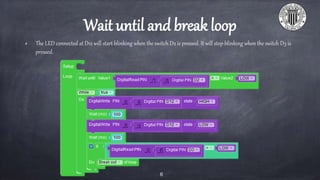
Wait until and break loop
The LED connected at D12 will start blinking when the switch D2 is pressed. It will stop blinking when the switch D3 is
pressed.
6
Alarm effect
Generate an alarm effect using the buzzer connected to
pin D5.
Start with a base frequency of 1318.51Hz and increase
the frequency 3% on each iteration until reaching
1567.98Hz with a duration of 22ms.
Then reset the value of the frequency and increase its
value 4% until reaching 2349.32Hz with a duration of
12ms.
7
Programming
Flow Control with Facilino
Leopoldo Armesto
Senior Lecturer
Universitat Politècnica de València
8

Flow Control with Facilino