Marketplace
Seller On Boarding
Agenda
A. Prerequisites for On boarding
B. Create Profile
1. Sign up
2. Business details
3. Bank details
4. Register your business
C. Manage Profile
Prerequisites for On boarding-I
1. TIN
○ TIN is an 11-digit number mentioned on your VAT registration certificate. If
you do not have TIN, you will be able to sell books and unstitched material by
furnishing PAN details.
2. PAN
○ PAN must belong to a company, firm, trust, or local authority.
3. Scanned copy of your VAT registration certificate
4. Scanned copy of PAN ID
5. Display name
○ Display name is the name by which buyers will know you on Flipkart.com. You
will not be allowed to change your display name post-registration.
6. Business name
○ A business name is the legally registered name of your business or company.
Your VAT registration certificate or PAN card must bear the business name.
Prerequisites for On boarding-II
7. Mobile
○ The number you provide while registering becomes the default primary
contact number, where all business updates from Flipkart are sent. However,
you can change your primary contact details post-registration through the
seller portal.
8. Pickup Address
○ Your packed orders will be fetched by the logistics team from your pickup
address. You can change your pickup address post-registration by emailing or
calling Seller Support.
9. Business Description
○ Your business description can talk about when you began to sell, your
expertise, offline presence, etc.
Prerequisites for On boarding-III
10. Scanned documents for ‘Know Your Customer’ process
i) Any of the following documents belonging to bank beneficiary as proof of identity:
● Passport
● Driver’s licence
● PAN card
● Voter’s identity card
ii) Any of the following documents belonging to bank beneficiary as proof of address:
● Passport
● Telephone/mobile phone bill
● Electricity bill
● Bank account/credit card statement
● Ration card
iii) Cancelled Cheque
Prerequisites for On boarding-IV
● Look for Flipkart Marketplace invite in your inbox.
● You will be able to sign up on Flipkart Marketplace using the link given in the
invite from ss@flipkart.com
● If you cannot find the invite in your inbox, check your spam folder.
● If you still fail to find the invite, please reach out to your account manager at
Flipkart.
Create Profile
1. Click on the link provided on the Invitation Email, It will directly take you to registration
page .
2. In case if you have asked to enter the User Name and password , That mean you have a
registered buyer account in Flipkart.
3. If you are a registered buyer on Flipkart.com, you have to use the same Email ID and Buyer
account password to get registration page.
4. If you have forgot the buyer account password, you will have to reset the same.
5 . You get a seller account as soon as you complete the registration
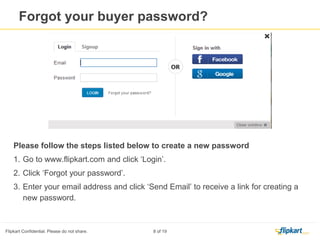
Please follow the steps listed below to create a new password
1. Go to www.flipkart.com and click ‘Login’.
2. Click ‘Forgot your password’.
3. Enter your email address and click ‘Send Email’ to receive a link for creating a new
password.
Forgot buyer password?
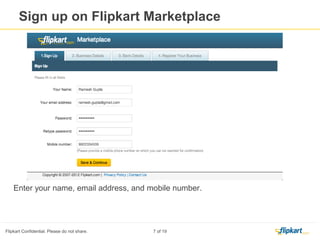
Enter the below mentioned
details
1. Your name
2. Primary Email ID
3. Create password for market
place account
4. Primary Contact number
Note: Primary Email and Contact number is used to send communications regarding your marketplace account ,
you are allowed to change this when ever required.
Click on ‘Save & Continue’ once
you fill all the required details.
Sign up on Flipkart Marketplace
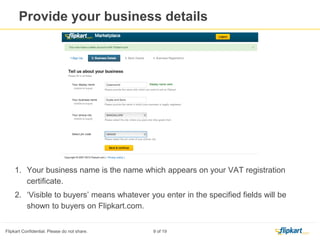
1. Your business name is the name which appears on your VAT registration
certificate.
2. Display Name is ‘Visible to buyers’, means whatever you enter in the specified fields will be shown to buyers
on Flipkart.com.
3. Enter the Pin code of your pick up city and click on ‘ Check Pin code’ tab, system will validate the Pin code.
Note: System will accept the Pin codes which are eligible for marketplace activity
Provide your business details
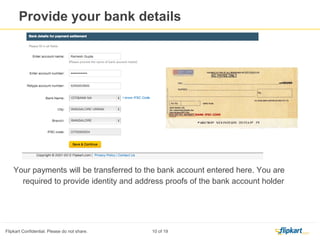
Provide your Bank Account Details
Your payments will be transferred to the bank account entered here. You are required
to provide identity and address proofs of the bank account holder
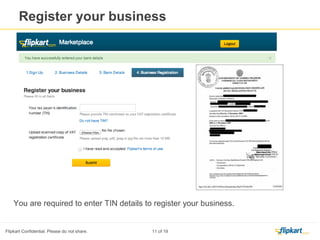
You are required to enter TIN details and upload the
scanned copy of TIN certificate.
Select the check box
after reading the
terms of use and
click on submit
Register your business
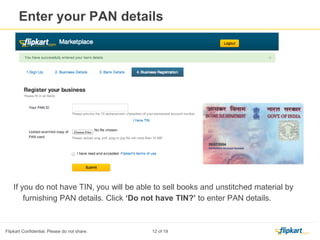
Click here if you do
not have the TIN
and wanted to
register with PAN
details Click here to enter the PAN Details,
Please Note if you do not have
TIN/VAT you will be able to sell
only books and unstitched fabric
Enter your PAN Details
Enter the PAN number and upload the scanned copy of PAN certificate
Select the check box
after reading the
terms of use and
click on submit
Enter your PAN Details
These fields require
your action
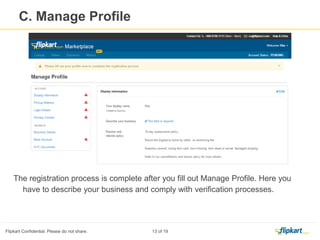
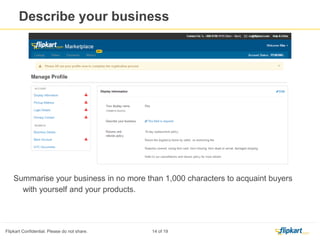
Summarise your business in no
more than 1,000 characters to
acquaint buyers with
yourself and your products in
the section called ‘Display
Information’.
Click on ‘Save
Changes’ to save the
information entered
by you, you can edit
the description
whenever required
Manage profile
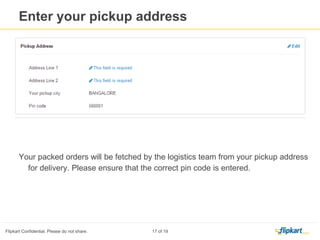
Enter Your Pick up address
Here
Click On ‘ Save Changes’
Your packed orders will be fetched by the logistics team from your pickup address for
delivery. Please ensure that the correct pin code is entered.
Manage Profile – Enter pick up address
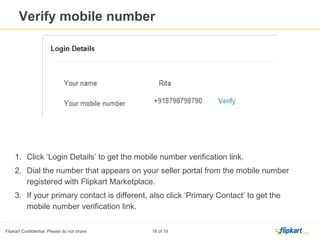
Click Here to Verify
your Login & Primary
Contact Number
Dial the number
that appears on
your seller portal
from the mobile
number registered
with Flipkart
Marketplace.
Manage profile-
Click Here to Verify
your Login & Primary
E mail ID
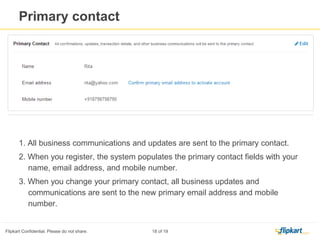
1. All business communications and updates are sent to the primary contact.
2. When you register, the system populates the primary contact fields with your name,
email address, and mobile number.
3. When you change your primary contact, all business updates and communications
are sent to the new primary email address and mobile number.
Manage profile- Verify Login & Primary Email ID
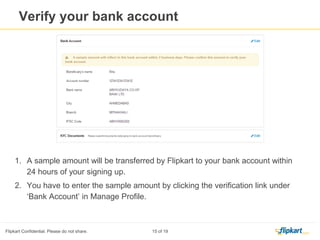
1. A sample amount will be transferred by Flipkart to your bank account within 2 Business days of your signing up.
2. You have to enter the sample amount by clicking the verification link under ‘Bank
Account’ in Manage Profile.
Manage profile- Verify your Bank Account
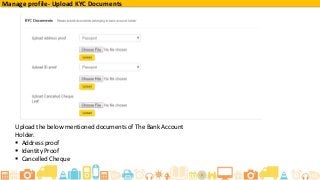
Upload the below mentioned documents of The Bank Account
Holder.
 Address proof
 Identity Proof
 Cancelled Cheque
Manage profile- Upload KYC Documents
● You can log in to your seller account by using your display name, registered mobile number, or email address.
● If you forget your password, click ‘Forgot your password?’.
● You can make changes to the entered information by going to ‘Manage Profile’.
● Start listing your items by clicking ‘Listings’.
● Write to Seller Support at ss@flipkart.com or call on 080-67981111(9am to 9pm) to know the status of your
application. Please mention either your email address or display name in all your communications.
What you can do next?
Reach out with your problems
Write to Seller Support at ss@flipkart.com
or call on 080-67981111 (9am to 9pm)
to clarify your doubts. Please mention your email
address/display name in all your communications

Flipkart Marketplace – Onboarding

  • 1.
  • 2.
    Agenda A. Prerequisites forOn boarding B. Create Profile 1. Sign up 2. Business details 3. Bank details 4. Register your business C. Manage Profile
  • 3.
    Prerequisites for Onboarding-I 1. TIN ○ TIN is an 11-digit number mentioned on your VAT registration certificate. If you do not have TIN, you will be able to sell books and unstitched material by furnishing PAN details. 2. PAN ○ PAN must belong to a company, firm, trust, or local authority. 3. Scanned copy of your VAT registration certificate 4. Scanned copy of PAN ID 5. Display name ○ Display name is the name by which buyers will know you on Flipkart.com. You will not be allowed to change your display name post-registration. 6. Business name ○ A business name is the legally registered name of your business or company. Your VAT registration certificate or PAN card must bear the business name.
  • 4.
    Prerequisites for Onboarding-II 7. Mobile ○ The number you provide while registering becomes the default primary contact number, where all business updates from Flipkart are sent. However, you can change your primary contact details post-registration through the seller portal. 8. Pickup Address ○ Your packed orders will be fetched by the logistics team from your pickup address. You can change your pickup address post-registration by emailing or calling Seller Support. 9. Business Description ○ Your business description can talk about when you began to sell, your expertise, offline presence, etc.
  • 5.
    Prerequisites for Onboarding-III 10. Scanned documents for ‘Know Your Customer’ process i) Any of the following documents belonging to bank beneficiary as proof of identity: ● Passport ● Driver’s licence ● PAN card ● Voter’s identity card ii) Any of the following documents belonging to bank beneficiary as proof of address: ● Passport ● Telephone/mobile phone bill ● Electricity bill ● Bank account/credit card statement ● Ration card iii) Cancelled Cheque
  • 6.
    Prerequisites for Onboarding-IV ● Look for Flipkart Marketplace invite in your inbox. ● You will be able to sign up on Flipkart Marketplace using the link given in the invite from ss@flipkart.com ● If you cannot find the invite in your inbox, check your spam folder. ● If you still fail to find the invite, please reach out to your account manager at Flipkart.
  • 7.
    Create Profile 1. Clickon the link provided on the Invitation Email, It will directly take you to registration page . 2. In case if you have asked to enter the User Name and password , That mean you have a registered buyer account in Flipkart. 3. If you are a registered buyer on Flipkart.com, you have to use the same Email ID and Buyer account password to get registration page. 4. If you have forgot the buyer account password, you will have to reset the same. 5 . You get a seller account as soon as you complete the registration
  • 8.
    Please follow thesteps listed below to create a new password 1. Go to www.flipkart.com and click ‘Login’. 2. Click ‘Forgot your password’. 3. Enter your email address and click ‘Send Email’ to receive a link for creating a new password. Forgot buyer password?
  • 9.
    Enter the belowmentioned details 1. Your name 2. Primary Email ID 3. Create password for market place account 4. Primary Contact number Note: Primary Email and Contact number is used to send communications regarding your marketplace account , you are allowed to change this when ever required. Click on ‘Save & Continue’ once you fill all the required details. Sign up on Flipkart Marketplace
  • 10.
    1. Your businessname is the name which appears on your VAT registration certificate. 2. Display Name is ‘Visible to buyers’, means whatever you enter in the specified fields will be shown to buyers on Flipkart.com. 3. Enter the Pin code of your pick up city and click on ‘ Check Pin code’ tab, system will validate the Pin code. Note: System will accept the Pin codes which are eligible for marketplace activity Provide your business details
  • 11.
    Provide your BankAccount Details Your payments will be transferred to the bank account entered here. You are required to provide identity and address proofs of the bank account holder
  • 12.
    You are requiredto enter TIN details and upload the scanned copy of TIN certificate. Select the check box after reading the terms of use and click on submit Register your business
  • 13.
    Click here ifyou do not have the TIN and wanted to register with PAN details Click here to enter the PAN Details, Please Note if you do not have TIN/VAT you will be able to sell only books and unstitched fabric Enter your PAN Details
  • 14.
    Enter the PANnumber and upload the scanned copy of PAN certificate Select the check box after reading the terms of use and click on submit Enter your PAN Details
  • 15.
    These fields require youraction Summarise your business in no more than 1,000 characters to acquaint buyers with yourself and your products in the section called ‘Display Information’. Click on ‘Save Changes’ to save the information entered by you, you can edit the description whenever required Manage profile
  • 16.
    Enter Your Pickup address Here Click On ‘ Save Changes’ Your packed orders will be fetched by the logistics team from your pickup address for delivery. Please ensure that the correct pin code is entered. Manage Profile – Enter pick up address
  • 17.
    Click Here toVerify your Login & Primary Contact Number Dial the number that appears on your seller portal from the mobile number registered with Flipkart Marketplace. Manage profile-
  • 18.
    Click Here toVerify your Login & Primary E mail ID 1. All business communications and updates are sent to the primary contact. 2. When you register, the system populates the primary contact fields with your name, email address, and mobile number. 3. When you change your primary contact, all business updates and communications are sent to the new primary email address and mobile number. Manage profile- Verify Login & Primary Email ID
  • 19.
    1. A sampleamount will be transferred by Flipkart to your bank account within 2 Business days of your signing up. 2. You have to enter the sample amount by clicking the verification link under ‘Bank Account’ in Manage Profile. Manage profile- Verify your Bank Account
  • 20.
    Upload the belowmentioned documents of The Bank Account Holder.  Address proof  Identity Proof  Cancelled Cheque Manage profile- Upload KYC Documents
  • 21.
    ● You canlog in to your seller account by using your display name, registered mobile number, or email address. ● If you forget your password, click ‘Forgot your password?’. ● You can make changes to the entered information by going to ‘Manage Profile’. ● Start listing your items by clicking ‘Listings’. ● Write to Seller Support at ss@flipkart.com or call on 080-67981111(9am to 9pm) to know the status of your application. Please mention either your email address or display name in all your communications. What you can do next?
  • 22.
    Reach out withyour problems Write to Seller Support at ss@flipkart.com or call on 080-67981111 (9am to 9pm) to clarify your doubts. Please mention your email address/display name in all your communications