Follow these short five steps to locate company reports and profiles using EBSCO’s database, Business Source Complete.


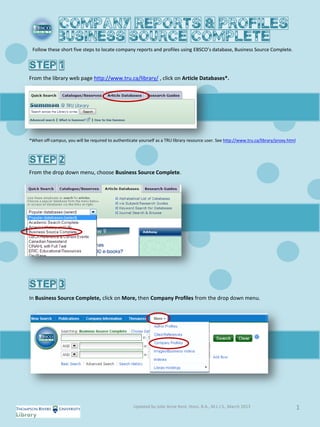
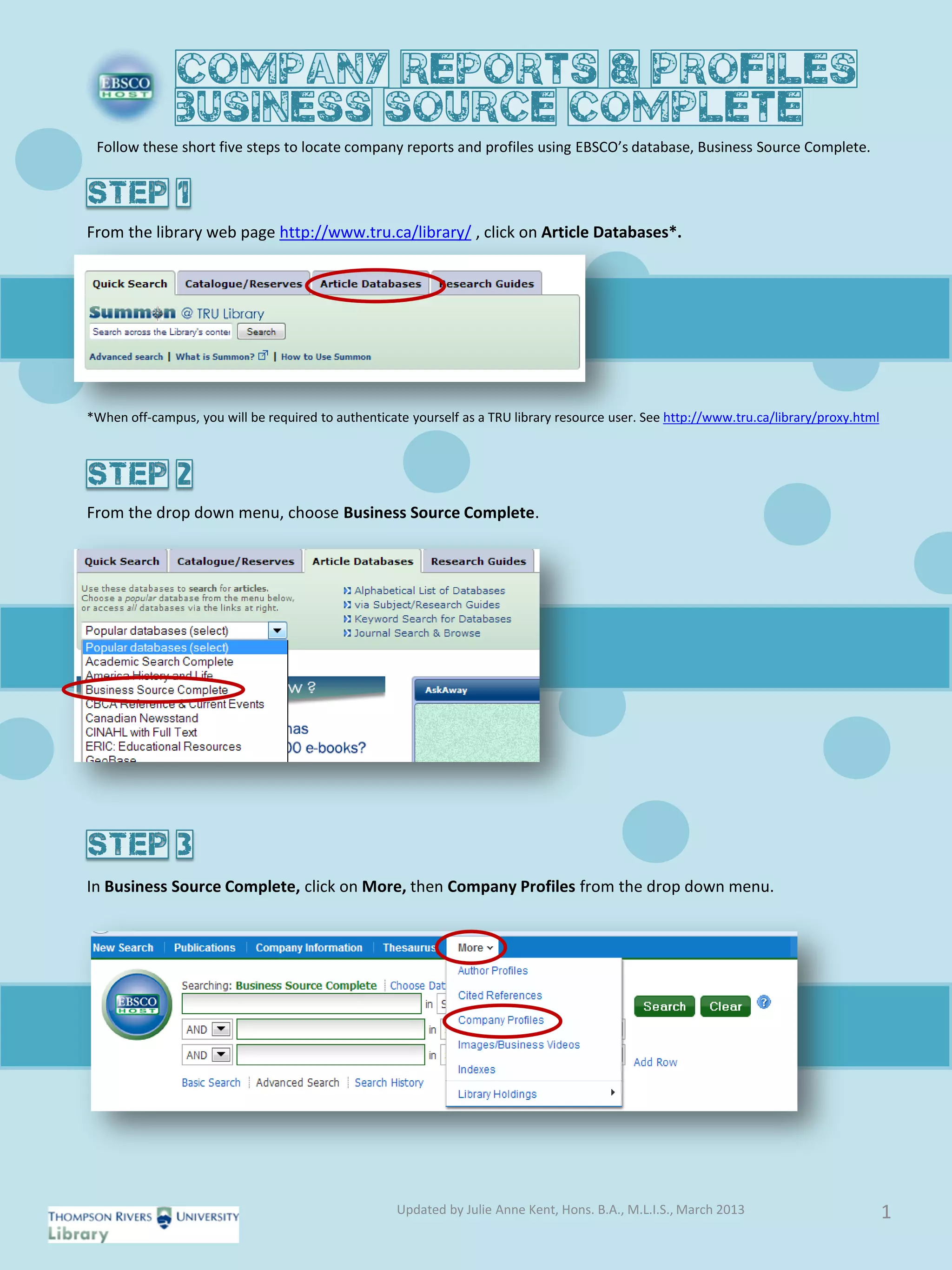
From the library web page http://www.tru.ca/library/ , click on Article Databases*.


*When off-campus, you will be required to authenticate yourself as a TRU library resource user. See http://www.tru.ca/library/proxy.html


From the drop down menu, choose Business Source Complete.


In Business Source Complete, click on More, then Company Profiles from the drop down menu.


                                                     Updated by Julie Anne Kent, Hons. B.A., M.L.I.S., March 2013                          1
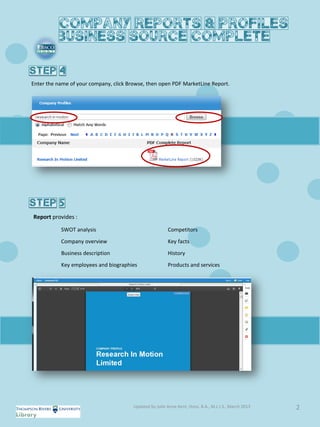
Enter the name of your company, click Browse, then open PDF MarketLine Report.


Report provides :

           SWOT analysis                                 Competitors
           Company overview                              Key facts
           Business description                          History
           Key employees and biographies                 Products and services


                                        Updated by Julie Anne Kent, Hons. B.A., M.L.I.S., March 2013   2
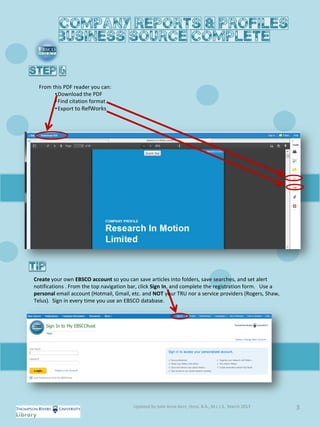
From this PDF reader you can:
        • Download the PDF
        • Find citation format
        • Export to RefWorks


Create your own EBSCO account so you can save articles into folders, save searches, and set alert
notifications . From the top navigation bar, click Sign In, and complete the registration form. Use a
personal email account (Hotmail, Gmail, etc. and NOT your TRU nor a service providers (Rogers, Shaw,
Telus). Sign in every time you use an EBSCO database.


                                        Updated by Julie Anne Kent, Hons. B.A., M.L.I.S., March 2013    3

Find company reports in EBSCO Business Source Complete

  • 1.
    Follow these shortfive steps to locate company reports and profiles using EBSCO’s database, Business Source Complete. From the library web page http://www.tru.ca/library/ , click on Article Databases*. *When off-campus, you will be required to authenticate yourself as a TRU library resource user. See http://www.tru.ca/library/proxy.html From the drop down menu, choose Business Source Complete. In Business Source Complete, click on More, then Company Profiles from the drop down menu. Updated by Julie Anne Kent, Hons. B.A., M.L.I.S., March 2013 1
  • 2.
    Enter the nameof your company, click Browse, then open PDF MarketLine Report. Report provides : SWOT analysis Competitors Company overview Key facts Business description History Key employees and biographies Products and services Updated by Julie Anne Kent, Hons. B.A., M.L.I.S., March 2013 2
  • 3.
    From this PDFreader you can: • Download the PDF • Find citation format • Export to RefWorks Create your own EBSCO account so you can save articles into folders, save searches, and set alert notifications . From the top navigation bar, click Sign In, and complete the registration form. Use a personal email account (Hotmail, Gmail, etc. and NOT your TRU nor a service providers (Rogers, Shaw, Telus). Sign in every time you use an EBSCO database. Updated by Julie Anne Kent, Hons. B.A., M.L.I.S., March 2013 3