Filming Schedule
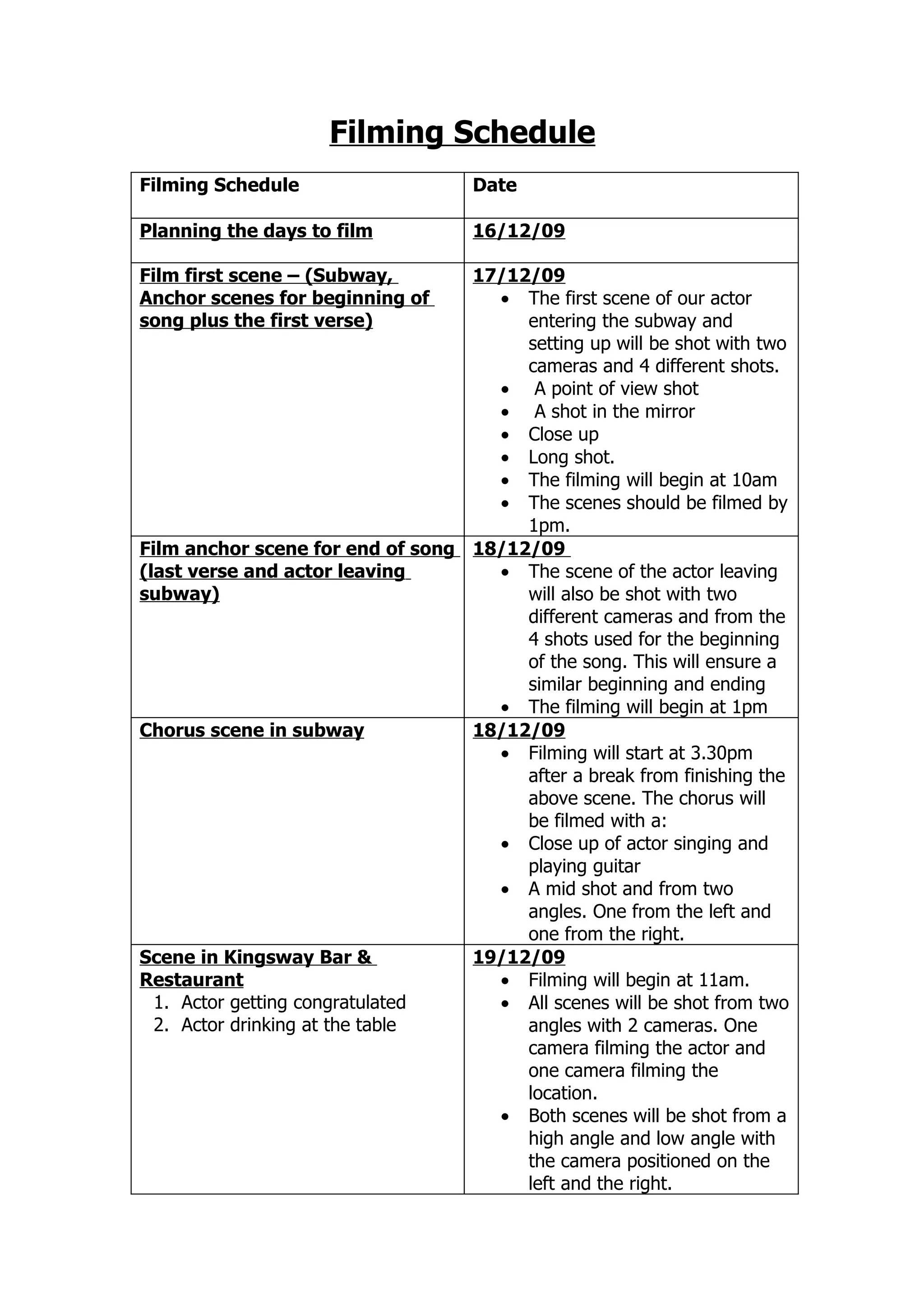
Filming Schedule                    Date

Planning the days to film           16/12/09

Film first scene – (Subway,       17/12/09
Anchor scenes for beginning of      • The first scene of our actor
song plus the first verse)             entering the subway and
                                       setting up will be shot with two
                                       cameras and 4 different shots.
                                    • A point of view shot
                                    • A shot in the mirror
                                    • Close up
                                    • Long shot.
                                    • The filming will begin at 10am
                                    • The scenes should be filmed by
                                       1pm.
Film anchor scene for end of song 18/12/09
(last verse and actor leaving       • The scene of the actor leaving
subway)                                will also be shot with two
                                       different cameras and from the
                                       4 shots used for the beginning
                                       of the song. This will ensure a
                                       similar beginning and ending
                                    • The filming will begin at 1pm
Chorus scene in subway            18/12/09
                                    • Filming will start at 3.30pm
                                       after a break from finishing the
                                       above scene. The chorus will
                                       be filmed with a:
                                    • Close up of actor singing and
                                       playing guitar
                                    • A mid shot and from two
                                       angles. One from the left and
                                       one from the right.
Scene in Kingsway Bar &           19/12/09
Restaurant                          • Filming will begin at 11am.
  1. Actor getting congratulated    • All scenes will be shot from two
  2. Actor drinking at the table       angles with 2 cameras. One
                                       camera filming the actor and
                                       one camera filming the
                                       location.
                                    • Both scenes will be shot from a
                                       high angle and low angle with
                                       the camera positioned on the
                                       left and the right.
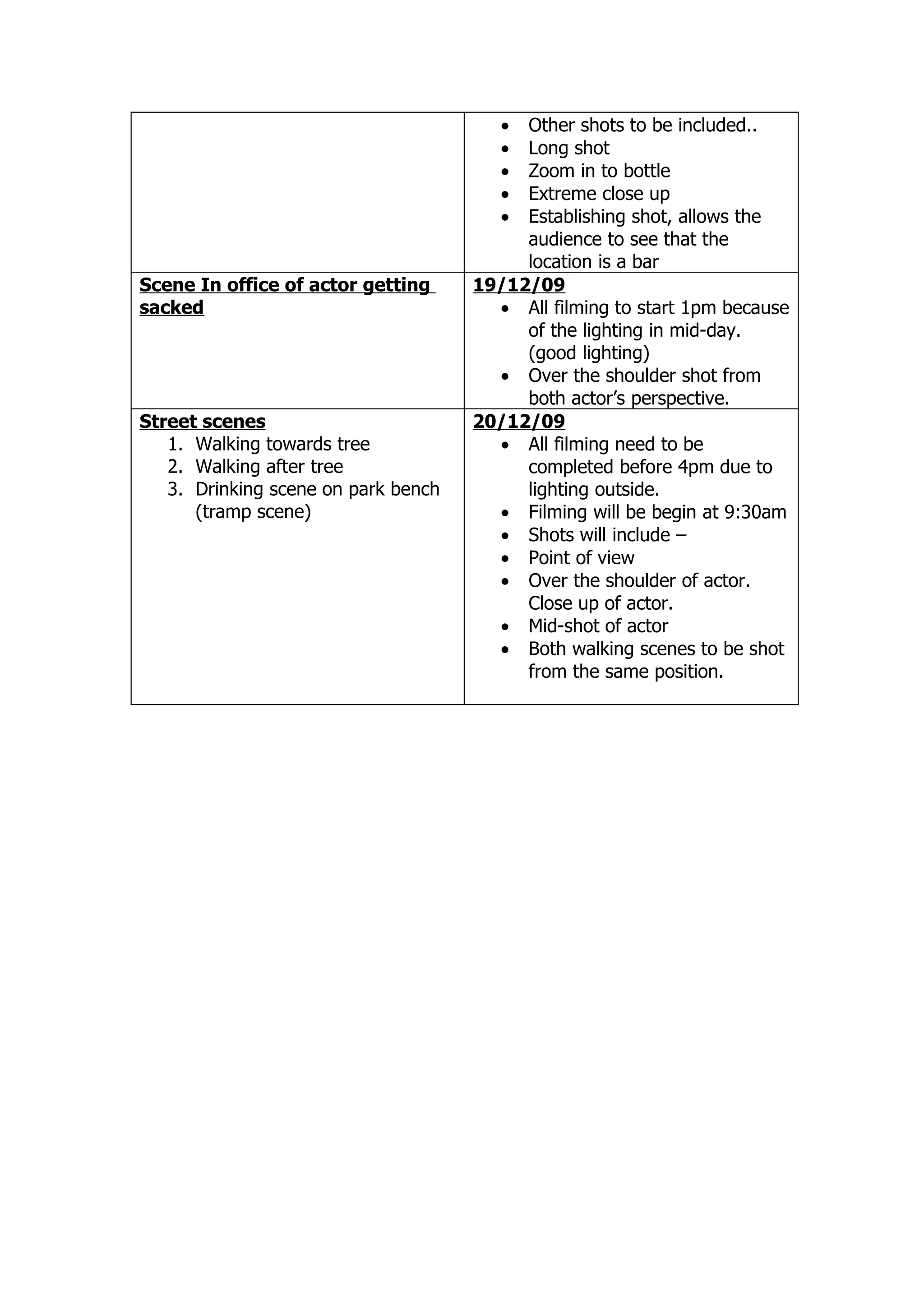
• Other shots to be included..
                                        • Long shot
                                        • Zoom in to bottle
                                        • Extreme close up
                                        • Establishing shot, allows the
                                          audience to see that the
                                          location is a bar
Scene In office of actor getting     19/12/09
sacked                                 • All filming to start 1pm because
                                          of the lighting in mid-day.
                                          (good lighting)
                                       • Over the shoulder shot from
                                          both actor’s perspective.
Street scenes                        20/12/09
   1. Walking towards tree             • All filming need to be
   2. Walking after tree                  completed before 4pm due to
   3. Drinking scene on park bench        lighting outside.
      (tramp scene)                    • Filming will be begin at 9:30am
                                       • Shots will include –
                                       • Point of view
                                       • Over the shoulder of actor.
                                          Close up of actor.
                                       • Mid-shot of actor
                                       • Both walking scenes to be shot
                                          from the same position.
Editing Schedule
Editing Schedule                   Date

Planning the days to edit.         27/12/09

Upload and Select final scenes     28/12/09
                                     • All group members begin at
                                        2pm at Malkit’s house.
                                     • All scenes will be uploaded
                                        onto computer.
                                     • Import all scenes into adobe
                                        premier pro 2.0.
                                     • All scenes to be finalised by
                                        4pm
Put all scenes into a timeline     28/12/09
                                     • All scenes into a timeline to see
                                        the length of our footage.
Change order                       29/12/09
                                     • Order of scenes need to be
                                        altered in order to suit the
                                        song.
                                     • Putting all scenes into timeline
                                        and ordering into correct order
                                        should be completed by 5:30
Check all scenes are into groups   28/12/09
of different scenes in the           • 6pm all scenes will checked
timeline. A group for street            into groupings and should be
scenes, anchor scenes, Kingsway         completed by 6:30pm.
scenes and office scenes.
                                   29/12/09
Import song                          • Editing will begin at 1pm at
                                        Malkit’s house.
                                     • The song will be imported to
                                        see if the length of our footage
                                        is too long, short or just right.

Check lip synchronisation          29/12/09
                                     • Ensure all lip sync of scenes
                                        and lyrics match. This should
                                        be competed by 3pm leaving
                                        us to check all transitions and
                                        editing techniques that we can
                                        use.
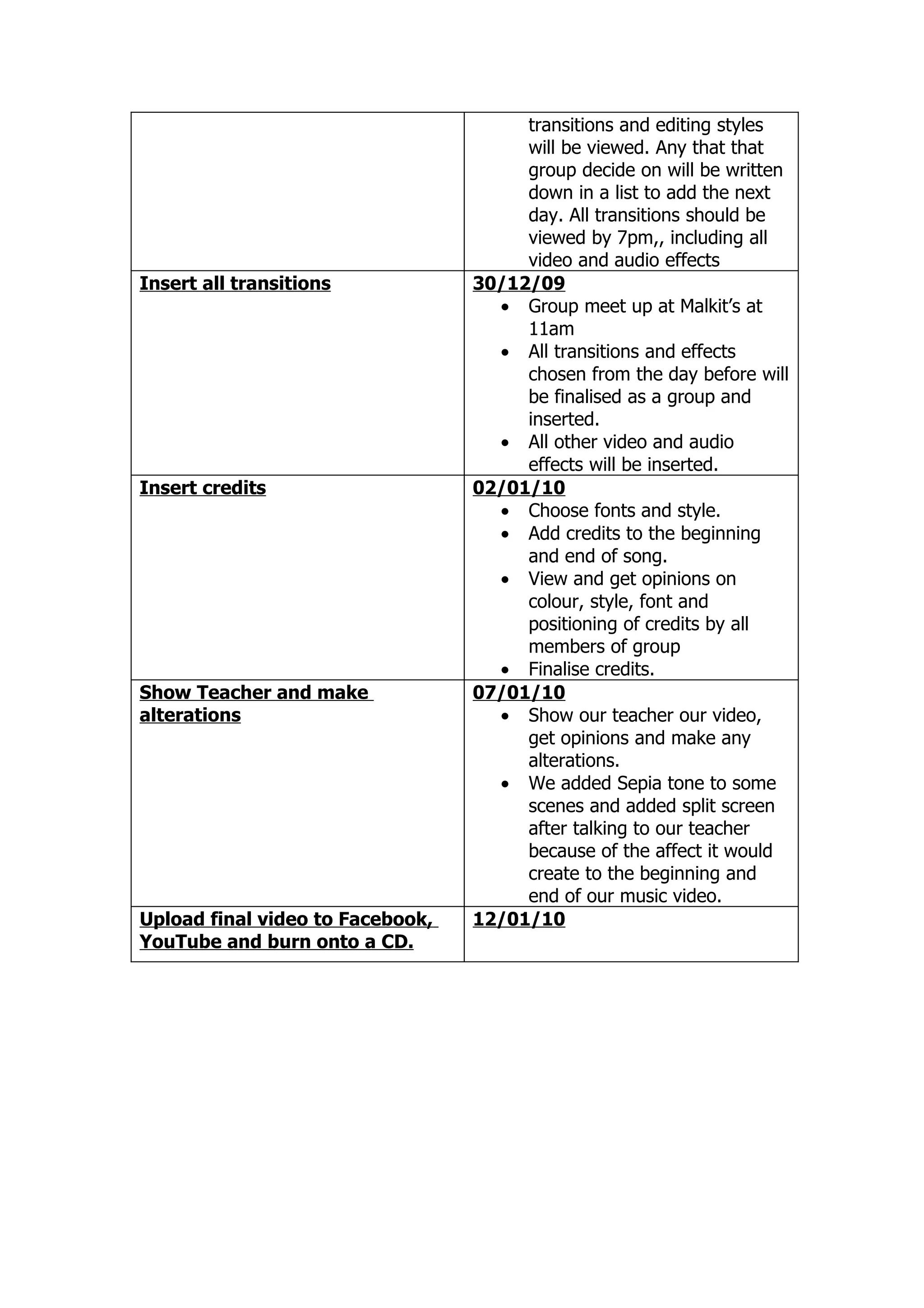
View all editing techniques and    29/12/09
transitions                          • From 3pm onwards, all
transitions and editing styles
                                       will be viewed. Any that that
                                       group decide on will be written
                                       down in a list to add the next
                                       day. All transitions should be
                                       viewed by 7pm,, including all
                                       video and audio effects
Insert all transitions            30/12/09
                                    • Group meet up at Malkit’s at
                                       11am
                                    • All transitions and effects
                                       chosen from the day before will
                                       be finalised as a group and
                                       inserted.
                                    • All other video and audio
                                       effects will be inserted.
Insert credits                    02/01/10
                                    • Choose fonts and style.
                                    • Add credits to the beginning
                                       and end of song.
                                    • View and get opinions on
                                       colour, style, font and
                                       positioning of credits by all
                                       members of group
                                    • Finalise credits.
Show Teacher and make             07/01/10
alterations                         • Show our teacher our video,
                                       get opinions and make any
                                       alterations.
                                    • We added Sepia tone to some
                                       scenes and added split screen
                                       after talking to our teacher
                                       because of the affect it would
                                       create to the beginning and
                                       end of our music video.
Upload final video to Facebook,   12/01/10
YouTube and burn onto a CD.

Filming Schedule & Editing Schedule 4 D Productions

  • 1.
    Filming Schedule Filming Schedule Date Planning the days to film 16/12/09 Film first scene – (Subway, 17/12/09 Anchor scenes for beginning of • The first scene of our actor song plus the first verse) entering the subway and setting up will be shot with two cameras and 4 different shots. • A point of view shot • A shot in the mirror • Close up • Long shot. • The filming will begin at 10am • The scenes should be filmed by 1pm. Film anchor scene for end of song 18/12/09 (last verse and actor leaving • The scene of the actor leaving subway) will also be shot with two different cameras and from the 4 shots used for the beginning of the song. This will ensure a similar beginning and ending • The filming will begin at 1pm Chorus scene in subway 18/12/09 • Filming will start at 3.30pm after a break from finishing the above scene. The chorus will be filmed with a: • Close up of actor singing and playing guitar • A mid shot and from two angles. One from the left and one from the right. Scene in Kingsway Bar & 19/12/09 Restaurant • Filming will begin at 11am. 1. Actor getting congratulated • All scenes will be shot from two 2. Actor drinking at the table angles with 2 cameras. One camera filming the actor and one camera filming the location. • Both scenes will be shot from a high angle and low angle with the camera positioned on the left and the right.
  • 2.
    • Other shotsto be included.. • Long shot • Zoom in to bottle • Extreme close up • Establishing shot, allows the audience to see that the location is a bar Scene In office of actor getting 19/12/09 sacked • All filming to start 1pm because of the lighting in mid-day. (good lighting) • Over the shoulder shot from both actor’s perspective. Street scenes 20/12/09 1. Walking towards tree • All filming need to be 2. Walking after tree completed before 4pm due to 3. Drinking scene on park bench lighting outside. (tramp scene) • Filming will be begin at 9:30am • Shots will include – • Point of view • Over the shoulder of actor. Close up of actor. • Mid-shot of actor • Both walking scenes to be shot from the same position.
  • 3.
    Editing Schedule Editing Schedule Date Planning the days to edit. 27/12/09 Upload and Select final scenes 28/12/09 • All group members begin at 2pm at Malkit’s house. • All scenes will be uploaded onto computer. • Import all scenes into adobe premier pro 2.0. • All scenes to be finalised by 4pm Put all scenes into a timeline 28/12/09 • All scenes into a timeline to see the length of our footage. Change order 29/12/09 • Order of scenes need to be altered in order to suit the song. • Putting all scenes into timeline and ordering into correct order should be completed by 5:30 Check all scenes are into groups 28/12/09 of different scenes in the • 6pm all scenes will checked timeline. A group for street into groupings and should be scenes, anchor scenes, Kingsway completed by 6:30pm. scenes and office scenes. 29/12/09 Import song • Editing will begin at 1pm at Malkit’s house. • The song will be imported to see if the length of our footage is too long, short or just right. Check lip synchronisation 29/12/09 • Ensure all lip sync of scenes and lyrics match. This should be competed by 3pm leaving us to check all transitions and editing techniques that we can use. View all editing techniques and 29/12/09 transitions • From 3pm onwards, all
  • 4.
    transitions and editingstyles will be viewed. Any that that group decide on will be written down in a list to add the next day. All transitions should be viewed by 7pm,, including all video and audio effects Insert all transitions 30/12/09 • Group meet up at Malkit’s at 11am • All transitions and effects chosen from the day before will be finalised as a group and inserted. • All other video and audio effects will be inserted. Insert credits 02/01/10 • Choose fonts and style. • Add credits to the beginning and end of song. • View and get opinions on colour, style, font and positioning of credits by all members of group • Finalise credits. Show Teacher and make 07/01/10 alterations • Show our teacher our video, get opinions and make any alterations. • We added Sepia tone to some scenes and added split screen after talking to our teacher because of the affect it would create to the beginning and end of our music video. Upload final video to Facebook, 12/01/10 YouTube and burn onto a CD.