OS2
File system Interface
Dr.Aboelela Abdou Abouelela
Faculty of Information Technology & Computer Science
Sinai Univeristy
North Sinai, Egypt
Abouelel.hussein@su.edu.eg
What the Lecture is About
Next…
3
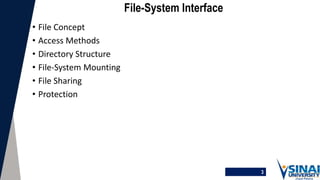
File-System Interface
• File Concept
• Access Methods
• Directory Structure
• File-System Mounting
• File Sharing
• Protection
4
Objectives
• To explain the function of file systems
• To describe the interfaces to file systems
• To discuss file-system design tradeoffs, including access methods, file
sharing, file locking, and directory structures
• To explore file-system protection
5
File Concept
• Contiguous logical address space
• Types:
• Data
• numeric
• character
• binary
• Program
6
7
8
9
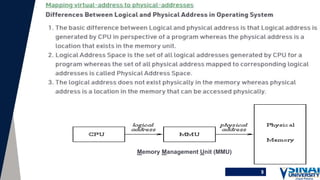
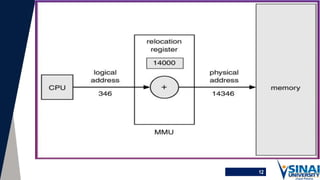
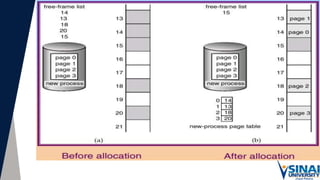
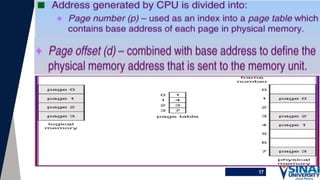
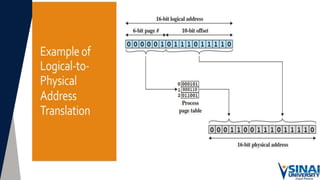
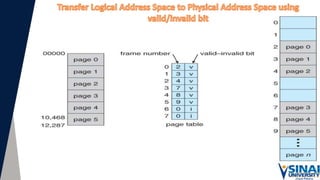
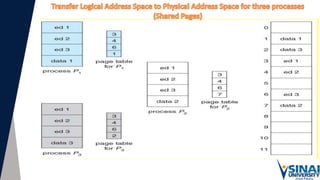
Memory Management Unit (MMU)
11
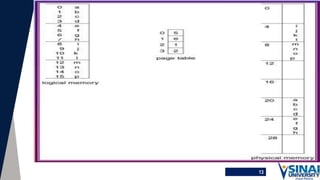
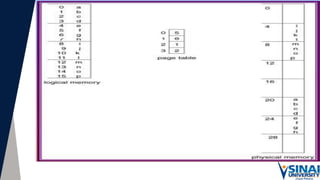
12
13
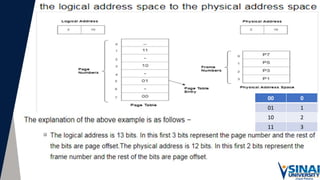
0
00
1
01
2
10
3
11
17
21
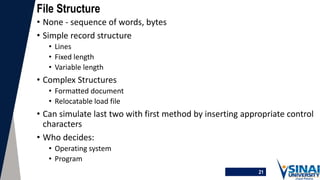
File Structure
• None - sequence of words, bytes
• Simple record structure
• Lines
• Fixed length
• Variable length
• Complex Structures
• Formatted document
• Relocatable load file
• Can simulate last two with first method by inserting appropriate control
characters
• Who decides:
• Operating system
• Program
22
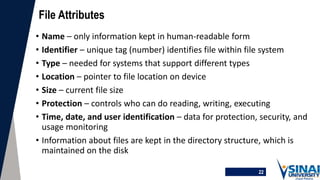
File Attributes
• Name – only information kept in human-readable form
• Identifier – unique tag (number) identifies file within file system
• Type – needed for systems that support different types
• Location – pointer to file location on device
• Size – current file size
• Protection – controls who can do reading, writing, executing
• Time, date, and user identification – data for protection, security, and
usage monitoring
• Information about files are kept in the directory structure, which is
maintained on the disk
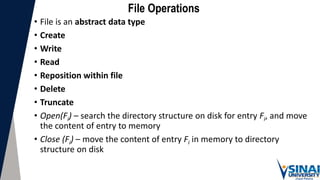
File Operations
• File is an abstract data type
• Create
• Write
• Read
• Reposition within file
• Delete
• Truncate
• Open(Fi) – search the directory structure on disk for entry Fi, and move
the content of entry to memory
• Close (Fi) – move the content of entry Fi in memory to directory
structure on disk
24
Open Files
• Several pieces of data are needed to manage open files:
• File pointer: pointer to last read/write location, per process that has the file open
• File-open count: counter of number of times a file is open – to allow removal of
data from open-file table when last processes closes it
• Disk location of the file: cache of data access information
• Access rights: per-process access mode information
25
Open File Locking
• Provided by some operating systems and file systems
• Mediates access to a file
• Mandatory or advisory:
• Mandatory – access is denied depending on locks held and requested
• Advisory – processes can find status of locks and decide what to do
26
File Locking Example – Java API
import java.io.*;
import java.nio.channels.*;
public class LockingExample {
public static final boolean EXCLUSIVE = false;
public static final boolean SHARED = true;
public static void main(String arsg[]) throws IOException {
FileLock sharedLock = null;
FileLock exclusiveLock = null;
try {
RandomAccessFile raf = new RandomAccessFile("file.txt", "rw");
// get the channel for the file
FileChannel ch = raf.getChannel();
// this locks the first half of the file - exclusive
exclusiveLock = ch.lock(0, raf.length()/2, EXCLUSIVE);
/** Now modify the data . . . */
// release the lock
exclusiveLock.release();
//Open for reading and writing. If the file does not already exist then an attempt will be made to create it.
// getChannel() returns the unique FileChannel object associated with this file input stream. The position of the returned channel
// raf : means random access file. //The lock() and tryLock():enables locking files at the OS level
// FileChannel : A channel for reading, writing, mapping, and manipulating a file.
27
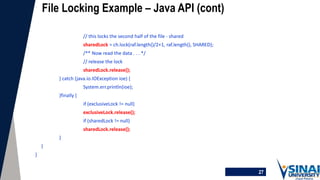
File Locking Example – Java API (cont)
// this locks the second half of the file - shared
sharedLock = ch.lock(raf.length()/2+1, raf.length(), SHARED);
/** Now read the data . . . */
// release the lock
sharedLock.release();
} catch (java.io.IOException ioe) {
System.err.println(ioe);
}finally {
if (exclusiveLock != null)
exclusiveLock.release();
if (sharedLock != null)
sharedLock.release();
}
}
}
28
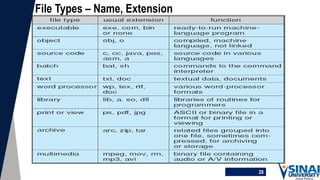
File Types – Name, Extension
29
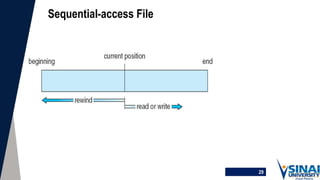
Sequential-access File
30
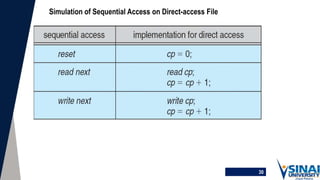
Simulation of Sequential Access on Direct-access File
31
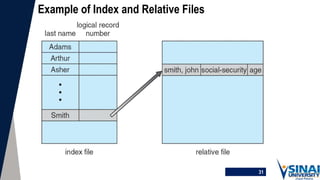
Example of Index and Relative Files
32

File system1.pptx

  • 1.
    OS2 File system Interface Dr.AboelelaAbdou Abouelela Faculty of Information Technology & Computer Science Sinai Univeristy North Sinai, Egypt Abouelel.hussein@su.edu.eg
  • 2.
    What the Lectureis About Next…
  • 3.
    3 File-System Interface • FileConcept • Access Methods • Directory Structure • File-System Mounting • File Sharing • Protection
  • 4.
    4 Objectives • To explainthe function of file systems • To describe the interfaces to file systems • To discuss file-system design tradeoffs, including access methods, file sharing, file locking, and directory structures • To explore file-system protection
  • 5.
    5 File Concept • Contiguouslogical address space • Types: • Data • numeric • character • binary • Program
  • 6.
  • 7.
  • 8.
  • 9.
  • 11.
  • 12.
  • 13.
  • 14.
  • 17.
  • 21.
    21 File Structure • None- sequence of words, bytes • Simple record structure • Lines • Fixed length • Variable length • Complex Structures • Formatted document • Relocatable load file • Can simulate last two with first method by inserting appropriate control characters • Who decides: • Operating system • Program
  • 22.
    22 File Attributes • Name– only information kept in human-readable form • Identifier – unique tag (number) identifies file within file system • Type – needed for systems that support different types • Location – pointer to file location on device • Size – current file size • Protection – controls who can do reading, writing, executing • Time, date, and user identification – data for protection, security, and usage monitoring • Information about files are kept in the directory structure, which is maintained on the disk
  • 23.
    File Operations • Fileis an abstract data type • Create • Write • Read • Reposition within file • Delete • Truncate • Open(Fi) – search the directory structure on disk for entry Fi, and move the content of entry to memory • Close (Fi) – move the content of entry Fi in memory to directory structure on disk
  • 24.
    24 Open Files • Severalpieces of data are needed to manage open files: • File pointer: pointer to last read/write location, per process that has the file open • File-open count: counter of number of times a file is open – to allow removal of data from open-file table when last processes closes it • Disk location of the file: cache of data access information • Access rights: per-process access mode information
  • 25.
    25 Open File Locking •Provided by some operating systems and file systems • Mediates access to a file • Mandatory or advisory: • Mandatory – access is denied depending on locks held and requested • Advisory – processes can find status of locks and decide what to do
  • 26.
    26 File Locking Example– Java API import java.io.*; import java.nio.channels.*; public class LockingExample { public static final boolean EXCLUSIVE = false; public static final boolean SHARED = true; public static void main(String arsg[]) throws IOException { FileLock sharedLock = null; FileLock exclusiveLock = null; try { RandomAccessFile raf = new RandomAccessFile("file.txt", "rw"); // get the channel for the file FileChannel ch = raf.getChannel(); // this locks the first half of the file - exclusive exclusiveLock = ch.lock(0, raf.length()/2, EXCLUSIVE); /** Now modify the data . . . */ // release the lock exclusiveLock.release(); //Open for reading and writing. If the file does not already exist then an attempt will be made to create it. // getChannel() returns the unique FileChannel object associated with this file input stream. The position of the returned channel // raf : means random access file. //The lock() and tryLock():enables locking files at the OS level // FileChannel : A channel for reading, writing, mapping, and manipulating a file.
  • 27.
    27 File Locking Example– Java API (cont) // this locks the second half of the file - shared sharedLock = ch.lock(raf.length()/2+1, raf.length(), SHARED); /** Now read the data . . . */ // release the lock sharedLock.release(); } catch (java.io.IOException ioe) { System.err.println(ioe); }finally { if (exclusiveLock != null) exclusiveLock.release(); if (sharedLock != null) sharedLock.release(); } } }
  • 28.
    28 File Types –Name, Extension
  • 29.
  • 30.
    30 Simulation of SequentialAccess on Direct-access File
  • 31.
    31 Example of Indexand Relative Files
  • 32.

Editor's Notes