Mrs.A.Reshma Parveen
C Programming
Module V
Mrs.A.Reshma Parveen
File Handling
Mrs.A.Reshma Parveen
File Handling in C
• In programming, we may require some specific input data to be generated several numbers of times. Sometimes,
it is not enough to only display the data on the console. The data to be displayed may be very large, and only a
limited amount of data can be displayed on the console, and since the memory is volatile, it is impossible to
recover the programmatically generated data again and again. However, if we need to do so, we may store it
onto the local file system which is volatile and can be accessed every time. Here, comes the need of file handling
in C.
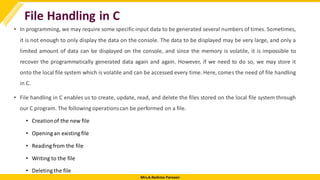
• File handling in C enables us to create, update, read, and delete the files stored on the local file system through
our C program. The following operationscan be performed on a file.
• Creationof the new file
• Opening an existing file
• Reading from the file
• Writing to the file
• Deletingthe file
Mrs.A.Reshma Parveen
Functions for file handling
Mrs.A.Reshma Parveen
Opening File: fopen()
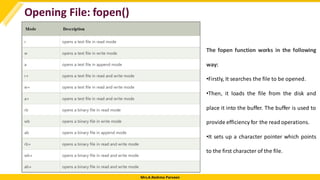
We must open a file before it can be read, write, or update. The fopen() function is used to open a file. The
syntax of the fopen() is given below.
FILE *fopen( const char * filename, const char * mode );
The fopen() function accepts two parameters:
•The file name (string). If the file is stored at some specific location, then we must mention the path at
which the file is stored. For example, a file name can be like "c://some_folder/some_file.ext".
•The mode in which the file is to be opened. It is a string.
Mrs.A.Reshma Parveen
Opening File: fopen()
The fopen function works in the following
way:
•Firstly, It searches the file to be opened.
•Then, it loads the file from the disk and
place it into the buffer. The buffer is used to
provide efficiency for the read operations.
•It sets up a character pointer which points
to the first character of the file.
Mrs.A.Reshma Parveen
Opening File: fopen()
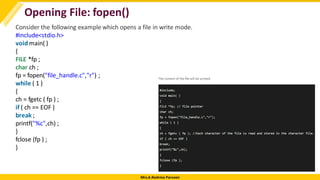
Consider the following example which opens a file in write mode.
#include<stdio.h>
void main( )
{
FILE *fp ;
char ch ;
fp = fopen("file_handle.c","r") ;
while ( 1 )
{
ch = fgetc ( fp ) ;
if ( ch == EOF )
break ;
printf("%c",ch) ;
}
fclose (fp ) ;
}
Mrs.A.Reshma Parveen
Closing File: fclose()
The fclose() function is used to close a file. The file must be closed after performing all the
operations on it. The syntax of fclose() function is given below:
int fclose( FILE *fp );
Mrs.A.Reshma Parveen
C fprintf() and fscanf()
Writing File : fprintf() function
The fprintf() function is used to write set of characters into file. It sends formatted output to a stream.
Syntax:
int fprintf(FILE *stream, const char *format [, argument, ...])
Example:
#include <stdio.h>
main(){
FILE *fp;
fp = fopen("file.txt", "w");//opening file
fprintf(fp, "Hello file by fprintf...n");//writing data into file
fclose(fp);//closing file
}
Mrs.A.Reshma Parveen
C fprintf() and fscanf()
Reading File : fscanf() function
The fscanf() function is used to read set of characters from file. It reads a word from the file and returns EOF
at the end of file.
Syntax:
int fscanf(FILE *stream, const char *format [, argument, ...])
Example:
#include <stdio.h>
main(){
FILE *fp;
char buff[255];//creating char array to store data of file
fp = fopen("file.txt", "r");
while(fscanf(fp, "%s", buff)!=EOF){
printf("%s ", buff );
}
fclose(fp);
}
Mrs.A.Reshma Parveen
C fprintf() and fscanf()
C File Example: Storing employee information
Let's see a file handling example to store employee information as entered by user from console. We are
going to store id, name and salary of the employee.
#include <stdio.h>
void main()
{
FILE *fptr;
int id;
char name[30];
floatsalary;
fptr = fopen("emp.txt", "w+");/* open for writing */
if (fptr == NULL)
{
printf("File does not exists n");
return;
}
printf("Enter the idn");
scanf("%d", &id);
fprintf(fptr, "Id= %dn", id);
printf("Enter the name n");
scanf("%s", name);
fprintf(fptr, "Name= %sn", name);
printf("Enter the salaryn");
scanf("%f", &salary);
fprintf(fptr, "Salary= %.2fn", salary);
fclose(fptr);
}
Mrs.A.Reshma Parveen
C fprintf() and fscanf()
Now open file from current directory. For windowsoperating system, go to TCbin directory, you will see emp.txt
file. It will have following information.
Mrs.A.Reshma Parveen
C fputc() and fgetc()
Writing File : fputc() function
The fputc() function is used to write a single character into file. It outputs a character to a stream.
Syntax:
int fputc(int c, FILE *stream)
Example:
#include <stdio.h>
main(){
FILE *fp;
fp = fopen("file1.txt", "w");//opening file
fputc('a',fp);//writing single character into file
fclose(fp);//closing file
}
Mrs.A.Reshma Parveen
C fputc() and fgetc()
Reading File : fgetc() function
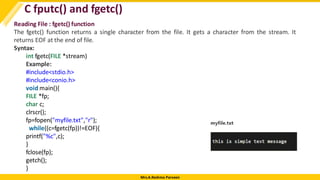
The fgetc() function returns a single character from the file. It gets a character from the stream. It
returns EOF at the end of file.
Syntax:
int fgetc(FILE *stream)
Example:
#include<stdio.h>
#include<conio.h>
void main(){
FILE *fp;
char c;
clrscr();
fp=fopen("myfile.txt","r");
while((c=fgetc(fp))!=EOF){
printf("%c",c);
}
fclose(fp);
getch();
}
Mrs.A.Reshma Parveen
C fputs() and fgets()
Writing File : fputs() function
The fputs() function writes a line of characters into file. It outputs string to a stream.
Syntax:
int fputs(const char *s, FILE *stream)
Example:
#include<stdio.h>
#include<conio.h>
void main(){
FILE *fp;
clrscr();
fp=fopen("myfile2.txt","w");
fputs("hello c programming",fp);
fclose(fp);
getch();
}
Mrs.A.Reshma Parveen
C fputs() and fgets()
Reading File : fgets() function
The fgets() function reads a line of characters from file. It gets string from a stream.
Syntax:
char* fgets(char *s, int n, FILE *stream)
Example:
#include<stdio.h>
#include<conio.h>
void main(){
FILE *fp;
char text[300];
clrscr();
fp=fopen("myfile2.txt","r");
printf("%s",fgets(text,200,fp));
fclose(fp);
getch();
}
Mrs.A.Reshma Parveen
C fseek() function
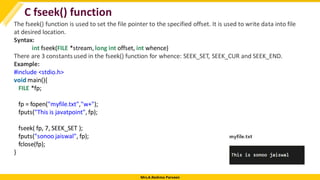
The fseek() function is used to set the file pointer to the specified offset. It is used to write data into file
at desired location.
Syntax:
int fseek(FILE *stream, long int offset, int whence)
There are 3 constants used in the fseek() function for whence: SEEK_SET, SEEK_CUR and SEEK_END.
Example:
#include <stdio.h>
void main(){
FILE *fp;
fp = fopen("myfile.txt","w+");
fputs("This is javatpoint", fp);
fseek( fp, 7, SEEK_SET );
fputs("sonoo jaiswal", fp);
fclose(fp);
}
Mrs.A.Reshma Parveen
C rewind() function
The rewind() function sets the file pointer at the beginning of the stream. It is useful if you have to use stream
many times.
Syntax:
void rewind(FILE *stream)
Example:
File: file.txt
this is a simple text
File: rewind.c
#include<stdio.h>
#include<conio.h>
void main(){
FILE *fp;
char c;
clrscr();
fp=fopen("file.txt","r");
while((c=fgetc(fp))!=EOF){
printf("%c",c);
}
rewind(fp);//moves the file pointer at beginningof the file
while((c=fgetc(fp))!=EOF){
printf("%c",c);
}
fclose(fp);
getch();
}
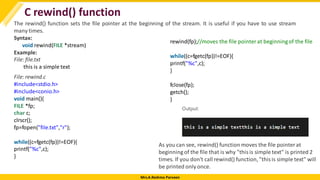
As you can see, rewind() function moves the file pointerat
beginning of the file that is why "thisis simple text" is printed 2
times. If you don't call rewind() function, "thisis simple text" will
be printed only once.
Mrs.A.Reshma Parveen
C ftell() function
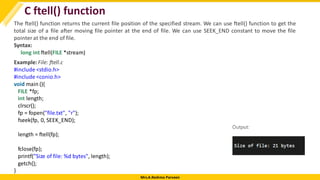
The ftell() function returns the current file position of the specified stream. We can use ftell() function to get the
total size of a file after moving file pointer at the end of file. We can use SEEK_END constant to move the file
pointer at the end of file.
Syntax:
long int ftell(FILE *stream)
Example:File: ftell.c
#include <stdio.h>
#include <conio.h>
void main (){
FILE *fp;
int length;
clrscr();
fp = fopen("file.txt", "r");
fseek(fp, 0, SEEK_END);
length = ftell(fp);
fclose(fp);
printf("Size of file: %d bytes", length);
getch();
}

File Handling-Module V.pdf dSfcsvfsvcdfscfd

  • 1.
  • 2.
  • 3.
    Mrs.A.Reshma Parveen File Handlingin C • In programming, we may require some specific input data to be generated several numbers of times. Sometimes, it is not enough to only display the data on the console. The data to be displayed may be very large, and only a limited amount of data can be displayed on the console, and since the memory is volatile, it is impossible to recover the programmatically generated data again and again. However, if we need to do so, we may store it onto the local file system which is volatile and can be accessed every time. Here, comes the need of file handling in C. • File handling in C enables us to create, update, read, and delete the files stored on the local file system through our C program. The following operationscan be performed on a file. • Creationof the new file • Opening an existing file • Reading from the file • Writing to the file • Deletingthe file
  • 4.
  • 5.
    Mrs.A.Reshma Parveen Opening File:fopen() We must open a file before it can be read, write, or update. The fopen() function is used to open a file. The syntax of the fopen() is given below. FILE *fopen( const char * filename, const char * mode ); The fopen() function accepts two parameters: •The file name (string). If the file is stored at some specific location, then we must mention the path at which the file is stored. For example, a file name can be like "c://some_folder/some_file.ext". •The mode in which the file is to be opened. It is a string.
  • 6.
    Mrs.A.Reshma Parveen Opening File:fopen() The fopen function works in the following way: •Firstly, It searches the file to be opened. •Then, it loads the file from the disk and place it into the buffer. The buffer is used to provide efficiency for the read operations. •It sets up a character pointer which points to the first character of the file.
  • 7.
    Mrs.A.Reshma Parveen Opening File:fopen() Consider the following example which opens a file in write mode. #include<stdio.h> void main( ) { FILE *fp ; char ch ; fp = fopen("file_handle.c","r") ; while ( 1 ) { ch = fgetc ( fp ) ; if ( ch == EOF ) break ; printf("%c",ch) ; } fclose (fp ) ; }
  • 8.
    Mrs.A.Reshma Parveen Closing File:fclose() The fclose() function is used to close a file. The file must be closed after performing all the operations on it. The syntax of fclose() function is given below: int fclose( FILE *fp );
  • 9.
    Mrs.A.Reshma Parveen C fprintf()and fscanf() Writing File : fprintf() function The fprintf() function is used to write set of characters into file. It sends formatted output to a stream. Syntax: int fprintf(FILE *stream, const char *format [, argument, ...]) Example: #include <stdio.h> main(){ FILE *fp; fp = fopen("file.txt", "w");//opening file fprintf(fp, "Hello file by fprintf...n");//writing data into file fclose(fp);//closing file }
  • 10.
    Mrs.A.Reshma Parveen C fprintf()and fscanf() Reading File : fscanf() function The fscanf() function is used to read set of characters from file. It reads a word from the file and returns EOF at the end of file. Syntax: int fscanf(FILE *stream, const char *format [, argument, ...]) Example: #include <stdio.h> main(){ FILE *fp; char buff[255];//creating char array to store data of file fp = fopen("file.txt", "r"); while(fscanf(fp, "%s", buff)!=EOF){ printf("%s ", buff ); } fclose(fp); }
  • 11.
    Mrs.A.Reshma Parveen C fprintf()and fscanf() C File Example: Storing employee information Let's see a file handling example to store employee information as entered by user from console. We are going to store id, name and salary of the employee. #include <stdio.h> void main() { FILE *fptr; int id; char name[30]; floatsalary; fptr = fopen("emp.txt", "w+");/* open for writing */ if (fptr == NULL) { printf("File does not exists n"); return; } printf("Enter the idn"); scanf("%d", &id); fprintf(fptr, "Id= %dn", id); printf("Enter the name n"); scanf("%s", name); fprintf(fptr, "Name= %sn", name); printf("Enter the salaryn"); scanf("%f", &salary); fprintf(fptr, "Salary= %.2fn", salary); fclose(fptr); }
  • 12.
    Mrs.A.Reshma Parveen C fprintf()and fscanf() Now open file from current directory. For windowsoperating system, go to TCbin directory, you will see emp.txt file. It will have following information.
  • 13.
    Mrs.A.Reshma Parveen C fputc()and fgetc() Writing File : fputc() function The fputc() function is used to write a single character into file. It outputs a character to a stream. Syntax: int fputc(int c, FILE *stream) Example: #include <stdio.h> main(){ FILE *fp; fp = fopen("file1.txt", "w");//opening file fputc('a',fp);//writing single character into file fclose(fp);//closing file }
  • 14.
    Mrs.A.Reshma Parveen C fputc()and fgetc() Reading File : fgetc() function The fgetc() function returns a single character from the file. It gets a character from the stream. It returns EOF at the end of file. Syntax: int fgetc(FILE *stream) Example: #include<stdio.h> #include<conio.h> void main(){ FILE *fp; char c; clrscr(); fp=fopen("myfile.txt","r"); while((c=fgetc(fp))!=EOF){ printf("%c",c); } fclose(fp); getch(); }
  • 15.
    Mrs.A.Reshma Parveen C fputs()and fgets() Writing File : fputs() function The fputs() function writes a line of characters into file. It outputs string to a stream. Syntax: int fputs(const char *s, FILE *stream) Example: #include<stdio.h> #include<conio.h> void main(){ FILE *fp; clrscr(); fp=fopen("myfile2.txt","w"); fputs("hello c programming",fp); fclose(fp); getch(); }
  • 16.
    Mrs.A.Reshma Parveen C fputs()and fgets() Reading File : fgets() function The fgets() function reads a line of characters from file. It gets string from a stream. Syntax: char* fgets(char *s, int n, FILE *stream) Example: #include<stdio.h> #include<conio.h> void main(){ FILE *fp; char text[300]; clrscr(); fp=fopen("myfile2.txt","r"); printf("%s",fgets(text,200,fp)); fclose(fp); getch(); }
  • 17.
    Mrs.A.Reshma Parveen C fseek()function The fseek() function is used to set the file pointer to the specified offset. It is used to write data into file at desired location. Syntax: int fseek(FILE *stream, long int offset, int whence) There are 3 constants used in the fseek() function for whence: SEEK_SET, SEEK_CUR and SEEK_END. Example: #include <stdio.h> void main(){ FILE *fp; fp = fopen("myfile.txt","w+"); fputs("This is javatpoint", fp); fseek( fp, 7, SEEK_SET ); fputs("sonoo jaiswal", fp); fclose(fp); }
  • 18.
    Mrs.A.Reshma Parveen C rewind()function The rewind() function sets the file pointer at the beginning of the stream. It is useful if you have to use stream many times. Syntax: void rewind(FILE *stream) Example: File: file.txt this is a simple text File: rewind.c #include<stdio.h> #include<conio.h> void main(){ FILE *fp; char c; clrscr(); fp=fopen("file.txt","r"); while((c=fgetc(fp))!=EOF){ printf("%c",c); } rewind(fp);//moves the file pointer at beginningof the file while((c=fgetc(fp))!=EOF){ printf("%c",c); } fclose(fp); getch(); } As you can see, rewind() function moves the file pointerat beginning of the file that is why "thisis simple text" is printed 2 times. If you don't call rewind() function, "thisis simple text" will be printed only once.
  • 19.
    Mrs.A.Reshma Parveen C ftell()function The ftell() function returns the current file position of the specified stream. We can use ftell() function to get the total size of a file after moving file pointer at the end of file. We can use SEEK_END constant to move the file pointer at the end of file. Syntax: long int ftell(FILE *stream) Example:File: ftell.c #include <stdio.h> #include <conio.h> void main (){ FILE *fp; int length; clrscr(); fp = fopen("file.txt", "r"); fseek(fp, 0, SEEK_END); length = ftell(fp); fclose(fp); printf("Size of file: %d bytes", length); getch(); }