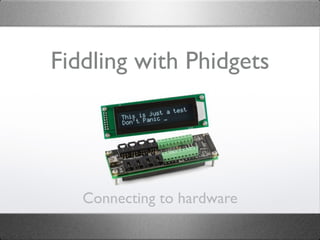
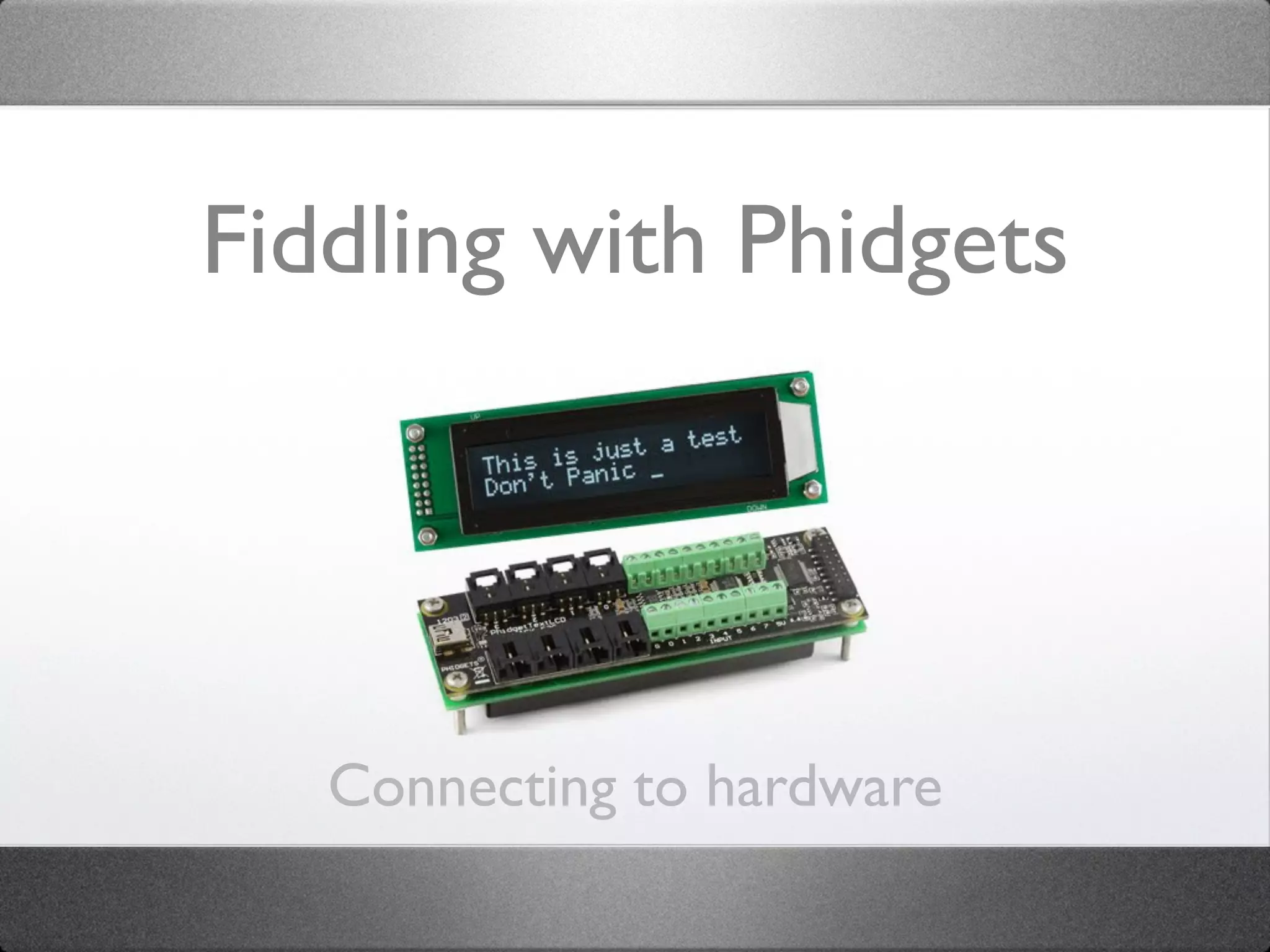
Fiddling with Phidgets


   Connecting to hardware
Who Am I?
Steven Peeters
Unit manager / Instructor / consultant at multimediacollegeTM

• Adobe Flex, AIR, Flash Catalyst & ColdFusion Certified Instructor
• Adobe Community Professional
• ColdFusion User Group Manager
• 12+ years of development experience
• Flex & AIR since 2004
• Author for Friends of ED

 Email:        steven@multimediacollege.be
 LinkedIn:     www.linkedin.com/in/stevenpeeters
 Twitter:      @aikisteve
 Blog          www.flexpert.be
 Website       www.multimediacollege.be
Topics


• Arduino
• Phidgets
• Other hardware
Twitter hash tag: #fiddlingphidgets
Getting started


• Yeah, how did I get started on this?
Getting started


• Yeah, how did I get started on this?
   • College
Getting started


• Yeah, how did I get started on this?
   • College
   • Prototype This
Getting started


• Yeah, how did I get started on this?
   • College
   • Prototype This
   • Grant Skinner
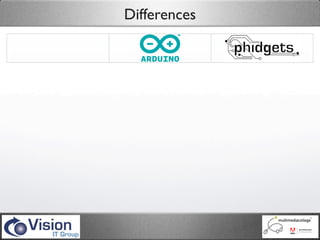
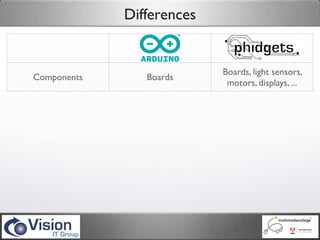
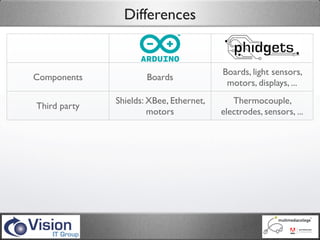
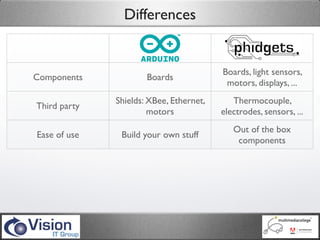
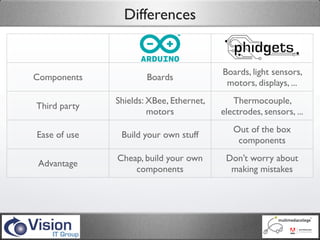
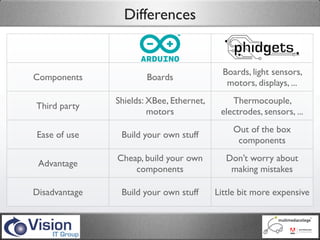
Differences


                                            Boards, light sensors,
Components             Boards
                                             motors, displays, ...
               Shields: XBee, Ethernet,       Thermocouple,
Third party
                        motors             electrodes, sensors, ...
                                              Out of the box
Ease of use     Build your own stuff
                                               components
               Cheap, build your own        Don’t worry about
 Advantage
                   components                making mistakes

Disadvantage    Build your own stuff      Little bit more expensive
Differences


                                            Boards, light sensors,
Components             Boards
                                             motors, displays, ...
               Shields: XBee, Ethernet,       Thermocouple,
Third party
                        motors             electrodes, sensors, ...
                                              Out of the box
Ease of use     Build your own stuff
                                               components
               Cheap, build your own        Don’t worry about
 Advantage
                   components                making mistakes

Disadvantage    Build your own stuff      Little bit more expensive
Differences


                                            Boards, light sensors,
Components             Boards
                                             motors, displays, ...
               Shields: XBee, Ethernet,       Thermocouple,
Third party
                        motors             electrodes, sensors, ...
                                              Out of the box
Ease of use     Build your own stuff
                                               components
               Cheap, build your own        Don’t worry about
 Advantage
                   components                making mistakes

Disadvantage    Build your own stuff      Little bit more expensive
Differences


                                            Boards, light sensors,
Components             Boards
                                             motors, displays, ...
               Shields: XBee, Ethernet,       Thermocouple,
Third party
                        motors             electrodes, sensors, ...
                                              Out of the box
Ease of use     Build your own stuff
                                               components
               Cheap, build your own        Don’t worry about
 Advantage
                   components                making mistakes

Disadvantage    Build your own stuff      Little bit more expensive
Differences


                                            Boards, light sensors,
Components             Boards
                                             motors, displays, ...
               Shields: XBee, Ethernet,       Thermocouple,
Third party
                        motors             electrodes, sensors, ...
                                              Out of the box
Ease of use     Build your own stuff
                                               components
               Cheap, build your own        Don’t worry about
 Advantage
                   components                making mistakes

Disadvantage    Build your own stuff      Little bit more expensive
Differences


                                            Boards, light sensors,
Components             Boards
                                             motors, displays, ...
               Shields: XBee, Ethernet,       Thermocouple,
Third party
                        motors             electrodes, sensors, ...
                                              Out of the box
Ease of use     Build your own stuff
                                               components
               Cheap, build your own        Don’t worry about
 Advantage
                   components                making mistakes

Disadvantage    Build your own stuff      Little bit more expensive
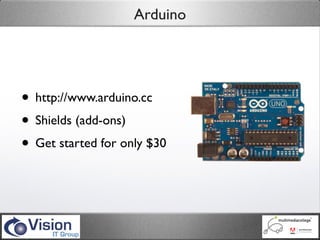
Arduino


• http://www.arduino.cc
• Shields (add-ons)
• Get started for only $30
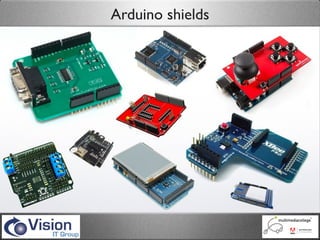
Arduino shields
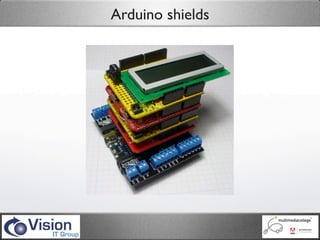
Arduino shields
Programming Arduino
Programming Arduino


• Open-source
Programming Arduino


• Open-source
• Large community
Programming Arduino


• Open-source
• Large community
• Lots of example available
Programming Arduino


• Open-source
• Large community
• Lots of example available
• Language based on processing
Programming Arduino


• Open-source
• Large community
• Lots of example available
• Language based on processing
• extensible with C, C++, Flash...
Programming Arduino


• Open-source
• Large community
• Lots of example available
• Language based on processing
• extensible with C, C++, Flash...
• examples in the IDE and on http://tv.adobe.com
Programming Arduino


• Connecting to Flash/Flex
Programming Arduino


• Connecting to Flash/Flex
   • Upload Firmata program to board
Programming Arduino


• Connecting to Flash/Flex
   • Upload Firmata program to board
   • SerProxy/TinkerProxy
Programming Arduino


• Connecting to Flash/Flex
   • Upload Firmata program to board
   • SerProxy/TinkerProxy
   • AS3Glue: http://code.google.com/p/as3glue/
Programming Arduino


• Connecting to Flash/Flex
   • Upload Firmata program to board
   • SerProxy/TinkerProxy
   • AS3Glue: http://code.google.com/p/as3glue/
   • Use Arduino object methods
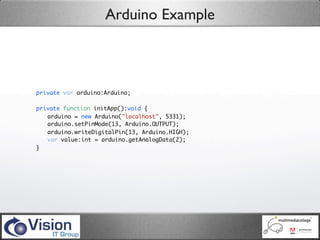
Arduino Example


private var arduino:Arduino;

private function initApp():void {
	 arduino = new Arduino("localhost", 5331);
	 arduino.setPinMode(13, Arduino.OUTPUT);
	 arduino.writeDigitalPin(13, Arduino.HIGH);
	 var value:int = arduino.getAnalogData(2);
}
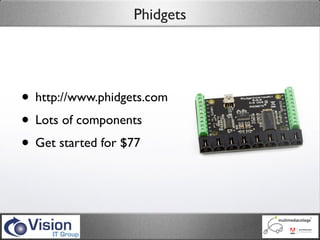
Phidgets


• http://www.phidgets.com
• Lots of components
• Get started for $77
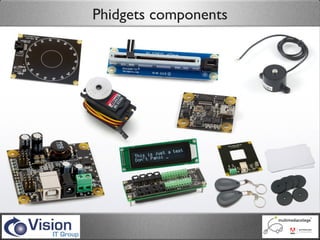
Phidgets components
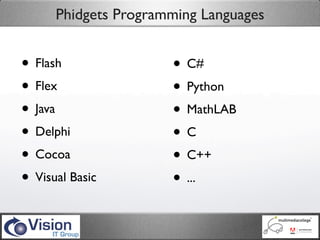
Phidgets Programming Languages


• Flash               • C#
• Flex                • Python
• Java                • MathLAB
• Delphi              •C
• Cocoa               • C++
• Visual Basic        • ...
Programming Phidgets


• Connecting to Flash/Flex
Programming Phidgets


• Connecting to Flash/Flex
   • Install drivers for boards
Programming Phidgets


• Connecting to Flash/Flex
   • Install drivers for boards
   • Run web service
Programming Phidgets


• Connecting to Flash/Flex
   • Install drivers for boards
   • Run web service
   • Use Phigets21Library.swc
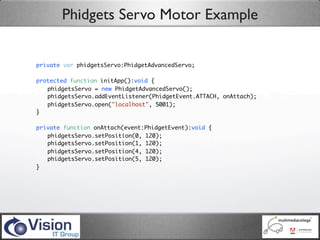
Phidgets Servo Motor Example


private var phidgetsServo:PhidgetAdvancedServo;

protected function initApp():void {
	 phidgetsServo = new PhidgetAdvancedServo();
	 phidgetsServo.addEventListener(PhidgetEvent.ATTACH, onAttach);
	 phidgetsServo.open("localhost", 5001);
}

private function onAttach(event:PhidgetEvent):void {
	 phidgetsServo.setPosition(0, 120);
	 phidgetsServo.setPosition(1, 120);
	 phidgetsServo.setPosition(4, 120);
	 phidgetsServo.setPosition(5, 120);
}
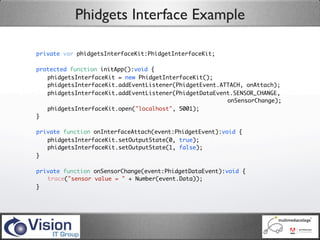
Phidgets Interface Example

private var phidgetsInterfaceKit:PhidgetInterfaceKit;

protected function initApp():void {
	 phidgetsInterfaceKit = new PhidgetInterfaceKit();
	 phidgetsInterfaceKit.addEventListener(PhidgetEvent.ATTACH, onAttach);
	 phidgetsInterfaceKit.addEventListener(PhidgetDataEvent.SENSOR_CHANGE,
                                                       onSensorChange);
	 phidgetsInterfaceKit.open("localhost", 5001);
}

private function onInterfaceAttach(event:PhidgetEvent):void {
	 phidgetsInterfaceKit.setOutputState(0, true);
	 phidgetsInterfaceKit.setOutputState(1, false);
}

private function onSensorChange(event:PhidgetDataEvent):void {
	 trace("sensor value = " + Number(event.Data));
}
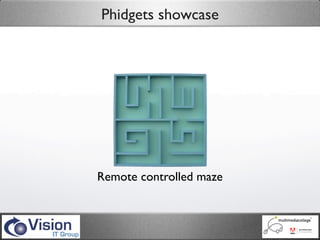
Phidgets showcase


Remote controlled maze
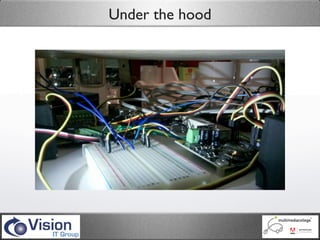
Under the hood
The only limit is your imagination
Thank you


     Twitter:
     @aikisteve

     Email:
     steven@multimediacollege.be

     Personal site:
     www.flexpert.be

Fiddling With Phidgets

  • 1.
    Fiddling with Phidgets Connecting to hardware
  • 2.
    Who Am I? StevenPeeters Unit manager / Instructor / consultant at multimediacollegeTM • Adobe Flex, AIR, Flash Catalyst & ColdFusion Certified Instructor • Adobe Community Professional • ColdFusion User Group Manager • 12+ years of development experience • Flex & AIR since 2004 • Author for Friends of ED Email: steven@multimediacollege.be LinkedIn: www.linkedin.com/in/stevenpeeters Twitter: @aikisteve Blog www.flexpert.be Website www.multimediacollege.be
  • 3.
    Topics • Arduino • Phidgets •Other hardware Twitter hash tag: #fiddlingphidgets
  • 4.
    Getting started • Yeah,how did I get started on this?
  • 5.
    Getting started • Yeah,how did I get started on this? • College
  • 6.
    Getting started • Yeah,how did I get started on this? • College • Prototype This
  • 7.
    Getting started • Yeah,how did I get started on this? • College • Prototype This • Grant Skinner
  • 8.
    Differences Boards, light sensors, Components Boards motors, displays, ... Shields: XBee, Ethernet, Thermocouple, Third party motors electrodes, sensors, ... Out of the box Ease of use Build your own stuff components Cheap, build your own Don’t worry about Advantage components making mistakes Disadvantage Build your own stuff Little bit more expensive
  • 9.
    Differences Boards, light sensors, Components Boards motors, displays, ... Shields: XBee, Ethernet, Thermocouple, Third party motors electrodes, sensors, ... Out of the box Ease of use Build your own stuff components Cheap, build your own Don’t worry about Advantage components making mistakes Disadvantage Build your own stuff Little bit more expensive
  • 10.
    Differences Boards, light sensors, Components Boards motors, displays, ... Shields: XBee, Ethernet, Thermocouple, Third party motors electrodes, sensors, ... Out of the box Ease of use Build your own stuff components Cheap, build your own Don’t worry about Advantage components making mistakes Disadvantage Build your own stuff Little bit more expensive
  • 11.
    Differences Boards, light sensors, Components Boards motors, displays, ... Shields: XBee, Ethernet, Thermocouple, Third party motors electrodes, sensors, ... Out of the box Ease of use Build your own stuff components Cheap, build your own Don’t worry about Advantage components making mistakes Disadvantage Build your own stuff Little bit more expensive
  • 12.
    Differences Boards, light sensors, Components Boards motors, displays, ... Shields: XBee, Ethernet, Thermocouple, Third party motors electrodes, sensors, ... Out of the box Ease of use Build your own stuff components Cheap, build your own Don’t worry about Advantage components making mistakes Disadvantage Build your own stuff Little bit more expensive
  • 13.
    Differences Boards, light sensors, Components Boards motors, displays, ... Shields: XBee, Ethernet, Thermocouple, Third party motors electrodes, sensors, ... Out of the box Ease of use Build your own stuff components Cheap, build your own Don’t worry about Advantage components making mistakes Disadvantage Build your own stuff Little bit more expensive
  • 14.
    Arduino • http://www.arduino.cc • Shields(add-ons) • Get started for only $30
  • 15.
  • 16.
  • 17.
  • 18.
  • 19.
  • 20.
    Programming Arduino • Open-source •Large community • Lots of example available
  • 21.
    Programming Arduino • Open-source •Large community • Lots of example available • Language based on processing
  • 22.
    Programming Arduino • Open-source •Large community • Lots of example available • Language based on processing • extensible with C, C++, Flash...
  • 23.
    Programming Arduino • Open-source •Large community • Lots of example available • Language based on processing • extensible with C, C++, Flash... • examples in the IDE and on http://tv.adobe.com
  • 24.
  • 25.
    Programming Arduino • Connectingto Flash/Flex • Upload Firmata program to board
  • 26.
    Programming Arduino • Connectingto Flash/Flex • Upload Firmata program to board • SerProxy/TinkerProxy
  • 27.
    Programming Arduino • Connectingto Flash/Flex • Upload Firmata program to board • SerProxy/TinkerProxy • AS3Glue: http://code.google.com/p/as3glue/
  • 28.
    Programming Arduino • Connectingto Flash/Flex • Upload Firmata program to board • SerProxy/TinkerProxy • AS3Glue: http://code.google.com/p/as3glue/ • Use Arduino object methods
  • 29.
    Arduino Example private vararduino:Arduino; private function initApp():void { arduino = new Arduino("localhost", 5331); arduino.setPinMode(13, Arduino.OUTPUT); arduino.writeDigitalPin(13, Arduino.HIGH); var value:int = arduino.getAnalogData(2); }
  • 30.
    Phidgets • http://www.phidgets.com • Lotsof components • Get started for $77
  • 31.
  • 32.
    Phidgets Programming Languages •Flash • C# • Flex • Python • Java • MathLAB • Delphi •C • Cocoa • C++ • Visual Basic • ...
  • 33.
  • 34.
    Programming Phidgets • Connectingto Flash/Flex • Install drivers for boards
  • 35.
    Programming Phidgets • Connectingto Flash/Flex • Install drivers for boards • Run web service
  • 36.
    Programming Phidgets • Connectingto Flash/Flex • Install drivers for boards • Run web service • Use Phigets21Library.swc
  • 37.
    Phidgets Servo MotorExample private var phidgetsServo:PhidgetAdvancedServo; protected function initApp():void { phidgetsServo = new PhidgetAdvancedServo(); phidgetsServo.addEventListener(PhidgetEvent.ATTACH, onAttach); phidgetsServo.open("localhost", 5001); } private function onAttach(event:PhidgetEvent):void { phidgetsServo.setPosition(0, 120); phidgetsServo.setPosition(1, 120); phidgetsServo.setPosition(4, 120); phidgetsServo.setPosition(5, 120); }
  • 38.
    Phidgets Interface Example privatevar phidgetsInterfaceKit:PhidgetInterfaceKit; protected function initApp():void { phidgetsInterfaceKit = new PhidgetInterfaceKit(); phidgetsInterfaceKit.addEventListener(PhidgetEvent.ATTACH, onAttach); phidgetsInterfaceKit.addEventListener(PhidgetDataEvent.SENSOR_CHANGE, onSensorChange); phidgetsInterfaceKit.open("localhost", 5001); } private function onInterfaceAttach(event:PhidgetEvent):void { phidgetsInterfaceKit.setOutputState(0, true); phidgetsInterfaceKit.setOutputState(1, false); } private function onSensorChange(event:PhidgetDataEvent):void { trace("sensor value = " + Number(event.Data)); }
  • 39.
  • 40.
  • 41.
    The only limitis your imagination
  • 42.
    The only limitis your imagination
  • 43.
    The only limitis your imagination
  • 44.
    Thank you Twitter: @aikisteve Email: steven@multimediacollege.be Personal site: www.flexpert.be