iDW, May 2017
FEEDING THE BOTS:
PREPARING PRODUCT CONTENT FOR THE
INTELLIGENT ASSISTANCE REVOLUTION
Joe Gelb
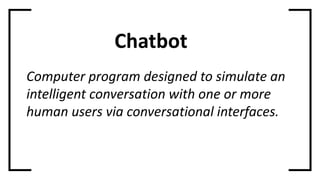
Chatbot
Computer program designed to simulate an
intelligent conversation with one or more
human users via conversational interfaces.
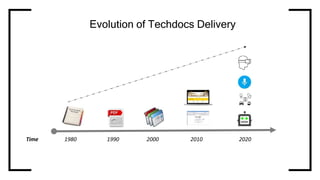
Evolution of Techdocs Delivery
Time 1980 1990 2000 2010 2020
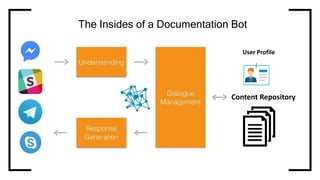
The Insides of a Documentation Bot
User Profile
Content Repository
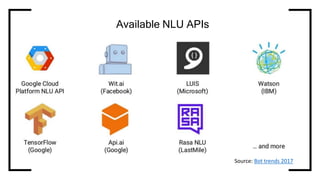
Available NLU APIs
Source: Bot trends 2017
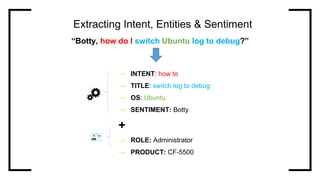
“Botty, how do I switch Ubuntu log to debug?”
Extracting Intent, Entities & Sentiment
→ INTENT: how to
→ TITLE: switch log to debug
→ OS: Ubuntu
→ SENTIMENT: Botty
+
→ ROLE: Administrator
→ PRODUCT: CF-5500
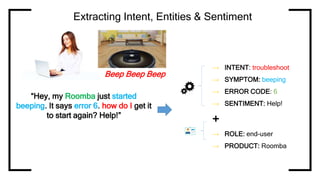
Extracting Intent, Entities & Sentiment
“Hey, my Roomba just started
beeping. It says error 6. how do I get it
to start again? Help!”
Beep Beep Beep
→ INTENT: troubleshoot
→ SYMPTOM: beeping
→ ERROR CODE: 6
→ SENTIMENT: Help!
+
→ ROLE: end-user
→ PRODUCT: Roomba
So, we have the context and parameters of the
question.
Now we need the answer.
Intelligent content provides answers for the
Intelligent Assistant…
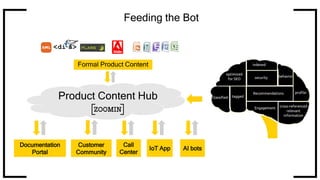
Feeding the Bot
Formal Product Content
Call
Center
Customer
Community
Documentation
Portal
IoT App AI bots
Product Content Hub
Intelligent Content for the Intelligent Assistant
→ Scenario-based: geared towards user stories
→ Topic-based – answers a single question:
→ What is this? [concept or definition]
→ How do I do it?
→ How do I find the problem, step by step?
→ What’s that detail I’m looking for?
→ Semantically tagged using taxonomy:
→ Controlled vocabulary with synonyms
→ Expresses role, goal, context
Intelligent Content for the Intelligent Assistant
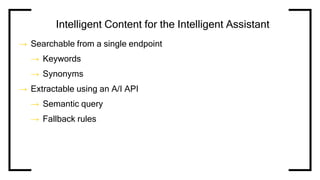
→ Searchable from a single endpoint
→ Keywords
→ Synonyms
→ Extractable using an A/I API
→ Semantic query
→ Fallback rules
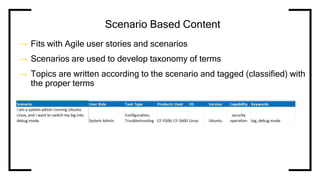
Scenario Based Content
→ Fits with Agile user stories and scenarios
→ Scenarios are used to develop taxonomy of terms
→ Topics are written according to the scenario and tagged (classified) with
the proper terms
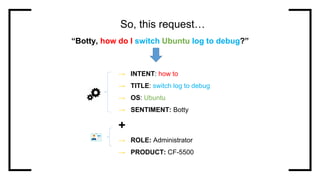
“Botty, how do I switch Ubuntu log to debug?”
So, this request…
→ INTENT: how to
→ TITLE: switch log to debug
→ OS: Ubuntu
→ SENTIMENT: Botty
+
→ ROLE: Administrator
→ PRODUCT: CF-5500
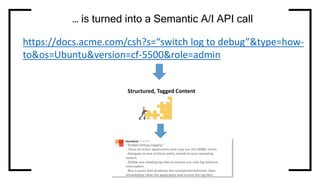
… is turned into a Semantic A/I API call
Structured, Tagged Content
https://docs.acme.com/csh?s=“switch log to debug”&type=how-
to&os=Ubuntu&version=cf-5500&role=admin
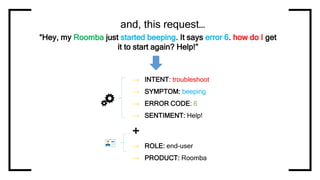
and, this request…
→ INTENT: troubleshoot
→ SYMPTOM: beeping
→ ERROR CODE: 6
→ SENTIMENT: Help!
+
→ ROLE: end-user
→ PRODUCT: Roomba
“Hey, my Roomba just started beeping. It says error 6. how do I get
it to start again? Help!”
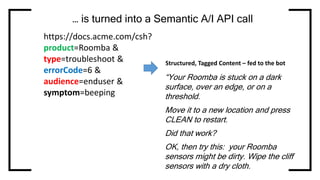
… is turned into a Semantic A/I API call
Structured, Tagged Content – fed to the bot
https://docs.acme.com/csh?
product=Roomba &
type=troubleshoot &
errorCode=6 &
audience=enduser &
symptom=beeping
“Your Roomba is stuck on a dark
surface, over an edge, or on a
threshold.
Move it to a new location and press
CLEAN to restart.
Did that work?
OK, then try this: your Roomba
sensors might be dirty. Wipe the cliff
sensors with a dry cloth.
THANK YOU!
Joe.Gelb@zoominsoftware.com

Feeding the Bots: Preparing Content for the Intelligent Assistant Revolution

  • 1.
    iDW, May 2017 FEEDINGTHE BOTS: PREPARING PRODUCT CONTENT FOR THE INTELLIGENT ASSISTANCE REVOLUTION Joe Gelb
  • 2.
    Chatbot Computer program designedto simulate an intelligent conversation with one or more human users via conversational interfaces.
  • 3.
    Evolution of TechdocsDelivery Time 1980 1990 2000 2010 2020
  • 4.
    The Insides ofa Documentation Bot User Profile Content Repository
  • 5.
  • 6.
    “Botty, how doI switch Ubuntu log to debug?” Extracting Intent, Entities & Sentiment → INTENT: how to → TITLE: switch log to debug → OS: Ubuntu → SENTIMENT: Botty + → ROLE: Administrator → PRODUCT: CF-5500
  • 7.
    Extracting Intent, Entities& Sentiment “Hey, my Roomba just started beeping. It says error 6. how do I get it to start again? Help!” Beep Beep Beep → INTENT: troubleshoot → SYMPTOM: beeping → ERROR CODE: 6 → SENTIMENT: Help! + → ROLE: end-user → PRODUCT: Roomba
  • 8.
    So, we havethe context and parameters of the question. Now we need the answer. Intelligent content provides answers for the Intelligent Assistant…
  • 9.
    Feeding the Bot FormalProduct Content Call Center Customer Community Documentation Portal IoT App AI bots Product Content Hub
  • 10.
    Intelligent Content forthe Intelligent Assistant → Scenario-based: geared towards user stories → Topic-based – answers a single question: → What is this? [concept or definition] → How do I do it? → How do I find the problem, step by step? → What’s that detail I’m looking for? → Semantically tagged using taxonomy: → Controlled vocabulary with synonyms → Expresses role, goal, context
  • 11.
    Intelligent Content forthe Intelligent Assistant → Searchable from a single endpoint → Keywords → Synonyms → Extractable using an A/I API → Semantic query → Fallback rules
  • 12.
    Scenario Based Content →Fits with Agile user stories and scenarios → Scenarios are used to develop taxonomy of terms → Topics are written according to the scenario and tagged (classified) with the proper terms
  • 13.
    “Botty, how doI switch Ubuntu log to debug?” So, this request… → INTENT: how to → TITLE: switch log to debug → OS: Ubuntu → SENTIMENT: Botty + → ROLE: Administrator → PRODUCT: CF-5500
  • 14.
    … is turnedinto a Semantic A/I API call Structured, Tagged Content https://docs.acme.com/csh?s=“switch log to debug”&type=how- to&os=Ubuntu&version=cf-5500&role=admin
  • 15.
    and, this request… →INTENT: troubleshoot → SYMPTOM: beeping → ERROR CODE: 6 → SENTIMENT: Help! + → ROLE: end-user → PRODUCT: Roomba “Hey, my Roomba just started beeping. It says error 6. how do I get it to start again? Help!”
  • 16.
    … is turnedinto a Semantic A/I API call Structured, Tagged Content – fed to the bot https://docs.acme.com/csh? product=Roomba & type=troubleshoot & errorCode=6 & audience=enduser & symptom=beeping “Your Roomba is stuck on a dark surface, over an edge, or on a threshold. Move it to a new location and press CLEAN to restart. Did that work? OK, then try this: your Roomba sensors might be dirty. Wipe the cliff sensors with a dry cloth.
  • 17.

Editor's Notes

  • #2 Hi everyone.
  • #3  And that’s exactly what a chatbot means.
  • #4 Now, users are starting the expect the same thing from their tech docs. If we look at the evolution of techdocs delivery, we can see that while this market legs behind the consumer web market but always catches up at some point. * So, at first, users were consuming your user guides and manuals from paperbooks, and then from e-books. * And then, when customers got accustomed to Google, leading to the docs industry to realize this basically means that every page is page one, customers started expecting to have a search-driven experience where they have a single place where they can find all of them content easily in the form of dynamic delivery systems. And as always, this is going to change quickly. By 2020, which is only 3 years from now, customers would expect to be able to consume product knowledge in a much more seamless way. Instead of having to open a browser, go to your docs site and start to search for something, they would expect the documentation to be seamlessly integrated with their enterprise instant messenger. When buying an connected device, also known as Internet of things, they would expect the documentation to be embedded in the usage experience. When using OK Google, Siri, or Alexa, they would expect your documentation to be fully integrated with it. When using AR/VR equipment, they would expect the documentation to blend in there. In other words, they would like to speak with your documentation directly.
  • #5 So now that we understand what a Chatbot is, and why users want to consume documentation with it, let’s see how we can actually make this happen. On the left side you have the instant messaging system. When the user types in a conversation, that conversation is being fed to a natural language understanding framework. It then breaks it into parts-of-speech, and in conjunction with the dialog management system looks at the intent, at the user profile, at your content and maybe some other resources, and then decides what to answer back to the user.
  • #6 There are plenty of such NLU frameworks out there today. You can see that Google, Microsoft, IBM, Facebook – all have their own services which run on their cloud frameworks, plus there are some open source ones.
  • #7 The engine now attempts to do what we call “Intent extraction”, or “Entity extraction”. In this case, the user entered: “Botty, how do I switch Ubuntu log to debug”? The engine was able to convert this to a structured json block with the following fields: ** INTENT: The user intent is to get information regarding a specific task (“How do I”). ** TITLE: represents what the user is looking for. In that case, the keywords are “switch log to debug”. ** OS: identification of a specific operating system And with data enrichment, in additional use profile is data from one of the company systems, we may also know things like the fact that the user is an administrator or which specific product he owns based on the CRM data.
  • #8 Just purchased a Roomba 600 iRobot She loves it One day it broke, beeping 6 times.
  • #10  So lets see how that will work. The organization publishes its formal content, including documentation and KB articles, to the Zoomin cloud. Next, the writers wish to publish a certain publication to the Documentation portal. A few hours later, a support agent is busy trying to troubleshoot a customer support case. For that end, he can – right from his salesforce interface- contextually query the zoomin cloud, and get the list of most appropriate content items – and have these displayed right in its salesforce screen, and even share that content with the customer in a single click. The day after, another customer looks at one of the topics in the documentation portal. Next to the body of the actual topic, he is being shown contextual suggestions of related community disucssions regarding the content of that topic, and relevant KB articles.
  • #14 The engine now attempts to do what we call “Intent extraction”, or “Entity extraction”. In this case, the user entered: “Botty, how do I switch Ubuntu log to debug”? The engine was able to convert this to a structured json block with the following fields: ** INTENT: The user intent is to get information regarding a specific task (“How do I”). ** TITLE: represents what the user is looking for. In that case, the keywords are “switch log to debug”. ** OS: identification of a specific operating system And with data enrichment, in additional use profile is data from one of the company systems, we may also know things like the fact that the user is an administrator or which specific product he owns based on the CRM data.
  • #15 * Now, you’ve all heard about how semantic tagging and corporate taxonomy can go along way increasing findability and support targeted filtering of your content. * So let’s see how that taxonomy can also serve in the framework on an Artificial In this case, the user entered: “Botty, how do I switch Ubuntu log to debug”? The engine was able to convert this to a structured json block with the following fields: ** INTENT: The user intent is to get information regarding a specific task (“How do I”). ** TITLE: represents what the user is looking for. In that case, the keywords are “switch log to debug”. ** VERSION and AUDIENCE: can also be extracted via the user profile
  • #16 The engine now attempts to do what we call “Intent extraction”, or “Entity extraction”. In this case, the user entered: “Botty, how do I switch Ubuntu log to debug”? The engine was able to convert this to a structured json block with the following fields: ** INTENT: The user intent is to get information regarding a specific task (“How do I”). ** TITLE: represents what the user is looking for. In that case, the keywords are “switch log to debug”. ** OS: identification of a specific operating system And with data enrichment, in additional use profile is data from one of the company systems, we may also know things like the fact that the user is an administrator or which specific product he owns based on the CRM data.
  • #17 * Now, you’ve all heard about how semantic tagging and corporate taxonomy can go along way increasing findability and support targeted filtering of your content. * So let’s see how that taxonomy can also serve in the framework on an Artificial In this case, the user entered: “Botty, how do I switch Ubuntu log to debug”? The engine was able to convert this to a structured json block with the following fields: ** INTENT: The user intent is to get information regarding a specific task (“How do I”). ** TITLE: represents what the user is looking for. In that case, the keywords are “switch log to debug”. ** VERSION and AUDIENCE: can also be extracted via the user profile
  • #18 Now I’ll take questions.