FANUC Profinet TIA Portal Integration
Haresh Moradia
Senior Segment Engineer
Software and Controller Products Group
General Industries and Automotive Segment
FANUC America Corporation
Today’s Speaker
Haresh Moradia
Senior Segment Engineer
Software and Controller Products
General Industries and Automotive Segment
Telephone: 248.377.7793
Email: Haresh.Moradia@fanucamerica.com
FANUC America Corporation
3900 W. Hamlin Rd.
Rochester Hills, Michigan 48309
www.fanucamerica.com
Access to Controls & Audio
You can access controls for the meeting at the top right of your screen if you are in
window mode, OR from a drop down menu at the top center if you are in full screen
mode.
If you do experience any audio problems, we find that the call in number can resolve
most issues; therefore, we do recommend you use that option if an audio problem
arises.
Questions
We will be taking questions using the Q&A panel that can be found on the top right if
you are in window mode or from a drop down menu at the top if you are in full screen
mode. Any questions entered in the Q&A will be addressed at the END of today’s
webinar.
Access to Webinar Files
A friendly reminder…
An archive copy of today’s presentation will be made available in 1 week on our CRC
website where you will be able to download the video file OR stream it to your desktop.
Additionally, an email will be sent to webinar registrants when the presentation is
available for download in PowerPoint.
Friday Webinar Series
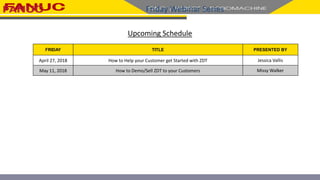
Upcoming Schedule
FRIDAY TITLE PRESENTED BY
April 27, 2018 How to Help your Customer get Started with ZDT Jessica Vallis
May 11, 2018 How to Demo/Sell ZDT to your Customers Missy Walker
Today’s Speaker
Haresh Moradia
Senior Segment Engineer
Software and Controller Products
General Industries and Automotive Segment
Telephone: 248.377.7793
Email: Haresh.Moradia@fanucamerica.com
FANUC America Corporation
3900 W. Hamlin Rd.
Rochester Hills, Michigan 48309
www.fanucamerica.com
FANUC R-30+B Plus
Totally Integrated Automation
Version 14, Service Pack 1, Update 4
TIA Portal Integration
• Hardware and Software Requirements
– Siemens
– Fanuc
• TIA Portal V14 SP1 UPD4
– Creating a Project
– Creating a custom GSD File
• Configuring and Mapping IO
– I-Controller
– I-Device
– F-Device
FANUC R-30+B Plus – Overview
PCBDO000000038O
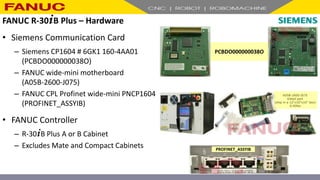
FANUC R-30+B Plus – Hardware
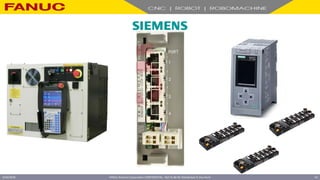
• Siemens Communication Card
– Siemens CP1604 # 6GK1 160-4AA01
(PCBDO000000038O)
– FANUC wide-mini motherboard
(A05B-2600-J075)
– FANUC CPL Profinet wide-mini PNCP1604
(PROFINET_ASSYIB)
• FANUC Controller
– R-30+B Plus A or B Cabinet
– Excludes Mate and Compact Cabinets PROFINET_ASSYIB
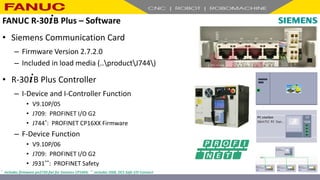
FANUC R-30+B Plus – Software
• Siemens Communication Card
– Firmware Version 2.7.2.0
– Included in load media (..productJ744)
• R-30+B Plus Controller
– I-Device and I-Controller Function
• V9.10P/05
• J709: PROFINET I/O G2
• J744*: PROFINET CP16XX Firmware
– F-Device Function
• V9.10P/06
• J709: PROFINET I/O G2
• J931**: PROFINET Safety
* includes firmware pn2720.fwl for Siemens CP1604; ** includes J568, DCS Safe I/O Connect
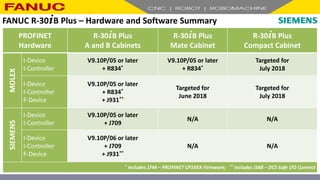
PROFINET
Hardware
R-30+B Plus
A and B Cabinets
R-30+B Plus
Mate Cabinet
R-30+B Plus
Compact Cabinet
MOLEX
I-Device
I-Controller
V9.10P/05 or later
+ R834*
V9.10P/05 or later
+ R834*
Targeted for
July 2018
I-Device
I-Controller
F-Device
V9.10P/05 or later
+ R834*
+ J931**
Targeted for
June 2018
Targeted for
July 2018
SIEMENS
I-Device
I-Controller
V9.10P/05 or later
+ J709
N/A N/A
I-Device
I-Controller
F-Device
V9.10P/06 or later
+ J709
+ J931**
N/A N/A
* includes J744 – PROFINET CP16XX Firmware; ** includes J568 – DCS Safe I/O Connect
FANUC R-30+B Plus – Hardware and Software Summary
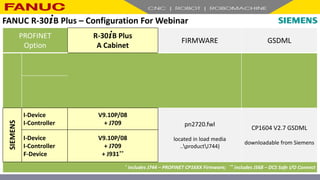
PROFINET
Option
R-30+B Plus
A Cabinet
FIRMWARE GSDML
MOLEX
I-Device
I-Controller
V9.10P/08
+ R834*
ef2.bin
located in load media
..productJ744)
GSDML-V2.33-Fanuc-
A05B2600R834V910-
20170720.xml
located in load media
..productR834
I-Device
I-Controller
F-Device
V9.10P/08
+ R834*
+ J931**
SIEMENS
I-Device
I-Controller
V9.10P/08
+ J709 pn2720.fwl
located in load media
..productJ744)
CP1604 V2.7 GSDML
downloadable from Siemens
I-Device
I-Controller
F-Device
V9.10P/08
+ J709
+ J931**
* includes J744 – PROFINET CP16XX Firmware; ** includes J568 – DCS Safe I/O Connect
FANUC R-30+B Plus – Configuration For Webinar
FANUC America Corporation CONFIDENTIAL - Not To Be Re-Distributed In Any Form
4/23/2018 14
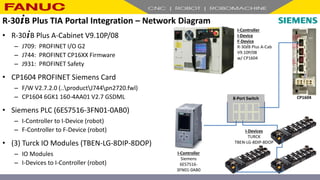
8-Port Switch
I-Controller
Siemens
6ES7516-
3FN01-0AB0
I-Controller
I-Device
F-Device
R-30+B Plus A-Cab
V9.10P/08
w/ CP1604
I-Devices
TURCK
TBEN-LG-8DIP-8DOP
CP1604
• R-30+B Plus A-Cabinet V9.10P/08
– J709: PROFINET I/O G2
– J744: PROFINET CP16XX Firmware
– J931: PROFINET Safety
• CP1604 PROFINET Siemens Card
– F/W V2.7.2.0 (..productJ744pn2720.fwl)
– CP1604 6GK1 160-4AA01 V2.7 GSDML
• Siemens PLC (6ES7516-3FN01-0AB0)
– I-Controller to I-Device (robot)
– F-Controller to F-Device (robot)
• (3) Turck IO Modules (TBEN-LG-8DIP-8DOP)
– IO Modules
– I-Devices to I-Controller (robot)
R-30+B Plus TIA Portal Integration – Network Diagram
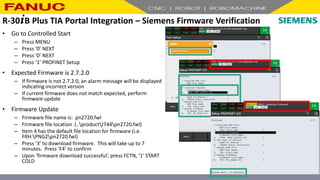
• Go to Controlled Start
– Press MENU
– Press ‘0’ NEXT
– Press ‘0’ NEXT
– Press ‘1’ PROFINET Setup
• Expected Firmware is 2.7.2.0
– If firmware is not 2.7.2.0, an alarm message will be displayed
indicating incorrect version
– If current firmware does not match expected, perform
firmware update
• Firmware Update
– Firmware file name is: pn2720.fwl
– Firmware file location (..productJ744pn2720.fwl)
– Item 4 has the default file location for firmware (i.e.
FRH:PNG2pn2720.fwl)
– Press ‘3’ to download firmware. This will take up to 7
minutes. Press ‘F4’ to confirm
– Upon ‘firmware download successful’, press FCTN, ‘1’ START
COLD
R-30+B Plus TIA Portal Integration – Siemens Firmware Verification
FANUC America Corporation CONFIDENTIAL - Not To Be Re-Distributed In Any Form
4/23/2018 17
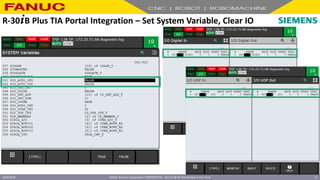
R-30+B Plus TIA Portal Integration – Set System Variable, Clear IO
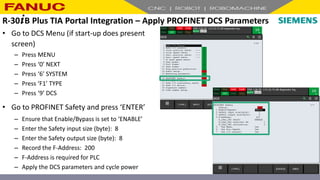
• Go to DCS Menu (if start-up does present
screen)
– Press MENU
– Press ‘0’ NEXT
– Press ‘6’ SYSTEM
– Press ‘F1’ TYPE
– Press ‘9’ DCS
• Go to PROFINET Safety and press ‘ENTER’
– Ensure that Enable/Bypass is set to ‘ENABLE’
– Enter the Safety input size (byte): 8
– Enter the Safety output size (byte): 8
– Record the F-Address: 200
– F-Address is required for PLC
– Apply the DCS parameters and cycle power
R-30+B Plus TIA Portal Integration – Apply PROFINET DCS Parameters
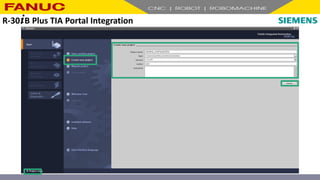
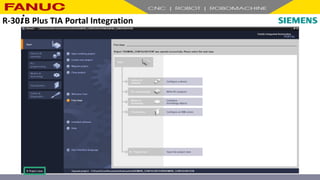
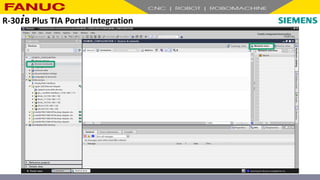
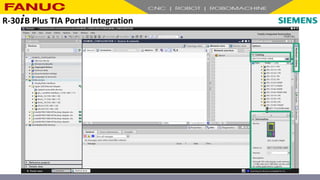
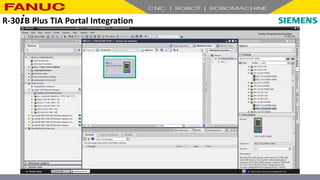
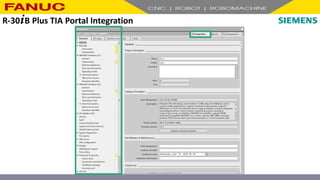
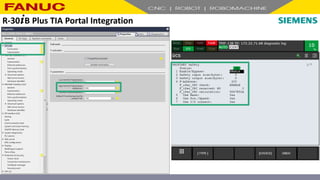
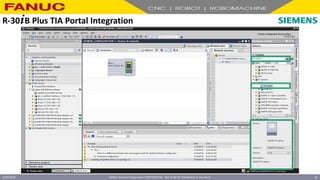
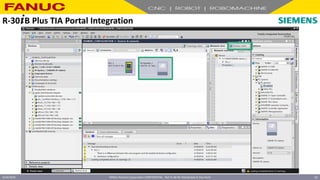
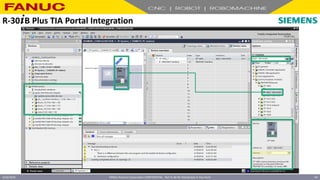
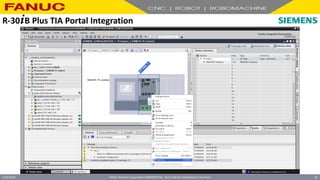
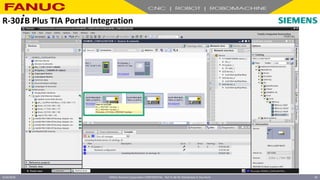
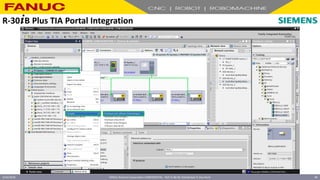
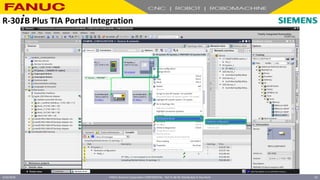
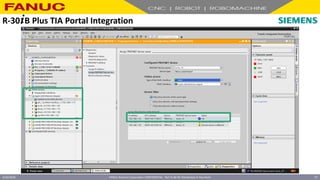
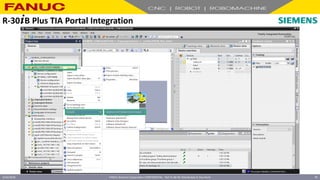
R-30+B Plus TIA Portal Integration
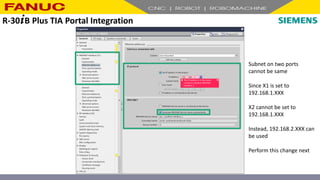
Subnet on two ports
cannot be same
Since X1 is set to
192.168.1.XXX
X2 cannot be set to
192.168.1.XXX
Instead, 192.168.2.XXX can
be used
Perform this change next
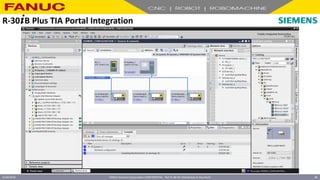
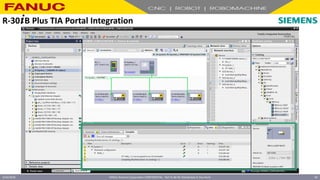
R-30+B Plus TIA Portal Integration
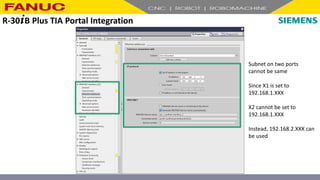
Subnet on two ports
cannot be same
Since X1 is set to
192.168.1.XXX
X2 cannot be set to
192.168.1.XXX
Instead, 192.168.2.XXX can
be used
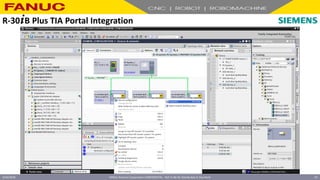
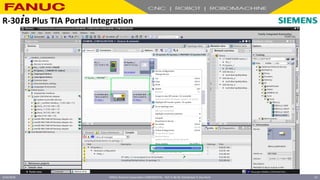
R-30+B Plus TIA Portal Integration
FANUC America Corporation CONFIDENTIAL - Not To Be Re-Distributed In Any Form
4/23/2018 30
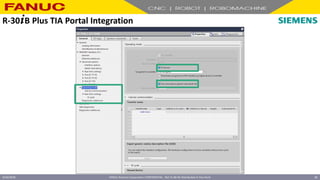
R-30+B Plus TIA Portal Integration
FANUC America Corporation CONFIDENTIAL - Not To Be Re-Distributed In Any Form
4/23/2018 31
R-30+B Plus TIA Portal Integration
FANUC America Corporation CONFIDENTIAL - Not To Be Re-Distributed In Any Form
4/23/2018 32
R-30+B Plus TIA Portal Integration
FANUC America Corporation CONFIDENTIAL - Not To Be Re-Distributed In Any Form
4/23/2018 33
R-30+B Plus TIA Portal Integration
FANUC America Corporation CONFIDENTIAL - Not To Be Re-Distributed In Any Form
4/23/2018 34
R-30+B Plus TIA Portal Integration
FANUC America Corporation CONFIDENTIAL - Not To Be Re-Distributed In Any Form
4/23/2018 35
R-30+B Plus TIA Portal Integration
FANUC America Corporation CONFIDENTIAL - Not To Be Re-Distributed In Any Form
4/23/2018 36
R-30+B Plus TIA Portal Integration
FANUC America Corporation CONFIDENTIAL - Not To Be Re-Distributed In Any Form
4/23/2018 37
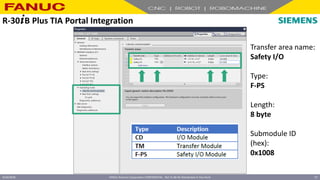
Transfer area name:
Safety I/O
Type:
F-PS
Length:
8 byte
Submodule ID
(hex):
0x1008
R-30+B Plus TIA Portal Integration
FANUC America Corporation CONFIDENTIAL - Not To Be Re-Distributed In Any Form
4/23/2018 38
R-30+B Plus TIA Portal Integration
FANUC America Corporation CONFIDENTIAL - Not To Be Re-Distributed In Any Form
4/23/2018 39
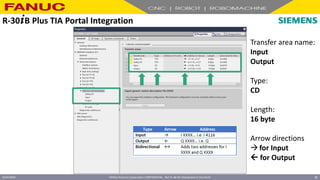
Transfer area name:
Input
Output
Type:
CD
Length:
16 byte
Arrow directions
for Input
 for Output
R-30+B Plus TIA Portal Integration
FANUC America Corporation CONFIDENTIAL - Not To Be Re-Distributed In Any Form
4/23/2018 40
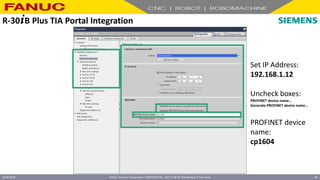
Set IP Address:
192.168.1.12
Uncheck boxes:
PROFINET device name…
Generate PROFINET device name…
PROFINET device
name:
cp1604
R-30+B Plus TIA Portal Integration
FANUC America Corporation CONFIDENTIAL - Not To Be Re-Distributed In Any Form
4/23/2018 41
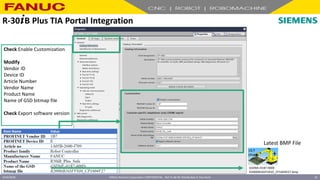
Check Enable Customization
Modify
Vendor ID
Device ID
Article Number
Vendor Name
Product Name
Name of GSD bitmap file
Check Export software version
GSDML-01B7-000E-
R2000iB165FV910_CP1604V27.bmp
Latest BMP File
R-30+B Plus TIA Portal Integration
FANUC America Corporation CONFIDENTIAL - Not To Be Re-Distributed In Any Form
4/23/2018 42
R-30+B Plus TIA Portal Integration
FANUC America Corporation CONFIDENTIAL - Not To Be Re-Distributed In Any Form
4/23/2018 43
R-30+B Plus TIA Portal Integration
FANUC America Corporation CONFIDENTIAL - Not To Be Re-Distributed In Any Form
4/23/2018 44
R-30+B Plus TIA Portal Integration
FANUC America Corporation CONFIDENTIAL - Not To Be Re-Distributed In Any Form
4/23/2018 45
R-30+B Plus TIA Portal Integration
FANUC America Corporation CONFIDENTIAL - Not To Be Re-Distributed In Any Form
4/23/2018 46
R-30+B Plus TIA Portal Integration
FANUC America Corporation CONFIDENTIAL - Not To Be Re-Distributed In Any Form
4/23/2018 47
R-30+B Plus TIA Portal Integration
FANUC America Corporation CONFIDENTIAL - Not To Be Re-Distributed In Any Form
4/23/2018 48
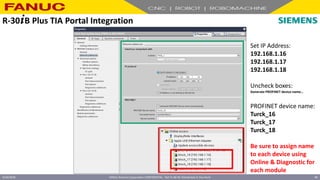
Set IP Address:
192.168.1.16
192.168.1.17
192.168.1.18
Uncheck boxes:
Generate PROFINET device name…
PROFINET device name:
Turck_16
Turck_17
Turck_18
Be sure to assign name
to each device using
Online & Diagnostic for
each module
R-30+B Plus TIA Portal Integration
FANUC America Corporation CONFIDENTIAL - Not To Be Re-Distributed In Any Form
4/23/2018 49
R-30+B Plus TIA Portal Integration
FANUC America Corporation CONFIDENTIAL - Not To Be Re-Distributed In Any Form
4/23/2018 50
R-30+B Plus TIA Portal Integration
FANUC America Corporation CONFIDENTIAL - Not To Be Re-Distributed In Any Form
4/23/2018 51
R-30+B Plus TIA Portal Integration
FANUC America Corporation CONFIDENTIAL - Not To Be Re-Distributed In Any Form
4/23/2018 52
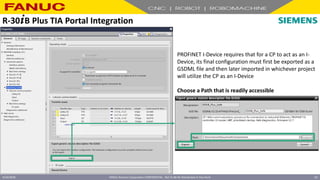
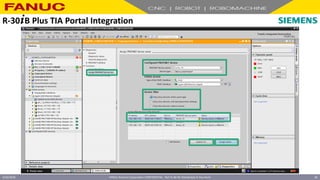
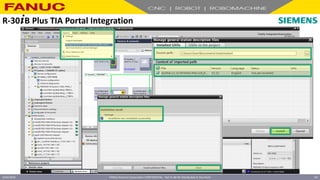
PROFINET I-Device requires that for a CP to act as an I-
Device, its final configuration must first be exported as a
GSDML file and then later imported in whichever project
will utilize the CP as an I-Device
Choose a Path that is readily accessible
R-30+B Plus TIA Portal Integration
FANUC America Corporation CONFIDENTIAL - Not To Be Re-Distributed In Any Form
4/23/2018 53
R-30+B Plus TIA Portal Integration
FANUC America Corporation CONFIDENTIAL - Not To Be Re-Distributed In Any Form
4/23/2018 54
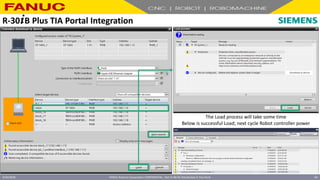
The Load process will take some time
Below is successful Load; next cycle Robot controller power
R-30+B Plus TIA Portal Integration
FANUC America Corporation CONFIDENTIAL - Not To Be Re-Distributed In Any Form
4/23/2018 55
R-30+B Plus TIA Portal Integration
FANUC America Corporation CONFIDENTIAL - Not To Be Re-Distributed In Any Form
4/23/2018 56
R-30+B Plus TIA Portal Integration
FANUC America Corporation CONFIDENTIAL - Not To Be Re-Distributed In Any Form
4/23/2018 57
R-30+B Plus TIA Portal Integration
FANUC America Corporation CONFIDENTIAL - Not To Be Re-Distributed In Any Form
4/23/2018 58
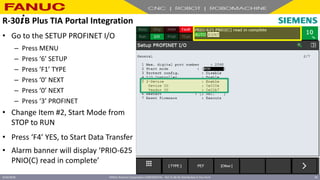
• Go to the SETUP PROFINET I/O
– Press MENU
– Press ‘6’ SETUP
– Press ‘F1’ TYPE
– Press ‘0’ NEXT
– Press ‘0’ NEXT
– Press ‘3’ PROFINET
• Change Item #2, Start Mode from
STOP to RUN
• Press ‘F4’ YES, to Start Data Transfer
• Alarm banner will display ‘PRIO-625
PNIO(C) read in complete’
R-30+B Plus TIA Portal Integration
FANUC America Corporation CONFIDENTIAL - Not To Be Re-Distributed In Any Form
4/23/2018 59
• Go to the Config Screen
– Press ‘F3’ [OTHER]
– Press ‘4’ CONFIG
R-30+B Plus TIA Portal Integration
FANUC America Corporation CONFIDENTIAL - Not To Be Re-Distributed In Any Form
4/23/2018 60
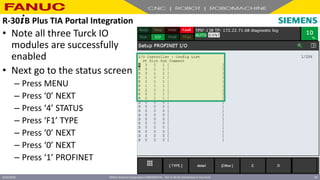
• Note all three Turck IO
modules are successfully
enabled
• Next go to the status screen
– Press MENU
– Press ‘0’ NEXT
– Press ‘4’ STATUS
– Press ‘F1’ TYPE
– Press ‘0’ NEXT
– Press ‘0’ NEXT
– Press ‘1’ PROFINET
R-30+B Plus TIA Portal Integration
FANUC America Corporation CONFIDENTIAL - Not To Be Re-Distributed In Any Form
4/23/2018 61
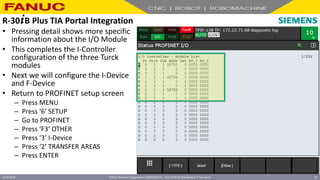
• Pressing detail shows more specific
information about the I/O Module
• This completes the I-Controller
configuration of the three Turck
modules
• Next we will configure the I-Device
and F-Device
• Return to PROFINET setup screen
– Press MENU
– Press ‘6’ SETUP
– Go to PROFINET
– Press ‘F3’ OTHER
– Press ‘3’ I-Device
– Press ‘2’ TRANSFER AREAS
– Press ENTER
R-30+B Plus TIA Portal Integration
FANUC America Corporation CONFIDENTIAL - Not To Be Re-Distributed In Any Form
4/23/2018 62
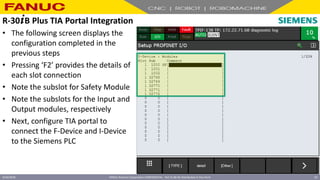
• The following screen displays the
configuration completed in the
previous steps
• Pressing ‘F2’ provides the details of
each slot connection
• Note the subslot for Safety Module
• Note the subslots for the Input and
Output modules, respectively
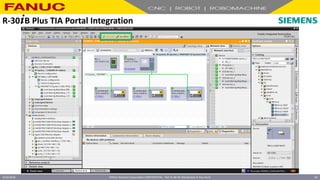
• Next, configure TIA portal to
connect the F-Device and I-Device
to the Siemens PLC
R-30+B Plus TIA Portal Integration
FANUC America Corporation CONFIDENTIAL - Not To Be Re-Distributed In Any Form
4/23/2018 63
R-30+B Plus TIA Portal Integration
FANUC America Corporation CONFIDENTIAL - Not To Be Re-Distributed In Any Form
4/23/2018 64
R-30+B Plus TIA Portal Integration
FANUC America Corporation CONFIDENTIAL - Not To Be Re-Distributed In Any Form
4/23/2018 65
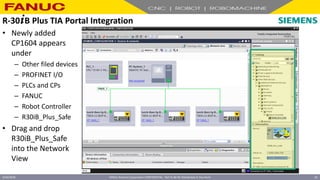
• Newly added
CP1604 appears
under
– Other filed devices
– PROFINET I/O
– PLCs and CPs
– FANUC
– Robot Controller
– R30iB_Plus_Safe
• Drag and drop
R30iB_Plus_Safe
into the Network
View
R-30+B Plus TIA Portal Integration
FANUC America Corporation CONFIDENTIAL - Not To Be Re-Distributed In Any Form
4/23/2018 66
R-30+B Plus TIA Portal Integration
FANUC America Corporation CONFIDENTIAL - Not To Be Re-Distributed In Any Form
4/23/2018 67
R-30+B Plus TIA Portal Integration
FANUC America Corporation CONFIDENTIAL - Not To Be Re-Distributed In Any Form
4/23/2018 68
R-30+B Plus TIA Portal Integration
FANUC America Corporation CONFIDENTIAL - Not To Be Re-Distributed In Any Form
4/23/2018 69
R-30+B Plus TIA Portal Integration
FANUC America Corporation CONFIDENTIAL - Not To Be Re-Distributed In Any Form
4/23/2018 70
R-30+B Plus TIA Portal Integration
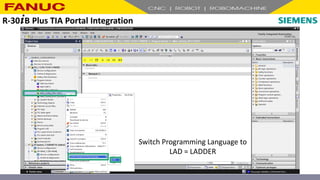
Switch Programming Language to
LAD = LADDER
R-30+B Plus TIA Portal Integration
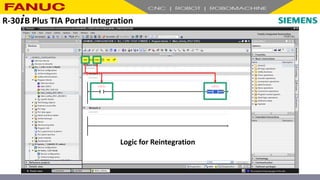
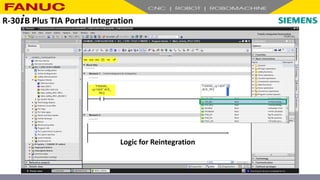
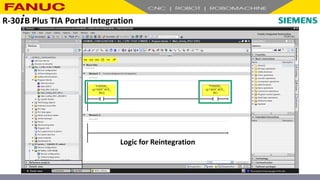
Logic for Reintegration
R-30+B Plus TIA Portal Integration
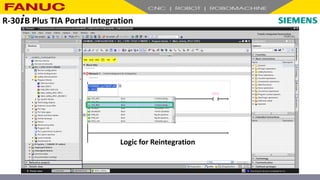
Logic for Reintegration
R-30+B Plus TIA Portal Integration
Logic for Reintegration
R-30+B Plus TIA Portal Integration
Logic for Reintegration
R-30+B Plus TIA Portal Integration
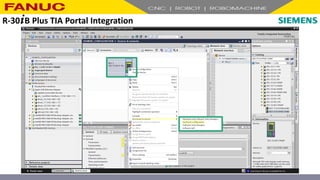
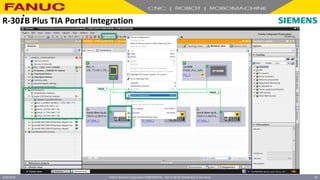
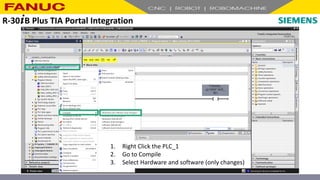
1. Right Click the PLC_1
2. Go to Compile
3. Select Hardware and software (only changes)
R-30+B Plus TIA Portal Integration
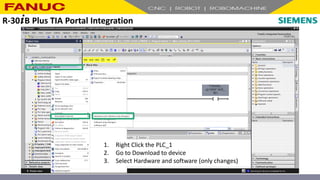
1. Right Click the PLC_1
2. Go to Download to device
3. Select Hardware and software (only changes)
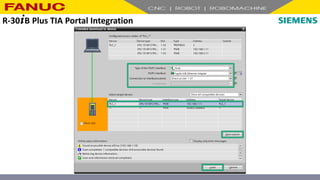
R-30+B Plus TIA Portal Integration
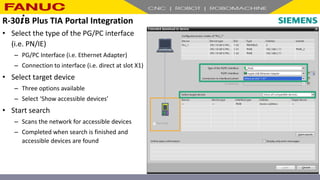
• Select the type of the PG/PC interface
(i.e. PN/IE)
– PG/PC Interface (i.e. Ethernet Adapter)
– Connection to interface (i.e. direct at slot X1)
• Select target device
– Three options available
– Select ‘Show accessible devices’
• Start search
– Scans the network for accessible devices
– Completed when search is finished and
accessible devices are found
R-30+B Plus TIA Portal Integration
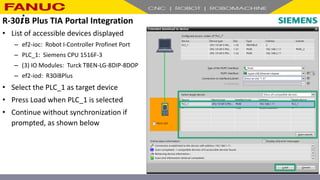
• List of accessible devices displayed
– ef2-ioc: Robot I-Controller Profinet Port
– PLC_1: Siemens CPU 1516F-3
– (3) IO Modules: Turck TBEN-LG-8DIP-8DOP
– ef2-iod: R30iBPlus
• Select the PLC_1 as target device
• Press Load when PLC_1 is selected
• Continue without synchronization if
prompted, as shown below
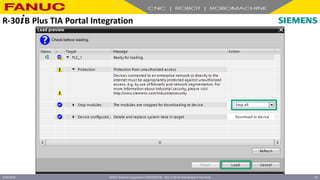
R-30+B Plus TIA Portal Integration
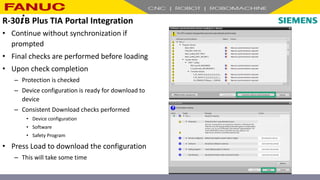
• Continue without synchronization if
prompted
• Final checks are performed before loading
• Upon check completion
– Protection is checked
– Device configuration is ready for download to
device
– Consistent Download checks performed
• Device configuration
• Software
• Safety Program
• Press Load to download the configuration
– This will take some time
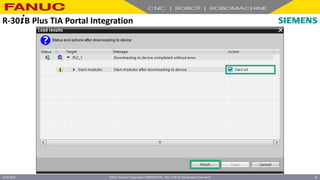
R-30+B Plus TIA Portal Integration
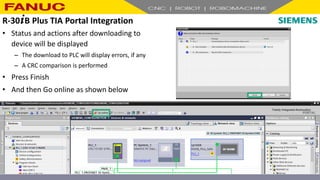
• Status and actions after downloading to
device will be displayed
– The download to PLC will display errors, if any
– A CRC comparison is performed
• Press Finish
• And then Go online as shown below
R-30+B Plus TIA Portal Integration
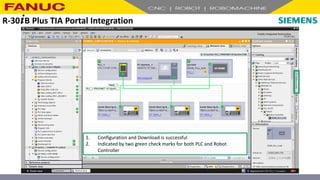
1. Configuration and Download is successful
2. Indicated by two green check marks for both PLC and Robot
Controller
R-30+B Plus TIA Portal Integration
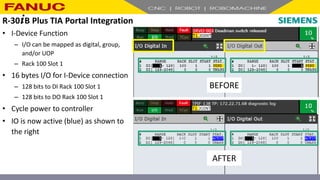
• I-Device Function
– I/O can be mapped as digital, group,
and/or UOP
– Rack 100 Slot 1
• 16 bytes I/O for I-Device connection
– 128 bits to DI Rack 100 Slot 1
– 128 bits to DO Rack 100 Slot 1
• Cycle power to controller
• IO is now active (blue) as shown to
the right
R-30+B Plus TIA Portal Integration
BEFORE
AFTER
c
R-30+B Plus TIA Portal Integration
c
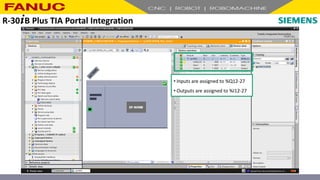
• Inputs are assigned to %Q12-27
• Outputs are assigned to %I12-27
R-30+B Plus TIA Portal Integration
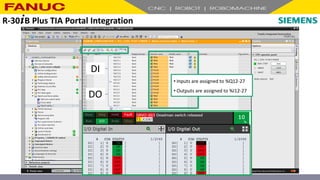
c• Inputs are assigned to %Q12-27
• Outputs are assigned to %I12-27
DI
DO
c
R-30+B Plus TIA Portal Integration
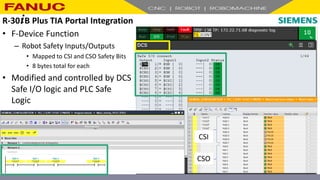
• F-Device Function
– Robot Safety Inputs/Outputs
• Mapped to CSI and CSO Safety Bits
• 8 bytes total for each
• Modified and controlled by DCS
Safe I/O logic and PLC Safe
Logic
CSI
CSO
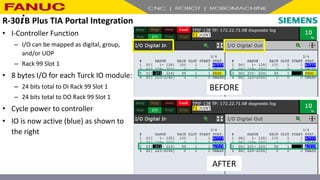
• I-Controller Function
– I/O can be mapped as digital, group,
and/or UOP
– Rack 99 Slot 1
• 8 bytes I/O for each Turck IO module:
– 24 bits total to DI Rack 99 Slot 1
– 24 bits total to DO Rack 99 Slot 1
• Cycle power to controller
• IO is now active (blue) as shown to
the right
R-30+B Plus TIA Portal Integration
BEFORE
AFTER
FANUC America Corporation CONFIDENTIAL - Not To Be Re-Distributed In Any Form
4/23/2018 88
R-30+B Plus TIA Portal Integration
• Digital Outputs to Turck IO
Modules
– DO[201 – 208]: Turck_16
– DO[209 – 216]: Turck_17
– DO[217 – 224]: Turck_18
• Manually set digital outputs and
observe Turck IO module outputs
turned on
• Digital inputs (i.e. proximity
switches, photo-eyes, etc.) can be
attached to modules; inputs
observed in robot digital input
table
Turck_16
Turck_17
Turck_18
R-30+B Plus TIA Portal Integration Summary
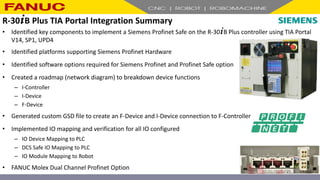
• Identified key components to implement a Siemens Profinet Safe on the R-30+B Plus controller using TIA Portal
V14, SP1, UPD4
• Identified platforms supporting Siemens Profinet Hardware
• Identified software options required for Siemens Profinet and Profinet Safe option
• Created a roadmap (network diagram) to breakdown device functions
– I-Controller
– I-Device
– F-Device
• Generated custom GSD file to create an F-Device and I-Device connection to F-Controller
• Implemented IO mapping and verification for all IO configured
– IO Device Mapping to PLC
– DCS Safe IO Mapping to PLC
– IO Module Mapping to Robot
• FANUC Molex Dual Channel Profinet Option
R-30+B Plus TIA Portal Integration
Questions?
R-30+B Plus TIA Portal Integration
thank you
Questions
We will now be taking questions using the Q&A panel that can be found on the top right
if you are in window mode or from a drop down menu at the top if you are in full screen
mode.
Friday Webinar Series
Upcoming Schedule
FRIDAY TITLE PRESENTED BY
April 27, 2018 How to Help your Customer get Started with ZDT Jessica Vallis
May 11, 2018 How to Demo/Sell ZDT to your Customers Missy Walker
FANUC ASI Network
I would also like to remind you that this webinar series is an exclusive benefit of being a
part of our FANUC Authorized System Integrator Network. Benefits of that network give
you access to a lot of other great features including the FANUC Sales Toolbox, our
Robotics Advantage Program, the CRC website and many other marketing programs.
Access to Webinar Files
A friendly reminder…
An archive copy of today’s presentation will be made available in 1 week on our CRC
website where you will be able to download the video file OR stream it to your desktop.
Additionally, an email will be sent to webinar registrants when the presentation is
available for download in PowerPoint.
Contact Information
Haresh Moradia
Senior Segment Engineer
Software and Controller Products
General Industries and Automotive Segment
Telephone: 248.377.7793
Email: Haresh.Moradia@fanucamerica.com
FANUC America Corporation
3900 W. Hamlin Rd.
Rochester Hills, Michigan 48309
www.fanucamerica.com

FANUC Profinet TIA Portal Integration.pdf

  • 1.
    FANUC Profinet TIAPortal Integration Haresh Moradia Senior Segment Engineer Software and Controller Products Group General Industries and Automotive Segment FANUC America Corporation
  • 2.
    Today’s Speaker Haresh Moradia SeniorSegment Engineer Software and Controller Products General Industries and Automotive Segment Telephone: 248.377.7793 Email: Haresh.Moradia@fanucamerica.com FANUC America Corporation 3900 W. Hamlin Rd. Rochester Hills, Michigan 48309 www.fanucamerica.com
  • 3.
    Access to Controls& Audio You can access controls for the meeting at the top right of your screen if you are in window mode, OR from a drop down menu at the top center if you are in full screen mode. If you do experience any audio problems, we find that the call in number can resolve most issues; therefore, we do recommend you use that option if an audio problem arises.
  • 4.
    Questions We will betaking questions using the Q&A panel that can be found on the top right if you are in window mode or from a drop down menu at the top if you are in full screen mode. Any questions entered in the Q&A will be addressed at the END of today’s webinar.
  • 5.
    Access to WebinarFiles A friendly reminder… An archive copy of today’s presentation will be made available in 1 week on our CRC website where you will be able to download the video file OR stream it to your desktop. Additionally, an email will be sent to webinar registrants when the presentation is available for download in PowerPoint.
  • 6.
    Friday Webinar Series UpcomingSchedule FRIDAY TITLE PRESENTED BY April 27, 2018 How to Help your Customer get Started with ZDT Jessica Vallis May 11, 2018 How to Demo/Sell ZDT to your Customers Missy Walker
  • 7.
    Today’s Speaker Haresh Moradia SeniorSegment Engineer Software and Controller Products General Industries and Automotive Segment Telephone: 248.377.7793 Email: Haresh.Moradia@fanucamerica.com FANUC America Corporation 3900 W. Hamlin Rd. Rochester Hills, Michigan 48309 www.fanucamerica.com
  • 8.
    FANUC R-30+B Plus TotallyIntegrated Automation Version 14, Service Pack 1, Update 4 TIA Portal Integration
  • 9.
    • Hardware andSoftware Requirements – Siemens – Fanuc • TIA Portal V14 SP1 UPD4 – Creating a Project – Creating a custom GSD File • Configuring and Mapping IO – I-Controller – I-Device – F-Device FANUC R-30+B Plus – Overview
  • 10.
    PCBDO000000038O FANUC R-30+B Plus– Hardware • Siemens Communication Card – Siemens CP1604 # 6GK1 160-4AA01 (PCBDO000000038O) – FANUC wide-mini motherboard (A05B-2600-J075) – FANUC CPL Profinet wide-mini PNCP1604 (PROFINET_ASSYIB) • FANUC Controller – R-30+B Plus A or B Cabinet – Excludes Mate and Compact Cabinets PROFINET_ASSYIB
  • 11.
    FANUC R-30+B Plus– Software • Siemens Communication Card – Firmware Version 2.7.2.0 – Included in load media (..productJ744) • R-30+B Plus Controller – I-Device and I-Controller Function • V9.10P/05 • J709: PROFINET I/O G2 • J744*: PROFINET CP16XX Firmware – F-Device Function • V9.10P/06 • J709: PROFINET I/O G2 • J931**: PROFINET Safety * includes firmware pn2720.fwl for Siemens CP1604; ** includes J568, DCS Safe I/O Connect
  • 12.
    PROFINET Hardware R-30+B Plus A andB Cabinets R-30+B Plus Mate Cabinet R-30+B Plus Compact Cabinet MOLEX I-Device I-Controller V9.10P/05 or later + R834* V9.10P/05 or later + R834* Targeted for July 2018 I-Device I-Controller F-Device V9.10P/05 or later + R834* + J931** Targeted for June 2018 Targeted for July 2018 SIEMENS I-Device I-Controller V9.10P/05 or later + J709 N/A N/A I-Device I-Controller F-Device V9.10P/06 or later + J709 + J931** N/A N/A * includes J744 – PROFINET CP16XX Firmware; ** includes J568 – DCS Safe I/O Connect FANUC R-30+B Plus – Hardware and Software Summary
  • 13.
    PROFINET Option R-30+B Plus A Cabinet FIRMWAREGSDML MOLEX I-Device I-Controller V9.10P/08 + R834* ef2.bin located in load media ..productJ744) GSDML-V2.33-Fanuc- A05B2600R834V910- 20170720.xml located in load media ..productR834 I-Device I-Controller F-Device V9.10P/08 + R834* + J931** SIEMENS I-Device I-Controller V9.10P/08 + J709 pn2720.fwl located in load media ..productJ744) CP1604 V2.7 GSDML downloadable from Siemens I-Device I-Controller F-Device V9.10P/08 + J709 + J931** * includes J744 – PROFINET CP16XX Firmware; ** includes J568 – DCS Safe I/O Connect FANUC R-30+B Plus – Configuration For Webinar
  • 14.
    FANUC America CorporationCONFIDENTIAL - Not To Be Re-Distributed In Any Form 4/23/2018 14
  • 15.
    8-Port Switch I-Controller Siemens 6ES7516- 3FN01-0AB0 I-Controller I-Device F-Device R-30+B PlusA-Cab V9.10P/08 w/ CP1604 I-Devices TURCK TBEN-LG-8DIP-8DOP CP1604 • R-30+B Plus A-Cabinet V9.10P/08 – J709: PROFINET I/O G2 – J744: PROFINET CP16XX Firmware – J931: PROFINET Safety • CP1604 PROFINET Siemens Card – F/W V2.7.2.0 (..productJ744pn2720.fwl) – CP1604 6GK1 160-4AA01 V2.7 GSDML • Siemens PLC (6ES7516-3FN01-0AB0) – I-Controller to I-Device (robot) – F-Controller to F-Device (robot) • (3) Turck IO Modules (TBEN-LG-8DIP-8DOP) – IO Modules – I-Devices to I-Controller (robot) R-30+B Plus TIA Portal Integration – Network Diagram
  • 16.
    • Go toControlled Start – Press MENU – Press ‘0’ NEXT – Press ‘0’ NEXT – Press ‘1’ PROFINET Setup • Expected Firmware is 2.7.2.0 – If firmware is not 2.7.2.0, an alarm message will be displayed indicating incorrect version – If current firmware does not match expected, perform firmware update • Firmware Update – Firmware file name is: pn2720.fwl – Firmware file location (..productJ744pn2720.fwl) – Item 4 has the default file location for firmware (i.e. FRH:PNG2pn2720.fwl) – Press ‘3’ to download firmware. This will take up to 7 minutes. Press ‘F4’ to confirm – Upon ‘firmware download successful’, press FCTN, ‘1’ START COLD R-30+B Plus TIA Portal Integration – Siemens Firmware Verification
  • 17.
    FANUC America CorporationCONFIDENTIAL - Not To Be Re-Distributed In Any Form 4/23/2018 17 R-30+B Plus TIA Portal Integration – Set System Variable, Clear IO
  • 18.
    • Go toDCS Menu (if start-up does present screen) – Press MENU – Press ‘0’ NEXT – Press ‘6’ SYSTEM – Press ‘F1’ TYPE – Press ‘9’ DCS • Go to PROFINET Safety and press ‘ENTER’ – Ensure that Enable/Bypass is set to ‘ENABLE’ – Enter the Safety input size (byte): 8 – Enter the Safety output size (byte): 8 – Record the F-Address: 200 – F-Address is required for PLC – Apply the DCS parameters and cycle power R-30+B Plus TIA Portal Integration – Apply PROFINET DCS Parameters
  • 19.
    R-30+B Plus TIAPortal Integration
  • 20.
    R-30+B Plus TIAPortal Integration
  • 21.
    R-30+B Plus TIAPortal Integration
  • 22.
    R-30+B Plus TIAPortal Integration
  • 23.
    R-30+B Plus TIAPortal Integration
  • 24.
    R-30+B Plus TIAPortal Integration
  • 25.
    R-30+B Plus TIAPortal Integration
  • 26.
    Subnet on twoports cannot be same Since X1 is set to 192.168.1.XXX X2 cannot be set to 192.168.1.XXX Instead, 192.168.2.XXX can be used Perform this change next R-30+B Plus TIA Portal Integration
  • 27.
    Subnet on twoports cannot be same Since X1 is set to 192.168.1.XXX X2 cannot be set to 192.168.1.XXX Instead, 192.168.2.XXX can be used R-30+B Plus TIA Portal Integration
  • 28.
    R-30+B Plus TIAPortal Integration
  • 29.
    R-30+B Plus TIAPortal Integration
  • 30.
    FANUC America CorporationCONFIDENTIAL - Not To Be Re-Distributed In Any Form 4/23/2018 30 R-30+B Plus TIA Portal Integration
  • 31.
    FANUC America CorporationCONFIDENTIAL - Not To Be Re-Distributed In Any Form 4/23/2018 31 R-30+B Plus TIA Portal Integration
  • 32.
    FANUC America CorporationCONFIDENTIAL - Not To Be Re-Distributed In Any Form 4/23/2018 32 R-30+B Plus TIA Portal Integration
  • 33.
    FANUC America CorporationCONFIDENTIAL - Not To Be Re-Distributed In Any Form 4/23/2018 33 R-30+B Plus TIA Portal Integration
  • 34.
    FANUC America CorporationCONFIDENTIAL - Not To Be Re-Distributed In Any Form 4/23/2018 34 R-30+B Plus TIA Portal Integration
  • 35.
    FANUC America CorporationCONFIDENTIAL - Not To Be Re-Distributed In Any Form 4/23/2018 35 R-30+B Plus TIA Portal Integration
  • 36.
    FANUC America CorporationCONFIDENTIAL - Not To Be Re-Distributed In Any Form 4/23/2018 36 R-30+B Plus TIA Portal Integration
  • 37.
    FANUC America CorporationCONFIDENTIAL - Not To Be Re-Distributed In Any Form 4/23/2018 37 Transfer area name: Safety I/O Type: F-PS Length: 8 byte Submodule ID (hex): 0x1008 R-30+B Plus TIA Portal Integration
  • 38.
    FANUC America CorporationCONFIDENTIAL - Not To Be Re-Distributed In Any Form 4/23/2018 38 R-30+B Plus TIA Portal Integration
  • 39.
    FANUC America CorporationCONFIDENTIAL - Not To Be Re-Distributed In Any Form 4/23/2018 39 Transfer area name: Input Output Type: CD Length: 16 byte Arrow directions for Input  for Output R-30+B Plus TIA Portal Integration
  • 40.
    FANUC America CorporationCONFIDENTIAL - Not To Be Re-Distributed In Any Form 4/23/2018 40 Set IP Address: 192.168.1.12 Uncheck boxes: PROFINET device name… Generate PROFINET device name… PROFINET device name: cp1604 R-30+B Plus TIA Portal Integration
  • 41.
    FANUC America CorporationCONFIDENTIAL - Not To Be Re-Distributed In Any Form 4/23/2018 41 Check Enable Customization Modify Vendor ID Device ID Article Number Vendor Name Product Name Name of GSD bitmap file Check Export software version GSDML-01B7-000E- R2000iB165FV910_CP1604V27.bmp Latest BMP File R-30+B Plus TIA Portal Integration
  • 42.
    FANUC America CorporationCONFIDENTIAL - Not To Be Re-Distributed In Any Form 4/23/2018 42 R-30+B Plus TIA Portal Integration
  • 43.
    FANUC America CorporationCONFIDENTIAL - Not To Be Re-Distributed In Any Form 4/23/2018 43 R-30+B Plus TIA Portal Integration
  • 44.
    FANUC America CorporationCONFIDENTIAL - Not To Be Re-Distributed In Any Form 4/23/2018 44 R-30+B Plus TIA Portal Integration
  • 45.
    FANUC America CorporationCONFIDENTIAL - Not To Be Re-Distributed In Any Form 4/23/2018 45 R-30+B Plus TIA Portal Integration
  • 46.
    FANUC America CorporationCONFIDENTIAL - Not To Be Re-Distributed In Any Form 4/23/2018 46 R-30+B Plus TIA Portal Integration
  • 47.
    FANUC America CorporationCONFIDENTIAL - Not To Be Re-Distributed In Any Form 4/23/2018 47 R-30+B Plus TIA Portal Integration
  • 48.
    FANUC America CorporationCONFIDENTIAL - Not To Be Re-Distributed In Any Form 4/23/2018 48 Set IP Address: 192.168.1.16 192.168.1.17 192.168.1.18 Uncheck boxes: Generate PROFINET device name… PROFINET device name: Turck_16 Turck_17 Turck_18 Be sure to assign name to each device using Online & Diagnostic for each module R-30+B Plus TIA Portal Integration
  • 49.
    FANUC America CorporationCONFIDENTIAL - Not To Be Re-Distributed In Any Form 4/23/2018 49 R-30+B Plus TIA Portal Integration
  • 50.
    FANUC America CorporationCONFIDENTIAL - Not To Be Re-Distributed In Any Form 4/23/2018 50 R-30+B Plus TIA Portal Integration
  • 51.
    FANUC America CorporationCONFIDENTIAL - Not To Be Re-Distributed In Any Form 4/23/2018 51 R-30+B Plus TIA Portal Integration
  • 52.
    FANUC America CorporationCONFIDENTIAL - Not To Be Re-Distributed In Any Form 4/23/2018 52 PROFINET I-Device requires that for a CP to act as an I- Device, its final configuration must first be exported as a GSDML file and then later imported in whichever project will utilize the CP as an I-Device Choose a Path that is readily accessible R-30+B Plus TIA Portal Integration
  • 53.
    FANUC America CorporationCONFIDENTIAL - Not To Be Re-Distributed In Any Form 4/23/2018 53 R-30+B Plus TIA Portal Integration
  • 54.
    FANUC America CorporationCONFIDENTIAL - Not To Be Re-Distributed In Any Form 4/23/2018 54 The Load process will take some time Below is successful Load; next cycle Robot controller power R-30+B Plus TIA Portal Integration
  • 55.
    FANUC America CorporationCONFIDENTIAL - Not To Be Re-Distributed In Any Form 4/23/2018 55 R-30+B Plus TIA Portal Integration
  • 56.
    FANUC America CorporationCONFIDENTIAL - Not To Be Re-Distributed In Any Form 4/23/2018 56 R-30+B Plus TIA Portal Integration
  • 57.
    FANUC America CorporationCONFIDENTIAL - Not To Be Re-Distributed In Any Form 4/23/2018 57 R-30+B Plus TIA Portal Integration
  • 58.
    FANUC America CorporationCONFIDENTIAL - Not To Be Re-Distributed In Any Form 4/23/2018 58 • Go to the SETUP PROFINET I/O – Press MENU – Press ‘6’ SETUP – Press ‘F1’ TYPE – Press ‘0’ NEXT – Press ‘0’ NEXT – Press ‘3’ PROFINET • Change Item #2, Start Mode from STOP to RUN • Press ‘F4’ YES, to Start Data Transfer • Alarm banner will display ‘PRIO-625 PNIO(C) read in complete’ R-30+B Plus TIA Portal Integration
  • 59.
    FANUC America CorporationCONFIDENTIAL - Not To Be Re-Distributed In Any Form 4/23/2018 59 • Go to the Config Screen – Press ‘F3’ [OTHER] – Press ‘4’ CONFIG R-30+B Plus TIA Portal Integration
  • 60.
    FANUC America CorporationCONFIDENTIAL - Not To Be Re-Distributed In Any Form 4/23/2018 60 • Note all three Turck IO modules are successfully enabled • Next go to the status screen – Press MENU – Press ‘0’ NEXT – Press ‘4’ STATUS – Press ‘F1’ TYPE – Press ‘0’ NEXT – Press ‘0’ NEXT – Press ‘1’ PROFINET R-30+B Plus TIA Portal Integration
  • 61.
    FANUC America CorporationCONFIDENTIAL - Not To Be Re-Distributed In Any Form 4/23/2018 61 • Pressing detail shows more specific information about the I/O Module • This completes the I-Controller configuration of the three Turck modules • Next we will configure the I-Device and F-Device • Return to PROFINET setup screen – Press MENU – Press ‘6’ SETUP – Go to PROFINET – Press ‘F3’ OTHER – Press ‘3’ I-Device – Press ‘2’ TRANSFER AREAS – Press ENTER R-30+B Plus TIA Portal Integration
  • 62.
    FANUC America CorporationCONFIDENTIAL - Not To Be Re-Distributed In Any Form 4/23/2018 62 • The following screen displays the configuration completed in the previous steps • Pressing ‘F2’ provides the details of each slot connection • Note the subslot for Safety Module • Note the subslots for the Input and Output modules, respectively • Next, configure TIA portal to connect the F-Device and I-Device to the Siemens PLC R-30+B Plus TIA Portal Integration
  • 63.
    FANUC America CorporationCONFIDENTIAL - Not To Be Re-Distributed In Any Form 4/23/2018 63 R-30+B Plus TIA Portal Integration
  • 64.
    FANUC America CorporationCONFIDENTIAL - Not To Be Re-Distributed In Any Form 4/23/2018 64 R-30+B Plus TIA Portal Integration
  • 65.
    FANUC America CorporationCONFIDENTIAL - Not To Be Re-Distributed In Any Form 4/23/2018 65 • Newly added CP1604 appears under – Other filed devices – PROFINET I/O – PLCs and CPs – FANUC – Robot Controller – R30iB_Plus_Safe • Drag and drop R30iB_Plus_Safe into the Network View R-30+B Plus TIA Portal Integration
  • 66.
    FANUC America CorporationCONFIDENTIAL - Not To Be Re-Distributed In Any Form 4/23/2018 66 R-30+B Plus TIA Portal Integration
  • 67.
    FANUC America CorporationCONFIDENTIAL - Not To Be Re-Distributed In Any Form 4/23/2018 67 R-30+B Plus TIA Portal Integration
  • 68.
    FANUC America CorporationCONFIDENTIAL - Not To Be Re-Distributed In Any Form 4/23/2018 68 R-30+B Plus TIA Portal Integration
  • 69.
    FANUC America CorporationCONFIDENTIAL - Not To Be Re-Distributed In Any Form 4/23/2018 69 R-30+B Plus TIA Portal Integration
  • 70.
    FANUC America CorporationCONFIDENTIAL - Not To Be Re-Distributed In Any Form 4/23/2018 70 R-30+B Plus TIA Portal Integration
  • 71.
    Switch Programming Languageto LAD = LADDER R-30+B Plus TIA Portal Integration
  • 72.
    Logic for Reintegration R-30+BPlus TIA Portal Integration
  • 73.
    Logic for Reintegration R-30+BPlus TIA Portal Integration
  • 74.
    Logic for Reintegration R-30+BPlus TIA Portal Integration
  • 75.
    Logic for Reintegration R-30+BPlus TIA Portal Integration
  • 76.
    1. Right Clickthe PLC_1 2. Go to Compile 3. Select Hardware and software (only changes) R-30+B Plus TIA Portal Integration
  • 77.
    1. Right Clickthe PLC_1 2. Go to Download to device 3. Select Hardware and software (only changes) R-30+B Plus TIA Portal Integration
  • 78.
    • Select thetype of the PG/PC interface (i.e. PN/IE) – PG/PC Interface (i.e. Ethernet Adapter) – Connection to interface (i.e. direct at slot X1) • Select target device – Three options available – Select ‘Show accessible devices’ • Start search – Scans the network for accessible devices – Completed when search is finished and accessible devices are found R-30+B Plus TIA Portal Integration
  • 79.
    • List ofaccessible devices displayed – ef2-ioc: Robot I-Controller Profinet Port – PLC_1: Siemens CPU 1516F-3 – (3) IO Modules: Turck TBEN-LG-8DIP-8DOP – ef2-iod: R30iBPlus • Select the PLC_1 as target device • Press Load when PLC_1 is selected • Continue without synchronization if prompted, as shown below R-30+B Plus TIA Portal Integration
  • 80.
    • Continue withoutsynchronization if prompted • Final checks are performed before loading • Upon check completion – Protection is checked – Device configuration is ready for download to device – Consistent Download checks performed • Device configuration • Software • Safety Program • Press Load to download the configuration – This will take some time R-30+B Plus TIA Portal Integration
  • 81.
    • Status andactions after downloading to device will be displayed – The download to PLC will display errors, if any – A CRC comparison is performed • Press Finish • And then Go online as shown below R-30+B Plus TIA Portal Integration
  • 82.
    1. Configuration andDownload is successful 2. Indicated by two green check marks for both PLC and Robot Controller R-30+B Plus TIA Portal Integration
  • 83.
    • I-Device Function –I/O can be mapped as digital, group, and/or UOP – Rack 100 Slot 1 • 16 bytes I/O for I-Device connection – 128 bits to DI Rack 100 Slot 1 – 128 bits to DO Rack 100 Slot 1 • Cycle power to controller • IO is now active (blue) as shown to the right R-30+B Plus TIA Portal Integration BEFORE AFTER c
  • 84.
    R-30+B Plus TIAPortal Integration c • Inputs are assigned to %Q12-27 • Outputs are assigned to %I12-27
  • 85.
    R-30+B Plus TIAPortal Integration c• Inputs are assigned to %Q12-27 • Outputs are assigned to %I12-27 DI DO c
  • 86.
    R-30+B Plus TIAPortal Integration • F-Device Function – Robot Safety Inputs/Outputs • Mapped to CSI and CSO Safety Bits • 8 bytes total for each • Modified and controlled by DCS Safe I/O logic and PLC Safe Logic CSI CSO
  • 87.
    • I-Controller Function –I/O can be mapped as digital, group, and/or UOP – Rack 99 Slot 1 • 8 bytes I/O for each Turck IO module: – 24 bits total to DI Rack 99 Slot 1 – 24 bits total to DO Rack 99 Slot 1 • Cycle power to controller • IO is now active (blue) as shown to the right R-30+B Plus TIA Portal Integration BEFORE AFTER
  • 88.
    FANUC America CorporationCONFIDENTIAL - Not To Be Re-Distributed In Any Form 4/23/2018 88 R-30+B Plus TIA Portal Integration • Digital Outputs to Turck IO Modules – DO[201 – 208]: Turck_16 – DO[209 – 216]: Turck_17 – DO[217 – 224]: Turck_18 • Manually set digital outputs and observe Turck IO module outputs turned on • Digital inputs (i.e. proximity switches, photo-eyes, etc.) can be attached to modules; inputs observed in robot digital input table Turck_16 Turck_17 Turck_18
  • 89.
    R-30+B Plus TIAPortal Integration Summary • Identified key components to implement a Siemens Profinet Safe on the R-30+B Plus controller using TIA Portal V14, SP1, UPD4 • Identified platforms supporting Siemens Profinet Hardware • Identified software options required for Siemens Profinet and Profinet Safe option • Created a roadmap (network diagram) to breakdown device functions – I-Controller – I-Device – F-Device • Generated custom GSD file to create an F-Device and I-Device connection to F-Controller • Implemented IO mapping and verification for all IO configured – IO Device Mapping to PLC – DCS Safe IO Mapping to PLC – IO Module Mapping to Robot • FANUC Molex Dual Channel Profinet Option
  • 90.
    R-30+B Plus TIAPortal Integration Questions?
  • 91.
    R-30+B Plus TIAPortal Integration thank you
  • 92.
    Questions We will nowbe taking questions using the Q&A panel that can be found on the top right if you are in window mode or from a drop down menu at the top if you are in full screen mode.
  • 93.
    Friday Webinar Series UpcomingSchedule FRIDAY TITLE PRESENTED BY April 27, 2018 How to Help your Customer get Started with ZDT Jessica Vallis May 11, 2018 How to Demo/Sell ZDT to your Customers Missy Walker
  • 94.
    FANUC ASI Network Iwould also like to remind you that this webinar series is an exclusive benefit of being a part of our FANUC Authorized System Integrator Network. Benefits of that network give you access to a lot of other great features including the FANUC Sales Toolbox, our Robotics Advantage Program, the CRC website and many other marketing programs.
  • 95.
    Access to WebinarFiles A friendly reminder… An archive copy of today’s presentation will be made available in 1 week on our CRC website where you will be able to download the video file OR stream it to your desktop. Additionally, an email will be sent to webinar registrants when the presentation is available for download in PowerPoint.
  • 96.
    Contact Information Haresh Moradia SeniorSegment Engineer Software and Controller Products General Industries and Automotive Segment Telephone: 248.377.7793 Email: Haresh.Moradia@fanucamerica.com FANUC America Corporation 3900 W. Hamlin Rd. Rochester Hills, Michigan 48309 www.fanucamerica.com