Creative Designs and Training (CDAT)
Facebook Page
and Ads and
YouTube Video
Tutorials
Author: Vicky khobragade
1
Creative Designs and Training (CDAT)Creative Designs and Training (CDAT)
How to create Facebook Page ?
Created By Vicky Khobragade
Creative Designs and Training (CDAT)
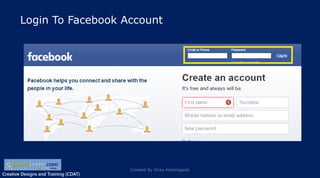
Login To Facebook Account
Created By Vicky Khobragade
Creative Designs and Training (CDAT)
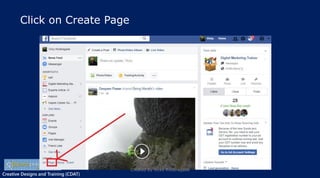
Click on Create Page
Created By Vicky Khobragade
Creative Designs and Training (CDAT)
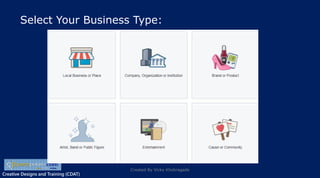
Select Your Business Type:
Created By Vicky Khobragade
Creative Designs and Training (CDAT)
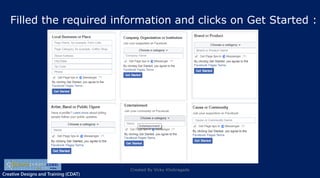
Filled the required information and clicks on Get Started :
Created By Vicky Khobragade
Creative Designs and Training (CDAT)
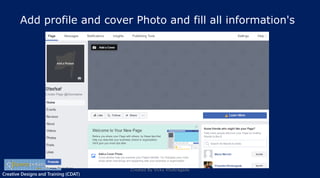
Add profile and cover Photo and fill all information's
Created By Vicky Khobragade
Creative Designs and Training (CDAT)
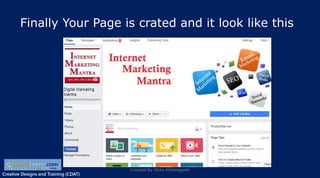
Finally Your Page is crated and it look like this
Created By Vicky Khobragade
Creative Designs and Training (CDAT)
How To Create Facebook Ads
Created By Vicky Khobragade
Creative Designs and Training (CDAT)
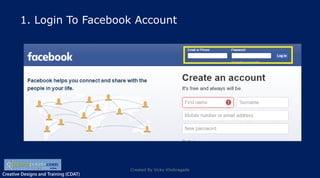
1. Login To Facebook Account
Created By Vicky Khobragade
Creative Designs and Training (CDAT)
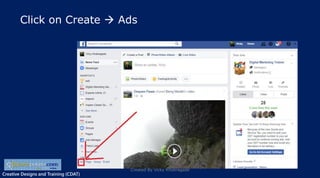
Click on Create  Ads
Created By Vicky Khobragade
Creative Designs and Training (CDAT)
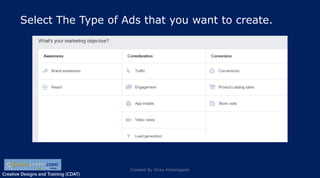
Select The Type of Ads that you want to create.
Created By Vicky Khobragade
Creative Designs and Training (CDAT)
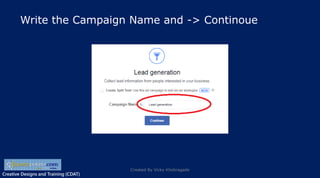
Write the Campaign Name and -> Continoue
Created By Vicky Khobragade
Creative Designs and Training (CDAT)
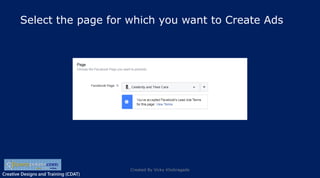
Select the page for which you want to Create Ads
Created By Vicky Khobragade
Creative Designs and Training (CDAT)
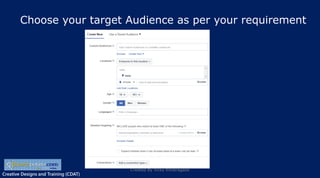
Choose your target Audience as per your requirement
Created By Vicky Khobragade
Creative Designs and Training (CDAT)
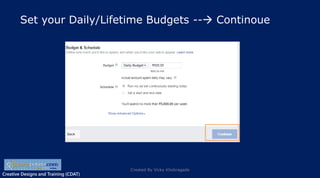
Set your Daily/Lifetime Budgets -- Continoue
Created By Vicky Khobragade
Creative Designs and Training (CDAT)
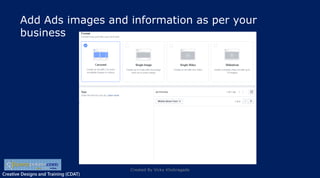
Add Ads images and information as per your
business
Created By Vicky Khobragade
Creative Designs and Training (CDAT)
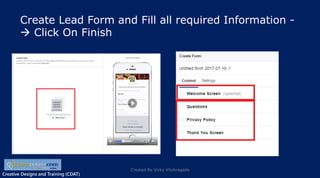
Create Lead Form and Fill all required Information -
 Click On Finish
Created By Vicky Khobragade
Creative Designs and Training (CDAT)
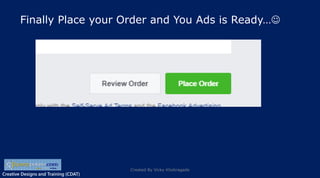
Finally Place your Order and You Ads is Ready…
Created By Vicky Khobragade
Creative Designs and Training (CDAT)
How to Upload YouTube Video
Created By Vicky Khobragade
Creative Designs and Training (CDAT)
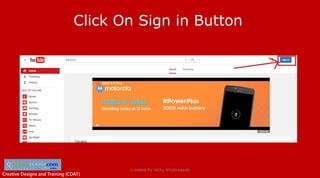
Click On Sign in Button
Created By Vicky Khobragade
Creative Designs and Training (CDAT)
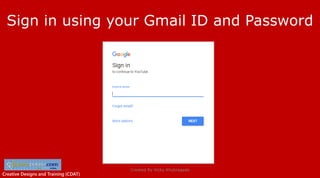
Sign in using your Gmail ID and Password
Created By Vicky Khobragade
Creative Designs and Training (CDAT)
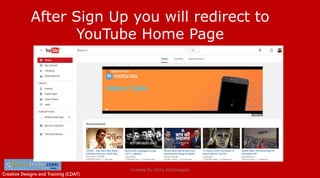
After Sign Up you will redirect to
YouTube Home Page
Created By Vicky Khobragade
Creative Designs and Training (CDAT)
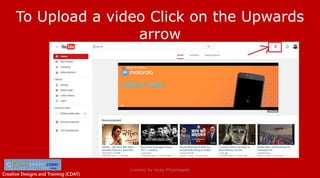
To Upload a video Click on the Upwards
arrow
Created By Vicky Khobragade
Creative Designs and Training (CDAT)
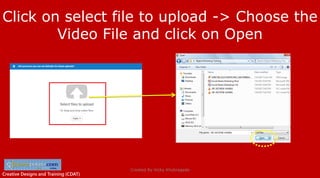
Click on select file to upload -> Choose the
Video File and click on Open
Created By Vicky Khobragade
Creative Designs and Training (CDAT)
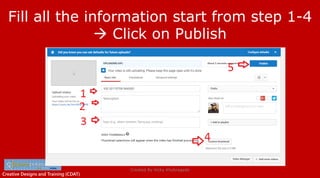
Fill all the information start from step 1-4
 Click on Publish
Created By Vicky Khobragade
Creative Designs and Training (CDAT)
The video is Published and it will be Live
once its approve by YouTube and they will
provide you the Video URL
Created By Vicky Khobragade
Creative Designs and Training (CDAT)Creative Designs and Training (CDAT)
Thanks 
Created By Vicky Khobragade

Facebook pages and ads and youtube video tutorials

  • 1.
    Creative Designs andTraining (CDAT) Facebook Page and Ads and YouTube Video Tutorials Author: Vicky khobragade 1
  • 2.
    Creative Designs andTraining (CDAT)Creative Designs and Training (CDAT) How to create Facebook Page ? Created By Vicky Khobragade
  • 3.
    Creative Designs andTraining (CDAT) Login To Facebook Account Created By Vicky Khobragade
  • 4.
    Creative Designs andTraining (CDAT) Click on Create Page Created By Vicky Khobragade
  • 5.
    Creative Designs andTraining (CDAT) Select Your Business Type: Created By Vicky Khobragade
  • 6.
    Creative Designs andTraining (CDAT) Filled the required information and clicks on Get Started : Created By Vicky Khobragade
  • 7.
    Creative Designs andTraining (CDAT) Add profile and cover Photo and fill all information's Created By Vicky Khobragade
  • 8.
    Creative Designs andTraining (CDAT) Finally Your Page is crated and it look like this Created By Vicky Khobragade
  • 9.
    Creative Designs andTraining (CDAT) How To Create Facebook Ads Created By Vicky Khobragade
  • 10.
    Creative Designs andTraining (CDAT) 1. Login To Facebook Account Created By Vicky Khobragade
  • 11.
    Creative Designs andTraining (CDAT) Click on Create  Ads Created By Vicky Khobragade
  • 12.
    Creative Designs andTraining (CDAT) Select The Type of Ads that you want to create. Created By Vicky Khobragade
  • 13.
    Creative Designs andTraining (CDAT) Write the Campaign Name and -> Continoue Created By Vicky Khobragade
  • 14.
    Creative Designs andTraining (CDAT) Select the page for which you want to Create Ads Created By Vicky Khobragade
  • 15.
    Creative Designs andTraining (CDAT) Choose your target Audience as per your requirement Created By Vicky Khobragade
  • 16.
    Creative Designs andTraining (CDAT) Set your Daily/Lifetime Budgets -- Continoue Created By Vicky Khobragade
  • 17.
    Creative Designs andTraining (CDAT) Add Ads images and information as per your business Created By Vicky Khobragade
  • 18.
    Creative Designs andTraining (CDAT) Create Lead Form and Fill all required Information -  Click On Finish Created By Vicky Khobragade
  • 19.
    Creative Designs andTraining (CDAT) Finally Place your Order and You Ads is Ready… Created By Vicky Khobragade
  • 20.
    Creative Designs andTraining (CDAT) How to Upload YouTube Video Created By Vicky Khobragade
  • 21.
    Creative Designs andTraining (CDAT) Click On Sign in Button Created By Vicky Khobragade
  • 22.
    Creative Designs andTraining (CDAT) Sign in using your Gmail ID and Password Created By Vicky Khobragade
  • 23.
    Creative Designs andTraining (CDAT) After Sign Up you will redirect to YouTube Home Page Created By Vicky Khobragade
  • 24.
    Creative Designs andTraining (CDAT) To Upload a video Click on the Upwards arrow Created By Vicky Khobragade
  • 25.
    Creative Designs andTraining (CDAT) Click on select file to upload -> Choose the Video File and click on Open Created By Vicky Khobragade
  • 26.
    Creative Designs andTraining (CDAT) Fill all the information start from step 1-4  Click on Publish Created By Vicky Khobragade
  • 27.
    Creative Designs andTraining (CDAT) The video is Published and it will be Live once its approve by YouTube and they will provide you the Video URL Created By Vicky Khobragade
  • 28.
    Creative Designs andTraining (CDAT)Creative Designs and Training (CDAT) Thanks  Created By Vicky Khobragade