Routing
mkdir my-express-app
cd my-express-app
npm init
npm install express --save
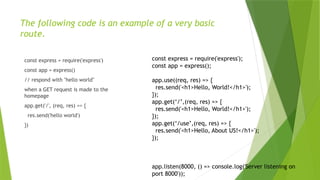
The following code is an example of a very basic
route.
const express = require('express')
const app = express()
// respond with "hello world"
when a GET request is made to the
homepage
app.get('/', (req, res) => {
res.send('hello world')
})
const express = require('express');
const app = express();
app.use((req, res) => {
res.send('<h1>Hello, World!</h1>');
});
app.get(‘/’,(req, res) => {
res.send('<h1>Hello, World!</h1>');
});
app.get(‘/use’,(req, res) => {
res.send('<h1>Hello, About US!</h1>');
});
app.listen(8000, () => console.log('Server listening on
port 8000'));
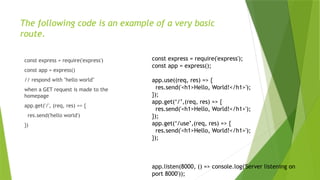
The following code is an example of a very basic
route.
const express = require('express')
const app = express()
// respond with "hello world"
when a GET request is made to the
homepage
app.get('/', (req, res) => {
res.send('hello world')
})
const express = require('express');
const app = express();
app.use((req, res) => {
res.send('<h1>Hello, World!</h1>');
});
app.get(‘/’,(req, res) => {
res.send('<h1>Hello, World!</h1>');
});
app.get(‘/use’,(req, res) => {
res.send('<h1>Hello, World!</h1>');
});
app.listen(8000, () => console.log('Server listening on
port 8000'));
 npm install -g nodemon
 npm install --save-dev nodemon
 nodemon app.js
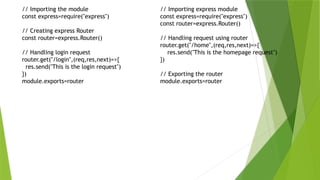
// Importing the module
const express=require("express")
// Creating express Router
const router=express.Router()
// Handling login request
router.get("/login",(req,res,next)=>{
res.send("This is the login request")
})
module.exports=router
// Importing express module
const express=require("express")
const router=express.Router()
// Handling request using router
router.get("/home",(req,res,next)=>{
res.send("This is the homepage request")
})
// Exporting the router
module.exports=router
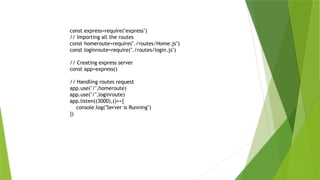
const express=require("express")
// Importing all the routes
const homeroute=require("./routes/Home.js")
const loginroute=require("./routes/login.js")
// Creating express server
const app=express()
// Handling routes request
app.use("/",homeroute)
app.use("/",loginroute)
app.listen((3000),()=>{
console.log("Server is Running")
})
const express = require("express");
const app = express();
app.get("/", function(req, res) {
res.send("This is a get request!!n");
});
app.post("/", function(req, res) {
res.send("This is a post request!!n");
});
app.put("/", function(req, res) {
res.send("This is a put request!!n");
});
app.get("/hey", function(req, res) {
res.send("This is a get request to '/hey'!!n");
});
app.listen(3000);
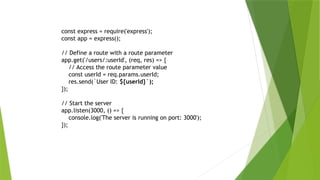
const express = require('express');
const app = express();
// Define a route with a route parameter
app.get('/users/:userId', (req, res) => {
// Access the route parameter value
const userId = req.params.userId;
res.send(`User ID: ${userId}`);
});
// Start the server
app.listen(3000, () => {
console.log('The server is running on port: 3000');
});
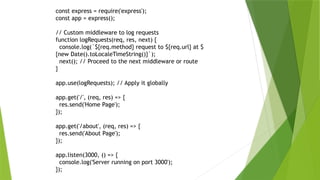
const express = require('express');
const app = express();
// Custom middleware to log requests
function logRequests(req, res, next) {
console.log(`${req.method} request to ${req.url} at $
{new Date().toLocaleTimeString()}`);
next(); // Proceed to the next middleware or route
}
app.use(logRequests); // Apply it globally
app.get('/', (req, res) => {
res.send('Home Page');
});
app.get('/about', (req, res) => {
res.send('About Page');
});
app.listen(3000, () => {
console.log('Server running on port 3000');
});
MULTIPLE MIDDLE
function first(req, res, next) {
console.log('First middleware');
next(); // Move to the next middleware
}
function second(req, res, next) {
console.log('Second middleware');
next(); // Move to the next middleware
}
app.get('/multi', first, second, (req, res) => {
res.send('Multiple middleware executed');
});
Cookies
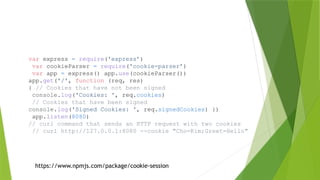
var express = require('express’)
var cookieParser = require('cookie-parser’)
var app = express() app.use(cookieParser())
app.get('/', function (req, res)
{ // Cookies that have not been signed
console.log('Cookies: ', req.cookies)
// Cookies that have been signed
console.log('Signed Cookies: ', req.signedCookies) })
app.listen(8080)
// curl command that sends an HTTP request with two cookies
// curl http://127.0.0.1:8080 --cookie "Cho=Kim;Greet=Hello"
https://www.npmjs.com/package/cookie-session
Simple view counter example
var cookieSession = require('cookie-session’)
var express = require('express’)
var app = express() app.set('trust proxy', 1)
// trust first proxy
app.use(cookieSession(
{ name: 'session', keys: ['key1', 'key2'] }))
app.get('/', function (req, res, next) {
// Update views
req.session.views = (req.session.views || 0) + 1
// Write response
res.end(req.session.views + ' views') })
app.listen(3000)

express-express-express-express-express-

  • 1.
  • 2.
    mkdir my-express-app cd my-express-app npminit npm install express --save
  • 3.
    The following codeis an example of a very basic route. const express = require('express') const app = express() // respond with "hello world" when a GET request is made to the homepage app.get('/', (req, res) => { res.send('hello world') }) const express = require('express'); const app = express(); app.use((req, res) => { res.send('<h1>Hello, World!</h1>'); }); app.get(‘/’,(req, res) => { res.send('<h1>Hello, World!</h1>'); }); app.get(‘/use’,(req, res) => { res.send('<h1>Hello, About US!</h1>'); }); app.listen(8000, () => console.log('Server listening on port 8000'));
  • 4.
    The following codeis an example of a very basic route. const express = require('express') const app = express() // respond with "hello world" when a GET request is made to the homepage app.get('/', (req, res) => { res.send('hello world') }) const express = require('express'); const app = express(); app.use((req, res) => { res.send('<h1>Hello, World!</h1>'); }); app.get(‘/’,(req, res) => { res.send('<h1>Hello, World!</h1>'); }); app.get(‘/use’,(req, res) => { res.send('<h1>Hello, World!</h1>'); }); app.listen(8000, () => console.log('Server listening on port 8000'));
  • 5.
     npm install-g nodemon  npm install --save-dev nodemon  nodemon app.js
  • 6.
    // Importing themodule const express=require("express") // Creating express Router const router=express.Router() // Handling login request router.get("/login",(req,res,next)=>{ res.send("This is the login request") }) module.exports=router // Importing express module const express=require("express") const router=express.Router() // Handling request using router router.get("/home",(req,res,next)=>{ res.send("This is the homepage request") }) // Exporting the router module.exports=router
  • 7.
    const express=require("express") // Importingall the routes const homeroute=require("./routes/Home.js") const loginroute=require("./routes/login.js") // Creating express server const app=express() // Handling routes request app.use("/",homeroute) app.use("/",loginroute) app.listen((3000),()=>{ console.log("Server is Running") })
  • 8.
    const express =require("express"); const app = express(); app.get("/", function(req, res) { res.send("This is a get request!!n"); }); app.post("/", function(req, res) { res.send("This is a post request!!n"); }); app.put("/", function(req, res) { res.send("This is a put request!!n"); }); app.get("/hey", function(req, res) { res.send("This is a get request to '/hey'!!n"); }); app.listen(3000);
  • 9.
    const express =require('express'); const app = express(); // Define a route with a route parameter app.get('/users/:userId', (req, res) => { // Access the route parameter value const userId = req.params.userId; res.send(`User ID: ${userId}`); }); // Start the server app.listen(3000, () => { console.log('The server is running on port: 3000'); });
  • 10.
    const express =require('express'); const app = express(); // Custom middleware to log requests function logRequests(req, res, next) { console.log(`${req.method} request to ${req.url} at $ {new Date().toLocaleTimeString()}`); next(); // Proceed to the next middleware or route } app.use(logRequests); // Apply it globally app.get('/', (req, res) => { res.send('Home Page'); }); app.get('/about', (req, res) => { res.send('About Page'); }); app.listen(3000, () => { console.log('Server running on port 3000'); });
  • 11.
    MULTIPLE MIDDLE function first(req,res, next) { console.log('First middleware'); next(); // Move to the next middleware } function second(req, res, next) { console.log('Second middleware'); next(); // Move to the next middleware } app.get('/multi', first, second, (req, res) => { res.send('Multiple middleware executed'); });
  • 12.
  • 13.
    var express =require('express’) var cookieParser = require('cookie-parser’) var app = express() app.use(cookieParser()) app.get('/', function (req, res) { // Cookies that have not been signed console.log('Cookies: ', req.cookies) // Cookies that have been signed console.log('Signed Cookies: ', req.signedCookies) }) app.listen(8080) // curl command that sends an HTTP request with two cookies // curl http://127.0.0.1:8080 --cookie "Cho=Kim;Greet=Hello" https://www.npmjs.com/package/cookie-session

  • 14.
    Simple view counterexample var cookieSession = require('cookie-session’) var express = require('express’) var app = express() app.set('trust proxy', 1) // trust first proxy app.use(cookieSession( { name: 'session', keys: ['key1', 'key2'] })) app.get('/', function (req, res, next) { // Update views req.session.views = (req.session.views || 0) + 1 // Write response res.end(req.session.views + ' views') }) app.listen(3000)