www.robfontanilla.com


                  EXPOSURE
         - Total amount of light allowed to fall on the
         photographic medium or sensor during the process of
         taking photograph
         - Refers to how bright or dark your photo is due to the
         amount of light that is recorded by your cameras
         sensor.


>>   0      >>       1      >>       2      >>         3           >>   4   >>
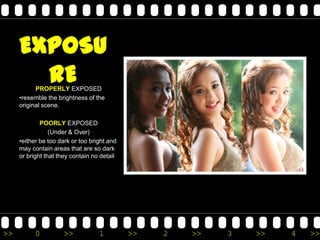
EXPOSU
       RE  PROPERLY EXPOSED
     •resemble the brightness of the
     original scene.

             POORLY EXPOSED
                 (Under & Over)
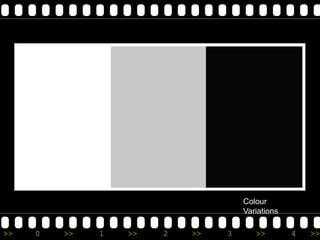
     •either be too dark or too bright and
     may contain areas that are so dark
     or bright that they contain no detail


>>         0         >>            1         >>   2   >>   3   >>   4   >>
Camera Meter

     Device ( either built-in or hand held)


     measures the amount of light
     reflected from or falling on the
     subject.

     recommends a shutter speed and
     an aperture value to achieve correct
     exposure


>>         0          >>          1           >>   2   >>   3   >>   4   >>
METERING STYLE


>>   0   >>   1   >>   2   >>   3   >>   4   >>
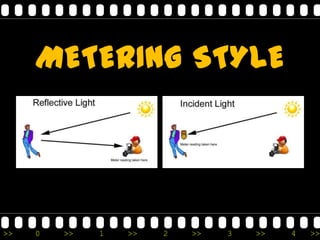
Incident & Reflected


     Incident Metering - reads the intensity of light falling on the subject (handheld meter)

     Reflected Metering - reads the intensity of light reflecting off of the subject, they are easily
     fooled by variances in tonality, colour, contrast, background brightness, surface textures and
     shape. (camera built-in meter)

     Incident Meter - more accurate than reflected metering


>>        0        >>          1        >>          2         >>         3         >>           4       >>
EXPOSURE

                              SHUTTER
                               SPEED              ISO
     LIGHT
   (water that   APERTURE       amount of      size of the
 flows through                time it takes   bucket (small
                 (the hose)
    our hose)                   to fill the   bucket more
                               bucket with      sensitive)
                                  water


>>       0        >>          1         >>          2         >>   3   >>   4   >>
ELEMENTS OF EXPOSURE
 Light – the most important element of exposure. Light creates shadows, highlights textures,
 accents, colours, creates moods and emotions, and a vast array of other enhancing effects in a
 photo. Light can also create harsh contrasts, bright spots, dark spots, glare, and other issues
 that are sometimes associated with poor photographs.

 The aperture is an adjustable hole inside your lens that may be made larger or smaller to
 control the intensity of the available light.

 The camera’s shutter is the device that opens and closes for a specified amount of time to
 allow the light entering the lens to expose the film. The duration of the opening is determined
 by the amount of light entering the lens. The aperture and shutter work together to produce
 correct exposures.

 ISO of our sensor. The ISO rating of film describes its sensitivity to light. Higher numbers on
 this rating mean that the film is more sensitive to light and will expose faster than lower
 numbered ratings. Example: 200 speed film will expose twice as fast as 100 and four times
 faster than 50.


>>       0         >>         1         >>         2         >>         3         >>          4    >>
Exposure Triangle

     •Each corner of the triangle
     represents one of the three
     variables, Aperture, Shutter
      Speed and *ISO.

     *ISO (International Standard Organization)

     APERTURE – controls the area of which
     light can enter the camera
     SHUTTER SPEED – controls the duration
     of exposure
     ISO – controls the sensitivity of your
     camera’s sensor to a given amount of
     light

                       NOTE
     Adjusting just one of these will make the
     photo darker or brighter and will change
     the appearance of the photo based on
     what you have changed


>>         0            >>             1          >>   2   >>   3   >>   4   >>
Camera Histogram


>>   0   >>   1   >>   2   >>   3   >>   4   >>
>>   0   >>   1   >>   2   >>   3   >>   4   >>
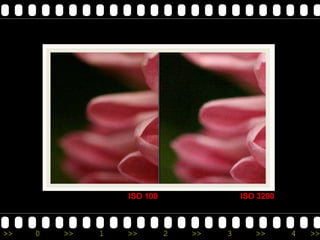
ISO
       International Standard
             Organization

     ISO measures the sensitivity of
     the image sensor. The same
     principles apply as in film
     photography – the lower the
     number the less sensitive your
     camera is to light and the finer the
     grain. Higher ISO settings are
     generally used in darker situations
     to get faster shutter speeds


>>        0       >>         1       >>      2    >>   3   >>   4   >>
ISO 100                ISO 3200


>>   0   >>   1   >>        2   >>   3      >>      4   >>
Mystery of the Gray Cat


>>   0   >>   1   >>   2   >>   3   >>   4   >>
Colour
                                    Variations

>>   0   >>   1   >>   2   >>   3      >>        4   >>
White - Gray - Black
     Black does not reflect much light, It reflects
     approximately 9% of the light that is falling on it.

     White reflects much more. It reflects
     approximately 36% of the light that falls on it.

     Gray is neutral. It reflects approximately 18% of
     the light that falls on it.

     meter on black, our camera will detect less light
     than it should. If the camera detects a deficiency
     of light, it will cause you to overexpose your
     photograph if you follow the meter reading.
     meter on white, the camera will detect too much
     light and cause you to underexpose your
     photograph.
     meter on a gray area, the camera should allow
     you to calculate a correct exposure.


>>          0          >>            1           >>         2   >>   3   >>   4   >>
18 % gray reflectance


>>   0     >>     1    >>        2   >>   3   >>   4   >>
Getting the right exposure
         White on white            Black on Black


                                            www.google.com


>>   0     >>     1       >>   2   >>   3          >>        4   >>
COLLOSEUM f/ 13, 1/250 sec. 18 mm


>>   0   >>   1   >>   2   >>         3         >>              4   >>
LETS SHOOT
     Try BLACK subject against BLACK background
                          &
       WHITE subject against WHITE background


>>     0   >>    1   >>    2   >>    3   >>       4   >>
Types of Meter


>>   0   >>   1   >>   2   >>   3   >>   4   >>
Center-weighted


>>   0   >>    1   >>   2   >>   3   >>   4   >>
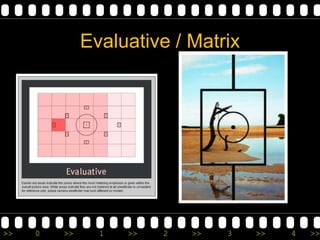
Evaluative / Matrix


>>   0   >>     1   >>   2   >>   3   >>   4   >>
Partial Meter


>>   0   >>   1     >>   2   >>   3   >>   4   >>
Spot Meter


>>   0   >>   1    >>   2   >>   3   >>   4   >>
Spot Meter


     Spot Meter – most accurate but the trickiest & hardest to use


>>      0       >>        1       >>        2       >>        3      >>   4   >>
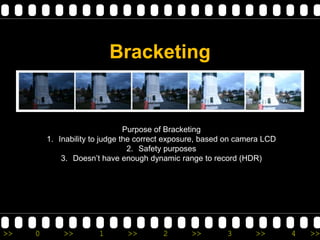
BRACKETING

         series of images of the same scene at a
         variety of different EXPOSURES that
         "bracket" the metered exposure (or manual
         exposure).


>>   0     >>     1     >>     2     >>     3        >>   4   >>
Auto bracket / Button


>>   0   >>   1   >>   2   >>   3   >>   4   >>
Bracketing


                                Purpose of Bracketing
         1. Inability to judge the correct exposure, based on camera LCD
                                 2. Safety purposes
             3. Doesn’t have enough dynamic range to record (HDR)


>>   0       >>        1       >>        2      >>        3       >>       4   >>
How to Bracket the shots
         -Manually adjusting through AEB button
         -Manually adjusting through changing the Aperture, Shutter
         Speed of the camera.


>>   0         >>        1       >>        2       >>       3         >>   4   >>
Shoot using different exposure


>>   0    >>   1   >>   2   >>   3   >>   4   >>
>>   0   >>   1   >>   2   >>   3   >>   4   >>
>>   0   >>   1   >>   2   >>   3   >>   4   >>
Silhouette / Back Lighted
                 Subjects


>>   0    >>   1   >>   2   >>   3   >>   4   >>
>>   0   >>   1   >>   2   >>   3   >>   4   >>
>>   0   >>   1   >>   2   >>   3   >>   4   >>
Remedy the back-lighting
               situation

                Adjust the exposure manually
                       Use of reflector
                      Use of flash as fill


>>   0     >>      1    >>    2    >>    3     >>   4   >>
www.robfontanilla.com copyright 2011


>>   0   >>     1      >>       2       >>       3   >>   4   >>

Exposure 2011

  • 1.
    www.robfontanilla.com EXPOSURE - Total amount of light allowed to fall on the photographic medium or sensor during the process of taking photograph - Refers to how bright or dark your photo is due to the amount of light that is recorded by your cameras sensor. >> 0 >> 1 >> 2 >> 3 >> 4 >>
  • 2.
    EXPOSU RE PROPERLY EXPOSED •resemble the brightness of the original scene. POORLY EXPOSED (Under & Over) •either be too dark or too bright and may contain areas that are so dark or bright that they contain no detail >> 0 >> 1 >> 2 >> 3 >> 4 >>
  • 3.
    Camera Meter Device ( either built-in or hand held) measures the amount of light reflected from or falling on the subject. recommends a shutter speed and an aperture value to achieve correct exposure >> 0 >> 1 >> 2 >> 3 >> 4 >>
  • 4.
    METERING STYLE >> 0 >> 1 >> 2 >> 3 >> 4 >>
  • 5.
    Incident & Reflected Incident Metering - reads the intensity of light falling on the subject (handheld meter) Reflected Metering - reads the intensity of light reflecting off of the subject, they are easily fooled by variances in tonality, colour, contrast, background brightness, surface textures and shape. (camera built-in meter) Incident Meter - more accurate than reflected metering >> 0 >> 1 >> 2 >> 3 >> 4 >>
  • 6.
    EXPOSURE SHUTTER SPEED ISO LIGHT (water that APERTURE amount of size of the flows through time it takes bucket (small (the hose) our hose) to fill the bucket more bucket with sensitive) water >> 0 >> 1 >> 2 >> 3 >> 4 >>
  • 7.
    ELEMENTS OF EXPOSURE Light – the most important element of exposure. Light creates shadows, highlights textures, accents, colours, creates moods and emotions, and a vast array of other enhancing effects in a photo. Light can also create harsh contrasts, bright spots, dark spots, glare, and other issues that are sometimes associated with poor photographs. The aperture is an adjustable hole inside your lens that may be made larger or smaller to control the intensity of the available light. The camera’s shutter is the device that opens and closes for a specified amount of time to allow the light entering the lens to expose the film. The duration of the opening is determined by the amount of light entering the lens. The aperture and shutter work together to produce correct exposures. ISO of our sensor. The ISO rating of film describes its sensitivity to light. Higher numbers on this rating mean that the film is more sensitive to light and will expose faster than lower numbered ratings. Example: 200 speed film will expose twice as fast as 100 and four times faster than 50. >> 0 >> 1 >> 2 >> 3 >> 4 >>
  • 8.
    Exposure Triangle •Each corner of the triangle represents one of the three variables, Aperture, Shutter Speed and *ISO. *ISO (International Standard Organization) APERTURE – controls the area of which light can enter the camera SHUTTER SPEED – controls the duration of exposure ISO – controls the sensitivity of your camera’s sensor to a given amount of light NOTE Adjusting just one of these will make the photo darker or brighter and will change the appearance of the photo based on what you have changed >> 0 >> 1 >> 2 >> 3 >> 4 >>
  • 9.
    Camera Histogram >> 0 >> 1 >> 2 >> 3 >> 4 >>
  • 10.
    >> 0 >> 1 >> 2 >> 3 >> 4 >>
  • 11.
    ISO International Standard Organization ISO measures the sensitivity of the image sensor. The same principles apply as in film photography – the lower the number the less sensitive your camera is to light and the finer the grain. Higher ISO settings are generally used in darker situations to get faster shutter speeds >> 0 >> 1 >> 2 >> 3 >> 4 >>
  • 12.
    ISO 100 ISO 3200 >> 0 >> 1 >> 2 >> 3 >> 4 >>
  • 13.
    Mystery of theGray Cat >> 0 >> 1 >> 2 >> 3 >> 4 >>
  • 14.
    Colour Variations >> 0 >> 1 >> 2 >> 3 >> 4 >>
  • 15.
    White - Gray- Black Black does not reflect much light, It reflects approximately 9% of the light that is falling on it. White reflects much more. It reflects approximately 36% of the light that falls on it. Gray is neutral. It reflects approximately 18% of the light that falls on it. meter on black, our camera will detect less light than it should. If the camera detects a deficiency of light, it will cause you to overexpose your photograph if you follow the meter reading. meter on white, the camera will detect too much light and cause you to underexpose your photograph. meter on a gray area, the camera should allow you to calculate a correct exposure. >> 0 >> 1 >> 2 >> 3 >> 4 >>
  • 16.
    18 % grayreflectance >> 0 >> 1 >> 2 >> 3 >> 4 >>
  • 17.
    Getting the rightexposure White on white Black on Black www.google.com >> 0 >> 1 >> 2 >> 3 >> 4 >>
  • 18.
    COLLOSEUM f/ 13,1/250 sec. 18 mm >> 0 >> 1 >> 2 >> 3 >> 4 >>
  • 19.
    LETS SHOOT Try BLACK subject against BLACK background & WHITE subject against WHITE background >> 0 >> 1 >> 2 >> 3 >> 4 >>
  • 20.
    Types of Meter >> 0 >> 1 >> 2 >> 3 >> 4 >>
  • 21.
    Center-weighted >> 0 >> 1 >> 2 >> 3 >> 4 >>
  • 22.
    Evaluative / Matrix >> 0 >> 1 >> 2 >> 3 >> 4 >>
  • 23.
    Partial Meter >> 0 >> 1 >> 2 >> 3 >> 4 >>
  • 24.
    Spot Meter >> 0 >> 1 >> 2 >> 3 >> 4 >>
  • 25.
    Spot Meter Spot Meter – most accurate but the trickiest & hardest to use >> 0 >> 1 >> 2 >> 3 >> 4 >>
  • 26.
    BRACKETING series of images of the same scene at a variety of different EXPOSURES that "bracket" the metered exposure (or manual exposure). >> 0 >> 1 >> 2 >> 3 >> 4 >>
  • 27.
    Auto bracket /Button >> 0 >> 1 >> 2 >> 3 >> 4 >>
  • 28.
    Bracketing Purpose of Bracketing 1. Inability to judge the correct exposure, based on camera LCD 2. Safety purposes 3. Doesn’t have enough dynamic range to record (HDR) >> 0 >> 1 >> 2 >> 3 >> 4 >>
  • 29.
    How to Bracketthe shots -Manually adjusting through AEB button -Manually adjusting through changing the Aperture, Shutter Speed of the camera. >> 0 >> 1 >> 2 >> 3 >> 4 >>
  • 30.
    Shoot using differentexposure >> 0 >> 1 >> 2 >> 3 >> 4 >>
  • 31.
    >> 0 >> 1 >> 2 >> 3 >> 4 >>
  • 32.
    >> 0 >> 1 >> 2 >> 3 >> 4 >>
  • 33.
    Silhouette / BackLighted Subjects >> 0 >> 1 >> 2 >> 3 >> 4 >>
  • 34.
    >> 0 >> 1 >> 2 >> 3 >> 4 >>
  • 35.
    >> 0 >> 1 >> 2 >> 3 >> 4 >>
  • 36.
    Remedy the back-lighting situation Adjust the exposure manually Use of reflector Use of flash as fill >> 0 >> 1 >> 2 >> 3 >> 4 >>
  • 37.
    www.robfontanilla.com copyright 2011 >> 0 >> 1 >> 2 >> 3 >> 4 >>