


Frank La Vigne, Tablet PC MVP Lead Designer Applied Information Systems Reston, VA APP329 Practical Ink Analysis
Who Is Frank La Vigne? 14 years of professional experience Started career writing Microsoft Visual  Basic 3 applications Microsoft MVP: Tablet PC User Group & Code Camp speaker President Emeritus of Richmond.NET  User Group Assistant Vice President of Technology  for INETA North America Lead Designer @ Applied Information Sciences Blog:  http://www.franksworld.com Corporate:  http://www.appliedis.com
Agenda Digital Ink Basics Limitations of Word Recognition Moving from Strings to Documents Meet the InkAnalyzer Improving Recognition Results Detecting Relationships in Ink Shape Recognition Additional Resources Questions and Answers
Digital Ink Basics You are Tablet PC developer, or want to be one You have at least a basic understanding of Ink You yearn for more out of the recognizer APIs You want to know the theory, but need practical solutions, not just abstract concepts This presentation makes the following assumptions:
Digital Ink Ink object Central to the Tablet platform Contains stroke data Contains all persistence mechanisms Extensible via the ExtendedProperties collection
Strokes Stroke object Represents a “stroke of the pen” One pen down, pen move, pen up sequence Has a rich API PacketData, Points, Bezier Points, BezierCusps Extensible via the ExtendedProperties collection Controls rendering properties via the DrawingAttributes object Resides in the Ink object in a collection
Capturing Ink Ink can be captured via:  InkOverlay  InkCollector InkCanvas (WPF) InkCollector provides core functionality InkOverlay adds easy to use editing modes  (Ink, Select, Erase) Each contains one Ink object Full set of event notifications
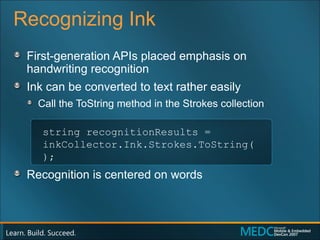
Recognizing Ink First-generation APIs placed emphasis on  handwriting recognition Ink can be converted to text rather easily Call the ToString method in the Strokes collection Recognition is centered on words string recognitionResults =  inkCollector.Ink.Strokes.ToString();
Digital Ink Basics
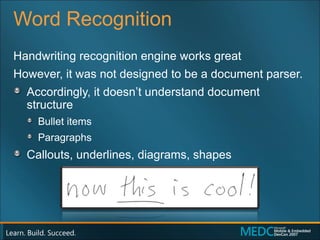
Word Recognition Handwriting recognition engine works great However, it was not designed to be a document parser. Accordingly, it doesn’t understand document structure Bullet items Paragraphs Callouts, underlines, diagrams, shapes
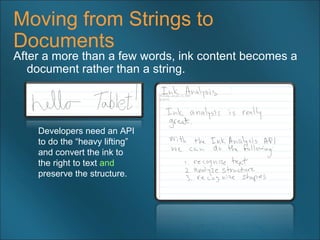
Moving from Strings to Documents After a more than a few words, ink content becomes a document rather than a string. Developers need an API  to do the “heavy lifting”  and convert the ink to  the right to text  and   preserve the structure.
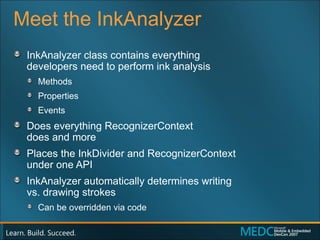
Meet the InkAnalyzer InkAnalyzer class contains everything  developers need to perform ink analysis Methods Properties Events Does everything RecognizerContext  does and more Places the InkDivider and RecognizerContext  under one API InkAnalyzer automatically determines writing  vs. drawing strokes Can be overridden via code
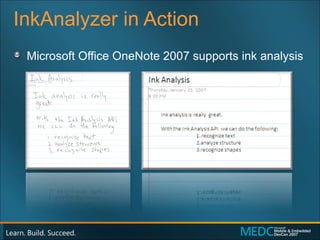
InkAnalyzer in Action Microsoft Office OneNote 2007 supports ink analysis
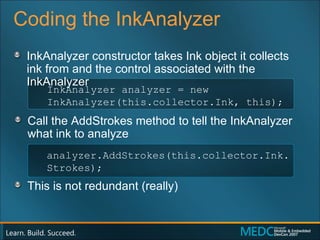
Coding the InkAnalyzer  InkAnalyzer constructor takes Ink object it collects ink from and the control associated with the InkAnalyzer Call the AddStrokes method to tell the InkAnalyzer what ink to analyze This is not redundant (really) InkAnalyzer analyzer = new  InkAnalyzer(this.collector.Ink, this); analyzer.AddStrokes(this.collector.Ink.Strokes);
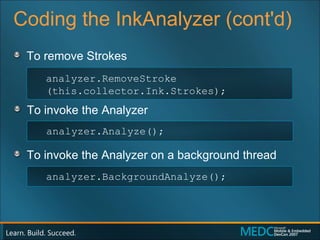
Coding the InkAnalyzer (cont'd)  To remove Strokes To invoke the Analyzer To invoke the Analyzer on a background thread analyzer.RemoveStroke (this.collector.Ink.Strokes); analyzer.Analyze(); analyzer.BackgroundAnalyze();
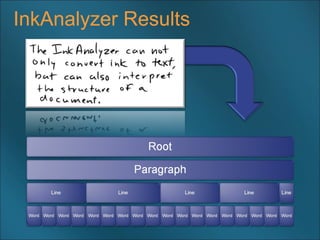
Ink Analysis Results The  InkAnalyzer  produces a tree  of  ContextNode  objects Starts with  RootNode  that includes  all analyzed Stroke collections Stroke collections get smaller the  further down the tree Stroke collections have a  ContextNodeType  classification  assigned to them by the InkAnalyzer The  FindNodesOfType  method  searches the entire tree for  ContextNodes  of a given type
ContextNode Types ContextNodeType s returned from the  InkAnalyzer Root WritingRegion Paragraph Line InkBullet InkDrawing InkWord
InkAnalyzer Results
Recursing the Tree // Kick off the Recursion with the RootNode TraverseNodes ( inkAnalyzer.RootNode , sbNodes, 0); // Parse ContextNode Tree private void  TraverseNodes ( ContextNode contextNode , StringBuilder nodes, int Depth) { nodes.Append(string.Empty.PadLeft(Depth * 4, ' ')); nodes.Append(contextNode.GetType().ToString() + "  "); nodes.Append("[" +  contextNode.Strokes.ToString()  + "]"); nodes.Append("\n"); foreach (ContextNode subNode in  contextNode.SubNodes ) { TraverseNodes (subNode, nodes, Depth + 1); } }
InkAnalysis Sample App
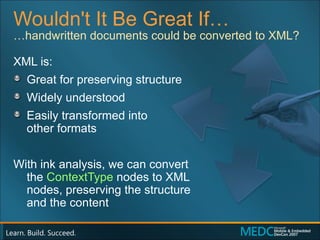
Wouldn't It Be Great If… XML is: Great for preserving structure Widely understood Easily transformed into  other formats With ink analysis, we can convert  the  ContextType  nodes to XML  nodes, preserving the structure  and the content … handwritten documents could be converted to XML?
Ink to XML Converter
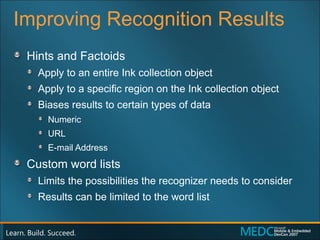
Improving Recognition Results Hints and Factoids Apply to an entire Ink collection object Apply to a specific region on the Ink collection object Biases results to certain types of data Numeric URL E-mail Address Custom word lists Limits the possibilities the recognizer needs to consider Results can be limited to the word list
Factoids in Action InkBrowser Application
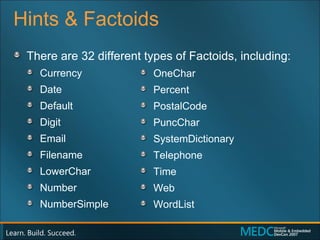
Hints & Factoids There are 32 different types of Factoids, including: Currency Date Default Digit Email Filename LowerChar Number NumberSimple OneChar Percent PostalCode PuncChar SystemDictionary Telephone Time Web WordList
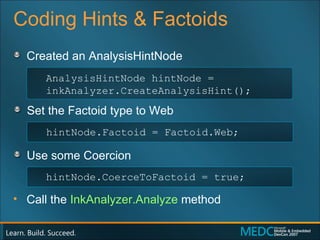
Coding Hints & Factoids Created an AnalysisHintNode Set the Factoid type to Web Use some Coercion  Call the  InkAnalyzer.Analyze  method AnalysisHintNode hintNode = inkAnalyzer.CreateAnalysisHint(); hintNode.Factoid = Factoid.Web; hintNode.CoerceToFactoid = true;
InkWeb Browser
Using a Custom Word List Create a  String  array & an  AnalysisHintNode Set the Factoid type to Web Insert string array using  SetWordList  method string[] wordListArray = { “Blogging", “AJAX", “Podcast“, “PVR” }; AnalysisHintNode hintNode = inkAnalyzer.CreateAnalysisHint(); hintNode.Factoid = Factoid.WordList; hintNode.SetWordlist(wordListArray);
Ink to Blog Application
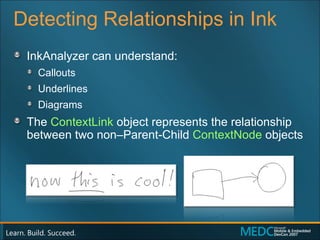
Detecting Relationships in Ink InkAnalyzer can understand: Callouts Underlines Diagrams The  ContextLink  object represents the relationship between two non–Parent-Child  ContextNode   objects
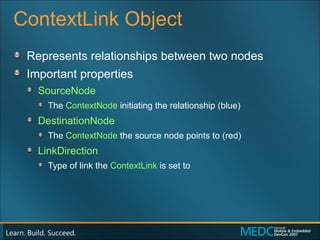
ContextLink Object Represents relationships between two nodes Important properties SourceNode  The  ContextNode  initiating the relationship (blue) DestinationNode The  ContextNode  the source node points to (red) LinkDirection Type of link the  ContextLink  is set to
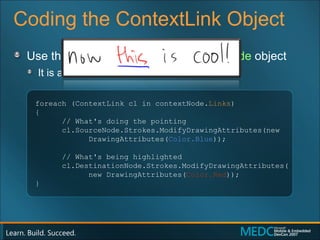
Coding the ContextLink Object Use the  Links  property of the  ContextNode  object It is a  ContextLink  collection foreach (ContextLink cl in contextNode. Links ) { // What's doing the pointing cl.SourceNode.Strokes.ModifyDrawingAttributes(new  DrawingAttributes( Color.Blue )); // What's being highlighted cl.DestinationNode.Strokes.ModifyDrawingAttributes( new DrawingAttributes( Color.Red )); }
Finding Context Links
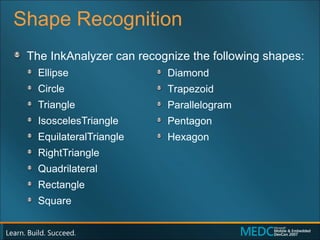
Shape Recognition The InkAnalyzer can recognize the following shapes: Ellipse  Circle  Triangle  IsoscelesTriangle  EquilateralTriangle  RightTriangle  Quadrilateral  Rectangle  Square  Diamond Trapezoid  Parallelogram  Pentagon  Hexagon
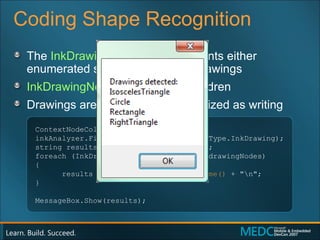
Coding Shape Recognition The  InkDrawingNode  type represents either enumerated shapes or abstract drawings InkDrawingNode s do not have children  Drawings are generally not recognized as writing ContextNodeCollection drawingNodes = inkAnalyzer.FindNodesOfType(ContextNodeType.InkDrawing); string results = "Drawings detected:\n"; foreach (InkDrawingNode drawingNode in drawingNodes) { results += drawingNode. GetShapeName()  + "\n"; } MessageBox.Show(results);
Shape Recognition Game
Additional Resources Ink Analysis Resources “ Exploring Ink Analysis:” article in  CoDe Focus   http://www.code-magazine.com/focus/Index.aspx Ink Analyzer Explorer   http://www.josheinstein.com/download/iaexplorer/ Tablet PC Development Resources Mobile PC Developer Center   http://msdn.microsoft.com/mobilepc My Blog http://www.franksworld.com
Questions & Answers
While You're Here Fill out your session evaluation Enter to win  a Windows Mobile ®  phone or Zune™ Geek out with a huge rack of servers Enterprise Mobility in Action  in the Expo Hall Go on a date ISV Speed Dating   lets you pitch your app to Mobile Operators and OEMs (May 1 only) Meet the geeks The  Expert Cabana  is packed with MEDC  speakers and MVPs
© 2007 Microsoft Corporation. All rights reserved. Microsoft, Windows, Windows Vista and other product names are or may be registered trademarks and/or trademarks in the U.S. and/or other countries. The information herein is for informational purposes only and represents the current view of Microsoft Corporation as of the date of this presentation.  Because Microsoft must respond to changing market conditions, it should not be interpreted to be a commitment on the part of Microsoft, and Microsoft cannot guarantee the accuracy of any information provided after the date of this presentation.  MICROSOFT MAKES NO WARRANTIES, EXPRESS, IMPLIED OR STATUTORY, AS TO THE INFORMATION IN THIS PRESENTATION.

Exploring Ink Analysis

  • 1.
  • 2.
    Frank La Vigne,Tablet PC MVP Lead Designer Applied Information Systems Reston, VA APP329 Practical Ink Analysis
  • 3.
    Who Is FrankLa Vigne? 14 years of professional experience Started career writing Microsoft Visual Basic 3 applications Microsoft MVP: Tablet PC User Group & Code Camp speaker President Emeritus of Richmond.NET User Group Assistant Vice President of Technology for INETA North America Lead Designer @ Applied Information Sciences Blog: http://www.franksworld.com Corporate: http://www.appliedis.com
  • 4.
    Agenda Digital InkBasics Limitations of Word Recognition Moving from Strings to Documents Meet the InkAnalyzer Improving Recognition Results Detecting Relationships in Ink Shape Recognition Additional Resources Questions and Answers
  • 5.
    Digital Ink BasicsYou are Tablet PC developer, or want to be one You have at least a basic understanding of Ink You yearn for more out of the recognizer APIs You want to know the theory, but need practical solutions, not just abstract concepts This presentation makes the following assumptions:
  • 6.
    Digital Ink Inkobject Central to the Tablet platform Contains stroke data Contains all persistence mechanisms Extensible via the ExtendedProperties collection
  • 7.
    Strokes Stroke objectRepresents a “stroke of the pen” One pen down, pen move, pen up sequence Has a rich API PacketData, Points, Bezier Points, BezierCusps Extensible via the ExtendedProperties collection Controls rendering properties via the DrawingAttributes object Resides in the Ink object in a collection
  • 8.
    Capturing Ink Inkcan be captured via: InkOverlay InkCollector InkCanvas (WPF) InkCollector provides core functionality InkOverlay adds easy to use editing modes (Ink, Select, Erase) Each contains one Ink object Full set of event notifications
  • 9.
    Recognizing Ink First-generationAPIs placed emphasis on handwriting recognition Ink can be converted to text rather easily Call the ToString method in the Strokes collection Recognition is centered on words string recognitionResults = inkCollector.Ink.Strokes.ToString();
  • 10.
  • 11.
    Word Recognition Handwritingrecognition engine works great However, it was not designed to be a document parser. Accordingly, it doesn’t understand document structure Bullet items Paragraphs Callouts, underlines, diagrams, shapes
  • 12.
    Moving from Stringsto Documents After a more than a few words, ink content becomes a document rather than a string. Developers need an API to do the “heavy lifting” and convert the ink to the right to text and preserve the structure.
  • 13.
    Meet the InkAnalyzerInkAnalyzer class contains everything developers need to perform ink analysis Methods Properties Events Does everything RecognizerContext does and more Places the InkDivider and RecognizerContext under one API InkAnalyzer automatically determines writing vs. drawing strokes Can be overridden via code
  • 14.
    InkAnalyzer in ActionMicrosoft Office OneNote 2007 supports ink analysis
  • 15.
    Coding the InkAnalyzer InkAnalyzer constructor takes Ink object it collects ink from and the control associated with the InkAnalyzer Call the AddStrokes method to tell the InkAnalyzer what ink to analyze This is not redundant (really) InkAnalyzer analyzer = new InkAnalyzer(this.collector.Ink, this); analyzer.AddStrokes(this.collector.Ink.Strokes);
  • 16.
    Coding the InkAnalyzer(cont'd) To remove Strokes To invoke the Analyzer To invoke the Analyzer on a background thread analyzer.RemoveStroke (this.collector.Ink.Strokes); analyzer.Analyze(); analyzer.BackgroundAnalyze();
  • 17.
    Ink Analysis ResultsThe InkAnalyzer produces a tree of ContextNode objects Starts with RootNode that includes all analyzed Stroke collections Stroke collections get smaller the further down the tree Stroke collections have a ContextNodeType classification assigned to them by the InkAnalyzer The FindNodesOfType method searches the entire tree for ContextNodes of a given type
  • 18.
    ContextNode Types ContextNodeTypes returned from the InkAnalyzer Root WritingRegion Paragraph Line InkBullet InkDrawing InkWord
  • 19.
  • 20.
    Recursing the Tree// Kick off the Recursion with the RootNode TraverseNodes ( inkAnalyzer.RootNode , sbNodes, 0); // Parse ContextNode Tree private void TraverseNodes ( ContextNode contextNode , StringBuilder nodes, int Depth) { nodes.Append(string.Empty.PadLeft(Depth * 4, ' ')); nodes.Append(contextNode.GetType().ToString() + " "); nodes.Append("[" + contextNode.Strokes.ToString() + "]"); nodes.Append("\n"); foreach (ContextNode subNode in contextNode.SubNodes ) { TraverseNodes (subNode, nodes, Depth + 1); } }
  • 21.
  • 22.
    Wouldn't It BeGreat If… XML is: Great for preserving structure Widely understood Easily transformed into other formats With ink analysis, we can convert the ContextType nodes to XML nodes, preserving the structure and the content … handwritten documents could be converted to XML?
  • 23.
    Ink to XMLConverter
  • 24.
    Improving Recognition ResultsHints and Factoids Apply to an entire Ink collection object Apply to a specific region on the Ink collection object Biases results to certain types of data Numeric URL E-mail Address Custom word lists Limits the possibilities the recognizer needs to consider Results can be limited to the word list
  • 25.
    Factoids in ActionInkBrowser Application
  • 26.
    Hints & FactoidsThere are 32 different types of Factoids, including: Currency Date Default Digit Email Filename LowerChar Number NumberSimple OneChar Percent PostalCode PuncChar SystemDictionary Telephone Time Web WordList
  • 27.
    Coding Hints &Factoids Created an AnalysisHintNode Set the Factoid type to Web Use some Coercion Call the InkAnalyzer.Analyze method AnalysisHintNode hintNode = inkAnalyzer.CreateAnalysisHint(); hintNode.Factoid = Factoid.Web; hintNode.CoerceToFactoid = true;
  • 28.
  • 29.
    Using a CustomWord List Create a String array & an AnalysisHintNode Set the Factoid type to Web Insert string array using SetWordList method string[] wordListArray = { “Blogging", “AJAX", “Podcast“, “PVR” }; AnalysisHintNode hintNode = inkAnalyzer.CreateAnalysisHint(); hintNode.Factoid = Factoid.WordList; hintNode.SetWordlist(wordListArray);
  • 30.
    Ink to BlogApplication
  • 31.
    Detecting Relationships inInk InkAnalyzer can understand: Callouts Underlines Diagrams The ContextLink object represents the relationship between two non–Parent-Child ContextNode objects
  • 32.
    ContextLink Object Representsrelationships between two nodes Important properties SourceNode The ContextNode initiating the relationship (blue) DestinationNode The ContextNode the source node points to (red) LinkDirection Type of link the ContextLink is set to
  • 33.
    Coding the ContextLinkObject Use the Links property of the ContextNode object It is a ContextLink collection foreach (ContextLink cl in contextNode. Links ) { // What's doing the pointing cl.SourceNode.Strokes.ModifyDrawingAttributes(new DrawingAttributes( Color.Blue )); // What's being highlighted cl.DestinationNode.Strokes.ModifyDrawingAttributes( new DrawingAttributes( Color.Red )); }
  • 34.
  • 35.
    Shape Recognition TheInkAnalyzer can recognize the following shapes: Ellipse Circle Triangle IsoscelesTriangle EquilateralTriangle RightTriangle Quadrilateral Rectangle Square Diamond Trapezoid Parallelogram Pentagon Hexagon
  • 36.
    Coding Shape RecognitionThe InkDrawingNode type represents either enumerated shapes or abstract drawings InkDrawingNode s do not have children Drawings are generally not recognized as writing ContextNodeCollection drawingNodes = inkAnalyzer.FindNodesOfType(ContextNodeType.InkDrawing); string results = "Drawings detected:\n"; foreach (InkDrawingNode drawingNode in drawingNodes) { results += drawingNode. GetShapeName() + "\n"; } MessageBox.Show(results);
  • 37.
  • 38.
    Additional Resources InkAnalysis Resources “ Exploring Ink Analysis:” article in CoDe Focus http://www.code-magazine.com/focus/Index.aspx Ink Analyzer Explorer http://www.josheinstein.com/download/iaexplorer/ Tablet PC Development Resources Mobile PC Developer Center http://msdn.microsoft.com/mobilepc My Blog http://www.franksworld.com
  • 39.
  • 40.
    While You're HereFill out your session evaluation Enter to win a Windows Mobile ® phone or Zune™ Geek out with a huge rack of servers Enterprise Mobility in Action in the Expo Hall Go on a date ISV Speed Dating lets you pitch your app to Mobile Operators and OEMs (May 1 only) Meet the geeks The Expert Cabana is packed with MEDC speakers and MVPs
  • 41.
    © 2007 MicrosoftCorporation. All rights reserved. Microsoft, Windows, Windows Vista and other product names are or may be registered trademarks and/or trademarks in the U.S. and/or other countries. The information herein is for informational purposes only and represents the current view of Microsoft Corporation as of the date of this presentation. Because Microsoft must respond to changing market conditions, it should not be interpreted to be a commitment on the part of Microsoft, and Microsoft cannot guarantee the accuracy of any information provided after the date of this presentation. MICROSOFT MAKES NO WARRANTIES, EXPRESS, IMPLIED OR STATUTORY, AS TO THE INFORMATION IN THIS PRESENTATION.

Editor's Notes

  • #2 06/08/09 15:52 © 2007 Microsoft Corporation. All rights reserved. Microsoft, Windows, Windows Vista and other product names are or may be registered trademarks and/or trademarks in the U.S. and/or other countries. The information herein is for informational purposes only and represents the current view of Microsoft Corporation as of the date of this presentation. Because Microsoft must respond to changing market conditions, it should not be interpreted to be a commitment on the part of Microsoft, and Microsoft cannot guarantee the accuracy of any information provided after the date of this presentation. MICROSOFT MAKES NO WARRANTIES, EXPRESS, IMPLIED OR STATUTORY, AS TO THE INFORMATION IN THIS PRESENTATION.