Using
          Filemaker
as a Linked (Open) Data client
              via
   Virtuoso’s ODBC Driver

      By Kingsley Idehen (@kidehen)
    Founder & CEO, OpenLink Software


           © 2012 OpenLink Software, All rights reserved.
Situation Analysis


Agility is the timeless pursuit of
enterprises and individuals alike.
In all cases, access, integration,
  and dissemination of data is
               pivotal.


          © 2008 OpenLink Software, All rights reserved.
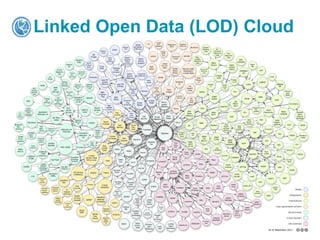
Linked Open Data (LOD) Cloud


        © 2010 OpenLink Software, All rights reserved.
Situation Analysis
Data is growing exponentially along the
following dimensions:
•Volume -- production

•Velocity – dissemination fire-hoses

•Variety – APIs and underlying data Models

•Virtuosity – insight discovery expectations.


All of this happens while the total hours in day
remains constant at 24 hours!


                           © 2012 OpenLink Software, All rights reserved.
Product Value Proposition


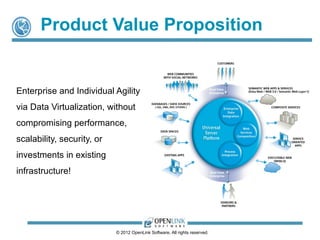
Enterprise and Individual Agility
via Data Virtualization, without
compromising performance,
scalability, security, or
investments in existing
infrastructure!


                            © 2012 OpenLink Software, All rights reserved.
Product Architecture


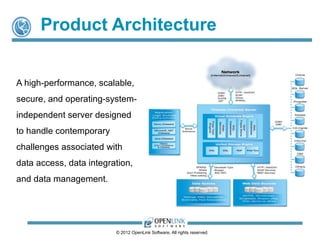
A high-performance, scalable,
secure, and operating-system-
independent server designed
to handle contemporary
challenges associated with
data access, data integration,
and data management.


                         © 2012 OpenLink Software, All rights reserved.
Data Virtualization Middleware


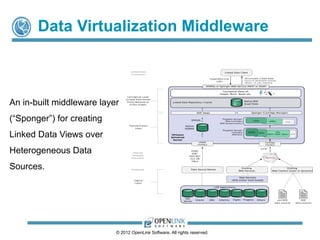
An in-built middleware layer
(“Sponger”) for creating
Linked Data Views over
Heterogeneous Data
Sources.


                           © 2012 OpenLink Software, All rights reserved.
Pluggable Linked Data Cartridges/Drivers


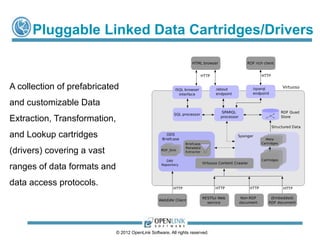
A collection of prefabricated
and customizable Data
Extraction, Transformation,
and Lookup cartridges
(drivers) covering a vast
ranges of data formats and
data access protocols.


                              © 2012 OpenLink Software, All rights reserved.
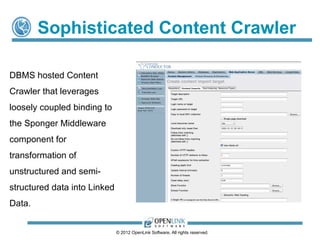
Sophisticated Content Crawler

DBMS hosted Content
Crawler that leverages
loosely coupled binding to
the Sponger Middleware
component for
transformation of
unstructured and semi-
structured data into Linked
Data.


                              © 2012 OpenLink Software, All rights reserved.
How Do I Get Going?

   Download, install, and experience the power of coherent
    integration of disparate data sources, data access protocols,
    and data representation formats.

   In an nutshell, commence exploitation of powerful business
    intelligence, socially enhanced collaboration, data
    virtualization, and entity analytics without writing a line of code!

   Turn "Big Data" into exploitable "Smart Data"
    without compromise!


                           © 2012 OpenLink Software, All rights reserved.
How Does Virtuoso Expose LOD Cloud
   Data To ODBC Clients?
 Creation of ODBC accessible SQL Views using
  SPASQL (SPARQL inside SQL) that targets local
  data
 Ditto via SPARQL-FED (Federated SPARQL) for
  external SPARQL endpoints.

  Example instances include:


      DBpedia (Linked Data version of Wikipedia content and LOD Cloud nexus)


      URIBurner Service for “on the fly” transformation of data from: LinkedIn, Facebook,

       Twitter, Google+, Freebase, Disqus etc.


      Live Linked Open Data LOD Cloud Cache.


                               © 2012 OpenLink Software, All rights reserved.
Virtuoso ODBC Driver Installation
               &
          Configuration


          © 2012 OpenLink Software, All rights reserved.
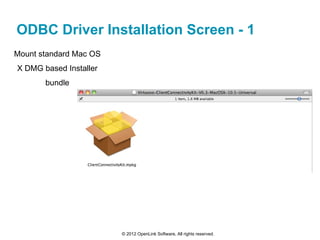
ODBC Driver Installation Screen - 1
Mount standard Mac OS
X DMG based Installer
       bundle


                        © 2012 OpenLink Software, All rights reserved.
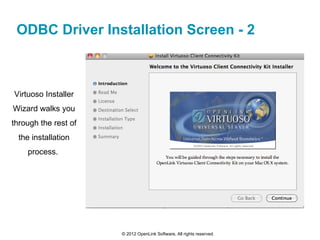
ODBC Driver Installation Screen - 2


Virtuoso Installer
Wizard walks you
through the rest of
  the installation
    process.


                      © 2012 OpenLink Software, All rights reserved.
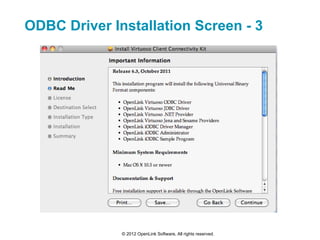
ODBC Driver Installation Screen - 3


              © 2012 OpenLink Software, All rights reserved.
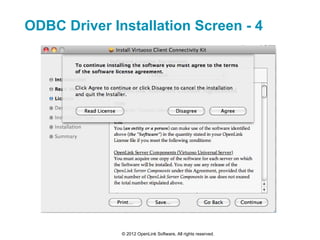
ODBC Driver Installation Screen - 4


              © 2012 OpenLink Software, All rights reserved.
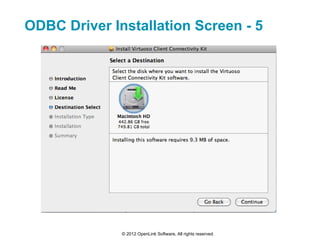
ODBC Driver Installation Screen - 5


              © 2012 OpenLink Software, All rights reserved.
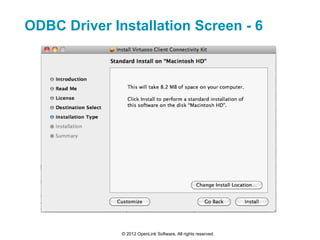
ODBC Driver Installation Screen - 6


              © 2012 OpenLink Software, All rights reserved.
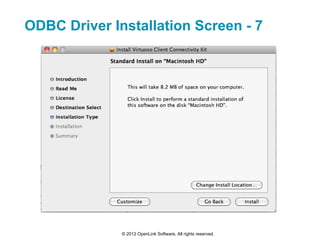
ODBC Driver Installation Screen - 7


              © 2012 OpenLink Software, All rights reserved.
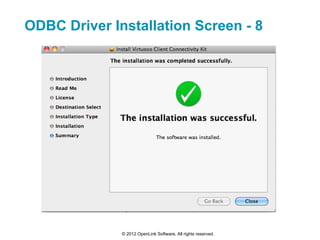
ODBC Driver Installation Screen - 8


              © 2012 OpenLink Software, All rights reserved.
Configuring Virtuoso ODBC Data
      Sources on Mac OS X
              Using
The OpenLink iODBC Administrator


          © 2012 OpenLink Software, All rights reserved.
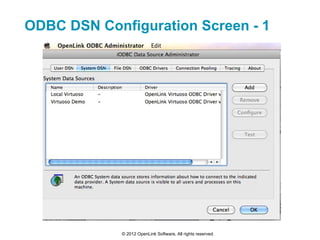
ODBC DSN Configuration Screen - 1


             © 2012 OpenLink Software, All rights reserved.
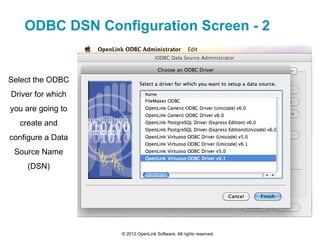
ODBC DSN Configuration Screen - 2


Select the ODBC
Driver for which
you are going to
  create and
configure a Data
 Source Name
    (DSN)


                   © 2012 OpenLink Software, All rights reserved.
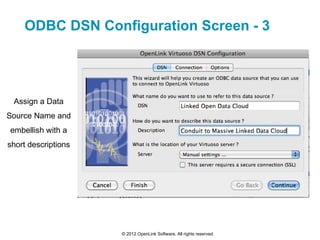
ODBC DSN Configuration Screen - 3


 Assign a Data
Source Name and
embellish with a
short descriptions


                     © 2012 OpenLink Software, All rights reserved.
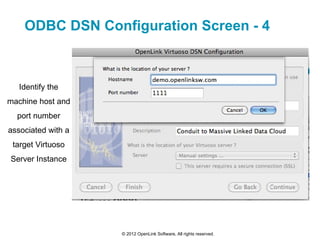
ODBC DSN Configuration Screen - 4


   Identify the
machine host and
  port number
associated with a
 target Virtuoso
Server Instance


                    © 2012 OpenLink Software, All rights reserved.
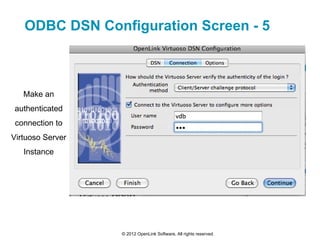
ODBC DSN Configuration Screen - 5


   Make an
authenticated
 connection to
Virtuoso Server
   Instance


                  © 2012 OpenLink Software, All rights reserved.
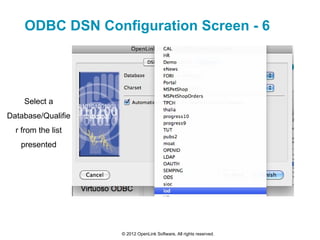
ODBC DSN Configuration Screen - 6


    Select a
Database/Qualifie
  r from the list
   presented


                    © 2012 OpenLink Software, All rights reserved.
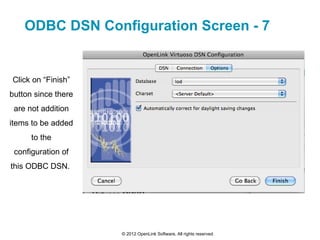
ODBC DSN Configuration Screen - 7


Click on “Finish”
button since there
 are not addition
items to be added
      to the
 configuration of
this ODBC DSN.


                     © 2012 OpenLink Software, All rights reserved.
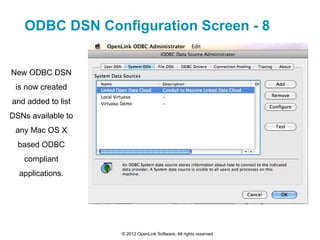
ODBC DSN Configuration Screen - 8


New ODBC DSN
 is now created
and added to list
DSNs available to
 any Mac OS X
  based ODBC
   compliant
  applications.


                    © 2012 OpenLink Software, All rights reserved.
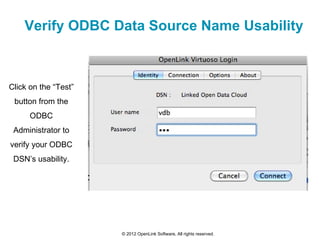
Verify ODBC Data Source Name Usability


Click on the “Test”
 button from the
      ODBC
 Administrator to
verify your ODBC
 DSN’s usability.


                      © 2012 OpenLink Software, All rights reserved.
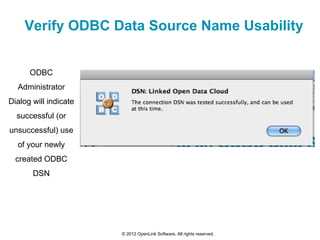
Verify ODBC Data Source Name Usability


      ODBC
  Administrator
Dialog will indicate
  successful (or
unsuccessful) use
  of your newly
  created ODBC
       DSN


                       © 2012 OpenLink Software, All rights reserved.
Using Filemaker with External Data
Sources (e.g. Linked Open Data Cloud)
                  via
  ODBC Data Source Names (DSNs)


            © 2012 OpenLink Software, All rights reserved.
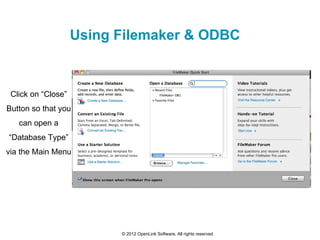
Using Filemaker & ODBC


 Click on “Close”
Button so that you
   can open a
“Database Type”
via the Main Menu


                          © 2012 OpenLink Software, All rights reserved.
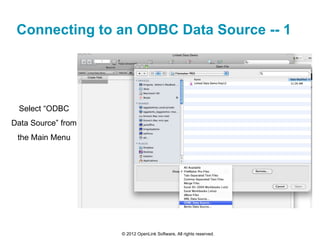
Connecting to an ODBC Data Source -- 1


 Select “ODBC
Data Source” from
 the Main Menu


                    © 2012 OpenLink Software, All rights reserved.
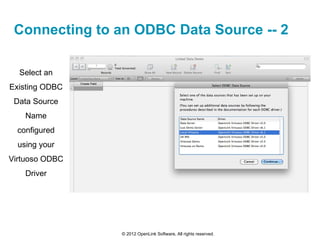
Connecting to an ODBC Data Source -- 2

  Select an
Existing ODBC
 Data Source
    Name
  configured
  using your
Virtuoso ODBC
    Driver


                © 2012 OpenLink Software, All rights reserved.
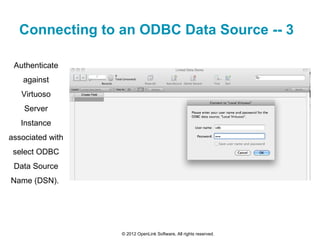
Connecting to an ODBC Data Source -- 3

 Authenticate
   against
   Virtuoso
    Server
   Instance
associated with
 select ODBC
 Data Source
Name (DSN).


                  © 2012 OpenLink Software, All rights reserved.
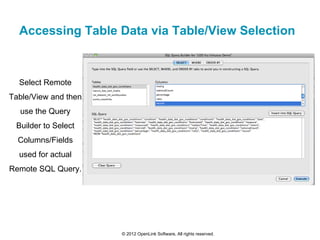
Accessing Table Data via Table/View Selection


  Select Remote
Table/View and then
  use the Query
 Builder to Select
  Columns/Fields
  used for actual
Remote SQL Query.


                      © 2012 OpenLink Software, All rights reserved.
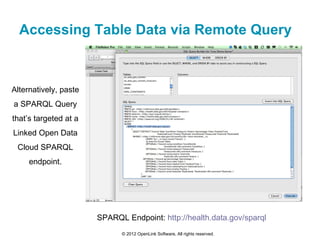
Accessing Table Data via Remote Query


Alternatively, paste
a SPARQL Query
that’s targeted at a
Linked Open Data
 Cloud SPARQL
     endpoint.


                       SPARQL Endpoint: http://health.data.gov/sparql
                             © 2012 OpenLink Software, All rights reserved.
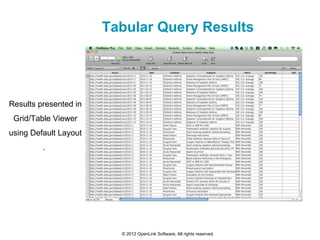
Tabular Query Results


Results presented in
 Grid/Table Viewer
using Default Layout
         .


                         © 2012 OpenLink Software, All rights reserved.
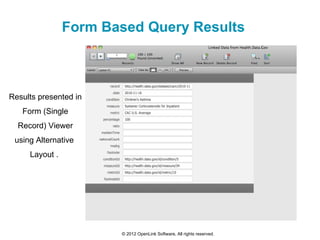
Form Based Query Results


Results presented in
   Form (Single
  Record) Viewer
 using Alternative
     Layout .


                       © 2012 OpenLink Software, All rights reserved.
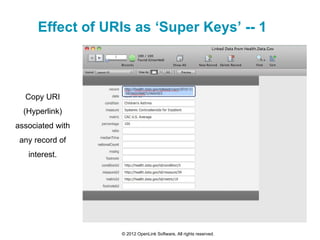
Effect of URIs as ‘Super Keys’ -- 1


  Copy URI
  (Hyperlink)
associated with
 any record of
   interest.


                  © 2012 OpenLink Software, All rights reserved.
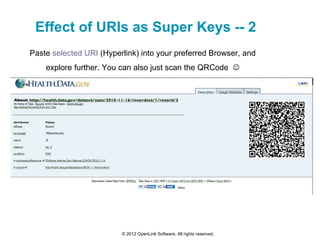
Effect of URIs as Super Keys -- 2
Paste selected URI (Hyperlink) into your preferred Browser, and
    explore further. You can also just scan the QRCode 


                         © 2012 OpenLink Software, All rights reserved.
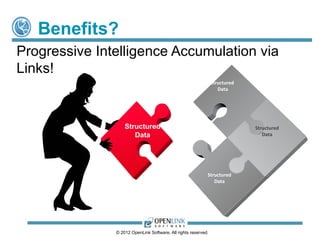
Benefits?
Progressive Intelligence Accumulation via
Links!
                                                                Structured
                                                                   Data


                   Structured                                                Structured
                      Data                                                      Data


                                                            Structured
                                                               Data


               © 2012 OpenLink Software, All rights reserved.
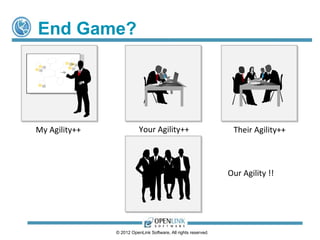
End Game?


My Agility++              Your Agility++                         Their Agility++


                                                                Our Agility !!


               © 2012 OpenLink Software, All rights reserved.
OpenLink Company Overview
   OpenLink Software is a privately-held company founded in 1992 by its President &
    CEO, Kingsley Idehen. The company is an industry acclaimed technology innovator
    in the following areas:

        ODBC, JDBC, ADO.NET, and OLE-DB compliant Data Access Drivers for Oracle,
         SQL Server, Informix, Ingres, Sybase, Progress, MySQL, and PostgreSQL
        High-Performance & Scalable Multi-Model (Relational & Graph) Database
         Technology
        Data Integration Middleware (Data Virtualization Technology across a wide variety of
         Protocols & Formats)
        Linked Data Deployment & Management
        Web Application Server Technology
        Socially-enhanced Distributed Collaborative Applications Platforms (Weblogs, Wikis,
         Feed Aggregation and Syndication, Web File Systems, Discussion Forums, etc.)
        Identity Management.


                                © 2012 OpenLink Software, All rights reserved.
Products & Services
Software Products

    •   OpenLink Universal Data Access Drivers (UDA) -
        High-performance data access drivers for ODBC, JDBC, ADO.NET, and OLE DB that provide
        transparent access to enterprise databases.
    •   OpenLink Virtuoso - available in single server and cluster editions that are deployed in
        cloud and/or enterprise modes.
    •   OpenLink Data Spaces Platform and Applications
    •   OpenLink Ajax Toolkit
    •   OpenLink Data Explorer
    •   An Open Source Data Access SDK for ODBC


All OpenLink products are delivered by download from the Internet (http, ftp, etc.).
Temporary licenses are issued upon download and may be extended as needed, on a case-
by-case basis. Permanent licenses are issued once payment is received.


                                  © 2012 OpenLink Software, All rights reserved.
Products & Services
Professional and Support Services

    •   OpenLink Product Support provides front-line email and phone support,
        web-based online support, and a variety of premium services such as phone,
        emergency, and onsite support.

    •   Our Support staff is comprised of individuals with extensive knowledge of data
        access, data migration, database administration, programming APIs, and other
        relevant skills.

    •   Services are sold in either Standard "Bronze" or Premium "Platinum" Support
        packages, with varying hours of availability, response times, etc.

    •   We also offer Custom Development, Training, and other Consultancy services.
        These services can be offered on- or off-site. Expenses for travel, accommodations,
        food, etc., associated with on-site services are charged separately.

        Rates start at US$250 per person per hour.


                               © 2012 OpenLink Software, All rights reserved.
Office Locations


USA                                               UK
OpenLink Software, Inc                            OpenLink Software Ltd.
10 Burlington Mall Road                           Airport House
Suite 265                                         Purley Way
Burlington, MA 01803                              Croydon, Surrey CR0 0XZ
Tel.: +1 781 273 0900                             Tel.: +44 (0)20 8681 7701
Fax: +1 781 229 8030                              Fax: +44 (0)20 8681 7702


                          © 2012 OpenLink Software, All rights reserved.
Additional Information
 OpenLink Software:
   OpenLink Software
   OpenLink Virtuoso
   Universal Data Access Drivers
 Social Media Data spaces
   http://www.openlinksw.com/blog/~kidehen/ (weblog)
   https://plus.google.com/112399767740508618350/posts
     (Google+)
   https://twitter.com/#!/kidehen (Twitter)
   Hashtag: #LinkedData (Anywhere) .

                 © 2012 OpenLink Software, All rights reserved.

Exploiting Linked Data via Filemaker

  • 1.
    Using Filemaker as a Linked (Open) Data client via Virtuoso’s ODBC Driver By Kingsley Idehen (@kidehen) Founder & CEO, OpenLink Software © 2012 OpenLink Software, All rights reserved.
  • 2.
    Situation Analysis Agility isthe timeless pursuit of enterprises and individuals alike. In all cases, access, integration, and dissemination of data is pivotal. © 2008 OpenLink Software, All rights reserved.
  • 3.
    Linked Open Data(LOD) Cloud © 2010 OpenLink Software, All rights reserved.
  • 4.
    Situation Analysis Data isgrowing exponentially along the following dimensions: •Volume -- production •Velocity – dissemination fire-hoses •Variety – APIs and underlying data Models •Virtuosity – insight discovery expectations. All of this happens while the total hours in day remains constant at 24 hours! © 2012 OpenLink Software, All rights reserved.
  • 5.
    Product Value Proposition Enterpriseand Individual Agility via Data Virtualization, without compromising performance, scalability, security, or investments in existing infrastructure! © 2012 OpenLink Software, All rights reserved.
  • 6.
    Product Architecture A high-performance,scalable, secure, and operating-system- independent server designed to handle contemporary challenges associated with data access, data integration, and data management. © 2012 OpenLink Software, All rights reserved.
  • 7.
    Data Virtualization Middleware Anin-built middleware layer (“Sponger”) for creating Linked Data Views over Heterogeneous Data Sources. © 2012 OpenLink Software, All rights reserved.
  • 8.
    Pluggable Linked DataCartridges/Drivers A collection of prefabricated and customizable Data Extraction, Transformation, and Lookup cartridges (drivers) covering a vast ranges of data formats and data access protocols. © 2012 OpenLink Software, All rights reserved.
  • 9.
    Sophisticated Content Crawler DBMShosted Content Crawler that leverages loosely coupled binding to the Sponger Middleware component for transformation of unstructured and semi- structured data into Linked Data. © 2012 OpenLink Software, All rights reserved.
  • 10.
    How Do IGet Going?  Download, install, and experience the power of coherent integration of disparate data sources, data access protocols, and data representation formats.  In an nutshell, commence exploitation of powerful business intelligence, socially enhanced collaboration, data virtualization, and entity analytics without writing a line of code!  Turn "Big Data" into exploitable "Smart Data" without compromise! © 2012 OpenLink Software, All rights reserved.
  • 11.
    How Does VirtuosoExpose LOD Cloud Data To ODBC Clients?  Creation of ODBC accessible SQL Views using SPASQL (SPARQL inside SQL) that targets local data  Ditto via SPARQL-FED (Federated SPARQL) for external SPARQL endpoints. Example instances include:  DBpedia (Linked Data version of Wikipedia content and LOD Cloud nexus)  URIBurner Service for “on the fly” transformation of data from: LinkedIn, Facebook, Twitter, Google+, Freebase, Disqus etc.  Live Linked Open Data LOD Cloud Cache. © 2012 OpenLink Software, All rights reserved.
  • 12.
    Virtuoso ODBC DriverInstallation & Configuration © 2012 OpenLink Software, All rights reserved.
  • 13.
    ODBC Driver InstallationScreen - 1 Mount standard Mac OS X DMG based Installer bundle © 2012 OpenLink Software, All rights reserved.
  • 14.
    ODBC Driver InstallationScreen - 2 Virtuoso Installer Wizard walks you through the rest of the installation process. © 2012 OpenLink Software, All rights reserved.
  • 15.
    ODBC Driver InstallationScreen - 3 © 2012 OpenLink Software, All rights reserved.
  • 16.
    ODBC Driver InstallationScreen - 4 © 2012 OpenLink Software, All rights reserved.
  • 17.
    ODBC Driver InstallationScreen - 5 © 2012 OpenLink Software, All rights reserved.
  • 18.
    ODBC Driver InstallationScreen - 6 © 2012 OpenLink Software, All rights reserved.
  • 19.
    ODBC Driver InstallationScreen - 7 © 2012 OpenLink Software, All rights reserved.
  • 20.
    ODBC Driver InstallationScreen - 8 © 2012 OpenLink Software, All rights reserved.
  • 21.
    Configuring Virtuoso ODBCData Sources on Mac OS X Using The OpenLink iODBC Administrator © 2012 OpenLink Software, All rights reserved.
  • 22.
    ODBC DSN ConfigurationScreen - 1 © 2012 OpenLink Software, All rights reserved.
  • 23.
    ODBC DSN ConfigurationScreen - 2 Select the ODBC Driver for which you are going to create and configure a Data Source Name (DSN) © 2012 OpenLink Software, All rights reserved.
  • 24.
    ODBC DSN ConfigurationScreen - 3 Assign a Data Source Name and embellish with a short descriptions © 2012 OpenLink Software, All rights reserved.
  • 25.
    ODBC DSN ConfigurationScreen - 4 Identify the machine host and port number associated with a target Virtuoso Server Instance © 2012 OpenLink Software, All rights reserved.
  • 26.
    ODBC DSN ConfigurationScreen - 5 Make an authenticated connection to Virtuoso Server Instance © 2012 OpenLink Software, All rights reserved.
  • 27.
    ODBC DSN ConfigurationScreen - 6 Select a Database/Qualifie r from the list presented © 2012 OpenLink Software, All rights reserved.
  • 28.
    ODBC DSN ConfigurationScreen - 7 Click on “Finish” button since there are not addition items to be added to the configuration of this ODBC DSN. © 2012 OpenLink Software, All rights reserved.
  • 29.
    ODBC DSN ConfigurationScreen - 8 New ODBC DSN is now created and added to list DSNs available to any Mac OS X based ODBC compliant applications. © 2012 OpenLink Software, All rights reserved.
  • 30.
    Verify ODBC DataSource Name Usability Click on the “Test” button from the ODBC Administrator to verify your ODBC DSN’s usability. © 2012 OpenLink Software, All rights reserved.
  • 31.
    Verify ODBC DataSource Name Usability ODBC Administrator Dialog will indicate successful (or unsuccessful) use of your newly created ODBC DSN © 2012 OpenLink Software, All rights reserved.
  • 32.
    Using Filemaker withExternal Data Sources (e.g. Linked Open Data Cloud) via ODBC Data Source Names (DSNs) © 2012 OpenLink Software, All rights reserved.
  • 33.
    Using Filemaker &ODBC Click on “Close” Button so that you can open a “Database Type” via the Main Menu © 2012 OpenLink Software, All rights reserved.
  • 34.
    Connecting to anODBC Data Source -- 1 Select “ODBC Data Source” from the Main Menu © 2012 OpenLink Software, All rights reserved.
  • 35.
    Connecting to anODBC Data Source -- 2 Select an Existing ODBC Data Source Name configured using your Virtuoso ODBC Driver © 2012 OpenLink Software, All rights reserved.
  • 36.
    Connecting to anODBC Data Source -- 3 Authenticate against Virtuoso Server Instance associated with select ODBC Data Source Name (DSN). © 2012 OpenLink Software, All rights reserved.
  • 37.
    Accessing Table Datavia Table/View Selection Select Remote Table/View and then use the Query Builder to Select Columns/Fields used for actual Remote SQL Query. © 2012 OpenLink Software, All rights reserved.
  • 38.
    Accessing Table Datavia Remote Query Alternatively, paste a SPARQL Query that’s targeted at a Linked Open Data Cloud SPARQL endpoint. SPARQL Endpoint: http://health.data.gov/sparql © 2012 OpenLink Software, All rights reserved.
  • 39.
    Tabular Query Results Resultspresented in Grid/Table Viewer using Default Layout . © 2012 OpenLink Software, All rights reserved.
  • 40.
    Form Based QueryResults Results presented in Form (Single Record) Viewer using Alternative Layout . © 2012 OpenLink Software, All rights reserved.
  • 41.
    Effect of URIsas ‘Super Keys’ -- 1 Copy URI (Hyperlink) associated with any record of interest. © 2012 OpenLink Software, All rights reserved.
  • 42.
    Effect of URIsas Super Keys -- 2 Paste selected URI (Hyperlink) into your preferred Browser, and explore further. You can also just scan the QRCode  © 2012 OpenLink Software, All rights reserved.
  • 43.
    Benefits? Progressive Intelligence Accumulationvia Links! Structured Data Structured Structured Data Data Structured Data © 2012 OpenLink Software, All rights reserved.
  • 44.
    End Game? My Agility++ Your Agility++ Their Agility++ Our Agility !! © 2012 OpenLink Software, All rights reserved.
  • 45.
    OpenLink Company Overview  OpenLink Software is a privately-held company founded in 1992 by its President & CEO, Kingsley Idehen. The company is an industry acclaimed technology innovator in the following areas:  ODBC, JDBC, ADO.NET, and OLE-DB compliant Data Access Drivers for Oracle, SQL Server, Informix, Ingres, Sybase, Progress, MySQL, and PostgreSQL  High-Performance & Scalable Multi-Model (Relational & Graph) Database Technology  Data Integration Middleware (Data Virtualization Technology across a wide variety of Protocols & Formats)  Linked Data Deployment & Management  Web Application Server Technology  Socially-enhanced Distributed Collaborative Applications Platforms (Weblogs, Wikis, Feed Aggregation and Syndication, Web File Systems, Discussion Forums, etc.)  Identity Management. © 2012 OpenLink Software, All rights reserved.
  • 46.
    Products & Services SoftwareProducts • OpenLink Universal Data Access Drivers (UDA) - High-performance data access drivers for ODBC, JDBC, ADO.NET, and OLE DB that provide transparent access to enterprise databases. • OpenLink Virtuoso - available in single server and cluster editions that are deployed in cloud and/or enterprise modes. • OpenLink Data Spaces Platform and Applications • OpenLink Ajax Toolkit • OpenLink Data Explorer • An Open Source Data Access SDK for ODBC All OpenLink products are delivered by download from the Internet (http, ftp, etc.). Temporary licenses are issued upon download and may be extended as needed, on a case- by-case basis. Permanent licenses are issued once payment is received. © 2012 OpenLink Software, All rights reserved.
  • 47.
    Products & Services Professionaland Support Services • OpenLink Product Support provides front-line email and phone support, web-based online support, and a variety of premium services such as phone, emergency, and onsite support. • Our Support staff is comprised of individuals with extensive knowledge of data access, data migration, database administration, programming APIs, and other relevant skills. • Services are sold in either Standard "Bronze" or Premium "Platinum" Support packages, with varying hours of availability, response times, etc. • We also offer Custom Development, Training, and other Consultancy services. These services can be offered on- or off-site. Expenses for travel, accommodations, food, etc., associated with on-site services are charged separately. Rates start at US$250 per person per hour. © 2012 OpenLink Software, All rights reserved.
  • 48.
    Office Locations USA UK OpenLink Software, Inc OpenLink Software Ltd. 10 Burlington Mall Road Airport House Suite 265 Purley Way Burlington, MA 01803 Croydon, Surrey CR0 0XZ Tel.: +1 781 273 0900 Tel.: +44 (0)20 8681 7701 Fax: +1 781 229 8030 Fax: +44 (0)20 8681 7702 © 2012 OpenLink Software, All rights reserved.
  • 49.
    Additional Information  OpenLinkSoftware:  OpenLink Software  OpenLink Virtuoso  Universal Data Access Drivers  Social Media Data spaces  http://www.openlinksw.com/blog/~kidehen/ (weblog)  https://plus.google.com/112399767740508618350/posts (Google+)  https://twitter.com/#!/kidehen (Twitter)  Hashtag: #LinkedData (Anywhere) . © 2012 OpenLink Software, All rights reserved.