




Symantec Enterprise Security :  Securing your business along network intrusions Somyos Udomnilobon Sales Engineer - Thailand
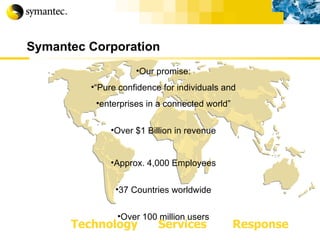
Symantec Corporation Our promise: “ Pure confidence for individuals and enterprises in a connected world” Over $1 Billion in revenue Approx. 4,000 Employees 37 Countries worldwide Over 100 million users Technology Services Response
 
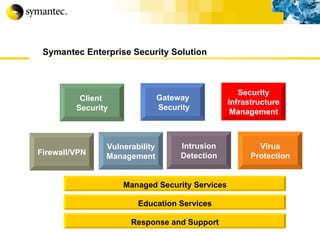
Symantec Enterprise Security Solution Vulnerability Management Firewall/VPN Intrusion Detection Virus Protection Client  Security Managed Security Services Education Services Response and Support Gateway Security Security Infrastructure Management
Agenda Why security is concern with business? Security Threats & how to protect… Wrap-up
Why security is concern?
Security Challenges Protect information which you must openly share Ever changing infrastructure technologies Increased connectivity leads to increased complexity The need to implement strong controls that are transparent to end users Apply security without jeopardizing performance and availability Reduced costs Increasingly difficult to stay on top of all the new features in applications and operating systems More work with less people to do it with
The Business Reasons Two Main Business Drivers Increased revenue Increased profitability Three Main Security Drivers Increasingly open and connected architecture leads to an increased vulnerability to attacks If an attack happens the results can be catastrophic The Damage per Incident is much greater
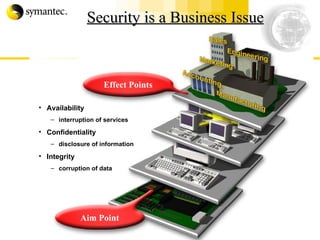
Security is a Business Issue Availability interruption of services Confidentiality disclosure of information Integrity corruption of data Aim Point Effect Points
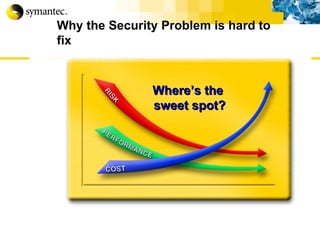
Why the Security Problem is hard to fix Where’s the  sweet spot?
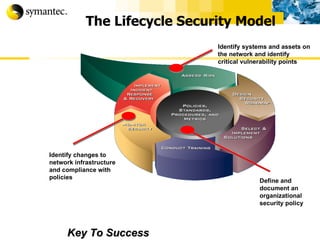
The Lifecycle Security Model Key To Success Identify systems and assets on the network and identify critical vulnerability points Define and document an organizational security policy Identify changes to  network infrastructure  and compliance with policies
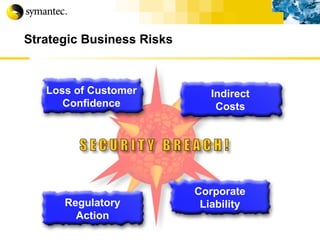
Strategic Business Risks Regulatory Action Corporate Liability Indirect Costs Loss of Customer Confidence
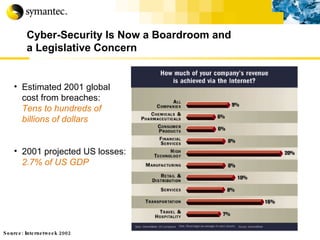
Cyber-Security Is Now a Boardroom and  a Legislative Concern Estimated 2001 global cost from breaches:  Tens to hundreds of billions of dollars 2001 projected US losses:  2.7% of US GDP Source: Internetweek 2002
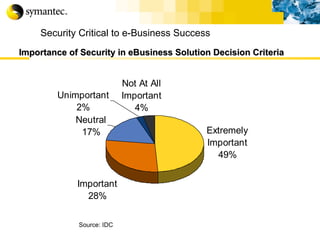
Security Critical to e-Business Success   Importance   of Security in eBusiness Solution Decision Criteria   Source: IDC
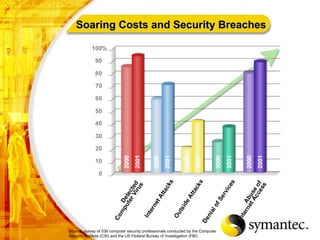
Source: survey of 538 computer security professionals conducted by the Computer Security Institute (CSI) and the US Federal Bureau of Investigation (FBI) . Soaring Costs and Security Breaches
Evolving Security Threats Will Your Perimeter Security Stop Them?
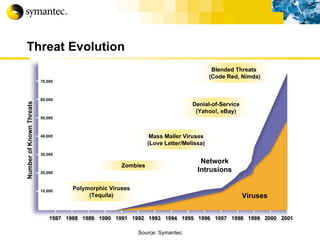
Threat Evolution Polymorphic Viruses (Tequila) Blended Threats  (Code Red, Nimda) Denial-of-Service (Yahoo!, eBay) Mass Mailer Viruses (Love Letter/Melissa) Zombies Source: Symantec Viruses Network Intrusions 70,000 60,000 50,000 40,000 30,000 20,000 10,000 Number of Known Threats
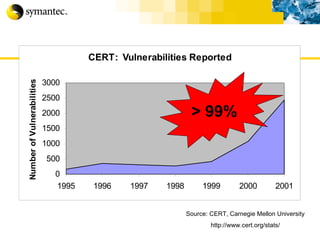
Source: CERT, Carnegie Mellon University http://www.cert.org/stats/ > 99%
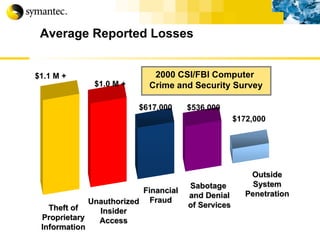
Average Reported Losses Unauthorized Insider Access Theft of Proprietary Information Outside System Penetration Financial Fraud Sabotage  and Denial of Services 2000 CSI/FBI Computer  Crime and Security Survey $1.1 M + $1.0 M + $617,000 $536,000 $172,000
 
Democratization of Hacking Over 30,000 hacking oriented sites Original hacker ethic is dead No longer need to be a guru Ability to download click-and-hack programs and scripts Advent of “hactivism” as a method for social protest
The Hacking Methodology Internet Footprinting Scanning and Landscape discovery Enumerating Penetrating Pillage Get Interactive Expand Influence
Internet Footprinting Review Public Information Examples  www.asic.com.au  or  www.netcraft.com   “ Whois” Enumeration (domain names and networks) DNS Interrogation (nslookup) Network Reconnaissance (registry and IP block lookup) ARIN, APNIC, RIPE Traceroute, Ping BGP (Border Gateway Protocol) (find more addresses)
Scanning and Landscape Discovery Ping Sweep (what hosts respond) Port Scanning (what ports are open) Banner Grabbing (what services are running) OS Guessing (what OS and vulnerabilities are inherent) Build a detailed picture of the target network. (Web Servers and other DMZ locals are the most common target)
Half Time. Up to this point everything was pretty much below the radar. Mostly public information or normal network operation. From this points onwards things get serious!
Host Enumeration The hacker is looking to obtain detailed information. User Details and Machine Details. Domain Names, Membership and Trust relationships SNMP and LDAP (mostly for usernames) MAC Addresses Special Services or Deamons The aim is to get a full understanding of the roles and functions of each host in the target network.
Penetrate (take ownership) Choose the right host to attack. Guessing username and password combinations. Taking SAM and password files for cracking. (DumpSEC) Use known accounts such as ArcServe, Tivoli, BackupExec. Default passwords are largely left unchanged.
Escalating your rights Root or Administrator equivalent is the target here. Many tools are available for this. GetAdmin SecHole PipeUpAdmin etc… Microsoft NT/2000 Resource Kit. (believe it or not!)
Pillage The compromised system becomes a staging point to penetrate the rest of the network. Preparations are made for further penetration. Multiple entry points are created for later re-entry. Tracks are covered. (log files erased or better yet, modified) SAM and password files are downloaded.
Get Interactive Gain an interactive command shell on the target machine. Move the admin tools (crack tools) onto other system and in inconspicuous places. From here the process of footprinting etc.. Starts again.
Expanding Influence Attacking the Internal Network and extend your reach. Using the first machine as a staging point Preparations are made for future operations Trojans, Remote Control apps, Hijacking tools, Streams, Auditpol, BO2K, etc…. “ Hacking ROOT is a way of life…”
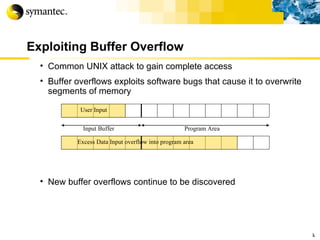
Exploiting Buffer Overflow Common UNIX attack to gain complete access Buffer overflows exploits software bugs that cause it to overwrite segments of memory New buffer overflows continue to be discovered  k Input Buffer Program Area User Input Excess Data Input overflow into program area
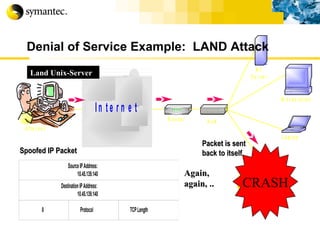
Denial of Service (DoS) TCP/IP Exploits Ping of death Sending oversized (>64k) ICMP echo packets to a vulnerable system “ Drop” Attacks teardrop syndrop boink SYN Flood LAND Process table flooding through Network services r
Denial of Service Example:  LAND Attack Spoofed IP Packet Packet is sent back to itself Again, again, .. Land Unix-Server CRASH
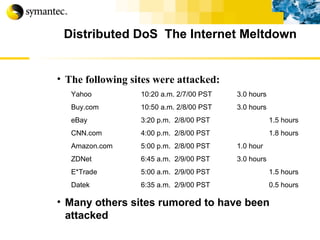
Distributed DoS  The Internet Meltdown The following sites were attacked: Yahoo   10:20 a.m. 2/7/00 PST 3.0 hours Buy.com 10:50 a.m. 2/8/00 PST 3.0 hours eBay 3:20 p.m.  2/8/00 PST 1.5 hours CNN.com 4:00 p.m.  2/8/00 PST 1.8 hours Amazon.com 5:00 p.m.  2/8/00 PST  1.0 hour ZDNet 6:45 a.m.  2/9/00 PST  3.0 hours E*Trade 5:00 a.m.  2/9/00 PST 1.5 hours Datek 6:35 a.m.  2/9/00 PST 0.5 hours Many others sites rumored to have been attacked
Distributed DoS Represents a new level of attack Use of multiple, sometimes compromised systems, to launch attacks known as “zombies” attackers looked for machines with large pipes to the Internet Upon receipt of remote command, zombies simultaneously flood target with packets Attacks included Trin00, Tribal Flood Network (TFN), and Stacheldraht
 
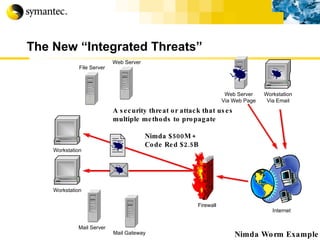
The New “Integrated Threats” Internet Nimda Worm Example Workstation A security threat or attack that uses multiple methods to propagate Nimda $500M + Code Red $2.5B Workstation Via Email File Server Workstation Mail Server Firewall Web Server Via Web Page Web Server Mail Gateway
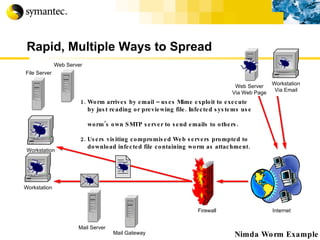
Rapid, Multiple Ways to Spread Internet Nimda Worm Example 1. Worm arrives by email – uses Mime exploit to execute by just reading or previewing file. Infected systems use  worm’s own SMTP server to send emails to others.  2. Users visiting compromised Web servers prompted to download infected file containing worm as attachment. Workstation Via Email File Server Workstation Mail Server Firewall Web Server Via Web Page Workstation Web Server Mail Gateway
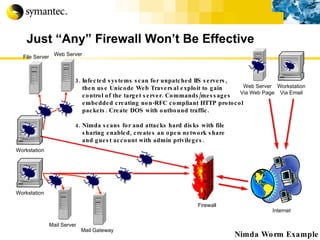
Just “Any” Firewall Won’t Be Effective Internet Nimda Worm Example Workstation 3. Infected systems scan for unpatched IIS servers,  then use Unicode Web Traversal exploit to gain  control of the target server. Commands/messages  embedded creating non-RFC compliant HTTP protocol packets. Create DOS with outbound traffic. 4. Nimda scans for and attacks hard disks with file  sharing enabled, creates an open network share and guest account with admin privileges. File Server Mail Server Firewall Web Server Mail Gateway Workstation Via Email Web Server Via Web Page Workstation
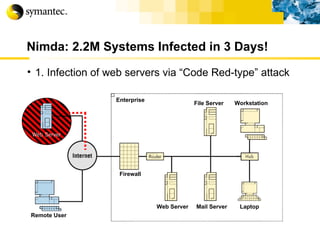
Nimda: 2.2M Systems Infected in 3 Days! 1. Infection of web servers via “Code Red-type” attack Web Server Remote User Enterprise File Server Workstation Web Server  Mail Server  Laptop Firewall
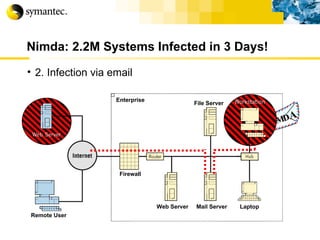
Nimda: 2.2M Systems Infected in 3 Days! 2. Infection via email NIMD A Remote User Enterprise File Server Workstation Web Server  Mail Server  Laptop Firewall
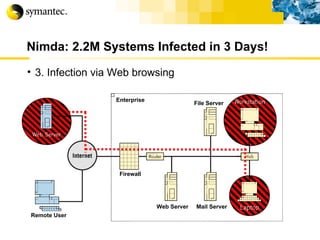
Nimda: 2.2M Systems Infected in 3 Days! 3. Infection via Web browsing Remote User Enterprise File Server Workstation Web Server  Mail Server  Laptop Firewall
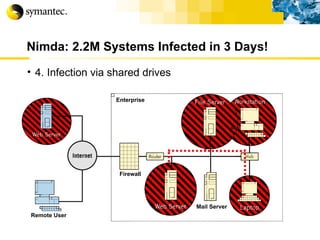
Nimda: 2.2M Systems Infected in 3 Days! 4. Infection via shared drives Remote User Enterprise File Server Workstation Web Server  Mail Server  Laptop Firewall
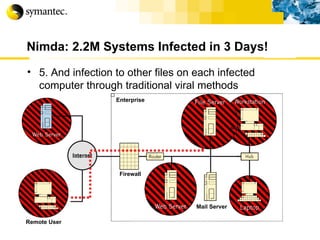
Nimda: 2.2M Systems Infected in 3 Days! 5. And infection to other files on each infected computer through traditional viral methods Remote User Enterprise File Server Workstation Web Server  Mail Server  Laptop Firewall Remote User
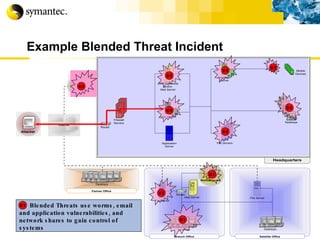
Example Blended Threat Incident Blended Threats use worms, email and application vulnerabilities, and network shares to gain control of systems BT BT BT BT BT BT BT BT BT BT BT
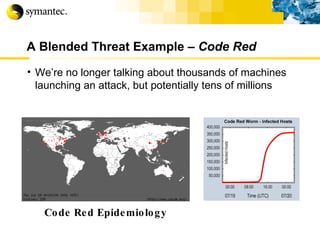
A Blended Threat Example –  Code Red   We’re no longer talking about thousands of machines launching an attack, but potentially tens of millions Code Red Epidemiology


 *
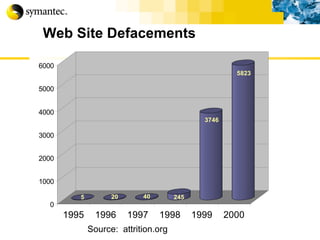
Web Site Defacements Source:  attrition.org
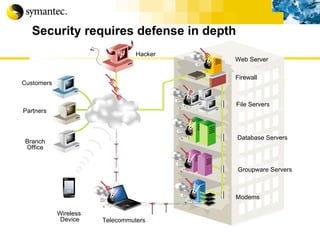
Security requires defense in depth Groupware Servers Database Servers File Servers Telecommuters Modems Hacker Customers Partners Branch Office Wireless   Device Web Server Firewall
Let’s take a break
Securing your business… How to prevent your network against  intrusion?
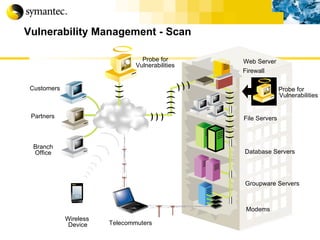
Vulnerability Management - Scan Groupware Servers Database Servers File Servers Customers Partners Branch Office Wireless   Device Web Server Telecommuters Modems Firewall Probe for Vulnerabilities Probe for Vulnerabilities
Vulnerability Management If you know where you are vulnerable and the risk these vulnerabilities pose to your organization, efficient steps can be taken to pro-actively close the vulnerabilities and mitigate the risk to an acceptable level.
Vulnerability Management How secure are we?
Host vs. Network Host-Based Assessment Inside-in view View systems from local privileged account perspective High-level summaries to convey status  Scheduled, safe, minimal impact to network, unobtrusive to end users   Network-Based Assessment Outside-in view View network from external “hacker” perspective Provide no insight into user activity risks Test critical network devices that do not run host software like: routers, switches, printers, appliances, and firewalls KEY = Hybrid, integrated approach In/out pix t
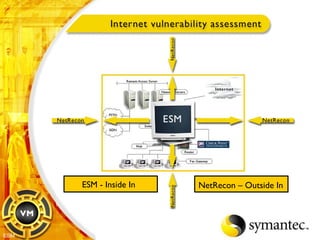
ESM - Inside In NetRecon – Outside In ESM
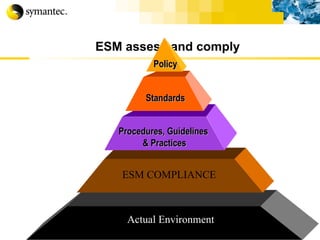
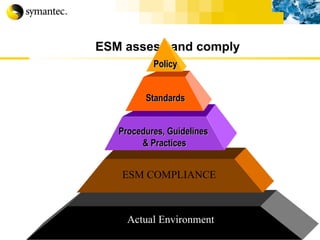
ESM assess and comply  Actual Environment ESM COMPLIANCE Policy Standards Procedures, Guidelines  & Practices
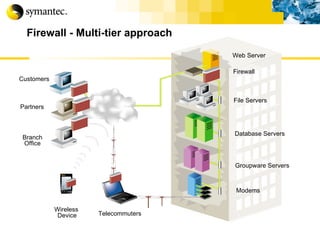
Firewall - Multi-tier approach Firewall Groupware Servers Database Servers File Servers Customers Partners Branch Office Wireless   Device Web Server Telecommuters Modems
Firewall Types Many types and vendors present in the market Most commercial firewalls mix characteristics from several firewall technologies Four basic types: Packet filtering Dynamic packet filtering Circuit-level gateway Stateful inspection (multilayer) Application gateway Air Gap
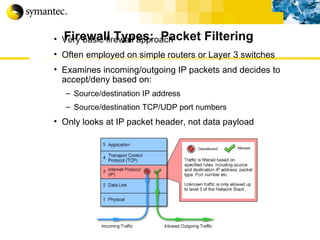
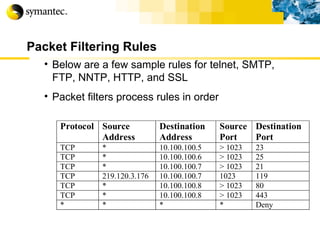
Firewall Types:  Packet Filtering Very basic firewall approach Often employed on simple routers or Layer 3 switches Examines incoming/outgoing IP packets and decides to accept/deny based on: Source/destination IP address Source/destination TCP/UDP port numbers Only looks at IP packet header, not data payload
Packet Filtering Rules Below are a few sample rules for telnet, SMTP, FTP, NNTP, HTTP, and SSL Packet filters process rules in order
Simple Packet Filter Standard IP router with packet filter rules defined Combines routing with packet filtering  Filter rules based on Data Link, IP, UDP, and TCP headers Standard and custom rules Disadvantages Inspects packets in isolation, does not maintain state information Limited handling of complex policies Susceptible to Application Layer attacks
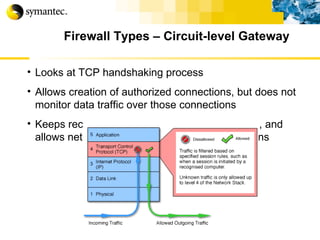
Firewall Types – Circuit-level Gateway Looks at TCP handshaking process  Allows creation of authorized connections, but does not monitor data traffic over those connections Keeps records of active authorized connections, and allows network traffic only over those connections
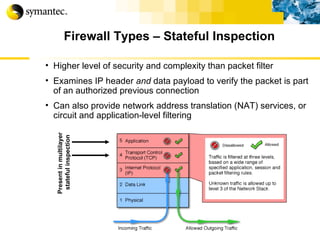
Firewall Types – Stateful Inspection Higher level of security and complexity than packet filter Examines IP header  and  data payload to verify the packet is part of an authorized previous connection Can also provide network address translation (NAT) services, or circuit and application-level filtering Present in multilayer  stateful inspection
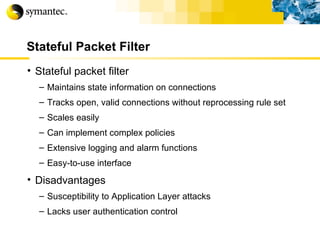
Stateful Packet Filter Stateful packet filter Maintains state information on connections Tracks open, valid connections without reprocessing rule set Scales easily Can implement complex policies Extensive logging and alarm functions Easy-to-use interface Disadvantages Susceptibility to Application Layer attacks Lacks user authentication control
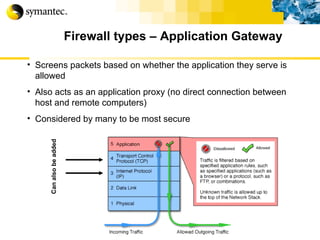
Firewall types – Application Gateway Screens packets based on whether the application they serve is allowed Also acts as an application proxy (no direct connection between host and remote computers) Considered by many to be most secure Can also be added
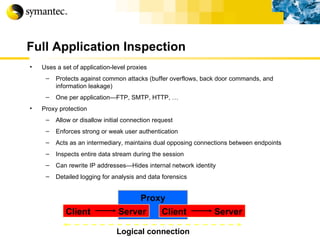
Full Application Inspection Uses a set of application-level proxies Protects against common attacks (buffer overflows, back door commands, and information leakage) One per application—FTP, SMTP, HTTP, … Proxy protection Allow or disallow initial connection request Enforces strong or weak user authentication Acts as an intermediary, maintains dual opposing connections between endpoints Inspects entire data stream during the session Can rewrite IP addresses—Hides internal network identity Detailed logging for analysis and data forensics Client Server Proxy Client Server Logical connection
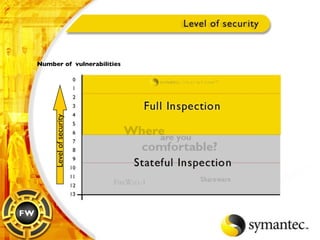
Hybrid Firewall Driven by the need to combine  security, flexibility, and performance , hybrid firewalls provide protection at all the layers of the network stack Application proxy protection provides maximum security and granularity by scanning traffic at the application layer! Stateful filtering protection provides authentication and maintains session state for performance and ease of management Packet filtering protection prevents denied traffic from consuming valuable resources on the system
Number of  vulnerabilities Level of security
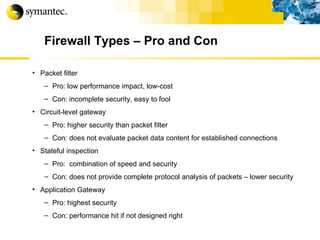
Firewall Types – Pro and Con Packet filter Pro: low performance impact, low-cost Con: incomplete security, easy to fool Circuit-level gateway Pro: higher security than packet filter Con: does not evaluate packet data content for established connections Stateful inspection Pro:  combination of speed and security Con: does not provide complete protocol analysis of packets – lower security Application Gateway Pro: highest security Con: performance hit if not designed right
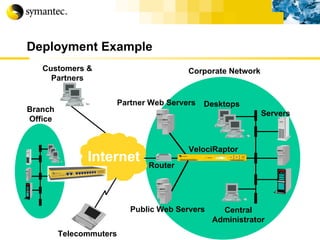
Deployment Example Desktops Public Web Servers Telecommuters Customers & Partners Servers VelociRaptor Router Corporate Network Partner Web Servers Branch Office Central Administrator Internet
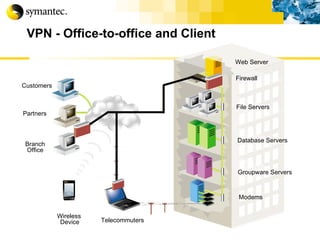
VPN - Office-to-office and Client Firewall Groupware Servers Database Servers File Servers Customers Partners Branch Office Wireless   Device Web Server Telecommuters Modems
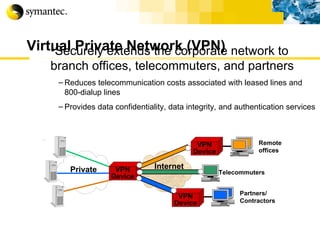
Virtual Private Network (VPN) Securely extends the corporate network to branch offices, telecommuters, and partners Reduces telecommunication costs associated with leased lines and 800-dialup lines Provides data confidentiality, data integrity, and authentication services Partners/ Contractors Remote offices Telecommuters Internet VPN Device VPN Device Private VPN Device
VPN (Cont.) Available as an integrated cross-grade to the firewall, or stand-alone Symantec Enterprise Firewall with VPN Symantec Enterprise VPN Build on-top of the award winning Symantec Enterprise Firewall architecture System and network level hardening Proxy-Secured Technology Extends full inspection protection and user authentication to VPN Tunnel Traffic! ICSA Certified for interoperability with other vendors Used by ICSA as a standard product to validate new products Export classification for 3DES/DES Exportable outside North America with proper paperwork
VPN (Cont.) Full support for IPSec standards Encapsulation Security Payload (ESP) Authentication Header (AH) Internet Security Association Key Management Protocol (ISAKMP) Internet Key Exchange (IKE) Gateway-to-Gateway VPN Shared key authentication and PKI support Supports DNS names in tunnel definition Compatible with Symantec Firewall/VPN and VelociRaptor 1.1 appliances, and MOST IPSec compliant servers Active connection display Client-to-Gateway VPN Includes Symantec Enterprise VPN Client with Personal Firewall Supports user authentication using shared secret key
VPN (Cont.) Dynamic Tunnel Internet Key Exchange (IKE) Main mode, Aggressive mode, and Quick Mode support 3DES/SHA1, DES/MD5, Shared Secret Static Tunnels ESP/AH 3DES/SHA1, DES/MD5 Public Key Infrastructure Support Entrust-ready! VPN Tunnel Wizards for easy administration
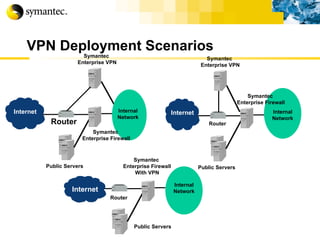
VPN Deployment Scenarios Public Servers Symantec  Enterprise Firewall Router Symantec  Enterprise VPN Public Servers Symantec  Enterprise Firewall With VPN Router Internal Network Public Servers Symantec  Enterprise Firewall Router Internal Network Symantec  Enterprise VPN Internal Network Internet Internet Internet
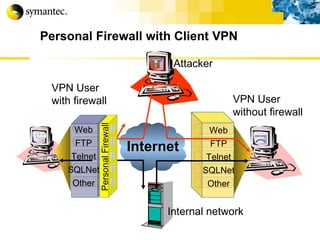
Personal Firewall with Client VPN Web FTP Telnet SQLNet Other Attacker Internal network VPN User without firewall Internet Personal Firewall Web FTP Telnet SQLNet Other VPN User with firewall
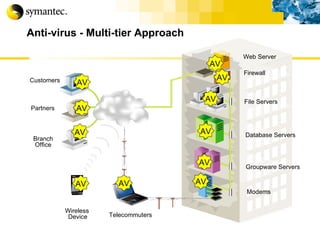
Anti-virus - Multi-tier Approach Firewall Groupware Servers Database Servers File Servers Customers Partners Branch Office Wireless   Device Web Server Telecommuters Modems AV AV AV AV AV AV AV AV AV AV AV
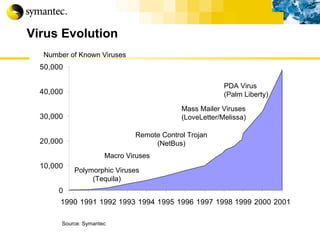
Virus Evolution Mass Mailer Viruses (LoveLetter/Melissa) Remote Control Trojan (NetBus) Polymorphic Viruses (Tequila) PDA Virus (Palm Liberty) Macro Viruses Source: Symantec Number of Known Viruses
Virus Protection Use anti-viral and content scanning software with automated signature updating  desktop e-mail server firewall Apply latest patches e-mail (e.g., Outlook) browser O/S Don’t double click blindly on attachments Use higher levels of browser security r
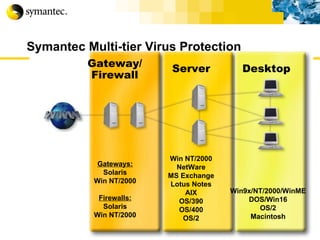
Symantec Multi-tier Virus Protection Gateway/ Firewall Gateways: Solaris Win NT/2000 Firewalls: Solaris Win NT/2000 Server Win NT/2000 NetWare MS Exchange Lotus Notes AIX OS/390 OS/400 OS/2 Desktop Win9x/NT/2000/WinME DOS/Win16 OS/2 Macintosh
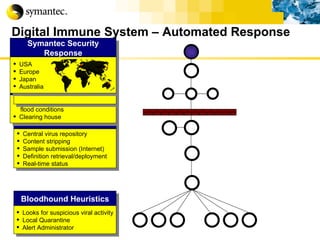
Digital Immune System – Automated Response Bloodhound Heuristics Looks for suspicious viral activity Local Quarantine Alert Administrator Central Quarantine Central virus repository Content stripping Sample submission (Internet) Definition retrieval/deployment Real-time status Immune System Gateways Scalable architecture to handle  flood conditions Clearing house Symantec AntiVirus  Response Automation Automatic analysis Generates cures for  90% of all submissions Symantec Security Response USA Europe Japan Australia
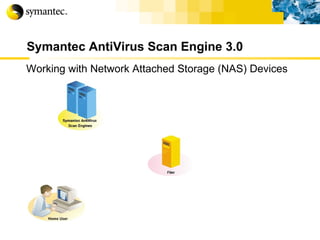
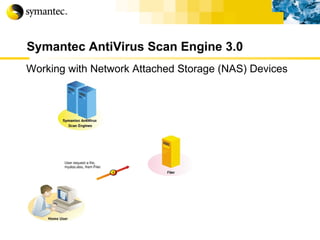
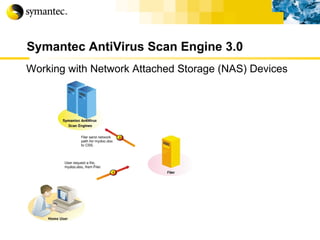
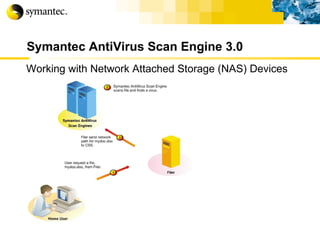
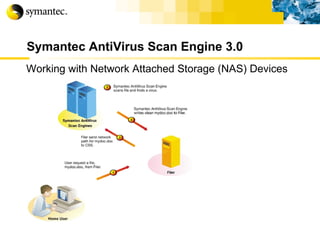
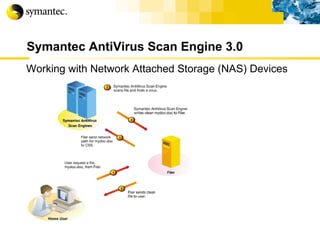
Symantec AntiVirus Scan Engine 3.0 Working with Network Attached Storage (NAS) Devices
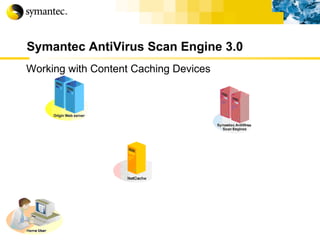
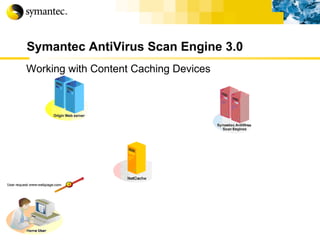
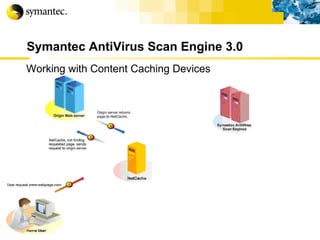
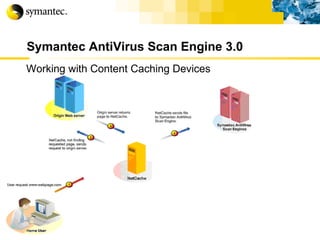
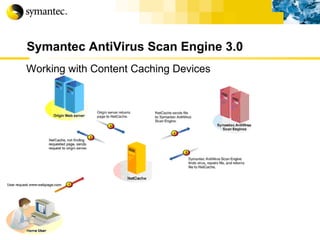
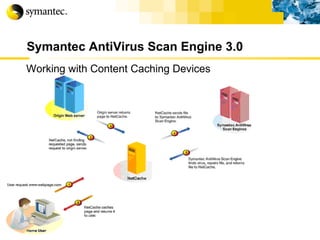
Symantec AntiVirus Scan Engine 3.0 Working with Content Caching Devices
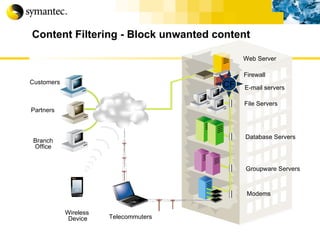
Content Filtering - Block unwanted content Firewall CF E-mail servers Groupware Servers Database Servers File Servers Customers Partners Branch Office Wireless   Device Web Server Telecommuters Modems
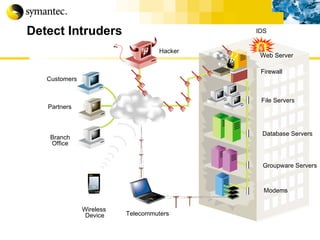
Detect Intruders Firewall Groupware Servers Database Servers File Servers Customers Partners Branch Office Wireless   Device Web Server Telecommuters Modems Hacker IDS
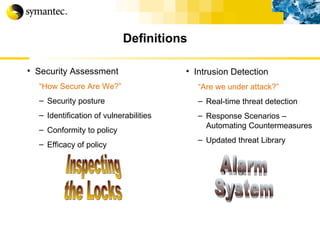
Definitions Security Assessment “ How Secure Are We?” Security posture Identification of vulnerabilities Conformity to policy Efficacy of policy Intrusion Detection “ Are we under attack?” Real-time threat detection Response Scenarios – Automating Countermeasures Updated threat Library Inspecting the Locks Alarm System
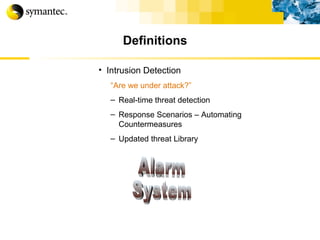
Definitions Intrusion Detection “ Are we under attack?” Real-time threat detection Response Scenarios – Automating Countermeasures Updated threat Library Alarm System
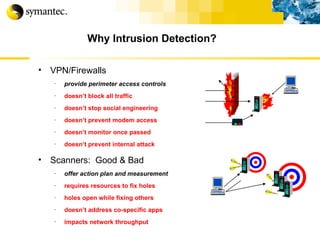
Why Intrusion Detection? VPN/Firewalls provide perimeter access controls doesn’t block all traffic doesn’t stop social engineering doesn’t prevent modem access doesn’t monitor once passed doesn’t prevent internal attack Scanners:  Good & Bad offer action plan and measurement requires resources to fix holes  holes open while fixing others doesn’t address co-specific apps impacts network throughput
Consider These Questions Can I  Detect? an intrusion as it occurs across my entire network?  Can I  React? with sufficient speed to minimize loss? Can I  Identify?   what systems and data were compromised? What is my risk of loss if I can’t?
(Network)  Monitors network traffic in real-time   Able to record and terminate sessions including modifying Firewall policy to prevent subsequent access (Host)  Continuously monitors servers  for misuse, malicious actions or policy abuse Analyzes system and application event logs and system calls including the ability to prevent data access and theft Attack / breach alerting, response and reporting Complements existing countermeasures Co-exists Firewalls, scanners, access controls, audit logs No impact on network performance Intrusion Detection offers
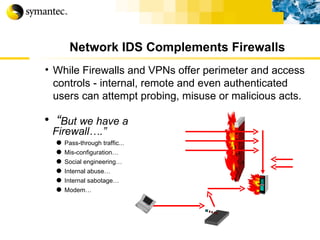
Network IDS Complements Firewalls While Firewalls and VPNs offer perimeter and access controls - internal, remote and even authenticated users can attempt probing, misuse or malicious acts. “ But we have a Firewall….” Pass-through traffic... Mis-configuration… Social engineering… Internal abuse… Internal sabotage… Modem…  
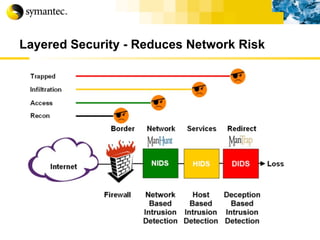
Layered Security - Reduces Network Risk
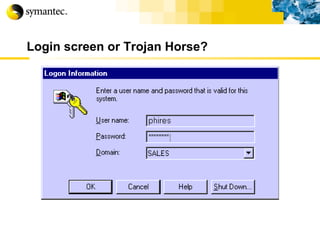
Login screen or Trojan Horse? G. Mark Hardy
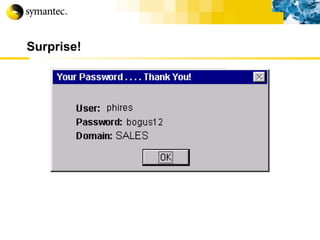
Surprise! G. Mark Hardy
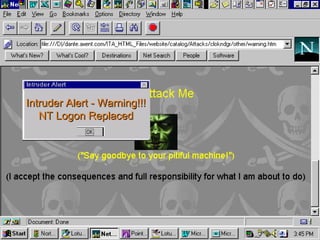
Intruder Alert - Warning!!! NT Logon Replaced
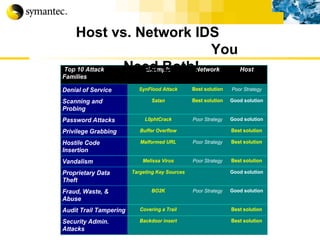
Host vs. Network IDS  You Need Both!
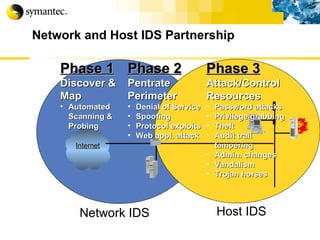
Network and Host IDS Partnership Network IDS Host IDS Phase 1 Discover & Map Automated Scanning & Probing Phase 2 Pentrate Perimeter Denial of Service Spoofing Protocol exploits Web appl. attack Phase 3 Attack/Control Resources Password attacks Privilege grabbing Theft Audit trail tampering Admin. changes Vandalism Trojan horses Internet
IDS Strengths Can be added to existing environment Does not require application or heavy system changes Detects attacks in real-time Responds to attacks Alerts you to attacks while they are happening Can assist in tracking down culprit
IDS Limitations No better at detecting attacks than the signatures or rules that drive it Will not catch everything Cannot block all attacks Does not replace need for firewall, authentication, or access controls Need to be careful that IDS does not cause Denial of Service Sometimes difficult to trace back to culprit Too many rules can cause performance problems Too many alarms can cause real problems to be lost in the noise
Why Traditional Network IDS Products Fall Short Products Focused on Aging Technology Standalone, single segment architecture Limited capability for high speed network detection Resource / time intensive manual event correlation Generate high numbers of false positives Limited response and attack mitigation capabilities
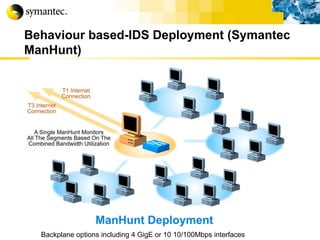
Backplane options including 4 GigE or 10 10/100Mbps interfaces Behaviour based-IDS Deployment (Symantec ManHunt)
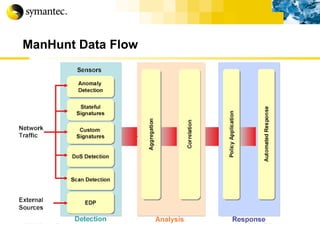
ManHunt Data Flow
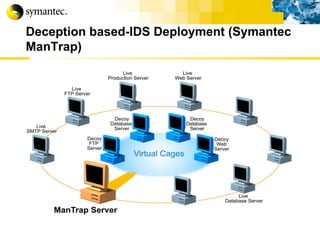
Deception based-IDS Deployment (Symantec ManTrap)
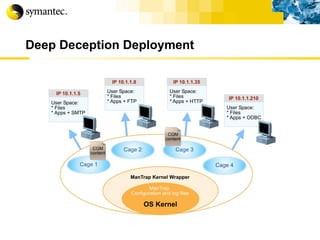
Deep Deception Deployment
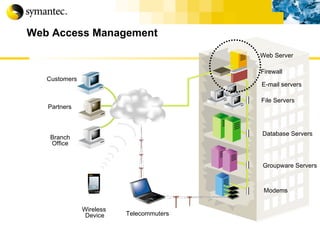
Web Access Management Firewall E-mail servers Groupware Servers Database Servers File Servers Customers Partners Branch Office Wireless   Device Web Server Telecommuters Modems
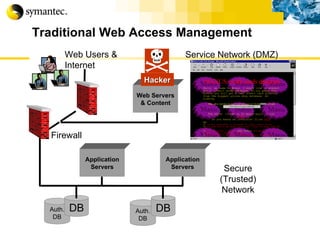
Traditional Web Access Management Auth. DB DB Auth. DB DB Secure (Trusted) Network Service Network (DMZ) Web Users & Internet Firewall Web Servers & Content Application Servers Application Servers Hacker
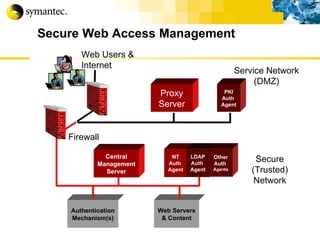
Secure Web Access Management Proxy Server NT Auth  Agent Authentication Mechanism(s) Secure (Trusted) Network Service Network (DMZ) Web Users & Internet Firewall LDAPAuth  Agent Other Auth  Agents Central Management Server Web Servers & Content PKI Auth  Agent
Authentication Username/password most common can be stolen or frequently cracked use SSL or similar web technology Two-factor authentication is stronger hardware token, smartcard, etc. soft token, digital certificate biometric
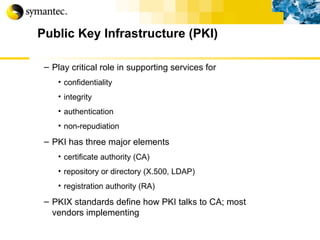
Public Key Infrastructure (PKI) Play critical role in supporting services for confidentiality integrity authentication non-repudiation PKI has three major elements certificate authority (CA) repository or directory (X.500, LDAP) registration authority (RA) PKIX standards define how PKI talks to CA; most vendors implementing
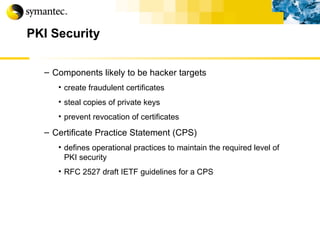
PKI Security Components likely to be hacker targets create fraudulent certificates steal copies of private keys prevent revocation of certificates Certificate Practice Statement (CPS) defines operational practices to maintain the required level of PKI security RFC 2527 draft IETF guidelines for a CPS
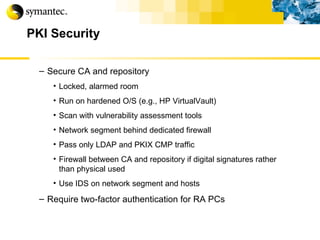
PKI Security Secure CA and repository Locked, alarmed room Run on hardened O/S (e.g., HP VirtualVault) Scan with vulnerability assessment tools Network segment behind dedicated firewall Pass only LDAP and PKIX CMP traffic Firewall between CA and repository if digital signatures rather than physical used Use IDS on network segment and hosts Require two-factor authentication for RA PCs
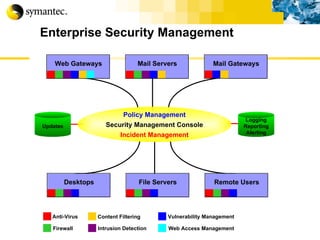
Enterprise Security Management Anti-Virus Firewall Content Filtering Vulnerability Management Web Access Management Intrusion Detection Web Gateways Mail Gateways Mail Servers File Servers Remote Users Desktops Policy Management Security Management Console Incident Management Logging Reporting Alerting Updates
How to implement in our system?
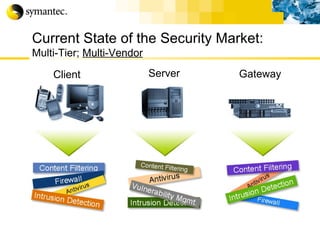
Client Server Gateway Current State of the Security Market: Multi-Tier;  Multi-Vendor
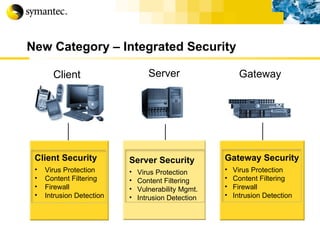
New Category – Integrated Security Client Server Gateway Client Security Virus Protection Content Filtering Firewall Intrusion Detection Server Security Virus Protection Content Filtering Vulnerability Mgmt. Intrusion Detection Gateway Security Virus Protection Content Filtering Firewall Intrusion Detection
Achieve  preventive  security through  policy compliance and vulnerability management  and  reduce  business risk!! Gaining the edge
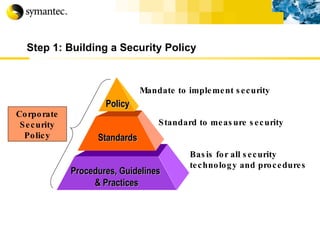
Step 1: Building a Security Policy Mandate to implement security Standard to measure security Basis for all security technology and procedures Policy Standards Procedures, Guidelines  & Practices Corporate Security Policy
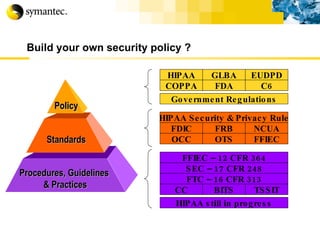
Build your own security policy ? FFIEC – 12 CFR 364 COPPA FDA C6 HIPAA GLBA EUDPD Government Regulations HIPAA Security & Privacy Rule OCC OTS FFIEC FDIC FRB NCUA SEC – 17 CFR 248 FTC – 16 CFR 313 HIPAA still in progress CC BITS TSSIT Policy Standards Procedures, Guidelines  & Practices
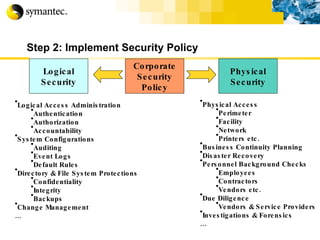
Step 2: Implement Security Policy Corporate Security Policy Physical Security Logical Security Physical Access Perimeter Facility Network Printers etc. Business Continuity Planning Disaster Recovery Personnel Background Checks Employees Contractors Vendors etc. Due Diligence Vendors & Service Providers Investigations & Forensics … Logical Access Administration Authentication Authorization Accountability System Configurations Auditing Event Logs Default Rules Directory & File System Protections Confidentiality Integrity Backups Change Management …
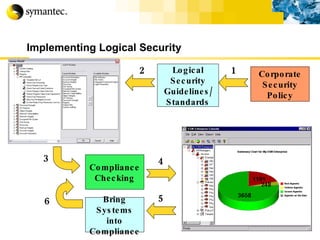
Implementing Logical Security Corporate Security Policy Logical Security Guidelines/ Standards Compliance Checking Bring Systems into Compliance 1 2 3 4 5 6
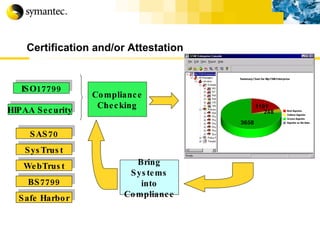
Certification and/or Attestation BS7799 SAS70 Safe Harbor SysTrust WebTrust ISO17799 Compliance Checking Bring Systems into Compliance HIPAA Security
ESM assess and comply  Actual Environment ESM COMPLIANCE Policy Standards Procedures, Guidelines  & Practices
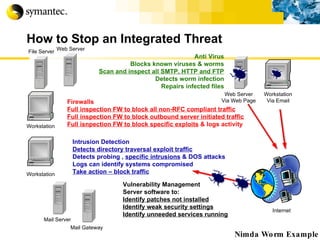
How to Stop an Integrated Threat Internet Nimda Worm Example Workstation Anti Virus Blocks known viruses & worms Scan and inspect all SMTP, HTTP and FTP Detects worm infection Repairs infected files Firewalls Full inspection FW to block all non-RFC compliant traffic Full inspection FW to block outbound server initiated traffic Full isnpection FW to block specific exploits  & logs activity Intrusion Detection Detects directory traversal exploit traffic Detects probing ,  specific intrusions  & DOS attacks Logs can identify systems compromised Take action – block traffic Vulnerability Management Server software to: Identify patches not installed Identify weak security settings Identify unneeded services running Workstation Via Email File Server Workstation Mail Server Web Server Via Web Page Web Server Mail Gateway
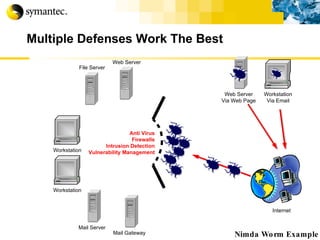
Multiple Defenses Work The Best Internet Nimda Worm Example Workstation Anti Virus Firewalls Intrusion Detection Vulnerability Management Workstation Via Email File Server Workstation Mail Server Web Server Via Web Page Web Server Mail Gateway
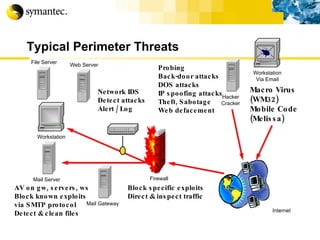
Typical Perimeter Threats Internet Probing Back-door attacks DOS attacks IP spoofing attacks Theft, Sabotage Web defacement Macro Virus (WM32) Mobile Code (Melissa) Block specific exploits Direct & inspect traffic AV on gw, servers, ws Block known exploits via SMTP protocol Detect & clean files Network IDS Detect attacks Alert / Log Workstation Via Email File Server Workstation Mail Server Firewall Hacker Cracker Web Server Mail Gateway
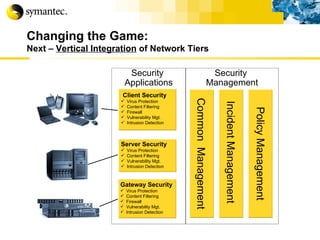
Changing the Game: Next –  Vertical Integration  of Network Tiers Security  Applications Gateway Security Virus Protection Content Filtering Firewall Vulnerability Mgt. Intrusion Detection Server Security Virus Protection Content Filtering Vulnerability Mgt. Intrusion Detection Client Security Virus Protection Content Filtering Firewall Vulnerability Mgt. Intrusion Detection Common  Management Incident Management  Policy Management Security  Management
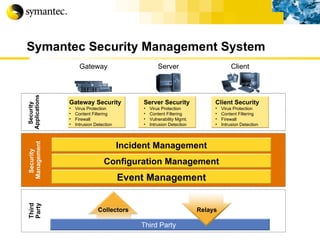
Symantec Security Management System Client Client Security Virus Protection Content Filtering Firewall Intrusion Detection Gateway Gateway Security Virus Protection Content Filtering Firewall Intrusion Detection Server Server Security Virus Protection Content Filtering Vulnerability Mgmt. Intrusion Detection Security  Applications Security  Management Event Management Configuration Management Incident Management Third Party Collectors Third Party Relays
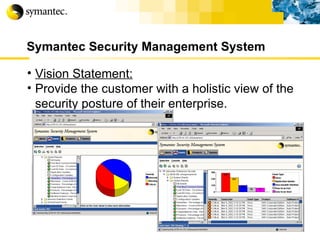
Symantec Security Management System Vision Statement: Provide the customer with a holistic view of the security posture of their enterprise.
Customer case studies
 
Symantec is winning at the Gateway!
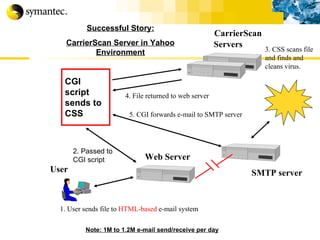
User SMTP server 1. User sends file to  HTML-based  e-mail system CarrierScan Servers 3. CSS scans file  and finds and cleans virus. Successful Story: CarrierScan Server in Yahoo Environment 5. CGI forwards e-mail to SMTP server Web Server CGI script sends to CSS 2. Passed to  CGI script 4. File returned to web server Note: 1M to 1.2M e-mail send/receive per day
Customer Success Stories
Wrap Up
Wrap-up
Thank you Somyos Udomnilobon [email_address] (662)627-9051
 

Event - Internet Thailand - Total Security Perimeters

  • 1.
    Symantec Enterprise Security: Securing your business along network intrusions Somyos Udomnilobon Sales Engineer - Thailand
  • 2.
    Symantec Corporation Ourpromise: “ Pure confidence for individuals and enterprises in a connected world” Over $1 Billion in revenue Approx. 4,000 Employees 37 Countries worldwide Over 100 million users Technology Services Response
  • 3.
  • 4.
    Symantec Enterprise SecuritySolution Vulnerability Management Firewall/VPN Intrusion Detection Virus Protection Client Security Managed Security Services Education Services Response and Support Gateway Security Security Infrastructure Management
  • 5.
    Agenda Why securityis concern with business? Security Threats & how to protect… Wrap-up
  • 6.
  • 7.
    Security Challenges Protectinformation which you must openly share Ever changing infrastructure technologies Increased connectivity leads to increased complexity The need to implement strong controls that are transparent to end users Apply security without jeopardizing performance and availability Reduced costs Increasingly difficult to stay on top of all the new features in applications and operating systems More work with less people to do it with
  • 8.
    The Business ReasonsTwo Main Business Drivers Increased revenue Increased profitability Three Main Security Drivers Increasingly open and connected architecture leads to an increased vulnerability to attacks If an attack happens the results can be catastrophic The Damage per Incident is much greater
  • 9.
    Security is aBusiness Issue Availability interruption of services Confidentiality disclosure of information Integrity corruption of data Aim Point Effect Points
  • 10.
    Why the SecurityProblem is hard to fix Where’s the sweet spot?
  • 11.
    The Lifecycle SecurityModel Key To Success Identify systems and assets on the network and identify critical vulnerability points Define and document an organizational security policy Identify changes to network infrastructure and compliance with policies
  • 12.
    Strategic Business RisksRegulatory Action Corporate Liability Indirect Costs Loss of Customer Confidence
  • 13.
    Cyber-Security Is Nowa Boardroom and a Legislative Concern Estimated 2001 global cost from breaches: Tens to hundreds of billions of dollars 2001 projected US losses: 2.7% of US GDP Source: Internetweek 2002
  • 14.
    Security Critical toe-Business Success Importance of Security in eBusiness Solution Decision Criteria Source: IDC
  • 15.
    Source: survey of538 computer security professionals conducted by the Computer Security Institute (CSI) and the US Federal Bureau of Investigation (FBI) . Soaring Costs and Security Breaches
  • 16.
    Evolving Security ThreatsWill Your Perimeter Security Stop Them?
  • 17.
    Threat Evolution PolymorphicViruses (Tequila) Blended Threats (Code Red, Nimda) Denial-of-Service (Yahoo!, eBay) Mass Mailer Viruses (Love Letter/Melissa) Zombies Source: Symantec Viruses Network Intrusions 70,000 60,000 50,000 40,000 30,000 20,000 10,000 Number of Known Threats
  • 18.
    Source: CERT, CarnegieMellon University http://www.cert.org/stats/ > 99%
  • 19.
    Average Reported LossesUnauthorized Insider Access Theft of Proprietary Information Outside System Penetration Financial Fraud Sabotage and Denial of Services 2000 CSI/FBI Computer Crime and Security Survey $1.1 M + $1.0 M + $617,000 $536,000 $172,000
  • 20.
  • 21.
    Democratization of HackingOver 30,000 hacking oriented sites Original hacker ethic is dead No longer need to be a guru Ability to download click-and-hack programs and scripts Advent of “hactivism” as a method for social protest
  • 22.
    The Hacking MethodologyInternet Footprinting Scanning and Landscape discovery Enumerating Penetrating Pillage Get Interactive Expand Influence
  • 23.
    Internet Footprinting ReviewPublic Information Examples www.asic.com.au or www.netcraft.com “ Whois” Enumeration (domain names and networks) DNS Interrogation (nslookup) Network Reconnaissance (registry and IP block lookup) ARIN, APNIC, RIPE Traceroute, Ping BGP (Border Gateway Protocol) (find more addresses)
  • 24.
    Scanning and LandscapeDiscovery Ping Sweep (what hosts respond) Port Scanning (what ports are open) Banner Grabbing (what services are running) OS Guessing (what OS and vulnerabilities are inherent) Build a detailed picture of the target network. (Web Servers and other DMZ locals are the most common target)
  • 25.
    Half Time. Upto this point everything was pretty much below the radar. Mostly public information or normal network operation. From this points onwards things get serious!
  • 26.
    Host Enumeration Thehacker is looking to obtain detailed information. User Details and Machine Details. Domain Names, Membership and Trust relationships SNMP and LDAP (mostly for usernames) MAC Addresses Special Services or Deamons The aim is to get a full understanding of the roles and functions of each host in the target network.
  • 27.
    Penetrate (take ownership)Choose the right host to attack. Guessing username and password combinations. Taking SAM and password files for cracking. (DumpSEC) Use known accounts such as ArcServe, Tivoli, BackupExec. Default passwords are largely left unchanged.
  • 28.
    Escalating your rightsRoot or Administrator equivalent is the target here. Many tools are available for this. GetAdmin SecHole PipeUpAdmin etc… Microsoft NT/2000 Resource Kit. (believe it or not!)
  • 29.
    Pillage The compromisedsystem becomes a staging point to penetrate the rest of the network. Preparations are made for further penetration. Multiple entry points are created for later re-entry. Tracks are covered. (log files erased or better yet, modified) SAM and password files are downloaded.
  • 30.
    Get Interactive Gainan interactive command shell on the target machine. Move the admin tools (crack tools) onto other system and in inconspicuous places. From here the process of footprinting etc.. Starts again.
  • 31.
    Expanding Influence Attackingthe Internal Network and extend your reach. Using the first machine as a staging point Preparations are made for future operations Trojans, Remote Control apps, Hijacking tools, Streams, Auditpol, BO2K, etc…. “ Hacking ROOT is a way of life…”
  • 32.
    Exploiting Buffer OverflowCommon UNIX attack to gain complete access Buffer overflows exploits software bugs that cause it to overwrite segments of memory New buffer overflows continue to be discovered k Input Buffer Program Area User Input Excess Data Input overflow into program area
  • 33.
    Denial of Service(DoS) TCP/IP Exploits Ping of death Sending oversized (>64k) ICMP echo packets to a vulnerable system “ Drop” Attacks teardrop syndrop boink SYN Flood LAND Process table flooding through Network services r
  • 34.
    Denial of ServiceExample: LAND Attack Spoofed IP Packet Packet is sent back to itself Again, again, .. Land Unix-Server CRASH
  • 35.
    Distributed DoS The Internet Meltdown The following sites were attacked: Yahoo 10:20 a.m. 2/7/00 PST 3.0 hours Buy.com 10:50 a.m. 2/8/00 PST 3.0 hours eBay 3:20 p.m. 2/8/00 PST 1.5 hours CNN.com 4:00 p.m. 2/8/00 PST 1.8 hours Amazon.com 5:00 p.m. 2/8/00 PST 1.0 hour ZDNet 6:45 a.m. 2/9/00 PST 3.0 hours E*Trade 5:00 a.m. 2/9/00 PST 1.5 hours Datek 6:35 a.m. 2/9/00 PST 0.5 hours Many others sites rumored to have been attacked
  • 36.
    Distributed DoS Representsa new level of attack Use of multiple, sometimes compromised systems, to launch attacks known as “zombies” attackers looked for machines with large pipes to the Internet Upon receipt of remote command, zombies simultaneously flood target with packets Attacks included Trin00, Tribal Flood Network (TFN), and Stacheldraht
  • 37.
  • 38.
    The New “IntegratedThreats” Internet Nimda Worm Example Workstation A security threat or attack that uses multiple methods to propagate Nimda $500M + Code Red $2.5B Workstation Via Email File Server Workstation Mail Server Firewall Web Server Via Web Page Web Server Mail Gateway
  • 39.
    Rapid, Multiple Waysto Spread Internet Nimda Worm Example 1. Worm arrives by email – uses Mime exploit to execute by just reading or previewing file. Infected systems use worm’s own SMTP server to send emails to others. 2. Users visiting compromised Web servers prompted to download infected file containing worm as attachment. Workstation Via Email File Server Workstation Mail Server Firewall Web Server Via Web Page Workstation Web Server Mail Gateway
  • 40.
    Just “Any” FirewallWon’t Be Effective Internet Nimda Worm Example Workstation 3. Infected systems scan for unpatched IIS servers, then use Unicode Web Traversal exploit to gain control of the target server. Commands/messages embedded creating non-RFC compliant HTTP protocol packets. Create DOS with outbound traffic. 4. Nimda scans for and attacks hard disks with file sharing enabled, creates an open network share and guest account with admin privileges. File Server Mail Server Firewall Web Server Mail Gateway Workstation Via Email Web Server Via Web Page Workstation
  • 41.
    Nimda: 2.2M SystemsInfected in 3 Days! 1. Infection of web servers via “Code Red-type” attack Web Server Remote User Enterprise File Server Workstation Web Server Mail Server Laptop Firewall
  • 42.
    Nimda: 2.2M SystemsInfected in 3 Days! 2. Infection via email NIMD A Remote User Enterprise File Server Workstation Web Server Mail Server Laptop Firewall
  • 43.
    Nimda: 2.2M SystemsInfected in 3 Days! 3. Infection via Web browsing Remote User Enterprise File Server Workstation Web Server Mail Server Laptop Firewall
  • 44.
    Nimda: 2.2M SystemsInfected in 3 Days! 4. Infection via shared drives Remote User Enterprise File Server Workstation Web Server Mail Server Laptop Firewall
  • 45.
    Nimda: 2.2M SystemsInfected in 3 Days! 5. And infection to other files on each infected computer through traditional viral methods Remote User Enterprise File Server Workstation Web Server Mail Server Laptop Firewall Remote User
  • 46.
    Example Blended ThreatIncident Blended Threats use worms, email and application vulnerabilities, and network shares to gain control of systems BT BT BT BT BT BT BT BT BT BT BT
  • 47.
    A Blended ThreatExample – Code Red We’re no longer talking about thousands of machines launching an attack, but potentially tens of millions Code Red Epidemiology
  • 48.
  • 49.
  • 50.
  • 51.
  • 52.
  • 53.
  • 54.
    Web Site DefacementsSource: attrition.org
  • 55.
    Security requires defensein depth Groupware Servers Database Servers File Servers Telecommuters Modems Hacker Customers Partners Branch Office Wireless Device Web Server Firewall
  • 56.
  • 57.
    Securing your business…How to prevent your network against intrusion?
  • 58.
    Vulnerability Management -Scan Groupware Servers Database Servers File Servers Customers Partners Branch Office Wireless Device Web Server Telecommuters Modems Firewall Probe for Vulnerabilities Probe for Vulnerabilities
  • 59.
    Vulnerability Management Ifyou know where you are vulnerable and the risk these vulnerabilities pose to your organization, efficient steps can be taken to pro-actively close the vulnerabilities and mitigate the risk to an acceptable level.
  • 60.
  • 61.
    Host vs. NetworkHost-Based Assessment Inside-in view View systems from local privileged account perspective High-level summaries to convey status Scheduled, safe, minimal impact to network, unobtrusive to end users Network-Based Assessment Outside-in view View network from external “hacker” perspective Provide no insight into user activity risks Test critical network devices that do not run host software like: routers, switches, printers, appliances, and firewalls KEY = Hybrid, integrated approach In/out pix t
  • 62.
    ESM - InsideIn NetRecon – Outside In ESM
  • 63.
    ESM assess andcomply Actual Environment ESM COMPLIANCE Policy Standards Procedures, Guidelines & Practices
  • 64.
    Firewall - Multi-tierapproach Firewall Groupware Servers Database Servers File Servers Customers Partners Branch Office Wireless Device Web Server Telecommuters Modems
  • 65.
    Firewall Types Manytypes and vendors present in the market Most commercial firewalls mix characteristics from several firewall technologies Four basic types: Packet filtering Dynamic packet filtering Circuit-level gateway Stateful inspection (multilayer) Application gateway Air Gap
  • 66.
    Firewall Types: Packet Filtering Very basic firewall approach Often employed on simple routers or Layer 3 switches Examines incoming/outgoing IP packets and decides to accept/deny based on: Source/destination IP address Source/destination TCP/UDP port numbers Only looks at IP packet header, not data payload
  • 67.
    Packet Filtering RulesBelow are a few sample rules for telnet, SMTP, FTP, NNTP, HTTP, and SSL Packet filters process rules in order
  • 68.
    Simple Packet FilterStandard IP router with packet filter rules defined Combines routing with packet filtering Filter rules based on Data Link, IP, UDP, and TCP headers Standard and custom rules Disadvantages Inspects packets in isolation, does not maintain state information Limited handling of complex policies Susceptible to Application Layer attacks
  • 69.
    Firewall Types –Circuit-level Gateway Looks at TCP handshaking process Allows creation of authorized connections, but does not monitor data traffic over those connections Keeps records of active authorized connections, and allows network traffic only over those connections
  • 70.
    Firewall Types –Stateful Inspection Higher level of security and complexity than packet filter Examines IP header and data payload to verify the packet is part of an authorized previous connection Can also provide network address translation (NAT) services, or circuit and application-level filtering Present in multilayer stateful inspection
  • 71.
    Stateful Packet FilterStateful packet filter Maintains state information on connections Tracks open, valid connections without reprocessing rule set Scales easily Can implement complex policies Extensive logging and alarm functions Easy-to-use interface Disadvantages Susceptibility to Application Layer attacks Lacks user authentication control
  • 72.
    Firewall types –Application Gateway Screens packets based on whether the application they serve is allowed Also acts as an application proxy (no direct connection between host and remote computers) Considered by many to be most secure Can also be added
  • 73.
    Full Application InspectionUses a set of application-level proxies Protects against common attacks (buffer overflows, back door commands, and information leakage) One per application—FTP, SMTP, HTTP, … Proxy protection Allow or disallow initial connection request Enforces strong or weak user authentication Acts as an intermediary, maintains dual opposing connections between endpoints Inspects entire data stream during the session Can rewrite IP addresses—Hides internal network identity Detailed logging for analysis and data forensics Client Server Proxy Client Server Logical connection
  • 74.
    Hybrid Firewall Drivenby the need to combine security, flexibility, and performance , hybrid firewalls provide protection at all the layers of the network stack Application proxy protection provides maximum security and granularity by scanning traffic at the application layer! Stateful filtering protection provides authentication and maintains session state for performance and ease of management Packet filtering protection prevents denied traffic from consuming valuable resources on the system
  • 75.
    Number of vulnerabilities Level of security
  • 76.
    Firewall Types –Pro and Con Packet filter Pro: low performance impact, low-cost Con: incomplete security, easy to fool Circuit-level gateway Pro: higher security than packet filter Con: does not evaluate packet data content for established connections Stateful inspection Pro: combination of speed and security Con: does not provide complete protocol analysis of packets – lower security Application Gateway Pro: highest security Con: performance hit if not designed right
  • 77.
    Deployment Example DesktopsPublic Web Servers Telecommuters Customers & Partners Servers VelociRaptor Router Corporate Network Partner Web Servers Branch Office Central Administrator Internet
  • 78.
    VPN - Office-to-officeand Client Firewall Groupware Servers Database Servers File Servers Customers Partners Branch Office Wireless Device Web Server Telecommuters Modems
  • 79.
    Virtual Private Network(VPN) Securely extends the corporate network to branch offices, telecommuters, and partners Reduces telecommunication costs associated with leased lines and 800-dialup lines Provides data confidentiality, data integrity, and authentication services Partners/ Contractors Remote offices Telecommuters Internet VPN Device VPN Device Private VPN Device
  • 80.
    VPN (Cont.) Availableas an integrated cross-grade to the firewall, or stand-alone Symantec Enterprise Firewall with VPN Symantec Enterprise VPN Build on-top of the award winning Symantec Enterprise Firewall architecture System and network level hardening Proxy-Secured Technology Extends full inspection protection and user authentication to VPN Tunnel Traffic! ICSA Certified for interoperability with other vendors Used by ICSA as a standard product to validate new products Export classification for 3DES/DES Exportable outside North America with proper paperwork
  • 81.
    VPN (Cont.) Fullsupport for IPSec standards Encapsulation Security Payload (ESP) Authentication Header (AH) Internet Security Association Key Management Protocol (ISAKMP) Internet Key Exchange (IKE) Gateway-to-Gateway VPN Shared key authentication and PKI support Supports DNS names in tunnel definition Compatible with Symantec Firewall/VPN and VelociRaptor 1.1 appliances, and MOST IPSec compliant servers Active connection display Client-to-Gateway VPN Includes Symantec Enterprise VPN Client with Personal Firewall Supports user authentication using shared secret key
  • 82.
    VPN (Cont.) DynamicTunnel Internet Key Exchange (IKE) Main mode, Aggressive mode, and Quick Mode support 3DES/SHA1, DES/MD5, Shared Secret Static Tunnels ESP/AH 3DES/SHA1, DES/MD5 Public Key Infrastructure Support Entrust-ready! VPN Tunnel Wizards for easy administration
  • 83.
    VPN Deployment ScenariosPublic Servers Symantec Enterprise Firewall Router Symantec Enterprise VPN Public Servers Symantec Enterprise Firewall With VPN Router Internal Network Public Servers Symantec Enterprise Firewall Router Internal Network Symantec Enterprise VPN Internal Network Internet Internet Internet
  • 84.
    Personal Firewall withClient VPN Web FTP Telnet SQLNet Other Attacker Internal network VPN User without firewall Internet Personal Firewall Web FTP Telnet SQLNet Other VPN User with firewall
  • 85.
    Anti-virus - Multi-tierApproach Firewall Groupware Servers Database Servers File Servers Customers Partners Branch Office Wireless Device Web Server Telecommuters Modems AV AV AV AV AV AV AV AV AV AV AV
  • 86.
    Virus Evolution MassMailer Viruses (LoveLetter/Melissa) Remote Control Trojan (NetBus) Polymorphic Viruses (Tequila) PDA Virus (Palm Liberty) Macro Viruses Source: Symantec Number of Known Viruses
  • 87.
    Virus Protection Useanti-viral and content scanning software with automated signature updating desktop e-mail server firewall Apply latest patches e-mail (e.g., Outlook) browser O/S Don’t double click blindly on attachments Use higher levels of browser security r
  • 88.
    Symantec Multi-tier VirusProtection Gateway/ Firewall Gateways: Solaris Win NT/2000 Firewalls: Solaris Win NT/2000 Server Win NT/2000 NetWare MS Exchange Lotus Notes AIX OS/390 OS/400 OS/2 Desktop Win9x/NT/2000/WinME DOS/Win16 OS/2 Macintosh
  • 89.
    Digital Immune System– Automated Response Bloodhound Heuristics Looks for suspicious viral activity Local Quarantine Alert Administrator Central Quarantine Central virus repository Content stripping Sample submission (Internet) Definition retrieval/deployment Real-time status Immune System Gateways Scalable architecture to handle flood conditions Clearing house Symantec AntiVirus Response Automation Automatic analysis Generates cures for 90% of all submissions Symantec Security Response USA Europe Japan Australia
  • 90.
    Symantec AntiVirus ScanEngine 3.0 Working with Network Attached Storage (NAS) Devices
  • 91.
    Symantec AntiVirus ScanEngine 3.0 Working with Network Attached Storage (NAS) Devices
  • 92.
    Symantec AntiVirus ScanEngine 3.0 Working with Network Attached Storage (NAS) Devices
  • 93.
    Symantec AntiVirus ScanEngine 3.0 Working with Network Attached Storage (NAS) Devices
  • 94.
    Symantec AntiVirus ScanEngine 3.0 Working with Network Attached Storage (NAS) Devices
  • 95.
    Symantec AntiVirus ScanEngine 3.0 Working with Network Attached Storage (NAS) Devices
  • 96.
    Symantec AntiVirus ScanEngine 3.0 Working with Content Caching Devices
  • 97.
    Symantec AntiVirus ScanEngine 3.0 Working with Content Caching Devices
  • 98.
    Symantec AntiVirus ScanEngine 3.0 Working with Content Caching Devices
  • 99.
    Symantec AntiVirus ScanEngine 3.0 Working with Content Caching Devices
  • 100.
    Symantec AntiVirus ScanEngine 3.0 Working with Content Caching Devices
  • 101.
    Symantec AntiVirus ScanEngine 3.0 Working with Content Caching Devices
  • 102.
    Content Filtering -Block unwanted content Firewall CF E-mail servers Groupware Servers Database Servers File Servers Customers Partners Branch Office Wireless Device Web Server Telecommuters Modems
  • 103.
    Detect Intruders FirewallGroupware Servers Database Servers File Servers Customers Partners Branch Office Wireless Device Web Server Telecommuters Modems Hacker IDS
  • 104.
    Definitions Security Assessment“ How Secure Are We?” Security posture Identification of vulnerabilities Conformity to policy Efficacy of policy Intrusion Detection “ Are we under attack?” Real-time threat detection Response Scenarios – Automating Countermeasures Updated threat Library Inspecting the Locks Alarm System
  • 105.
    Definitions Intrusion Detection“ Are we under attack?” Real-time threat detection Response Scenarios – Automating Countermeasures Updated threat Library Alarm System
  • 106.
    Why Intrusion Detection?VPN/Firewalls provide perimeter access controls doesn’t block all traffic doesn’t stop social engineering doesn’t prevent modem access doesn’t monitor once passed doesn’t prevent internal attack Scanners: Good & Bad offer action plan and measurement requires resources to fix holes holes open while fixing others doesn’t address co-specific apps impacts network throughput
  • 107.
    Consider These QuestionsCan I Detect? an intrusion as it occurs across my entire network? Can I React? with sufficient speed to minimize loss? Can I Identify? what systems and data were compromised? What is my risk of loss if I can’t?
  • 108.
    (Network) Monitorsnetwork traffic in real-time Able to record and terminate sessions including modifying Firewall policy to prevent subsequent access (Host) Continuously monitors servers for misuse, malicious actions or policy abuse Analyzes system and application event logs and system calls including the ability to prevent data access and theft Attack / breach alerting, response and reporting Complements existing countermeasures Co-exists Firewalls, scanners, access controls, audit logs No impact on network performance Intrusion Detection offers
  • 109.
    Network IDS ComplementsFirewalls While Firewalls and VPNs offer perimeter and access controls - internal, remote and even authenticated users can attempt probing, misuse or malicious acts. “ But we have a Firewall….” Pass-through traffic... Mis-configuration… Social engineering… Internal abuse… Internal sabotage… Modem…  
  • 110.
    Layered Security -Reduces Network Risk
  • 111.
    Login screen orTrojan Horse? G. Mark Hardy
  • 112.
  • 113.
    Intruder Alert -Warning!!! NT Logon Replaced
  • 114.
    Host vs. NetworkIDS You Need Both!
  • 115.
    Network and HostIDS Partnership Network IDS Host IDS Phase 1 Discover & Map Automated Scanning & Probing Phase 2 Pentrate Perimeter Denial of Service Spoofing Protocol exploits Web appl. attack Phase 3 Attack/Control Resources Password attacks Privilege grabbing Theft Audit trail tampering Admin. changes Vandalism Trojan horses Internet
  • 116.
    IDS Strengths Canbe added to existing environment Does not require application or heavy system changes Detects attacks in real-time Responds to attacks Alerts you to attacks while they are happening Can assist in tracking down culprit
  • 117.
    IDS Limitations Nobetter at detecting attacks than the signatures or rules that drive it Will not catch everything Cannot block all attacks Does not replace need for firewall, authentication, or access controls Need to be careful that IDS does not cause Denial of Service Sometimes difficult to trace back to culprit Too many rules can cause performance problems Too many alarms can cause real problems to be lost in the noise
  • 118.
    Why Traditional NetworkIDS Products Fall Short Products Focused on Aging Technology Standalone, single segment architecture Limited capability for high speed network detection Resource / time intensive manual event correlation Generate high numbers of false positives Limited response and attack mitigation capabilities
  • 119.
    Backplane options including4 GigE or 10 10/100Mbps interfaces Behaviour based-IDS Deployment (Symantec ManHunt)
  • 120.
  • 121.
  • 122.
  • 123.
    Web Access ManagementFirewall E-mail servers Groupware Servers Database Servers File Servers Customers Partners Branch Office Wireless Device Web Server Telecommuters Modems
  • 124.
    Traditional Web AccessManagement Auth. DB DB Auth. DB DB Secure (Trusted) Network Service Network (DMZ) Web Users & Internet Firewall Web Servers & Content Application Servers Application Servers Hacker
  • 125.
    Secure Web AccessManagement Proxy Server NT Auth Agent Authentication Mechanism(s) Secure (Trusted) Network Service Network (DMZ) Web Users & Internet Firewall LDAPAuth Agent Other Auth Agents Central Management Server Web Servers & Content PKI Auth Agent
  • 126.
    Authentication Username/password mostcommon can be stolen or frequently cracked use SSL or similar web technology Two-factor authentication is stronger hardware token, smartcard, etc. soft token, digital certificate biometric
  • 127.
    Public Key Infrastructure(PKI) Play critical role in supporting services for confidentiality integrity authentication non-repudiation PKI has three major elements certificate authority (CA) repository or directory (X.500, LDAP) registration authority (RA) PKIX standards define how PKI talks to CA; most vendors implementing
  • 128.
    PKI Security Componentslikely to be hacker targets create fraudulent certificates steal copies of private keys prevent revocation of certificates Certificate Practice Statement (CPS) defines operational practices to maintain the required level of PKI security RFC 2527 draft IETF guidelines for a CPS
  • 129.
    PKI Security SecureCA and repository Locked, alarmed room Run on hardened O/S (e.g., HP VirtualVault) Scan with vulnerability assessment tools Network segment behind dedicated firewall Pass only LDAP and PKIX CMP traffic Firewall between CA and repository if digital signatures rather than physical used Use IDS on network segment and hosts Require two-factor authentication for RA PCs
  • 130.
    Enterprise Security ManagementAnti-Virus Firewall Content Filtering Vulnerability Management Web Access Management Intrusion Detection Web Gateways Mail Gateways Mail Servers File Servers Remote Users Desktops Policy Management Security Management Console Incident Management Logging Reporting Alerting Updates
  • 131.
    How to implementin our system?
  • 132.
    Client Server GatewayCurrent State of the Security Market: Multi-Tier; Multi-Vendor
  • 133.
    New Category –Integrated Security Client Server Gateway Client Security Virus Protection Content Filtering Firewall Intrusion Detection Server Security Virus Protection Content Filtering Vulnerability Mgmt. Intrusion Detection Gateway Security Virus Protection Content Filtering Firewall Intrusion Detection
  • 134.
    Achieve preventive security through policy compliance and vulnerability management and reduce business risk!! Gaining the edge
  • 135.
    Step 1: Buildinga Security Policy Mandate to implement security Standard to measure security Basis for all security technology and procedures Policy Standards Procedures, Guidelines & Practices Corporate Security Policy
  • 136.
    Build your ownsecurity policy ? FFIEC – 12 CFR 364 COPPA FDA C6 HIPAA GLBA EUDPD Government Regulations HIPAA Security & Privacy Rule OCC OTS FFIEC FDIC FRB NCUA SEC – 17 CFR 248 FTC – 16 CFR 313 HIPAA still in progress CC BITS TSSIT Policy Standards Procedures, Guidelines & Practices
  • 137.
    Step 2: ImplementSecurity Policy Corporate Security Policy Physical Security Logical Security Physical Access Perimeter Facility Network Printers etc. Business Continuity Planning Disaster Recovery Personnel Background Checks Employees Contractors Vendors etc. Due Diligence Vendors & Service Providers Investigations & Forensics … Logical Access Administration Authentication Authorization Accountability System Configurations Auditing Event Logs Default Rules Directory & File System Protections Confidentiality Integrity Backups Change Management …
  • 138.
    Implementing Logical SecurityCorporate Security Policy Logical Security Guidelines/ Standards Compliance Checking Bring Systems into Compliance 1 2 3 4 5 6
  • 139.
    Certification and/or AttestationBS7799 SAS70 Safe Harbor SysTrust WebTrust ISO17799 Compliance Checking Bring Systems into Compliance HIPAA Security
  • 140.
    ESM assess andcomply Actual Environment ESM COMPLIANCE Policy Standards Procedures, Guidelines & Practices
  • 141.
    How to Stopan Integrated Threat Internet Nimda Worm Example Workstation Anti Virus Blocks known viruses & worms Scan and inspect all SMTP, HTTP and FTP Detects worm infection Repairs infected files Firewalls Full inspection FW to block all non-RFC compliant traffic Full inspection FW to block outbound server initiated traffic Full isnpection FW to block specific exploits & logs activity Intrusion Detection Detects directory traversal exploit traffic Detects probing , specific intrusions & DOS attacks Logs can identify systems compromised Take action – block traffic Vulnerability Management Server software to: Identify patches not installed Identify weak security settings Identify unneeded services running Workstation Via Email File Server Workstation Mail Server Web Server Via Web Page Web Server Mail Gateway
  • 142.
    Multiple Defenses WorkThe Best Internet Nimda Worm Example Workstation Anti Virus Firewalls Intrusion Detection Vulnerability Management Workstation Via Email File Server Workstation Mail Server Web Server Via Web Page Web Server Mail Gateway
  • 143.
    Typical Perimeter ThreatsInternet Probing Back-door attacks DOS attacks IP spoofing attacks Theft, Sabotage Web defacement Macro Virus (WM32) Mobile Code (Melissa) Block specific exploits Direct & inspect traffic AV on gw, servers, ws Block known exploits via SMTP protocol Detect & clean files Network IDS Detect attacks Alert / Log Workstation Via Email File Server Workstation Mail Server Firewall Hacker Cracker Web Server Mail Gateway
  • 144.
    Changing the Game:Next – Vertical Integration of Network Tiers Security Applications Gateway Security Virus Protection Content Filtering Firewall Vulnerability Mgt. Intrusion Detection Server Security Virus Protection Content Filtering Vulnerability Mgt. Intrusion Detection Client Security Virus Protection Content Filtering Firewall Vulnerability Mgt. Intrusion Detection Common Management Incident Management Policy Management Security Management
  • 145.
    Symantec Security ManagementSystem Client Client Security Virus Protection Content Filtering Firewall Intrusion Detection Gateway Gateway Security Virus Protection Content Filtering Firewall Intrusion Detection Server Server Security Virus Protection Content Filtering Vulnerability Mgmt. Intrusion Detection Security Applications Security Management Event Management Configuration Management Incident Management Third Party Collectors Third Party Relays
  • 146.
    Symantec Security ManagementSystem Vision Statement: Provide the customer with a holistic view of the security posture of their enterprise.
  • 147.
  • 148.
  • 149.
    Symantec is winningat the Gateway!
  • 150.
    User SMTP server1. User sends file to HTML-based e-mail system CarrierScan Servers 3. CSS scans file and finds and cleans virus. Successful Story: CarrierScan Server in Yahoo Environment 5. CGI forwards e-mail to SMTP server Web Server CGI script sends to CSS 2. Passed to CGI script 4. File returned to web server Note: 1M to 1.2M e-mail send/receive per day
  • 151.
  • 152.
  • 153.
  • 154.
    Thank you SomyosUdomnilobon [email_address] (662)627-9051
  • 155.