-How did you use new media for your research and
planning?
Media technologies helped a lot in the research and
planning stages because it enabled me to experience a
wide range of trailers that would inspire creative ideas
and use as a guide.
YouTube was particularly helpful in the research stage,
because of the vast amount of content available on
them. There are three trailers that influenced my trailer
for different reasons.
• Day of the Dead (1985)
https://www.youtube.com/watch?v=5g9XorBCikM
This is a trailer that stayed in my mind after watching it
in the research stages and served as a reminder of what
not to do when making a horror trailer. From watching
this trailer, you expect a totally different film to what you
actually get from the film which can result in you
attracting the wrong target demographic. The trailer
makes the film seem light-hearted and almost comedic,
whereas in the actual film there is a scene of a man’s
body being ripped in half. It is important in a trailer to sell
the film for what it really is, so this trailer definitely
influenced my trailer because I wanted to avoid its
pitfalls.
• Evil Dead (2013)
https://www.youtube.com/watch?v=BHDJm1D2ELw
This is one of my favourite trailers I have ever watched
because it’s so gripping and really made me want to watch the
film. I think the pacing in the trailer is just right and there’s a
good balance of body horror with jump scares. Watching this
trailer encouraged me to think about balancing the trailer’s
pacing and build to a startling conclusion.
• Psycho (1960)
https://www.youtube.com/watch?v=DTJQfFQ40lI
This is a rather unconventional trailer by today’s standards but
still achieves a positive outcome. I know this from the
comments on the YouTube channel; one user commented that
they “want to watch the movie just for clarification on what
actually happened, trailer did its job!” Even though the trailer,
which is presented by Hitchcock himself, explains some of the
plot in depth it still leaves enough mystery and confusion to
make people want to go watch it. This trailer showed that me
that sometimes being slightly unconventional can work in a
trailer, as long as there enough recognisable conventions as
well.
In the research and planning stages I also
watched a lot of horror films on Netflix, as I
don’t own that many DVD’s. Already a
Netflix subscriber, I found this a really
useful way to find hundreds of horror films
that I’d never even heard of before as well
as re-watching some ones that I had seen
before.
Films that I watched at home during the
coursework were The Amityville Horror
(2005), Tucker and Dale vs. Evil (2010)
and Sinister (2012). Either during or after
watching a film I would always research
the film on imdb.com which would tell me
about the director, whether it was a remake
of an old film and usually there were some
reviews on there as well which helped me
process the film.
-How did you use new media for your construction?
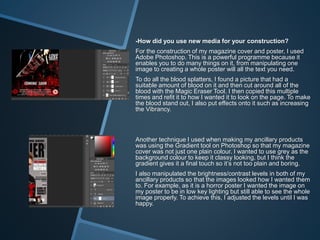
For the construction of my magazine cover and poster, I used
Adobe Photoshop. This is a powerful programme because it
enables you to do many things on it, from manipulating one
image to creating a whole poster will all the text you need.
To do all the blood splatters, I found a picture that had a
suitable amount of blood on it and then cut around all of the
blood with the Magic Eraser Tool. I then copied this multiple
times and refit it to how I wanted it to look on the page. To make
the blood stand out, I also put effects onto it such as increasing
the Vibrancy.
Another technique I used when making my ancillary products
was using the Gradient tool on Photoshop so that my magazine
cover was not just one plain colour. I wanted to use grey as the
background colour to keep it classy looking, but I think the
gradient gives it a final touch so it’s not too plain and boring.
I also manipulated the brightness/contrast levels in both of my
ancillary products so that the images looked how I wanted them
to. For example, as it is a horror poster I wanted the image on
my poster to be in low key lighting but still able to see the whole
image properly. To achieve this, I adjusted the levels until I was
happy.
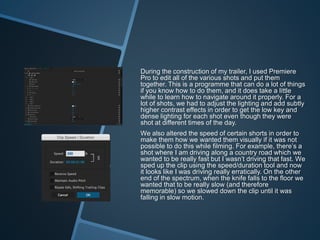
During the construction of my trailer, I used Premiere
Pro to edit all of the various shots and put them
together. This is a programme that can do a lot of things
if you know how to do them, and it does take a little
while to learn how to navigate around it properly. For a
lot of shots, we had to adjust the lighting and add subtly
higher contrast effects in order to get the low key and
dense lighting for each shot even though they were
shot at different times of the day.
We also altered the speed of certain shorts in order to
make them how we wanted them visually if it was not
possible to do this while filming. For example, there’s a
shot where I am driving along a country road which we
wanted to be really fast but I wasn’t driving that fast. We
sped up the clip using the speed/duration tool and now
it looks like I was driving really erratically. On the other
end of the spectrum, when the knife falls to the floor we
wanted that to be really slow (and therefore
memorable) so we slowed down the clip until it was
falling in slow motion.
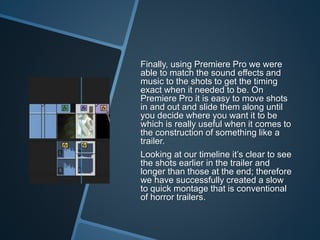
Finally, using Premiere Pro we were
able to match the sound effects and
music to the shots to get the timing
exact when it needed to be. On
Premiere Pro it is easy to move shots
in and out and slide them along until
you decide where you want it to be
which is really useful when it comes to
the construction of something like a
trailer.
Looking at our timeline it’s clear to see
the shots earlier in the trailer and
longer than those at the end; therefore
we have successfully created a slow
to quick montage that is conventional
of horror trailers.
-How did you use media technologies to evaluate
your products?
To evaluate my products, I used a range of
technologies. One of these is Blogger, which is the
website I have used throughout all of the stages of this
coursework to upload my work on to, and label them for
ease of access. When it came to evaluating all of my
work, it helped to have all of it in one place which I
could access anywhere that I had internet, whether that
be at college or home. A key part in evaluating my
products came from the focus group screening. For
this, we watched everyone’s trailer on the big screen
and then received feedback from the rest of the class.
Some of the improvements that were suggested were
ones that although we’d never thought of ourselves
were actually really good for the trailer. As well as
screening the trailer at college, I chose to send the link
to the trailer on YouTube to some of my friends and
family to see what they thought about the trailer. They
all viewed the trailer positively but also highlighted
some issues with our “rough” cut that were similar to
the audience of the focus group. This feedback
reiterated the need to concentrate on those issues.

Evaluation 3 powerpoint

  • 2.
    -How did youuse new media for your research and planning? Media technologies helped a lot in the research and planning stages because it enabled me to experience a wide range of trailers that would inspire creative ideas and use as a guide. YouTube was particularly helpful in the research stage, because of the vast amount of content available on them. There are three trailers that influenced my trailer for different reasons. • Day of the Dead (1985) https://www.youtube.com/watch?v=5g9XorBCikM This is a trailer that stayed in my mind after watching it in the research stages and served as a reminder of what not to do when making a horror trailer. From watching this trailer, you expect a totally different film to what you actually get from the film which can result in you attracting the wrong target demographic. The trailer makes the film seem light-hearted and almost comedic, whereas in the actual film there is a scene of a man’s body being ripped in half. It is important in a trailer to sell the film for what it really is, so this trailer definitely influenced my trailer because I wanted to avoid its pitfalls.
  • 3.
    • Evil Dead(2013) https://www.youtube.com/watch?v=BHDJm1D2ELw This is one of my favourite trailers I have ever watched because it’s so gripping and really made me want to watch the film. I think the pacing in the trailer is just right and there’s a good balance of body horror with jump scares. Watching this trailer encouraged me to think about balancing the trailer’s pacing and build to a startling conclusion. • Psycho (1960) https://www.youtube.com/watch?v=DTJQfFQ40lI This is a rather unconventional trailer by today’s standards but still achieves a positive outcome. I know this from the comments on the YouTube channel; one user commented that they “want to watch the movie just for clarification on what actually happened, trailer did its job!” Even though the trailer, which is presented by Hitchcock himself, explains some of the plot in depth it still leaves enough mystery and confusion to make people want to go watch it. This trailer showed that me that sometimes being slightly unconventional can work in a trailer, as long as there enough recognisable conventions as well.
  • 4.
    In the researchand planning stages I also watched a lot of horror films on Netflix, as I don’t own that many DVD’s. Already a Netflix subscriber, I found this a really useful way to find hundreds of horror films that I’d never even heard of before as well as re-watching some ones that I had seen before. Films that I watched at home during the coursework were The Amityville Horror (2005), Tucker and Dale vs. Evil (2010) and Sinister (2012). Either during or after watching a film I would always research the film on imdb.com which would tell me about the director, whether it was a remake of an old film and usually there were some reviews on there as well which helped me process the film.
  • 5.
    -How did youuse new media for your construction? For the construction of my magazine cover and poster, I used Adobe Photoshop. This is a powerful programme because it enables you to do many things on it, from manipulating one image to creating a whole poster will all the text you need. To do all the blood splatters, I found a picture that had a suitable amount of blood on it and then cut around all of the blood with the Magic Eraser Tool. I then copied this multiple times and refit it to how I wanted it to look on the page. To make the blood stand out, I also put effects onto it such as increasing the Vibrancy. Another technique I used when making my ancillary products was using the Gradient tool on Photoshop so that my magazine cover was not just one plain colour. I wanted to use grey as the background colour to keep it classy looking, but I think the gradient gives it a final touch so it’s not too plain and boring. I also manipulated the brightness/contrast levels in both of my ancillary products so that the images looked how I wanted them to. For example, as it is a horror poster I wanted the image on my poster to be in low key lighting but still able to see the whole image properly. To achieve this, I adjusted the levels until I was happy.
  • 6.
    During the constructionof my trailer, I used Premiere Pro to edit all of the various shots and put them together. This is a programme that can do a lot of things if you know how to do them, and it does take a little while to learn how to navigate around it properly. For a lot of shots, we had to adjust the lighting and add subtly higher contrast effects in order to get the low key and dense lighting for each shot even though they were shot at different times of the day. We also altered the speed of certain shorts in order to make them how we wanted them visually if it was not possible to do this while filming. For example, there’s a shot where I am driving along a country road which we wanted to be really fast but I wasn’t driving that fast. We sped up the clip using the speed/duration tool and now it looks like I was driving really erratically. On the other end of the spectrum, when the knife falls to the floor we wanted that to be really slow (and therefore memorable) so we slowed down the clip until it was falling in slow motion.
  • 7.
    Finally, using PremierePro we were able to match the sound effects and music to the shots to get the timing exact when it needed to be. On Premiere Pro it is easy to move shots in and out and slide them along until you decide where you want it to be which is really useful when it comes to the construction of something like a trailer. Looking at our timeline it’s clear to see the shots earlier in the trailer and longer than those at the end; therefore we have successfully created a slow to quick montage that is conventional of horror trailers.
  • 8.
    -How did youuse media technologies to evaluate your products? To evaluate my products, I used a range of technologies. One of these is Blogger, which is the website I have used throughout all of the stages of this coursework to upload my work on to, and label them for ease of access. When it came to evaluating all of my work, it helped to have all of it in one place which I could access anywhere that I had internet, whether that be at college or home. A key part in evaluating my products came from the focus group screening. For this, we watched everyone’s trailer on the big screen and then received feedback from the rest of the class. Some of the improvements that were suggested were ones that although we’d never thought of ourselves were actually really good for the trailer. As well as screening the trailer at college, I chose to send the link to the trailer on YouTube to some of my friends and family to see what they thought about the trailer. They all viewed the trailer positively but also highlighted some issues with our “rough” cut that were similar to the audience of the focus group. This feedback reiterated the need to concentrate on those issues.