Error 2908 is an installation error. Your computer may
show this error while a setup program is performing the
requested tasks, for example, installation of Microsoft
Office and other programs.
5 Ways to Fix Error 2908:
Run the setup under different user profile
Registry problems
Reinstall Windows Installer
Delete a Registry Key
Clean Temporary Directories using System Cleaner
RUN THE SETUP UNDER DIFFERENT
USER PROFILE
To fix error 2908 in Windows 7, Vista and XP, run the
setup under different user profile. Log-off the active
session, and log-in from a different user profile, if any.
Click the Start button, and then point to the Arrow next
to Shutdown option.
Select Switch User option.
Your computer will now log-off.
A screen may appear showing different user profiles that
are available on your machine.
Select another user profile/ account, and log-in with valid
password or security information that you have.
Registry Problems
What you required to do is just start a full registry scan,
and if any errors are found, clean them immediately. After
doing so, restart your computer and re-run the setup. To
fix error 2908 in Windows 7, Vista and XP, download a
reliable Registry Cleaner such as the Intel Software
Partner Reginout.
Reinstall Windows Installer
To fix error 2908 in Windows 7, Vista and XP, reinstall
Windows Installer as highlighted in the following steps:
Click Start, point to All Programs | Accessories.
Right click Command Prompt and select Run as
Administrator.
Type the following commands:
msiexec /unreg
msiexec /regserver
exit
Re-start your setup program.
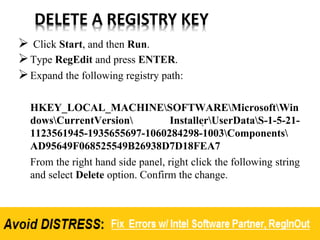
DELETE A REGISTRY KEY
 Click Start, and then Run.
Type RegEdit and press ENTER.
Expand the following registry path:
HKEY_LOCAL_MACHINESOFTWAREMicrosoftWin
dowsCurrentVersion InstallerUserDataS-1-5-21-
1123561945-1935655697-1060284298-1003Components
AD95649F068525549B26938D7D18FEA7
From the right hand side panel, right click the following string
and select Delete option. Confirm the change.
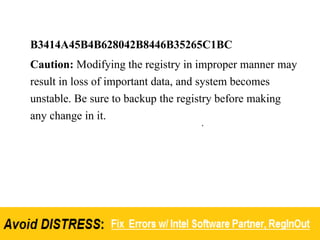
B3414A45B4B628042B8446B35265C1BC
Caution: Modifying the registry in improper manner may
result in loss of important data, and system becomes
unstable. Be sure to backup the registry before making
any change in it.
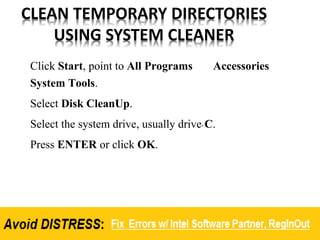
CLEAN TEMPORARY DIRECTORIES
USING SYSTEM CLEANER
Click Start, point to All Programs Accessories
System Tools.
Select Disk CleanUp.
Select the system drive, usually drive C.
Press ENTER or click OK.
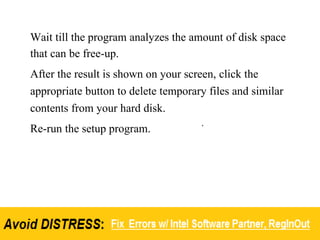
Wait till the program analyzes the amount of disk space
that can be free-up.
After the result is shown on your screen, click the
appropriate button to delete temporary files and similar
contents from your hard disk.
Re-run the setup program.

Error 2908 TroubleShooting Steps For Windows

  • 2.
    Error 2908 isan installation error. Your computer may show this error while a setup program is performing the requested tasks, for example, installation of Microsoft Office and other programs. 5 Ways to Fix Error 2908:
  • 3.
    Run the setupunder different user profile Registry problems Reinstall Windows Installer Delete a Registry Key Clean Temporary Directories using System Cleaner
  • 4.
    RUN THE SETUPUNDER DIFFERENT USER PROFILE To fix error 2908 in Windows 7, Vista and XP, run the setup under different user profile. Log-off the active session, and log-in from a different user profile, if any.
  • 5.
    Click the Startbutton, and then point to the Arrow next to Shutdown option. Select Switch User option. Your computer will now log-off. A screen may appear showing different user profiles that are available on your machine. Select another user profile/ account, and log-in with valid password or security information that you have.
  • 6.
    Registry Problems What yourequired to do is just start a full registry scan, and if any errors are found, clean them immediately. After doing so, restart your computer and re-run the setup. To fix error 2908 in Windows 7, Vista and XP, download a reliable Registry Cleaner such as the Intel Software Partner Reginout.
  • 7.
    Reinstall Windows Installer Tofix error 2908 in Windows 7, Vista and XP, reinstall Windows Installer as highlighted in the following steps:
  • 8.
    Click Start, pointto All Programs | Accessories. Right click Command Prompt and select Run as Administrator. Type the following commands: msiexec /unreg msiexec /regserver exit Re-start your setup program.
  • 9.
    DELETE A REGISTRYKEY  Click Start, and then Run. Type RegEdit and press ENTER. Expand the following registry path: HKEY_LOCAL_MACHINESOFTWAREMicrosoftWin dowsCurrentVersion InstallerUserDataS-1-5-21- 1123561945-1935655697-1060284298-1003Components AD95649F068525549B26938D7D18FEA7 From the right hand side panel, right click the following string and select Delete option. Confirm the change.
  • 10.
    B3414A45B4B628042B8446B35265C1BC Caution: Modifying theregistry in improper manner may result in loss of important data, and system becomes unstable. Be sure to backup the registry before making any change in it.
  • 11.
    CLEAN TEMPORARY DIRECTORIES USINGSYSTEM CLEANER Click Start, point to All Programs Accessories System Tools. Select Disk CleanUp. Select the system drive, usually drive C. Press ENTER or click OK.
  • 12.
    Wait till theprogram analyzes the amount of disk space that can be free-up. After the result is shown on your screen, click the appropriate button to delete temporary files and similar contents from your hard disk. Re-run the setup program.