2
• Basic Definitions Related to Ergonomics
• Why Ergonomics Is Important
• Typical Applications for Ergonomics
• Typical Office Ergonomic Problems
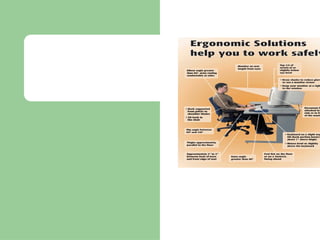
• The Ergonomically Correct Computer Work Station
• The Environmental Concerns in Today’s Office
Environment
• The Importance of Personal Breaks/exercise During the
Work Day
• The Concepts of Work Station Design
UNDERSTAND THE FOLLOWING:
Objectives
3
🗹 Discovering the capabilities and limitations of the
human body
🗹 The art and science that addresses workers’ job
performance and well-being in relation to their job
tasks, tools, equipment and environment
🗹 The study of the relationship between people and
machines or between employees and their
environment
VARIOUS AUTHORS DEFINE ERGONOMICS AS:
Definitions
4
🗹 The study of the interaction between the
worker and the process at the workplace.
VARIOUS AUTHORS DEFINE ERGONOMICS AS:
WHAT OTHER DEFINITIONS
HAVE YOU HEARD?
Continued
Definition
5
🗹 Improve quality
🗹 Improve absenteeism
🗹 Maintain a healthier work force.
🗹 Reduce injury and illness rates
🗹 Acceptance of high-turnover jobs
🗹 Workers feel good about their work
🗹 Reduce workers’ compensation costs
🗹 Elevate awareness to a higher level
ERGONOMICS PLAYS A ROLE IN APPROXIMATELY 50% OF
ALL WORKPLACE INJURIES. ERGONOMICS WILL HELP:
SAFETY
STATISTICS
Importance of Ergonomics
6
THINK ABOUT THE NUMBER
OF WAYS ERGONOMICS
IMPACTS OUR DAILY LIFE!
Ergonomics a Multi Disciplinary
Approach
7
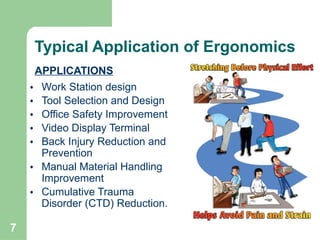
• Work Station design
• Tool Selection and Design
• Office Safety Improvement
• Video Display Terminal
• Back Injury Reduction and
Prevention
• Manual Material Handling
Improvement
• Cumulative Trauma
Disorder (CTD) Reduction.
APPLICATIONS
Typical Application of Ergonomics
8
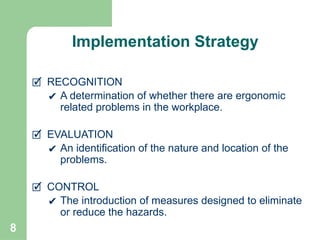
🗹 RECOGNITION
✔ A determination of whether there are ergonomic
related problems in the workplace.
🗹 EVALUATION
✔ An identification of the nature and location of the
problems.
🗹 CONTROL
✔ The introduction of measures designed to eliminate
or reduce the hazards.
Implementation Strategy
9
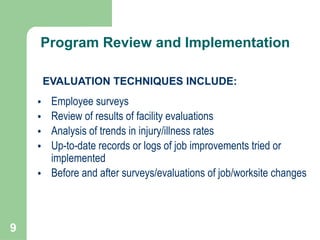
• Employee surveys
• Review of results of facility evaluations
• Analysis of trends in injury/illness rates
• Up-to-date records or logs of job improvements tried or
implemented
• Before and after surveys/evaluations of job/worksite changes
EVALUATION TECHNIQUES INCLUDE:
Program Review and Implementation
10
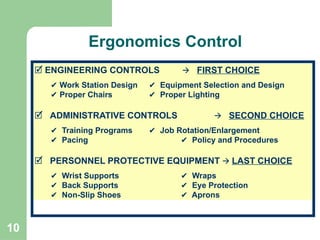
🗹 ENGINEERING CONTROLS 🡪 FIRST CHOICE
✔ Work Station Design ✔ Equipment Selection and Design
✔ Proper Chairs ✔ Proper Lighting
🗹 ADMINISTRATIVE CONTROLS 🡪 SECOND CHOICE
✔ Training Programs ✔ Job Rotation/Enlargement
✔ Pacing ✔ Policy and Procedures
🗹 PERSONNEL PROTECTIVE EQUIPMENT 🡪 LAST CHOICE
✔ Wrist Supports ✔ Wraps
✔ Back Supports ✔ Eye Protection
✔ Non-Slip Shoes ✔ Aprons
Ergonomics Control
11
🗹 INAPPROPRIATE
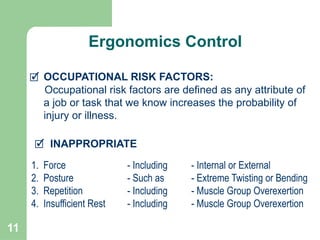
🗹 OCCUPATIONAL RISK FACTORS:
Occupational risk factors are defined as any attribute of
a job or task that we know increases the probability of
injury or illness.
1. Force - Including - Internal or External
2. Posture - Such as - Extreme Twisting or Bending
3. Repetition - Including - Muscle Group Overexertion
4. Insufficient Rest - Including - Muscle Group Overexertion
Ergonomics Control
12
WORKSITE ANALYSIS IS DIVIDED INTO FOUR
MAIN PARTS:
1. Gathering information from available sources
2. Conducting baseline screening surveys to determine which jobs
need a closer analysis
3. Performing ergonomic job hazard analyses of those work stations
with identified risk factors
4. After implementing control measures, conducting periodic surveys
and follow-up to evaluate changes
Worksite Analysis
13
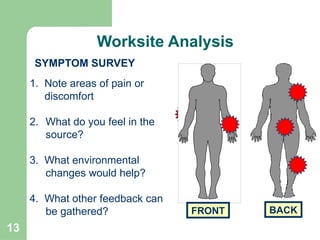
SYMPTOM SURVEY
1. Note areas of pain or
discomfort
2. What do you feel in the
source?
3. What environmental
changes would help?
4. What other feedback can
be gathered? FRONT BACK
Worksite Analysis
14
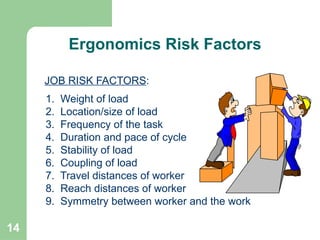
JOB RISK FACTORS:
1. Weight of load
2. Location/size of load
3. Frequency of the task
4. Duration and pace of cycle
5. Stability of load
6. Coupling of load
7. Travel distances of worker
8. Reach distances of worker
9. Symmetry between worker and the work
Ergonomics Risk Factors
15
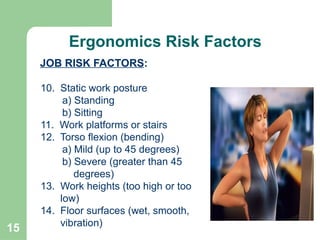
10. Static work posture
a) Standing
b) Sitting
11. Work platforms or stairs
12. Torso flexion (bending)
a) Mild (up to 45 degrees)
b) Severe (greater than 45
degrees)
13. Work heights (too high or too
low)
14. Floor surfaces (wet, smooth,
vibration)
JOB RISK FACTORS:
Ergonomics Risk Factors
16
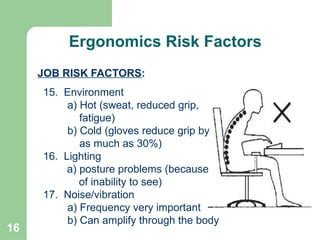
15. Environment
a) Hot (sweat, reduced grip,
fatigue)
b) Cold (gloves reduce grip by
as much as 30%)
16. Lighting
a) posture problems (because
of inability to see)
17. Noise/vibration
a) Frequency very important
b) Can amplify through the body
JOB RISK FACTORS:
Continued
Ergonomics Risk Factors
17
WHAT ARE THE
PRIMARY RISK
FACTORS
ASSOCIATED WITH
YOUR JOB?
Continued
Ergonomics Risk Factors
18
Typical Office Ergonomics Problem
● TENDINITIS:
⮚ Characterized by inflammation of tendons or their
surrounding sheaths
● REPETITIVE STRAIN INJURY - RSI:
⮚ RSI (Repetitive Strain Injury) disorders can begin as
mildly aggravating and with the continuance of bad
habits, may quickly progress to be debilitating
19
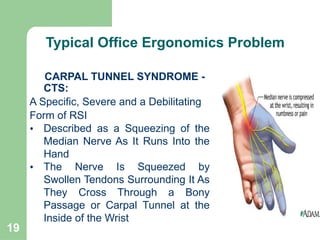
CARPAL TUNNEL SYNDROME -
CTS:
A Specific, Severe and a Debilitating
Form of RSI
• Described as a Squeezing of the
Median Nerve As It Runs Into the
Hand
• The Nerve Is Squeezed by
Swollen Tendons Surrounding It As
They Cross Through a Bony
Passage or Carpal Tunnel at the
Inside of the Wrist
Continued
Typical Office Ergonomics Problem
20
CARPAL TUNNEL SYNDROME - SYMPTOMS:
- Tingling of the Hands and Wrists
- Tightness, Discomfort, Stiffness, Soreness or
Burning in the Hands, Wrists, Fingers, Forearms, or
Elbows
- Some Symptoms Include a Feeling of a Need to
Massage Your Hands, Wrists, and Arms
- Clumsiness or Loss of Strength and Coordination
in The Hands Also Can Be Symptoms
Continued
Typical Office Ergonomics Problem
21
CARPAL TUNNEL SYNDROME - WHAT TO DO:
- Correct your work or typing technique
- Keep your wrists in a “neutral” position
- Adjust your work posture (back, hips, shoulders)
- Make sure your workstation is positioned properly
- Make adjustments for your body size
- Consider your height and arm reach distances
- Reduce the amount of force and repetition
Continued
Typical Office Ergonomics Problem
22
INAPPROPRIATE
OFFICE RISK FACTORS:
Office risk factors are defined as any attribute of a job or
task that we know increases the probability of injury or
illness.
1. Force - Including - Internal or External
2. Posture - Such as - Extreme Twisting or Bending
3. Repetition - Including - Muscle Group Overexertion
4. Insufficient Rest - Including - Muscle Group Overexertion
TYPICAL OFFICE ERGONOMIC PROBLEMS
Typical Office Ergonomics Problem
23
Ergonomics Program
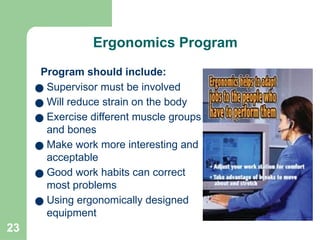
Program should include:
● Supervisor must be involved
● Will reduce strain on the body
● Exercise different muscle groups
and bones
● Make work more interesting and
acceptable
● Good work habits can correct
most problems
● Using ergonomically designed
equipment
24
Ergonomics Program
ADJUSTMENT PERIOD FOR WORKERS:
● Period may take 10 to 20 working days
● Used to be known as “Work Hardening”
● Workers should be told of the adjustment period
● Workers may be uncomfortable with initial
adjustments
● Look for improvements in your ability to perform work
● Know that your comfort will improve over time
● Muscles take time to become comfortable with
change
● Remember - old habits are hard to break
● Remember - the goal is safety and injury prevention
DW-HSE-TM040
25
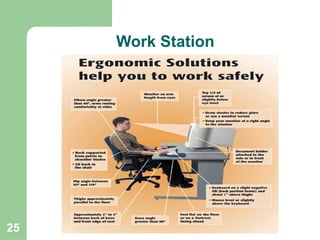
Work Station
26
Continued
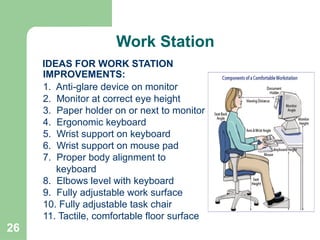
IDEAS FOR WORK STATION
IMPROVEMENTS:
1. Anti-glare device on monitor
2. Monitor at correct eye height
3. Paper holder on or next to monitor
4. Ergonomic keyboard
5. Wrist support on keyboard
6. Wrist support on mouse pad
7. Proper body alignment to
keyboard
8. Elbows level with keyboard
9. Fully adjustable work surface
10. Fully adjustable task chair
11. Tactile, comfortable floor surface
Work Station
27
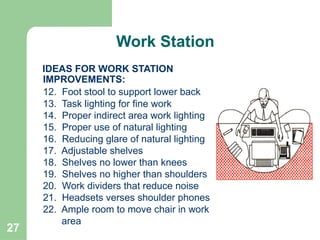
IDEAS FOR WORK STATION
IMPROVEMENTS:
12. Foot stool to support lower back
13. Task lighting for fine work
14. Proper indirect area work lighting
15. Proper use of natural lighting
16. Reducing glare of natural lighting
17. Adjustable shelves
18. Shelves no lower than knees
19. Shelves no higher than shoulders
20. Work dividers that reduce noise
21. Headsets verses shoulder phones
22. Ample room to move chair in work
area
Work Station
28
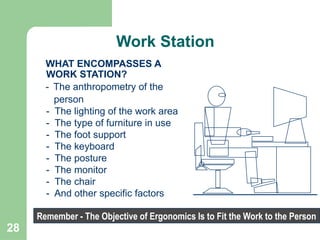
WHAT ENCOMPASSES A
WORK STATION?
- The anthropometry of the
person
- The lighting of the work area
- The type of furniture in use
- The foot support
- The keyboard
- The posture
- The monitor
- The chair
- And other specific factors
Remember - The Objective of Ergonomics Is to Fit the Work to the Person
Work Station
29
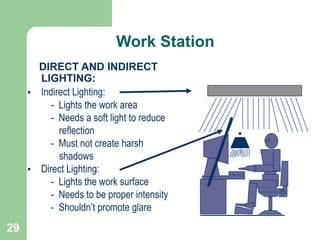
DIRECT AND INDIRECT
LIGHTING:
• Indirect Lighting:
- Lights the work area
- Needs a soft light to reduce
reflection
- Must not create harsh
shadows
• Direct Lighting:
- Lights the work surface
- Needs to be proper intensity
- Shouldn’t promote glare
Work Station
30
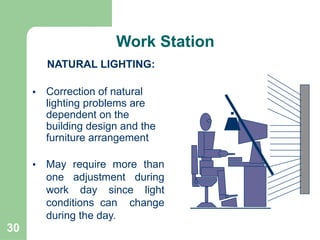
NATURAL LIGHTING:
• Correction of natural
lighting problems are
dependent on the
building design and the
furniture arrangement
• May require more than
one adjustment during
work day since light
conditions can change
during the day.
Work Station
31
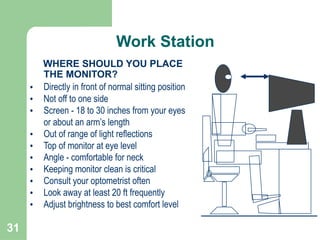
WHERE SHOULD YOU PLACE
THE MONITOR?
• Directly in front of normal sitting position
• Not off to one side
• Screen - 18 to 30 inches from your eyes
or about an arm’s length
• Out of range of light reflections
• Top of monitor at eye level
• Angle - comfortable for neck
• Keeping monitor clean is critical
• Consult your optometrist often
• Look away at least 20 ft frequently
• Adjust brightness to best comfort level
Work Station
32
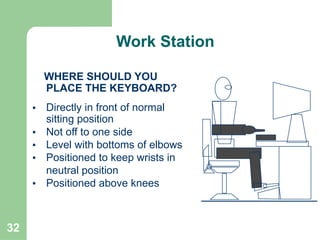
WHERE SHOULD YOU
PLACE THE KEYBOARD?
• Directly in front of normal
sitting position
• Not off to one side
• Level with bottoms of elbows
• Positioned to keep wrists in
neutral position
• Positioned above knees
Work Station
33
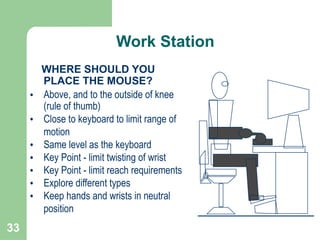
WHERE SHOULD YOU
PLACE THE MOUSE?
• Above, and to the outside of knee
(rule of thumb)
• Close to keyboard to limit range of
motion
• Same level as the keyboard
• Key Point - limit twisting of wrist
• Key Point - limit reach requirements
• Explore different types
• Keep hands and wrists in neutral
position
Work Station
34
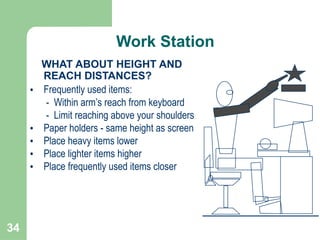
WHAT ABOUT HEIGHT AND
REACH DISTANCES?
• Frequently used items:
- Within arm’s reach from keyboard
- Limit reaching above your shoulders
• Paper holders - same height as screen
• Place heavy items lower
• Place lighter items higher
• Place frequently used items closer
Work Station
35
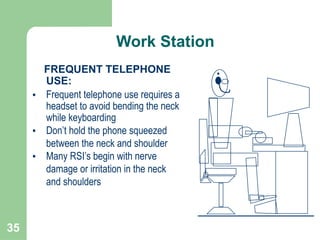
FREQUENT TELEPHONE
USE:
• Frequent telephone use requires a
headset to avoid bending the neck
while keyboarding
• Don’t hold the phone squeezed
between the neck and shoulder
• Many RSI’s begin with nerve
damage or irritation in the neck
and shoulders
Work Station
36
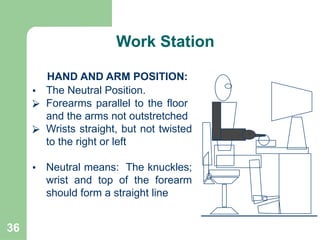
HAND AND ARM POSITION:
• The Neutral Position.
⮚ Forearms parallel to the floor
and the arms not outstretched
⮚ Wrists straight, but not twisted
to the right or left
• Neutral means: The knuckles;
wrist and top of the forearm
should form a straight line
Work Station
37
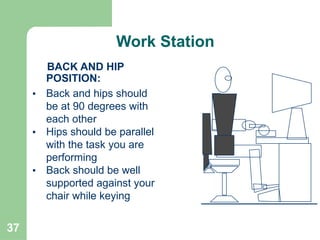
BACK AND HIP
POSITION:
• Back and hips should
be at 90 degrees with
each other
• Hips should be parallel
with the task you are
performing
• Back should be well
supported against your
chair while keying
Work Station
38
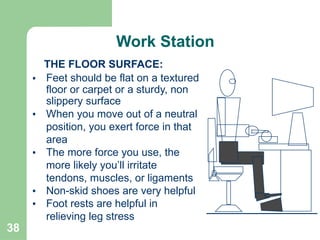
THE FLOOR SURFACE:
• Feet should be flat on a textured
floor or carpet or a sturdy, non
slippery surface
• When you move out of a neutral
position, you exert force in that
area
• The more force you use, the
more likely you’ll irritate
tendons, muscles, or ligaments
• Non-skid shoes are very helpful
• Foot rests are helpful in
relieving leg stress
Work Station
39
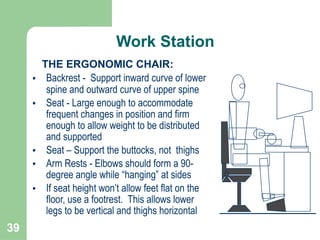
THE ERGONOMIC CHAIR:
• Backrest - Support inward curve of lower
spine and outward curve of upper spine
• Seat - Large enough to accommodate
frequent changes in position and firm
enough to allow weight to be distributed
and supported
• Seat – Support the buttocks, not thighs
• Arm Rests - Elbows should form a 90-
degree angle while “hanging” at sides
• If seat height won’t allow feet flat on the
floor, use a footrest. This allows lower
legs to be vertical and thighs horizontal
Work Station
40
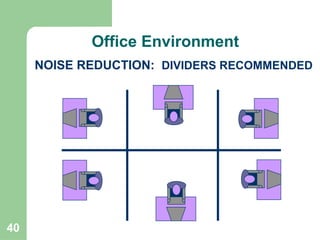
NOISE REDUCTION: DIVIDERS RECOMMENDED
Office Environment
41
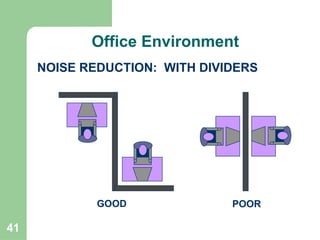
NOISE REDUCTION: WITH DIVIDERS
POOR
GOOD
Office Environment
42
NOISE REDUCTION:
• Establish office policy concerning talking, noise and PA systems
• Establish office policy concerning use of radios
• Insulate office equipment with sound absorbing dividers
• Install sound dampening window coverings
• Consider replacing windows with sound dampening glass
• Install acoustical panels around desks
• Pay close attention to reflected sounds within the office
• Determine affect of reflected sound from the office ceiling
• Determine affect of reflected sound from floor
• Consider installing carpeting to reduce noise
• Relocate noisy equipment to unoccupied area if possible
Office Environment
43
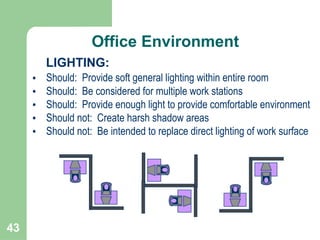
LIGHTING:
• Should: Provide soft general lighting within entire room
• Should: Be considered for multiple work stations
• Should: Provide enough light to provide comfortable environment
• Should not: Create harsh shadow areas
• Should not: Be intended to replace direct lighting of work surface
Office Environment
44
OFFICE COMFORT:
• Survey employees to determine their comfort level
• Pay attention to health complaints related to air quality
• Discuss temperature and humidity levels with maintenance manager
• Discuss HVAC maintenance requirements with maintenance manager
• Install fans as necessary to control air flow within room
• Ensure an adequate smoking policy exists
• Allow employees to wear appropriate clothing to sustain their comfort
• Adjust room design to capitalize on existing comfort sources
• Consider how window coverings can be used to enhance comfort
• Encourage workers to get fresh air periodically during work day
Office Environment
45
Personnel Break & Exercise
ACTIVE BREAKS:
⮚ A short break in work activity
⮚ Should be taken at least every 30 minutes
⮚ Especially if you keyboard for more than 2 hours a day
⮚ Walking and stretching periodically is essential
⮚ Frequently focus your eyes on objects farther away than monitor
⮚ Move arms and shoulders to loosen muscles and allow blood
flow
⮚ Change sitting position at least every 15 minutes
⮚ Relive pressure on bottom of upper legs
⮚ Allow blood to circulate through buttocks and legs
46
Personnel Break & Exercise
MICRO-BREAKS:
● Short momentary breaks while continuing work
activity
● Should occur more often than active breaks
● Occurs when you stop keyboarding to do other things
● Micro break should include specific exercises
● Take or make phone calls
● File papers or get up to get a drink of water
● Rotate chair to a different task in the work station
● Move different sets of muscles and bones
47
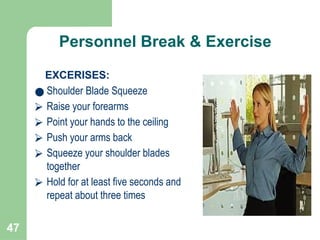
Personnel Break & Exercise
EXCERISES:
● Shoulder Blade Squeeze
⮚ Raise your forearms
⮚ Point your hands to the ceiling
⮚ Push your arms back
⮚ Squeeze your shoulder blades
together
⮚ Hold for at least five seconds and
repeat about three times
48
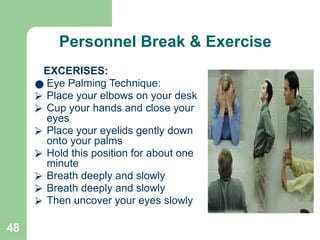
Personnel Break & Exercise
EXCERISES:
● Eye Palming Technique:
⮚ Place your elbows on your desk
⮚ Cup your hands and close your
eyes
⮚ Place your eyelids gently down
onto your palms
⮚ Hold this position for about one
minute
⮚ Breath deeply and slowly
⮚ Then uncover your eyes slowly
49
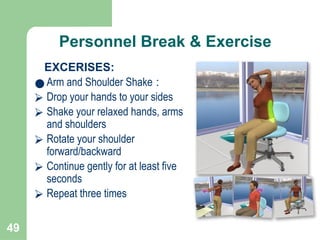
Personnel Break & Exercise
EXCERISES:
● Arm and Shoulder Shake :
⮚ Drop your hands to your sides
⮚ Shake your relaxed hands, arms
and shoulders
⮚ Rotate your shoulder
forward/backward
⮚ Continue gently for at least five
seconds
⮚ Repeat three times
50
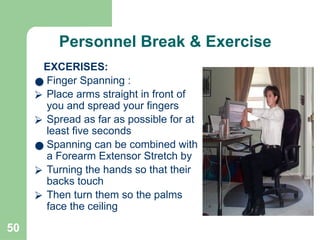
Personnel Break & Exercise
EXCERISES:
● Finger Spanning :
⮚ Place arms straight in front of
you and spread your fingers
⮚ Spread as far as possible for at
least five seconds
● Spanning can be combined with
a Forearm Extensor Stretch by
⮚ Turning the hands so that their
backs touch
⮚ Then turn them so the palms
face the ceiling
51
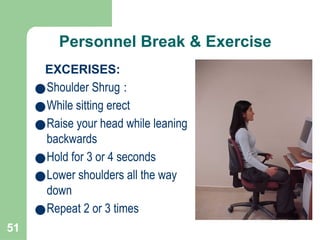
Personnel Break & Exercise
EXCERISES:
●Shoulder Shrug :
●While sitting erect
●Raise your head while leaning
backwards
●Hold for 3 or 4 seconds
●Lower shoulders all the way
down
●Repeat 2 or 3 times
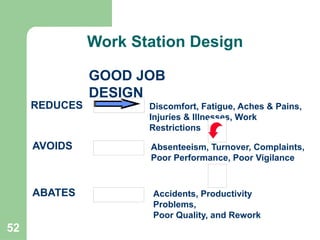
52
GOOD JOB
DESIGN
REDUCES Discomfort, Fatigue, Aches & Pains,
Injuries & Illnesses, Work
Restrictions
AVOIDS Absenteeism, Turnover, Complaints,
Poor Performance, Poor Vigilance
ABATES Accidents, Productivity
Problems,
Poor Quality, and Rework
Work Station Design
53
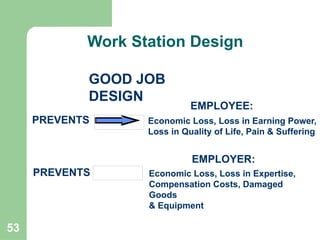
GOOD JOB
DESIGN
PREVENTS
PREVENTS
Economic Loss, Loss in Earning Power,
Loss in Quality of Life, Pain & Suffering
EMPLOYEE:
Economic Loss, Loss in Expertise,
Compensation Costs, Damaged
Goods
& Equipment
EMPLOYER:
Continued
Work Station Design
54
• Design for the Range-of-Motion of the Worker
• Design for the Field of Vision of the Worker
• Design out Extreme Ranges-of-Motion
• Reduce Force in Job Accomplishment
• Reduce the Frequency of Motions Required
• Reduce the Duration of a Specific Task
• Design to Provide Adequate Support to Back, and
Legs
Continued
Work Station Design
DESIGN CONSIDERATIONS
55
• Incorporate Adjustable Work Surfaces
• Design Storage Bins to Accommodate Various Heights
• Design Storage Bins to Accommodate Various Reaches
• Design Work Platforms with Ranges-of-Movement
• Incorporate the use of Mechanical or Powered Assists
• Incorporate the use of Floor mats to Reduce Leg
Trauma
DESIGN CONSIDERATIONS
Continued
Work Station Design
56
⮚ DO NOT DESIGN FOR THE AVERAGE!
⮚ DO NOT DESIGN FOR YOURSELF!
⮚ THE LARGE MUST BE ABLE TO FIT!
⮚ THE SMALL MUST BE ABLE TO REACH!
⮚ DESIGN FOR A RANGE!
⮚ DESIGN FOR ADJUSTABILITY!
Summary
57
WHAT ADDITIONAL
DESIGN
CONSIDERATIONS
CAN YOU THINK OF
FOR COMPUTER
WORK STATIONS?

Ergonomics HSE Presentation Formats.pptx

  • 2.
    2 • Basic DefinitionsRelated to Ergonomics • Why Ergonomics Is Important • Typical Applications for Ergonomics • Typical Office Ergonomic Problems • The Ergonomically Correct Computer Work Station • The Environmental Concerns in Today’s Office Environment • The Importance of Personal Breaks/exercise During the Work Day • The Concepts of Work Station Design UNDERSTAND THE FOLLOWING: Objectives
  • 3.
    3 🗹 Discovering thecapabilities and limitations of the human body 🗹 The art and science that addresses workers’ job performance and well-being in relation to their job tasks, tools, equipment and environment 🗹 The study of the relationship between people and machines or between employees and their environment VARIOUS AUTHORS DEFINE ERGONOMICS AS: Definitions
  • 4.
    4 🗹 The studyof the interaction between the worker and the process at the workplace. VARIOUS AUTHORS DEFINE ERGONOMICS AS: WHAT OTHER DEFINITIONS HAVE YOU HEARD? Continued Definition
  • 5.
    5 🗹 Improve quality 🗹Improve absenteeism 🗹 Maintain a healthier work force. 🗹 Reduce injury and illness rates 🗹 Acceptance of high-turnover jobs 🗹 Workers feel good about their work 🗹 Reduce workers’ compensation costs 🗹 Elevate awareness to a higher level ERGONOMICS PLAYS A ROLE IN APPROXIMATELY 50% OF ALL WORKPLACE INJURIES. ERGONOMICS WILL HELP: SAFETY STATISTICS Importance of Ergonomics
  • 6.
    6 THINK ABOUT THENUMBER OF WAYS ERGONOMICS IMPACTS OUR DAILY LIFE! Ergonomics a Multi Disciplinary Approach
  • 7.
    7 • Work Stationdesign • Tool Selection and Design • Office Safety Improvement • Video Display Terminal • Back Injury Reduction and Prevention • Manual Material Handling Improvement • Cumulative Trauma Disorder (CTD) Reduction. APPLICATIONS Typical Application of Ergonomics
  • 8.
    8 🗹 RECOGNITION ✔ Adetermination of whether there are ergonomic related problems in the workplace. 🗹 EVALUATION ✔ An identification of the nature and location of the problems. 🗹 CONTROL ✔ The introduction of measures designed to eliminate or reduce the hazards. Implementation Strategy
  • 9.
    9 • Employee surveys •Review of results of facility evaluations • Analysis of trends in injury/illness rates • Up-to-date records or logs of job improvements tried or implemented • Before and after surveys/evaluations of job/worksite changes EVALUATION TECHNIQUES INCLUDE: Program Review and Implementation
  • 10.
    10 🗹 ENGINEERING CONTROLS🡪 FIRST CHOICE ✔ Work Station Design ✔ Equipment Selection and Design ✔ Proper Chairs ✔ Proper Lighting 🗹 ADMINISTRATIVE CONTROLS 🡪 SECOND CHOICE ✔ Training Programs ✔ Job Rotation/Enlargement ✔ Pacing ✔ Policy and Procedures 🗹 PERSONNEL PROTECTIVE EQUIPMENT 🡪 LAST CHOICE ✔ Wrist Supports ✔ Wraps ✔ Back Supports ✔ Eye Protection ✔ Non-Slip Shoes ✔ Aprons Ergonomics Control
  • 11.
    11 🗹 INAPPROPRIATE 🗹 OCCUPATIONALRISK FACTORS: Occupational risk factors are defined as any attribute of a job or task that we know increases the probability of injury or illness. 1. Force - Including - Internal or External 2. Posture - Such as - Extreme Twisting or Bending 3. Repetition - Including - Muscle Group Overexertion 4. Insufficient Rest - Including - Muscle Group Overexertion Ergonomics Control
  • 12.
    12 WORKSITE ANALYSIS ISDIVIDED INTO FOUR MAIN PARTS: 1. Gathering information from available sources 2. Conducting baseline screening surveys to determine which jobs need a closer analysis 3. Performing ergonomic job hazard analyses of those work stations with identified risk factors 4. After implementing control measures, conducting periodic surveys and follow-up to evaluate changes Worksite Analysis
  • 13.
    13 SYMPTOM SURVEY 1. Noteareas of pain or discomfort 2. What do you feel in the source? 3. What environmental changes would help? 4. What other feedback can be gathered? FRONT BACK Worksite Analysis
  • 14.
    14 JOB RISK FACTORS: 1.Weight of load 2. Location/size of load 3. Frequency of the task 4. Duration and pace of cycle 5. Stability of load 6. Coupling of load 7. Travel distances of worker 8. Reach distances of worker 9. Symmetry between worker and the work Ergonomics Risk Factors
  • 15.
    15 10. Static workposture a) Standing b) Sitting 11. Work platforms or stairs 12. Torso flexion (bending) a) Mild (up to 45 degrees) b) Severe (greater than 45 degrees) 13. Work heights (too high or too low) 14. Floor surfaces (wet, smooth, vibration) JOB RISK FACTORS: Ergonomics Risk Factors
  • 16.
    16 15. Environment a) Hot(sweat, reduced grip, fatigue) b) Cold (gloves reduce grip by as much as 30%) 16. Lighting a) posture problems (because of inability to see) 17. Noise/vibration a) Frequency very important b) Can amplify through the body JOB RISK FACTORS: Continued Ergonomics Risk Factors
  • 17.
    17 WHAT ARE THE PRIMARYRISK FACTORS ASSOCIATED WITH YOUR JOB? Continued Ergonomics Risk Factors
  • 18.
    18 Typical Office ErgonomicsProblem ● TENDINITIS: ⮚ Characterized by inflammation of tendons or their surrounding sheaths ● REPETITIVE STRAIN INJURY - RSI: ⮚ RSI (Repetitive Strain Injury) disorders can begin as mildly aggravating and with the continuance of bad habits, may quickly progress to be debilitating
  • 19.
    19 CARPAL TUNNEL SYNDROME- CTS: A Specific, Severe and a Debilitating Form of RSI • Described as a Squeezing of the Median Nerve As It Runs Into the Hand • The Nerve Is Squeezed by Swollen Tendons Surrounding It As They Cross Through a Bony Passage or Carpal Tunnel at the Inside of the Wrist Continued Typical Office Ergonomics Problem
  • 20.
    20 CARPAL TUNNEL SYNDROME- SYMPTOMS: - Tingling of the Hands and Wrists - Tightness, Discomfort, Stiffness, Soreness or Burning in the Hands, Wrists, Fingers, Forearms, or Elbows - Some Symptoms Include a Feeling of a Need to Massage Your Hands, Wrists, and Arms - Clumsiness or Loss of Strength and Coordination in The Hands Also Can Be Symptoms Continued Typical Office Ergonomics Problem
  • 21.
    21 CARPAL TUNNEL SYNDROME- WHAT TO DO: - Correct your work or typing technique - Keep your wrists in a “neutral” position - Adjust your work posture (back, hips, shoulders) - Make sure your workstation is positioned properly - Make adjustments for your body size - Consider your height and arm reach distances - Reduce the amount of force and repetition Continued Typical Office Ergonomics Problem
  • 22.
    22 INAPPROPRIATE OFFICE RISK FACTORS: Officerisk factors are defined as any attribute of a job or task that we know increases the probability of injury or illness. 1. Force - Including - Internal or External 2. Posture - Such as - Extreme Twisting or Bending 3. Repetition - Including - Muscle Group Overexertion 4. Insufficient Rest - Including - Muscle Group Overexertion TYPICAL OFFICE ERGONOMIC PROBLEMS Typical Office Ergonomics Problem
  • 23.
    23 Ergonomics Program Program shouldinclude: ● Supervisor must be involved ● Will reduce strain on the body ● Exercise different muscle groups and bones ● Make work more interesting and acceptable ● Good work habits can correct most problems ● Using ergonomically designed equipment
  • 24.
    24 Ergonomics Program ADJUSTMENT PERIODFOR WORKERS: ● Period may take 10 to 20 working days ● Used to be known as “Work Hardening” ● Workers should be told of the adjustment period ● Workers may be uncomfortable with initial adjustments ● Look for improvements in your ability to perform work ● Know that your comfort will improve over time ● Muscles take time to become comfortable with change ● Remember - old habits are hard to break ● Remember - the goal is safety and injury prevention
  • 25.
  • 26.
    26 Continued IDEAS FOR WORKSTATION IMPROVEMENTS: 1. Anti-glare device on monitor 2. Monitor at correct eye height 3. Paper holder on or next to monitor 4. Ergonomic keyboard 5. Wrist support on keyboard 6. Wrist support on mouse pad 7. Proper body alignment to keyboard 8. Elbows level with keyboard 9. Fully adjustable work surface 10. Fully adjustable task chair 11. Tactile, comfortable floor surface Work Station
  • 27.
    27 IDEAS FOR WORKSTATION IMPROVEMENTS: 12. Foot stool to support lower back 13. Task lighting for fine work 14. Proper indirect area work lighting 15. Proper use of natural lighting 16. Reducing glare of natural lighting 17. Adjustable shelves 18. Shelves no lower than knees 19. Shelves no higher than shoulders 20. Work dividers that reduce noise 21. Headsets verses shoulder phones 22. Ample room to move chair in work area Work Station
  • 28.
    28 WHAT ENCOMPASSES A WORKSTATION? - The anthropometry of the person - The lighting of the work area - The type of furniture in use - The foot support - The keyboard - The posture - The monitor - The chair - And other specific factors Remember - The Objective of Ergonomics Is to Fit the Work to the Person Work Station
  • 29.
    29 DIRECT AND INDIRECT LIGHTING: •Indirect Lighting: - Lights the work area - Needs a soft light to reduce reflection - Must not create harsh shadows • Direct Lighting: - Lights the work surface - Needs to be proper intensity - Shouldn’t promote glare Work Station
  • 30.
    30 NATURAL LIGHTING: • Correctionof natural lighting problems are dependent on the building design and the furniture arrangement • May require more than one adjustment during work day since light conditions can change during the day. Work Station
  • 31.
    31 WHERE SHOULD YOUPLACE THE MONITOR? • Directly in front of normal sitting position • Not off to one side • Screen - 18 to 30 inches from your eyes or about an arm’s length • Out of range of light reflections • Top of monitor at eye level • Angle - comfortable for neck • Keeping monitor clean is critical • Consult your optometrist often • Look away at least 20 ft frequently • Adjust brightness to best comfort level Work Station
  • 32.
    32 WHERE SHOULD YOU PLACETHE KEYBOARD? • Directly in front of normal sitting position • Not off to one side • Level with bottoms of elbows • Positioned to keep wrists in neutral position • Positioned above knees Work Station
  • 33.
    33 WHERE SHOULD YOU PLACETHE MOUSE? • Above, and to the outside of knee (rule of thumb) • Close to keyboard to limit range of motion • Same level as the keyboard • Key Point - limit twisting of wrist • Key Point - limit reach requirements • Explore different types • Keep hands and wrists in neutral position Work Station
  • 34.
    34 WHAT ABOUT HEIGHTAND REACH DISTANCES? • Frequently used items: - Within arm’s reach from keyboard - Limit reaching above your shoulders • Paper holders - same height as screen • Place heavy items lower • Place lighter items higher • Place frequently used items closer Work Station
  • 35.
    35 FREQUENT TELEPHONE USE: • Frequenttelephone use requires a headset to avoid bending the neck while keyboarding • Don’t hold the phone squeezed between the neck and shoulder • Many RSI’s begin with nerve damage or irritation in the neck and shoulders Work Station
  • 36.
    36 HAND AND ARMPOSITION: • The Neutral Position. ⮚ Forearms parallel to the floor and the arms not outstretched ⮚ Wrists straight, but not twisted to the right or left • Neutral means: The knuckles; wrist and top of the forearm should form a straight line Work Station
  • 37.
    37 BACK AND HIP POSITION: •Back and hips should be at 90 degrees with each other • Hips should be parallel with the task you are performing • Back should be well supported against your chair while keying Work Station
  • 38.
    38 THE FLOOR SURFACE: •Feet should be flat on a textured floor or carpet or a sturdy, non slippery surface • When you move out of a neutral position, you exert force in that area • The more force you use, the more likely you’ll irritate tendons, muscles, or ligaments • Non-skid shoes are very helpful • Foot rests are helpful in relieving leg stress Work Station
  • 39.
    39 THE ERGONOMIC CHAIR: •Backrest - Support inward curve of lower spine and outward curve of upper spine • Seat - Large enough to accommodate frequent changes in position and firm enough to allow weight to be distributed and supported • Seat – Support the buttocks, not thighs • Arm Rests - Elbows should form a 90- degree angle while “hanging” at sides • If seat height won’t allow feet flat on the floor, use a footrest. This allows lower legs to be vertical and thighs horizontal Work Station
  • 40.
    40 NOISE REDUCTION: DIVIDERSRECOMMENDED Office Environment
  • 41.
    41 NOISE REDUCTION: WITHDIVIDERS POOR GOOD Office Environment
  • 42.
    42 NOISE REDUCTION: • Establishoffice policy concerning talking, noise and PA systems • Establish office policy concerning use of radios • Insulate office equipment with sound absorbing dividers • Install sound dampening window coverings • Consider replacing windows with sound dampening glass • Install acoustical panels around desks • Pay close attention to reflected sounds within the office • Determine affect of reflected sound from the office ceiling • Determine affect of reflected sound from floor • Consider installing carpeting to reduce noise • Relocate noisy equipment to unoccupied area if possible Office Environment
  • 43.
    43 LIGHTING: • Should: Providesoft general lighting within entire room • Should: Be considered for multiple work stations • Should: Provide enough light to provide comfortable environment • Should not: Create harsh shadow areas • Should not: Be intended to replace direct lighting of work surface Office Environment
  • 44.
    44 OFFICE COMFORT: • Surveyemployees to determine their comfort level • Pay attention to health complaints related to air quality • Discuss temperature and humidity levels with maintenance manager • Discuss HVAC maintenance requirements with maintenance manager • Install fans as necessary to control air flow within room • Ensure an adequate smoking policy exists • Allow employees to wear appropriate clothing to sustain their comfort • Adjust room design to capitalize on existing comfort sources • Consider how window coverings can be used to enhance comfort • Encourage workers to get fresh air periodically during work day Office Environment
  • 45.
    45 Personnel Break &Exercise ACTIVE BREAKS: ⮚ A short break in work activity ⮚ Should be taken at least every 30 minutes ⮚ Especially if you keyboard for more than 2 hours a day ⮚ Walking and stretching periodically is essential ⮚ Frequently focus your eyes on objects farther away than monitor ⮚ Move arms and shoulders to loosen muscles and allow blood flow ⮚ Change sitting position at least every 15 minutes ⮚ Relive pressure on bottom of upper legs ⮚ Allow blood to circulate through buttocks and legs
  • 46.
    46 Personnel Break &Exercise MICRO-BREAKS: ● Short momentary breaks while continuing work activity ● Should occur more often than active breaks ● Occurs when you stop keyboarding to do other things ● Micro break should include specific exercises ● Take or make phone calls ● File papers or get up to get a drink of water ● Rotate chair to a different task in the work station ● Move different sets of muscles and bones
  • 47.
    47 Personnel Break &Exercise EXCERISES: ● Shoulder Blade Squeeze ⮚ Raise your forearms ⮚ Point your hands to the ceiling ⮚ Push your arms back ⮚ Squeeze your shoulder blades together ⮚ Hold for at least five seconds and repeat about three times
  • 48.
    48 Personnel Break &Exercise EXCERISES: ● Eye Palming Technique: ⮚ Place your elbows on your desk ⮚ Cup your hands and close your eyes ⮚ Place your eyelids gently down onto your palms ⮚ Hold this position for about one minute ⮚ Breath deeply and slowly ⮚ Breath deeply and slowly ⮚ Then uncover your eyes slowly
  • 49.
    49 Personnel Break &Exercise EXCERISES: ● Arm and Shoulder Shake : ⮚ Drop your hands to your sides ⮚ Shake your relaxed hands, arms and shoulders ⮚ Rotate your shoulder forward/backward ⮚ Continue gently for at least five seconds ⮚ Repeat three times
  • 50.
    50 Personnel Break &Exercise EXCERISES: ● Finger Spanning : ⮚ Place arms straight in front of you and spread your fingers ⮚ Spread as far as possible for at least five seconds ● Spanning can be combined with a Forearm Extensor Stretch by ⮚ Turning the hands so that their backs touch ⮚ Then turn them so the palms face the ceiling
  • 51.
    51 Personnel Break &Exercise EXCERISES: ●Shoulder Shrug : ●While sitting erect ●Raise your head while leaning backwards ●Hold for 3 or 4 seconds ●Lower shoulders all the way down ●Repeat 2 or 3 times
  • 52.
    52 GOOD JOB DESIGN REDUCES Discomfort,Fatigue, Aches & Pains, Injuries & Illnesses, Work Restrictions AVOIDS Absenteeism, Turnover, Complaints, Poor Performance, Poor Vigilance ABATES Accidents, Productivity Problems, Poor Quality, and Rework Work Station Design
  • 53.
    53 GOOD JOB DESIGN PREVENTS PREVENTS Economic Loss,Loss in Earning Power, Loss in Quality of Life, Pain & Suffering EMPLOYEE: Economic Loss, Loss in Expertise, Compensation Costs, Damaged Goods & Equipment EMPLOYER: Continued Work Station Design
  • 54.
    54 • Design forthe Range-of-Motion of the Worker • Design for the Field of Vision of the Worker • Design out Extreme Ranges-of-Motion • Reduce Force in Job Accomplishment • Reduce the Frequency of Motions Required • Reduce the Duration of a Specific Task • Design to Provide Adequate Support to Back, and Legs Continued Work Station Design DESIGN CONSIDERATIONS
  • 55.
    55 • Incorporate AdjustableWork Surfaces • Design Storage Bins to Accommodate Various Heights • Design Storage Bins to Accommodate Various Reaches • Design Work Platforms with Ranges-of-Movement • Incorporate the use of Mechanical or Powered Assists • Incorporate the use of Floor mats to Reduce Leg Trauma DESIGN CONSIDERATIONS Continued Work Station Design
  • 56.
    56 ⮚ DO NOTDESIGN FOR THE AVERAGE! ⮚ DO NOT DESIGN FOR YOURSELF! ⮚ THE LARGE MUST BE ABLE TO FIT! ⮚ THE SMALL MUST BE ABLE TO REACH! ⮚ DESIGN FOR A RANGE! ⮚ DESIGN FOR ADJUSTABILITY! Summary
  • 57.
    57 WHAT ADDITIONAL DESIGN CONSIDERATIONS CAN YOUTHINK OF FOR COMPUTER WORK STATIONS?