Environment for training models
Dmitry Spodarets
AI Rush
Who am I
Dmitry Spodarets
• Founder and CEO at FlyElephant
• PhD candidate at Odessa National University
• Lecturer at Odessa Polytechnic University
• Organizer of technical conferences about AI,
BigData, HPC, JS, Web Technologies …
Agenda
• Data Science Tools Survey Results
• Computing resources
• Clouds (AWS & Azure)
• Containers (Docker, Singularity)
• FlyElephant platform for Data Science
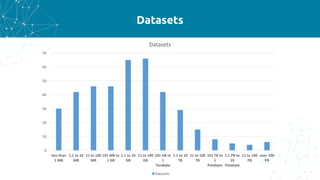
Data Science Tools Survey
220	data	scientist
Datasets
0
10
20
30
40
50
60
70
less	than	
1	MB
1.1	to	10	
MB
11	to	100	
MB
101	MB	to	
1	GB
1.1	to	10	
GB
11	to	100	
GB
101	GB	to	
1	
Terabyte
1.1	to	10	
TB
11	to	100	
TB
101	TB	to	
1	
Petabyte
1.1	PB	to	
10	
Petabyte
11	to	100	
PB
over	100	
PB
Datasets
Datasets
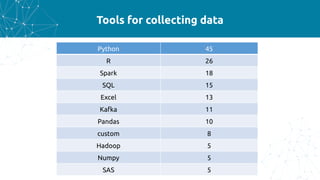
Tools for collecting data
Python 45
R 26
Spark 18
SQL 15
Excel 13
Kafka 11
Pandas 10
custom 8
Hadoop 5
Numpy 5
SAS 5
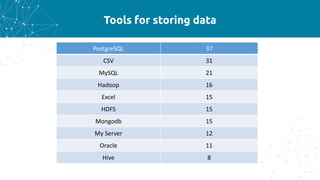
Tools for storing data
PostgreSQL 37
CSV 31
MySQL 21
Hadoop 16
Excel 15
HDFS 15
Mongodb 15
My	Server 12
Oracle 11
Hive 8
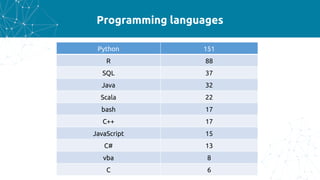
Programming languages
Python 151
R 88
SQL 37
Java 32
Scala 22
bash 17
C++ 17
JavaScript 15
C# 13
vba 8
C 6
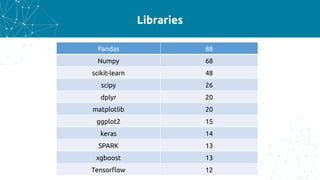
Libraries
Pandas 88
Numpy 68
scikit-learn 48
scipy 26
dplyr 20
matplotlib 20
ggplot2 15
keras 14
SPARK 13
xgboost 13
Tensorflow 12
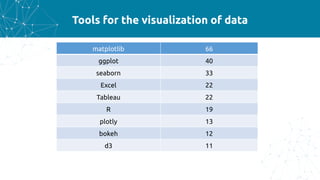
Tools for the visualization of data
matplotlib 66
ggplot 40
seaborn 33
Excel 22
Tableau 22
R 19
plotly 13
bokeh 12
d3 11
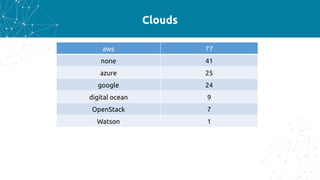
Clouds
aws 77
none 41
azure 25
google 24
digital ocean 9
OpenStack 7
Watson 1
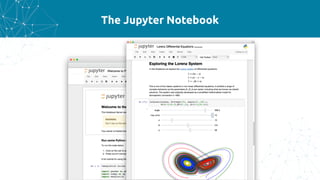
The Jupyter Notebook
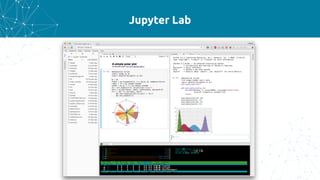
Jupyter Lab
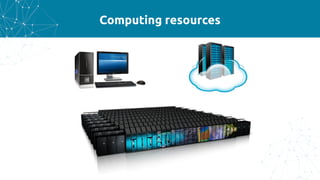
Computing resources
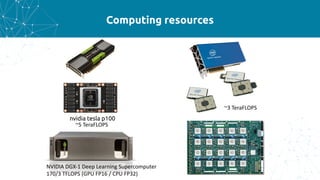
Computing resources
Computing resources
NVIDIA	DGX-1	Deep Learning Supercomputer
170/3	TFLOPS	(GPU	FP16	/	CPU	FP32)	
nvidia tesla p100
~5 TeraFLOPS
~3	TeraFLOPS
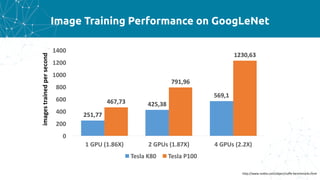
Image Training Performance on GoogLeNet
251,77
425,38
569,1
467,73
791,96
1230,63
0
200
400
600
800
1000
1200
1400
1	GPU	(1.86X) 2	GPUs	(1.87X) 4	GPUs	(2.2X)
Tesla	K80 Tesla	P100
http://www.nvidia.com/object/caffe-benchmarks.html
imagestrainedpersecond
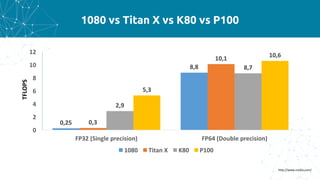
1080 vs Titan X vs K80 vs P100
0,25
8,8
0,3
10,1
2,9
8,7
5,3
10,6
0
2
4
6
8
10
12
FP32	(Single	precision) FP64	(Double	precision)
1080 Titan	X K80 P100
http://www.nvidia.com/
TFLOPS
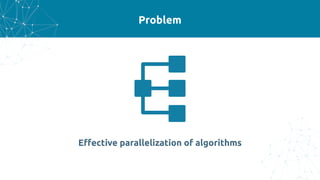
Problem
Effective parallelization of algorithms
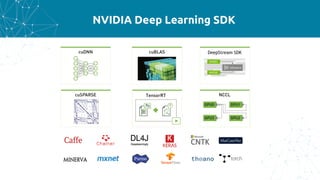
NVIDIA Deep Learning SDK
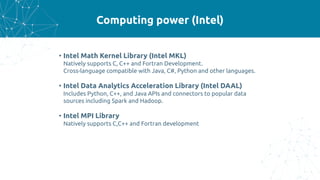
Computing power (Intel)
• Intel Math Kernel Library (Intel MKL)
Natively supports C, C++ and Fortran Development.
Cross-language compatible with Java, C#, Python and other languages.
• Intel Data Analytics Acceleration Library (Intel DAAL)
Includes Python, C++, and Java APIs and connectors to popular data
sources including Spark and Hadoop.
• Intel MPI Library
Natively supports C,C++ and Fortran development
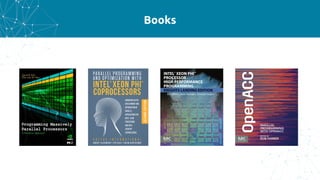
Books
Clouds
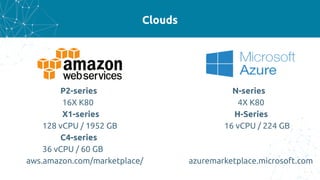
Clouds
P2-series N-series
16X K80 4X K80
X1-series H-Series
128 vCPU / 1952 GB 16 vCPU / 224 GB
C4-series
36 vCPU / 60 GB
aws.amazon.com/marketplace/ azuremarketplace.microsoft.com
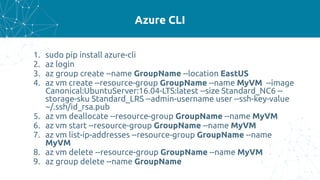
Azure CLI
1. sudo pip install azure-cli
2. az login
3. az group create --name GroupName --location EastUS
4. az vm create --resource-group GroupName --name MyVM --image
Canonical:UbuntuServer:16.04-LTS:latest --size Standard_NC6 --
storage-sku Standard_LRS --admin-username user --ssh-key-value
~/.ssh/id_rsa.pub
5. az vm deallocate --resource-group GroupName --name MyVM
6. az vm start --resource-group GroupName --name MyVM
7. az vm list-ip-addresses --resource-group GroupName --name
MyVM
8. az vm delete --resource-group GroupName --name MyVM
9. az group delete --name GroupName
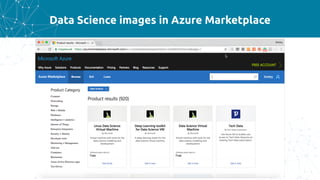
Data Science images in Azure Marketplace
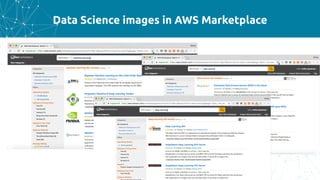
Data Science images in AWS Marketplace
Containers
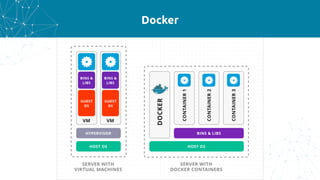
Docker
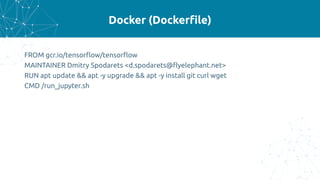
Docker (Dockerfile)
FROM gcr.io/tensorflow/tensorflow
MAINTAINER Dmitry Spodarets <d.spodarets@flyelephant.net>
RUN apt update && apt -y upgrade && apt -y install git curl wget
CMD /run_jupyter.sh
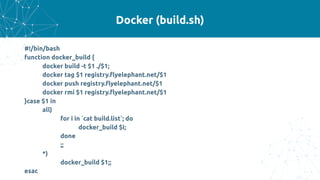
Docker (build.sh)
#!/bin/bash
function docker_build {
docker build -t $1 ./$1;
docker tag $1 registry.flyelephant.net/$1
docker push registry.flyelephant.net/$1
docker rmi $1 registry.flyelephant.net/$1
}case $1 in
all)
for i in `cat build.list`; do
docker_build $i;
done
;;
*)
docker_build $1;;
esac
Docker Hub
https://hub.docker.com/
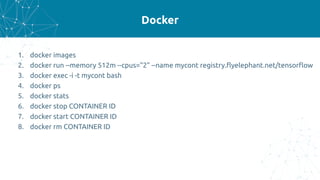
Docker
1. docker images
2. docker run --memory 512m --cpus="2" --name mycont registry.flyelephant.net/tensorflow
3. docker exec -i -t mycont bash
4. docker ps
5. docker stats
6. docker stop CONTAINER ID
7. docker start CONTAINER ID
8. docker rm CONTAINER ID
Docker Machine
• Amazon Web Services
• Digital Ocean
• Exoscale
• Generic
• Google Compute Engine
• IBM Softlayer
• Microsoft Azure
• Microsoft Hyper-V
• OpenStack
• Oracle
• VirtualBox
• Rackspace
• VMware Fusion
• VMware v
• Cloud Air
• VMware vSphere
docker-machine create --driver azure --azure-subscription-id subscription-id --azure-
resource-group resourcename --azure-ssh-user user --azure-size machine-name
docker-machine ssh machine-name
Singularity
Singularity - Containers for Science
• First public release in April 2016, followed by a massive uptake
• HPC Wire Editor’s choice: Top Technologies to Watch for 2017
• Simple integration with resource managers, InfiniBand, GPUs, MPI, file
systems, and supports multiple architectures (x86_64, PPC, ARM, etc..)
• Limits user’s privileges (inside user == outside user)
• No root owned container daemon
• Network images are supported via URIs and all require local caching:
○ docker:// - This will pull a container from Docker Hub
○ http://, https:// - This will pull an image or tarball from the URL, cache and run it
○ shub:// - Pull an image from the Singularity Hub
Singularity - Usage Examples
$ python ./hello.py
Hello World: The Python version is 2.7.5
$ sudo singularity exec --writable /tmp/debian.img apt-get install python
…
$ singularity exec /tmp/debian.img python ./hello.py
Hello World: The Python version is 2.7.12
Webinar	"Introduction	to	Singularity"	
https://youtu.be/h5rDnCA3NJA
Contributors to Singularity
Network Based Computing Lab
Ohio State University
• High-Performance Big Data (HiBD)
http://hibd.cse.ohio-state.edu/
• High-Performance Deep Learning (HiDL)
http://hidl.cse.ohio-state.edu/
FlyElephant
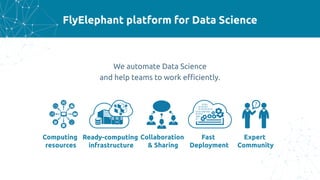
FlyElephant platform for Data Science
We automate Data Science
and help teams to work efficiently.
Computing
resources
Ready-computing
infrastructure
Collaboration
& Sharing
Fast
Deployment
Expert
Community
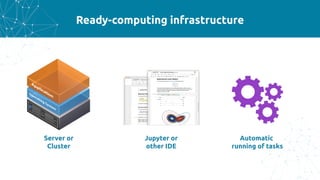
Ready-computing infrastructure
Jupyter or
other IDE
Automatic
running of tasks
Server or
Cluster
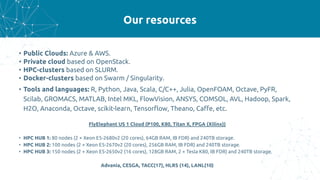
Our resources
• Public Clouds: Azure & AWS.
• Private cloud based on OpenStack.
• HPC-clusters based on SLURM.
• Docker-clusters based on Swarm / Singularity.
• Tools and languages: R, Python, Java, Scala, C/C++, Julia, OpenFOAM, Octave, PyFR,
Scilab, GROMACS, MATLAB, Intel MKL, FlowVision, ANSYS, COMSOL, AVL, Hadoop, Spark,
H2O, Anaconda, Octave, scikit-learn, Tensorflow, Theano, Caffe, etc.
FlyElephant US 1 Cloud (P100, K80, Titan X, FPGA (Xilinx))
• HPC HUB 1: 80 nodes (2 × Xeon E5-2680v2 (20 cores), 64GB RAM, IB FDR) and 240TB storage.
• HPC HUB 2: 100 nodes (2 × Xeon E5-2670v2 (20 cores), 256GB RAM, IB FDR) and 240TB storage.
• HPC HUB 3: 150 nodes (2 × Xeon E5-2650v2 (16 cores), 128GB RAM, 2 × Tesla K80, IB FDR) and 240TB storage.
Advania, CESGA, TACC(17), HLRS (14), LANL(10)
Dmitry Spodarets
d.spodarets@flyelephant.net
www.flyelephant.net

Environment for training models

  • 1.
    Environment for trainingmodels Dmitry Spodarets AI Rush
  • 2.
    Who am I DmitrySpodarets • Founder and CEO at FlyElephant • PhD candidate at Odessa National University • Lecturer at Odessa Polytechnic University • Organizer of technical conferences about AI, BigData, HPC, JS, Web Technologies …
  • 3.
    Agenda • Data ScienceTools Survey Results • Computing resources • Clouds (AWS & Azure) • Containers (Docker, Singularity) • FlyElephant platform for Data Science
  • 4.
    Data Science ToolsSurvey 220 data scientist
  • 5.
  • 6.
    Tools for collectingdata Python 45 R 26 Spark 18 SQL 15 Excel 13 Kafka 11 Pandas 10 custom 8 Hadoop 5 Numpy 5 SAS 5
  • 7.
    Tools for storingdata PostgreSQL 37 CSV 31 MySQL 21 Hadoop 16 Excel 15 HDFS 15 Mongodb 15 My Server 12 Oracle 11 Hive 8
  • 8.
    Programming languages Python 151 R88 SQL 37 Java 32 Scala 22 bash 17 C++ 17 JavaScript 15 C# 13 vba 8 C 6
  • 9.
    Libraries Pandas 88 Numpy 68 scikit-learn48 scipy 26 dplyr 20 matplotlib 20 ggplot2 15 keras 14 SPARK 13 xgboost 13 Tensorflow 12
  • 10.
    Tools for thevisualization of data matplotlib 66 ggplot 40 seaborn 33 Excel 22 Tableau 22 R 19 plotly 13 bokeh 12 d3 11
  • 11.
    Clouds aws 77 none 41 azure25 google 24 digital ocean 9 OpenStack 7 Watson 1
  • 12.
  • 13.
  • 14.
  • 15.
  • 16.
    Computing resources NVIDIA DGX-1 Deep LearningSupercomputer 170/3 TFLOPS (GPU FP16 / CPU FP32) nvidia tesla p100 ~5 TeraFLOPS ~3 TeraFLOPS
  • 17.
    Image Training Performanceon GoogLeNet 251,77 425,38 569,1 467,73 791,96 1230,63 0 200 400 600 800 1000 1200 1400 1 GPU (1.86X) 2 GPUs (1.87X) 4 GPUs (2.2X) Tesla K80 Tesla P100 http://www.nvidia.com/object/caffe-benchmarks.html imagestrainedpersecond
  • 18.
    1080 vs TitanX vs K80 vs P100 0,25 8,8 0,3 10,1 2,9 8,7 5,3 10,6 0 2 4 6 8 10 12 FP32 (Single precision) FP64 (Double precision) 1080 Titan X K80 P100 http://www.nvidia.com/ TFLOPS
  • 19.
  • 20.
  • 21.
    Computing power (Intel) •Intel Math Kernel Library (Intel MKL) Natively supports C, C++ and Fortran Development. Cross-language compatible with Java, C#, Python and other languages. • Intel Data Analytics Acceleration Library (Intel DAAL) Includes Python, C++, and Java APIs and connectors to popular data sources including Spark and Hadoop. • Intel MPI Library Natively supports C,C++ and Fortran development
  • 22.
  • 23.
  • 24.
    Clouds P2-series N-series 16X K804X K80 X1-series H-Series 128 vCPU / 1952 GB 16 vCPU / 224 GB C4-series 36 vCPU / 60 GB aws.amazon.com/marketplace/ azuremarketplace.microsoft.com
  • 25.
    Azure CLI 1. sudopip install azure-cli 2. az login 3. az group create --name GroupName --location EastUS 4. az vm create --resource-group GroupName --name MyVM --image Canonical:UbuntuServer:16.04-LTS:latest --size Standard_NC6 -- storage-sku Standard_LRS --admin-username user --ssh-key-value ~/.ssh/id_rsa.pub 5. az vm deallocate --resource-group GroupName --name MyVM 6. az vm start --resource-group GroupName --name MyVM 7. az vm list-ip-addresses --resource-group GroupName --name MyVM 8. az vm delete --resource-group GroupName --name MyVM 9. az group delete --name GroupName
  • 26.
    Data Science imagesin Azure Marketplace
  • 27.
    Data Science imagesin AWS Marketplace
  • 28.
  • 29.
  • 30.
    Docker (Dockerfile) FROM gcr.io/tensorflow/tensorflow MAINTAINERDmitry Spodarets <d.spodarets@flyelephant.net> RUN apt update && apt -y upgrade && apt -y install git curl wget CMD /run_jupyter.sh
  • 31.
    Docker (build.sh) #!/bin/bash function docker_build{ docker build -t $1 ./$1; docker tag $1 registry.flyelephant.net/$1 docker push registry.flyelephant.net/$1 docker rmi $1 registry.flyelephant.net/$1 }case $1 in all) for i in `cat build.list`; do docker_build $i; done ;; *) docker_build $1;; esac
  • 32.
  • 33.
    Docker 1. docker images 2.docker run --memory 512m --cpus="2" --name mycont registry.flyelephant.net/tensorflow 3. docker exec -i -t mycont bash 4. docker ps 5. docker stats 6. docker stop CONTAINER ID 7. docker start CONTAINER ID 8. docker rm CONTAINER ID
  • 34.
    Docker Machine • AmazonWeb Services • Digital Ocean • Exoscale • Generic • Google Compute Engine • IBM Softlayer • Microsoft Azure • Microsoft Hyper-V • OpenStack • Oracle • VirtualBox • Rackspace • VMware Fusion • VMware v • Cloud Air • VMware vSphere docker-machine create --driver azure --azure-subscription-id subscription-id --azure- resource-group resourcename --azure-ssh-user user --azure-size machine-name docker-machine ssh machine-name
  • 35.
  • 36.
    Singularity - Containersfor Science • First public release in April 2016, followed by a massive uptake • HPC Wire Editor’s choice: Top Technologies to Watch for 2017 • Simple integration with resource managers, InfiniBand, GPUs, MPI, file systems, and supports multiple architectures (x86_64, PPC, ARM, etc..) • Limits user’s privileges (inside user == outside user) • No root owned container daemon • Network images are supported via URIs and all require local caching: ○ docker:// - This will pull a container from Docker Hub ○ http://, https:// - This will pull an image or tarball from the URL, cache and run it ○ shub:// - Pull an image from the Singularity Hub
  • 37.
    Singularity - UsageExamples $ python ./hello.py Hello World: The Python version is 2.7.5 $ sudo singularity exec --writable /tmp/debian.img apt-get install python … $ singularity exec /tmp/debian.img python ./hello.py Hello World: The Python version is 2.7.12 Webinar "Introduction to Singularity" https://youtu.be/h5rDnCA3NJA
  • 38.
  • 39.
    Network Based ComputingLab Ohio State University • High-Performance Big Data (HiBD) http://hibd.cse.ohio-state.edu/ • High-Performance Deep Learning (HiDL) http://hidl.cse.ohio-state.edu/
  • 40.
  • 41.
    FlyElephant platform forData Science We automate Data Science and help teams to work efficiently. Computing resources Ready-computing infrastructure Collaboration & Sharing Fast Deployment Expert Community
  • 42.
    Ready-computing infrastructure Jupyter or otherIDE Automatic running of tasks Server or Cluster
  • 43.
    Our resources • PublicClouds: Azure & AWS. • Private cloud based on OpenStack. • HPC-clusters based on SLURM. • Docker-clusters based on Swarm / Singularity. • Tools and languages: R, Python, Java, Scala, C/C++, Julia, OpenFOAM, Octave, PyFR, Scilab, GROMACS, MATLAB, Intel MKL, FlowVision, ANSYS, COMSOL, AVL, Hadoop, Spark, H2O, Anaconda, Octave, scikit-learn, Tensorflow, Theano, Caffe, etc. FlyElephant US 1 Cloud (P100, K80, Titan X, FPGA (Xilinx)) • HPC HUB 1: 80 nodes (2 × Xeon E5-2680v2 (20 cores), 64GB RAM, IB FDR) and 240TB storage. • HPC HUB 2: 100 nodes (2 × Xeon E5-2670v2 (20 cores), 256GB RAM, IB FDR) and 240TB storage. • HPC HUB 3: 150 nodes (2 × Xeon E5-2650v2 (16 cores), 128GB RAM, 2 × Tesla K80, IB FDR) and 240TB storage. Advania, CESGA, TACC(17), HLRS (14), LANL(10)
  • 44.