Understanding Java EE
Ms. Sophia Dcruz
Enterprise Java
USIT506
What is an Enterprise Application?
 EA is a business application.
 In corporate environment, applications are complex, scalable, distributed,
component-based and mission centric.
 They may be deployed on a variety of platforms across corporate networks,
intranets or the Internet.
 Challenges Of Enterprise Application Development:
1. Programming Productivity
2. Response to Demand
3. Integration with Existing System
4. Freedom to Choose
5. Maintaining Security
EA…
 Architecture of an EA:
 A distributed, multi-tiered application model.
 Application logic is divided into components. (Different components on
different systems at different locations)
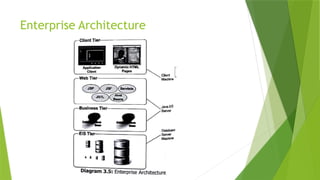
 EA divided into following tiers:
1. Client Tier Services: Runs on client machine
2. Web Tier Services: Runs on the server
3. Business Tier Services: Runs on the server
4. Enterprise Information System[EIS]: Runs on EIS server
What is Java Enterprise Edition?
 Java EE is a set of coordinated technologies
 Enables developing, deploying and managing multi-tier server centric EA.
 Advantages:
1. Powerful set of APIs
2. Reduced Development Time
3. Reduced Application Complexity
4. Improved Application Performance
 Java EE is also influenced by the internet
 Write Once, Run Anywhere (WORA) philosophy
Java EE …
 Java EE provides a collection of:
1. Standardized components that help creating commercial application.
2. Standard interface that define how various application modules
interconnect.
3. Standard services that define how different software modules communicate.
Java EE Technologies
1. Web Application Technologies (Java Servlet, JSP, JSTL, JSF,Facelets)
2. Enterprise Application Technologies (EJB, JPA, JTA, JMS, Java EE Connector)
3. Web Services Technologies (SOAP and RESTful, JAXR)
4. Security Technologies (JACC, JASPIC)
Web Application Technologies
1. Java Servlet:
 Extends the functionality of a web server.
 Receive a request, dynamically generate response, send response containing HTML/XML document.
2. JavaServer Pages (JSP):
 Helps to generate dynamic content for a web client.
 Contains two types of text: Static Data, JSP elements
3. JavaServer Pages Standard Tag Library (JSTL)
 Encapsulates core functionality of JSP
 Allows creating standard set of tags
 Has iterator and conditional tags for handling control flow
 Tags for manipulating XML documents
 Tags for accessing databases using SQL
Web App Technologies…
4. JavaServer Faces (JSF)
 User interface for building web application
5. Facelets
 Page declaration language developed for use with JSF
 Built specifically for JSF
Enterprise Application Technologies
1. Enterprise JavaBeans (EJB)
 Has methods to implement modules of business logic.
 They are scalable, transactional, secure and are building blocks
2. Java Persistence API (JPA)
 API for Object-Relational Mapping (ORM)
 Helps bridge the gap between object oriented model and a relational database.
 JPA consists of:
1. The Java Persistence API
2. The query language
3. Object/relation mapping meta data
Enterprise Application Technologies…
3. Java Transaction API (JTA)
 Standard interface for demarcating transactions.
 Provides command over commit and rollbacks.
4. Java Message Service (JMS)
 Messaging standard that allows Java EE application components to create, send,
receive and read messages.
 Enables loosely coupled, reliable and asynchronous communication.
5. Java EE Connector Architecture
 Helps create resource adapters that support access to EIS can be plugged into
any Java EE product.
6. Java Mail
 A service provider interface that allows application components to send emails.
Web Services Technologies
1. SOAP and RESTful
 Java API for RESTful Web Services (JAX-RS): Web services built according to REST
architectural style.
 Java API for XML-Based Web Services (JAX-WS): Supports web services using the
SOAP/ HTTP protocol.
2. Java API for XML Registries (JAXR)
 Accessing business and general-purpose registries over the Web.
Security Technologies
1. JACC
 Java Authorization Contract for Containers (JACC) defines a contract between a
Java EE application server and an authorization policy provider.
 Enables to authenticate and enforce access controls upon users.
2. JASPIC
 Java Authentication Service Provider Interface for Containers defines a Service
Provider Interface by which authentication providers implement message
authentication mechanisms.
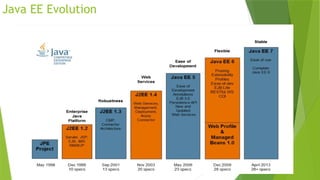
Java EE Evolution
GlassFish Server 4.0
 Built using an open source license.
 GlassFish Server 4.0 provides the following:
1. A lightweight and extensible core based on OSGi Alliance standards
2. A web container
3. An easy-to-use Administration Console for configuration and management
4. Update Tool connectivity for updates and add-on components
5. Support for high availability clustering and load balancing
GlassFish Server …
 Administration
 The main responsibilities are to establish a secure GlassFish Server
environment and to oversee the services, resources and users that
participate in that environment.
 The key tasks include
 configuring resources and services
 managing GlassFish Server at runtime
 fixing problems that are associated with the server
 installing software, integrating add-on components
 deploying applications.
GlassFish Server …
 Developers: Offers a lightweight runtime that starts in seconds and enables
rapid iterative development with Active Redeploy that saves session state
when an application is redeployed.
 IT Operations: For IT Operations, GlassFish Server offers a feature-rich web
console for manual operation and a feature-equivalent command line utility
for automated environment.
Features of GlassFish Server…
 Java API for JSON Processing 1.0
 Java API for WebSockets 1.0
 Java Batch 1.0
 Concurrency Utilities for Java EE
1.0
 Java Message Service [JMS] 2.0
 Java API for RESTful Web Services
[JAX-RS] 2.0
 Enterprise Java Beans [EJB] 3.2
 Contexts and Dependency Injection for
Java EE [CDI] 1.1
 Java Persistence API [JPA] 2.1
 JavaServer Faces [JSF] 2.2
 Java Servlet 3.1
 Bean Validation [BV] 1.1
 Expression Language [EL] 3.0
 Interceptors 1.2
 Java Transaction API [JTA] 1.2
 JavaServer Pages [JSP] 2.3
 JavaMail 1.5
Java EE Architecture,
Server and Containers
Introduction
 Applications are developed to support companies in their business operations.
 They take data as input, process the data based on business rules and provide
data or information as output. Based on this fact, all applications have three
elements:
 The User Interface or the presentation element, through which data is taken as
input
 The Application Logic or the business rule element, which helps in implementing
the operations to be performed on the data input
 The Data Storage or the data management element, which manages the storage
and retrieval of data
 These three elements form the core of all application architecture used in
Commercial Application Development.
Introduction…
 As a developer, before deciding on the number of tiers in application architecture,
the following factors must be considered:
 Scalability: The capability of an application to adapt to any new hardware
environment
 Availability: The ability of an application to cater to the increased demands from
client
 Extensibility: The ability of an application to incrementally add features from
time to time to improve performance and provide better functionality to the client
 Maintainability: The ability of an application to respond to bug-fixes with the
minimal utilization of resources in terms of people, time and technology
 Security: The ability of an application to maintain the integrity of data
 Performance: The ability of an application to respond to a client request in the
minimum time
Types of System Architecture
1. Single Tier Architecture
2. Two Tier Architecture
3. Three Tier Architecture
4. Multi Tier Architecture
5. Enterprise Architecture
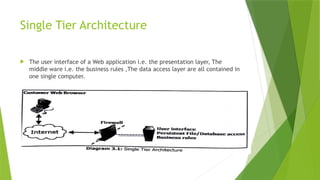
Single Tier Architecture
 The user interface of a Web application i.e. the presentation layer, The
middle ware i.e. the business rules ,The data access layer are all contained in
one single computer.
Single Tier …
 Advantages:
 The simplest and least expensive alternative
 Less equipment to purchase and maintain
 Disadvantages:
 This type of implementation is lower security and the lack of scalability. An architecture is
scalable when it can be easily expanded or augmented to meet increasing performance
needs
 Having all of the site's major components and data on a single computer behind the domain
firewall leaves the site more vulnerable to malicious attacks
 Running all of the site's components on a single computer also limits expansion and
optimization possibilities
 If the developer knows that the application will not grow over time, then the
developer may decide to use single tier architecture.
Two Tier Architecture
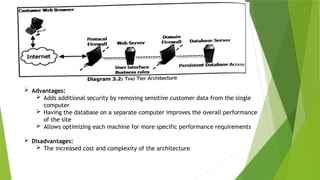
 In this architecture, an application is divided into two components:
 Client
 Implements the user interface
 Contains business logic
 Server
 Used to store and access business data, captured by the user interface run on the
Client in a data store at the Server
 The User Interface is always physically located in the user's desktop
 The database management services are always physically located on a
Server
 Advantages:
 Adds additional security by removing sensitive customer data from the single
computer
 Having the database on a separate computer improves the overall performance
of the site
 Allows optimizing each machine for more specific performance requirements
 Disadvantages:
 The increased cost and complexity of the architecture
Three Tier Architecture
 User Services - Presentation Layer: Provides service such as the Graphical
User Interface and other automation tasks that the application has to perform
 Business Services - Business Layer: Implements business rules. This layer
encapsulates the business logic from users such that they need not know
how business logic is applied When business is upgraded, only the business
layer is affected and must be a upgraded, the rest of the application services
can remain untouched
 Data Services - Data Layer: Provides data availability and integrity. It is
responsible for adding, modifying and deleting data from the data store
 Most expensive but most scalable and secure
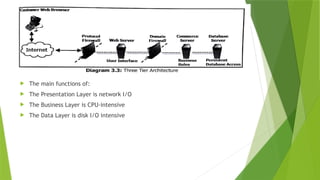
 The main functions of:
 The Presentation Layer is network I/O
 The Business Layer is CPU-intensive
 The Data Layer is disk I/O intensive
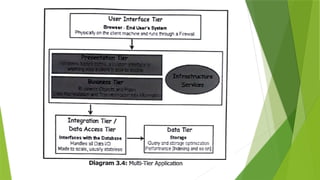
Multi Tier Architecture
 User Interface Tier: Handles users interaction with the application.
 Presentation Tier: Provides an interface for the end user to the application
data manipulation code spec.
 Business Tier: Contains business rules, data manipulation and so on.(brain)
 Infrastructure Services: Provides additional functionalities (messaging,
transactional support, etc. )
 Integration Tier/ Data Access Tier: Provide access to backend resources
 Data Tier: Any DBMS, Binary Files, Plain text files, etc.
Enterprise Architecture
Java EE Server
 Java EE Server is a server application that implements the Java EE platform
APls and provides the standard Java EE services.
 Java EE servers are sometimes called Application Servers because they allow
serving application data to clients, much as how Web Servers serve web pages
to Web Browsers.
 Java EE servers host several application component types that correspond to
the tiers in a multi-tiered application. The Java EE server provides services to
these components in the form of a Container.
 During the deployment process, installation of Java EE application
components takes place in the Java EE Containers on the Java EE Server.
Java EE Containers
 Containers are like interface connecting them with the low-level platform specific
functionality.
 Container is the only way to access the functionality of a component object. The
component is first assembled into Java EE Module and deployed into its container. Then
only the component can be executed.
 The following are the services provided by container to a component:
 Allows configuring a web component or enterprise bean so that only authorized users
can access the system resources
 Allows specifying relationships among methods that make up a single transaction so
that all methods in one transaction are treated as a single unit
 Provides a unified interface to multiple naming and directory services in the enterprise
so that application components can access these services
 Manage low-level communications between clients and enterprise beans.
Container Types
1. Enterprise JavaBeans [EJB] Container: provides local and remote access to
EJB, is responsible for spawning the EJB on demand, binding the EJB to
appropriate naming service so that other applications can find and use the
EJB.
2. Web Container: Hosts web application, responsible for instantiating,
initializing and invoking Servlets and supporting the HTTP and HTTPS
protocols.
3. Application Client Container: Provides services required for the execution of
application client components.
4. Applet Container: Gives a secure environment to applets
Introduction to Java
Servlets
The Need for Dynamic Content
 In the earlier days, web pages were static i.e. a user requests a resource and
the server returns it.
 However, with the growth of commercial activities on the Web and the rapid
spread and adoption of the World Wide Web as a network without
geographical boundaries, companies wanted to deliver dynamic content to
their customers such as:
 Displaying bank account details
 Performing bank transactions
 Booking tickets
 Weather reports
 News headlines
Common Gateway Interface [CGI]
 CGI programs provided a relatively simple way to create Web applications that accepts user
input, queries a database and returns relevant results back to the Web browser.
 A CGI program can be written in many languages such as C, C++, VB Script, TCL, REXX,
Python, Icon, AppleScript, although the most popular language for CGI programming is PERL.
 Disadvantages In CGI
 Lack of scalability and reduced speed.
 Each time a request is received by the Web server, an entirely new process thread is created
 It was platform dependent
 A process thread consumes a lot of server side resources especially in multi-user situation .
 Difficult for beginners to program modules in this environment
 Sharing resources such as database connections between scripts or multiple calls to the same
script was not available, leading to repeated execution of expensive operations
Alternatives To CGI
 Several alternatives [proprietary APIs] of CGI came into picture.
 FastCGI
 mod_perl
 NSAPI
 ISAPI
 Java Servlets
 Most of these had relatively better performance and scalability support.
However, it was the Java Servlets Technology which actually replaced CGI
almost entirely.
Java Servlet Technology
 Server-side program that services HTTP requests and returns the results as HTTP
responses.
 It has a lifecycle similar to that of an applet and runs inside a JVM at the Web
server.
 Servlets are the Web server side counterpart to Applets. Applets run only on the
client side within a Java enabled browser.
 Can easily share resources
 Can be easily ported to other platforms that support Java, as it runs inside a JVM
 When a user issues a request for a URL that corresponds to a Java Servlet, the
server hands the request off to the Servlet for processing. The Servlet dynamically
produces a response to the request, typically an HTML Web page and sends it back
to the requesting Web browser.
Why Servlets?
 Are loaded into memory once and run from memory thereafter
 Are spawned as a thread, not as a process
 Are a powerful object-oriented abstraction of HTTP
 Are portable across multiple Web servers and platforms
 Are simple to design and implement
 Obey the rules of a standard Servlet API
 Run within the secure and reliable scope of a Java Virtual Machine [JVM]
 Are robust, scalable, secure CGI Replacement
 Being on the Server-side provides code protection
 Are supported by several Web servers
What can Servlets do?
 Small, self-contained, portion of code that is executed at the Web Server in response to
an HTTP request from a client's browser.
 Servlets can do the following:
1. A Servlet can process and/or store data submitted by an HTML form
2. A Servlet can provide dynamic content, for example, return the results of a database
query to the client
3. Servlet can manage state information on top of the stateless HTTP, for example, for an
online shopping cart system which manages shopping carts for many concurrent customers
and maps every request to the right customer
4. Servlets can be used as a plug-in, that features a search engine or semi-customized
applications such as web-based banking or inventory systems
5. A Servlet can handle multiple requests concurrently and these requests can be
synchronized to support systems allowing collaboration between people
What can Servlets do ?...
5. Servlets can forward requests to other Servers and Servlets, This allows them
to be used to balance load among several servers that mirror the same content
6. Servlets can maintain and track sessions [either by URL rewriting or cookies].
Servlets clean up the session precisely when a session is terminated, either by
logging off or by a time-out
7. Servlets can pass data between themselves
8. Servlets can be used to serve as the HTTP speaking middle tier between any
kind of thin client and large enterprise services being made available via EJB's
Servlet API and Lifecycle
Introduction
 A servlet is a Java programming language class used to extend the capabilities
of servers that host applications accessed via a request-response
programming model.
 Although servlets can respond to any type of request, they are commonly
used to extend the applications hosted by web servers.
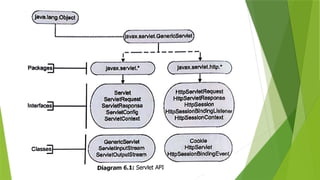
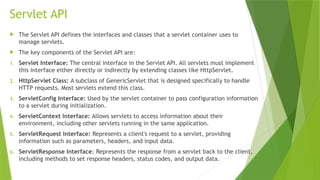
Servlet API
 The Servlet API defines the interfaces and classes that a servlet container uses to
manage servlets.
 The key components of the Servlet API are:
1. Servlet Interface: The central interface in the Servlet API. All servlets must implement
this interface either directly or indirectly by extending classes like HttpServlet.
2. HttpServlet Class: A subclass of GenericServlet that is designed specifically to handle
HTTP requests. Most servlets extend this class.
3. ServletConfig Interface: Used by the servlet container to pass configuration information
to a servlet during initialization.
4. ServletContext Interface: Allows servlets to access information about their
environment, including other servlets running in the same application.
5. ServletRequest Interface: Represents a client's request to a servlet, providing
information such as parameters, headers, and input data.
6. ServletResponse Interface: Represents the response from a servlet back to the client,
including methods to set response headers, status codes, and output data.
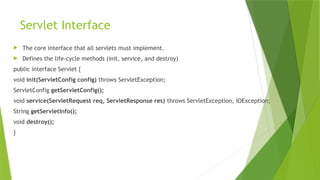
Servlet Interface
 The core interface that all servlets must implement.
 Defines the life-cycle methods (init, service, and destroy)
public interface Servlet {
void init(ServletConfig config) throws ServletException;
ServletConfig getServletConfig();
void service(ServletRequest req, ServletResponse res) throws ServletException, IOException;
String getServletInfo();
void destroy();
}
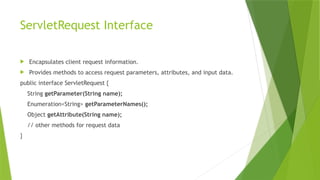
ServletRequest Interface
 Encapsulates client request information.
 Provides methods to access request parameters, attributes, and input data.
public interface ServletRequest {
String getParameter(String name);
Enumeration<String> getParameterNames();
Object getAttribute(String name);
// other methods for request data
}
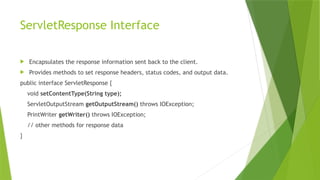
ServletResponse Interface
 Encapsulates the response information sent back to the client.
 Provides methods to set response headers, status codes, and output data.
public interface ServletResponse {
void setContentType(String type);
ServletOutputStream getOutputStream() throws IOException;
PrintWriter getWriter() throws IOException;
// other methods for response data
}
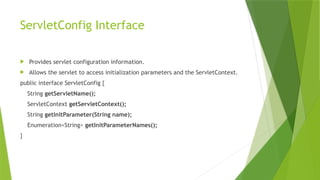
ServletConfig Interface
 Provides servlet configuration information.
 Allows the servlet to access initialization parameters and the ServletContext.
public interface ServletConfig {
String getServletName();
ServletContext getServletContext();
String getInitParameter(String name);
Enumeration<String> getInitParameterNames();
}
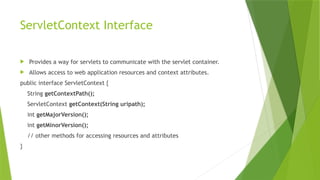
ServletContext Interface
 Provides a way for servlets to communicate with the servlet container.
 Allows access to web application resources and context attributes.
public interface ServletContext {
String getContextPath();
ServletContext getContext(String uripath);
int getMajorVersion();
int getMinorVersion();
// other methods for accessing resources and attributes
}
HttpServletRequest Interface
 Extends ServletRequest to provide HTTP-specific functionality.
 Methods to access HTTP headers, cookies, session information, and request
methods.
public interface HttpServletRequest extends ServletRequest {
String getMethod();
String getRequestURI();
HttpSession getSession();
Cookie[] getCookies();
// other HTTP-specific methods
}
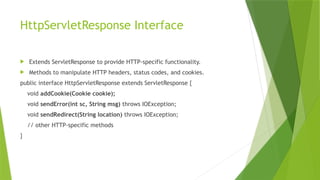
HttpServletResponse Interface
 Extends ServletResponse to provide HTTP-specific functionality.
 Methods to manipulate HTTP headers, status codes, and cookies.
public interface HttpServletResponse extends ServletResponse {
void addCookie(Cookie cookie);
void sendError(int sc, String msg) throws IOException;
void sendRedirect(String location) throws IOException;
// other HTTP-specific methods
}
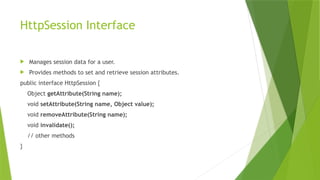
HttpSession Interface
 Manages session data for a user.
 Provides methods to set and retrieve session attributes.
public interface HttpSession {
Object getAttribute(String name);
void setAttribute(String name, Object value);
void removeAttribute(String name);
void invalidate();
// other methods
}
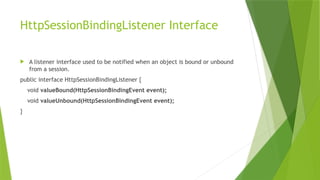
HttpSessionBindingListener Interface
 A listener interface used to be notified when an object is bound or unbound
from a session.
public interface HttpSessionBindingListener {
void valueBound(HttpSessionBindingEvent event);
void valueUnbound(HttpSessionBindingEvent event);
}
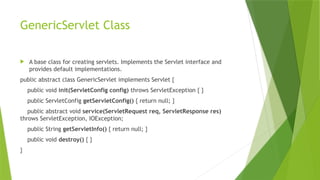
GenericServlet Class
 A base class for creating servlets. Implements the Servlet interface and
provides default implementations.
public abstract class GenericServlet implements Servlet {
public void init(ServletConfig config) throws ServletException { }
public ServletConfig getServletConfig() { return null; }
public abstract void service(ServletRequest req, ServletResponse res)
throws ServletException, IOException;
public String getServletInfo() { return null; }
public void destroy() { }
}
ServletOutputStream and ServletInputStream Class
 Provides an output stream to send data to the client.
 Provides an input stream to read data from the request.
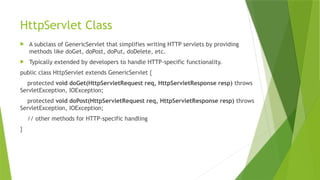
HttpServlet Class
 A subclass of GenericServlet that simplifies writing HTTP servlets by providing
methods like doGet, doPost, doPut, doDelete, etc.
 Typically extended by developers to handle HTTP-specific functionality.
public class HttpServlet extends GenericServlet {
protected void doGet(HttpServletRequest req, HttpServletResponse resp) throws
ServletException, IOException;
protected void doPost(HttpServletRequest req, HttpServletResponse resp) throws
ServletException, IOException;
// other methods for HTTP-specific handling
}
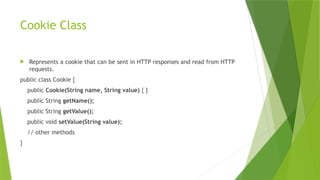
Cookie Class
 Represents a cookie that can be sent in HTTP responses and read from HTTP
requests.
public class Cookie {
public Cookie(String name, String value) { }
public String getName();
public String getValue();
public void setValue(String value);
// other methods
}
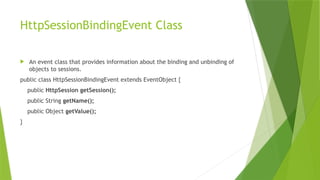
HttpSessionBindingEvent Class
 An event class that provides information about the binding and unbinding of
objects to sessions.
public class HttpSessionBindingEvent extends EventObject {
public HttpSession getSession();
public String getName();
public Object getValue();
}
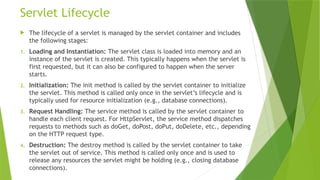
Servlet Lifecycle
Servlet Lifecycle
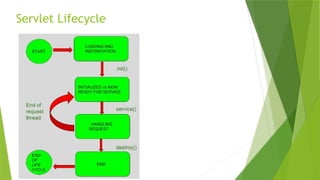
 The lifecycle of a servlet is managed by the servlet container and includes
the following stages:
1. Loading and Instantiation: The servlet class is loaded into memory and an
instance of the servlet is created. This typically happens when the servlet is
first requested, but it can also be configured to happen when the server
starts.
2. Initialization: The init method is called by the servlet container to initialize
the servlet. This method is called only once in the servlet’s lifecycle and is
typically used for resource initialization (e.g., database connections).
3. Request Handling: The service method is called by the servlet container to
handle each client request. For HttpServlet, the service method dispatches
requests to methods such as doGet, doPost, doPut, doDelete, etc., depending
on the HTTP request type.
4. Destruction: The destroy method is called by the servlet container to take
the servlet out of service. This method is called only once and is used to
release any resources the servlet might be holding (e.g., closing database
connections).
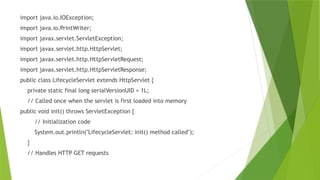
import java.io.IOException;
import java.io.PrintWriter;
import javax.servlet.ServletException;
import javax.servlet.http.HttpServlet;
import javax.servlet.http.HttpServletRequest;
import javax.servlet.http.HttpServletResponse;
public class LifecycleServlet extends HttpServlet {
private static final long serialVersionUID = 1L;
// Called once when the servlet is first loaded into memory
public void init() throws ServletException {
// Initialization code
System.out.println("LifecycleServlet: init() method called");
}
// Handles HTTP GET requests
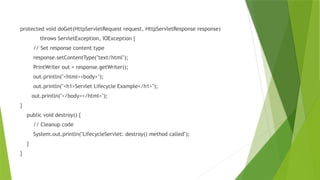
protected void doGet(HttpServletRequest request, HttpServletResponse response)
throws ServletException, IOException {
// Set response content type
response.setContentType("text/html");
PrintWriter out = response.getWriter();
out.println("<html><body>");
out.println("<h1>Servlet Lifecycle Example</h1>");
out.println("</body></html>");
}
public void destroy() {
// Cleanup code
System.out.println("LifecycleServlet: destroy() method called");
}
}
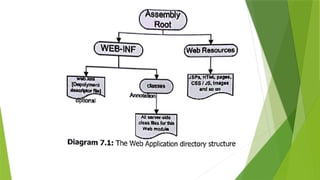
Working with Servlet
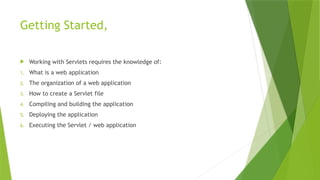
Getting Started,
 Working with Servlets requires the knowledge of:
1. What is a web application
2. The organization of a web application
3. How to create a Servlet file
4. Compiling and building the application
5. Deploying the application
6. Executing the Servlet / web application
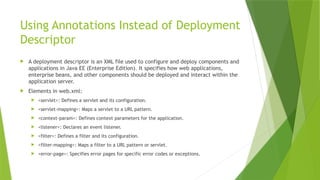
Using Annotations Instead of Deployment
Descriptor
 A deployment descriptor is an XML file used to configure and deploy components and
applications in Java EE (Enterprise Edition). It specifies how web applications,
enterprise beans, and other components should be deployed and interact within the
application server.
 Elements in web.xml:
 <servlet>: Defines a servlet and its configuration.
 <servlet-mapping>: Maps a servlet to a URL pattern.
 <context-param>: Defines context parameters for the application.
 <listener>: Declares an event listener.
 <filter>: Defines a filter and its configuration.
 <filter-mapping>: Maps a filter to a URL pattern or servlet.
 <error-page>: Specifies error pages for specific error codes or exceptions.
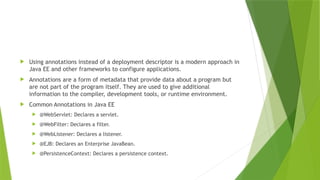
 Using annotations instead of a deployment descriptor is a modern approach in
Java EE and other frameworks to configure applications.
 Annotations are a form of metadata that provide data about a program but
are not part of the program itself. They are used to give additional
information to the compiler, development tools, or runtime environment.
 Common Annotations in Java EE
 @WebServlet: Declares a servlet.
 @WebFilter: Declares a filter.
 @WebListener: Declares a listener.
 @EJB: Declares an Enterprise JavaBean.
 @PersistenceContext: Declares a persistence context.
Working with Databases
What Is JDBC?
 In 1996, JavaSoft, released its first version of the JDBC kit. JDBC stands for
Java DataBase Connectivity
 This is actually an API, which consists of a set of Java classes, interfaces
and exceptions designed to perform actions against any database.
 Applications developed with Java and JDBC are platform and database
vendor
 JDBC is today a mature and well-accepted table data, access and standard.
 The primary purpose of JDBC is to provide developers with a consistent
way to issue SQL statements to databases and process their results. This
allows Java applications to access and manipulate data stored in relational
databases.
JDBC Drivers
 In the context of JDBC (Java Database Connectivity), a database driver acts as an
intermediary between the Java application and the database.
 It provides a standard API for Java applications to interact with various types of
databases, abstracting the details of database-specific communication protocols.
 Key Roles of a JDBC Driver:
1. Connection Management: Establishes and manages the connection between the
Java application and the database.
2. Query Execution: Sends SQL queries from the Java application to the database and
retrieves the results.
3. Data Conversion: Converts data between Java types and database types.
4. Transaction Management: Manages database transactions (e.g., commit, rollback).
Types of JDBC Drivers
 Type 1 - JDBC-ODBC Bridge Driver:
 Uses ODBC drivers to connect to the database.
 Acts as a bridge between JDBC and ODBC.
 Requires ODBC driver and native libraries on the client machine.
 Type 2 - Native-API Driver:
 Uses native database libraries via the Java Native Interface (JNI).
 Requires database-specific native client libraries on the client machine.
 Type 3 - Network Protocol Driver
 Uses a network protocol to communicate with middleware that translates
requests to the database.
 No client-side installation required.
 Flexible and can connect to various databases.
 Type 4 - Thin Driver:
 Written in pure Java and communicates directly with the database using
its native protocol.
 No client-side native libraries required.
 Fastest and most efficient type of driver.
JDBC Architecture
 JDBC defines several classes and interfaces that represent various aspects of database
connectivity and interaction:
 Database Connections: Establishing a link between the application and the database.
 SQL Statements: Issuing SQL commands to the database.
 Result Sets: Retrieving results from executed SQL queries.
 Database Metadata: Getting information about the database structure.
 Prepared Statements: Precompiled SQL statements for better performance.
 Binary Large Objects (BLOBs): Handling large binary data.
 Character Large Objects (CLOBs): Handling large text data.
 Callable Statements: Executing stored procedures in the database.
 Database Drivers: Providing the necessary implementation for database-specific
communication.
 Driver Manager: Managing the database drivers and connections.
 JDBC Driver Manager
 The JDBC Driver Manager is responsible for:
 Maintaining a list of database drivers.
 Loading and managing these drivers.
 Establishing connections to databases by selecting the appropriate driver.
 JDBC API Packages
 JDBC is divided into two main packages:
 java.sql Package: Core JDBC API compatible with any JDBC driver.
 javax.sql Package: Optional package extending core JDBC functionality, including
features like scrollable result sets and advanced connection pooling.
 Driver: Provides the launching point for database connectivity.Responds to
DriverManager connection requests and provides information about the driver
implementation.
 DriverManager: Keeps a list of loaded drivers.Selects the appropriate driver
when a connection request is made.
 Connection: Represents a connection to a specific database.Can be used to
retrieve database metadata and manage transactions.
 Statement: Represents a static SQL statement.Used to execute SQL queries
and retrieve results as ResultSet objects.Only one ResultSet can be open per
statement at a time.
 ResultSet: Represents the result of a SQL query. Data is delivered in the form
of a table, with rows returned sequentially.
 PreparedStatement: Represents a precompiled SQL statement. Can be
executed multiple times efficiently. Provides better performance and security
compared to Statement.
 CallableStatement: Represents a stored procedure in the database. Used to
execute stored procedures that are precompiled and stored in the database.
Accessing Database
 To access and work with a database using JDBC, follow these steps:
 Configuring JDBC Driver
 Creating a Database Connection
 Executing Queries
 Processing the Results
 Closing the Database Connection
 Step 1: Configuring JDBC Driver
 To establish a database connection, you need to load the specific JDBC driver
class into the application's JVM (Java Virtual Machine). This makes the driver
available for opening the connection.
 Class.forName("com.mysql.jdbc.Driver").newInstance();
 Step 2: Creating a Database Connection
 Once the driver is loaded, you need to establish a connection to the database
using a database URL, which identifies the database and informs the driver
manager about which driver and data source to use.
 jdbc:<SubProtocol>:<SubName>
 jdbc:mysql://Server[:Port]/Database_Name
 To create a database connection, use the getConnection() method of
DriverManager
 Connection con =
DriverManager.getConnection("jdbc:mysql://localhost/test", "user",
"passwd");
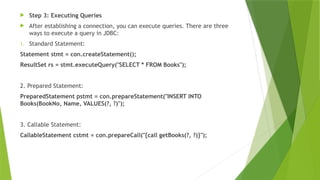
 Step 3: Executing Queries
 After establishing a connection, you can execute queries. There are three
ways to execute a query in JDBC:
1. Standard Statement:
Statement stmt = con.createStatement();
ResultSet rs = stmt.executeQuery("SELECT * FROM Books");
2. Prepared Statement:
PreparedStatement pstmt = con.prepareStatement("INSERT INTO
Books(BookNo, Name, VALUES(?, ?)");
3. Callable Statement:
CallableStatement cstmt = con.prepareCall("{call getBooks(?, ?)}");
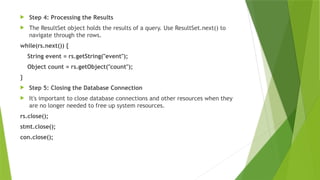
 Step 4: Processing the Results
 The ResultSet object holds the results of a query. Use ResultSet.next() to
navigate through the rows.
while(rs.next()) {
String event = rs.getString("event");
Object count = rs.getObject("count");
}
 Step 5: Closing the Database Connection
 It's important to close database connections and other resources when they
are no longer needed to free up system resources.
rs.close();
stmt.close();
con.close();
The Servlet GUI and Database Example
 Practical 1C

Enrterprise Java-Unit 1 (All chapters) for TYIT PPTx

  • 1.
    Understanding Java EE Ms.Sophia Dcruz Enterprise Java USIT506
  • 2.
    What is anEnterprise Application?  EA is a business application.  In corporate environment, applications are complex, scalable, distributed, component-based and mission centric.  They may be deployed on a variety of platforms across corporate networks, intranets or the Internet.  Challenges Of Enterprise Application Development: 1. Programming Productivity 2. Response to Demand 3. Integration with Existing System 4. Freedom to Choose 5. Maintaining Security
  • 3.
    EA…  Architecture ofan EA:  A distributed, multi-tiered application model.  Application logic is divided into components. (Different components on different systems at different locations)  EA divided into following tiers: 1. Client Tier Services: Runs on client machine 2. Web Tier Services: Runs on the server 3. Business Tier Services: Runs on the server 4. Enterprise Information System[EIS]: Runs on EIS server
  • 4.
    What is JavaEnterprise Edition?  Java EE is a set of coordinated technologies  Enables developing, deploying and managing multi-tier server centric EA.  Advantages: 1. Powerful set of APIs 2. Reduced Development Time 3. Reduced Application Complexity 4. Improved Application Performance  Java EE is also influenced by the internet  Write Once, Run Anywhere (WORA) philosophy
  • 5.
    Java EE … Java EE provides a collection of: 1. Standardized components that help creating commercial application. 2. Standard interface that define how various application modules interconnect. 3. Standard services that define how different software modules communicate.
  • 6.
    Java EE Technologies 1.Web Application Technologies (Java Servlet, JSP, JSTL, JSF,Facelets) 2. Enterprise Application Technologies (EJB, JPA, JTA, JMS, Java EE Connector) 3. Web Services Technologies (SOAP and RESTful, JAXR) 4. Security Technologies (JACC, JASPIC)
  • 7.
    Web Application Technologies 1.Java Servlet:  Extends the functionality of a web server.  Receive a request, dynamically generate response, send response containing HTML/XML document. 2. JavaServer Pages (JSP):  Helps to generate dynamic content for a web client.  Contains two types of text: Static Data, JSP elements 3. JavaServer Pages Standard Tag Library (JSTL)  Encapsulates core functionality of JSP  Allows creating standard set of tags  Has iterator and conditional tags for handling control flow  Tags for manipulating XML documents  Tags for accessing databases using SQL
  • 8.
    Web App Technologies… 4.JavaServer Faces (JSF)  User interface for building web application 5. Facelets  Page declaration language developed for use with JSF  Built specifically for JSF
  • 9.
    Enterprise Application Technologies 1.Enterprise JavaBeans (EJB)  Has methods to implement modules of business logic.  They are scalable, transactional, secure and are building blocks 2. Java Persistence API (JPA)  API for Object-Relational Mapping (ORM)  Helps bridge the gap between object oriented model and a relational database.  JPA consists of: 1. The Java Persistence API 2. The query language 3. Object/relation mapping meta data
  • 10.
    Enterprise Application Technologies… 3.Java Transaction API (JTA)  Standard interface for demarcating transactions.  Provides command over commit and rollbacks. 4. Java Message Service (JMS)  Messaging standard that allows Java EE application components to create, send, receive and read messages.  Enables loosely coupled, reliable and asynchronous communication. 5. Java EE Connector Architecture  Helps create resource adapters that support access to EIS can be plugged into any Java EE product. 6. Java Mail  A service provider interface that allows application components to send emails.
  • 11.
    Web Services Technologies 1.SOAP and RESTful  Java API for RESTful Web Services (JAX-RS): Web services built according to REST architectural style.  Java API for XML-Based Web Services (JAX-WS): Supports web services using the SOAP/ HTTP protocol. 2. Java API for XML Registries (JAXR)  Accessing business and general-purpose registries over the Web.
  • 12.
    Security Technologies 1. JACC Java Authorization Contract for Containers (JACC) defines a contract between a Java EE application server and an authorization policy provider.  Enables to authenticate and enforce access controls upon users. 2. JASPIC  Java Authentication Service Provider Interface for Containers defines a Service Provider Interface by which authentication providers implement message authentication mechanisms.
  • 13.
  • 14.
    GlassFish Server 4.0 Built using an open source license.  GlassFish Server 4.0 provides the following: 1. A lightweight and extensible core based on OSGi Alliance standards 2. A web container 3. An easy-to-use Administration Console for configuration and management 4. Update Tool connectivity for updates and add-on components 5. Support for high availability clustering and load balancing
  • 15.
    GlassFish Server … Administration  The main responsibilities are to establish a secure GlassFish Server environment and to oversee the services, resources and users that participate in that environment.  The key tasks include  configuring resources and services  managing GlassFish Server at runtime  fixing problems that are associated with the server  installing software, integrating add-on components  deploying applications.
  • 16.
    GlassFish Server … Developers: Offers a lightweight runtime that starts in seconds and enables rapid iterative development with Active Redeploy that saves session state when an application is redeployed.  IT Operations: For IT Operations, GlassFish Server offers a feature-rich web console for manual operation and a feature-equivalent command line utility for automated environment.
  • 17.
    Features of GlassFishServer…  Java API for JSON Processing 1.0  Java API for WebSockets 1.0  Java Batch 1.0  Concurrency Utilities for Java EE 1.0  Java Message Service [JMS] 2.0  Java API for RESTful Web Services [JAX-RS] 2.0  Enterprise Java Beans [EJB] 3.2  Contexts and Dependency Injection for Java EE [CDI] 1.1  Java Persistence API [JPA] 2.1  JavaServer Faces [JSF] 2.2  Java Servlet 3.1  Bean Validation [BV] 1.1  Expression Language [EL] 3.0  Interceptors 1.2  Java Transaction API [JTA] 1.2  JavaServer Pages [JSP] 2.3  JavaMail 1.5
  • 18.
  • 19.
    Introduction  Applications aredeveloped to support companies in their business operations.  They take data as input, process the data based on business rules and provide data or information as output. Based on this fact, all applications have three elements:  The User Interface or the presentation element, through which data is taken as input  The Application Logic or the business rule element, which helps in implementing the operations to be performed on the data input  The Data Storage or the data management element, which manages the storage and retrieval of data  These three elements form the core of all application architecture used in Commercial Application Development.
  • 20.
    Introduction…  As adeveloper, before deciding on the number of tiers in application architecture, the following factors must be considered:  Scalability: The capability of an application to adapt to any new hardware environment  Availability: The ability of an application to cater to the increased demands from client  Extensibility: The ability of an application to incrementally add features from time to time to improve performance and provide better functionality to the client  Maintainability: The ability of an application to respond to bug-fixes with the minimal utilization of resources in terms of people, time and technology  Security: The ability of an application to maintain the integrity of data  Performance: The ability of an application to respond to a client request in the minimum time
  • 21.
    Types of SystemArchitecture 1. Single Tier Architecture 2. Two Tier Architecture 3. Three Tier Architecture 4. Multi Tier Architecture 5. Enterprise Architecture
  • 22.
    Single Tier Architecture The user interface of a Web application i.e. the presentation layer, The middle ware i.e. the business rules ,The data access layer are all contained in one single computer.
  • 23.
    Single Tier … Advantages:  The simplest and least expensive alternative  Less equipment to purchase and maintain  Disadvantages:  This type of implementation is lower security and the lack of scalability. An architecture is scalable when it can be easily expanded or augmented to meet increasing performance needs  Having all of the site's major components and data on a single computer behind the domain firewall leaves the site more vulnerable to malicious attacks  Running all of the site's components on a single computer also limits expansion and optimization possibilities  If the developer knows that the application will not grow over time, then the developer may decide to use single tier architecture.
  • 24.
    Two Tier Architecture In this architecture, an application is divided into two components:  Client  Implements the user interface  Contains business logic  Server  Used to store and access business data, captured by the user interface run on the Client in a data store at the Server  The User Interface is always physically located in the user's desktop  The database management services are always physically located on a Server
  • 25.
     Advantages:  Addsadditional security by removing sensitive customer data from the single computer  Having the database on a separate computer improves the overall performance of the site  Allows optimizing each machine for more specific performance requirements  Disadvantages:  The increased cost and complexity of the architecture
  • 26.
    Three Tier Architecture User Services - Presentation Layer: Provides service such as the Graphical User Interface and other automation tasks that the application has to perform  Business Services - Business Layer: Implements business rules. This layer encapsulates the business logic from users such that they need not know how business logic is applied When business is upgraded, only the business layer is affected and must be a upgraded, the rest of the application services can remain untouched  Data Services - Data Layer: Provides data availability and integrity. It is responsible for adding, modifying and deleting data from the data store  Most expensive but most scalable and secure
  • 27.
     The mainfunctions of:  The Presentation Layer is network I/O  The Business Layer is CPU-intensive  The Data Layer is disk I/O intensive
  • 28.
    Multi Tier Architecture User Interface Tier: Handles users interaction with the application.  Presentation Tier: Provides an interface for the end user to the application data manipulation code spec.  Business Tier: Contains business rules, data manipulation and so on.(brain)  Infrastructure Services: Provides additional functionalities (messaging, transactional support, etc. )  Integration Tier/ Data Access Tier: Provide access to backend resources  Data Tier: Any DBMS, Binary Files, Plain text files, etc.
  • 30.
  • 31.
    Java EE Server Java EE Server is a server application that implements the Java EE platform APls and provides the standard Java EE services.  Java EE servers are sometimes called Application Servers because they allow serving application data to clients, much as how Web Servers serve web pages to Web Browsers.  Java EE servers host several application component types that correspond to the tiers in a multi-tiered application. The Java EE server provides services to these components in the form of a Container.  During the deployment process, installation of Java EE application components takes place in the Java EE Containers on the Java EE Server.
  • 32.
    Java EE Containers Containers are like interface connecting them with the low-level platform specific functionality.  Container is the only way to access the functionality of a component object. The component is first assembled into Java EE Module and deployed into its container. Then only the component can be executed.  The following are the services provided by container to a component:  Allows configuring a web component or enterprise bean so that only authorized users can access the system resources  Allows specifying relationships among methods that make up a single transaction so that all methods in one transaction are treated as a single unit  Provides a unified interface to multiple naming and directory services in the enterprise so that application components can access these services  Manage low-level communications between clients and enterprise beans.
  • 33.
    Container Types 1. EnterpriseJavaBeans [EJB] Container: provides local and remote access to EJB, is responsible for spawning the EJB on demand, binding the EJB to appropriate naming service so that other applications can find and use the EJB. 2. Web Container: Hosts web application, responsible for instantiating, initializing and invoking Servlets and supporting the HTTP and HTTPS protocols. 3. Application Client Container: Provides services required for the execution of application client components. 4. Applet Container: Gives a secure environment to applets
  • 34.
  • 35.
    The Need forDynamic Content  In the earlier days, web pages were static i.e. a user requests a resource and the server returns it.  However, with the growth of commercial activities on the Web and the rapid spread and adoption of the World Wide Web as a network without geographical boundaries, companies wanted to deliver dynamic content to their customers such as:  Displaying bank account details  Performing bank transactions  Booking tickets  Weather reports  News headlines
  • 36.
    Common Gateway Interface[CGI]  CGI programs provided a relatively simple way to create Web applications that accepts user input, queries a database and returns relevant results back to the Web browser.  A CGI program can be written in many languages such as C, C++, VB Script, TCL, REXX, Python, Icon, AppleScript, although the most popular language for CGI programming is PERL.  Disadvantages In CGI  Lack of scalability and reduced speed.  Each time a request is received by the Web server, an entirely new process thread is created  It was platform dependent  A process thread consumes a lot of server side resources especially in multi-user situation .  Difficult for beginners to program modules in this environment  Sharing resources such as database connections between scripts or multiple calls to the same script was not available, leading to repeated execution of expensive operations
  • 37.
    Alternatives To CGI Several alternatives [proprietary APIs] of CGI came into picture.  FastCGI  mod_perl  NSAPI  ISAPI  Java Servlets  Most of these had relatively better performance and scalability support. However, it was the Java Servlets Technology which actually replaced CGI almost entirely.
  • 38.
    Java Servlet Technology Server-side program that services HTTP requests and returns the results as HTTP responses.  It has a lifecycle similar to that of an applet and runs inside a JVM at the Web server.  Servlets are the Web server side counterpart to Applets. Applets run only on the client side within a Java enabled browser.  Can easily share resources  Can be easily ported to other platforms that support Java, as it runs inside a JVM  When a user issues a request for a URL that corresponds to a Java Servlet, the server hands the request off to the Servlet for processing. The Servlet dynamically produces a response to the request, typically an HTML Web page and sends it back to the requesting Web browser.
  • 39.
    Why Servlets?  Areloaded into memory once and run from memory thereafter  Are spawned as a thread, not as a process  Are a powerful object-oriented abstraction of HTTP  Are portable across multiple Web servers and platforms  Are simple to design and implement  Obey the rules of a standard Servlet API  Run within the secure and reliable scope of a Java Virtual Machine [JVM]  Are robust, scalable, secure CGI Replacement  Being on the Server-side provides code protection  Are supported by several Web servers
  • 40.
    What can Servletsdo?  Small, self-contained, portion of code that is executed at the Web Server in response to an HTTP request from a client's browser.  Servlets can do the following: 1. A Servlet can process and/or store data submitted by an HTML form 2. A Servlet can provide dynamic content, for example, return the results of a database query to the client 3. Servlet can manage state information on top of the stateless HTTP, for example, for an online shopping cart system which manages shopping carts for many concurrent customers and maps every request to the right customer 4. Servlets can be used as a plug-in, that features a search engine or semi-customized applications such as web-based banking or inventory systems 5. A Servlet can handle multiple requests concurrently and these requests can be synchronized to support systems allowing collaboration between people
  • 41.
    What can Servletsdo ?... 5. Servlets can forward requests to other Servers and Servlets, This allows them to be used to balance load among several servers that mirror the same content 6. Servlets can maintain and track sessions [either by URL rewriting or cookies]. Servlets clean up the session precisely when a session is terminated, either by logging off or by a time-out 7. Servlets can pass data between themselves 8. Servlets can be used to serve as the HTTP speaking middle tier between any kind of thin client and large enterprise services being made available via EJB's
  • 42.
    Servlet API andLifecycle
  • 43.
    Introduction  A servletis a Java programming language class used to extend the capabilities of servers that host applications accessed via a request-response programming model.  Although servlets can respond to any type of request, they are commonly used to extend the applications hosted by web servers.
  • 45.
    Servlet API  TheServlet API defines the interfaces and classes that a servlet container uses to manage servlets.  The key components of the Servlet API are: 1. Servlet Interface: The central interface in the Servlet API. All servlets must implement this interface either directly or indirectly by extending classes like HttpServlet. 2. HttpServlet Class: A subclass of GenericServlet that is designed specifically to handle HTTP requests. Most servlets extend this class. 3. ServletConfig Interface: Used by the servlet container to pass configuration information to a servlet during initialization. 4. ServletContext Interface: Allows servlets to access information about their environment, including other servlets running in the same application. 5. ServletRequest Interface: Represents a client's request to a servlet, providing information such as parameters, headers, and input data. 6. ServletResponse Interface: Represents the response from a servlet back to the client, including methods to set response headers, status codes, and output data.
  • 46.
    Servlet Interface  Thecore interface that all servlets must implement.  Defines the life-cycle methods (init, service, and destroy) public interface Servlet { void init(ServletConfig config) throws ServletException; ServletConfig getServletConfig(); void service(ServletRequest req, ServletResponse res) throws ServletException, IOException; String getServletInfo(); void destroy(); }
  • 47.
    ServletRequest Interface  Encapsulatesclient request information.  Provides methods to access request parameters, attributes, and input data. public interface ServletRequest { String getParameter(String name); Enumeration<String> getParameterNames(); Object getAttribute(String name); // other methods for request data }
  • 48.
    ServletResponse Interface  Encapsulatesthe response information sent back to the client.  Provides methods to set response headers, status codes, and output data. public interface ServletResponse { void setContentType(String type); ServletOutputStream getOutputStream() throws IOException; PrintWriter getWriter() throws IOException; // other methods for response data }
  • 49.
    ServletConfig Interface  Providesservlet configuration information.  Allows the servlet to access initialization parameters and the ServletContext. public interface ServletConfig { String getServletName(); ServletContext getServletContext(); String getInitParameter(String name); Enumeration<String> getInitParameterNames(); }
  • 50.
    ServletContext Interface  Providesa way for servlets to communicate with the servlet container.  Allows access to web application resources and context attributes. public interface ServletContext { String getContextPath(); ServletContext getContext(String uripath); int getMajorVersion(); int getMinorVersion(); // other methods for accessing resources and attributes }
  • 51.
    HttpServletRequest Interface  ExtendsServletRequest to provide HTTP-specific functionality.  Methods to access HTTP headers, cookies, session information, and request methods. public interface HttpServletRequest extends ServletRequest { String getMethod(); String getRequestURI(); HttpSession getSession(); Cookie[] getCookies(); // other HTTP-specific methods }
  • 52.
    HttpServletResponse Interface  ExtendsServletResponse to provide HTTP-specific functionality.  Methods to manipulate HTTP headers, status codes, and cookies. public interface HttpServletResponse extends ServletResponse { void addCookie(Cookie cookie); void sendError(int sc, String msg) throws IOException; void sendRedirect(String location) throws IOException; // other HTTP-specific methods }
  • 53.
    HttpSession Interface  Managessession data for a user.  Provides methods to set and retrieve session attributes. public interface HttpSession { Object getAttribute(String name); void setAttribute(String name, Object value); void removeAttribute(String name); void invalidate(); // other methods }
  • 54.
    HttpSessionBindingListener Interface  Alistener interface used to be notified when an object is bound or unbound from a session. public interface HttpSessionBindingListener { void valueBound(HttpSessionBindingEvent event); void valueUnbound(HttpSessionBindingEvent event); }
  • 55.
    GenericServlet Class  Abase class for creating servlets. Implements the Servlet interface and provides default implementations. public abstract class GenericServlet implements Servlet { public void init(ServletConfig config) throws ServletException { } public ServletConfig getServletConfig() { return null; } public abstract void service(ServletRequest req, ServletResponse res) throws ServletException, IOException; public String getServletInfo() { return null; } public void destroy() { } }
  • 56.
    ServletOutputStream and ServletInputStreamClass  Provides an output stream to send data to the client.  Provides an input stream to read data from the request.
  • 57.
    HttpServlet Class  Asubclass of GenericServlet that simplifies writing HTTP servlets by providing methods like doGet, doPost, doPut, doDelete, etc.  Typically extended by developers to handle HTTP-specific functionality. public class HttpServlet extends GenericServlet { protected void doGet(HttpServletRequest req, HttpServletResponse resp) throws ServletException, IOException; protected void doPost(HttpServletRequest req, HttpServletResponse resp) throws ServletException, IOException; // other methods for HTTP-specific handling }
  • 58.
    Cookie Class  Representsa cookie that can be sent in HTTP responses and read from HTTP requests. public class Cookie { public Cookie(String name, String value) { } public String getName(); public String getValue(); public void setValue(String value); // other methods }
  • 59.
    HttpSessionBindingEvent Class  Anevent class that provides information about the binding and unbinding of objects to sessions. public class HttpSessionBindingEvent extends EventObject { public HttpSession getSession(); public String getName(); public Object getValue(); }
  • 60.
  • 61.
    Servlet Lifecycle  Thelifecycle of a servlet is managed by the servlet container and includes the following stages: 1. Loading and Instantiation: The servlet class is loaded into memory and an instance of the servlet is created. This typically happens when the servlet is first requested, but it can also be configured to happen when the server starts. 2. Initialization: The init method is called by the servlet container to initialize the servlet. This method is called only once in the servlet’s lifecycle and is typically used for resource initialization (e.g., database connections). 3. Request Handling: The service method is called by the servlet container to handle each client request. For HttpServlet, the service method dispatches requests to methods such as doGet, doPost, doPut, doDelete, etc., depending on the HTTP request type. 4. Destruction: The destroy method is called by the servlet container to take the servlet out of service. This method is called only once and is used to release any resources the servlet might be holding (e.g., closing database connections).
  • 62.
    import java.io.IOException; import java.io.PrintWriter; importjavax.servlet.ServletException; import javax.servlet.http.HttpServlet; import javax.servlet.http.HttpServletRequest; import javax.servlet.http.HttpServletResponse; public class LifecycleServlet extends HttpServlet { private static final long serialVersionUID = 1L; // Called once when the servlet is first loaded into memory public void init() throws ServletException { // Initialization code System.out.println("LifecycleServlet: init() method called"); } // Handles HTTP GET requests
  • 63.
    protected void doGet(HttpServletRequestrequest, HttpServletResponse response) throws ServletException, IOException { // Set response content type response.setContentType("text/html"); PrintWriter out = response.getWriter(); out.println("<html><body>"); out.println("<h1>Servlet Lifecycle Example</h1>"); out.println("</body></html>"); } public void destroy() { // Cleanup code System.out.println("LifecycleServlet: destroy() method called"); } }
  • 64.
  • 65.
    Getting Started,  Workingwith Servlets requires the knowledge of: 1. What is a web application 2. The organization of a web application 3. How to create a Servlet file 4. Compiling and building the application 5. Deploying the application 6. Executing the Servlet / web application
  • 67.
    Using Annotations Insteadof Deployment Descriptor  A deployment descriptor is an XML file used to configure and deploy components and applications in Java EE (Enterprise Edition). It specifies how web applications, enterprise beans, and other components should be deployed and interact within the application server.  Elements in web.xml:  <servlet>: Defines a servlet and its configuration.  <servlet-mapping>: Maps a servlet to a URL pattern.  <context-param>: Defines context parameters for the application.  <listener>: Declares an event listener.  <filter>: Defines a filter and its configuration.  <filter-mapping>: Maps a filter to a URL pattern or servlet.  <error-page>: Specifies error pages for specific error codes or exceptions.
  • 68.
     Using annotationsinstead of a deployment descriptor is a modern approach in Java EE and other frameworks to configure applications.  Annotations are a form of metadata that provide data about a program but are not part of the program itself. They are used to give additional information to the compiler, development tools, or runtime environment.  Common Annotations in Java EE  @WebServlet: Declares a servlet.  @WebFilter: Declares a filter.  @WebListener: Declares a listener.  @EJB: Declares an Enterprise JavaBean.  @PersistenceContext: Declares a persistence context.
  • 69.
  • 70.
    What Is JDBC? In 1996, JavaSoft, released its first version of the JDBC kit. JDBC stands for Java DataBase Connectivity  This is actually an API, which consists of a set of Java classes, interfaces and exceptions designed to perform actions against any database.  Applications developed with Java and JDBC are platform and database vendor  JDBC is today a mature and well-accepted table data, access and standard.  The primary purpose of JDBC is to provide developers with a consistent way to issue SQL statements to databases and process their results. This allows Java applications to access and manipulate data stored in relational databases.
  • 71.
    JDBC Drivers  Inthe context of JDBC (Java Database Connectivity), a database driver acts as an intermediary between the Java application and the database.  It provides a standard API for Java applications to interact with various types of databases, abstracting the details of database-specific communication protocols.  Key Roles of a JDBC Driver: 1. Connection Management: Establishes and manages the connection between the Java application and the database. 2. Query Execution: Sends SQL queries from the Java application to the database and retrieves the results. 3. Data Conversion: Converts data between Java types and database types. 4. Transaction Management: Manages database transactions (e.g., commit, rollback).
  • 72.
    Types of JDBCDrivers  Type 1 - JDBC-ODBC Bridge Driver:  Uses ODBC drivers to connect to the database.  Acts as a bridge between JDBC and ODBC.  Requires ODBC driver and native libraries on the client machine.  Type 2 - Native-API Driver:  Uses native database libraries via the Java Native Interface (JNI).  Requires database-specific native client libraries on the client machine.
  • 73.
     Type 3- Network Protocol Driver  Uses a network protocol to communicate with middleware that translates requests to the database.  No client-side installation required.  Flexible and can connect to various databases.  Type 4 - Thin Driver:  Written in pure Java and communicates directly with the database using its native protocol.  No client-side native libraries required.  Fastest and most efficient type of driver.
  • 74.
    JDBC Architecture  JDBCdefines several classes and interfaces that represent various aspects of database connectivity and interaction:  Database Connections: Establishing a link between the application and the database.  SQL Statements: Issuing SQL commands to the database.  Result Sets: Retrieving results from executed SQL queries.  Database Metadata: Getting information about the database structure.  Prepared Statements: Precompiled SQL statements for better performance.  Binary Large Objects (BLOBs): Handling large binary data.  Character Large Objects (CLOBs): Handling large text data.  Callable Statements: Executing stored procedures in the database.  Database Drivers: Providing the necessary implementation for database-specific communication.  Driver Manager: Managing the database drivers and connections.
  • 75.
     JDBC DriverManager  The JDBC Driver Manager is responsible for:  Maintaining a list of database drivers.  Loading and managing these drivers.  Establishing connections to databases by selecting the appropriate driver.  JDBC API Packages  JDBC is divided into two main packages:  java.sql Package: Core JDBC API compatible with any JDBC driver.  javax.sql Package: Optional package extending core JDBC functionality, including features like scrollable result sets and advanced connection pooling.
  • 76.
     Driver: Providesthe launching point for database connectivity.Responds to DriverManager connection requests and provides information about the driver implementation.  DriverManager: Keeps a list of loaded drivers.Selects the appropriate driver when a connection request is made.  Connection: Represents a connection to a specific database.Can be used to retrieve database metadata and manage transactions.  Statement: Represents a static SQL statement.Used to execute SQL queries and retrieve results as ResultSet objects.Only one ResultSet can be open per statement at a time.
  • 77.
     ResultSet: Representsthe result of a SQL query. Data is delivered in the form of a table, with rows returned sequentially.  PreparedStatement: Represents a precompiled SQL statement. Can be executed multiple times efficiently. Provides better performance and security compared to Statement.  CallableStatement: Represents a stored procedure in the database. Used to execute stored procedures that are precompiled and stored in the database.
  • 78.
    Accessing Database  Toaccess and work with a database using JDBC, follow these steps:  Configuring JDBC Driver  Creating a Database Connection  Executing Queries  Processing the Results  Closing the Database Connection
  • 79.
     Step 1:Configuring JDBC Driver  To establish a database connection, you need to load the specific JDBC driver class into the application's JVM (Java Virtual Machine). This makes the driver available for opening the connection.  Class.forName("com.mysql.jdbc.Driver").newInstance();  Step 2: Creating a Database Connection  Once the driver is loaded, you need to establish a connection to the database using a database URL, which identifies the database and informs the driver manager about which driver and data source to use.  jdbc:<SubProtocol>:<SubName>  jdbc:mysql://Server[:Port]/Database_Name  To create a database connection, use the getConnection() method of DriverManager  Connection con = DriverManager.getConnection("jdbc:mysql://localhost/test", "user", "passwd");
  • 80.
     Step 3:Executing Queries  After establishing a connection, you can execute queries. There are three ways to execute a query in JDBC: 1. Standard Statement: Statement stmt = con.createStatement(); ResultSet rs = stmt.executeQuery("SELECT * FROM Books"); 2. Prepared Statement: PreparedStatement pstmt = con.prepareStatement("INSERT INTO Books(BookNo, Name, VALUES(?, ?)"); 3. Callable Statement: CallableStatement cstmt = con.prepareCall("{call getBooks(?, ?)}");
  • 81.
     Step 4:Processing the Results  The ResultSet object holds the results of a query. Use ResultSet.next() to navigate through the rows. while(rs.next()) { String event = rs.getString("event"); Object count = rs.getObject("count"); }  Step 5: Closing the Database Connection  It's important to close database connections and other resources when they are no longer needed to free up system resources. rs.close(); stmt.close(); con.close();
  • 82.
    The Servlet GUIand Database Example  Practical 1C