Email in a Social Media/
Mobile Device World
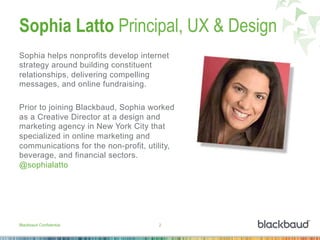
Sophia Latto Principal, UX & Design
Sophia helps nonprofits develop internet
strategy around building constituent
relationships, delivering compelling
messages, and online fundraising.
Prior to joining Blackbaud, Sophia worked
as a Creative Director at a design and
marketing agency in New York City that
specialized in online marketing and
communications for the non-profit, utility,
beverage, and financial sectors.
@sophialatto
Blackbaud Confidential 2
Quick Quiz
How many times have you…
Checked your email today?
Checked your email in the last half hour?
Checked your email since you entered the room?
(Are you looking at it right now?)
Blackbaud Confidential 3
On any given day, the average customer will be exposed
to 2,904 media messages, will pay attention to 52 and will
positively remember only four.
Source: Marketo, Definitive Guide to Email Marketing
Email Habits and Trends
•  72% of respondents read email when they are bored. 67.1% check it at
their desk, and 57% when they are at lunch.*
•  38% of respondents have two personal email accounts, whereas 21%
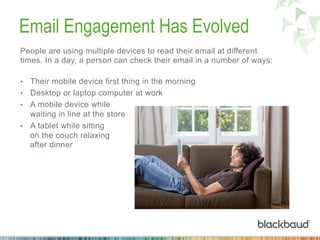
have three accounts. 57% have one business email account.*
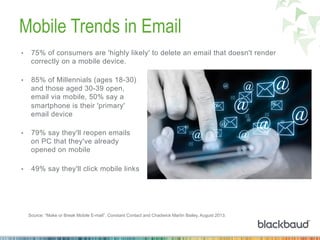
•  Nearly 49% have email accounts for messages they rarely intend to
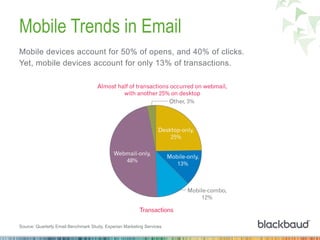
open. That most likely includes marketing messages from senders they
don’t trust or care much about.^
•  Email volume rose by 15.6% in Q1 2014 compared to Q1 2013.+
Blackbaud Confidential 4
*Acxiom "Email Marketing and Mobile Devices: A Survey of Consumer Habits and Perceptions" (2013)
^Ascend2 "Marketing Strategy Report" (2013)
+Experian "Q1 2014 Quarterly Benchmark Study”
Why send email?
Gen Y Gen X Boomer Mature
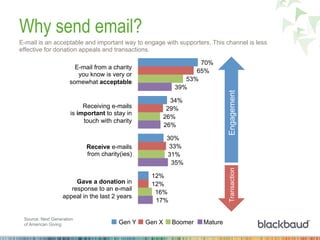
E-mail is an acceptable and important way to engage with supporters. This channel is less
effective for donation appeals and transactions.
70%
34%
30%
12%
65%
29%
33%
12%
53%
26%
31%
16%
39%
26%
35%
17%
E-mail from a charity
you know is very or
somewhat acceptable	
  
Receiving e-mails
is important to stay in
touch with charity	
  
Receive e-mails
from charity(ies)	
  
Gave a donation in
response to an e-mail
appeal in the last 2 years	
  
EngagementTransaction
Source: Next Generation
of American Giving
2013 Key Benchmarks
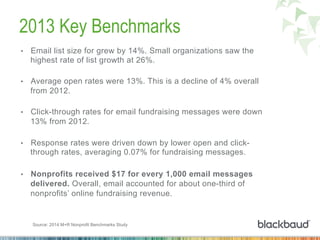
•  Email list size for grew by 14%. Small organizations saw the
highest rate of list growth at 26%.
•  Average open rates were 13%. This is a decline of 4% overall
from 2012.
•  Click-through rates for email fundraising messages were down
13% from 2012.
•  Response rates were driven down by lower open and click-
through rates, averaging 0.07% for fundraising messages.
•  Nonprofits received $17 for every 1,000 email messages
delivered. Overall, email accounted for about one-third of
nonprofits’ online fundraising revenue.
Source: 2014 M+R Nonprofit Benchmarks Study
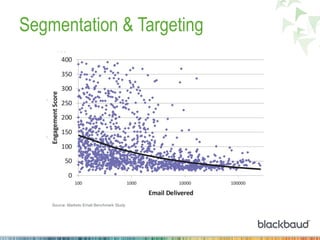
Segmentation & Targeting
Source: Marketo Email Benchmark Study
Driving Engagement
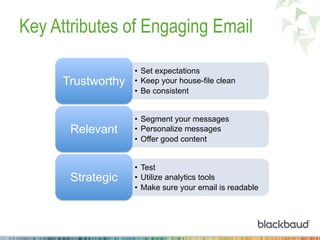
Key Attributes of Engaging Email
•  Set expectations
•  Keep your house-file clean
•  Be consistent
Trustworthy
•  Segment your messages
•  Personalize messages
•  Offer good content
Relevant
•  Test
•  Utilize analytics tools
•  Make sure your email is readable
Strategic
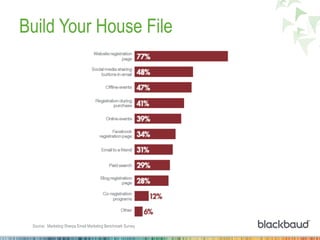
Build Your House File
Source: Marketing Sherpa Email Marketing Benchmark Survey
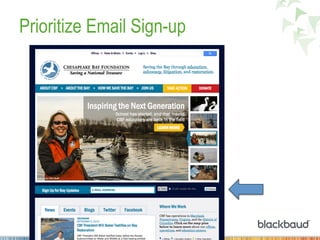
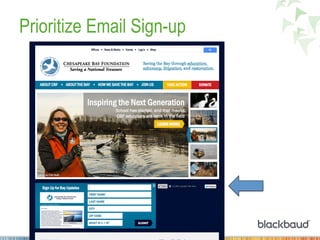
Prioritize Email Sign-up
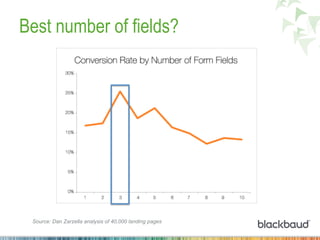
Best number of fields?
Source: Dan Zarzella analysis of 40,000 landing pages
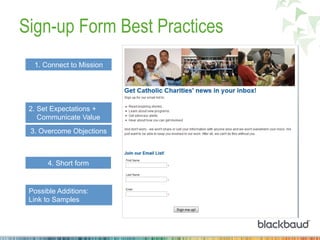
Sign-up Form Best Practices
2. Set Expectations +
Communicate Value
3. Overcome Objections
1. Connect to Mission
4. Short form
Possible Additions:
Link to Samples
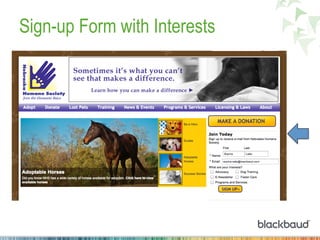
Sign-up Form with Interests
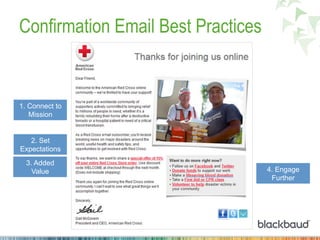
Confirmation Email Best Practices
2. Set
Expectations
1. Connect to
Mission
3. Added
Value 4. Engage
Further
Paring Housefile Helps Deliverability
Take the non-openers out
of your email sends to
improve the chances of
your message reaching
the inbox.
http://philanthropy.com/article/Paring-Email-Lists-Ensures/145181/
“We needed to get rid of people who were not engaging with us at all…
We didn’t see really big improvement in deliveries until we culled down
to just the active people.”
- Colleen Hutchings, director of online fundraising and engagement at the Environmental Working Group
Case Study: From Spam Folder to Inbox:
How Unicef Solved Its Big Email Problem
•  100% of Gmail and 90% of Yahoo
addresses were landing in spam folders
which identified Unicef as a possible
spammer.
•  Unicef removed 850k inactive addresses
from their email list and now 95% of their
emails are being delivered to supporters’
inboxes.
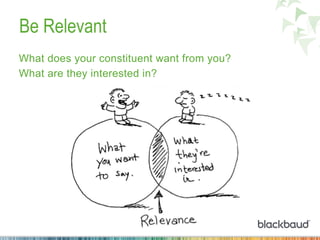
Be Relevant
What does your constituent want from you?
What are they interested in?
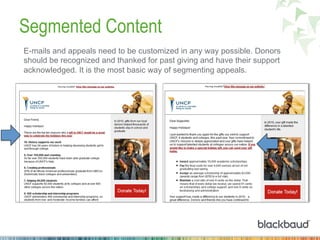
Segmented Content
E-mails and appeals need to be customized in any way possible. Donors
should be recognized and thanked for past giving and have their support
acknowledged. It is the most basic way of segmenting appeals.
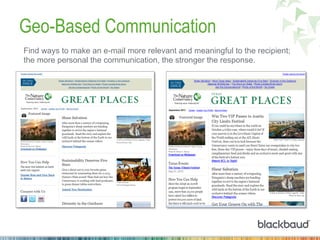
Geo-Based Communication
Find ways to make an e-mail more relevant and meaningful to the recipient;
the more personal the communication, the stronger the response.
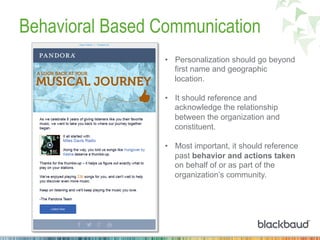
Behavioral Based Communication
•  Personalization should go beyond
first name and geographic
location.
•  It should reference and
acknowledge the relationship
between the organization and
constituent.
•  Most important, it should reference
past behavior and actions taken
on behalf of or as part of the
organization’s community.
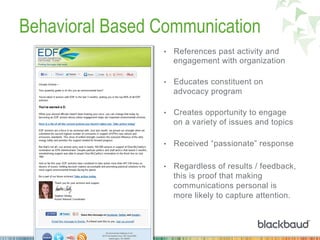
Behavioral Based Communication
•  References past activity and
engagement with organization
•  Educates constituent on
advocacy program
•  Creates opportunity to engage
on a variety of issues and topics
•  Received “passionate” response
•  Regardless of results / feedback,
this is proof that making
communications personal is
more likely to capture attention.
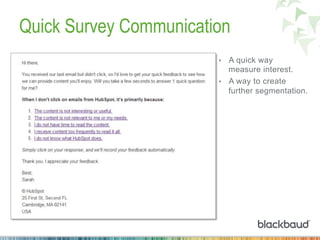
Quick Survey Communication
•  A quick way
measure interest.
•  A way to create
further segmentation.
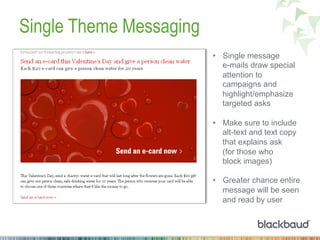
Single Theme Messaging
•  Single message
e-mails draw special
attention to
campaigns and
highlight/emphasize
targeted asks
•  Make sure to include
alt-text and text copy
that explains ask
(for those who
block images)
•  Greater chance entire
message will be seen
and read by user
Single Call to Action
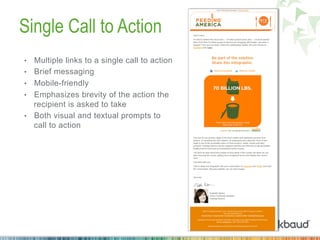
•  Multiple links to a single call to action
•  Brief messaging
•  Mobile-friendly
•  Emphasizes brevity of the action the
recipient is asked to take
•  Both visual and textual prompts to
call to action
Video Helps Drive Conversion
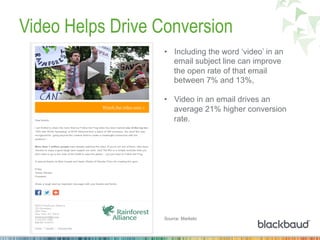
•  Including the word ‘video’ in an
email subject line can improve
the open rate of that email
between 7% and 13%,
•  Video in an email drives an
average 21% higher conversion
rate.
Source: Marketo
Lapsed Response Communication
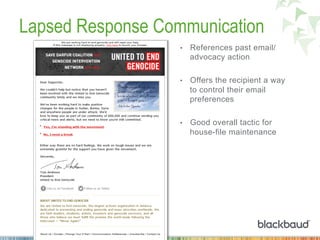
•  References past email/
advocacy action
•  Offers the recipient a way
to control their email
preferences
•  Good overall tactic for
house-file maintenance
Robust Unsubscribe Page
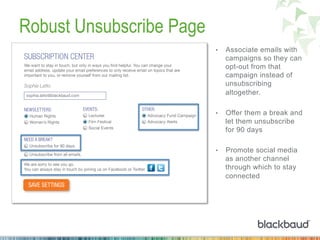
•  Associate emails with
campaigns so they can
opt-out from that
campaign instead of
unsubscribing
altogether.
•  Offer them a break and
let them unsubscribe
for 90 days
•  Promote social media
as another channel
through which to stay
connected
Mobile Impact on Email
Blackbaud Confidential 29
Email Engagement Has Evolved
People are using multiple devices to read their email at different
times. In a day, a person can check their email in a number of ways:
•  Their mobile device first thing in the morning
•  Desktop or laptop computer at work
•  A mobile device while
waiting in line at the store
•  A tablet while sitting
on the couch relaxing
after dinner
Mobile Trends in Email
•  75% of consumers are 'highly likely' to delete an email that doesn't render
correctly on a mobile device.
•  85% of Millennials (ages 18-30)
and those aged 30-39 open,
email via mobile, 50% say a
smartphone is their 'primary'
email device
•  79% say they'll reopen emails
on PC that they've already
opened on mobile
•  49% say they'll click mobile links
Source: “Make or Break Mobile E-mail”, Constant Contact and Chadwick Martin Bailey, August 2013.
Mobile Trends in Email
Mobile devices account for 50% of opens, and 40% of clicks.
Yet, mobile devices account for only 13% of transactions.
Source: Quarterly Email Benchmark Study, Experian Marketing Services.
Mobile Trends in Email
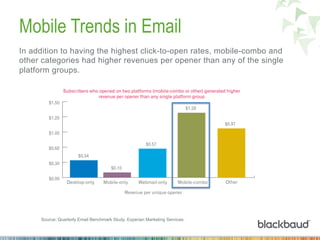
In addition to having the highest click-to-open rates, mobile-combo and
other categories had higher revenues per opener than any of the single
platform groups.
Source: Quarterly Email Benchmark Study, Experian Marketing Services.
Include Two Kinds Of Email in Your Toolbox
SCALABLE
&
RESPONSIVE
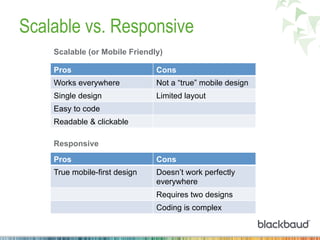
Scalable vs. Responsive
Pros Cons
True mobile-first design Doesn’t work perfectly
everywhere
Requires two designs
Coding is complex
Responsive
Pros Cons
Works everywhere Not a “true” mobile design
Single design Limited layout
Easy to code
Readable & clickable
Scalable (or Mobile Friendly)
What Makes an Email Scalable
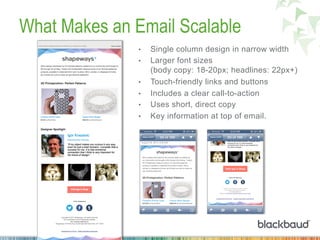
•  Single column design in narrow width
•  Larger font sizes
(body copy: 18-20px; headlines: 22px+)
•  Touch-friendly links and buttons
•  Includes a clear call-to-action
•  Uses short, direct copy
•  Key information at top of email.
What Makes an Email Responsive
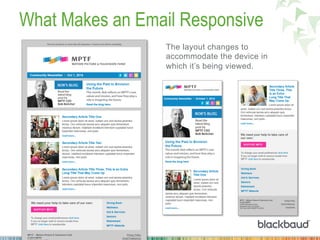
The layout changes to
accommodate the device in
which it’s being viewed.
Media Query Devices
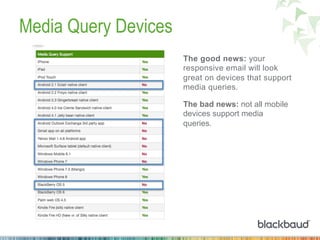
The good news: your
responsive email will look
great on devices that support
media queries.
The bad news: not all mobile
devices support media
queries.
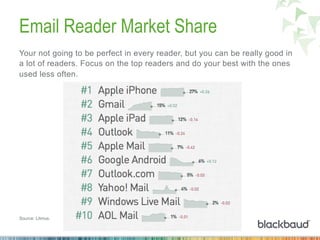
Email Reader Market Share
Your not going to be perfect in every reader, but you can be really good in
a lot of readers. Focus on the top readers and do your best with the ones
used less often.
Source: Litmus.
Testing Will Help You Get it Right
There are third party tools available that help you test for all kinds of
readers and devices and can also supplement your email reports. They
work with your current email service provider tools.
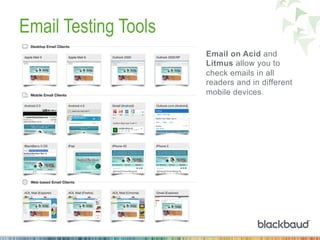
Emailonacid.com — a paid service available for all ESPs
Litmus.com — a paid service available for all ESPs.
Email Testing Tools
Email on Acid and
Litmus allow you to
check emails in all
readers and in different
mobile devices.
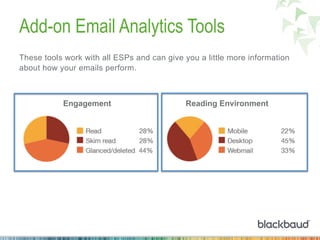
Add-on Email Analytics Tools
These tools work with all ESPs and can give you a little more information
about how your emails perform.
Engagement Reading Environment
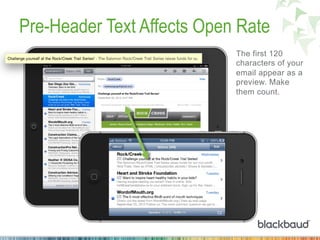
Pre-Header Text Affects Open Rate
The first 120
characters of your
email appear as a
preview. Make
them count.
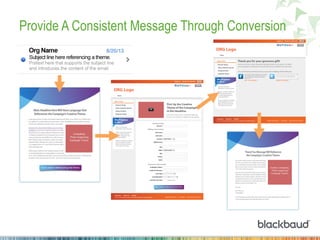
Provide A Consistent Message Through Conversion
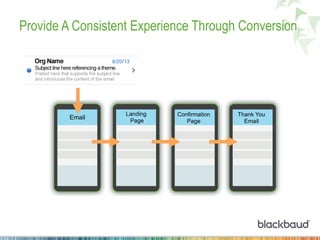
Provide A Consistent Experience Through Conversion
Email
Landing
Page
Confirmation
Page
Thank You
Email
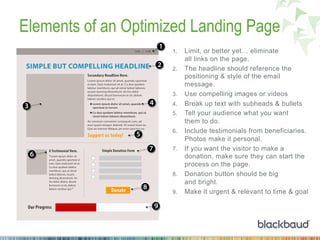
Elements of an Optimized Landing Page
1.  Limit, or better yet… eliminate
all links on the page.
2.  The headline should reference the
positioning & style of the email
message.
3.  Use compelling images or videos
4.  Break up text with subheads & bullets
5.  Tell your audience what you want
them to do.
6.  Include testimonials from beneficiaries.
Photos make it personal.
7.  If you want the visitor to make a
donation, make sure they can start the
process on the page.
8.  Donation button should be big
and bright.
9.  Make it urgent & relevant to time & goal
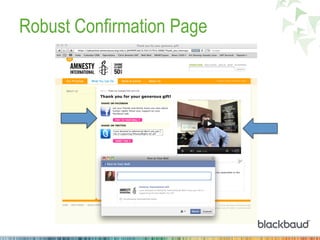
Robust Confirmation Page
Projections for the Future
*Source: Litmus
+ Marketing Trend Watch: 2014 Planning Edition
•  Inbox organizers will change subscribers’ view of email:
Organizers automatically organize & display content based on
default rules and detection.*
•  Symbols in subject lines are here to stay:
Hearts, stars, airplanes, and snowmen were one of the biggest
trends in 2012 and continue to be popular.*
•  Visualization will reign supreme:
Content that incorporates graphics, images, and videos will
continue to add visual impact and share-worthiness to emails.*
•  Marketers will continue to invest in email:
Email continues to be the most popular marketing channel.+
•  Video email will finally take off: HTML5 video will finally
deliver on the video in email experience.*
Thank you!

Driving email engagement for non-profits.

  • 1.
    Email in aSocial Media/ Mobile Device World
  • 2.
    Sophia Latto Principal,UX & Design Sophia helps nonprofits develop internet strategy around building constituent relationships, delivering compelling messages, and online fundraising. Prior to joining Blackbaud, Sophia worked as a Creative Director at a design and marketing agency in New York City that specialized in online marketing and communications for the non-profit, utility, beverage, and financial sectors. @sophialatto Blackbaud Confidential 2
  • 3.
    Quick Quiz How manytimes have you… Checked your email today? Checked your email in the last half hour? Checked your email since you entered the room? (Are you looking at it right now?) Blackbaud Confidential 3 On any given day, the average customer will be exposed to 2,904 media messages, will pay attention to 52 and will positively remember only four. Source: Marketo, Definitive Guide to Email Marketing
  • 4.
    Email Habits andTrends •  72% of respondents read email when they are bored. 67.1% check it at their desk, and 57% when they are at lunch.* •  38% of respondents have two personal email accounts, whereas 21% have three accounts. 57% have one business email account.* •  Nearly 49% have email accounts for messages they rarely intend to open. That most likely includes marketing messages from senders they don’t trust or care much about.^ •  Email volume rose by 15.6% in Q1 2014 compared to Q1 2013.+ Blackbaud Confidential 4 *Acxiom "Email Marketing and Mobile Devices: A Survey of Consumer Habits and Perceptions" (2013) ^Ascend2 "Marketing Strategy Report" (2013) +Experian "Q1 2014 Quarterly Benchmark Study”
  • 5.
    Why send email? GenY Gen X Boomer Mature E-mail is an acceptable and important way to engage with supporters. This channel is less effective for donation appeals and transactions. 70% 34% 30% 12% 65% 29% 33% 12% 53% 26% 31% 16% 39% 26% 35% 17% E-mail from a charity you know is very or somewhat acceptable   Receiving e-mails is important to stay in touch with charity   Receive e-mails from charity(ies)   Gave a donation in response to an e-mail appeal in the last 2 years   EngagementTransaction Source: Next Generation of American Giving
  • 6.
    2013 Key Benchmarks • Email list size for grew by 14%. Small organizations saw the highest rate of list growth at 26%. •  Average open rates were 13%. This is a decline of 4% overall from 2012. •  Click-through rates for email fundraising messages were down 13% from 2012. •  Response rates were driven down by lower open and click- through rates, averaging 0.07% for fundraising messages. •  Nonprofits received $17 for every 1,000 email messages delivered. Overall, email accounted for about one-third of nonprofits’ online fundraising revenue. Source: 2014 M+R Nonprofit Benchmarks Study
  • 7.
    Segmentation & Targeting Source:Marketo Email Benchmark Study
  • 8.
  • 9.
    Key Attributes ofEngaging Email •  Set expectations •  Keep your house-file clean •  Be consistent Trustworthy •  Segment your messages •  Personalize messages •  Offer good content Relevant •  Test •  Utilize analytics tools •  Make sure your email is readable Strategic
  • 10.
    Build Your HouseFile Source: Marketing Sherpa Email Marketing Benchmark Survey
  • 11.
  • 12.
  • 13.
    Best number offields? Source: Dan Zarzella analysis of 40,000 landing pages
  • 14.
    Sign-up Form BestPractices 2. Set Expectations + Communicate Value 3. Overcome Objections 1. Connect to Mission 4. Short form Possible Additions: Link to Samples
  • 15.
  • 16.
    Confirmation Email BestPractices 2. Set Expectations 1. Connect to Mission 3. Added Value 4. Engage Further
  • 17.
    Paring Housefile HelpsDeliverability Take the non-openers out of your email sends to improve the chances of your message reaching the inbox. http://philanthropy.com/article/Paring-Email-Lists-Ensures/145181/ “We needed to get rid of people who were not engaging with us at all… We didn’t see really big improvement in deliveries until we culled down to just the active people.” - Colleen Hutchings, director of online fundraising and engagement at the Environmental Working Group Case Study: From Spam Folder to Inbox: How Unicef Solved Its Big Email Problem •  100% of Gmail and 90% of Yahoo addresses were landing in spam folders which identified Unicef as a possible spammer. •  Unicef removed 850k inactive addresses from their email list and now 95% of their emails are being delivered to supporters’ inboxes.
  • 18.
    Be Relevant What doesyour constituent want from you? What are they interested in?
  • 19.
    Segmented Content E-mails andappeals need to be customized in any way possible. Donors should be recognized and thanked for past giving and have their support acknowledged. It is the most basic way of segmenting appeals.
  • 20.
    Geo-Based Communication Find waysto make an e-mail more relevant and meaningful to the recipient; the more personal the communication, the stronger the response.
  • 21.
    Behavioral Based Communication • Personalization should go beyond first name and geographic location. •  It should reference and acknowledge the relationship between the organization and constituent. •  Most important, it should reference past behavior and actions taken on behalf of or as part of the organization’s community.
  • 22.
    Behavioral Based Communication • References past activity and engagement with organization •  Educates constituent on advocacy program •  Creates opportunity to engage on a variety of issues and topics •  Received “passionate” response •  Regardless of results / feedback, this is proof that making communications personal is more likely to capture attention.
  • 23.
    Quick Survey Communication • A quick way measure interest. •  A way to create further segmentation.
  • 24.
    Single Theme Messaging • Single message e-mails draw special attention to campaigns and highlight/emphasize targeted asks •  Make sure to include alt-text and text copy that explains ask (for those who block images) •  Greater chance entire message will be seen and read by user
  • 25.
    Single Call toAction •  Multiple links to a single call to action •  Brief messaging •  Mobile-friendly •  Emphasizes brevity of the action the recipient is asked to take •  Both visual and textual prompts to call to action
  • 26.
    Video Helps DriveConversion •  Including the word ‘video’ in an email subject line can improve the open rate of that email between 7% and 13%, •  Video in an email drives an average 21% higher conversion rate. Source: Marketo
  • 27.
    Lapsed Response Communication • References past email/ advocacy action •  Offers the recipient a way to control their email preferences •  Good overall tactic for house-file maintenance
  • 28.
    Robust Unsubscribe Page • Associate emails with campaigns so they can opt-out from that campaign instead of unsubscribing altogether. •  Offer them a break and let them unsubscribe for 90 days •  Promote social media as another channel through which to stay connected
  • 29.
    Mobile Impact onEmail Blackbaud Confidential 29
  • 30.
    Email Engagement HasEvolved People are using multiple devices to read their email at different times. In a day, a person can check their email in a number of ways: •  Their mobile device first thing in the morning •  Desktop or laptop computer at work •  A mobile device while waiting in line at the store •  A tablet while sitting on the couch relaxing after dinner
  • 31.
    Mobile Trends inEmail •  75% of consumers are 'highly likely' to delete an email that doesn't render correctly on a mobile device. •  85% of Millennials (ages 18-30) and those aged 30-39 open, email via mobile, 50% say a smartphone is their 'primary' email device •  79% say they'll reopen emails on PC that they've already opened on mobile •  49% say they'll click mobile links Source: “Make or Break Mobile E-mail”, Constant Contact and Chadwick Martin Bailey, August 2013.
  • 32.
    Mobile Trends inEmail Mobile devices account for 50% of opens, and 40% of clicks. Yet, mobile devices account for only 13% of transactions. Source: Quarterly Email Benchmark Study, Experian Marketing Services.
  • 33.
    Mobile Trends inEmail In addition to having the highest click-to-open rates, mobile-combo and other categories had higher revenues per opener than any of the single platform groups. Source: Quarterly Email Benchmark Study, Experian Marketing Services.
  • 34.
    Include Two KindsOf Email in Your Toolbox SCALABLE & RESPONSIVE
  • 35.
    Scalable vs. Responsive ProsCons True mobile-first design Doesn’t work perfectly everywhere Requires two designs Coding is complex Responsive Pros Cons Works everywhere Not a “true” mobile design Single design Limited layout Easy to code Readable & clickable Scalable (or Mobile Friendly)
  • 36.
    What Makes anEmail Scalable •  Single column design in narrow width •  Larger font sizes (body copy: 18-20px; headlines: 22px+) •  Touch-friendly links and buttons •  Includes a clear call-to-action •  Uses short, direct copy •  Key information at top of email.
  • 37.
    What Makes anEmail Responsive The layout changes to accommodate the device in which it’s being viewed.
  • 38.
    Media Query Devices Thegood news: your responsive email will look great on devices that support media queries. The bad news: not all mobile devices support media queries.
  • 39.
    Email Reader MarketShare Your not going to be perfect in every reader, but you can be really good in a lot of readers. Focus on the top readers and do your best with the ones used less often. Source: Litmus.
  • 40.
    Testing Will HelpYou Get it Right There are third party tools available that help you test for all kinds of readers and devices and can also supplement your email reports. They work with your current email service provider tools. Emailonacid.com — a paid service available for all ESPs Litmus.com — a paid service available for all ESPs.
  • 41.
    Email Testing Tools Emailon Acid and Litmus allow you to check emails in all readers and in different mobile devices.
  • 42.
    Add-on Email AnalyticsTools These tools work with all ESPs and can give you a little more information about how your emails perform. Engagement Reading Environment
  • 43.
    Pre-Header Text AffectsOpen Rate The first 120 characters of your email appear as a preview. Make them count.
  • 44.
    Provide A ConsistentMessage Through Conversion
  • 45.
    Provide A ConsistentExperience Through Conversion Email Landing Page Confirmation Page Thank You Email
  • 46.
    Elements of anOptimized Landing Page 1.  Limit, or better yet… eliminate all links on the page. 2.  The headline should reference the positioning & style of the email message. 3.  Use compelling images or videos 4.  Break up text with subheads & bullets 5.  Tell your audience what you want them to do. 6.  Include testimonials from beneficiaries. Photos make it personal. 7.  If you want the visitor to make a donation, make sure they can start the process on the page. 8.  Donation button should be big and bright. 9.  Make it urgent & relevant to time & goal
  • 47.
  • 48.
    Projections for theFuture *Source: Litmus + Marketing Trend Watch: 2014 Planning Edition •  Inbox organizers will change subscribers’ view of email: Organizers automatically organize & display content based on default rules and detection.* •  Symbols in subject lines are here to stay: Hearts, stars, airplanes, and snowmen were one of the biggest trends in 2012 and continue to be popular.* •  Visualization will reign supreme: Content that incorporates graphics, images, and videos will continue to add visual impact and share-worthiness to emails.* •  Marketers will continue to invest in email: Email continues to be the most popular marketing channel.+ •  Video email will finally take off: HTML5 video will finally deliver on the video in email experience.*
  • 49.