Emacs Command Cheat Sheet
Standard Emacs Commands and Command Lines
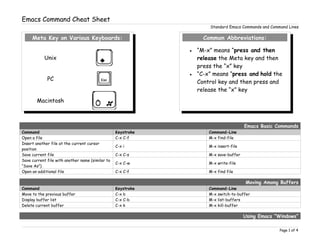
Emacs Basic Commands
Command Keystroke Command-Line
Open a file C-x C-f M-x find-file
Insert another file at the current cursor
position
C-x i M-x insert-file
Save current file C-x C-s M-x save-buffer
Save current file with another name (similar to
“Save As”)
C-x C-w M-x write-file
Open an additional file C-x C-f M-x find file
Moving Among Buffers
Command Keystroke Command-Line
Move to the previous buffer C-x b M-x switch-to-buffer
Display buffer list C-x C-b M-x list-buffers
Delete current buffer C-x k M-x kill-buffer
Using Emacs “Windows”
Page 1 of 4
Meta Key on Various Keyboards:
Unix
PC
Macintosh
Common Abbreviations:
 “M-x” means “press and then
release the Meta key and then
press the “x” key
 “C-x” means “press and hold the
Control key and then press and
release the “x” key
Emacs Command Cheat Sheet
Standard Emacs Commands and Command Lines
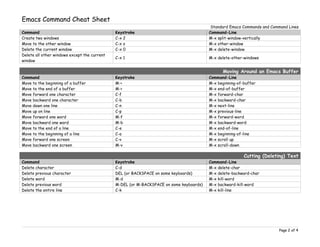
Command Keystroke Command-Line
Create two windows C-x 2 M-x split-window-vertically
Move to the other window C-x o M-x other-window
Delete the current window C-x 0 M-x delete-window
Delete all other windows except the current
window
C-x 1 M-x delete-other-windows
Moving Around an Emacs Buffer
Command Keystroke Command-Line
Move to the beginning of a buffer M-< M-x beginning-of-buffer
Move to the end of a buffer M-> M-x end-of-buffer
Move forward one character C-f M-x forward-char
Move backward one character C-b M-x backward-char
Move down one line C-n M-x next-line
Move up on line C-p M-x previous-line
Move forward one word M-f M-x forward-word
Move backward one word M-b M-x backward-word
Move to the end of a line C-e M-x end-of-line
Move to the beginning of a line C-a M-x beginning-of-line
Move forward one screen C-v M-x scroll up
Move backward one screen M-v M-x scroll-down
Cutting (Deleting) Text
Command Keystroke Command-Line
Delete character C-d M-x delete-char
Delete previous character DEL (or BACKSPACE on some keyboards) M-x delete-backward-char
Delete word M-d M-x kill-word
Delete previous word M-DEL (or M-BACKSPACE on some keyboards) M-x backward-kill-word
Delete the entire line C-k M-x kill-line
Page 2 of 4
Emacs Command Cheat Sheet
Standard Emacs Commands and Command Lines
Marking Text to Delete, Move or Copy
Command Keystroke Command-Line
Mark the beginning of a selection C-@ or C-SPACEBAR M-x set-mark-command
Delete the marked region C-w M-x kill-region
Copy a marked region M-w or C-INSERT M-x kill-ring-save
Paste (Yank) a cut or copied a region C-y M-x yank
Searching & Replacing Text
Command Keystroke Command-Line
Incremental search forward* C-s M-x isearch-forward
Incremental search backward* C-r M-x isearch-backward
Exit incremental search* <ENTER> or <RETURN> *None
Cancel incremental search* C-g M-x keyboard-quit
Delete incorrect character in search string of
incremental search*
DEL (or M-BACKSPACE on some keyboards) *None
Non-incremental search forward C-s RETURN (or ENTER on some keyboards) *None
Non-incremental search backward C-r RETURN (or ENTER on some keyboards) *None
Start query replace M-% M-x query-replace
Replace current instance and continue on to
next instance
SPACEBAR or y *None
Don’t replace current instance, but move on
to next instance
DEL (or M-BACKSPACE on some keyboards)
or
n
*None
Replace the current instance and then quit . (period key) *None
Replace the current instance and then
pause
, (comma key) *None
Resume after pausing SPACEBAR or y *None
Replace remaining instances without asking ! *None
Back up to previous instance ^ *None
Exit query replace RETURN (or ENTER on some keyboards) or q *None
*- NOTE: An incremental search is one in which the search begins as soon as you begin typing and continues search as you type additional
characters.
Wildcard Searches
Page 3 of 4
Emacs Command Cheat Sheet
Standard Emacs Commands and Command Lines
Command Keystroke Command-Line
Search for a group of sequential
characters forward
M C-s RETURN (ENTER on some keyboards)
FOLLOWED BY
thisIsMySearchExpressio*
M-x re-search-forward
Search for a group of sequential
characters backward
M C-r RETURN (ENTER on some keyboards)
FOLLOWED BY
thisIsMySearchExpressio*
M-x re-search-backward
Search for a group of sequential
characters forward and incrementally
M C-s M-x isearch-forward-regexp
Search for a group of sequential
characters backward and incrementally
M C-r M-x isearch-backward-regexp
Various Other Commands
Command Keystroke Command-Line
Undoing recent changes C-x u *None
Undo all changes since the last save *None M-x revert-buffer
Go back to an earlier version of the current
file (the file as it appeared when you first
opened it)
C-x C-f filename~ RETURN (ENTER on some
keyboards) FOLLOWED BY
C-x C-w filename
*None
Pop out to your Unix prompt *None M-x shell
Cancel current command C-g *None
Page 4 of 4

Emacs Cheatsheet

  • 1.
    Emacs Command CheatSheet Standard Emacs Commands and Command Lines Emacs Basic Commands Command Keystroke Command-Line Open a file C-x C-f M-x find-file Insert another file at the current cursor position C-x i M-x insert-file Save current file C-x C-s M-x save-buffer Save current file with another name (similar to “Save As”) C-x C-w M-x write-file Open an additional file C-x C-f M-x find file Moving Among Buffers Command Keystroke Command-Line Move to the previous buffer C-x b M-x switch-to-buffer Display buffer list C-x C-b M-x list-buffers Delete current buffer C-x k M-x kill-buffer Using Emacs “Windows” Page 1 of 4 Meta Key on Various Keyboards: Unix PC Macintosh Common Abbreviations:  “M-x” means “press and then release the Meta key and then press the “x” key  “C-x” means “press and hold the Control key and then press and release the “x” key
  • 2.
    Emacs Command CheatSheet Standard Emacs Commands and Command Lines Command Keystroke Command-Line Create two windows C-x 2 M-x split-window-vertically Move to the other window C-x o M-x other-window Delete the current window C-x 0 M-x delete-window Delete all other windows except the current window C-x 1 M-x delete-other-windows Moving Around an Emacs Buffer Command Keystroke Command-Line Move to the beginning of a buffer M-< M-x beginning-of-buffer Move to the end of a buffer M-> M-x end-of-buffer Move forward one character C-f M-x forward-char Move backward one character C-b M-x backward-char Move down one line C-n M-x next-line Move up on line C-p M-x previous-line Move forward one word M-f M-x forward-word Move backward one word M-b M-x backward-word Move to the end of a line C-e M-x end-of-line Move to the beginning of a line C-a M-x beginning-of-line Move forward one screen C-v M-x scroll up Move backward one screen M-v M-x scroll-down Cutting (Deleting) Text Command Keystroke Command-Line Delete character C-d M-x delete-char Delete previous character DEL (or BACKSPACE on some keyboards) M-x delete-backward-char Delete word M-d M-x kill-word Delete previous word M-DEL (or M-BACKSPACE on some keyboards) M-x backward-kill-word Delete the entire line C-k M-x kill-line Page 2 of 4
  • 3.
    Emacs Command CheatSheet Standard Emacs Commands and Command Lines Marking Text to Delete, Move or Copy Command Keystroke Command-Line Mark the beginning of a selection C-@ or C-SPACEBAR M-x set-mark-command Delete the marked region C-w M-x kill-region Copy a marked region M-w or C-INSERT M-x kill-ring-save Paste (Yank) a cut or copied a region C-y M-x yank Searching & Replacing Text Command Keystroke Command-Line Incremental search forward* C-s M-x isearch-forward Incremental search backward* C-r M-x isearch-backward Exit incremental search* <ENTER> or <RETURN> *None Cancel incremental search* C-g M-x keyboard-quit Delete incorrect character in search string of incremental search* DEL (or M-BACKSPACE on some keyboards) *None Non-incremental search forward C-s RETURN (or ENTER on some keyboards) *None Non-incremental search backward C-r RETURN (or ENTER on some keyboards) *None Start query replace M-% M-x query-replace Replace current instance and continue on to next instance SPACEBAR or y *None Don’t replace current instance, but move on to next instance DEL (or M-BACKSPACE on some keyboards) or n *None Replace the current instance and then quit . (period key) *None Replace the current instance and then pause , (comma key) *None Resume after pausing SPACEBAR or y *None Replace remaining instances without asking ! *None Back up to previous instance ^ *None Exit query replace RETURN (or ENTER on some keyboards) or q *None *- NOTE: An incremental search is one in which the search begins as soon as you begin typing and continues search as you type additional characters. Wildcard Searches Page 3 of 4
  • 4.
    Emacs Command CheatSheet Standard Emacs Commands and Command Lines Command Keystroke Command-Line Search for a group of sequential characters forward M C-s RETURN (ENTER on some keyboards) FOLLOWED BY thisIsMySearchExpressio* M-x re-search-forward Search for a group of sequential characters backward M C-r RETURN (ENTER on some keyboards) FOLLOWED BY thisIsMySearchExpressio* M-x re-search-backward Search for a group of sequential characters forward and incrementally M C-s M-x isearch-forward-regexp Search for a group of sequential characters backward and incrementally M C-r M-x isearch-backward-regexp Various Other Commands Command Keystroke Command-Line Undoing recent changes C-x u *None Undo all changes since the last save *None M-x revert-buffer Go back to an earlier version of the current file (the file as it appeared when you first opened it) C-x C-f filename~ RETURN (ENTER on some keyboards) FOLLOWED BY C-x C-w filename *None Pop out to your Unix prompt *None M-x shell Cancel current command C-g *None Page 4 of 4