EdTECH Overview 2018
• Mashme.io was founded in 2012 by Víctor Sánchez, Master’s Degree in ITM from
Illinois Institute of Technology.
• The company has users in 73 countries, surpassing the one million user mark in
2015.
• Our corporate client portfolio includes industry leaders Telefonica, Movistar,
Orange, Santillana, IE University/Business School, Catenon, Saïd Business School -
University of Oxford and The Valley Digital Business School.
• The company launched its third generation software platform Mashme.io in 2017,
designed specifically for EdTECH and B2B applications.
About
Mashme.io
Mission & Vision
Our mission is to transform remote
education and training through seamless
interactive learning experiences.
Our vision is to be the standard for on-line
learning and training, facilitating a
universally accessible global education
market.
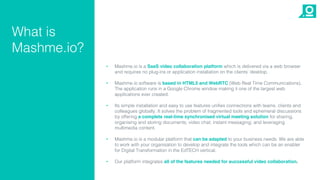
• Mashme.io is a SaaS video collaboration platform which is delivered via a web browser
and requires no plug-ins or application installation on the clients’ desktop.
• Mashme.io software is based in HTML5 and WebRTC (Web Real Time Communications).
The application runs in a Google Chrome window making it one of the largest web
applications ever created.
• Its simple installation and easy to use features unifies connections with teams, clients and
colleagues globally. It solves the problem of fragmented tools and ephemeral discussions
by offering a complete real-time synchronised virtual meeting solution for sharing,
organising and storing documents; video chat; instant messaging; and leveraging
multimedia content.
• Mashme.io is a modular platform that can be adapted to your business needs. We are able
to work with your organisation to develop and integrate the tools which can be an enabler
for Digital Transformation in the EdTECH vertical.
• Our platform integrates all of the features needed for successful video collaboration.
What is
Mashme.io?
leading edge
technologies
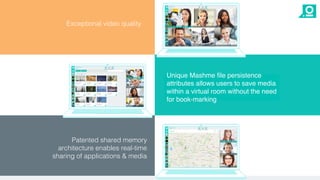
Patented shared memory
architecture enables real-time
sharing of applications & media
Unique Mashme file persistence
attributes allows users to save media
within a virtual room without the need
for book-marking
Exceptional video quality
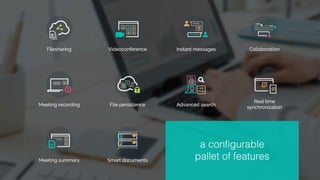
a configurable
pallet of features
Mashme.io Enterprise Connect
Our browser-based SaaS platform offers a rich video
collaboration experience, synchronised in real time,
with one click and no downloads, setups or
configuration. Users connect in seconds not minutes.
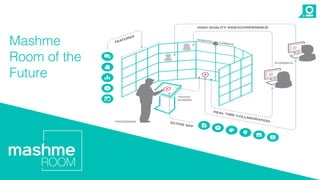
Room of the Future
A virtual training room designed to deliver an
interactive on-line class. Full HD delegates, graphical
feedback for the moderator and a seamless
experience for remote participants.
Our solutions
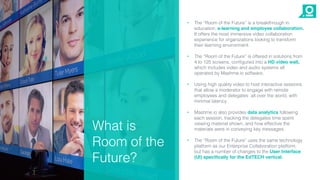
• The “Room of the Future” is a breakthrough in
education, e-learning and employee collaboration.
It offers the most immersive video collaboration
experience for organizations looking to transform
their learning environment.
• The “Room of the Future” is offered in solutions from
4 to 125 screens, configured into a HD video wall,
which includes video and audio systems all
operated by Mashme.io software.
• Using high quality video to host interactive sessions
that allow a moderator to engage with remote
employees and delegates all over the world, with
minimal latency.
• Mashme.io also provides data analytics following
each session, tracking the delegates time spent
viewing material shown, and how effective the
materials were in conveying key messages.
• The “Room of the Future” uses the same technology
platform as our Enterprise Collaboration platform,
but has a number of changes to the User Interface
(UI) specifically for the EdTECH vertical.
What is
Room of the
Future?
Mashme
Room of the
Future
• Enriches online and blended learning experience
for e-learning environments for both students and
faculty.
• Supports immersive and continuous virtual
learning.
• Not limited by Office hours.
• Enables remote interactive and collaborative study
groups.
• Coordinate different remote teams or venues.
• High quality recordings for tutorials, classes and
training rooms.
• Edit, create and share files with your team.
• Conduct meetings with both internal/external
common interest groups from anywhere in the
world.
• Benefit from savings in infrastructure, time, travel
and physical space reservation.
• Easy access via URL, no software or download
required.
Mashme.io
transforms the
learning experience
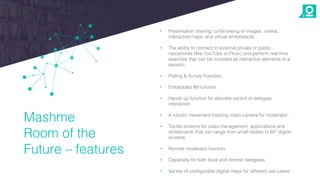
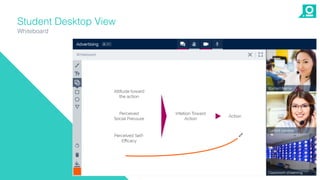
• Presentation sharing, co-browsing of images, videos,
interactive maps, and virtual whiteboards.
• The ability to connect to external private or public
repositories (like YouTube or Flickr) and perform real-time
searches that can be included as interactive elements to a
session.
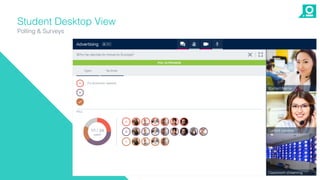
• Polling & Survey Function.
• Embedded IM function.
• Hands up function for discrete control of delegate
interaction.
• A robotic movement tracking video camera for moderator.
• Tactile screens for class management, applications and
whiteboards that can range from small tablets to 65” digital
screens.
• Remote moderator function.
• Capability for both local and remote delegates.
• Variety of configurable digital maps for different use cases.
Mashme
Room of the
Future – features
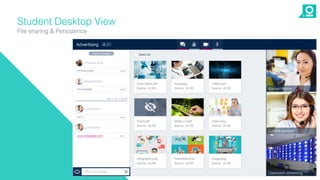
Student Desktop View
File sharing & Persistence
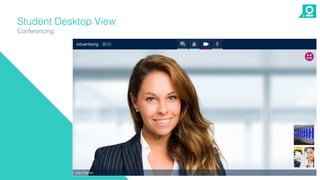
Student Desktop View
Conferencing
Student Desktop View
Whiteboard
Student Desktop View
Polling & Surveys
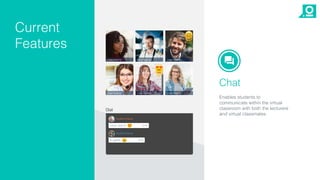
Chat
Enables students to
communicate within the virtual
classroom with both the lecturere
and virtual classmates.
Current
Features
Chat
Current
Features
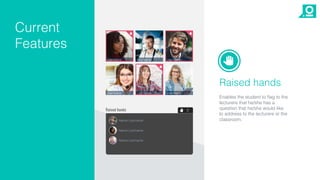
Raised hands
Enables the student to flag to the
lecturere that he/she has a
question that he/she would like
to address to the lecturere or the
classroom.
Chat
Current
Features
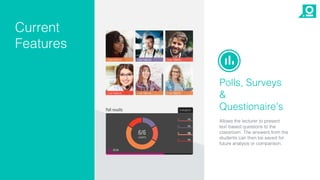
Polls, Surveys
&
Questionaire’s
Allows the lecturer to present
text based questions to the
classroom. The answers from the
students can then be saved for
future analysis or comparison.
Chat
Current
Features
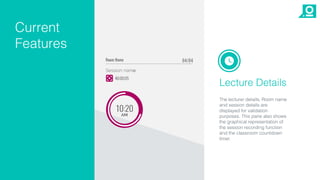
Lecture Details
The lecturer details, Room name
and session details are
displayed for validation
purposes. This pane also shows
the graphical representation of
the session recording function
and the classroom countdown
timer.
The WOW Room
IE, Madrid
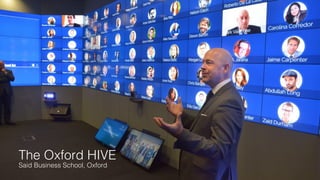
The Oxford HIVE
Said Business School, Oxford
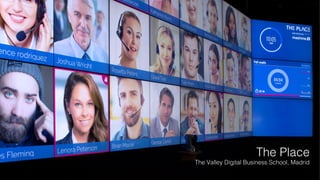
The Place
The Valley Digital Business School, Madrid
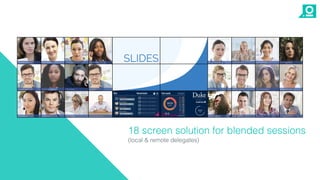
18 screen solution for blended sessions
(local & remote delegates)
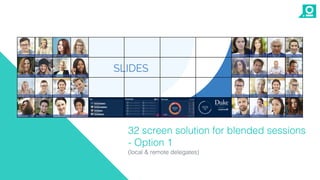
32 screen solution for blended sessions
- Option 1
(local & remote delegates)
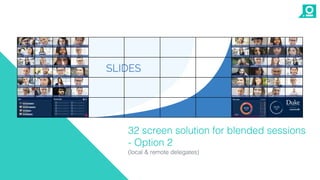
32 screen solution for blended sessions
- Option 2
(local & remote delegates)
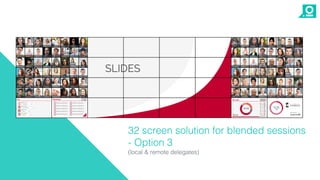
32 screen solution for blended sessions
- Option 3
(local & remote delegates)
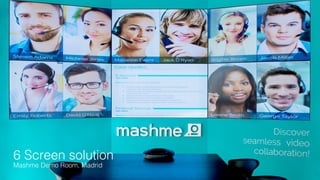
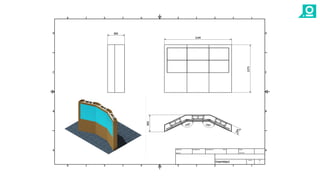
6 Screen solution
Mashme Demo Room, Madrid
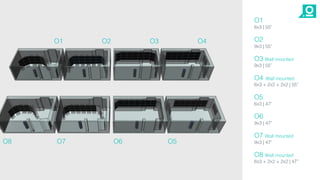
O1
6x3 | 55”
O2
9x3 | 55”
O3 Wall mounted
9x3 | 55”
O4 Wall mounted
6x3 + 2x2 + 2x2 | 55”
O5
6x3 | 47”
O6
9x3 | 47”
O7 Wall mounted
9x3 | 47”
O8 Wall mounted
6x3 + 2x2 + 2x2 | 47”
O1 O2 O3 O4
O8 O7 O6 O5
Roadmap 2018
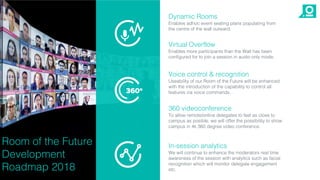
Voice control & recognition
Useability of our Room of the Future will be enhanced
with the introduction of the capability to control all
features via voice commands.
360 videoconference
To allow remote/online delegates to feel as close to
campus as posible, we will offer the possibility to show
campus in 4k 360 degree video conference.
In-session analytics
We will continue to enhance the moderators real time
awareness of the session with analytics such as facial
recognition which will monitor delegate engagement
etc.
Room of the Future
Development
Roadmap 2018
Virtual Overflow
Enables more participants than the Wall has been
configured for to join a session in audio only mode.
Dynamic Rooms
Enables adhoc event seating plans populating from
the centre of the wall outward.
Roadmap
Admin Feature
Enhancements
• Dynamic rooms.
• Test call / class.
• User roles improvement.
• Guest presenter role.
• Break-out rooms upgrades.
• Polls & Survey upgrades
• Virtual overflow – youtube streaming.
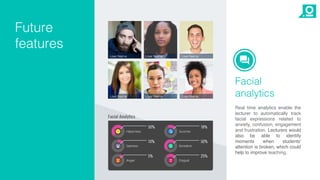
Facial
analytics
Real time analytics enable the
lecturer to automatically track
facial expressions related to
anxiety, confusion, engagement
and frustration. Lecturers would
also be able to identify
moments when students'
attention is broken, which could
help to improve teaching.
Future
features
www.mashme.io

El Aula del Futuro

  • 1.
  • 2.
    • Mashme.io wasfounded in 2012 by Víctor Sánchez, Master’s Degree in ITM from Illinois Institute of Technology. • The company has users in 73 countries, surpassing the one million user mark in 2015. • Our corporate client portfolio includes industry leaders Telefonica, Movistar, Orange, Santillana, IE University/Business School, Catenon, Saïd Business School - University of Oxford and The Valley Digital Business School. • The company launched its third generation software platform Mashme.io in 2017, designed specifically for EdTECH and B2B applications. About Mashme.io
  • 3.
    Mission & Vision Ourmission is to transform remote education and training through seamless interactive learning experiences. Our vision is to be the standard for on-line learning and training, facilitating a universally accessible global education market.
  • 4.
    • Mashme.io isa SaaS video collaboration platform which is delivered via a web browser and requires no plug-ins or application installation on the clients’ desktop. • Mashme.io software is based in HTML5 and WebRTC (Web Real Time Communications). The application runs in a Google Chrome window making it one of the largest web applications ever created. • Its simple installation and easy to use features unifies connections with teams, clients and colleagues globally. It solves the problem of fragmented tools and ephemeral discussions by offering a complete real-time synchronised virtual meeting solution for sharing, organising and storing documents; video chat; instant messaging; and leveraging multimedia content. • Mashme.io is a modular platform that can be adapted to your business needs. We are able to work with your organisation to develop and integrate the tools which can be an enabler for Digital Transformation in the EdTECH vertical. • Our platform integrates all of the features needed for successful video collaboration. What is Mashme.io?
  • 5.
  • 6.
    Patented shared memory architectureenables real-time sharing of applications & media Unique Mashme file persistence attributes allows users to save media within a virtual room without the need for book-marking Exceptional video quality
  • 7.
  • 8.
    Mashme.io Enterprise Connect Ourbrowser-based SaaS platform offers a rich video collaboration experience, synchronised in real time, with one click and no downloads, setups or configuration. Users connect in seconds not minutes. Room of the Future A virtual training room designed to deliver an interactive on-line class. Full HD delegates, graphical feedback for the moderator and a seamless experience for remote participants. Our solutions
  • 9.
    • The “Roomof the Future” is a breakthrough in education, e-learning and employee collaboration. It offers the most immersive video collaboration experience for organizations looking to transform their learning environment. • The “Room of the Future” is offered in solutions from 4 to 125 screens, configured into a HD video wall, which includes video and audio systems all operated by Mashme.io software. • Using high quality video to host interactive sessions that allow a moderator to engage with remote employees and delegates all over the world, with minimal latency. • Mashme.io also provides data analytics following each session, tracking the delegates time spent viewing material shown, and how effective the materials were in conveying key messages. • The “Room of the Future” uses the same technology platform as our Enterprise Collaboration platform, but has a number of changes to the User Interface (UI) specifically for the EdTECH vertical. What is Room of the Future?
  • 10.
  • 11.
    • Enriches onlineand blended learning experience for e-learning environments for both students and faculty. • Supports immersive and continuous virtual learning. • Not limited by Office hours. • Enables remote interactive and collaborative study groups. • Coordinate different remote teams or venues. • High quality recordings for tutorials, classes and training rooms. • Edit, create and share files with your team. • Conduct meetings with both internal/external common interest groups from anywhere in the world. • Benefit from savings in infrastructure, time, travel and physical space reservation. • Easy access via URL, no software or download required. Mashme.io transforms the learning experience
  • 12.
    • Presentation sharing,co-browsing of images, videos, interactive maps, and virtual whiteboards. • The ability to connect to external private or public repositories (like YouTube or Flickr) and perform real-time searches that can be included as interactive elements to a session. • Polling & Survey Function. • Embedded IM function. • Hands up function for discrete control of delegate interaction. • A robotic movement tracking video camera for moderator. • Tactile screens for class management, applications and whiteboards that can range from small tablets to 65” digital screens. • Remote moderator function. • Capability for both local and remote delegates. • Variety of configurable digital maps for different use cases. Mashme Room of the Future – features
  • 13.
    Student Desktop View Filesharing & Persistence
  • 14.
  • 15.
  • 16.
  • 17.
    Chat Enables students to communicatewithin the virtual classroom with both the lecturere and virtual classmates. Current Features
  • 18.
    Chat Current Features Raised hands Enables thestudent to flag to the lecturere that he/she has a question that he/she would like to address to the lecturere or the classroom.
  • 19.
    Chat Current Features Polls, Surveys & Questionaire’s Allows thelecturer to present text based questions to the classroom. The answers from the students can then be saved for future analysis or comparison.
  • 20.
    Chat Current Features Lecture Details The lecturerdetails, Room name and session details are displayed for validation purposes. This pane also shows the graphical representation of the session recording function and the classroom countdown timer.
  • 21.
  • 22.
    The Oxford HIVE SaidBusiness School, Oxford
  • 23.
    The Place The ValleyDigital Business School, Madrid
  • 24.
    18 screen solutionfor blended sessions (local & remote delegates)
  • 25.
    32 screen solutionfor blended sessions - Option 1 (local & remote delegates)
  • 26.
    32 screen solutionfor blended sessions - Option 2 (local & remote delegates)
  • 27.
    32 screen solutionfor blended sessions - Option 3 (local & remote delegates)
  • 28.
    6 Screen solution MashmeDemo Room, Madrid
  • 30.
    O1 6x3 | 55” O2 9x3| 55” O3 Wall mounted 9x3 | 55” O4 Wall mounted 6x3 + 2x2 + 2x2 | 55” O5 6x3 | 47” O6 9x3 | 47” O7 Wall mounted 9x3 | 47” O8 Wall mounted 6x3 + 2x2 + 2x2 | 47” O1 O2 O3 O4 O8 O7 O6 O5
  • 31.
  • 32.
    Voice control &recognition Useability of our Room of the Future will be enhanced with the introduction of the capability to control all features via voice commands. 360 videoconference To allow remote/online delegates to feel as close to campus as posible, we will offer the possibility to show campus in 4k 360 degree video conference. In-session analytics We will continue to enhance the moderators real time awareness of the session with analytics such as facial recognition which will monitor delegate engagement etc. Room of the Future Development Roadmap 2018 Virtual Overflow Enables more participants than the Wall has been configured for to join a session in audio only mode. Dynamic Rooms Enables adhoc event seating plans populating from the centre of the wall outward.
  • 33.
    Roadmap Admin Feature Enhancements • Dynamicrooms. • Test call / class. • User roles improvement. • Guest presenter role. • Break-out rooms upgrades. • Polls & Survey upgrades • Virtual overflow – youtube streaming.
  • 34.
    Facial analytics Real time analyticsenable the lecturer to automatically track facial expressions related to anxiety, confusion, engagement and frustration. Lecturers would also be able to identify moments when students' attention is broken, which could help to improve teaching. Future features
  • 35.