Saving the Search History or Folder items:
UNDERSTANDING THE SEARCH RESULTS
                                                                Once you have signed in, any records added to your
                                                                folder while you are still signed in are automatically       ATENEO DE NAGA UNIVERSITY
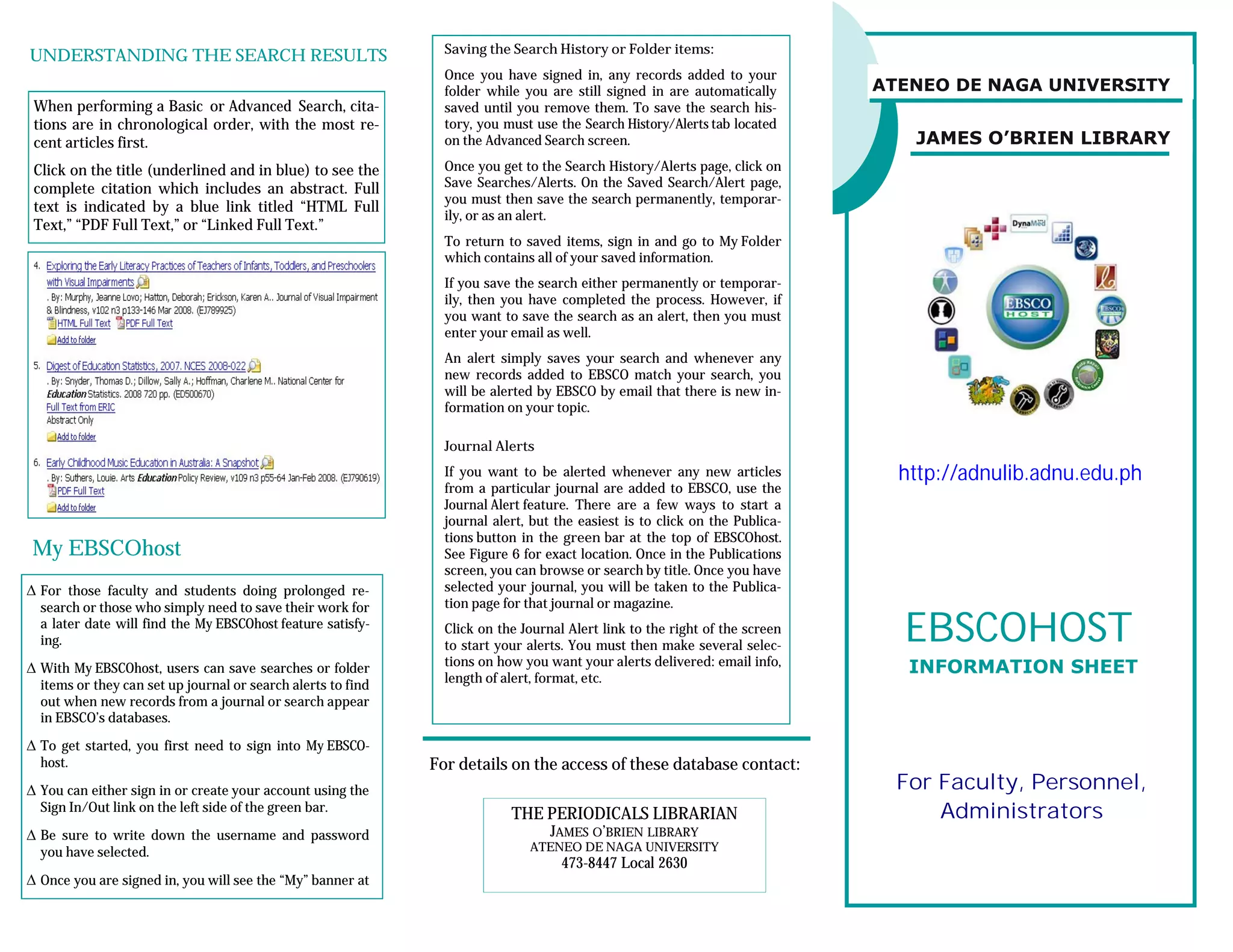
 When performing a Basic or Advanced Search, cita-              saved until you remove them. To save the search his-
 tions are in chronological order, with the most re-            tory, you must use the Search History/Alerts tab located
 cent articles first.                                           on the Advanced Search screen.                                  JAMES O’BRIEN LIBRARY
 Click on the title (underlined and in blue) to see the         Once you get to the Search History/Alerts page, click on
 complete citation which includes an abstract. Full             Save Searches/Alerts. On the Saved Search/Alert page,
                                                                you must then save the search permanently, temporar-
 text is indicated by a blue link titled “HTML Full
                                                                ily, or as an alert.
 Text,” “PDF Full Text,” or “Linked Full Text.”
                                                                To return to saved items, sign in and go to My Folder
                                                                which contains all of your saved information.
                                                                If you save the search either permanently or temporar-
                                                                ily, then you have completed the process. However, if
                                                                you want to save the search as an alert, then you must
                                                                enter your email as well.
                                                                An alert simply saves your search and whenever any
                                                                new records added to EBSCO match your search, you
                                                                will be alerted by EBSCO by email that there is new in-
                                                                formation on your topic.

                                                                Journal Alerts
                                                                If you want to be alerted whenever any new articles            http://adnulib.adnu.edu.ph
                                                                from a particular journal are added to EBSCO, use the
                                                                Journal Alert feature. There are a few ways to start a
                                                                journal alert, but the easiest is to click on the Publica-
                                                                tions button in the green bar at the top of EBSCOhost.
My EBSCOhost                                                    See Figure 6 for exact location. Once in the Publications
                                                                screen, you can browse or search by title. Once you have
 For those faculty and students doing prolonged re-            selected your journal, you will be taken to the Publica-
  search or those who simply need to save their work for        tion page for that journal or magazine.
  a later date will find the My EBSCOhost feature satisfy-
  ing.
                                                                Click on the Journal Alert link to the right of the screen
                                                                to start your alerts. You must then make several selec-
                                                                                                                               EBSCOHOST
 With My EBSCOhost, users can save searches or folder          tions on how you want your alerts delivered: email info,        INFORMATION SHEET
  items or they can set up journal or search alerts to find     length of alert, format, etc.
  out when new records from a journal or search appear
  in EBSCO’s databases.
 To get started, you first need to sign into My EBSCO-
  host.                                                       For details on the access of these database contact:
 You can either sign in or create your account using the                                                                      For Faculty, Personnel,
  Sign In/Out link on the left side of the green bar.
                                                                           THE PERIODICALS LIBRARIAN                               Administrators
 Be sure to write down the username and password                               JAMES O’BRIEN LIBRARY
  you have selected.                                                          ATENEO DE NAGA UNIVERSITY
                                                                                    473-8447 Local 2630
 Once you are signed in, you will see the “My” banner at
 To search more than one database, click on the box to
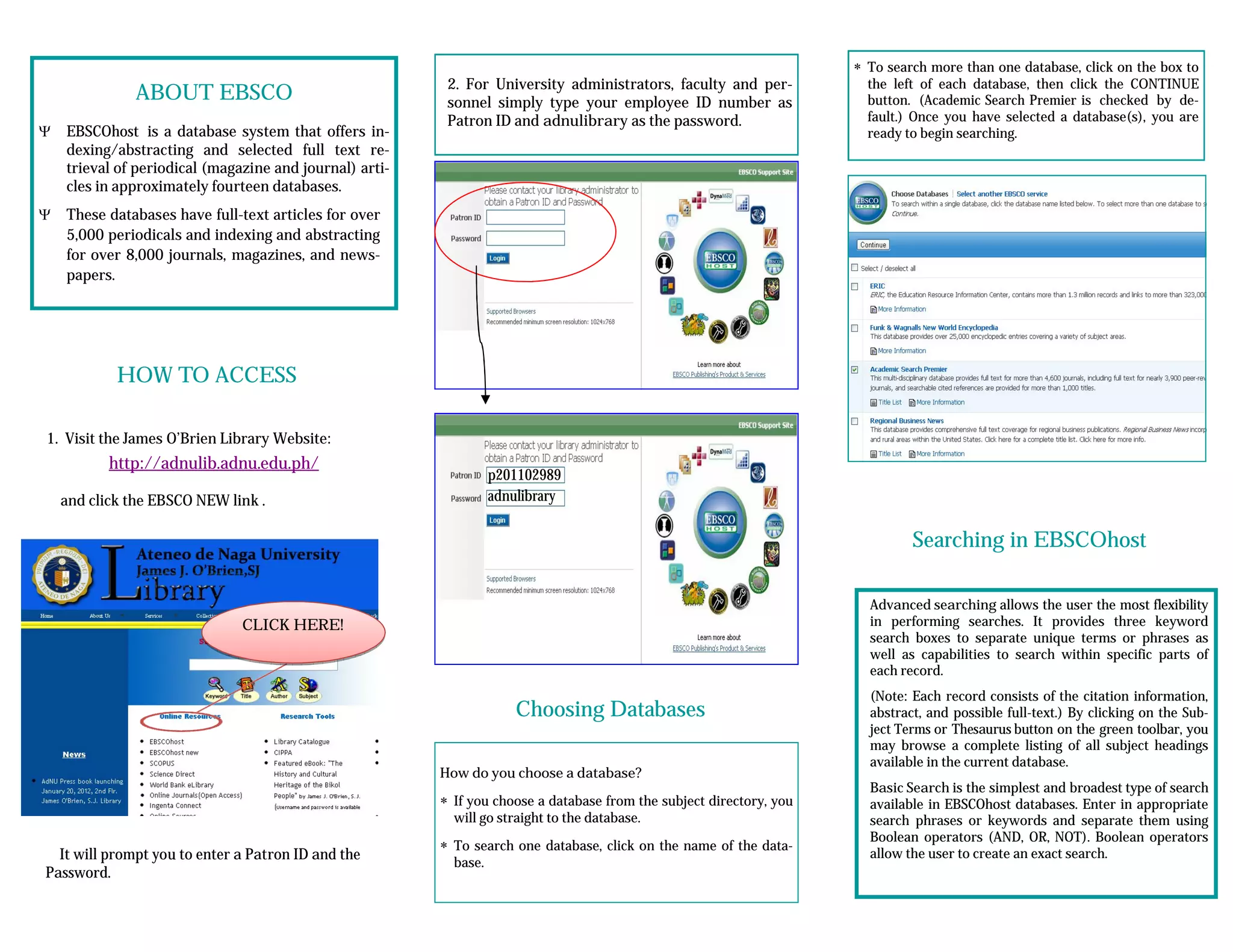
                                                          2. For University administrators, faculty and per-            the left of each database, then click the CONTINUE
              ABOUT EBSCO                                 sonnel simply type your employee ID number as                 button. (Academic Search Premier is checked by de-
                                                          Patron ID and adnulibrary as the password.                    fault.) Once you have selected a database(s), you are
   EBSCOhost is a database system that offers in-                                                                      ready to begin searching.
    dexing/abstracting and selected full text re-
    trieval of periodical (magazine and journal) arti-
    cles in approximately fourteen databases.
   These databases have full-text articles for over
    5,000 periodicals and indexing and abstracting
    for over 8,000 journals, magazines, and news-
    papers.


            HOW TO ACCESS

1. Visit the James O’Brien Library Website:
           http://adnulib.adnu.edu.ph/
                                                                   p201102989
    and click the EBSCO NEW link .                                 adnulibrary

                                                                                                                               Searching in EBSCOhost

                                                                                                                        Advanced searching allows the user the most flexibility
                               CLICK HERE!                                                                              in performing searches. It provides three keyword
                                                                                                                        search boxes to separate unique terms or phrases as
                                                                                                                        well as capabilities to search within specific parts of
                                                                                                                        each record.
                                                                                                                        (Note: Each record consists of the citation information,
                                                                       Choosing Databases                               abstract, and possible full-text.) By clicking on the Sub-
                                                                                                                        ject Terms or Thesaurus button on the green toolbar, you
                                                                                                                        may browse a complete listing of all subject headings
                                                                                                                        available in the current database.
                                                         How do you choose a database?
                                                                                                                        Basic Search is the simplest and broadest type of search
                                                          If you choose a database from the subject directory, you     available in EBSCOhost databases. Enter in appropriate
                                                           will go straight to the database.                            search phrases or keywords and separate them using
                                                                                                                        Boolean operators (AND, OR, NOT). Boolean operators
                                                          To search one database, click on the name of the data-
  It will prompt you to enter a Patron ID and the                                                                       allow the user to create an exact search.
                                                           base.
Password.

EBSCO INFO. SHEET- ADNU EMPLOYEES

  • 1.
    Saving the SearchHistory or Folder items: UNDERSTANDING THE SEARCH RESULTS Once you have signed in, any records added to your folder while you are still signed in are automatically ATENEO DE NAGA UNIVERSITY When performing a Basic or Advanced Search, cita- saved until you remove them. To save the search his- tions are in chronological order, with the most re- tory, you must use the Search History/Alerts tab located cent articles first. on the Advanced Search screen. JAMES O’BRIEN LIBRARY Click on the title (underlined and in blue) to see the Once you get to the Search History/Alerts page, click on complete citation which includes an abstract. Full Save Searches/Alerts. On the Saved Search/Alert page, you must then save the search permanently, temporar- text is indicated by a blue link titled “HTML Full ily, or as an alert. Text,” “PDF Full Text,” or “Linked Full Text.” To return to saved items, sign in and go to My Folder which contains all of your saved information. If you save the search either permanently or temporar- ily, then you have completed the process. However, if you want to save the search as an alert, then you must enter your email as well. An alert simply saves your search and whenever any new records added to EBSCO match your search, you will be alerted by EBSCO by email that there is new in- formation on your topic. Journal Alerts If you want to be alerted whenever any new articles http://adnulib.adnu.edu.ph from a particular journal are added to EBSCO, use the Journal Alert feature. There are a few ways to start a journal alert, but the easiest is to click on the Publica- tions button in the green bar at the top of EBSCOhost. My EBSCOhost See Figure 6 for exact location. Once in the Publications screen, you can browse or search by title. Once you have  For those faculty and students doing prolonged re- selected your journal, you will be taken to the Publica- search or those who simply need to save their work for tion page for that journal or magazine. a later date will find the My EBSCOhost feature satisfy- ing. Click on the Journal Alert link to the right of the screen to start your alerts. You must then make several selec- EBSCOHOST  With My EBSCOhost, users can save searches or folder tions on how you want your alerts delivered: email info, INFORMATION SHEET items or they can set up journal or search alerts to find length of alert, format, etc. out when new records from a journal or search appear in EBSCO’s databases.  To get started, you first need to sign into My EBSCO- host. For details on the access of these database contact:  You can either sign in or create your account using the For Faculty, Personnel, Sign In/Out link on the left side of the green bar. THE PERIODICALS LIBRARIAN Administrators  Be sure to write down the username and password JAMES O’BRIEN LIBRARY you have selected. ATENEO DE NAGA UNIVERSITY 473-8447 Local 2630  Once you are signed in, you will see the “My” banner at
  • 2.
     To searchmore than one database, click on the box to 2. For University administrators, faculty and per- the left of each database, then click the CONTINUE ABOUT EBSCO sonnel simply type your employee ID number as button. (Academic Search Premier is checked by de- Patron ID and adnulibrary as the password. fault.) Once you have selected a database(s), you are  EBSCOhost is a database system that offers in- ready to begin searching. dexing/abstracting and selected full text re- trieval of periodical (magazine and journal) arti- cles in approximately fourteen databases.  These databases have full-text articles for over 5,000 periodicals and indexing and abstracting for over 8,000 journals, magazines, and news- papers. HOW TO ACCESS 1. Visit the James O’Brien Library Website: http://adnulib.adnu.edu.ph/ p201102989 and click the EBSCO NEW link . adnulibrary Searching in EBSCOhost Advanced searching allows the user the most flexibility CLICK HERE! in performing searches. It provides three keyword search boxes to separate unique terms or phrases as well as capabilities to search within specific parts of each record. (Note: Each record consists of the citation information, Choosing Databases abstract, and possible full-text.) By clicking on the Sub- ject Terms or Thesaurus button on the green toolbar, you may browse a complete listing of all subject headings available in the current database. How do you choose a database? Basic Search is the simplest and broadest type of search  If you choose a database from the subject directory, you available in EBSCOhost databases. Enter in appropriate will go straight to the database. search phrases or keywords and separate them using Boolean operators (AND, OR, NOT). Boolean operators  To search one database, click on the name of the data- It will prompt you to enter a Patron ID and the allow the user to create an exact search. base. Password.