Easy Ways To Use Iframe in WordPress
Site
The WordPress platform allows you to publish a wide array of content. However,
featuring content from other third-party websites can have severe consequences and
put you in legal problems. Hosting huge files might also consume storage and degrade
site performance.
Are you thinking about how you can use iFrame on a WordPress site?
Luckily, here is the solution to both these issues below. Let us explore what iFrames are
and how they can help you post the most engaging content to your site without
compromising performance.
What is the Use of iFrame in a WordPress Site?
A method of embedding a web page into the text of another webpage is known as an
iFrame. URLs to external pages, HTML tags, and specifications for the window
representation are essential and useful.
Typically, there are two concerns to consider, as we described earlier. Firstly, you would
want to post content that isn't yours. You can use iFrames to embed content here. This
is not considered a copyright violation. Overall, it will be a more legal method to share
content when compared to other possibilities.
Secondly, you might want to use iFrame in the WordPress site to exchange large files
such as images, audio, and movies. As an example, YouTube is an amazingplatform.
Above all, it becomes easy to display the content on your site without hosting on
WordPress Media Library.
Methods to Use iFrame in WordPress Website
There are several methods for implementing iFrames, just as it is the only solution that
addresses two issues.
Let us discuss these ways in detail below.
Manual Addition of iFrames in WordPress
Adding an iFrame to a web page is a simple process. You must open and close HTML
tags and the webpage URL to be embedded.
<iframe src="example.com"></iframe>
Keep in mind, though, that you can only share content from HTTPS sites if your site is
HTTPS.
Furthermore, manual iFrame embedding is restricted on platforms such as YouTube
and Facebook. As a result, attempting this method will merely reveal the problem.
You can use iFrame parameters to adapt the code to meet the website requirements.
● Height: It determines the size of the iFrame window on your web page in pixels.
● Width: It specifies the pixel size of the iFrame window on your website.
● Importance: This value determines when an iFrame will load.
● Allow: This parameter sets payment processing, full-screen viewing, and other
iFrame features by default.
All these settings enable the development of basic iFrames for sharing content and
videos from Youtube.
Embed iFrames Using a Plugin
Of course, you can hire a WordPress developer to make the process of using a plugin
to integrate iFrames easier. Furthermore, if you frequently share external information on
your site, you have two options that you can count on.
You can utilize the iFrame plugin as the best alternative. It allows the use of shortcodes
for the addition of iFrames. You can also specify the parameters manually, as you did
with HTML.
In addition, an Advanced iFrame plugin is an option. It works similarly and uses
shortcodes to share content. It does, however, provide extra features such as security
codes. As a result, it is easier to restrict other users from integrating iFrames, changing
styles, and more without your consent.
Create iFrames by Adding Embed Codes
As we previously noted, some websites forbid the manual embedding of information. It
does not prevent you from using iFrames to show the content.
Let us take an example of Youtube. How will you embed the video, whether it's yours or
someone else's? Follow these steps:
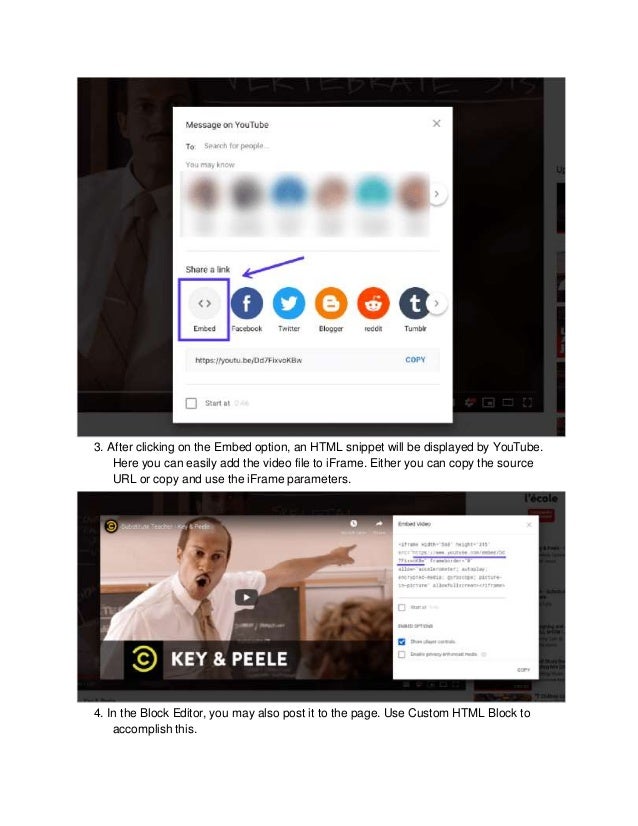
1. There is a Share button beneath the videoplayer
2. Press the button, and a window displaying sharing options will appear. It will include
embed choice.
3. After clicking on the Embed option, an HTML snippet will be displayed by YouTube.
Here you can easily add the video file to iFrame. Either you can copy the source
URL or copy and use the iFrame parameters.
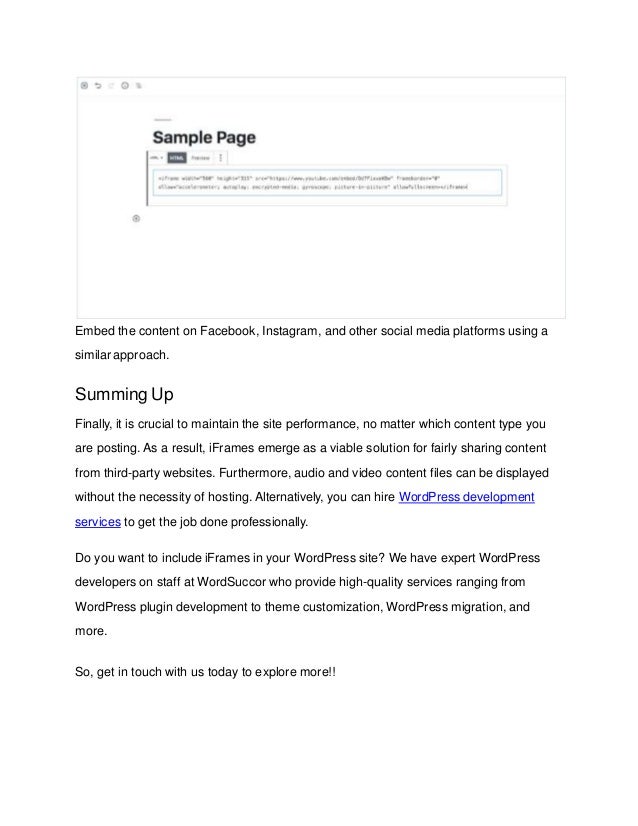
4. In the Block Editor, you may also post it to the page. Use Custom HTML Block to
accomplish this.
Embed the content on Facebook, Instagram, and other social media platforms using a
similar approach.
Summing Up
Finally, it is crucial to maintain the site performance, no matter which content type you
are posting. As a result, iFrames emerge as a viable solution for fairly sharing content
from third-party websites. Furthermore, audio and video content files can be displayed
without the necessity of hosting. Alternatively, you can hire WordPress development
services to get the job done professionally.
Do you want to include iFrames in your WordPress site? We have expert WordPress
developers on staff at WordSuccor who provide high-quality services ranging from
WordPress plugin development to theme customization, WordPress migration, and
more.
So, get in touch with us today to explore more!!
Source: https://www.wordsuccor.com/easy-ways-to-use-iframe-in-wordpress-site/

Easy Ways To Use iframe in WordPress Site

  • 1.
    Easy Ways ToUse Iframe in WordPress Site The WordPress platform allows you to publish a wide array of content. However, featuring content from other third-party websites can have severe consequences and put you in legal problems. Hosting huge files might also consume storage and degrade site performance. Are you thinking about how you can use iFrame on a WordPress site? Luckily, here is the solution to both these issues below. Let us explore what iFrames are and how they can help you post the most engaging content to your site without compromising performance. What is the Use of iFrame in a WordPress Site?
  • 2.
    A method ofembedding a web page into the text of another webpage is known as an iFrame. URLs to external pages, HTML tags, and specifications for the window representation are essential and useful. Typically, there are two concerns to consider, as we described earlier. Firstly, you would want to post content that isn't yours. You can use iFrames to embed content here. This is not considered a copyright violation. Overall, it will be a more legal method to share content when compared to other possibilities. Secondly, you might want to use iFrame in the WordPress site to exchange large files such as images, audio, and movies. As an example, YouTube is an amazingplatform. Above all, it becomes easy to display the content on your site without hosting on WordPress Media Library. Methods to Use iFrame in WordPress Website There are several methods for implementing iFrames, just as it is the only solution that addresses two issues. Let us discuss these ways in detail below. Manual Addition of iFrames in WordPress
  • 3.
    Adding an iFrameto a web page is a simple process. You must open and close HTML tags and the webpage URL to be embedded. <iframe src="example.com"></iframe> Keep in mind, though, that you can only share content from HTTPS sites if your site is HTTPS. Furthermore, manual iFrame embedding is restricted on platforms such as YouTube and Facebook. As a result, attempting this method will merely reveal the problem. You can use iFrame parameters to adapt the code to meet the website requirements. ● Height: It determines the size of the iFrame window on your web page in pixels. ● Width: It specifies the pixel size of the iFrame window on your website. ● Importance: This value determines when an iFrame will load. ● Allow: This parameter sets payment processing, full-screen viewing, and other iFrame features by default. All these settings enable the development of basic iFrames for sharing content and videos from Youtube. Embed iFrames Using a Plugin
  • 4.
    Of course, youcan hire a WordPress developer to make the process of using a plugin to integrate iFrames easier. Furthermore, if you frequently share external information on your site, you have two options that you can count on. You can utilize the iFrame plugin as the best alternative. It allows the use of shortcodes for the addition of iFrames. You can also specify the parameters manually, as you did with HTML. In addition, an Advanced iFrame plugin is an option. It works similarly and uses shortcodes to share content. It does, however, provide extra features such as security codes. As a result, it is easier to restrict other users from integrating iFrames, changing styles, and more without your consent. Create iFrames by Adding Embed Codes As we previously noted, some websites forbid the manual embedding of information. It does not prevent you from using iFrames to show the content. Let us take an example of Youtube. How will you embed the video, whether it's yours or someone else's? Follow these steps:
  • 5.
    1. There isa Share button beneath the videoplayer 2. Press the button, and a window displaying sharing options will appear. It will include embed choice.
  • 6.
    3. After clickingon the Embed option, an HTML snippet will be displayed by YouTube. Here you can easily add the video file to iFrame. Either you can copy the source URL or copy and use the iFrame parameters. 4. In the Block Editor, you may also post it to the page. Use Custom HTML Block to accomplish this.
  • 7.
    Embed the contenton Facebook, Instagram, and other social media platforms using a similar approach. Summing Up Finally, it is crucial to maintain the site performance, no matter which content type you are posting. As a result, iFrames emerge as a viable solution for fairly sharing content from third-party websites. Furthermore, audio and video content files can be displayed without the necessity of hosting. Alternatively, you can hire WordPress development services to get the job done professionally. Do you want to include iFrames in your WordPress site? We have expert WordPress developers on staff at WordSuccor who provide high-quality services ranging from WordPress plugin development to theme customization, WordPress migration, and more. So, get in touch with us today to explore more!!
  • 8.