5 Best Programming Languages Used
For WordPress Development
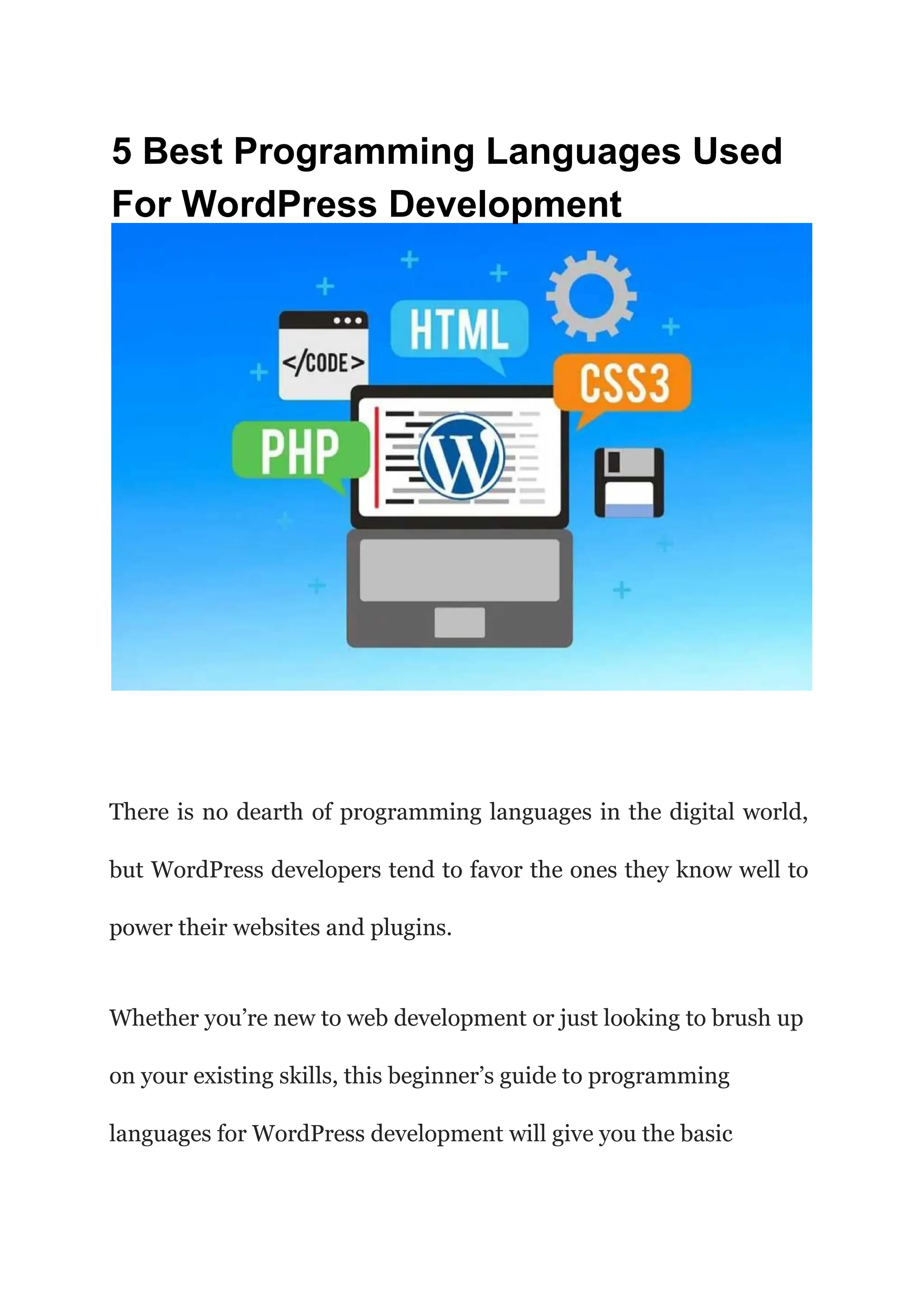
There is no dearth of programming languages in the digital world,
but WordPress developers tend to favor the ones they know well to
power their websites and plugins.
Whether you’re new to web development or just looking to brush up
on your existing skills, this beginner’s guide to programming
languages for WordPress development will give you the basic
background knowledge you need to pick up any language and create
awesome stuff with it.
Many developers have an interest in learning how to program
WordPress but don’t know where to start. With several different
programming languages available, it can be hard to know which
ones are worth learning and why.
Fortunately, there are only a few languages you really need to know.
In fact, you probably already know some of them! So without
further ado, take a glance at a brief introduction to popular
programming languages used with WordPress development.
#1. PHP
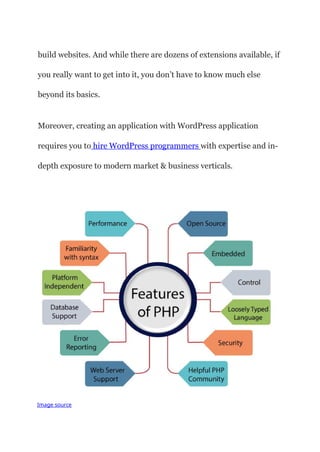
PHP is a server-side programming language that promotes the
development of dynamic web pages. It underpins WordPress itself,
as well as many other popular platforms and applications (including
Facebook and Instagram).
It’s one of the most sought-after skills today, making it a good choice
if you want a career in software development.
PHP In WordPress:
Most people ask which programming language is used to
write WordPress. Then let me tell you, it is PHP.
Moreover, if you’re going down the WordPress development route,
you’ll need a good understanding of PHP. This is one of two core
languages (the other being HTML) that sit at its heart.
It’s what allows WordPress themes and plugins to manipulate
content, take user input, and do all sorts of other stuff that can
change how your site works.
When WordPress sets up your website, developers create everything
easily using PHP. Later on, it takes all that information and presents
it as static pages in your browser when someone visits.
Thus, without knowing anything about PHP coding — or even
opening up any code files — you could technically view source on
any website powered by WordPress to see what makes things tick
behind the scenes.
Although PHP is capable of a lot more than just WordPress, that’s
probably where most people first come across it while learning to
build websites. And while there are dozens of extensions available, if
you really want to get into it, you don’t have to know much else
beyond its basics.
Moreover, creating an application with WordPress application
requires you to hire WordPress programmers with expertise and in-
depth exposure to modern market & business verticals.
Image source
Here are the Advantages Of PHP :
If you’re just getting started with WordPress development, PHP is
pretty easy to pick up. You don’t need much coding experience or
formal education in programming; many people get into it while
they’re learning HTML and CSS.
It also runs on pretty much any server, so you can host it yourself if
you want total control over your sites and where they live on the
web.
The biggest advantage to using PHP — besides its popularity — is
that it has one of the best frameworks around WordPress. The
variety of things you can do with its core code, plus all of its great
plugins, is practically endless.
As we mentioned earlier, there’s no best language to learn first
contest; but if you have to go down one path, PHP is certainly worth
considering.
Disadvantages Of PHP:
Unfortunately, as you might imagine, almost every good thing about
PHP comes with some sort of downside attached. It’s easy to learn,
but it’s also prone to hacks and errors if you don’t know what you’re
doing.
It also requires a lot of RAM in order to work effectively on your
server — meaning it’s one of those languages that require heavy
hardware and intensive processing power in order to operate
smoothly.
#2. HTML
<!DOCTYPE html> <meta charset="utf-8">
<titlex/title>
<body>
<H1x/h1>
<h2x/h2>
<h3x/h3>
<px/p>
<headx/head>
<h4x/h4>
<h5x/h5>
<h6x/H6>
</body>
Image source
Most people with no technology background abruptly ask
that Does WordPress use HTML and CSS? The answer is
yes.
HTML5 was created with web app development in mind. It has
several features that are highly relevant for building complex web
applications.
In a nutshell, HTML5 is just another version of HTML (Hypertext
Markup Language), which describes the content on a page or site
using hyperlinks, headers, lists, images, and other elements. HTML
5 is greatly admired by WordPress developers, as it enables the
development of a very engaging UI experience.
HTML In WordPress:
HTML is responsible for content generation and formatting, so it’s a
very important part of your site and WordPress development. There
are several versions of HTML, each with its own sets of features.
However, only one version — HTML5 — is used in WordPress theme
development.
In other words, if you are wondering about creating a beautiful
website using WordPress, you’ll be using HTML5 for content
generation and formatting.
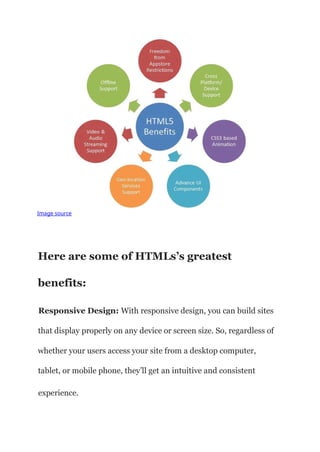
Image source
Here are some of HTMLs’s greatest
benefits:
Responsive Design: With responsive design, you can build sites
that display properly on any device or screen size. So, regardless of
whether your users access your site from a desktop computer,
tablet, or mobile phone, they’ll get an intuitive and consistent
experience.
It doesn’t matter if they use a smartphone or a 100-inch TV — as
long as they have web browsers on their devices, your website will
adjust itself accordingly and provide them with everything they
need.
Local Storage: If you need to store large files such as images on
your user’s computers without affecting performance or introducing
security risks, local storage is what you need. And thanks to
HTML5, it’s available in WordPress.
Touch Events: HTML5 makes touch events easier than ever before
— and that includes mobile devices like smartphones and tablets. So
if your users access your site using touchscreen devices, they will get
a more intuitive experience with enhanced gestures that offer true
interactivity between their fingers and content areas of your pages.
Form Validation: It’s now possible to add error messages and
field validations directly in your HTML code without having to use
JavaScript or any other third-party tool. So you can easily build
user-friendly websites that make it easy for visitors to navigate,
search through information or submit forms.
Disadvantages of HTML5
Besides, you must know some things you can’t do in WordPress
using HTML5. For example, you can’t do any heavy calculations
without reaching out to a third-party tool or plugin. And if you want
to build rich and interactive websites, then you’ll need to rely on
other tools such as JavaScript or CSS3.
However, HTML has a critical role in WordPress development.
Thus, every WordPress development company always has
developers having expertise in HTML.
#3. JavaScript
Image source
Is JavaScript used in WordPress? Well, JavaScript is an
essential programming language for all developers working on a
website that has some interactive features in WordPress.
In its most basic form, JavaScript allows you to take action based on
user interaction with your website and bring interactivity into your
design.
For example, you can use it to validate data entered into form fields
or style elements dynamically depending on what section of your
site users are viewing. It’s one of those languages that have many
uses in every project, so get familiar with it as soon as possible.
JavaScript In WordPress
The role of JavaScript in a WordPress website is really important.
The main aim of using scripts is that it makes your
website/application more interesting and user friendly, and easy to
use. So we can say that script is used for adding advanced features
or functions in web applications that improve user experience.
There are different types of scripting languages, but the most
commonly used language for backend development is PHP, and for
frontend development, it’s jQuery /javascript.
A lot of developers use Javascript as a part of a larger, more
comprehensive framework. Because of its open-source structure,
several frameworks are available to help you implement new and
advanced features into your website.
In WordPress, you can add JavaScript by using a built-in function.
For example, add in jQuery by adding in a custom field and entering
wp_enqueue_script( ‘jquery’ ); into it. Don’t forget to load up your
jQuery library on your web page by calling wp_head(), or you will
get errors on your website when you go live.
It is also important to remember that WordPress does not accept all
code from all functions. Specifically, code within jQuery() will run
immediately upon loading up a webpage.
Creating WordPress applications requires expertise that you can
only procure by hiring WordPress developers with essential
business know-how.
Image source
Here are the Benefits Of JavaScript
There are many benefits of using jQuery in your website, one of
which is making it easier to access and change HTML elements on a
webpage.
With certain CSS selectors, it is impossible to target an element on a
web page. However, with jQuery, you can add additional code to any
element, meaning you can style and manipulate a webpage with
ease.
Other uses include setting custom user information by storing data
within cookies.
Disadvantages Of JavaScript
Unfortunately, there are disadvantages to using jQuery as well. First
and foremost, it is a heavier code that can slow down your website.
The added bandwidth might also hurt search engine optimization.
In addition, once your website has been created, if you ever want to
change something on a webpage, you will have to edit all of your
external files because they are not stored in your database.
One last disadvantage is that you will have multiple issues if you
ever switch web hosts or shift your website to another location.
#4. CSS (Cascading Style Sheet)
Image source
CSS is greatly used in WordPress themes and plugins. CSS stands
for Cascading Style Sheets. It lets you modify how a web page looks
without changing any of its content, using font, color, and layout
changes.
When people think of a programming language, they think of
something cryptic and unreadable. That’s not how CSS works. In
fact, it’s one of the simplest languages to learn about (and use) even
if you have no prior coding experience.
Advantages Of CSS
There are many advantages of using CSS. For starters, it allows you
to save time when you have a good understanding of how to use it.
You have to learn other languages like HTML and PHP when CSS
will let you do everything else that you need.
It also helps make your site load faster because it doesn’t require as
much information being sent over each page load.
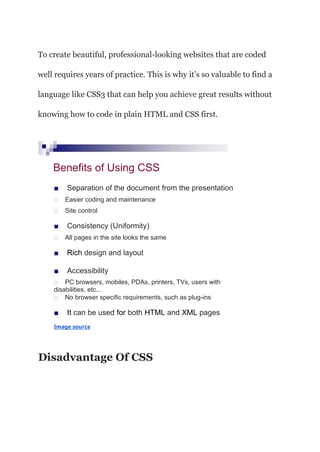
To create beautiful, professional-looking websites that are coded
well requires years of practice. This is why it’s so valuable to find a
language like CSS3 that can help you achieve great results without
knowing how to code in plain HTML and CSS first.
Benefits of Using CSS
■ Separation of the document from the presentation
□ Easier coding and maintenance
□ Site control
■ Consistency (Uniformity)
□ All pages in the site looks the same
■ Rich design and layout
■ Accessibility
□ PC browsers, mobiles, PDAs, printers, TVs, users with
disabilities, etc...
□ No browser specific requirements, such as plug-ins
■ It can be used for both HTML and XML pages
Image source
Disadvantage Of CSS
If you know how to make a website look nice using HTML and CSS,
you have a valuable skills. The problem is that most people can’t
code in plain HTML or CSS well enough to create impressive-
looking websites.
This means that if you’re learning HTML and CSS, then you
probably won’t be able to start making websites on your own yet.
However, if you want to create an excellent application, you need to
hire a WordPress developer with excellence in technology, including
HTML, PHP, CSS, JavaScript, and Ajax.
#5. Ajax
Image source
While Ajax isn’t exactly a programming language, it’s an important
technology used by many developers. It complies with
Asynchronous JavaScript and XML and is basically a way to send
data back and forth without refreshing a page or navigating away
from it.
While primarily used in web apps, Ajax has been showing up more
frequently in site-building frameworks like Bootstrap, which makes
adding it to your website incredibly easy (see below).
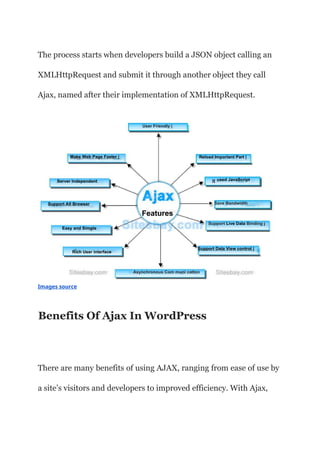
The process starts when developers build a JSON object calling an
XMLHttpRequest and submit it through another object they call
Ajax, named after their implementation of XMLHttpRequest.
Features
User Friendly |
Make Web Page Faster | Reload Important Part |
used JavaScript
Server Independent
► Save Bandwidth
Support All Browser
Support Live Data Binding j
Easy and Simple
Support Data View control |
Rich User interface
Asynchronous Com muni catton
Images source
Benefits Of Ajax In WordPress
There are many benefits of using AJAX, ranging from ease of use by
a site’s visitors and developers to improved efficiency. With Ajax,
users don’t have to download or upload data; with updates only
coming after they click on something,
There’s no need for them to leave a page (also known as Single-Page
Interface). To website owners and their users, that means less time
loading pages.
Disadvantages Of Ajax
There are a few drawbacks, however. JavaScript is responsible for
creating, sending, and parsing XMLHttpRequests, which means it
can negatively affect a site’s performance.
To develop a WordPress solution that can win the market
competition, you should get top WordPress development
services from a renowned company.
Why Must You Consult WordPress Expert For
Custom Web Development?
Every business has different needs, and crafting a solution that can
suit all your requirement is quite difficult for a novice. Moreover,
including plugins for payment, marketing, and other features
require coding expertise to solve errors.
Therefore, every business must hire a WordPress expert for custom
web development.
Conclusion
WordPress is a critical and easy-to-use website platform that allows
anyone with basic computer skills to design a professional website.
It is an online tool that enables users to publish blogs and other
content such as videos and photos.
Besides, It allows individuals and organizations alike a venue to
share their thoughts and ideas, build credibility through quality
content, promote their products or services, generate leads and
profits while engaging with target audiences.
Since programming language has a great role to play within
WordPress development, discussed (above) coding languages have
great influence. Among developers, these programming languages
are must learn. For official projects, some notable languages are
mentioned here.
The most recommended languages that you must learn for
WordPress development are HTML, CSS, & PHP. However, some
basic knowledge of JavaScript & Ajax is also critical.
Must remember, WordPress is an easy-to-use platform that does
not require in-depth technical knowledge or coding abilities. It is,
therefore, suitable for beginner web developers, web designers, and
small businesses/startup enthusiasts who may want to get their feet
wet on creating a website.

5-Best-Programming-Languages-Used-For-WordPress-Development.ppt

  • 1.
    5 Best ProgrammingLanguages Used For WordPress Development There is no dearth of programming languages in the digital world, but WordPress developers tend to favor the ones they know well to power their websites and plugins. Whether you’re new to web development or just looking to brush up on your existing skills, this beginner’s guide to programming languages for WordPress development will give you the basic
  • 2.
    background knowledge youneed to pick up any language and create awesome stuff with it. Many developers have an interest in learning how to program WordPress but don’t know where to start. With several different programming languages available, it can be hard to know which ones are worth learning and why. Fortunately, there are only a few languages you really need to know. In fact, you probably already know some of them! So without further ado, take a glance at a brief introduction to popular programming languages used with WordPress development. #1. PHP
  • 3.
    PHP is aserver-side programming language that promotes the development of dynamic web pages. It underpins WordPress itself, as well as many other popular platforms and applications (including Facebook and Instagram). It’s one of the most sought-after skills today, making it a good choice if you want a career in software development. PHP In WordPress: Most people ask which programming language is used to write WordPress. Then let me tell you, it is PHP.
  • 4.
    Moreover, if you’regoing down the WordPress development route, you’ll need a good understanding of PHP. This is one of two core languages (the other being HTML) that sit at its heart. It’s what allows WordPress themes and plugins to manipulate content, take user input, and do all sorts of other stuff that can change how your site works. When WordPress sets up your website, developers create everything easily using PHP. Later on, it takes all that information and presents it as static pages in your browser when someone visits. Thus, without knowing anything about PHP coding — or even opening up any code files — you could technically view source on any website powered by WordPress to see what makes things tick behind the scenes. Although PHP is capable of a lot more than just WordPress, that’s probably where most people first come across it while learning to
  • 5.
    build websites. Andwhile there are dozens of extensions available, if you really want to get into it, you don’t have to know much else beyond its basics. Moreover, creating an application with WordPress application requires you to hire WordPress programmers with expertise and in- depth exposure to modern market & business verticals. Image source
  • 6.
    Here are theAdvantages Of PHP : If you’re just getting started with WordPress development, PHP is pretty easy to pick up. You don’t need much coding experience or formal education in programming; many people get into it while they’re learning HTML and CSS. It also runs on pretty much any server, so you can host it yourself if you want total control over your sites and where they live on the web. The biggest advantage to using PHP — besides its popularity — is that it has one of the best frameworks around WordPress. The variety of things you can do with its core code, plus all of its great plugins, is practically endless. As we mentioned earlier, there’s no best language to learn first contest; but if you have to go down one path, PHP is certainly worth considering.
  • 7.
    Disadvantages Of PHP: Unfortunately,as you might imagine, almost every good thing about PHP comes with some sort of downside attached. It’s easy to learn, but it’s also prone to hacks and errors if you don’t know what you’re doing. It also requires a lot of RAM in order to work effectively on your server — meaning it’s one of those languages that require heavy hardware and intensive processing power in order to operate smoothly. #2. HTML
  • 8.
    <!DOCTYPE html> <metacharset="utf-8"> <titlex/title> <body> <H1x/h1> <h2x/h2> <h3x/h3> <px/p> <headx/head> <h4x/h4> <h5x/h5> <h6x/H6> </body> Image source Most people with no technology background abruptly ask that Does WordPress use HTML and CSS? The answer is yes. HTML5 was created with web app development in mind. It has several features that are highly relevant for building complex web applications. In a nutshell, HTML5 is just another version of HTML (Hypertext Markup Language), which describes the content on a page or site using hyperlinks, headers, lists, images, and other elements. HTML
  • 9.
    5 is greatlyadmired by WordPress developers, as it enables the development of a very engaging UI experience. HTML In WordPress: HTML is responsible for content generation and formatting, so it’s a very important part of your site and WordPress development. There are several versions of HTML, each with its own sets of features. However, only one version — HTML5 — is used in WordPress theme development. In other words, if you are wondering about creating a beautiful website using WordPress, you’ll be using HTML5 for content generation and formatting.
  • 10.
    Image source Here aresome of HTMLs’s greatest benefits: Responsive Design: With responsive design, you can build sites that display properly on any device or screen size. So, regardless of whether your users access your site from a desktop computer, tablet, or mobile phone, they’ll get an intuitive and consistent experience.
  • 11.
    It doesn’t matterif they use a smartphone or a 100-inch TV — as long as they have web browsers on their devices, your website will adjust itself accordingly and provide them with everything they need. Local Storage: If you need to store large files such as images on your user’s computers without affecting performance or introducing security risks, local storage is what you need. And thanks to HTML5, it’s available in WordPress. Touch Events: HTML5 makes touch events easier than ever before — and that includes mobile devices like smartphones and tablets. So if your users access your site using touchscreen devices, they will get a more intuitive experience with enhanced gestures that offer true interactivity between their fingers and content areas of your pages. Form Validation: It’s now possible to add error messages and field validations directly in your HTML code without having to use
  • 12.
    JavaScript or anyother third-party tool. So you can easily build user-friendly websites that make it easy for visitors to navigate, search through information or submit forms. Disadvantages of HTML5 Besides, you must know some things you can’t do in WordPress using HTML5. For example, you can’t do any heavy calculations without reaching out to a third-party tool or plugin. And if you want to build rich and interactive websites, then you’ll need to rely on other tools such as JavaScript or CSS3. However, HTML has a critical role in WordPress development. Thus, every WordPress development company always has developers having expertise in HTML. #3. JavaScript
  • 13.
    Image source Is JavaScriptused in WordPress? Well, JavaScript is an essential programming language for all developers working on a website that has some interactive features in WordPress. In its most basic form, JavaScript allows you to take action based on user interaction with your website and bring interactivity into your design. For example, you can use it to validate data entered into form fields or style elements dynamically depending on what section of your site users are viewing. It’s one of those languages that have many uses in every project, so get familiar with it as soon as possible.
  • 14.
    JavaScript In WordPress Therole of JavaScript in a WordPress website is really important. The main aim of using scripts is that it makes your website/application more interesting and user friendly, and easy to use. So we can say that script is used for adding advanced features or functions in web applications that improve user experience. There are different types of scripting languages, but the most commonly used language for backend development is PHP, and for frontend development, it’s jQuery /javascript. A lot of developers use Javascript as a part of a larger, more comprehensive framework. Because of its open-source structure, several frameworks are available to help you implement new and advanced features into your website. In WordPress, you can add JavaScript by using a built-in function. For example, add in jQuery by adding in a custom field and entering
  • 15.
    wp_enqueue_script( ‘jquery’ );into it. Don’t forget to load up your jQuery library on your web page by calling wp_head(), or you will get errors on your website when you go live. It is also important to remember that WordPress does not accept all code from all functions. Specifically, code within jQuery() will run immediately upon loading up a webpage. Creating WordPress applications requires expertise that you can only procure by hiring WordPress developers with essential business know-how.
  • 16.
    Image source Here arethe Benefits Of JavaScript There are many benefits of using jQuery in your website, one of which is making it easier to access and change HTML elements on a webpage. With certain CSS selectors, it is impossible to target an element on a web page. However, with jQuery, you can add additional code to any element, meaning you can style and manipulate a webpage with ease. Other uses include setting custom user information by storing data within cookies. Disadvantages Of JavaScript
  • 17.
    Unfortunately, there aredisadvantages to using jQuery as well. First and foremost, it is a heavier code that can slow down your website. The added bandwidth might also hurt search engine optimization. In addition, once your website has been created, if you ever want to change something on a webpage, you will have to edit all of your external files because they are not stored in your database. One last disadvantage is that you will have multiple issues if you ever switch web hosts or shift your website to another location. #4. CSS (Cascading Style Sheet) Image source
  • 18.
    CSS is greatlyused in WordPress themes and plugins. CSS stands for Cascading Style Sheets. It lets you modify how a web page looks without changing any of its content, using font, color, and layout changes. When people think of a programming language, they think of something cryptic and unreadable. That’s not how CSS works. In fact, it’s one of the simplest languages to learn about (and use) even if you have no prior coding experience. Advantages Of CSS There are many advantages of using CSS. For starters, it allows you to save time when you have a good understanding of how to use it. You have to learn other languages like HTML and PHP when CSS will let you do everything else that you need. It also helps make your site load faster because it doesn’t require as much information being sent over each page load.
  • 19.
    To create beautiful,professional-looking websites that are coded well requires years of practice. This is why it’s so valuable to find a language like CSS3 that can help you achieve great results without knowing how to code in plain HTML and CSS first. Benefits of Using CSS ■ Separation of the document from the presentation □ Easier coding and maintenance □ Site control ■ Consistency (Uniformity) □ All pages in the site looks the same ■ Rich design and layout ■ Accessibility □ PC browsers, mobiles, PDAs, printers, TVs, users with disabilities, etc... □ No browser specific requirements, such as plug-ins ■ It can be used for both HTML and XML pages Image source Disadvantage Of CSS
  • 20.
    If you knowhow to make a website look nice using HTML and CSS, you have a valuable skills. The problem is that most people can’t code in plain HTML or CSS well enough to create impressive- looking websites. This means that if you’re learning HTML and CSS, then you probably won’t be able to start making websites on your own yet. However, if you want to create an excellent application, you need to hire a WordPress developer with excellence in technology, including HTML, PHP, CSS, JavaScript, and Ajax. #5. Ajax
  • 21.
    Image source While Ajaxisn’t exactly a programming language, it’s an important technology used by many developers. It complies with Asynchronous JavaScript and XML and is basically a way to send data back and forth without refreshing a page or navigating away from it. While primarily used in web apps, Ajax has been showing up more frequently in site-building frameworks like Bootstrap, which makes adding it to your website incredibly easy (see below).
  • 22.
    The process startswhen developers build a JSON object calling an XMLHttpRequest and submit it through another object they call Ajax, named after their implementation of XMLHttpRequest. Features User Friendly | Make Web Page Faster | Reload Important Part | used JavaScript Server Independent ► Save Bandwidth Support All Browser Support Live Data Binding j Easy and Simple Support Data View control | Rich User interface Asynchronous Com muni catton Images source Benefits Of Ajax In WordPress There are many benefits of using AJAX, ranging from ease of use by a site’s visitors and developers to improved efficiency. With Ajax,
  • 23.
    users don’t haveto download or upload data; with updates only coming after they click on something, There’s no need for them to leave a page (also known as Single-Page Interface). To website owners and their users, that means less time loading pages. Disadvantages Of Ajax There are a few drawbacks, however. JavaScript is responsible for creating, sending, and parsing XMLHttpRequests, which means it can negatively affect a site’s performance. To develop a WordPress solution that can win the market competition, you should get top WordPress development services from a renowned company. Why Must You Consult WordPress Expert For Custom Web Development?
  • 24.
    Every business hasdifferent needs, and crafting a solution that can suit all your requirement is quite difficult for a novice. Moreover, including plugins for payment, marketing, and other features require coding expertise to solve errors. Therefore, every business must hire a WordPress expert for custom web development. Conclusion WordPress is a critical and easy-to-use website platform that allows anyone with basic computer skills to design a professional website. It is an online tool that enables users to publish blogs and other content such as videos and photos. Besides, It allows individuals and organizations alike a venue to share their thoughts and ideas, build credibility through quality content, promote their products or services, generate leads and profits while engaging with target audiences.
  • 25.
    Since programming languagehas a great role to play within WordPress development, discussed (above) coding languages have great influence. Among developers, these programming languages are must learn. For official projects, some notable languages are mentioned here. The most recommended languages that you must learn for WordPress development are HTML, CSS, & PHP. However, some basic knowledge of JavaScript & Ajax is also critical. Must remember, WordPress is an easy-to-use platform that does not require in-depth technical knowledge or coding abilities. It is, therefore, suitable for beginner web developers, web designers, and small businesses/startup enthusiasts who may want to get their feet wet on creating a website.