How to document systems built in
react in a reactish way
WHY WHY NOT WHY NOT X
HOW WHERE
THE WHO THE WHAT
Why trust me?
One way to go pro
Why Finland?
Science.
ZURB Foundation
Top Contributor, Certified Preferred, etc.
A*%#@& => React
5 STAGES OF GRIEF
1. Denial
2. Anger
3. Bargaining
4. Depression
5. Acceptance
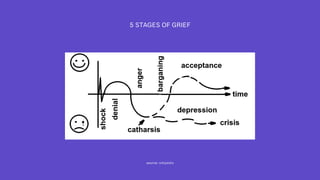
5 STAGES OF GRIEF
source: wikipedia
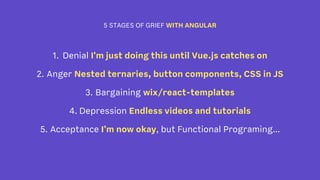
5 STAGES OF GRIEF WITH ANGULAR
1. Denial I'm just doing this until Vue.js catches on
2. Anger Nested ternaries, button components, CSS in JS
3. Bargaining wix/react-templates
4. Depression Endless videos and tutorials
5. Acceptance I'm now okay, but Functional Programing...
WHY A LIVING STYLEGUIDE
1. Foster better communication
2. Play to your team's strengths
3. Avoid conflict between teams
4. Produce a better quality product
5. More design consistency
6. Less meetings
source: Design Systems Crash Course
In my experience there are two ways to get started with creating a
Design System that will work for an organization of any size. Even a
web team of one.
‣ Front-end Code
‣ Living Styleguide
source: Design Systems Crash Course
Both of these are what I like to call low hanging fruit. This means that
you will be able to build these the fastest, with the least amount of
effort and they will have the biggest rewards.
source: Design Systems Crash Course
WHY NOT X STORYBOOK
‣ You write stories in JavaScript files (vs md)
‣ How you describe components
‣ Shows only one variation at a time (vs. multiple)
source: React Styleguidist Cookbook
REACT STLYEGUIDIST GIVES YOU
‣ Auto public method docs
‣ All components on a single page (Styleguide)
‣ Extra docs added (Design System or More complete docs)
‣ Can be branded (customizable design)
‣ You get some docs auto generated*
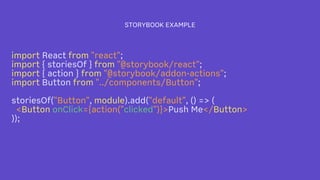
STORYBOOK EXAMPLE
import React from "react";
import { storiesOf } from "@storybook/react";
import { action } from "@storybook/addon-actions";
import Button from "../components/Button";
storiesOf("Button", module).add("default", () => (
<Button onClick={action("clicked")}>Push Me</Button>
));
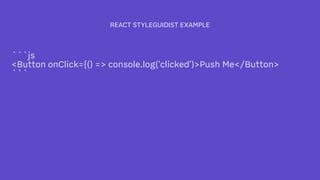
REACT STYLEGUIDIST EXAMPLE
```js
<Button onClick={() => console.log('clicked')>Push Me</Button>
```
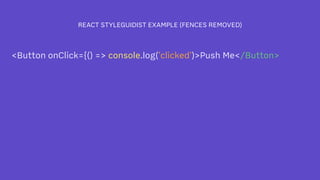
REACT STYLEGUIDIST EXAMPLE (FENCES REMOVED)
<Button onClick={() => console.log('clicked')>Push Me</Button>
HOW REDUX TODO MVC EXAMPLE
WHERE
github.com/jamesstoneco/react-styleguidist-todo
Easy Bolt-on Docs Using React Styleguidist

Easy Bolt-on Docs Using React Styleguidist

  • 2.
    How to documentsystems built in react in a reactish way
  • 3.
    WHY WHY NOTWHY NOT X HOW WHERE
  • 4.
  • 5.
  • 6.
    One way togo pro
  • 7.
  • 8.
    ZURB Foundation Top Contributor,Certified Preferred, etc.
  • 9.
  • 10.
    5 STAGES OFGRIEF 1. Denial 2. Anger 3. Bargaining 4. Depression 5. Acceptance
  • 11.
    5 STAGES OFGRIEF source: wikipedia
  • 12.
    5 STAGES OFGRIEF WITH ANGULAR 1. Denial I'm just doing this until Vue.js catches on 2. Anger Nested ternaries, button components, CSS in JS 3. Bargaining wix/react-templates 4. Depression Endless videos and tutorials 5. Acceptance I'm now okay, but Functional Programing...
  • 13.
    WHY A LIVINGSTYLEGUIDE 1. Foster better communication 2. Play to your team's strengths 3. Avoid conflict between teams 4. Produce a better quality product 5. More design consistency 6. Less meetings source: Design Systems Crash Course
  • 14.
    In my experiencethere are two ways to get started with creating a Design System that will work for an organization of any size. Even a web team of one. ‣ Front-end Code ‣ Living Styleguide source: Design Systems Crash Course
  • 15.
    Both of theseare what I like to call low hanging fruit. This means that you will be able to build these the fastest, with the least amount of effort and they will have the biggest rewards. source: Design Systems Crash Course
  • 16.
    WHY NOT XSTORYBOOK ‣ You write stories in JavaScript files (vs md) ‣ How you describe components ‣ Shows only one variation at a time (vs. multiple) source: React Styleguidist Cookbook
  • 17.
    REACT STLYEGUIDIST GIVESYOU ‣ Auto public method docs ‣ All components on a single page (Styleguide) ‣ Extra docs added (Design System or More complete docs) ‣ Can be branded (customizable design) ‣ You get some docs auto generated*
  • 18.
    STORYBOOK EXAMPLE import Reactfrom "react"; import { storiesOf } from "@storybook/react"; import { action } from "@storybook/addon-actions"; import Button from "../components/Button"; storiesOf("Button", module).add("default", () => ( <Button onClick={action("clicked")}>Push Me</Button> ));
  • 19.
    REACT STYLEGUIDIST EXAMPLE ```js <ButtononClick={() => console.log('clicked')>Push Me</Button> ```
  • 20.
    REACT STYLEGUIDIST EXAMPLE(FENCES REMOVED) <Button onClick={() => console.log('clicked')>Push Me</Button>
  • 21.
    HOW REDUX TODOMVC EXAMPLE
  • 22.