INDEX
Introduction,
Stackand Queue as ADT,
Representation and implementation of stack and
queue using sequential and linked allocation,
Circular queue and its implementation,
Application of stack for expression evaluation
and expression conversion,
Recursion,
Priority queue.
STACK AS ADT
Stack ADT
In Stack ADT Implementation instead of data being stored in each node,
the pointer to data is stored.
The program allocates memory for the data and address is passed to the
stack ADT.
The head node and the data nodes are encapsulated in the ADT. The
calling function can only see the pointer to the stack.
The stack head structure also contains a pointer to top and count of
number of entries currently in stack.
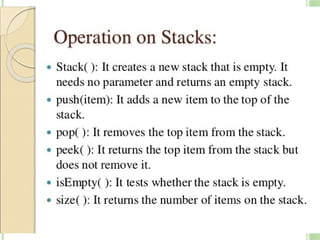
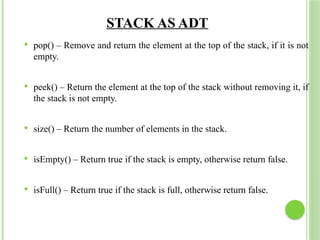
push() – Insert an element at one end of the stack called top.
13.
STACK AS ADT
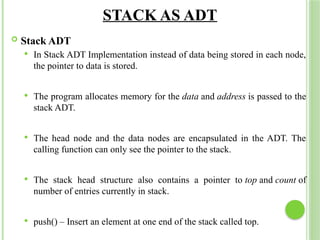
pop() – Remove and return the element at the top of the stack, if it is not
empty.
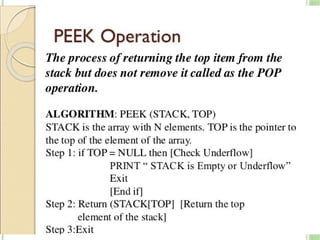
peek() – Return the element at the top of the stack without removing it, if
the stack is not empty.
size() – Return the number of elements in the stack.
isEmpty() – Return true if the stack is empty, otherwise return false.
isFull() – Return true if the stack is full, otherwise return false.
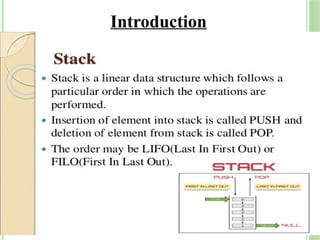
STACK USING ARRAY
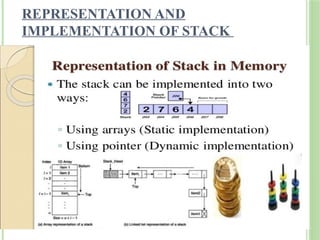
A stack data structure can be implemented using a one-
dimensional array. But stack implemented using array stores
only a fixed number of data values.
We define a one dimensional array of specific size and insert or
delete the values into that array by using LIFO principle with
the help of a variable called 'top
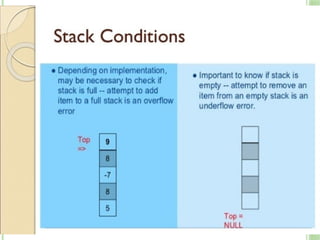
Initially, the top is set to -1.
Whenever we want to insert a value into the stack, increment the
top value by one and then insert. Whenever we want to delete a
value from the stack, then delete the top value and decrement the
top value by one.
16.
IM
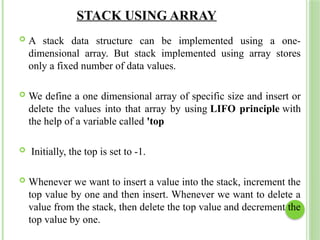
Advantages ofarray implementation:
Easy to implement.
Memory is saved as pointers are not involved.
Disadvantages of array implementation:
It is not dynamic.
It doesn’t grow and shrink depending on needs at
runtime.
18.
STACK OPERATIONS USINGARRAY
A stack can be implemented using array as follows...
Before implementing actual operations, first follow the
below steps to create an empty stack.
Step 1 - Include all the header files which are used in the
program and define a constant 'SIZE' with specific value.
Step 2 - Declare all the functions used in stack
implementation.
Step 3 - Create a one dimensional array with fixed size (int
stack[SIZE])
Step 4 - Define a integer variable 'top' and initialize with '-
1'. (int top = -1)
Step 5 - In main method, display menu with list of
operations and make suitable function calls to perform
operation selected by the user on the stack.
19.
CNT…
Top Empty
# defineMAXELE 100
struct stack {
int top ;
int elements[MAXELE];
};
struct stack s:
Empty (ts)
Struct stack *ts;
{
If (ts- top ==-1)
Return (1);
Else
Return(0);
}
20.
PUSH(VALUE) - INSERTINGVALUE INTO THE STACK
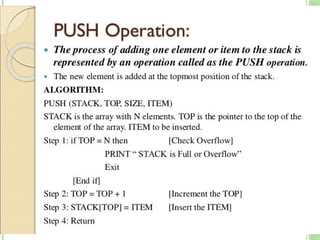
In a stack, push() is a function used to insert an element into
the stack. In a stack, the new element is always inserted
at top position.
Push function takes one integer value as parameter and inserts
that value into the stack. We can use the following steps to
push an element on to the stack...
Step 1 - Check whether stack is FULL. (top == SIZE-1)
Step 2 - If it is FULL, then display "Stack is FULL!!!
Insertion is not possible!!!" and terminate the function.
Step 3 - If it is NOT FULL, then increment top value by one
(top++) and set stack[top] to value (stack[top] = value).
21.
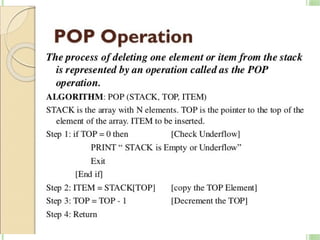
POP() - DELETEA VALUE FROM THE STACK
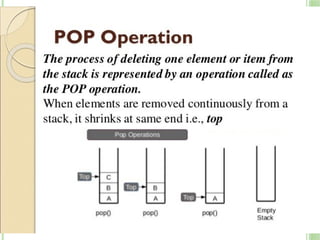
In a stack, pop() is a function used to delete an element from the
stack.
In a stack, the element is always deleted from top position. Pop
function does not take any value as parameter.
We can use the following steps to pop an element from the
stack...
Step 1 - Check whether stack is EMPTY. (top == -1)
Step 2 - If it is EMPTY, then display "Stack is EMPTY!!!
Deletion is not possible!!!" and terminate the function.
Step 3 - If it is NOT EMPTY, then delete stack[top] and
decrement top value by one (top--).
22.
CNT…
Pop push
Pop (ts)
structstack * ts;
{
If (empty (ts))
Printf(“%s”,”stack
underflow” );
Return (0)
Else
Return (ts elements[ts top-
1]);
}
push (ts,x)
Struct stack *ts;
Int x;
{
Ts elements[++(ts
top)]=x;
Return;
}
23.
DISPLAY() - DISPLAYSTHE ELEMENTS OF A STACK
We can use the following steps to display the elements of a
stack...
Step 1 - Check whether stack is EMPTY. (top == -1)
Step 2 - If it is EMPTY, then display "Stack is
EMPTY!!!" and terminate the function.
Step 3 - If it is NOT EMPTY, then define a variable 'i' and
initialize with top. Display stack[i] value and decrement i value
by one (i--).
Step 3 - Repeat above step until i value becomes '0
24.
STACK USING LINKEDLIST
The major problem with the stack implemented using an
array is, it works only for a fixed number of data values.
That means the amount of data must be specified at the
beginning of the implementation itself.
Stack implemented using an array is not suitable, when
we don't know the size of data which we are going to use.
A stack data structure can be implemented by using a
linked list data structure.
The stack implemented using linked list can work for an
unlimited number of values. That means, stack
implemented using linked list works for the variable size
of data.
So, there is no need to fix the size at the beginning of the
implementation. The Stack implemented using linked list
can organize as many data values as we want.
25.
CNT..
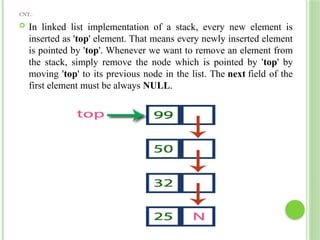
In linkedlist implementation of a stack, every new element is
inserted as 'top' element. That means every newly inserted element
is pointed by 'top'. Whenever we want to remove an element from
the stack, simply remove the node which is pointed by 'top' by
moving 'top' to its previous node in the list. The next field of the
first element must be always NULL.
26.
STACK OPERATIONS USINGLINKED LIST
To implement a stack using a linked list, we need to set the
following things before implementing actual operations.
Step 1 - Include all the header files which are used in the
program. And declare all the user defined functions.
Step 2 - Define a 'Node' structure with two
members data and next.
Step 3 - Define a Node pointer 'top' and set it to NULL.
Step 4 - Implement the main method by displaying Menu with
list of operations and make suitable function calls in
the main method.
27.
PUSH(VALUE) - INSERTINGAN ELEMENT INTO THE STACK
We can use the following steps to insert a new node into the
stack...
Step 1 - Create a newNode with given value.
Step 2 - Check whether stack is Empty (top == NULL)
Step 3 - If it is Empty, then set newNode → next = NULL.
Step 4 - If it is Not Empty, then set newNode → next = top.
Step 5 - Finally, set top = newNode.
28.
CNT…
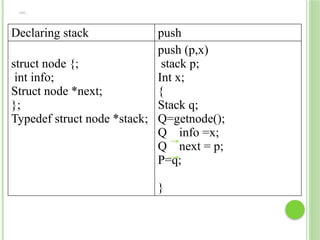
Declaring stack push
structnode {;
int info;
Struct node *next;
};
Typedef struct node *stack;
push (p,x)
stack p;
Int x;
{
Stack q;
Q=getnode();
Q info =x;
Q next = p;
P=q;
}
29.
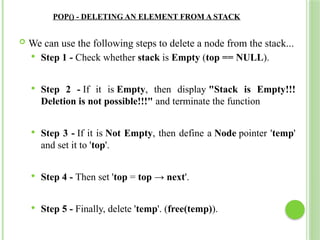
POP() - DELETINGAN ELEMENT FROM A STACK
We can use the following steps to delete a node from the stack...
Step 1 - Check whether stack is Empty (top == NULL).
Step 2 - If it is Empty, then display "Stack is Empty!!!
Deletion is not possible!!!" and terminate the function
Step 3 - If it is Not Empty, then define a Node pointer 'temp'
and set it to 'top'.
Step 4 - Then set 'top = top → next'.
Step 5 - Finally, delete 'temp'. (free(temp)).
30.
CNT…
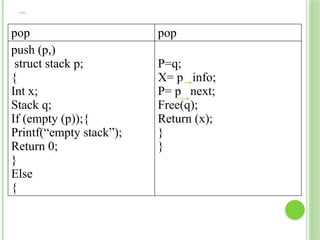
pop pop
push (p,)
structstack p;
{
Int x;
Stack q;
If (empty (p));{
Printf(“empty stack”);
Return 0;
}
Else
{
P=q;
X= p info;
P= p next;
Free(q);
Return (x);
}
}
31.
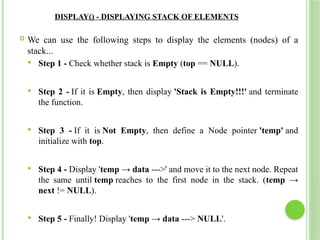
DISPLAY() - DISPLAYINGSTACK OF ELEMENTS
We can use the following steps to display the elements (nodes) of a
stack...
Step 1 - Check whether stack is Empty (top == NULL).
Step 2 - If it is Empty, then display 'Stack is Empty!!!' and terminate
the function.
Step 3 - If it is Not Empty, then define a Node pointer 'temp' and
initialize with top.
Step 4 - Display 'temp → data --->' and move it to the next node. Repeat
the same until temp reaches to the first node in the stack. (temp →
next != NULL).
Step 5 - Finally! Display 'temp → data ---> NULL'.
32.
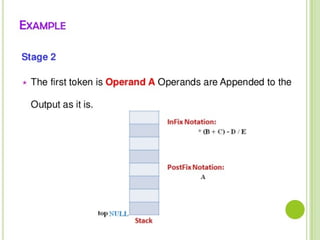
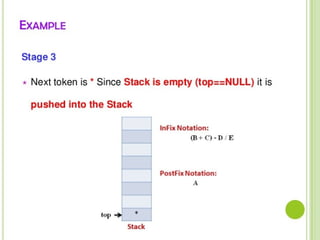
APPLICATION OF STACKFOR EXPRESSION
EVALUATION AND EXPRESSION CONVERSION
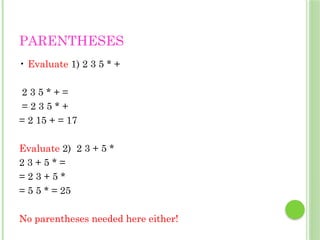
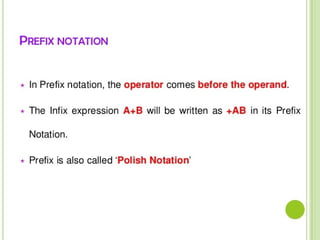
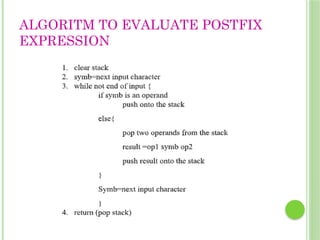
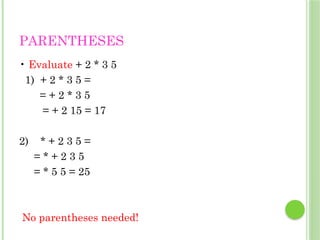
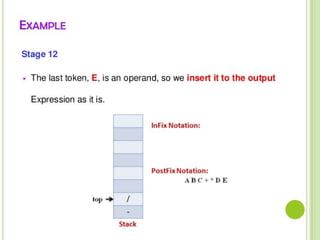
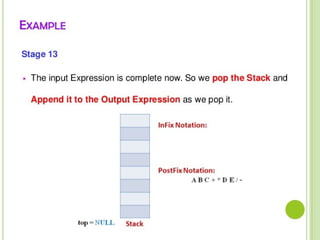
1.Evaluation of postfix expression
2.Conversion of Infix to Postfix
RECURSION
A programmingtechnique in which a function calls
itself.
One of the most effective techniques in programming.
60.
USE OF RECURSION
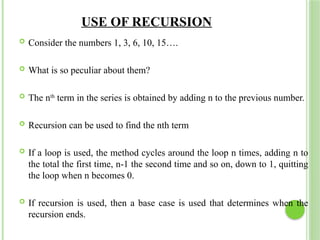
Consider the numbers 1, 3, 6, 10, 15….
What is so peculiar about them?
The nth
term in the series is obtained by adding n to the previous number.
Recursion can be used to find the nth term
If a loop is used, the method cycles around the loop n times, adding n to
the total the first time, n-1 the second time and so on, down to 1, quitting
the loop when n becomes 0.
If recursion is used, then a base case is used that determines when the
recursion ends.
61.
CHARACTERISTICS OF RECURSION
The recursive method calls itself to solve a smaller problem.
The base case is the smallest problem that the routine solves
and the value is returned to the calling method. (Terminal
condition)
Calling a method involves certain overhead in transferring
the control to the beginning of the method and in storing the
information of the return point.
Memory is used to store all the intermediate arguments and
return values on the internal stack.
The most important advantage is that it simplifies the
problem conceptually.
62.
RECURSION USING STACK
Most compilers implement recursion using stacks.
When a method is called the compiler pushes the arguments
to the method and the return address on the stack and then
transfers the control to the method
When the method returns, it pops these values off the stack
The arguments disappear and the control returns to the return
address.
63.
RECURSION USING STACK
Stack is used to store and restore the recursive function
and its argument(s).
The general idea behind recursion is
To divide a problem into smaller pieces until reaching to
solvable pieces.
Then, to solve the problem by solving these small pieces of
problem and merging the solutions to eachother.
64.
CONT..
Generally arecursive algorithm has two parts. The 1st part
checks if the problem is solvable and solves it.
The 2nd part that divides the problem into smaller pieces in
each round until it falls under part one.
Here in the 2nd part we see that the same function calls itself
many times to break the problem into smaller pieces.



![STACK OPERATIONS USING ARRAY
A stack can be implemented using array as follows...
Before implementing actual operations, first follow the
below steps to create an empty stack.
Step 1 - Include all the header files which are used in the
program and define a constant 'SIZE' with specific value.
Step 2 - Declare all the functions used in stack
implementation.
Step 3 - Create a one dimensional array with fixed size (int
stack[SIZE])
Step 4 - Define a integer variable 'top' and initialize with '-
1'. (int top = -1)
Step 5 - In main method, display menu with list of
operations and make suitable function calls to perform
operation selected by the user on the stack.](https://image.slidesharecdn.com/ds-unit-02-251003070610-93c822a4/85/DS-UNIT-02-introduction-Queue-data-structure-pptx-18-320.jpg)
![CNT…
Top Empty
# define MAXELE 100
struct stack {
int top ;
int elements[MAXELE];
};
struct stack s:
Empty (ts)
Struct stack *ts;
{
If (ts- top ==-1)
Return (1);
Else
Return(0);
}](https://image.slidesharecdn.com/ds-unit-02-251003070610-93c822a4/85/DS-UNIT-02-introduction-Queue-data-structure-pptx-19-320.jpg)
![PUSH(VALUE) - INSERTING VALUE INTO THE STACK
In a stack, push() is a function used to insert an element into
the stack. In a stack, the new element is always inserted
at top position.
Push function takes one integer value as parameter and inserts
that value into the stack. We can use the following steps to
push an element on to the stack...
Step 1 - Check whether stack is FULL. (top == SIZE-1)
Step 2 - If it is FULL, then display "Stack is FULL!!!
Insertion is not possible!!!" and terminate the function.
Step 3 - If it is NOT FULL, then increment top value by one
(top++) and set stack[top] to value (stack[top] = value).](https://image.slidesharecdn.com/ds-unit-02-251003070610-93c822a4/85/DS-UNIT-02-introduction-Queue-data-structure-pptx-20-320.jpg)
![POP() - DELETE A VALUE FROM THE STACK
In a stack, pop() is a function used to delete an element from the
stack.
In a stack, the element is always deleted from top position. Pop
function does not take any value as parameter.
We can use the following steps to pop an element from the
stack...
Step 1 - Check whether stack is EMPTY. (top == -1)
Step 2 - If it is EMPTY, then display "Stack is EMPTY!!!
Deletion is not possible!!!" and terminate the function.
Step 3 - If it is NOT EMPTY, then delete stack[top] and
decrement top value by one (top--).](https://image.slidesharecdn.com/ds-unit-02-251003070610-93c822a4/85/DS-UNIT-02-introduction-Queue-data-structure-pptx-21-320.jpg)
![CNT…
Pop push
Pop (ts)
struct stack * ts;
{
If (empty (ts))
Printf(“%s”,”stack
underflow” );
Return (0)
Else
Return (ts elements[ts top-
1]);
}
push (ts,x)
Struct stack *ts;
Int x;
{
Ts elements[++(ts
top)]=x;
Return;
}](https://image.slidesharecdn.com/ds-unit-02-251003070610-93c822a4/85/DS-UNIT-02-introduction-Queue-data-structure-pptx-22-320.jpg)
![DISPLAY() - DISPLAYS THE ELEMENTS OF A STACK
We can use the following steps to display the elements of a
stack...
Step 1 - Check whether stack is EMPTY. (top == -1)
Step 2 - If it is EMPTY, then display "Stack is
EMPTY!!!" and terminate the function.
Step 3 - If it is NOT EMPTY, then define a variable 'i' and
initialize with top. Display stack[i] value and decrement i value
by one (i--).
Step 3 - Repeat above step until i value becomes '0](https://image.slidesharecdn.com/ds-unit-02-251003070610-93c822a4/85/DS-UNIT-02-introduction-Queue-data-structure-pptx-23-320.jpg)