Drupal 7 Media Modules (Media, Media Gallery, etc.) Grigory NAUMOVETS Kiev, Ukraine
Outline [why] Do we need more modules to manage media? Media module:  features, advantages, problems 1.x and 2.x branches Media Gallery module: features, advantages, problems Other media-related modules: MediaElement, Media Browser Plus, MediaFront Conclusions
Site content Text content Nodes Comments Blocks Views etc. Media (file) content Managed files   (have their own  File ID  in the system) Unmanaged files   (are not known to the system – just linked from somewhere)
Managed files in Drupal 7 Drupal 7 has database tables ‘ file_managed ’ and ‘ file_usage ’ keeping track of managed files: file ID, name, URI, size, type, user and module responsible for this file, etc. But there is no user interface to manage these ‘managed files’!
[Text] Content administration /admin/content  – [node] content administration Also, we can administer comments, blocks, views, etc…  but how can we administer MEDIA???
Filefield <- media file Regular File upload widget: How can we use one file in many nodes? We can only duplicate it – WTF??? We want to: Re-use one file in many fields Organize media (tags, directories, etc.)
List of f ile  u ploading and  m anaging  modules groups.drupal.org/node/20291 Database File manager,  FileDepot,  File Framework,  Filemanager,  File maintenance,  WebFM,  Upload paths,  Filefield paths, etc. etc. etc. Many of these are obsolete/abandoned/rarely used No full-featured solution yet
Media module Available only for Drupal 7 Reported installs: >39,000 (Feb. 2012) Branches: 7.x-1.x – recommended (features freezed, bugfixes only) 7.x-2.x – unstable (with new improvements) Requirements: Javascript must be enabled CTools Media 7.x-2.x relies on Views and File entity (fieldable files); 7.x-1.x has File entity included inside Media module development was sponsored by:  Acquia, Advomatic, and Palantir.net
Installing Media module… Now we have: New field type: Multimedia asset New widget:  Media File Selector Media Library
We also have… Content types »… »   Manage display   New display formatter:  Media
File display format should be defined for the appropriate file type (“bundle”) – Image, Audio, Video, Other /admin/config/media/file-types
Configuring file display for each file type admin/config/media/file-types/manage/video/file-display File view modes –  ‘Default’, ‘Link’, ‘Preview’, ‘Small’, ‘Large’, ‘Original’, etc.; you need to save settings separately for each mode Display precedence order is important –  e.g. when you need to display videos from YouTube, ‘YouTube Video’ display should go before ‘MediaElement Video’ etc.
Media Library: now media content can be managed like node content /admin/content  – Node content administration /admin/content/media  – Media content administration new tab for Media administration
Media administration /admin/content/media We can choose  LIST view or THUMBNAIL view
Media items in the list  have their own URLs  and can be viewed/edited like nodes /media/45/edit edit Media item /media/45 view Media item
Viewing Media items like nodes /media/[fid] Media item URL [fid] is File ID from ‘file_managed’ table
So, Media module does not create a ‘Media Library’ table in the database It uses the tables that Drupal 7 already has: ‘file_managed’ and ‘file_usage’ But it adds  new fields to define  new properties of media files:  ‘Title’ and ‘Description’ field_data_media_title, field_data_media_description field_revision_media_title, field_revision_media_description
Editing Media items ‘ Title ’ and  ‘ Description ’ of items in Media Library are DIFFERENT from ‘ Title ’ and ‘ Alternate text ’ properties of images in Image field and ‘ Description ’ property of files in File field They are NOT shown when displaying images or file attachments in the usual way Modules displaying media should be able to handle media titles and descriptions (e.g. Media Gallery)
Under the hood: Media title and description These are different values kept in different database tables than  ‘File description’ and ‘Image title’ properties available for File/Image fields
Adding files to Media Library via Upload With Plupload plugin, we can upload multiple files by drag-n-dropping them here
Adding media from web hhh via media_vimeo.module via media_youtube.module With some additional modules, we can add to the Media Library media from YouTube, Vimeo, and other supported providers
Adding media from Remote URL Remote stream wrapper module:  now we can add remote media to the Media Library without copying the files to our server via remote_stream_wrapper.module
Importing files to Media Library from another directory In this way, we can import files bigger than maximum size allowed for PHP upload (upload files by FTP to some directory, then import to Media Library)
Using media from Media Library in File/Image fields Now we have a new widget type: Media file selector
Media file selector widget Selecting media from Library
However, some things are missing… With regular Image widget, we have “ Alternate text ” and “ Title ” that we can display near/over the image
What we see with the regular Image widget Image Title displayed in a lightbox view
With Media File selector widget We can edit ‘ Title ’ and ‘ Description ’ of this item in Media Library, but we cannot display them in the same way as we display “Alternate text” and “Title” image properties It’s really a disappointment         Same problem with ‘ File description ’ for File fields         “ Alternate text ” and “ Title ” image properties are no longer available.  WTF???
Referencing media from Library inline in textarea fields TinyMCE, CKEditor: enable ‘Media browser’ plugin or add ‘Media’ button File display modes (Configuration » Media » File types » Manage file display)
Media input filter should be enabled to convert media tags into markup Media tags look like that: [[{&quot;type&quot;:&quot;media&quot;,&quot;view_mode&quot;:&quot;media_preview&quot;,&quot;fid&quot;:&quot;44&quot;,&quot;attributes&quot;:{&quot;alt&quot;:&quot;&quot;,&quot;class&quot;:&quot;media-image&quot;,&quot;height&quot;:&quot;180&quot;,&quot;typeof&quot;:&quot;foaf:Image&quot;,&quot;width&quot;:&quot;180&quot;}}]]
Removing media from a node Removing a media file from a node does not  delete it from the Media Library
Removing files from Media Library … /admin/content/media You cannot delete a media file which is in use somewhere until you remove it from all the nodes Sometimes it’s kind of frustrating…
Media Gallery module Depends on Media module Understands ‘Title’ and ‘Description’ attributes of media files Can display images and videos in the same gallery Developed by the engineering team at Acquia
Viewing all galleries
We can have images and videos  in the same gallery Media Title  displayed on hover These are videos
Images and videos can be displayed inline or in a pop-up colorbox Media Gallery can display both Title and Description of media items Media Gallery calls Colorbox library independently of Colorbox module Integration with Colorbox module (to use its features and settings) requires some patching
It’s easy to add, reorder, and edit media in the gallery Edit or Remove Reorder items  by dragging the handle to a new position Add media  with Media File selector
Editing gallery settings It’s easy to set for each specific gallery the number of rows and columns, media display inline or in a pop-up box, etc.
Displaying LOCAL video files (not from YouTube, Vimeo, etc.) For this, you may need to install and configure some media player - e.g. MediaElement player (Drupal module integrating MediaElement.js library) May not work in a pop-up box
Configuring file display settings for Video admin/config/media/file-types/ manage/video/file-display
Media Gallery problems: Theme-dependent Theme-dependent problems (e.g. for  Adaptivetheme and related themes) Broken display of “All Galleries” page (may need some css tweaking) Drag handles not displayed: how can you reorder items now? (may need some patching)
Media Gallery problems: Colorbox Colorbox-related problems: Clicking on the colorbox (not on the arrows) does not work as expected: it leads to “View Detail page” instead of showing the next item in the gallery  (may need some css patching) Media Gallery work with Colorbox directly; integration with Colorbox module (to use all its features and settings) may require some patching
Media Gallery problems: Taxonomy Strange things with Taxonomy: Media Gallery creates  ‘Gallery collections’ vocabulary with ‘Galleries’ term in it, but they are not visible and not editable in admin/structure/taxonomy interface Conflicts with i18n_taxonomy reported
So, Media Gallery still needs some File tools
… more than you could expect from a module creating quite a lot of tables in the database
Problems with Media Organize Media (with lots of items in Media Library, you need to structurize it somehow via folders, tags, etc. – like you do with your boomarks or email) Handling media attributes (Media’s ‘Title’ and ‘Description’ vs  Image’s “Title’ and “Alt text’ and File’s ‘Description’)
Media Browser Plus module Works with Media 7.x-1.x and 7.x-2.x branches UI and functional improvements (multiple selection, media search, etc.) Organizing Media: folders, tags, etc.
Media 7.x-2.x branch ‘ Media’ is now called ‘Files’:  /admin/content/file  instead of  /admin/content/media
Media 7.x-2.x branch:  core File field instead of Media field And it’s not just name change: now we are supposed to work with the core File field instead of ‘Multimedia asset’ fields (which are deprecated)
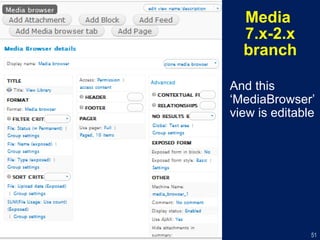
Media 7.x-2.x branch One more change:  Integration with Views . Now we have ‘View Library’ selection mode
Media  7.x-2.x branch And this ‘MediaBrowser’ view is editable
MediaFront module Integration of OSM media player Plays both local and remote (YouTube, Vimeo, etc.) video Integration with Views: can create video galleries displayed as playlists in media player’s window Detailed video tutorial: http://youtu.be/k7tbGXjMRWQ
MediaFront: a video gallery displayed as a playlist
How to re-use files in file fields  without Media File selector? FileField Sources module/widget
References James Gollan’s presentation http://youtu.be/8pHoGZBv47c Drupalcon Chicago presentation http://chicago2011.drupal.org/sessions/media http://www.slideshare.net/JacobSingh/multimedia-handing-in-drupal-7-done-better-with-the-media-module
Questions? Contact info: http://drupal.ua/users/GN [email_address]

Drupal 7 Media modules

  • 1.
    Drupal 7 MediaModules (Media, Media Gallery, etc.) Grigory NAUMOVETS Kiev, Ukraine
  • 2.
    Outline [why] Dowe need more modules to manage media? Media module: features, advantages, problems 1.x and 2.x branches Media Gallery module: features, advantages, problems Other media-related modules: MediaElement, Media Browser Plus, MediaFront Conclusions
  • 3.
    Site content Textcontent Nodes Comments Blocks Views etc. Media (file) content Managed files (have their own File ID in the system) Unmanaged files (are not known to the system – just linked from somewhere)
  • 4.
    Managed files inDrupal 7 Drupal 7 has database tables ‘ file_managed ’ and ‘ file_usage ’ keeping track of managed files: file ID, name, URI, size, type, user and module responsible for this file, etc. But there is no user interface to manage these ‘managed files’!
  • 5.
    [Text] Content administration/admin/content – [node] content administration Also, we can administer comments, blocks, views, etc… but how can we administer MEDIA???
  • 6.
    Filefield <- mediafile Regular File upload widget: How can we use one file in many nodes? We can only duplicate it – WTF??? We want to: Re-use one file in many fields Organize media (tags, directories, etc.)
  • 7.
    List of file u ploading and m anaging modules groups.drupal.org/node/20291 Database File manager, FileDepot, File Framework, Filemanager, File maintenance, WebFM, Upload paths, Filefield paths, etc. etc. etc. Many of these are obsolete/abandoned/rarely used No full-featured solution yet
  • 8.
    Media module Availableonly for Drupal 7 Reported installs: >39,000 (Feb. 2012) Branches: 7.x-1.x – recommended (features freezed, bugfixes only) 7.x-2.x – unstable (with new improvements) Requirements: Javascript must be enabled CTools Media 7.x-2.x relies on Views and File entity (fieldable files); 7.x-1.x has File entity included inside Media module development was sponsored by: Acquia, Advomatic, and Palantir.net
  • 9.
    Installing Media module…Now we have: New field type: Multimedia asset New widget: Media File Selector Media Library
  • 10.
    We also have…Content types »… » Manage display New display formatter: Media
  • 11.
    File display formatshould be defined for the appropriate file type (“bundle”) – Image, Audio, Video, Other /admin/config/media/file-types
  • 12.
    Configuring file displayfor each file type admin/config/media/file-types/manage/video/file-display File view modes – ‘Default’, ‘Link’, ‘Preview’, ‘Small’, ‘Large’, ‘Original’, etc.; you need to save settings separately for each mode Display precedence order is important – e.g. when you need to display videos from YouTube, ‘YouTube Video’ display should go before ‘MediaElement Video’ etc.
  • 13.
    Media Library: nowmedia content can be managed like node content /admin/content – Node content administration /admin/content/media – Media content administration new tab for Media administration
  • 14.
    Media administration /admin/content/mediaWe can choose LIST view or THUMBNAIL view
  • 15.
    Media items inthe list have their own URLs and can be viewed/edited like nodes /media/45/edit edit Media item /media/45 view Media item
  • 16.
    Viewing Media itemslike nodes /media/[fid] Media item URL [fid] is File ID from ‘file_managed’ table
  • 17.
    So, Media moduledoes not create a ‘Media Library’ table in the database It uses the tables that Drupal 7 already has: ‘file_managed’ and ‘file_usage’ But it adds new fields to define new properties of media files: ‘Title’ and ‘Description’ field_data_media_title, field_data_media_description field_revision_media_title, field_revision_media_description
  • 18.
    Editing Media items‘ Title ’ and ‘ Description ’ of items in Media Library are DIFFERENT from ‘ Title ’ and ‘ Alternate text ’ properties of images in Image field and ‘ Description ’ property of files in File field They are NOT shown when displaying images or file attachments in the usual way Modules displaying media should be able to handle media titles and descriptions (e.g. Media Gallery)
  • 19.
    Under the hood:Media title and description These are different values kept in different database tables than ‘File description’ and ‘Image title’ properties available for File/Image fields
  • 20.
    Adding files toMedia Library via Upload With Plupload plugin, we can upload multiple files by drag-n-dropping them here
  • 21.
    Adding media fromweb hhh via media_vimeo.module via media_youtube.module With some additional modules, we can add to the Media Library media from YouTube, Vimeo, and other supported providers
  • 22.
    Adding media fromRemote URL Remote stream wrapper module: now we can add remote media to the Media Library without copying the files to our server via remote_stream_wrapper.module
  • 23.
    Importing files toMedia Library from another directory In this way, we can import files bigger than maximum size allowed for PHP upload (upload files by FTP to some directory, then import to Media Library)
  • 24.
    Using media fromMedia Library in File/Image fields Now we have a new widget type: Media file selector
  • 25.
    Media file selectorwidget Selecting media from Library
  • 26.
    However, some thingsare missing… With regular Image widget, we have “ Alternate text ” and “ Title ” that we can display near/over the image
  • 27.
    What we seewith the regular Image widget Image Title displayed in a lightbox view
  • 28.
    With Media Fileselector widget We can edit ‘ Title ’ and ‘ Description ’ of this item in Media Library, but we cannot display them in the same way as we display “Alternate text” and “Title” image properties It’s really a disappointment    Same problem with ‘ File description ’ for File fields    “ Alternate text ” and “ Title ” image properties are no longer available. WTF???
  • 29.
    Referencing media fromLibrary inline in textarea fields TinyMCE, CKEditor: enable ‘Media browser’ plugin or add ‘Media’ button File display modes (Configuration » Media » File types » Manage file display)
  • 30.
    Media input filtershould be enabled to convert media tags into markup Media tags look like that: [[{&quot;type&quot;:&quot;media&quot;,&quot;view_mode&quot;:&quot;media_preview&quot;,&quot;fid&quot;:&quot;44&quot;,&quot;attributes&quot;:{&quot;alt&quot;:&quot;&quot;,&quot;class&quot;:&quot;media-image&quot;,&quot;height&quot;:&quot;180&quot;,&quot;typeof&quot;:&quot;foaf:Image&quot;,&quot;width&quot;:&quot;180&quot;}}]]
  • 31.
    Removing media froma node Removing a media file from a node does not delete it from the Media Library
  • 32.
    Removing files fromMedia Library … /admin/content/media You cannot delete a media file which is in use somewhere until you remove it from all the nodes Sometimes it’s kind of frustrating…
  • 33.
    Media Gallery moduleDepends on Media module Understands ‘Title’ and ‘Description’ attributes of media files Can display images and videos in the same gallery Developed by the engineering team at Acquia
  • 34.
  • 35.
    We can haveimages and videos in the same gallery Media Title displayed on hover These are videos
  • 36.
    Images and videoscan be displayed inline or in a pop-up colorbox Media Gallery can display both Title and Description of media items Media Gallery calls Colorbox library independently of Colorbox module Integration with Colorbox module (to use its features and settings) requires some patching
  • 37.
    It’s easy toadd, reorder, and edit media in the gallery Edit or Remove Reorder items by dragging the handle to a new position Add media with Media File selector
  • 38.
    Editing gallery settingsIt’s easy to set for each specific gallery the number of rows and columns, media display inline or in a pop-up box, etc.
  • 39.
    Displaying LOCAL videofiles (not from YouTube, Vimeo, etc.) For this, you may need to install and configure some media player - e.g. MediaElement player (Drupal module integrating MediaElement.js library) May not work in a pop-up box
  • 40.
    Configuring file displaysettings for Video admin/config/media/file-types/ manage/video/file-display
  • 41.
    Media Gallery problems:Theme-dependent Theme-dependent problems (e.g. for Adaptivetheme and related themes) Broken display of “All Galleries” page (may need some css tweaking) Drag handles not displayed: how can you reorder items now? (may need some patching)
  • 42.
    Media Gallery problems:Colorbox Colorbox-related problems: Clicking on the colorbox (not on the arrows) does not work as expected: it leads to “View Detail page” instead of showing the next item in the gallery (may need some css patching) Media Gallery work with Colorbox directly; integration with Colorbox module (to use all its features and settings) may require some patching
  • 43.
    Media Gallery problems:Taxonomy Strange things with Taxonomy: Media Gallery creates ‘Gallery collections’ vocabulary with ‘Galleries’ term in it, but they are not visible and not editable in admin/structure/taxonomy interface Conflicts with i18n_taxonomy reported
  • 44.
    So, Media Gallerystill needs some File tools
  • 45.
    … more thanyou could expect from a module creating quite a lot of tables in the database
  • 46.
    Problems with MediaOrganize Media (with lots of items in Media Library, you need to structurize it somehow via folders, tags, etc. – like you do with your boomarks or email) Handling media attributes (Media’s ‘Title’ and ‘Description’ vs Image’s “Title’ and “Alt text’ and File’s ‘Description’)
  • 47.
    Media Browser Plusmodule Works with Media 7.x-1.x and 7.x-2.x branches UI and functional improvements (multiple selection, media search, etc.) Organizing Media: folders, tags, etc.
  • 48.
    Media 7.x-2.x branch‘ Media’ is now called ‘Files’: /admin/content/file instead of /admin/content/media
  • 49.
    Media 7.x-2.x branch: core File field instead of Media field And it’s not just name change: now we are supposed to work with the core File field instead of ‘Multimedia asset’ fields (which are deprecated)
  • 50.
    Media 7.x-2.x branchOne more change: Integration with Views . Now we have ‘View Library’ selection mode
  • 51.
    Media 7.x-2.xbranch And this ‘MediaBrowser’ view is editable
  • 52.
    MediaFront module Integrationof OSM media player Plays both local and remote (YouTube, Vimeo, etc.) video Integration with Views: can create video galleries displayed as playlists in media player’s window Detailed video tutorial: http://youtu.be/k7tbGXjMRWQ
  • 53.
    MediaFront: a videogallery displayed as a playlist
  • 54.
    How to re-usefiles in file fields without Media File selector? FileField Sources module/widget
  • 55.
    References James Gollan’spresentation http://youtu.be/8pHoGZBv47c Drupalcon Chicago presentation http://chicago2011.drupal.org/sessions/media http://www.slideshare.net/JacobSingh/multimedia-handing-in-drupal-7-done-better-with-the-media-module
  • 56.
    Questions? Contact info:http://drupal.ua/users/GN [email_address]