Indian Language App.Development
Framework for Android 2.x
Siji Sunny
siji@melabs.in
www.melabs.in
Background
●Indic scripts have been displayed using opentype font
after adoption of unicode standard largely at the instance
of Microsoft and followed by the free software community
also.
●Unicode as an International standard is a great thing to
have happened and is now accepted as an international
standard by the ISO. It looks irreversible
●Opentype font - corporate standard initiated by the
Microsoft and Adobe
●Truetype fonts is a standard created by Adobe but with
sufficient wide spread usage and with adequate tools
even in the free software domain.
Unicode
Unicode provides a unique number for every
character-
●no matter what the platform,
●no matter what the program,
●no matter what the language.
●Devanagari – 0090 to 097F
●Latin Alphabets A to Z – U0041 to U005A
a to z – U0061 to U007A
www.melabs.in
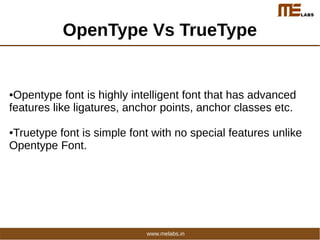
OpenType Vs TrueType
●Opentype font is highly intelligent font that has advanced
features like ligatures, anchor points, anchor classes etc.
●Truetype font is simple font with no special features unlike
Opentype Font.
www.melabs.in
Text Rendering Process -Latin Script
www.melabs.in
Application (Character Layer)
Drawtext (position,Text string)
Font
Charmap
Unicode GlyphID
47 3
4f 5
44 9
Font Layer
Char to Glyph ID
Glyph ID to Glyph
Glyphs To Pixels
Char To GlyphID
Glyph ID Glyph
3 G
5 O
9 D
PaintImage (position,Image)
GetTextExtent
(Text string)
Text Rendering Process -Complex Scripts
www.melabs.in
Application (Character Layer)
Drawtext
(position,Text string)
Font
Charmap
Unicode GlyphID
91A 3
948 5
924 6
928 7
94D 8
92F 9
Glyph ID Substitution
Glyphs To Pixels
Char To GlyphID
Glyph ID Glyph
12 चच
6 त
16 न्य
PaintImage (position,Image)
GSUBs
Source Target
3 5 12
7 8 9 16
Font Layer
Char Reordering
Glyph ID to Glyph
GetTextExtent
(Text string)
Android_Indic -Current Scenario
●Andorid supports OTF (Open Type Fonts)
●Java.text library that is used for drawing text
private void drawText(Canvas canvas)
{
paint.setColor(Color.WHITE);
paint.setTextSize(48);
canvas.drawText(text, 60, 300, paint);
}
●core rendering mechanism is only supported for Latin Scripts.
Indic text will display without re-ordering
●Android 4.1 supports indian languages -
Not sure how the rendering is happening in backend
www.melabs.in
Approach & Methodology
Multibyte Unicode Truetype font & Library
www.melabs.in
Rendering Engine - Text Conversion
(Convert Unicode encoded text into Android Encoded text)
Android Specific Indic Font
Asset Manager
Class Typeface
SetTypeface ( )
TextView ( )
www.melabs.in
Approach & Methodology - Font
New glyphs and encodings added for conjucts where
necessary
1)To eliminate use of halant with consonants , half forms of almost
all consonants are created .
2) Vatu forms (Consonant + Halant + Consonant LetterRA(u0930
र)) are also created in same manner
क्क , क्ख, ग्न
म, क, व
www.melabs.in
Approach & Methodology -Font
●Conjuncts which included combination of more than one
consonants, half forms etc. are also created new.
स
●Few of the dependent vowels are duplicated in Latin 1
supplementary range to make conjucts look proper when these
dependent vowels come along with consonants like
LetterKA(u0915 क), LetterPHA(u092b फ), etc.
ृृ ृ ु ृ
www.melabs.in
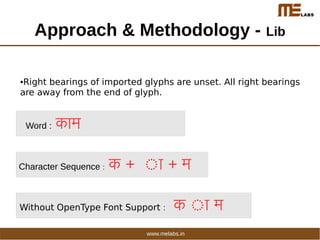
Approach & Methodology - Lib
●Right bearings of imported glyphs are unset. All right bearings
are away from the end of glyph.
Word : ककाम
Character Sequence : क + ृका + म
:Without OpenType Font Support क ृका म
www.melabs.in
Approach & Methodology - Lib
●Consonant is followed by Symbol( ) then symbol appears after
the consonant but actually it should be processed in such a way
that it appear prior to consonant
Eg:
Word : टटटम
Character Sequence : ट + ृ ् + र + टृ + म
:With Out OpenType Font Support टट टृम
www.melabs.in
Sample
package com.indic.test;
import android.graphics.Typeface;
import android.widget.TextView;
public class IndicTest extends Activity {
public void onCreate(Bundle savedInstanceState) {
super.onCreate(savedInstanceState);
setContentView(R.layout.main);
TextView AndroidHindi=(TextView)findViewById(R.id.AndroidHindiFont);
TextView AndroidGuj=(TextView)findViewById(R.id.AndroidGujFont);
Typeface Hindi=Typeface.createFromAsset(getAssets(),"fonts/AndroidHindi.ttf");
Typeface Guj=Typeface.createFromAsset(getAssets(),"fonts/AndroidGuj.ttf");
AndroidHindi.setTypeface(Hindi);
AndroidGuj.setTypeface(Guj);
}}
www.melabs.in
Sample
<TextView
android:layout_width="fill_parent"
android:layout_height="wrap_content"
android:text="@string/hello" />
<TextView
android:id="@+id/AndroidGujFont"
android:layout_width="fill_parent"
android:layout_height="wrap_content"
android:text="AndroidGuj-- પતĔગય, હ¹તમથન, ઓĔ¹ĒĔલયન, ĔલĔવગન
" />
<TextView
android:id="@+id/AndroidHindiFont"
android:layout_width="fill_parent"
android:layout_height="wrap_content"
android:text="AndroidHindi-- टृवषययों , और मकागÜ,řवययोग, आपयोआप, řवषय,
řŁममीतमीय" />
</LinearLayout>
www.melabs.in
References
●Project Setu :By C-DAC Mumbai
●Project Indix : By C-DAC Mumbai
●AOSP Source & Documentation
●Unicode Chart - http://www.unicode.org/charts/
www.melabs.in
Thank You
Email : siji@melabs.in
Gtalk : sijisunny
Twitter : siji_sunny
Irc : siji
www.melabs.in

Indian Language App.Development Framework for Android

  • 1.
    Indian Language App.Development Frameworkfor Android 2.x Siji Sunny siji@melabs.in
  • 2.
    www.melabs.in Background ●Indic scripts havebeen displayed using opentype font after adoption of unicode standard largely at the instance of Microsoft and followed by the free software community also. ●Unicode as an International standard is a great thing to have happened and is now accepted as an international standard by the ISO. It looks irreversible ●Opentype font - corporate standard initiated by the Microsoft and Adobe ●Truetype fonts is a standard created by Adobe but with sufficient wide spread usage and with adequate tools even in the free software domain.
  • 3.
    Unicode Unicode provides aunique number for every character- ●no matter what the platform, ●no matter what the program, ●no matter what the language. ●Devanagari – 0090 to 097F ●Latin Alphabets A to Z – U0041 to U005A a to z – U0061 to U007A www.melabs.in
  • 4.
    OpenType Vs TrueType ●Opentypefont is highly intelligent font that has advanced features like ligatures, anchor points, anchor classes etc. ●Truetype font is simple font with no special features unlike Opentype Font. www.melabs.in
  • 5.
    Text Rendering Process-Latin Script www.melabs.in
  • 6.
    Application (Character Layer) Drawtext(position,Text string) Font Charmap Unicode GlyphID 47 3 4f 5 44 9 Font Layer Char to Glyph ID Glyph ID to Glyph Glyphs To Pixels Char To GlyphID Glyph ID Glyph 3 G 5 O 9 D PaintImage (position,Image) GetTextExtent (Text string)
  • 7.
    Text Rendering Process-Complex Scripts www.melabs.in
  • 8.
    Application (Character Layer) Drawtext (position,Textstring) Font Charmap Unicode GlyphID 91A 3 948 5 924 6 928 7 94D 8 92F 9 Glyph ID Substitution Glyphs To Pixels Char To GlyphID Glyph ID Glyph 12 चच 6 त 16 न्य PaintImage (position,Image) GSUBs Source Target 3 5 12 7 8 9 16 Font Layer Char Reordering Glyph ID to Glyph GetTextExtent (Text string)
  • 9.
    Android_Indic -Current Scenario ●Andoridsupports OTF (Open Type Fonts) ●Java.text library that is used for drawing text private void drawText(Canvas canvas) { paint.setColor(Color.WHITE); paint.setTextSize(48); canvas.drawText(text, 60, 300, paint); } ●core rendering mechanism is only supported for Latin Scripts. Indic text will display without re-ordering ●Android 4.1 supports indian languages - Not sure how the rendering is happening in backend www.melabs.in
  • 10.
    Approach & Methodology MultibyteUnicode Truetype font & Library www.melabs.in
  • 11.
    Rendering Engine -Text Conversion (Convert Unicode encoded text into Android Encoded text) Android Specific Indic Font Asset Manager Class Typeface SetTypeface ( ) TextView ( ) www.melabs.in
  • 12.
    Approach & Methodology- Font New glyphs and encodings added for conjucts where necessary 1)To eliminate use of halant with consonants , half forms of almost all consonants are created . 2) Vatu forms (Consonant + Halant + Consonant LetterRA(u0930 र)) are also created in same manner क्क , क्ख, ग्न म, क, व www.melabs.in
  • 13.
    Approach & Methodology-Font ●Conjuncts which included combination of more than one consonants, half forms etc. are also created new. स ●Few of the dependent vowels are duplicated in Latin 1 supplementary range to make conjucts look proper when these dependent vowels come along with consonants like LetterKA(u0915 क), LetterPHA(u092b फ), etc. ृृ ृ ु ृ www.melabs.in
  • 14.
    Approach & Methodology- Lib ●Right bearings of imported glyphs are unset. All right bearings are away from the end of glyph. Word : ककाम Character Sequence : क + ृका + म :Without OpenType Font Support क ृका म www.melabs.in
  • 15.
    Approach & Methodology- Lib ●Consonant is followed by Symbol( ) then symbol appears after the consonant but actually it should be processed in such a way that it appear prior to consonant Eg: Word : टटटम Character Sequence : ट + ृ ् + र + टृ + म :With Out OpenType Font Support टट टृम www.melabs.in
  • 16.
    Sample package com.indic.test; import android.graphics.Typeface; importandroid.widget.TextView; public class IndicTest extends Activity { public void onCreate(Bundle savedInstanceState) { super.onCreate(savedInstanceState); setContentView(R.layout.main); TextView AndroidHindi=(TextView)findViewById(R.id.AndroidHindiFont); TextView AndroidGuj=(TextView)findViewById(R.id.AndroidGujFont); Typeface Hindi=Typeface.createFromAsset(getAssets(),"fonts/AndroidHindi.ttf"); Typeface Guj=Typeface.createFromAsset(getAssets(),"fonts/AndroidGuj.ttf"); AndroidHindi.setTypeface(Hindi); AndroidGuj.setTypeface(Guj); }} www.melabs.in
  • 17.
    Sample <TextView android:layout_width="fill_parent" android:layout_height="wrap_content" android:text="@string/hello" /> <TextView android:id="@+id/AndroidGujFont" android:layout_width="fill_parent" android:layout_height="wrap_content" android:text="AndroidGuj-- પતĔગય,હ¹તમથન, ઓĔ¹ĒĔલયન, ĔલĔવગન " /> <TextView android:id="@+id/AndroidHindiFont" android:layout_width="fill_parent" android:layout_height="wrap_content" android:text="AndroidHindi-- टृवषययों , और मकागÜ,řवययोग, आपयोआप, řवषय, řŁममीतमीय" /> </LinearLayout> www.melabs.in
  • 18.
    References ●Project Setu :ByC-DAC Mumbai ●Project Indix : By C-DAC Mumbai ●AOSP Source & Documentation ●Unicode Chart - http://www.unicode.org/charts/ www.melabs.in
  • 19.
    Thank You Email :siji@melabs.in Gtalk : sijisunny Twitter : siji_sunny Irc : siji www.melabs.in