Geminate comes with an amazing feature of Document WhatsApp
Messaging. By using 'Chat API Integration', it sends whatsapp
messages automatically on update of documents like sale order,
purchase order etc based on document configuration and list of fields
configured. It allows you to configure the 'Chat API Integration' on the
users settings so you can use different WhatsApp (sender) phone
numbers for individual users because there are possibilities that there
in sales team multiple salesperson are handling different customers
so those salesperson should familiar as sender to those customer to
avoid spam considered by customer.
Document Whatsapp Messaging
We are validating the 'Phone number' on the list of contacts at the time
of contact creation whether the registered phone is whatsapp or not.
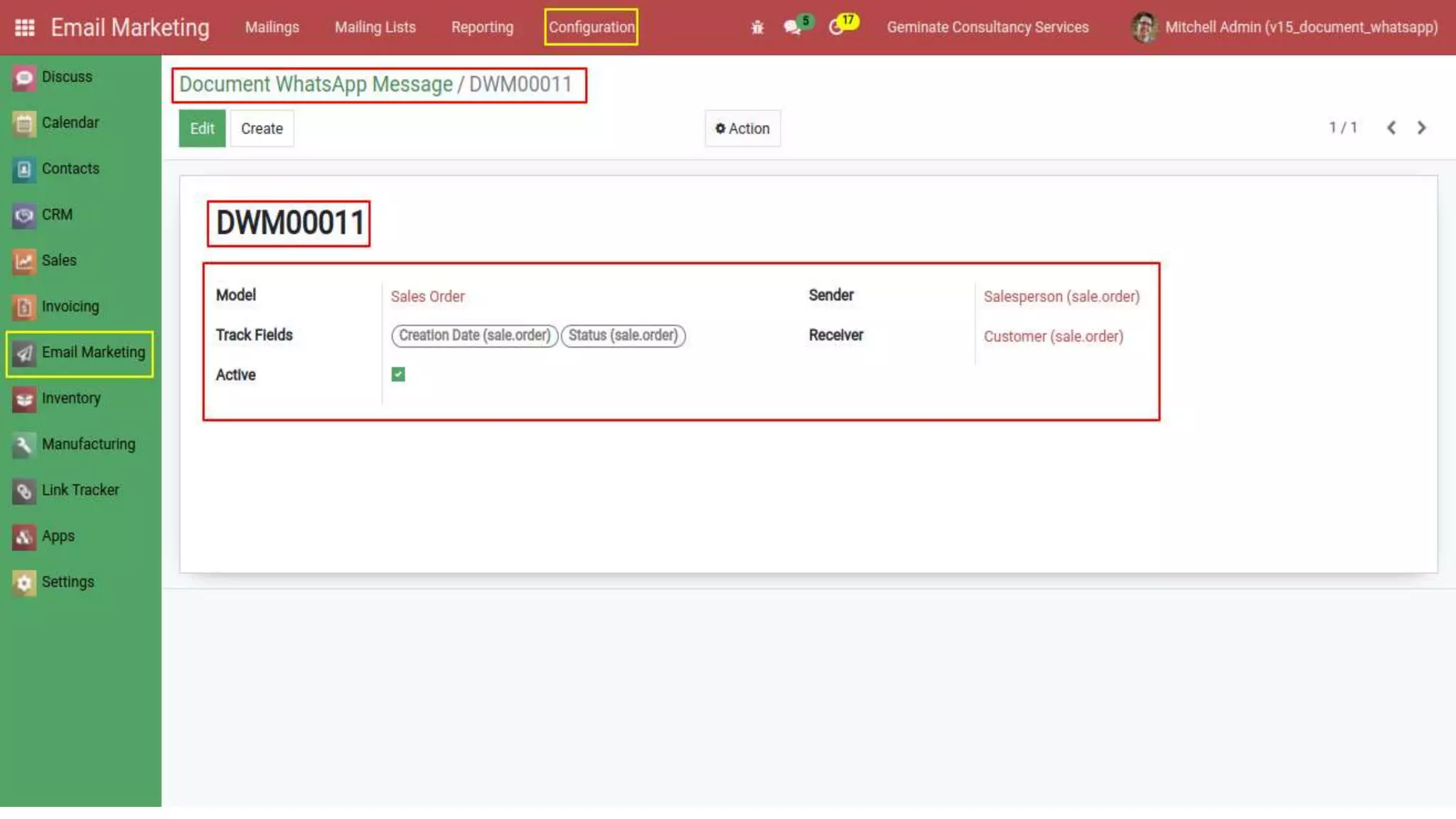
When you create 'Document Whatsapp Message' then 'Sender',
'Receiver' and 'Track Fields' will show only on 'Model' related fields. If you
select Sale Order 'Model' then other fields declare only Sale Order fields.
If 'Active' is True only then you are able to send a message.
When we are making changes in selected values of the 'Document
WhatsApp Messaging' then we get a message in our WhatsApp. 'Chat
API Integration' ideally allows you to fully integrate WhatsApp to your
existing module so that it can offer very quick support to your existing
customers.
Hot Features
➔ Document WhatsApp Messaging through WhatsApp messenger by
using 'WhatsApp chat API'.
➔ Allows to configure the 'Chat API Integration' on the users settings.
➔ Validates the 'Phone number' at the time of contact creation
whether that is a valid whatsapp registered number or not.
➔ Multiple whatsapp accounts, one for each sales person.
Note: Extensively Tested on Odoo Vanilla with Ubuntu OS
How It Works?
Why Choose Us?
FAQ's
Releases
HOW IT WORKS?
➔Go to Settings → Users & Companies →
Users
➔Go to 'Chat API Integration' page.
➔Go to Email Marketing
→Configuration → Document
WhatsApp Message
➔You can see selected 'Model' values.
➔When 'Document WhatsApp Message'
saved, then 'Automated Actions' will
create automatically Otherwise not.
➔Go to Settings → Technical → Automation.
➔Click on 'Automated Actions'.
➔Go to Contacts.
➔Enter your phone number in the 'Phone'
field. By entering a phone number, the
'Check' box is automatically set to True.
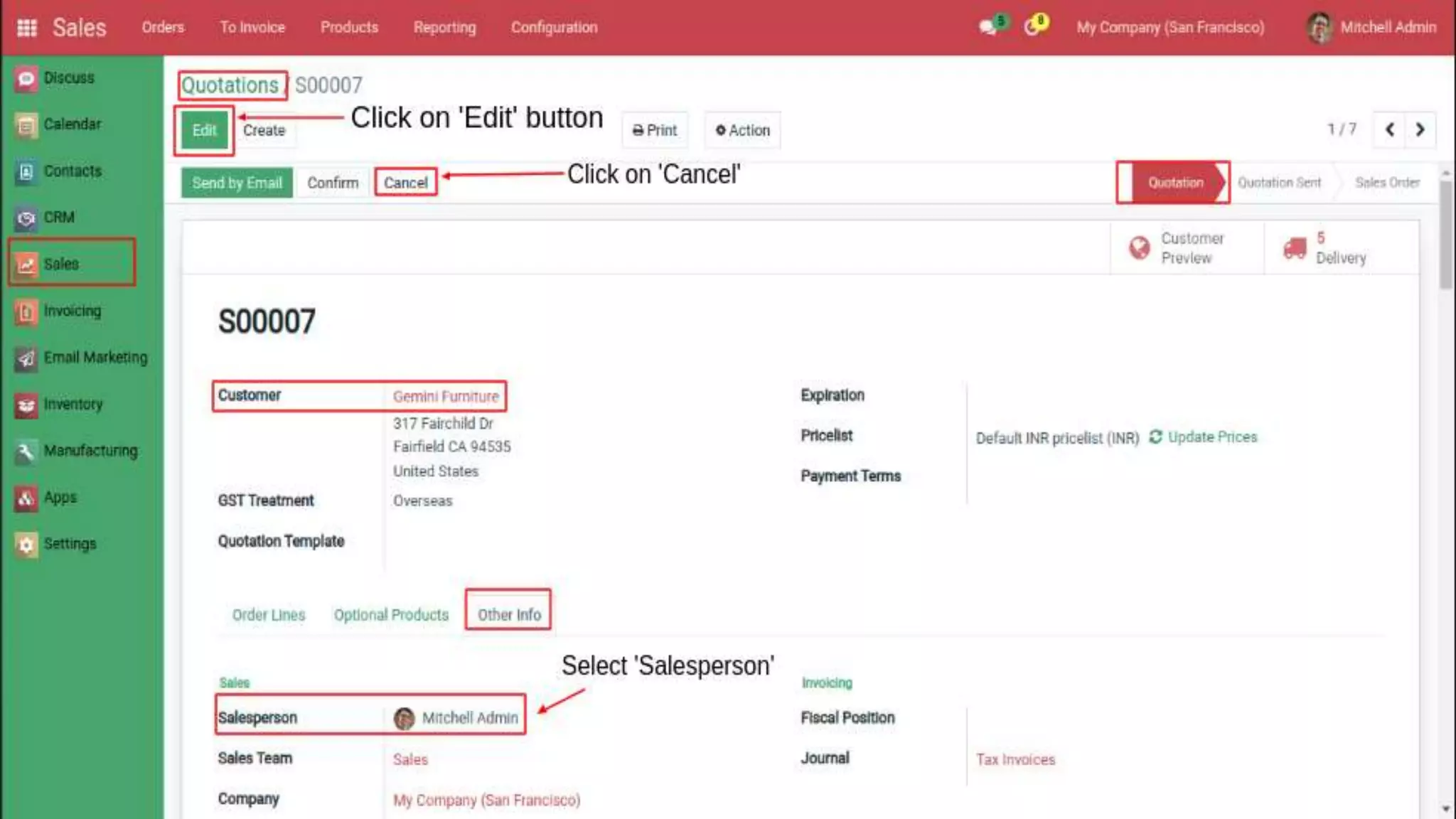
➔Go to Sales → Quotations
➔Click on the 'Other Info' page.
➔Select 'Salesperson'.
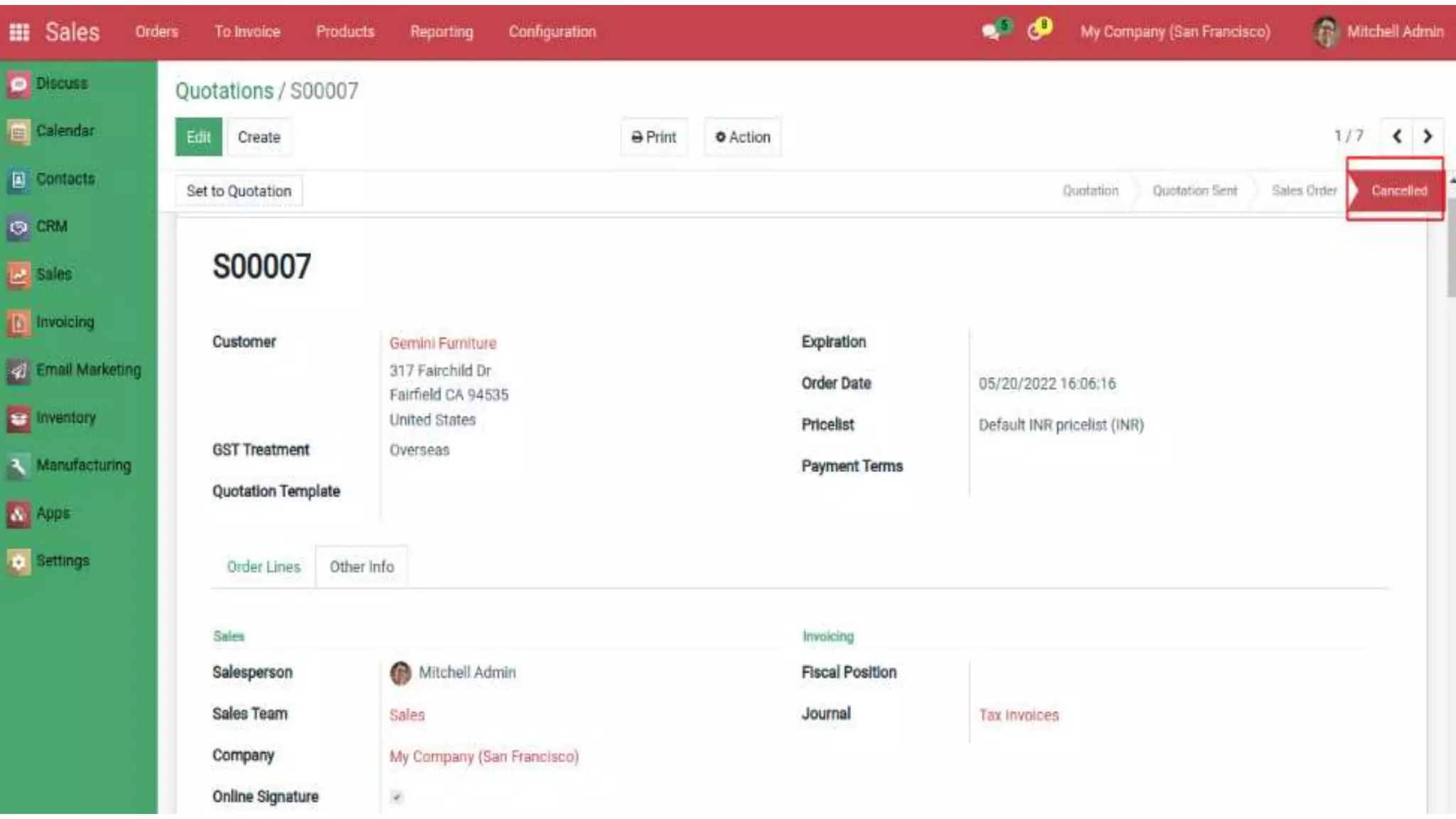
➔'State' is Cancelled.
➔A WhatsApp message will now
notify us that the status has been
cancelled.
Why Choose Us?
➔ Multi whatsapp accounts support specific users.
➔ Multiple document configuration for whatsapp
messaging document specific.
➔ Quick, easy and smooth for the latest trend of
communication.
➔ Is This app is compatible with Odoo Enterprise?
Yes, our app works with Odoo Enterprise as well as Community.
➔ What are the benefits of using this feature?
Instant notification on whatsapp messenger for customers
whenever their related document is updated for a specific field as
per the configuration.
➔ Need some customization in this app, whom to contact?
Please drop an email at contact@geminatecs.com for further
discussion.
Frequently Asked Question
eLearning Local
Video Resume
Mail SMTP and IMAP + Alias
Domain By Company
Helpdesk
Website Live
Chatbot MCQ
Mrp Production
Customize
Database User
Anonymization
Geminate
Voice Input
Geminate IM Multi
Language
Website Video
Translate
Auto Screenshot
Capture
Mass Whatsapp
Messaging
Web Twitter Post
Tweets
Dental Management
System
Online Dental
Appointment
Booking System
POS Laundry
Management
POS Laundry
Service
Paymaya Payment
Acquirer
Find more Apps from Geminate
OUR SERVICES:
Odoo Integration Odoo Support Odoo Implementation Odoo Customization
Complimentary Support
You will get 60 days free support for any
doubt, queries, and bug fixing (excluding
data recovery) or any type of issue related
to this module.
Contact / Support
Services
Send Email
Website
Thank you

Document Whatsapp Messaging

  • 2.
    Geminate comes withan amazing feature of Document WhatsApp Messaging. By using 'Chat API Integration', it sends whatsapp messages automatically on update of documents like sale order, purchase order etc based on document configuration and list of fields configured. It allows you to configure the 'Chat API Integration' on the users settings so you can use different WhatsApp (sender) phone numbers for individual users because there are possibilities that there in sales team multiple salesperson are handling different customers so those salesperson should familiar as sender to those customer to avoid spam considered by customer. Document Whatsapp Messaging
  • 3.
    We are validatingthe 'Phone number' on the list of contacts at the time of contact creation whether the registered phone is whatsapp or not. When you create 'Document Whatsapp Message' then 'Sender', 'Receiver' and 'Track Fields' will show only on 'Model' related fields. If you select Sale Order 'Model' then other fields declare only Sale Order fields. If 'Active' is True only then you are able to send a message. When we are making changes in selected values of the 'Document WhatsApp Messaging' then we get a message in our WhatsApp. 'Chat API Integration' ideally allows you to fully integrate WhatsApp to your existing module so that it can offer very quick support to your existing customers.
  • 4.
    Hot Features ➔ DocumentWhatsApp Messaging through WhatsApp messenger by using 'WhatsApp chat API'. ➔ Allows to configure the 'Chat API Integration' on the users settings. ➔ Validates the 'Phone number' at the time of contact creation whether that is a valid whatsapp registered number or not. ➔ Multiple whatsapp accounts, one for each sales person.
  • 5.
    Note: Extensively Testedon Odoo Vanilla with Ubuntu OS How It Works? Why Choose Us? FAQ's Releases
  • 6.
  • 7.
    ➔Go to Settings→ Users & Companies → Users
  • 9.
    ➔Go to 'ChatAPI Integration' page.
  • 12.
    ➔Go to EmailMarketing →Configuration → Document WhatsApp Message
  • 14.
    ➔You can seeselected 'Model' values.
  • 16.
    ➔When 'Document WhatsAppMessage' saved, then 'Automated Actions' will create automatically Otherwise not.
  • 18.
    ➔Go to Settings→ Technical → Automation.
  • 20.
  • 22.
    ➔Go to Contacts. ➔Enteryour phone number in the 'Phone' field. By entering a phone number, the 'Check' box is automatically set to True.
  • 24.
    ➔Go to Sales→ Quotations ➔Click on the 'Other Info' page. ➔Select 'Salesperson'.
  • 26.
  • 28.
    ➔A WhatsApp messagewill now notify us that the status has been cancelled.
  • 30.
    Why Choose Us? ➔Multi whatsapp accounts support specific users. ➔ Multiple document configuration for whatsapp messaging document specific. ➔ Quick, easy and smooth for the latest trend of communication.
  • 31.
    ➔ Is Thisapp is compatible with Odoo Enterprise? Yes, our app works with Odoo Enterprise as well as Community. ➔ What are the benefits of using this feature? Instant notification on whatsapp messenger for customers whenever their related document is updated for a specific field as per the configuration. ➔ Need some customization in this app, whom to contact? Please drop an email at contact@geminatecs.com for further discussion. Frequently Asked Question
  • 32.
    eLearning Local Video Resume MailSMTP and IMAP + Alias Domain By Company Helpdesk Website Live Chatbot MCQ Mrp Production Customize Database User Anonymization Geminate Voice Input Geminate IM Multi Language Website Video Translate
  • 33.
    Auto Screenshot Capture Mass Whatsapp Messaging WebTwitter Post Tweets Dental Management System Online Dental Appointment Booking System POS Laundry Management POS Laundry Service Paymaya Payment Acquirer
  • 34.
    Find more Appsfrom Geminate OUR SERVICES: Odoo Integration Odoo Support Odoo Implementation Odoo Customization
  • 35.
    Complimentary Support You willget 60 days free support for any doubt, queries, and bug fixing (excluding data recovery) or any type of issue related to this module.
  • 36.
  • 37.