Clinic Management System
★ Geminate comes with clinic management system with various type of functionality like managing clinic, doctor and
patients informations with appointment booking and case overview after consultation. Geminate also provides the details
regarding doctor and clinics. Geminate provides clinic management system for particular one doctor and the clinic which
is controlled by that particular doctor .
★ In clinic management system, we provide different users with their own responsibilities. For example, we have four
different users which includes doctor, patient, reception and system-admin. Here, activities like appointment confirm and
cancel can only be done by reception and case confirmation can be done by doctor. This facility is very helpful to restrict
access and data which they can only have access to avoid security breach or privacy.
★ In clinic management system, we provide multiple facilities but the most valuable facility is if patient has booked an
appointment and at that time doctor is busy or doctor has some other work then doctor can cancel the the appointment
and and the appointment would be saved as a draft and patient can book an appointment whenever patient wishes to
book.
★ In clinic management system, we provide reports for certain functionality to analyze data and to help to track the
previous record and we also provide inter linked facility like accounting and sales management to process a complete
appointment up to payment with sale order, invoicing and stock management.
Exciting Features
★ A different role for users.
★ Supports only one doctor which can be provided by system admin after co-ordinating with the doctor.
★ Email to patients on appointments confirmation and cancellation.
★ Supports multiple patient and clinic information with appointment booking, case overview and payment after consultation.
★ Patient can receive their individual report and appointment as well as case report to analyze data and to keep the records.
★ Inbuilt accounting and sales management to process a complete appointment up to payment with sale order, invoicing and stock management.
★ Multiple user roles help to restrict the access and data to avoid security breach or privacy.
★ Doctor can cancel appointment due to any reasons and transfer that appointment to the draft.
★ Supports calendar for booking an appointment.
★ Patient can see the payment status on their dashboard whether patient has completed the payment or not.
★ Easy to configure and more user-friendly to use.
Note: Extensively Tested on Odoo Vanilla with Ubuntu OS
How It Works?
Why Choose Us?
FAQ's
Releases
HOW IT WORKS?
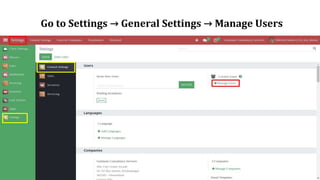
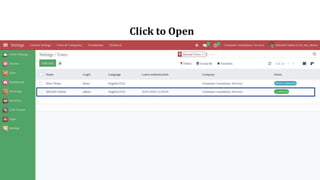
Go to Settings → General Settings → Manage Users
Click to Open
System Admin - Doctor
★ Accessing Patient Information: Show scheduling Appointments select a
Patient, and Verify that you can view the Patient's medical and Ortho history,
personal information, and contact details.
★ Creating a Treatment Plan: Confirm the appointment and save the case after
verifying that you can create a treatment plan by selecting procedures.
★ Treatment Documentation: Doctor consultation report and full case report
★ Invoice and Billing: Billing and payment processing.
★ Managing Schedule: You can view and manage your schedule, including
scheduling Appointments, blocking off time, and managing Patient waitlists.
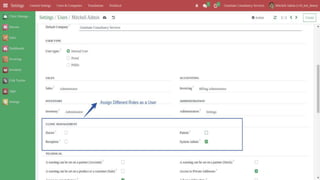
★ The system admin can create new user accounts, modify existing user
accounts, and delete user accounts as needed.
Doctor or System Admin Role.
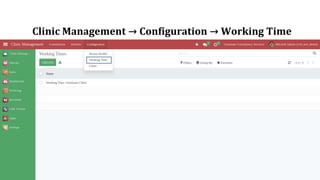
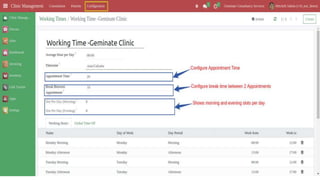
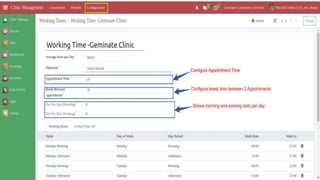
Clinic Management → Configuration → Working Time
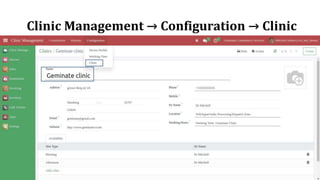
Clinic Management → Configuration → Clinic
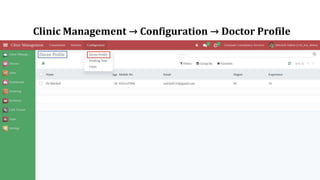
Clinic Management → Configuration → Doctor Profile
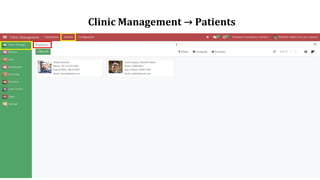
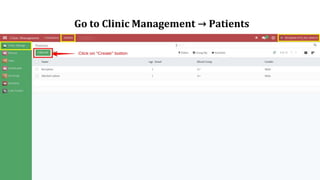
Clinic Management → Patients
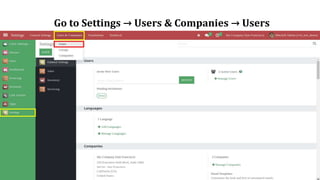
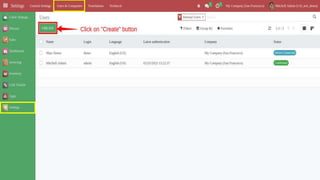
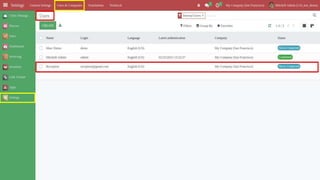
Go to Settings → Users & Companies → Users
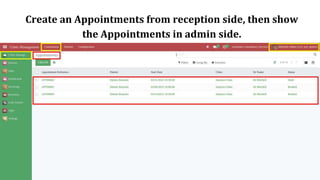
Create an Appointments from reception side, then show
the Appointments in admin side.
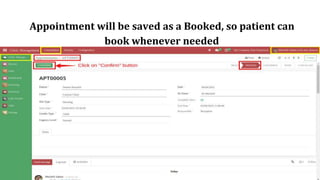
Appointment will be saved as a Booked, so patient can
book whenever needed
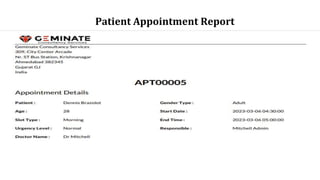
Patient Appointment Report
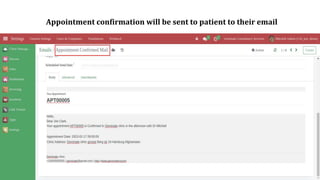
Appointment confirmation will be sent to patient to their email
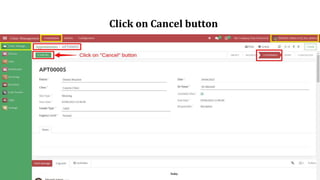
Click on Cancel button
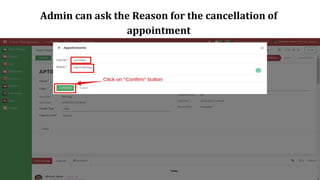
Admin can ask the Reason for the cancellation of
appointment
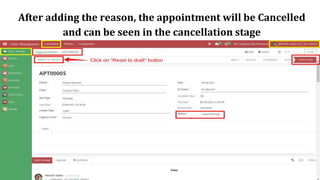
After adding the reason, the appointment will be Cancelled
and can be seen in the cancellation stage
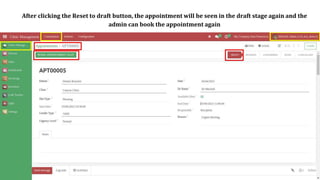
After clicking the Reset to draft button, the appointment will be seen in the draft stage again and the
admin can book the appointment again
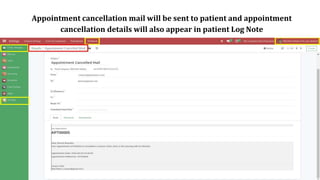
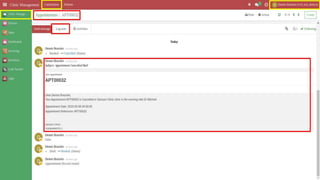
Appointment cancellation mail will be sent to patient and appointment
cancellation details will also appear in patient Log Note
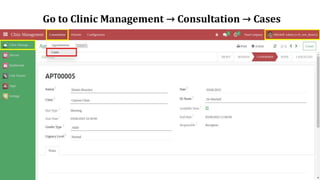
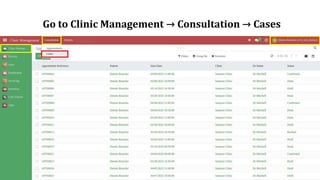
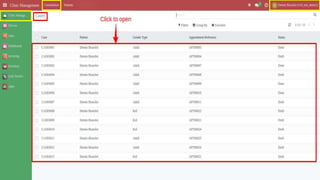
Go to Clinic Management → Consultation → Cases
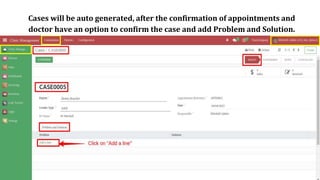
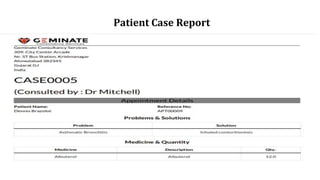
Cases will be auto generated, after the confirmation of appointments and
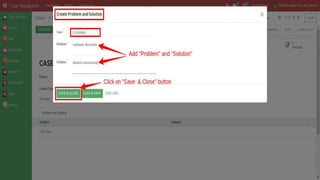
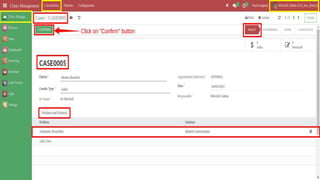
doctor have an option to confirm the case and add Problem and Solution.
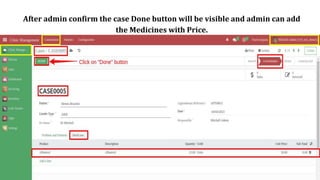
After admin confirm the case Done button will be visible and admin can add
the Medicines with Price.
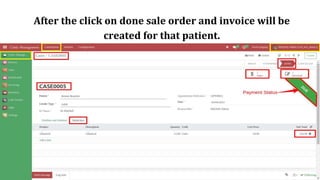
After the click on done sale order and invoice will be
created for that patient.
Patient Case Report
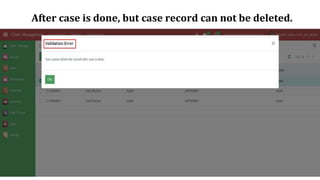
After case is done, but case record can not be deleted.
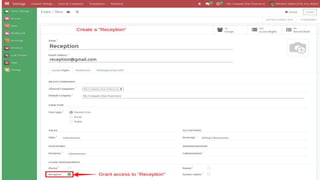
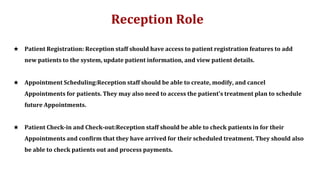
Reception Role
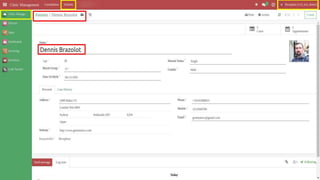
★ Patient Registration: Reception staff should have access to patient registration features to add
new patients to the system, update patient information, and view patient details.
★ Appointment Scheduling:Reception staff should be able to create, modify, and cancel
Appointments for patients. They may also need to access the patient's treatment plan to schedule
future Appointments.
★ Patient Check-in and Check-out:Reception staff should be able to check patients in for their
Appointments and confirm that they have arrived for their scheduled treatment. They should also
be able to check patients out and process payments.
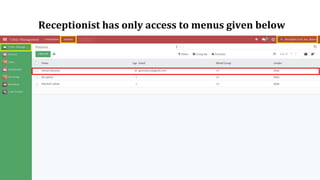
Go to Clinic Management → Patients
Receptionist has only access to menus given below
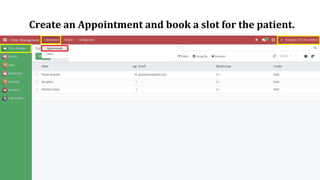
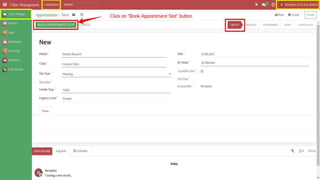
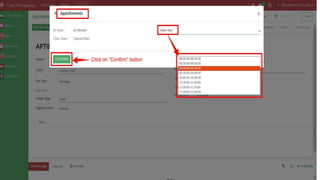
Create an Appointment and book a slot for the patient.
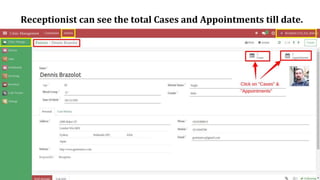
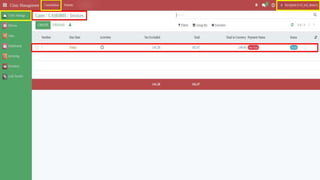
Receptionist can see the total Cases and Appointments till date.
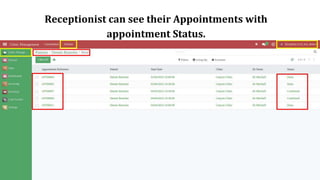
Receptionist can see their Appointments with
appointment Status.
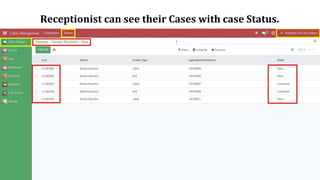
Receptionist can see their Cases with case Status.
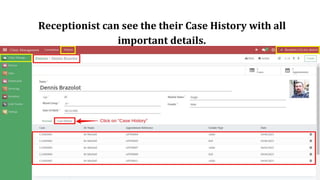
Receptionist can see the their Case History with all
important details.
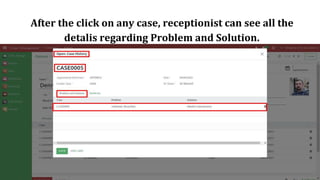
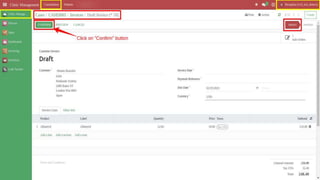
After the click on any case, receptionist can see all the
detalis regarding Problem and Solution.
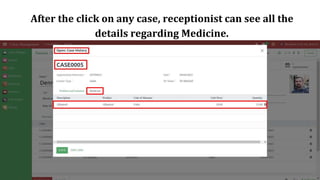
After the click on any case, receptionist can see all the
details regarding Medicine.
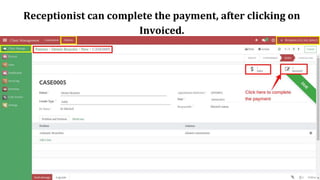
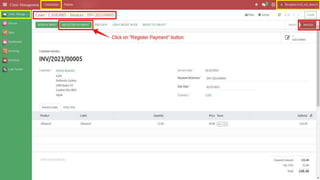
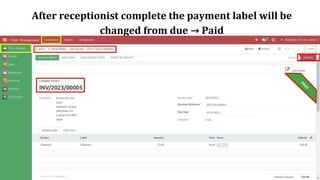
Receptionist can complete the payment, after clicking on
Invoiced.
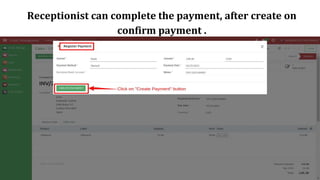
Receptionist can complete the payment, after create on
confirm payment .
After receptionist complete the payment label will be
changed from due → Paid
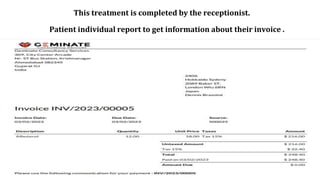
Patient individual report to get information about their invoice .
This treatment is completed by the receptionist.
Patient Role
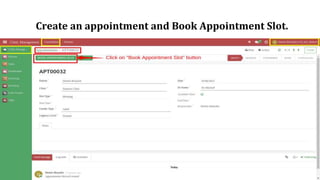
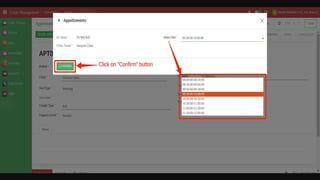
★ Patient Appointment: A patient can book the appointment, but cannot confirm it.
★ Patient Case: The patient can view the case but cannot create, edit or cancel it.
★ Go to Clinic Management → Consultation → Appointments
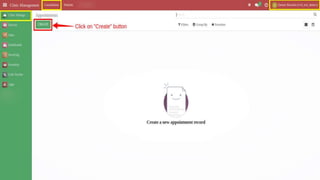
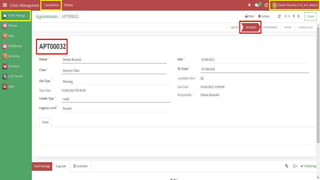
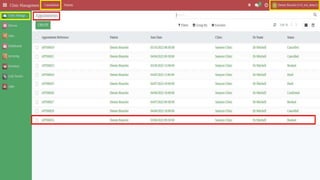
Create an appointment and Book Appointment Slot.
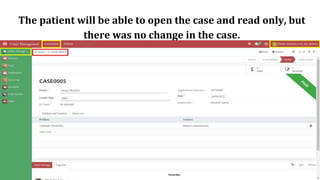
Go to Clinic Management → Consultation → Cases
The patient will be able to open the case and read only, but
there was no change in the case.
Why Choose Us?
★ Saves your valuable time.
★ Simple to use and fast to apply.
★ We provide only limited access for users.
★ Appointment cancellation information is sent by email.
★ Doctors can easily cancel the appointment if they do
not have time.
Frequently Asked Question
➔ Is This app is compatible with Odoo Enterprise?
Yes, our app works with Odoo Enterprise as well as Community.
➔ Can I find out about cancelling an appointment by mail?
Yes, you find out about cancelling an appointment by mail.
➔ Can we allow limited access for the user?
Yes, we allow limited access for the user.
➔ Need some customization in this app, whom to contact?
Please drop an email at contact@geminatecs.com for further discussion
eLearning Local
Video Resume
Mail SMTP and IMAP + Alias
Domain By Company
Helpdesk
Website Live
Chatbot MCQ
Mrp Production
Customize
Database User
Anonymization
Geminate
Voice Input
Geminate IM Multi
Language
Website Video
Translate
Auto Screenshot
Capture
Mass Whatsapp
Messaging
Web Twitter Post
Tweets
Dental Management
System
Online Dental
Appointment
Booking System
POS Laundry
Management
POS Laundry
Service
Paymaya Payment
Acquirer
Find more Apps from Geminate
OUR SERVICES:
Odoo Integration Odoo Support Odoo Implementation Odoo Customization
Complimentary Support
You will get 60 days free support for any
doubt, queries, and bug fixing (excluding data
recovery) or any type of issue related to this
module.
Contact / Support
Services
Send Email
Website
Thank you

Clinic Management System

  • 2.
    Clinic Management System ★Geminate comes with clinic management system with various type of functionality like managing clinic, doctor and patients informations with appointment booking and case overview after consultation. Geminate also provides the details regarding doctor and clinics. Geminate provides clinic management system for particular one doctor and the clinic which is controlled by that particular doctor . ★ In clinic management system, we provide different users with their own responsibilities. For example, we have four different users which includes doctor, patient, reception and system-admin. Here, activities like appointment confirm and cancel can only be done by reception and case confirmation can be done by doctor. This facility is very helpful to restrict access and data which they can only have access to avoid security breach or privacy. ★ In clinic management system, we provide multiple facilities but the most valuable facility is if patient has booked an appointment and at that time doctor is busy or doctor has some other work then doctor can cancel the the appointment and and the appointment would be saved as a draft and patient can book an appointment whenever patient wishes to book. ★ In clinic management system, we provide reports for certain functionality to analyze data and to help to track the previous record and we also provide inter linked facility like accounting and sales management to process a complete appointment up to payment with sale order, invoicing and stock management.
  • 3.
    Exciting Features ★ Adifferent role for users. ★ Supports only one doctor which can be provided by system admin after co-ordinating with the doctor. ★ Email to patients on appointments confirmation and cancellation. ★ Supports multiple patient and clinic information with appointment booking, case overview and payment after consultation. ★ Patient can receive their individual report and appointment as well as case report to analyze data and to keep the records. ★ Inbuilt accounting and sales management to process a complete appointment up to payment with sale order, invoicing and stock management. ★ Multiple user roles help to restrict the access and data to avoid security breach or privacy. ★ Doctor can cancel appointment due to any reasons and transfer that appointment to the draft. ★ Supports calendar for booking an appointment. ★ Patient can see the payment status on their dashboard whether patient has completed the payment or not. ★ Easy to configure and more user-friendly to use.
  • 4.
    Note: Extensively Testedon Odoo Vanilla with Ubuntu OS How It Works? Why Choose Us? FAQ's Releases
  • 5.
  • 6.
    Go to Settings→ General Settings → Manage Users
  • 7.
  • 8.
    System Admin -Doctor ★ Accessing Patient Information: Show scheduling Appointments select a Patient, and Verify that you can view the Patient's medical and Ortho history, personal information, and contact details. ★ Creating a Treatment Plan: Confirm the appointment and save the case after verifying that you can create a treatment plan by selecting procedures. ★ Treatment Documentation: Doctor consultation report and full case report ★ Invoice and Billing: Billing and payment processing. ★ Managing Schedule: You can view and manage your schedule, including scheduling Appointments, blocking off time, and managing Patient waitlists. ★ The system admin can create new user accounts, modify existing user accounts, and delete user accounts as needed.
  • 10.
    Doctor or SystemAdmin Role.
  • 11.
    Clinic Management →Configuration → Working Time
  • 14.
    Clinic Management →Configuration → Clinic
  • 15.
    Clinic Management →Configuration → Doctor Profile
  • 16.
  • 17.
    Go to Settings→ Users & Companies → Users
  • 21.
    Create an Appointmentsfrom reception side, then show the Appointments in admin side.
  • 22.
    Appointment will besaved as a Booked, so patient can book whenever needed
  • 23.
  • 24.
    Appointment confirmation willbe sent to patient to their email
  • 25.
  • 26.
    Admin can askthe Reason for the cancellation of appointment
  • 27.
    After adding thereason, the appointment will be Cancelled and can be seen in the cancellation stage
  • 28.
    After clicking theReset to draft button, the appointment will be seen in the draft stage again and the admin can book the appointment again
  • 29.
    Appointment cancellation mailwill be sent to patient and appointment cancellation details will also appear in patient Log Note
  • 31.
    Go to ClinicManagement → Consultation → Cases
  • 32.
    Cases will beauto generated, after the confirmation of appointments and doctor have an option to confirm the case and add Problem and Solution.
  • 35.
    After admin confirmthe case Done button will be visible and admin can add the Medicines with Price.
  • 36.
    After the clickon done sale order and invoice will be created for that patient.
  • 37.
  • 38.
    After case isdone, but case record can not be deleted.
  • 39.
    Reception Role ★ PatientRegistration: Reception staff should have access to patient registration features to add new patients to the system, update patient information, and view patient details. ★ Appointment Scheduling:Reception staff should be able to create, modify, and cancel Appointments for patients. They may also need to access the patient's treatment plan to schedule future Appointments. ★ Patient Check-in and Check-out:Reception staff should be able to check patients in for their Appointments and confirm that they have arrived for their scheduled treatment. They should also be able to check patients out and process payments.
  • 40.
    Go to ClinicManagement → Patients
  • 42.
    Receptionist has onlyaccess to menus given below
  • 43.
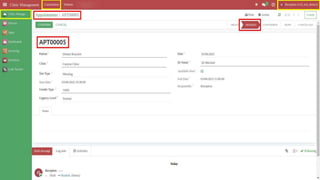
    Create an Appointmentand book a slot for the patient.
  • 47.
    Receptionist can seethe total Cases and Appointments till date.
  • 48.
    Receptionist can seetheir Appointments with appointment Status.
  • 49.
    Receptionist can seetheir Cases with case Status.
  • 50.
    Receptionist can seethe their Case History with all important details.
  • 51.
    After the clickon any case, receptionist can see all the detalis regarding Problem and Solution.
  • 52.
    After the clickon any case, receptionist can see all the details regarding Medicine.
  • 53.
    Receptionist can completethe payment, after clicking on Invoiced.
  • 57.
    Receptionist can completethe payment, after create on confirm payment .
  • 58.
    After receptionist completethe payment label will be changed from due → Paid
  • 59.
    Patient individual reportto get information about their invoice . This treatment is completed by the receptionist.
  • 60.
    Patient Role ★ PatientAppointment: A patient can book the appointment, but cannot confirm it. ★ Patient Case: The patient can view the case but cannot create, edit or cancel it. ★ Go to Clinic Management → Consultation → Appointments
  • 62.
    Create an appointmentand Book Appointment Slot.
  • 66.
    Go to ClinicManagement → Consultation → Cases
  • 68.
    The patient willbe able to open the case and read only, but there was no change in the case.
  • 69.
    Why Choose Us? ★Saves your valuable time. ★ Simple to use and fast to apply. ★ We provide only limited access for users. ★ Appointment cancellation information is sent by email. ★ Doctors can easily cancel the appointment if they do not have time.
  • 70.
    Frequently Asked Question ➔Is This app is compatible with Odoo Enterprise? Yes, our app works with Odoo Enterprise as well as Community. ➔ Can I find out about cancelling an appointment by mail? Yes, you find out about cancelling an appointment by mail. ➔ Can we allow limited access for the user? Yes, we allow limited access for the user. ➔ Need some customization in this app, whom to contact? Please drop an email at contact@geminatecs.com for further discussion
  • 71.
    eLearning Local Video Resume MailSMTP and IMAP + Alias Domain By Company Helpdesk Website Live Chatbot MCQ Mrp Production Customize Database User Anonymization Geminate Voice Input Geminate IM Multi Language Website Video Translate
  • 72.
    Auto Screenshot Capture Mass Whatsapp Messaging WebTwitter Post Tweets Dental Management System Online Dental Appointment Booking System POS Laundry Management POS Laundry Service Paymaya Payment Acquirer
  • 73.
    Find more Appsfrom Geminate OUR SERVICES: Odoo Integration Odoo Support Odoo Implementation Odoo Customization
  • 74.
    Complimentary Support You willget 60 days free support for any doubt, queries, and bug fixing (excluding data recovery) or any type of issue related to this module.
  • 75.
  • 76.