1
Docker Workshop
Alex Barreto
Cloud Domain Architect
alexb@redhat.com
@shakamunyi
22 May 2014
2
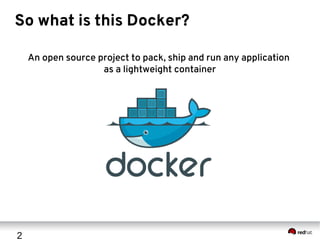
So what is this Docker?
An open source project to pack, ship and run any application
as a lightweight container
3
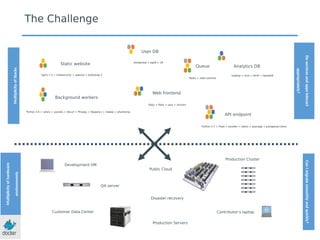
What do you have to say for yourself?
Static website
Web frontend
User DB
Queue Analytics DB
Background workers
API endpoint
nginx 1.5 + modsecurity + openssl + bootstrap 2
postgresql + pgv8 + v8
hadoop + hive + thrift + OpenJDK
Ruby + Rails + sass + Unicorn
Redis + redis-sentinel
Python 3.0 + celery + pyredis + libcurl + ffmpeg + libopencv + nodejs + phantomjs
Python 2.7 + Flask + pyredis + celery + psycopg + postgresql-client
Development VM
QA server
Public Cloud
Disaster recovery
Contributor’s laptop
Production Servers
The Challenge
MultplicityofStacks
Multplicityofhardware
environments
Production Cluster
Customer Data Center
Doservicesandappsinteract
appropriately?
CanImigratesmoothlyandquickly?
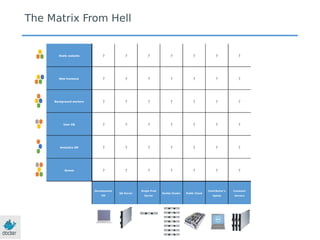
The Matrix From Hell
Static website
Web frontend
Background workers
User DB
Analytics DB
Queue
Development
VM
QA Server
Single Prod
Server
Onsite Cluster Public Cloud
Contributor’s
laptop
Customer
Servers
? ? ? ? ? ? ?
? ? ? ? ? ? ?
? ? ? ? ? ? ?
? ? ? ? ? ? ?
? ? ? ? ? ? ?
? ? ? ? ? ? ?
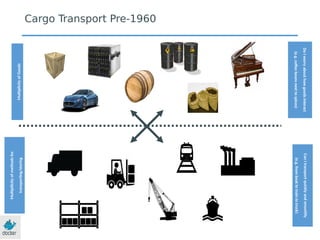
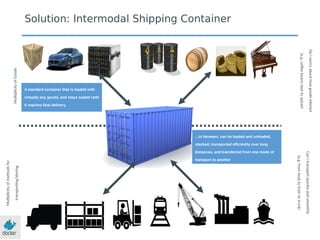
MultplicityofGoods
Multpilicityofmethodsfor
transportng/storing
DoIworryabouthowgoodsinteract
(e.g.cofeebeansnexttospices)
CanItransportquicklyandsmoothly
(e.g.fromboattotraintotruck)
Cargo Transport Pre-1960
? ? ? ? ? ? ?
? ? ? ? ? ? ?
? ? ? ? ? ? ?
? ? ? ? ? ? ?
? ? ? ? ? ? ?
? ? ? ? ? ? ?
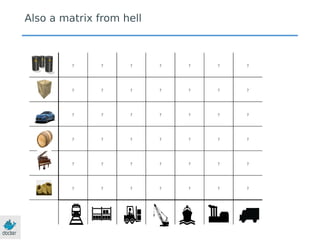
Also a matrix from hell
MultplicityofGoods
Multplicityofmethodsfor
transportng/storing
DoIworryabouthowgoodsinteract
(e.g.cofeebeansnexttospices)
CanItransportquicklyandsmoothly
(e.g.fromboattotraintotruck)
Solution: Intermodal Shipping Container
…in between, can be loaded and unloaded,
stacked, transported efficiently over long
distances, and transferred from one mode of
transport to another
A standard container that is loaded with
virtually any goods, and stays sealed until
it reaches final delivery.
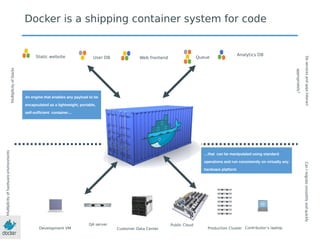
Static website Web frontendUser DB Queue
Analytics DB
Development VM
QA server Public Cloud
Contributor’s laptop
Docker is a shipping container system for code
MultplicityofStacks
Multplicityofhardwareenvironments
Production ClusterCustomer Data Center
Doservicesandappsinteract
appropriately?
CanImigratesmoothlyandquickly
…that can be manipulated using standard
operations and run consistently on virtually any
hardware platform
An engine that enables any payload to be
encapsulated as a lightweight, portable,
self-sufficient container…
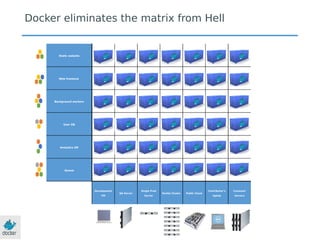
Static website
Web frontend
Background workers
User DB
Analytics DB
Queue
Development
VM
QA Server
Single Prod
Server
Onsite Cluster Public Cloud
Contributor’s
laptop
Customer
Servers
Docker eliminates the matrix from Hell
11
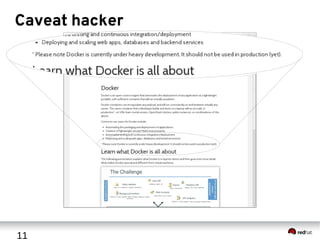
Caveat hacker
12
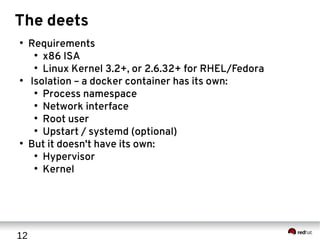
The deets
●
Requirements
●
x86 ISA
●
Linux Kernel 3.2+, or 2.6.32+ for RHEL/Fedora
●
Isolation – a docker container has its own:
●
Process namespace
●
Network interface
●
Root user
●
Upstart / systemd (optional)
●
But it doesn't have its own:
●
Hypervisor
●
Kernel
13
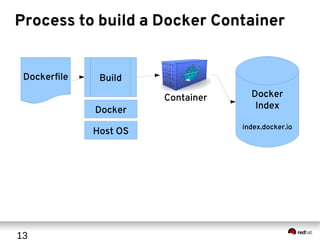
Process to build a Docker Container
Dockerfile Build
Docker
Host OS
Container Docker
Index
index.docker.io
14
The Dockerfile
●
Really basic example from http://goo.gl/Z2OWXN
FROM ubuntu
MAINTAINER SvenDowideit@docker.com
RUN apt­key adv ­­keyserver keyserver.ubuntu.com ­­recv­keys  
B97B0AFCAA1A47F044F244A07FCC7D46ACCC4CF8
RUN echo "deb http://apt.postgresql.org/pub/repos/apt/ precise­pgdg main"  
  > /etc/apt/sources.list.d/pgdg.list
RUN apt­get update
RUN apt­get ­y ­q install python­software­properties software­properties­common
RUN apt­get ­y ­q install postgresql­9.3 postgresql­client­9.3 
  postgresql­contrib­9.3
USER postgres
RUN    /etc/init.d/postgresql start &&
 psql ­­command "CREATE USER docker WITH SUPERUSER PASSWORD 'docker';" &&
  createdb ­O docker docker
RUN echo "host all  all    0.0.0.0/0  md5"  
 >> /etc/postgresql/9.3/main/pg_hba.conf
RUN echo "listen_addresses='*'" >> /etc/postgresql/9.3/main/postgresql.conf
EXPOSE 5432
VOLUME ["/etc/postgresql", "/var/log/postgresql", "/var/lib/postgresql"]
CMD ["/usr/lib/postgresql/9.3/bin/postgres", "­D",    
 "/var/lib/postgresql/9.3/main", "­c",  
 "config_file=/etc/postgresql/9.3/main/postgresql.conf"]
15
Let's build that on RHEL
●
Installation procedure for RHEL 6.5
●
Get key from
●
http://github.com/jason-callaway/openstackdc
### AWS instances are pre­registered for updates
[root@localhost]# yum update ­y
[root@localhost]# wget https://mirror.us.leaseweb.net/epel/6/x86_64/epel­
release­6­8.noarch.rpm
[root@localhost]# yum install ­y ./epel­release­6­8.noarch.rpm
[root@localhost]# yum install ­y docker­io git postgresql
[root@localhost]# service docker start; chkconfig docker on
[root@localhost]# git clone http://github.com/jason­callaway/openstackdc
[root@localhost]# cd openstackdc
[root@localhost]# ln ­s Dockerfile_ubuntu­postgres Dockerfile
[root@localhost]# docker build ­t <yourname>_pg .
### Look at the new image you've made
[root@localhost]# docker images
### Now let's run it
[root@localhost]# docker run ­d ­name pg <yourname>_pg
### Check the running containers
[root@localhost]# docker ps
[root@localhost]# docker inspect pg
16
Now let's make one based on Fedora
FROM fedora
MAINTAINER alexb@redhat.com
RUN yum install ­y postgresql­server
USER postgres
RUN /bin/initdb ­D /var/lib/pgsql/data
RUN /usr/bin/pg_ctl start ­D /var/lib/pgsql/data ­s ­o "­p 5432" ­w ­t 300 &&
 /bin/psql ­­command "CREATE USER docker WITH SUPERUSER PASSWORD 'docker';" &&
   /bin/createdb ­O docker docker
RUN echo "host all  all    0.0.0.0/0  md5" >> /var/lib/pgsql/data/pg_hba.conf
RUN echo "listen_addresses='*'" >> /var/lib/pgsql/data/postgresql.conf
EXPOSE 5432
VOLUME ["/var/lib/pgsql/data"]
CMD ["/bin/postgres", "­D", "/var/lib/pgsql/data", "­c", 
"config_file=/var/lib/pgsql/data/postgresql.conf"]
17
Docker Workshop
Alex Barreto
Cloud Domain Architect
alexb@redhat.com
@shakamunyi
22 May 2014

Docker Workshop

  • 1.
    1 Docker Workshop Alex Barreto CloudDomain Architect alexb@redhat.com @shakamunyi 22 May 2014
  • 2.
    2 So what isthis Docker? An open source project to pack, ship and run any application as a lightweight container
  • 3.
    3 What do youhave to say for yourself?
  • 4.
    Static website Web frontend UserDB Queue Analytics DB Background workers API endpoint nginx 1.5 + modsecurity + openssl + bootstrap 2 postgresql + pgv8 + v8 hadoop + hive + thrift + OpenJDK Ruby + Rails + sass + Unicorn Redis + redis-sentinel Python 3.0 + celery + pyredis + libcurl + ffmpeg + libopencv + nodejs + phantomjs Python 2.7 + Flask + pyredis + celery + psycopg + postgresql-client Development VM QA server Public Cloud Disaster recovery Contributor’s laptop Production Servers The Challenge MultplicityofStacks Multplicityofhardware environments Production Cluster Customer Data Center Doservicesandappsinteract appropriately? CanImigratesmoothlyandquickly?
  • 5.
    The Matrix FromHell Static website Web frontend Background workers User DB Analytics DB Queue Development VM QA Server Single Prod Server Onsite Cluster Public Cloud Contributor’s laptop Customer Servers ? ? ? ? ? ? ? ? ? ? ? ? ? ? ? ? ? ? ? ? ? ? ? ? ? ? ? ? ? ? ? ? ? ? ? ? ? ? ? ? ? ?
  • 6.
  • 7.
    ? ? ?? ? ? ? ? ? ? ? ? ? ? ? ? ? ? ? ? ? ? ? ? ? ? ? ? ? ? ? ? ? ? ? ? ? ? ? ? ? ? Also a matrix from hell
  • 8.
    MultplicityofGoods Multplicityofmethodsfor transportng/storing DoIworryabouthowgoodsinteract (e.g.cofeebeansnexttospices) CanItransportquicklyandsmoothly (e.g.fromboattotraintotruck) Solution: Intermodal ShippingContainer …in between, can be loaded and unloaded, stacked, transported efficiently over long distances, and transferred from one mode of transport to another A standard container that is loaded with virtually any goods, and stays sealed until it reaches final delivery.
  • 9.
    Static website WebfrontendUser DB Queue Analytics DB Development VM QA server Public Cloud Contributor’s laptop Docker is a shipping container system for code MultplicityofStacks Multplicityofhardwareenvironments Production ClusterCustomer Data Center Doservicesandappsinteract appropriately? CanImigratesmoothlyandquickly …that can be manipulated using standard operations and run consistently on virtually any hardware platform An engine that enables any payload to be encapsulated as a lightweight, portable, self-sufficient container…
  • 10.
    Static website Web frontend Backgroundworkers User DB Analytics DB Queue Development VM QA Server Single Prod Server Onsite Cluster Public Cloud Contributor’s laptop Customer Servers Docker eliminates the matrix from Hell
  • 11.
  • 12.
    12 The deets ● Requirements ● x86 ISA ● LinuxKernel 3.2+, or 2.6.32+ for RHEL/Fedora ● Isolation – a docker container has its own: ● Process namespace ● Network interface ● Root user ● Upstart / systemd (optional) ● But it doesn't have its own: ● Hypervisor ● Kernel
  • 13.
    13 Process to builda Docker Container Dockerfile Build Docker Host OS Container Docker Index index.docker.io
  • 14.
    14 The Dockerfile ● Really basicexample from http://goo.gl/Z2OWXN FROM ubuntu MAINTAINER SvenDowideit@docker.com RUN apt­key adv ­­keyserver keyserver.ubuntu.com ­­recv­keys   B97B0AFCAA1A47F044F244A07FCC7D46ACCC4CF8 RUN echo "deb http://apt.postgresql.org/pub/repos/apt/ precise­pgdg main"     > /etc/apt/sources.list.d/pgdg.list RUN apt­get update RUN apt­get ­y ­q install python­software­properties software­properties­common RUN apt­get ­y ­q install postgresql­9.3 postgresql­client­9.3    postgresql­contrib­9.3 USER postgres RUN    /etc/init.d/postgresql start &&  psql ­­command "CREATE USER docker WITH SUPERUSER PASSWORD 'docker';" &&   createdb ­O docker docker RUN echo "host all  all    0.0.0.0/0  md5"    >> /etc/postgresql/9.3/main/pg_hba.conf RUN echo "listen_addresses='*'" >> /etc/postgresql/9.3/main/postgresql.conf EXPOSE 5432 VOLUME ["/etc/postgresql", "/var/log/postgresql", "/var/lib/postgresql"] CMD ["/usr/lib/postgresql/9.3/bin/postgres", "­D",      "/var/lib/postgresql/9.3/main", "­c",    "config_file=/etc/postgresql/9.3/main/postgresql.conf"]
  • 15.
    15 Let's build thaton RHEL ● Installation procedure for RHEL 6.5 ● Get key from ● http://github.com/jason-callaway/openstackdc ### AWS instances are pre­registered for updates [root@localhost]# yum update ­y [root@localhost]# wget https://mirror.us.leaseweb.net/epel/6/x86_64/epel­ release­6­8.noarch.rpm [root@localhost]# yum install ­y ./epel­release­6­8.noarch.rpm [root@localhost]# yum install ­y docker­io git postgresql [root@localhost]# service docker start; chkconfig docker on [root@localhost]# git clone http://github.com/jason­callaway/openstackdc [root@localhost]# cd openstackdc [root@localhost]# ln ­s Dockerfile_ubuntu­postgres Dockerfile [root@localhost]# docker build ­t <yourname>_pg . ### Look at the new image you've made [root@localhost]# docker images ### Now let's run it [root@localhost]# docker run ­d ­name pg <yourname>_pg ### Check the running containers [root@localhost]# docker ps [root@localhost]# docker inspect pg
  • 16.
    16 Now let's makeone based on Fedora FROM fedora MAINTAINER alexb@redhat.com RUN yum install ­y postgresql­server USER postgres RUN /bin/initdb ­D /var/lib/pgsql/data RUN /usr/bin/pg_ctl start ­D /var/lib/pgsql/data ­s ­o "­p 5432" ­w ­t 300 &&  /bin/psql ­­command "CREATE USER docker WITH SUPERUSER PASSWORD 'docker';" &&    /bin/createdb ­O docker docker RUN echo "host all  all    0.0.0.0/0  md5" >> /var/lib/pgsql/data/pg_hba.conf RUN echo "listen_addresses='*'" >> /var/lib/pgsql/data/postgresql.conf EXPOSE 5432 VOLUME ["/var/lib/pgsql/data"] CMD ["/bin/postgres", "­D", "/var/lib/pgsql/data", "­c",  "config_file=/var/lib/pgsql/data/postgresql.conf"]
  • 17.
    17 Docker Workshop Alex Barreto CloudDomain Architect alexb@redhat.com @shakamunyi 22 May 2014