Subject: Operating system
Class:S.YBSC(IT)
Semester:lll
Topic:
Presented by: Granthali Madhavi
Hinal Diwani
Abhishek Prajapati
Jay Patil
Pranjal Rane
Contents
1: Disk Scheduling and disk performance
parameters
2: FCFS
3: SSTF
4: SCAN
5: C-SCAN
6: C-LOCK
7: Selecting a disk scheduling algorithm
1. Disk Scheduling and disk performance parameters
Disk scheduling is a technique operating systems use
to manage the order in which disk I/O (input/output)
requests are processed. Disk scheduling is also
known as I/O Scheduling. The main goals of disk
scheduling are to optimize the performance of disk
operations, reduce the time it takes to access data
and improve overall system efficiency.
Disk Scheduling
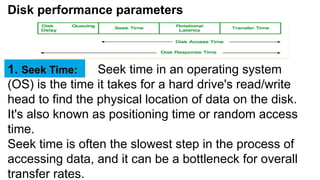
Disk performance parameters
Seek time in an operating system
(OS) is the time it takes for a hard drive's read/write
head to find the physical location of data on the disk.
It's also known as positioning time or random access
time.
Seek time is often the slowest step in the process of
accessing data, and it can be a bottleneck for overall
transfer rates.
1. Seek Time:
Rotational latency is the time it
takes for a disk's platter to rotate and bring the desired
sector of data under the read-write head of a disk drive.
It's also known as rotational delay or just latency.
Rotational latency depends on the disk's rotational
speed, which is measured in revolutions per minute
(RPM). The average rotational latency for a disk is half
the time it takes for the disk to make one full rotation.
Rotational latency is one of the factors that contribute to
disk access time, which is the total time it takes to read a
block of data from a disk into memory.
2. Rotational Latency:
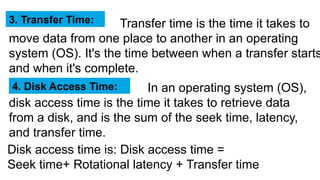
Transfer time is the time it takes to
move data from one place to another in an operating
system (OS). It's the time between when a transfer starts
and when it's complete.
3. Transfer Time:
In an operating system (OS),
disk access time is the time it takes to retrieve data
from a disk, and is the sum of the seek time, latency,
and transfer time.
4. Disk Access Time:
Disk access time is: Disk access time =
Seek time+ Rotational latency + Transfer time
Enter Title
In an operating system
(OS), disk response time is the average time it takes for
a request to perform an input/output (I/O) operation on a
disk. A lower response time is better, and a response
time of less than 10 milliseconds is considered good. If
the response time is consistently more than 20
milliseconds, there may be a problem that needs
attention.
5. Disk Response Time:
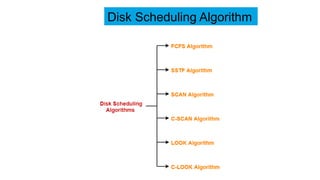
Disk Scheduling Algorithm
FCFS stands for First Come, First Served.
It's a scheduling algorithm that helps operating systems
and networks process tasks, requests, and processes
in the order they are added to the queue.
1.FCFS:
In FCFS, the requests are addressed in the order they
arrive in the queue.
With this algorithm every request gets a fair chance also
postponement does not occurs.
But this algorithm does not try to optimize seek time
also not able to provide best service.
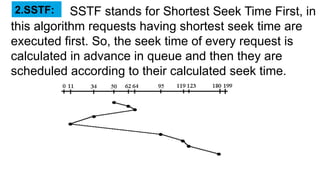
SSTF stands for Shortest Seek Time First, in
this algorithm requests having shortest seek time are
executed first. So, the seek time of every request is
calculated in advance in queue and then they are
scheduled according to their calculated seek time.
2.SSTF:
As a result, the request near the disk arm will get
executed first. SSTF is certainly an improvement over
FCFS as it decreases the average response time and
increases the throughput of system.
But in this algorithm overhead of calculating seek time
increases. It can cause starvation for a request if it has
higher seek time as compared to incoming requests. It
also has high variance of response time as SSTF
favours only sone requests.
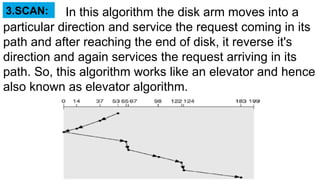
In this algorithm the disk arm moves into a
particular direction and service the request coming in its
path and after reaching the end of disk, it reverse it's
direction and again services the request arriving in its
path. So, this algorithm works like an elevator and hence
also known as elevator algorithm.
3.SCAN:
As a result, the requests at the midrange are serviced
more and those arriving behind the disk arm will have to
wait.
Use of this algorithm causes to gain high throughput,
Low variance of response time and Average response
time.
But in this case long waiting time is required for requests
for locationa just visited by disk arm.
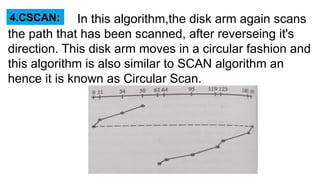
In this algorithm,the disk arm again scans
the path that has been scanned, after reverseing it's
direction. This disk arm moves in a circular fashion and
this algorithm is also similar to SCAN algorithm an
hence it is known as Circular Scan.
4.CSCAN:
Enter Title
These situations are avoided in CSCAN algorithm in
which the disk arm instead of reversing it's direction
goes to the other end of the disk and starts servicing the
requests from there.
So it may be possible that too many requests are waiting
at the other end or there may be zero or few requests
pending at the scanned area
It provides more uniform wait time compared to SCAN.
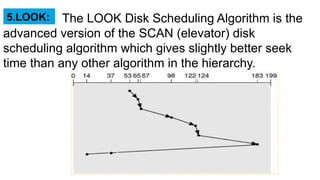
The LOOK Disk Scheduling Algorithm is the
advanced version of the SCAN (elevator) disk
scheduling algorithm which gives slightly better seek
time than any other algorithm in the hierarchy.
5.LOOK:
It is similar to SCAN disk scheduling algorithm except
the difference that the disk arm in spite of going to the
end of the disk goes only to the last request to be
serviced in front of the head and then reverses it's
direction from there only.
Thus it prevents the extra delay which occured due to
unnecessary traversal to the end of the disk.
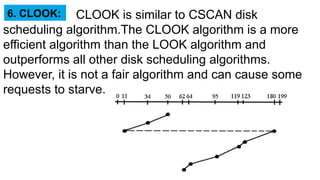
CLOOK is similar to CSCAN disk
scheduling algorithm.The CLOOK algorithm is a more
efficient algorithm than the LOOK algorithm and
outperforms all other disk scheduling algorithms.
However, it is not a fair algorithm and can cause some
requests to starve.
6. CLOOK:
In CLOOK, the disk arm in spite of going to the end goes
only to the last request to be serviced in front of the
head and then from there goes to the end's last request.
Thus, it also prevents the extra delay which occured due
to unnecessary traversal to the end of the disk.
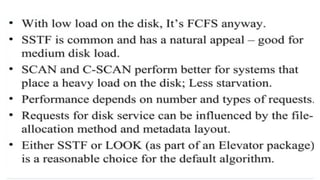
Selecting a disk scheduling
algorithm
disk Scheduling explanation hsbsjjsj1.pptx

disk Scheduling explanation hsbsjjsj1.pptx

  • 1.
    Subject: Operating system Class:S.YBSC(IT) Semester:lll Topic: Presentedby: Granthali Madhavi Hinal Diwani Abhishek Prajapati Jay Patil Pranjal Rane
  • 2.
    Contents 1: Disk Schedulingand disk performance parameters 2: FCFS 3: SSTF 4: SCAN 5: C-SCAN 6: C-LOCK 7: Selecting a disk scheduling algorithm
  • 3.
    1. Disk Schedulingand disk performance parameters Disk scheduling is a technique operating systems use to manage the order in which disk I/O (input/output) requests are processed. Disk scheduling is also known as I/O Scheduling. The main goals of disk scheduling are to optimize the performance of disk operations, reduce the time it takes to access data and improve overall system efficiency. Disk Scheduling
  • 4.
    Disk performance parameters Seektime in an operating system (OS) is the time it takes for a hard drive's read/write head to find the physical location of data on the disk. It's also known as positioning time or random access time. Seek time is often the slowest step in the process of accessing data, and it can be a bottleneck for overall transfer rates. 1. Seek Time:
  • 5.
    Rotational latency isthe time it takes for a disk's platter to rotate and bring the desired sector of data under the read-write head of a disk drive. It's also known as rotational delay or just latency. Rotational latency depends on the disk's rotational speed, which is measured in revolutions per minute (RPM). The average rotational latency for a disk is half the time it takes for the disk to make one full rotation. Rotational latency is one of the factors that contribute to disk access time, which is the total time it takes to read a block of data from a disk into memory. 2. Rotational Latency:
  • 6.
    Transfer time isthe time it takes to move data from one place to another in an operating system (OS). It's the time between when a transfer starts and when it's complete. 3. Transfer Time: In an operating system (OS), disk access time is the time it takes to retrieve data from a disk, and is the sum of the seek time, latency, and transfer time. 4. Disk Access Time: Disk access time is: Disk access time = Seek time+ Rotational latency + Transfer time
  • 7.
    Enter Title In anoperating system (OS), disk response time is the average time it takes for a request to perform an input/output (I/O) operation on a disk. A lower response time is better, and a response time of less than 10 milliseconds is considered good. If the response time is consistently more than 20 milliseconds, there may be a problem that needs attention. 5. Disk Response Time:
  • 8.
  • 9.
    FCFS stands forFirst Come, First Served. It's a scheduling algorithm that helps operating systems and networks process tasks, requests, and processes in the order they are added to the queue. 1.FCFS:
  • 10.
    In FCFS, therequests are addressed in the order they arrive in the queue. With this algorithm every request gets a fair chance also postponement does not occurs. But this algorithm does not try to optimize seek time also not able to provide best service.
  • 11.
    SSTF stands forShortest Seek Time First, in this algorithm requests having shortest seek time are executed first. So, the seek time of every request is calculated in advance in queue and then they are scheduled according to their calculated seek time. 2.SSTF:
  • 12.
    As a result,the request near the disk arm will get executed first. SSTF is certainly an improvement over FCFS as it decreases the average response time and increases the throughput of system. But in this algorithm overhead of calculating seek time increases. It can cause starvation for a request if it has higher seek time as compared to incoming requests. It also has high variance of response time as SSTF favours only sone requests.
  • 13.
    In this algorithmthe disk arm moves into a particular direction and service the request coming in its path and after reaching the end of disk, it reverse it's direction and again services the request arriving in its path. So, this algorithm works like an elevator and hence also known as elevator algorithm. 3.SCAN:
  • 14.
    As a result,the requests at the midrange are serviced more and those arriving behind the disk arm will have to wait. Use of this algorithm causes to gain high throughput, Low variance of response time and Average response time. But in this case long waiting time is required for requests for locationa just visited by disk arm.
  • 15.
    In this algorithm,thedisk arm again scans the path that has been scanned, after reverseing it's direction. This disk arm moves in a circular fashion and this algorithm is also similar to SCAN algorithm an hence it is known as Circular Scan. 4.CSCAN:
  • 16.
    Enter Title These situationsare avoided in CSCAN algorithm in which the disk arm instead of reversing it's direction goes to the other end of the disk and starts servicing the requests from there. So it may be possible that too many requests are waiting at the other end or there may be zero or few requests pending at the scanned area It provides more uniform wait time compared to SCAN.
  • 17.
    The LOOK DiskScheduling Algorithm is the advanced version of the SCAN (elevator) disk scheduling algorithm which gives slightly better seek time than any other algorithm in the hierarchy. 5.LOOK:
  • 18.
    It is similarto SCAN disk scheduling algorithm except the difference that the disk arm in spite of going to the end of the disk goes only to the last request to be serviced in front of the head and then reverses it's direction from there only. Thus it prevents the extra delay which occured due to unnecessary traversal to the end of the disk.
  • 19.
    CLOOK is similarto CSCAN disk scheduling algorithm.The CLOOK algorithm is a more efficient algorithm than the LOOK algorithm and outperforms all other disk scheduling algorithms. However, it is not a fair algorithm and can cause some requests to starve. 6. CLOOK:
  • 20.
    In CLOOK, thedisk arm in spite of going to the end goes only to the last request to be serviced in front of the head and then from there goes to the end's last request. Thus, it also prevents the extra delay which occured due to unnecessary traversal to the end of the disk.
  • 21.
    Selecting a diskscheduling algorithm