Sharpening Spatial Filters ( high pass)
Previously we have looked at smoothing
filters which remove fine detail
Sharpening spatial filters seek to highlight
fine detail
 Remove blurring from images
 Highlight edges
 Useful for emphasizing transitions in image
intensity
Sharpening filters are based on spatial
differentiation
Spatial Differentiation
Differentiation measures the rate of change
of a function
Let’s consider a simple 1 dimensional
example
Spatial Differentiation
A B
Spatial filters : Sharpening ( high pass)
1.LAPLACE
2.SOBEL
Spatial filters : Sharpening
1) LAPLACE
Laplace kernels
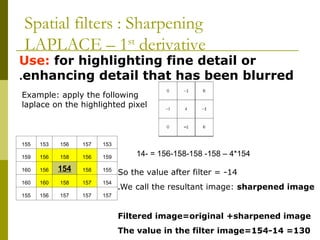
Use: for highlighting fine detail or
enhancing detail that has been blurred
.
153
157
156
153
155
159
156
158
156
159
155
158
154
156
160
154
157
158
160
160
157
157
157
156
155
Example: apply the following
laplace on the highlighted pixel
154
*
4
–
158
-
156-158-158
- =
14
So the value after filter = -14
We call the resultant image: sharpened image
.
Filtered image=original +sharpened image
The value in the filter image=154-14 =130
Spatial filters : Sharpening
LAPLACE – 1st
derivative
Spatial Fltering
LAPLACIAN
In the sharpened image , we may get negative value,
We deal with this case in 3 ways:
1.Covert negative value to zero (matlab does this)
2.Apply 2nd
derivative of laplace
1.Apply laplace again to the resultant sharpened
image
Spatial filters : Sharpening
LAPLACE – 1st
derivative
153
157
156
153
155
159
156
158
156
159
155
158
154
156
160
154
157
158
160
160
157
157
157
156
155
Example: apply the following
laplace 2nd
derivative on the
highlighted pixel
Solution: apply laplace to all pixels
So the value after 2nd
derivative filter =-74
the value of pixel in the filter image=154-74 = 80
Spatial filters : Sharpening
LAPLACE – 2nd
derivative
154
*
4
–
158
-
156-158-158
- =
14
Then apply it again to our pixel:-14*4 – 10 -10 – (-6) -4 =-74
Spatial filters : Sharpening
1st
VS 2nd
derivative sharpening
1st
derivative sharpening produces thicker edges in an image
1st derivative sharpening has stronger response to gray level
change
2nd
derivative sharpening has stronger response to fine
details, such as thin lines and isolated points
.
2nd
derivative sharpening has double response to gray level
change
Laplacian Image Enhancement
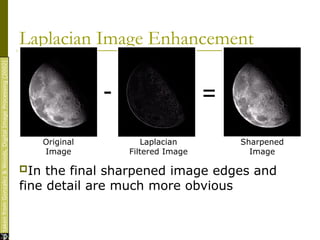
In the final sharpened image edges and
fine detail are much more obvious
es
taken
from
Gonzalez
&
Woods,
Digital
Image
Processing
(2002)
- =
Original
Image
Laplacian
Filtered Image
Sharpened
Image
Laplacian Image Enhancement
es
taken
from
Gonzalez
&
Woods,
Digital
Image
Processing
(2002)
La place Sharpened image La place filtered image
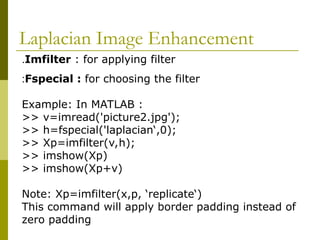
Imfilter : for applying filter
.
Fspecial : for choosing the filter
:
Example: In MATLAB :
>> v=imread('picture2.jpg');
>> h=fspecial('laplacian‘,0);
>> Xp=imfilter(v,h);
>> imshow(Xp)
>> imshow(Xp+v)
Note: Xp=imfilter(x,p, ‘replicate‘)
This command will apply border padding instead of
zero padding
Laplacian Image Enhancement
Spatial filters : Sharpening
2) Sobel
Detects horizontal edges Detects vertical edges
Spatial filters : Sharpening
2) Sobel
we can apply the sobel horizontal kernel or the
sobel vertical kernel or both and adding them
together
.
Spatial filters : Sharpening
2) Sobel
MATLAB
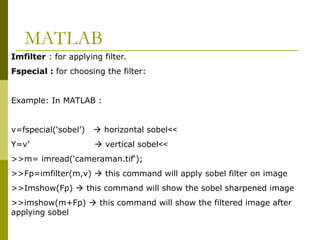
Imfilter : for applying filter.
Fspecial : for choosing the filter:
Example: In MATLAB :
>>
v=fspecial(‘sobel’)  horizontal sobel
>>
Y=v’  vertical sobel
>>m= imread(‘cameraman.tif‘);
>>Fp=imfilter(m,v)  this command will apply sobel filter on image
>>Imshow(Fp)  this command will show the sobel sharpened image
>>imshow(m+Fp)  this command will show the filtered image after
applying sobel
>>
imshow(v),figure,imshow(f+v)
;
>>
v=imread('picture2.jpg')
;
>>
h=fspecial('sobel')
;
>>
h1=h
;'
>>
p1=imfilter(v,h)
;
>>
p2=imfilter(v,h1)
;
>>
p3=abs(p1)+abs(p2)
;
>>
imshow(v),figure,imshow(p3+v)
;
Spatial filters : Sharpening
2) Sobel
Sharpening Filters:
Laplacian Sobel
Combining Spatial Enhancement Methods
Successful image
enhancement is typically
not achieved using a single
operation
Rather we combine a
range of techniques in order
to achieve a final result
This example will focus on
enhancing the bone scan to
the right
Combining Spatial Enhancement Methods
(cont…)
Images
taken
from
Gonzalez
&
Woods,
Digital
Image
Processing
(2002)
Laplacian filter of
bone scan (a)
Sharpened version
of bone scan
achieved by
subtracting (a)
and (b)
Sobel filter of
bone scan (a)
(a)
(b)
(c)
(d)
Combining Spatial Enhancement Methods
(cont…)
es
taken
from
Gonzalez
&
Woods,
Digital
Image
Processing
(2002)
The product of (c)
and (e) which will
be used as a mask
Sharpened image
which is sum of
(a) and (f)
Result of applying
apower-law
trans. to (g)
(
e
)
(
f
)
(
g
)
(
h
)
Image (d) smoothed
with a 5*5 averaging
filter
Combining Spatial Enhancement Methods
(cont…)
Compare the original and final images
Edge Tracing
b=rgb2gray(a); % convert to gray.
WE can only do edge tracing for gray
images
.
edge(b,'prewitt')
;
edge(b,'sobel')
;
edge(b,'sobel','vertical')
;
edge(b,'sobel','horizontal')
;
edge(b,'sobel','both')
;
Edge tracing
We can only do edge tracing using
gray scale images (i.e images without
color).
>> BW=rgb2gray(A);
>> edge(BW,’prewitt’)
That is what I saw
!
>>
edge(BW,’sobel’,’vertical’)
>>
edge(BW,’sobel’,’horizontal’)
>>
edge(BW,’sobel’,’both’)
Digital Image Processing Filters part10.ppt

  • 1.
    Sharpening Spatial Filters( high pass) Previously we have looked at smoothing filters which remove fine detail Sharpening spatial filters seek to highlight fine detail  Remove blurring from images  Highlight edges  Useful for emphasizing transitions in image intensity Sharpening filters are based on spatial differentiation
  • 2.
    Spatial Differentiation Differentiation measuresthe rate of change of a function Let’s consider a simple 1 dimensional example
  • 3.
  • 4.
    Spatial filters :Sharpening ( high pass) 1.LAPLACE 2.SOBEL
  • 5.
    Spatial filters :Sharpening 1) LAPLACE Laplace kernels
  • 6.
    Use: for highlightingfine detail or enhancing detail that has been blurred . 153 157 156 153 155 159 156 158 156 159 155 158 154 156 160 154 157 158 160 160 157 157 157 156 155 Example: apply the following laplace on the highlighted pixel 154 * 4 – 158 - 156-158-158 - = 14 So the value after filter = -14 We call the resultant image: sharpened image . Filtered image=original +sharpened image The value in the filter image=154-14 =130 Spatial filters : Sharpening LAPLACE – 1st derivative
  • 7.
  • 8.
    In the sharpenedimage , we may get negative value, We deal with this case in 3 ways: 1.Covert negative value to zero (matlab does this) 2.Apply 2nd derivative of laplace 1.Apply laplace again to the resultant sharpened image Spatial filters : Sharpening LAPLACE – 1st derivative
  • 9.
    153 157 156 153 155 159 156 158 156 159 155 158 154 156 160 154 157 158 160 160 157 157 157 156 155 Example: apply thefollowing laplace 2nd derivative on the highlighted pixel Solution: apply laplace to all pixels So the value after 2nd derivative filter =-74 the value of pixel in the filter image=154-74 = 80 Spatial filters : Sharpening LAPLACE – 2nd derivative 154 * 4 – 158 - 156-158-158 - = 14 Then apply it again to our pixel:-14*4 – 10 -10 – (-6) -4 =-74
  • 10.
    Spatial filters :Sharpening 1st VS 2nd derivative sharpening 1st derivative sharpening produces thicker edges in an image 1st derivative sharpening has stronger response to gray level change 2nd derivative sharpening has stronger response to fine details, such as thin lines and isolated points . 2nd derivative sharpening has double response to gray level change
  • 11.
    Laplacian Image Enhancement Inthe final sharpened image edges and fine detail are much more obvious es taken from Gonzalez & Woods, Digital Image Processing (2002) - = Original Image Laplacian Filtered Image Sharpened Image
  • 12.
  • 13.
    La place Sharpenedimage La place filtered image
  • 14.
    Imfilter : forapplying filter . Fspecial : for choosing the filter : Example: In MATLAB : >> v=imread('picture2.jpg'); >> h=fspecial('laplacian‘,0); >> Xp=imfilter(v,h); >> imshow(Xp) >> imshow(Xp+v) Note: Xp=imfilter(x,p, ‘replicate‘) This command will apply border padding instead of zero padding Laplacian Image Enhancement
  • 15.
    Spatial filters :Sharpening 2) Sobel Detects horizontal edges Detects vertical edges
  • 16.
    Spatial filters :Sharpening 2) Sobel we can apply the sobel horizontal kernel or the sobel vertical kernel or both and adding them together .
  • 17.
    Spatial filters :Sharpening 2) Sobel
  • 18.
    MATLAB Imfilter : forapplying filter. Fspecial : for choosing the filter: Example: In MATLAB : >> v=fspecial(‘sobel’)  horizontal sobel >> Y=v’  vertical sobel >>m= imread(‘cameraman.tif‘); >>Fp=imfilter(m,v)  this command will apply sobel filter on image >>Imshow(Fp)  this command will show the sobel sharpened image >>imshow(m+Fp)  this command will show the filtered image after applying sobel
  • 19.
  • 20.
  • 21.
    Combining Spatial EnhancementMethods Successful image enhancement is typically not achieved using a single operation Rather we combine a range of techniques in order to achieve a final result This example will focus on enhancing the bone scan to the right
  • 22.
    Combining Spatial EnhancementMethods (cont…) Images taken from Gonzalez & Woods, Digital Image Processing (2002) Laplacian filter of bone scan (a) Sharpened version of bone scan achieved by subtracting (a) and (b) Sobel filter of bone scan (a) (a) (b) (c) (d)
  • 23.
    Combining Spatial EnhancementMethods (cont…) es taken from Gonzalez & Woods, Digital Image Processing (2002) The product of (c) and (e) which will be used as a mask Sharpened image which is sum of (a) and (f) Result of applying apower-law trans. to (g) ( e ) ( f ) ( g ) ( h ) Image (d) smoothed with a 5*5 averaging filter
  • 24.
    Combining Spatial EnhancementMethods (cont…) Compare the original and final images
  • 25.
    Edge Tracing b=rgb2gray(a); %convert to gray. WE can only do edge tracing for gray images . edge(b,'prewitt') ; edge(b,'sobel') ; edge(b,'sobel','vertical') ; edge(b,'sobel','horizontal') ; edge(b,'sobel','both') ;
  • 26.
    Edge tracing We canonly do edge tracing using gray scale images (i.e images without color). >> BW=rgb2gray(A); >> edge(BW,’prewitt’) That is what I saw ! >> edge(BW,’sobel’,’vertical’) >> edge(BW,’sobel’,’horizontal’) >> edge(BW,’sobel’,’both’)