Design Process in an 
Open Community 
Ecaterina Moraru — 31 Oct 2014 —
What is an Open Community? 
A community is a social unit of any size that shares common values 
An open-source software has its source code made available with a 
license that provides the rights to study, change and distribute the software 
to anyone and for any purpose 
An open community: 
let's everyone participate in the process 
makes her processes transparent 
the discussions are open and inclusive 
listens to community opinions and takes decisions based on them 
· 
· 
· 
···· Design Examples: Drupal Design, Mozilla Creative, Mozilla UX, WordPress UI, XWiki Design, etc. 2/22
Want to be a designer? 
Several subcategories in Design 
· 
· 
User Research, User Testing, Product Design, Graphic/Visual Design, 
Interaction Design, Information Architecture, Usability, Interface Design, 
User Experience Design, Accessibility, Human-computer Interaction, 
Game Design, Industrial Design, Knowledge Visualisation, Sound Design, 
Web Design, User-Centered Design, Software Design, etc. 
Find our what suits you 
Start designing 
You don't have to be hired in order to design 
All Open Communities need designers (and developers, and testers, and ... ) 
· 
· 
·· 3/22
Open / Design / Product Communities 
Each community has its rules & processes: 
Communication channels (IRC, Mailing list) 
Periodic meetings 
Feedback & Statistics 
Documentation processes 
Acceptance / Critique rules 
Voting rules 
What you need in order to provide designs: 
A problem to solve 
Familiarity with the product / service 
Familiarity with the target 
Minimal usage of collaboration tools 
Minimal understanding of rules & procedures 
· 
······ 
· 
····· 4/22
What is XWiki? 
http://www.xwiki.org 
LGPL 2.1 open source license 
Jan 2004 initial release 
820,996 lines of code 
from 36,080 commits 
95 contributors 
19 active committers 
700+ extensions 
with over 150 applications 
11,637 issues reported 
1,849 issues resolved last year 
259,526 mail messages 
4,479 discussions last year 
5/22
Design Process Steps 
Planning 
Features according to the Roadmap or cycle theme 
Ideas / suggestions can be submitted anytime 
Discussions 
Made on IRC or mailing lists 
Public and referenceable 
Proposals 
Deliverables (use cases/requirements/mockups/prototypes) are created on 
design.xwiki.org in an iterative manner 
Receive feedback for them on mailing list 
Tags: [Brainstorming], [Discussion], [Proposal], [Vote] 
· 
·· 
· 
·· 
· 
· 
· 
· 
6/22
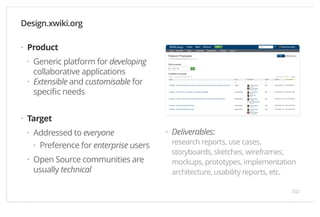
Product 
Generic platform for developing 
collaborative applications 
Extensible and customisable for 
specific needs 
Target 
Addressed to everyone 
Preference for enterprise users 
Open Source communities are 
usually technical 
Deliverables: 
research reports, use cases, 
storyboards, sketches, wireframes, 
mockups, prototypes, implementation 
architecture, usability reports, etc. 
Design.xwiki.org 
· 
· 
· 
· 
· 
· 
· 
· 
7/22
Proposal Evolution 
Product vs. Projects 
Get to see how your proposals hold the test of time 
Lots of diversity from making an extensible and customisable product 
Get to understand how many small components build the big picture 
Creativity vs. Implementability 
Creativity is encouraged, but users prefer standard patterns 
Users don't like big changes from one version to another 
Conclusions 
Design as generic as you can 
Consistency is king 
Use as much standards and patterns as you can 
· 
··· 
· 
·· 
· 
··· 8/22
Decision Making 
Contribution Levels: 
Users (Lvl. 1), Contributors (Lvl. 2), Committers (Lvl. 3) 
Voting: 
Majority of discussions / decisions are done using our mailing lists 
Community members are encouraged to participate 
Committers have a duty to participate in [VOTE] discussions 
Possible votes: 
+1 — I agree and I'll help as I can 
+/-0 — I'm ok but I'm letting the others decide and I'll be happy with 
whatever the outcome is 
-1 — I'm against it and I veto the change 
A vote cannot pass if a committer has voted -1 
· 
· 
· 
···· 
·· 
· 
· 
9/22
Decision Making 
Closed Design Process vs. Open Design Process 
1++ Client 
representatives 
0..m Community members 
1 Major Veto 
vote 
c Committers Veto votes 
u Initial use cases u(+m) Iterative adaptable use cases 
f Functionalities f+(+m) Functionality + integrable + extensible + 
backward compatibility + cross browser + 
platform independent + multi lingual + ... 
Obs1. Cannot make everybody happy 
Obs2. Take the best decision for the project (according to vision and principles) 
· 
· 
· 
10/22
Decision Making — Symptom: "Bike Shed" (1/4) 
The bike shed story tells of a management committee’s 
decision to approve a nuclear power plant, which it does so 
with little argument or deliberation. 
The story contrasts this with another decision on choosing the 
colour of the bike shed where the management gets into a nit-picking 
debate and expends far more time and energy 
than on the nuclear power plant decision. 
— Source 
“ 
” 
11/22
Decision Making — Symptom: "Bike Shed" (2/4) 
Also known as "Parkinson's law of triviality" (1957) 
The amount of discussion is inversely proportional to the complexity of 
the topic 
Trivial decisions often come under debate because everyone is on equal 
footing 
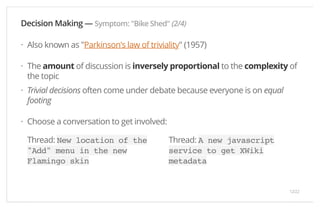
Choose a conversation to get involved: 
Thread: New location of the 
"Add" menu in the new 
Flamingo skin 
Thread: A new javascript 
service to get XWiki 
metadata 
· 
· 
· 
· 
12/22
Decision Making — Symptom: "Bike Shed" (3/4) 
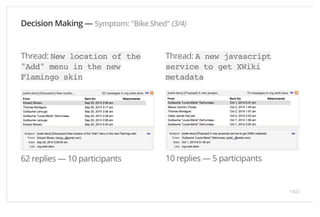
Thread: New location of the 
"Add" menu in the new 
Flamingo skin 
62 replies — 10 participants 
Thread: A new javascript 
service to get XWiki 
metadata 
10 replies — 5 participants 
13/22
Decision Making — Symptom: "Bike Shed" (4/4) 
Thread: Interface and Content 
Language Separation 
29 replies — 13 participants 
14/22
Decision Making — Symptom: "Make everything configurable" 
Premises: 
Usually happens when is hard to reach a conclusion 
Compromise method in order to satisfy multiple use cases 
Gives power to the user, but the user's profile is advanced 
Problem: Increases the complexity of the product (branching functionality is 
harder to test). Documentation is mandatory 
Solution: "Good Defaults" pattern 
Pre-fill the configuration with most common default values 
Important to know which use case is used more 
Alternative is to use Themes / Profiles 
· 
··· 
· 
· 
··· 15/22
Decision Making — Symptom: "I don't know what I was voting" 
Premises: 
Partial understanding of the problem / solution 
Missing information from the voting process 
Solutions: 
Best designs are iterative (improvements after a period of testing) 
Try to provide clear mockups and prototypes 
Conclusions: 
"NO perfect proposal". Changes in: target, purpose, technology evolves, 
new requirements appear, new user behaviour found, etc. 
It's normal for people to change their mind 
· 
·· 
· 
·· 
· 
· 
· 
16/22
Decision Making — Other Symptom 
· 
S4: "But the competition does it" 
· 
S5: "I tested it with ONE user" 
· 
S6: "It's a nice idea for ... next century" 
· 
S7: "Cannot implement it like this since it's not supported by ... " (code, IE, 
mobile, JS disabled, etc.) 
· 
Other... 
17/22
Designing in the Open 
· · 
Advantages for Participants: 
Easy to participate 
Multiple eyes 
Helpful feedback / collaboration 
Honesty 
High impact of proposal 
Longer lifespan (open projects die 
harder) 
Everything is public and referenceable 
Meritocracy 
Advantages for Product: 
Many ideas from many participants 
Know what users are wanting 
'Automatic' sort of higher quality 
solutions 
Work in iterations (no deadline) 
Testing, maintenance and feedback 
from community 
Rapidly knowing if something goes 
wrong 
Disadvantages for Participants: 
Endless discussions 
Slow decision process 
Expect criticism 
Disadvantages for Product: 
Hard to determine statistics (target, 
usage) 
· · 
18/22
Join a community 
— Start designing!
Other Questions?
Thank you 
and happy designing 
Ecaterina Moraru — 31 Oct 2014 —

Design process in an Open Community

  • 1.
    Design Process inan Open Community Ecaterina Moraru — 31 Oct 2014 —
  • 2.
    What is anOpen Community? A community is a social unit of any size that shares common values An open-source software has its source code made available with a license that provides the rights to study, change and distribute the software to anyone and for any purpose An open community: let's everyone participate in the process makes her processes transparent the discussions are open and inclusive listens to community opinions and takes decisions based on them · · · ···· Design Examples: Drupal Design, Mozilla Creative, Mozilla UX, WordPress UI, XWiki Design, etc. 2/22
  • 3.
    Want to bea designer? Several subcategories in Design · · User Research, User Testing, Product Design, Graphic/Visual Design, Interaction Design, Information Architecture, Usability, Interface Design, User Experience Design, Accessibility, Human-computer Interaction, Game Design, Industrial Design, Knowledge Visualisation, Sound Design, Web Design, User-Centered Design, Software Design, etc. Find our what suits you Start designing You don't have to be hired in order to design All Open Communities need designers (and developers, and testers, and ... ) · · ·· 3/22
  • 4.
    Open / Design/ Product Communities Each community has its rules & processes: Communication channels (IRC, Mailing list) Periodic meetings Feedback & Statistics Documentation processes Acceptance / Critique rules Voting rules What you need in order to provide designs: A problem to solve Familiarity with the product / service Familiarity with the target Minimal usage of collaboration tools Minimal understanding of rules & procedures · ······ · ····· 4/22
  • 5.
    What is XWiki? http://www.xwiki.org LGPL 2.1 open source license Jan 2004 initial release 820,996 lines of code from 36,080 commits 95 contributors 19 active committers 700+ extensions with over 150 applications 11,637 issues reported 1,849 issues resolved last year 259,526 mail messages 4,479 discussions last year 5/22
  • 6.
    Design Process Steps Planning Features according to the Roadmap or cycle theme Ideas / suggestions can be submitted anytime Discussions Made on IRC or mailing lists Public and referenceable Proposals Deliverables (use cases/requirements/mockups/prototypes) are created on design.xwiki.org in an iterative manner Receive feedback for them on mailing list Tags: [Brainstorming], [Discussion], [Proposal], [Vote] · ·· · ·· · · · · 6/22
  • 7.
    Product Generic platformfor developing collaborative applications Extensible and customisable for specific needs Target Addressed to everyone Preference for enterprise users Open Source communities are usually technical Deliverables: research reports, use cases, storyboards, sketches, wireframes, mockups, prototypes, implementation architecture, usability reports, etc. Design.xwiki.org · · · · · · · · 7/22
  • 8.
    Proposal Evolution Productvs. Projects Get to see how your proposals hold the test of time Lots of diversity from making an extensible and customisable product Get to understand how many small components build the big picture Creativity vs. Implementability Creativity is encouraged, but users prefer standard patterns Users don't like big changes from one version to another Conclusions Design as generic as you can Consistency is king Use as much standards and patterns as you can · ··· · ·· · ··· 8/22
  • 9.
    Decision Making ContributionLevels: Users (Lvl. 1), Contributors (Lvl. 2), Committers (Lvl. 3) Voting: Majority of discussions / decisions are done using our mailing lists Community members are encouraged to participate Committers have a duty to participate in [VOTE] discussions Possible votes: +1 — I agree and I'll help as I can +/-0 — I'm ok but I'm letting the others decide and I'll be happy with whatever the outcome is -1 — I'm against it and I veto the change A vote cannot pass if a committer has voted -1 · · · ···· ·· · · 9/22
  • 10.
    Decision Making ClosedDesign Process vs. Open Design Process 1++ Client representatives 0..m Community members 1 Major Veto vote c Committers Veto votes u Initial use cases u(+m) Iterative adaptable use cases f Functionalities f+(+m) Functionality + integrable + extensible + backward compatibility + cross browser + platform independent + multi lingual + ... Obs1. Cannot make everybody happy Obs2. Take the best decision for the project (according to vision and principles) · · · 10/22
  • 11.
    Decision Making —Symptom: "Bike Shed" (1/4) The bike shed story tells of a management committee’s decision to approve a nuclear power plant, which it does so with little argument or deliberation. The story contrasts this with another decision on choosing the colour of the bike shed where the management gets into a nit-picking debate and expends far more time and energy than on the nuclear power plant decision. — Source “ ” 11/22
  • 12.
    Decision Making —Symptom: "Bike Shed" (2/4) Also known as "Parkinson's law of triviality" (1957) The amount of discussion is inversely proportional to the complexity of the topic Trivial decisions often come under debate because everyone is on equal footing Choose a conversation to get involved: Thread: New location of the "Add" menu in the new Flamingo skin Thread: A new javascript service to get XWiki metadata · · · · 12/22
  • 13.
    Decision Making —Symptom: "Bike Shed" (3/4) Thread: New location of the "Add" menu in the new Flamingo skin 62 replies — 10 participants Thread: A new javascript service to get XWiki metadata 10 replies — 5 participants 13/22
  • 14.
    Decision Making —Symptom: "Bike Shed" (4/4) Thread: Interface and Content Language Separation 29 replies — 13 participants 14/22
  • 15.
    Decision Making —Symptom: "Make everything configurable" Premises: Usually happens when is hard to reach a conclusion Compromise method in order to satisfy multiple use cases Gives power to the user, but the user's profile is advanced Problem: Increases the complexity of the product (branching functionality is harder to test). Documentation is mandatory Solution: "Good Defaults" pattern Pre-fill the configuration with most common default values Important to know which use case is used more Alternative is to use Themes / Profiles · ··· · · ··· 15/22
  • 16.
    Decision Making —Symptom: "I don't know what I was voting" Premises: Partial understanding of the problem / solution Missing information from the voting process Solutions: Best designs are iterative (improvements after a period of testing) Try to provide clear mockups and prototypes Conclusions: "NO perfect proposal". Changes in: target, purpose, technology evolves, new requirements appear, new user behaviour found, etc. It's normal for people to change their mind · ·· · ·· · · · 16/22
  • 17.
    Decision Making —Other Symptom · S4: "But the competition does it" · S5: "I tested it with ONE user" · S6: "It's a nice idea for ... next century" · S7: "Cannot implement it like this since it's not supported by ... " (code, IE, mobile, JS disabled, etc.) · Other... 17/22
  • 18.
    Designing in theOpen · · Advantages for Participants: Easy to participate Multiple eyes Helpful feedback / collaboration Honesty High impact of proposal Longer lifespan (open projects die harder) Everything is public and referenceable Meritocracy Advantages for Product: Many ideas from many participants Know what users are wanting 'Automatic' sort of higher quality solutions Work in iterations (no deadline) Testing, maintenance and feedback from community Rapidly knowing if something goes wrong Disadvantages for Participants: Endless discussions Slow decision process Expect criticism Disadvantages for Product: Hard to determine statistics (target, usage) · · 18/22
  • 19.
    Join a community — Start designing!
  • 20.
  • 21.
    Thank you andhappy designing Ecaterina Moraru — 31 Oct 2014 —