Deploying Apache Spark on a Local Kubernetes
Cluster: A Comprehensive Guide
Sumarry :
1 - Introduction
2 - Set up a Local Kubernetes Cluster
3 - Install Kubectl
4 - Build a Docker Image for Spark and Push it to
Kubernetes Internal Repository
5 - Deploy Spark Job Using spark-submit
6 - Monitor the Application
Introduction
• Welcome to the second part of our tutorial on deploying
Apache Spark on a local Kubernetes cluster. If you
haven’t read the first part yet, where we explored
deploying Spark using Docker-compose, we encourage
you to check it out to gain a solid understanding of that
deployment method. In this article, we will dive into
deploying Spark on a Kubernetes cluster, leveraging the
power and scalability of Kubernetes to manage Spark
applications efficiently.
Kubernetes, a leading container orchestration
platform, provides a robust environment for
deploying and managing distributed applications.
By deploying Spark on Kubernetes, you can take
advantage of Kubernetes’ features such as
dynamic scaling, fault tolerance, and resource
allocation, ensuring optimal performance and
resource utilization.
Before we proceed, we will guide you through
setting up a local Kubernetes cluster using Kind
(Kubernetes IN Docker), a tool designed for
running Kubernetes clusters using Docker
container “nodes.” We will then install Kubectl,
the Kubernetes command-line tool, on Windows
and ensure connectivity to the local Kubernetes
cluster.
• Once our Kubernetes cluster is up and running, we
will move on to creating a Docker image for Apache
Spark, including all the necessary dependencies and
configurations. We will push the Docker image to
the Kubernetes internal repository, making it
accessible within the cluster.
• With the Spark Docker image ready, we will explore
how to deploy Spark jobs on the Kubernetes cluster
using the spark-submit command. We will configure
the required parameters and monitor the Spark
application’s execution and resource utilization.
• Throughout this article, we will emphasize monitoring and
optimizing the Spark application deployed on Kubernetes. By
leveraging Kubernetes’ monitoring tools and practices, we
can gain insights into application performance, troubleshoot
issues, and fine-tune resource allocation for optimal Spark
processing.
• By the end of this tutorial, you will have a comprehensive
understanding of deploying Apache Spark on a local
Kubernetes cluster. You will be equipped with the knowledge
and skills to harness the power of Kubernetes for efficient
and scalable Spark processing, enabling you to tackle large-
scale data challenges with ease. So, let’s dive in and explore
the world of Spark and Kubernetes deployment together!
Deploying Apache Spark on a Local Kubernetes Cluster.pptx

Deploying Apache Spark on a Local Kubernetes Cluster.pptx

  • 1.
    Deploying Apache Sparkon a Local Kubernetes Cluster: A Comprehensive Guide Sumarry : 1 - Introduction 2 - Set up a Local Kubernetes Cluster 3 - Install Kubectl 4 - Build a Docker Image for Spark and Push it to Kubernetes Internal Repository 5 - Deploy Spark Job Using spark-submit 6 - Monitor the Application
  • 2.
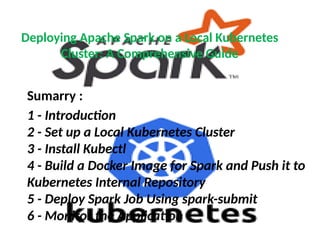
    Introduction • Welcome tothe second part of our tutorial on deploying Apache Spark on a local Kubernetes cluster. If you haven’t read the first part yet, where we explored deploying Spark using Docker-compose, we encourage you to check it out to gain a solid understanding of that deployment method. In this article, we will dive into deploying Spark on a Kubernetes cluster, leveraging the power and scalability of Kubernetes to manage Spark applications efficiently.
  • 3.
    Kubernetes, a leadingcontainer orchestration platform, provides a robust environment for deploying and managing distributed applications. By deploying Spark on Kubernetes, you can take advantage of Kubernetes’ features such as dynamic scaling, fault tolerance, and resource allocation, ensuring optimal performance and resource utilization.
  • 4.
    Before we proceed,we will guide you through setting up a local Kubernetes cluster using Kind (Kubernetes IN Docker), a tool designed for running Kubernetes clusters using Docker container “nodes.” We will then install Kubectl, the Kubernetes command-line tool, on Windows and ensure connectivity to the local Kubernetes cluster.
  • 5.
    • Once ourKubernetes cluster is up and running, we will move on to creating a Docker image for Apache Spark, including all the necessary dependencies and configurations. We will push the Docker image to the Kubernetes internal repository, making it accessible within the cluster. • With the Spark Docker image ready, we will explore how to deploy Spark jobs on the Kubernetes cluster using the spark-submit command. We will configure the required parameters and monitor the Spark application’s execution and resource utilization.
  • 6.
    • Throughout thisarticle, we will emphasize monitoring and optimizing the Spark application deployed on Kubernetes. By leveraging Kubernetes’ monitoring tools and practices, we can gain insights into application performance, troubleshoot issues, and fine-tune resource allocation for optimal Spark processing. • By the end of this tutorial, you will have a comprehensive understanding of deploying Apache Spark on a local Kubernetes cluster. You will be equipped with the knowledge and skills to harness the power of Kubernetes for efficient and scalable Spark processing, enabling you to tackle large- scale data challenges with ease. So, let’s dive in and explore the world of Spark and Kubernetes deployment together!