2Department of Education
MAPaaralan: School mo, i-pin mo!
GET STARTED!
In your web browser, please go to
http://maps.google.com
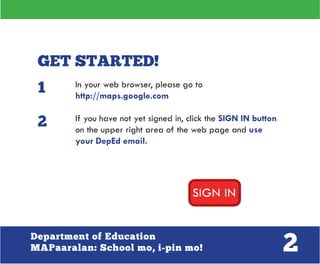
If you have not yet signed in, click the SIGN IN button
on the upper right area of the web page and use
your DepEd email.
1
2
3Department of Education
MAPaaralan: School mo, i-pin mo!
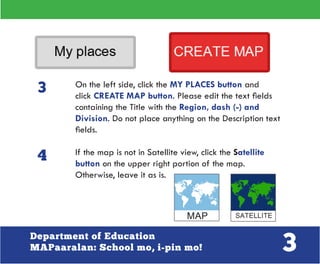
On the left side, click the MY PLACES button and
click CREATE MAP button. Please edit the text fields
containing the Title with the Region, dash (-) and
Division. Do not place anything on the Description text
fields.
If the map is not in Satellite view, click the Satellite
button on the upper right portion of the map.
Otherwise, leave it as is.
3
4
4Department of Education
MAPaaralan: School mo, i-pin mo!
FIND IT!
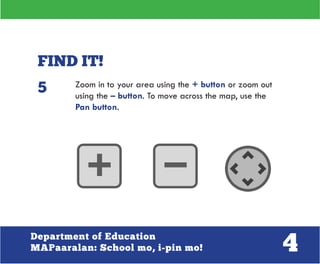
Zoom in to your area using the + button or zoom out
using the – button. To move across the map, use the
Pan button.
5
5Department of Education
MAPaaralan: School mo, i-pin mo!
PIN IT!
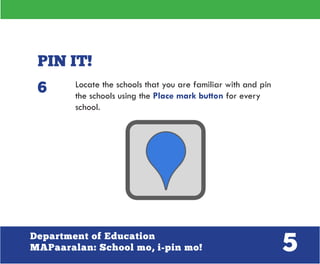
Locate the schools that you are familiar with and pin
the schools using the Place mark button for every
school.
6
6Department of Education
MAPaaralan: School mo, i-pin mo!
A pop up balloon will show up after you pin a school.
In the title, please put the School ID number, an
asterisk (*), and the School name. If you are not
familiar with the School ID number, simply put in the
School name, an asterisk, the Division where the
school is, an asterisk, and use Pub or Pri if the school
is either Public or Private. Do not type anything in the
description.
Examples:
•	 405268*Xavier University Grade School
•	 Biaknabato ES*Negros Occidental*Pub
7
7Department of Education
MAPaaralan: School mo, i-pin mo!
After making sure that either of the formats has been
followed correctly, click the OK button on the lower
right portion of the pop up balloon.
Continue to map as many schools as you can.
8
9
8Department of Education
MAPaaralan: School mo, i-pin mo!
After all schools have been pinned, make sure that the
“Privacy and sharing settings” are set to “Unlisted”
then click the DONE button.
If you have accomplished mapping the schools, click the
DONE button on the left side of the web page.
10
11
9Department of Education
MAPaaralan: School mo, i-pin mo!
Click the Link button the left side of the web page.
Copy the URL and send it to
miguel.macariola@deped.gov.ph
12
10Department of Education
MAPaaralan: School mo, i-pin mo!
Invite your co-DepEd employees to map, if they haven’t
registered to the official email service yet, they may visit
http://depedverify.appspot.com/.
Thank you very much!

DepED MAPAralan: School Mo, I - Pin Mo [Manual]

  • 2.
    2Department of Education MAPaaralan:School mo, i-pin mo! GET STARTED! In your web browser, please go to http://maps.google.com If you have not yet signed in, click the SIGN IN button on the upper right area of the web page and use your DepEd email. 1 2
  • 3.
    3Department of Education MAPaaralan:School mo, i-pin mo! On the left side, click the MY PLACES button and click CREATE MAP button. Please edit the text fields containing the Title with the Region, dash (-) and Division. Do not place anything on the Description text fields. If the map is not in Satellite view, click the Satellite button on the upper right portion of the map. Otherwise, leave it as is. 3 4
  • 4.
    4Department of Education MAPaaralan:School mo, i-pin mo! FIND IT! Zoom in to your area using the + button or zoom out using the – button. To move across the map, use the Pan button. 5
  • 5.
    5Department of Education MAPaaralan:School mo, i-pin mo! PIN IT! Locate the schools that you are familiar with and pin the schools using the Place mark button for every school. 6
  • 6.
    6Department of Education MAPaaralan:School mo, i-pin mo! A pop up balloon will show up after you pin a school. In the title, please put the School ID number, an asterisk (*), and the School name. If you are not familiar with the School ID number, simply put in the School name, an asterisk, the Division where the school is, an asterisk, and use Pub or Pri if the school is either Public or Private. Do not type anything in the description. Examples: • 405268*Xavier University Grade School • Biaknabato ES*Negros Occidental*Pub 7
  • 7.
    7Department of Education MAPaaralan:School mo, i-pin mo! After making sure that either of the formats has been followed correctly, click the OK button on the lower right portion of the pop up balloon. Continue to map as many schools as you can. 8 9
  • 8.
    8Department of Education MAPaaralan:School mo, i-pin mo! After all schools have been pinned, make sure that the “Privacy and sharing settings” are set to “Unlisted” then click the DONE button. If you have accomplished mapping the schools, click the DONE button on the left side of the web page. 10 11
  • 9.
    9Department of Education MAPaaralan:School mo, i-pin mo! Click the Link button the left side of the web page. Copy the URL and send it to miguel.macariola@deped.gov.ph 12
  • 10.
    10Department of Education MAPaaralan:School mo, i-pin mo! Invite your co-DepEd employees to map, if they haven’t registered to the official email service yet, they may visit http://depedverify.appspot.com/. Thank you very much!