Demonstration Of Desktop Computer
Hardware Components.
SlideMake.com
Introduction to Desktop Computer Hardware
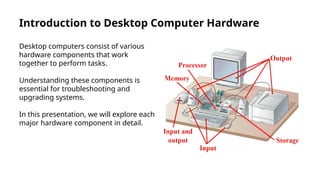
Desktop computers consist of various
hardware components that work
together to perform tasks.
Understanding these components is
essential for troubleshooting and
upgrading systems.
In this presentation, we will explore each
major hardware component in detail.
Central Processing Unit (CPU)
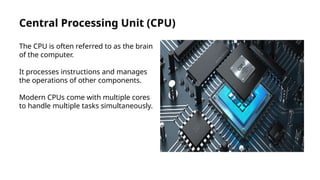
The CPU is often referred to as the brain
of the computer.
It processes instructions and manages
the operations of other components.
Modern CPUs come with multiple cores
to handle multiple tasks simultaneously.
Motherboard
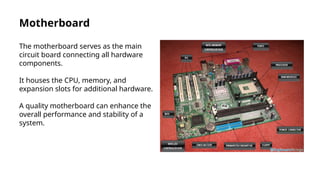
The motherboard serves as the main
circuit board connecting all hardware
components.
It houses the CPU, memory, and
expansion slots for additional hardware.
A quality motherboard can enhance the
overall performance and stability of a
system.
Random Access Memory (RAM)
RAM is the temporary storage that holds
data currently in use by the CPU.
More RAM allows for smoother
multitasking and faster data access.
Upgrading RAM can significantly improve
system performance for demanding
applications.
Storage Devices
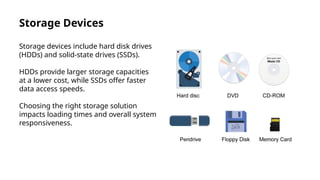
Storage devices include hard disk drives
(HDDs) and solid-state drives (SSDs).
HDDs provide larger storage capacities
at a lower cost, while SSDs offer faster
data access speeds.
Choosing the right storage solution
impacts loading times and overall system
responsiveness.
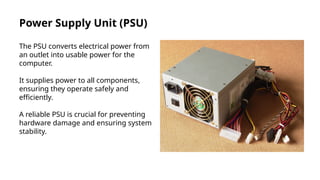
Power Supply Unit (PSU)
The PSU converts electrical power from
an outlet into usable power for the
computer.
It supplies power to all components,
ensuring they operate safely and
efficiently.
A reliable PSU is crucial for preventing
hardware damage and ensuring system
stability.
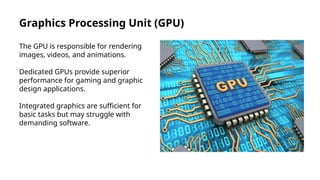
Graphics Processing Unit (GPU)
The GPU is responsible for rendering
images, videos, and animations.
Dedicated GPUs provide superior
performance for gaming and graphic
design applications.
Integrated graphics are sufficient for
basic tasks but may struggle with
demanding software.
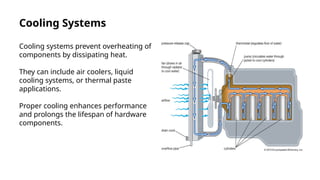
Cooling Systems
Cooling systems prevent overheating of
components by dissipating heat.
They can include air coolers, liquid
cooling systems, or thermal paste
applications.
Proper cooling enhances performance
and prolongs the lifespan of hardware
components.
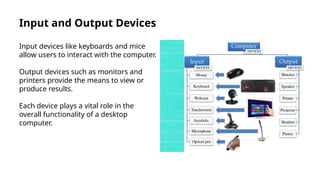
Input and Output Devices
Input devices like keyboards and mice
allow users to interact with the computer.
Output devices such as monitors and
printers provide the means to view or
produce results.
Each device plays a vital role in the
overall functionality of a desktop
computer.
Conclusion and Q&A
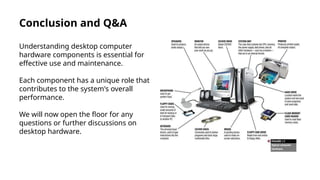
Understanding desktop computer
hardware components is essential for
effective use and maintenance.
Each component has a unique role that
contributes to the system's overall
performance.
We will now open the floor for any
questions or further discussions on
desktop hardware.

Demonstration Of Desktop Computer Hardware Components..pptx

  • 1.
    Demonstration Of DesktopComputer Hardware Components. SlideMake.com
  • 2.
    Introduction to DesktopComputer Hardware Desktop computers consist of various hardware components that work together to perform tasks. Understanding these components is essential for troubleshooting and upgrading systems. In this presentation, we will explore each major hardware component in detail.
  • 3.
    Central Processing Unit(CPU) The CPU is often referred to as the brain of the computer. It processes instructions and manages the operations of other components. Modern CPUs come with multiple cores to handle multiple tasks simultaneously.
  • 4.
    Motherboard The motherboard servesas the main circuit board connecting all hardware components. It houses the CPU, memory, and expansion slots for additional hardware. A quality motherboard can enhance the overall performance and stability of a system.
  • 5.
    Random Access Memory(RAM) RAM is the temporary storage that holds data currently in use by the CPU. More RAM allows for smoother multitasking and faster data access. Upgrading RAM can significantly improve system performance for demanding applications.
  • 6.
    Storage Devices Storage devicesinclude hard disk drives (HDDs) and solid-state drives (SSDs). HDDs provide larger storage capacities at a lower cost, while SSDs offer faster data access speeds. Choosing the right storage solution impacts loading times and overall system responsiveness.
  • 7.
    Power Supply Unit(PSU) The PSU converts electrical power from an outlet into usable power for the computer. It supplies power to all components, ensuring they operate safely and efficiently. A reliable PSU is crucial for preventing hardware damage and ensuring system stability.
  • 8.
    Graphics Processing Unit(GPU) The GPU is responsible for rendering images, videos, and animations. Dedicated GPUs provide superior performance for gaming and graphic design applications. Integrated graphics are sufficient for basic tasks but may struggle with demanding software.
  • 9.
    Cooling Systems Cooling systemsprevent overheating of components by dissipating heat. They can include air coolers, liquid cooling systems, or thermal paste applications. Proper cooling enhances performance and prolongs the lifespan of hardware components.
  • 10.
    Input and OutputDevices Input devices like keyboards and mice allow users to interact with the computer. Output devices such as monitors and printers provide the means to view or produce results. Each device plays a vital role in the overall functionality of a desktop computer.
  • 11.
    Conclusion and Q&A Understandingdesktop computer hardware components is essential for effective use and maintenance. Each component has a unique role that contributes to the system's overall performance. We will now open the floor for any questions or further discussions on desktop hardware.
Editor's Notes

  • #2 Image source: https://limbd.org/parts-of-computer-system-computer-hardware-software-types-of-computers-micro-computers/
  • #3 Image source: https://www.learncomputerscienceonline.com/central-processing-unit/
  • #4 Image source: https://klaeieywd.blob.core.windows.net/lsl1bagmkq/parts-of-motherboard-and-its-function.html
  • #5 Image source: https://www.webopedia.com/definitions/ram/
  • #6 Image source: https://dandkmotorsports.com/examples-of-storage-unit-in-computer/
  • #7 Image source: https://loeswpymt.blob.core.windows.net/hpd1uoqgty/power-supply-of-cpu.html
  • #8 Image source: https://www.javatpoint.com/gpu-full-form
  • #9 Image source: https://loezkouyj.blob.core.windows.net/yau1njmmgx/parts-of-a-liquid-cooling-system.html
  • #10 Image source: https://exocgufar.blob.core.windows.net/fvg1inckor/input-devices-and-output-devices-of-computer-ppt.html
  • #11 Image source: https://www.pinterest.co.uk/pin/948078159036744342/