THE RISE OF SECURITY ASSISTANTS
OVER SECURITY AUDIT SERVICES
YURY CHEMERKIN
MULTI-SKILLED SECURITY EXPERT
YURY CHEMERKIN
I have ten years of experience in information
security. I‘m a multi-skilled security expert on
security & compliance and mainly focused on
privacy and leakage showdown. Key activity
fields are EMM and Mobile &, Cloud
Computing, IAM, Forensics & Compliance.
I published many papers on mobile and cloud
security, regularly appears at conferences such
as CyberCrimeForum, HackerHalted, DefCamp,
NullCon, OWASP, CONFidence, Hacktivity,
Hackfest, DeepSec Intelligence, HackMiami,
NotaCon, BalcCon, Intelligence-Sec, InfoSec
NetSysAdmins, etc.
LINKEDIN:
HTTPS://WWW.LINKEDIN.COM/IN/YURYCHEMERKIN
TWITTER: @YURYCHEMERKIN
EMAIL: YURY.S@CHEMERKIN.COM
MOBILE PROTECTION & ISSUES
1. Data 2. App 3. OS
4. Device 5. Network 6. Compliance
MOBILE PROTECTION & ISSUES
1. Data 2. App 3. OS
4. Device 5. Network 6. Compliance
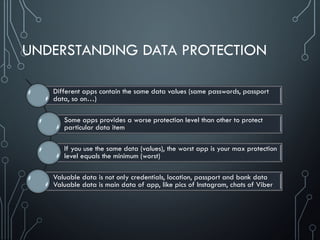
UNDERSTANDING DATA PROTECTION
Different apps contain the same data values (same passwords, passport
data, so on…)
Some apps provides a worse protection level than other to protect
particular data item
If you use the same data (values), the worst app is your max protection
level equals the minimum (worst)
Valuable data is not only credentials, location, passport and bank data
Valuable data is main data of app, like pics of Instagram, chats of Viber
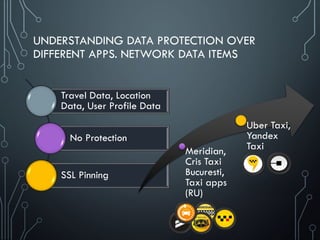
UNDERSTANDING DATA PROTECTION OVER
DIFFERENT APPS. NETWORK DATA ITEMS
Travel Data, Location
Data, User Profile Data
No Protection
SSL Pinning
Meridian,
Cris Taxi
Bucuresti,
Taxi apps
(RU)
Uber Taxi,
Yandex
Taxi
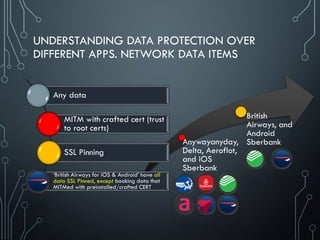
UNDERSTANDING DATA PROTECTION OVER
DIFFERENT APPS. NETWORK DATA ITEMS
Anywayanyday,
Delta, Aeroflot,
and iOS
Sberbank
British
Airways, and
Android
Sberbank
Any data
MITM with crafted cert (trust
to root certs)
SSL Pinning
‘British Airways for iOS & Android’ have all
data SSL Pinned, except booking data that
MITMed with preinstalled/crafted CERT
MOBILE PROTECTION & ISSUES
1. Data 2. App 3. OS
4. Device 5. Network 6. Compliance
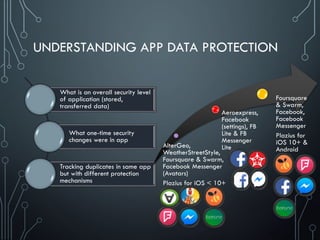
UNDERSTANDING APP DATA PROTECTION
What is an overall security level
of application (stored,
transferred data)
What one-time security
changes were in app
Tracking duplicates in same app
but with different protection
mechanisms
AlterGeo,
WeatherStreetStyle,
Foursquare & Swarm,
Facebook Messenger
(Avatars)
Plazius for iOS < 10+
Aeroexpress,
Facebook
(settings), FB
Lite & FB
Messenger
Lite
Foursquare
& Swarm,
Facebook,
Facebook
Messenger
Plazius for
iOS 10+ &
Android
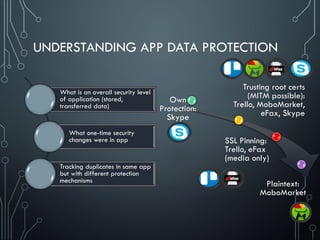
UNDERSTANDING APP DATA PROTECTION
What is an overall security level
of application (stored,
transferred data)
What one-time security
changes were in app
Tracking duplicates in same app
but with different protection
mechanisms
Own
Protection:
Skype
SSL Pinning:
Trello, eFax
(media only)
Trusting root certs
(MITM possible):
Trello, MoboMarket,
eFax, Skype
Plaintext:
MoboMarket
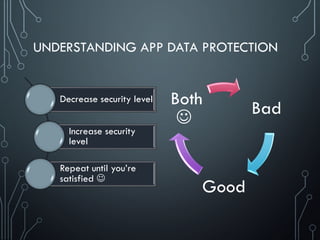
UNDERSTANDING APP DATA PROTECTION
Decrease security level
Increase security
level
Repeat until you’re
satisfied 
Bad
Good
Both

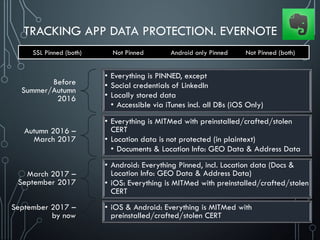
TRACKING APP DATA PROTECTION. EVERNOTE
SSL Pinned (both) Not Pinned Android only Pinned Not Pinned (both)
Before
Summer/Autumn
2016
• Everything is PINNED, except
• Social credentials of LinkedIn
• Locally stored data
• Accessible via iTunes incl. all DBs (iOS Only)
Autumn 2016 –
March 2017
• Everything is MITMed with preinstalled/crafted/stolen
CERT
• Location data is not protected (in plaintext)
• Documents & Location Info: GEO Data & Address Data
March 2017 –
September 2017
• Android: Everything Pinned, incl. Location data (Docs &
Location Info: GEO Data & Address Data)
• iOS: Everything is MITMed with preinstalled/crafted/stolen
CERT
September 2017 –
by now
• iOS & Android: Everything is MITMed with
preinstalled/crafted/stolen CERT
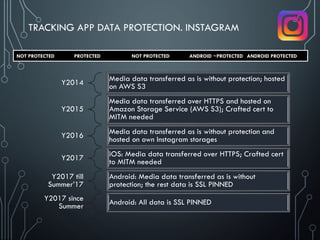
Y2014 Media data transferred as is without protection; hosted
on AWS S3
Y2015
Media data transferred over HTTPS and hosted on
Amazon Storage Service (AWS S3); Crafted cert to
MITM needed
Y2016 Media data transferred as is without protection and
hosted on own Instagram storages
Y2017 iOS: Media data transferred over HTTPS; Crafted cert
to MITM needed
Y2017 till
Summer’17
Android: Media data transferred as is without
protection; the rest data is SSL PINNED
Y2017 since
Summer Android: All data is SSL PINNED
TRACKING APP DATA PROTECTION. INSTAGRAM
NOT PROTECTED PROTECTED NOT PROTECTED ANDROID ~PROTECTED ANDROID PROTECTED
UNDERSTANDING DATA & APP
PROTECTION IN DETAILS (EXAMPLES)
• Many examples were collected to go deeper
• Check next slides 
Powerful and Awful apps
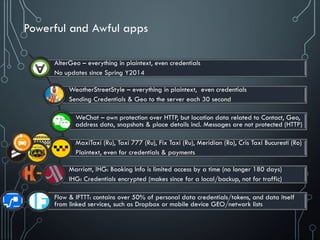
AlterGeo – everything in plaintext, even credentials
No updates since Spring Y2014
WeatherStreetStyle – everything in plaintext, even credentials
Sending Credentials & Geo to the server each 30 second
WeChat – own protection over HTTP, but location data related to Contact, Geo,
address data, snapshots & place details incl. Messages are not protected (HTTP)
MaxiTaxi (Ru), Taxi 777 (Ru), Fix Taxi (Ru), Meridian (Ro), Cris Taxi Bucuresti (Ro)
Plaintext, even for credentials & payments
Marriott, IHG: Booking Info is limited access by a time (no longer 180 days)
IHG: Credentials encrypted (makes since for a local/backup, not for traffic)
Flow & IFTTT: contains over 50% of personal data credentials/tokens, and data itself
from linked services, such as Dropbox or mobile device GEO/network lists
UNDERSTANDING DATA OVER APPS PROTECTION.
SAME DATA OVER DIFFERENT APPS. PASSPORT DETAILS
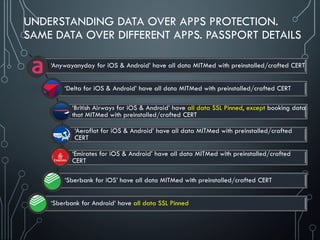
‘Anywayanyday for iOS & Android’ have all data MITMed with preinstalled/crafted CERT
‘Delta for iOS & Android’ have all data MITMed with preinstalled/crafted CERT
‘British Airways for iOS & Android’ have all data SSL Pinned, except booking data
that MITMed with preinstalled/crafted CERT
‘Aeroflot for iOS & Android’ have all data MITMed with preinstalled/crafted
CERT
‘Emirates for iOS & Android’ have all data MITMed with preinstalled/crafted
CERT
‘Sberbank for iOS’ have all data MITMed with preinstalled/crafted CERT
‘Sberbank for Android’ have all data SSL Pinned
TRACKING APP DATA PROTECTION.
GOOGLE MAPS, TRELLO, SWARM, FOURSQUARE, PLAZIUS
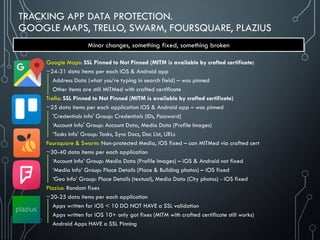
Google Maps: SSL Pinned to Not Pinned (MITM is available by crafted certificate)
~24-31 data items per each iOS & Android app
Address Data (what you’re typing in search field) – was pinned
Other items are still MITMed with crafted certificate
Trello: SSL Pinned to Not Pinned (MITM is available by crafted certificate)
~25 data items per each application iOS & Android app – was pinned
'Credentials Info' Group: Credentials (IDs, Password)
‘Account Info' Group: Account Data, Media Data (Profile Images)
‘Tasks Info' Group: Tasks, Sync Docs, Doc List, URLs
Foursquare & Swarm: Non-protected Media, iOS fixed – can MITMed via crafted cert
~30-40 data items per each application
‘Account Info’ Group: Media Data (Profile Images) – iOS & Android not fixed
‘Media Info’ Group: Place Details (Place & Building photos) – iOS fixed
‘Geo Info’ Group: Place Details (textual), Media Data (City photos) - iOS fixed
Plazius: Random fixes
~20-25 data items per each application
Apps written for iOS < 10 DO NOT HAVE a SSL validation
Apps written for iOS 10+ only got fixes (MITM with crafted certificate still works)
Android Apps HAVE a SSL Pinning
Minor changes, something fixed, something broken
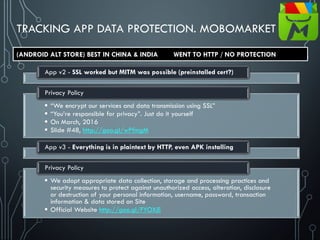
TRACKING APP DATA PROTECTION. MOBOMARKET
App v2 - SSL worked but MITM was possible (preinstalled cert?)
 “We encrypt our services and data transmission using SSL”
 “You’re responsible for privacy”. Just do it yourself
 On March, 2016
 Slide #48, http://goo.gl/wPfmgM
Privacy Policy
App v3 - Everything is in plaintext by HTTP, even APK installing
 We adopt appropriate data collection, storage and processing practices and
security measures to protect against unauthorized access, alteration, disclosure
or destruction of your personal information, username, password, transaction
information & data stored on Site
 Official Website http://goo.gl/FYOXjE
Privacy Policy
(ANDROID ALT STORE) BEST IN CHINA & INDIA WENT TO HTTP / NO PROTECTION
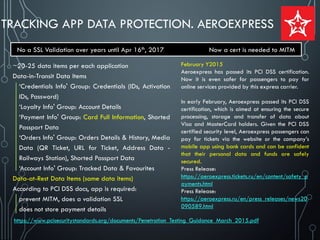
TRACKING APP DATA PROTECTION. AEROEXPRESS
~20-25 data items per each application
Data-in-Transit Data Items
‘Credentials Info' Group: Credentials (IDs, Activation
IDs, Password)
‘Loyalty Info' Group: Account Details
‘Payment Info' Group: Card Full Information, Shorted
Passport Data
‘Orders Info' Group: Orders Details & History, Media
Data (QR Ticket, URL for Ticket, Address Data -
Railways Station), Shorted Passport Data
‘Account Info' Group: Tracked Data & Favourites
Data-at-Rest Data Items (same data items)
According to PCI DSS docs, app is required:
prevent MITM, does a validation SSL
does not store payment details
No a SSL Validation over years until Apr 16th, 2017 Now a cert is needed to MITM
https://www.pcisecuritystandards.org/documents/Penetration_Testing_Guidance_March_2015.pdf
February Y2015
Aeroexpress has passed its PCI DSS certification.
Now it is even safer for passengers to pay for
online services provided by this express carrier.
In early February, Aeroexpress passed its PCI DSS
certification, which is aimed at ensuring the secure
processing, storage and transfer of data about
Visa and MasterCard holders. Given the PCI DSS
certified security level, Aeroexpress passengers can
pay for tickets via the website or the company’s
mobile app using bank cards and can be confident
that their personal data and funds are safely
secured.
Press Release:
https://aeroexpress.tickets.ru/en/content/safety_p
ayments.html
Press Release:
https://aeroexpress.ru/en/press_releases/news20
090589.html
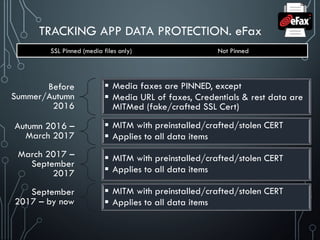
TRACKING APP DATA PROTECTION. eFax
SSL Pinned (media files only) Not Pinned
Before
Summer/Autumn
2016
 Media faxes are PINNED, except
 Media URL of faxes, Credentials & rest data are
MITMed (fake/crafted SSL Cert)
Autumn 2016 –
March 2017
 MITM with preinstalled/crafted/stolen CERT
 Applies to all data items
March 2017 –
September
2017
 MITM with preinstalled/crafted/stolen CERT
 Applies to all data items
September
2017 – by now
 MITM with preinstalled/crafted/stolen CERT
 Applies to all data items
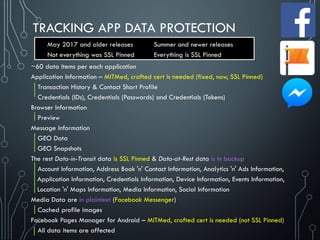
TRACKING APP DATA PROTECTION
~60 data items per each application
Application Information – MITMed, crafted cert is needed (fixed, now, SSL Pinned)
Transaction History & Contact Short Profile
Credentials (IDs), Credentials (Passwords) and Credentials (Tokens)
Browser Information
Preview
Message Information
GEO Data
GEO Snapshots
The rest Data-in-Transit data is SSL Pinned & Data-at-Rest data is in backup
Account Information, Address Book 'n' Contact Information, Analytics 'n' Ads Information,
Application Information, Credentials Information, Device Information, Events Information,
Location 'n' Maps Information, Media Information, Social Information
Media Data are in plaintext (Facebook Messenger)
Cached profile images
Facebook Pages Manager for Android – MITMed, crafted cert is needed (not SSL Pinned)
All data items are affected
May 2017 and older releases
Not everything was SSL Pinned
Summer and newer releases
Everything is SSL Pinned
MOBILE PROTECTION & ISSUES
1. Data 2. App 3. OS
4. Device 5. Network 6. Compliance
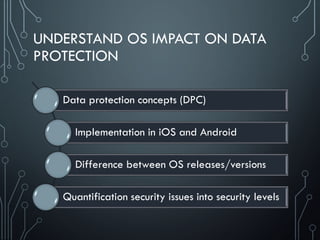
UNDERSTAND OS IMPACT ON DATA
PROTECTION
Data protection concepts (DPC)
Implementation in iOS and Android
Difference between OS releases/versions
Quantification security issues into security levels
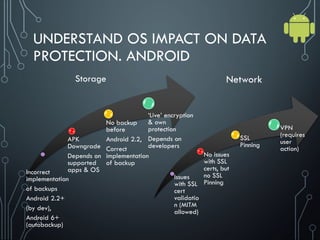
UNDERSTAND OS IMPACT ON DATA
PROTECTION. ANDROID
Incorrect
implementation
of backups
Android 2.2+
(by dev),
Android 6+
(autobackup)
APK
Downgrade
Depends on
supported
apps & OS
No backup
before
Android 2.2,
Correct
implementation
of backup
‘Live’ encryption
& own
protection
Depends on
developers
Network
Storage
Issues
with SSL
cert
validatio
n (MITM
allowed)
No issues
with SSL
certs, but
no SSL
Pinning
SSL
Pinning
VPN
(requires
user
action)
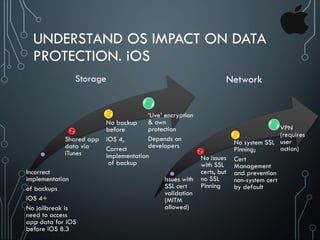
UNDERSTAND OS IMPACT ON DATA
PROTECTION. iOS
Incorrect
implementation
of backups
iOS 4+
No jailbreak is
need to access
app data for iOS
before iOS 8.3
Shared app
data via
iTunes
No backup
before
iOS 4,
Correct
implementation
of backup
‘Live’ encryption
& own
protection
Depends on
developers
Issues with
SSL cert
validation
(MITM
allowed)
No issues
with SSL
certs, but
no SSL
Pinning
No system SSL
Pinning;
Cert
Management
and prevention
non-system cert
by default
VPN
(requires
user
action)
Network
Storage
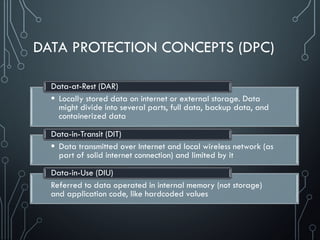
DATA PROTECTION CONCEPTS (DPC)
 Locally stored data on internet or external storage. Data
might divide into several parts, full data, backup data, and
containerized data
Data-at-Rest (DAR)
 Data transmitted over Internet and local wireless network (as
part of solid internet connection) and limited by it
Data-in-Transit (DIT)
Referred to data operated in internal memory (not storage)
and application code, like hardcoded values
Data-in-Use (DIU)
COMMON WEAKNESS OR VULNERABILITIES IN
DATA PROTECTION. EXCERPTs
Sensitive data leakage [CWE-200]
 Sensitive data leakage can be either inadvertent or side channel
 Protection can be poorly implemented exposing it:
Location; Owner ID info: name, number, device ID; Authentication credentials & tokens
Target App Information is also sensitive (out of scope of CWE-200)
Unsafe sensitive data storage [CWE-312] (Data-at-Rest)
 Sensitive data should always be stored encrypted so that attackers cannot simply retrieve this
data off the file system, especially on removable disk like micro SD card or public folders (out
of scope of CWE-312) such as
banking and payment system PIN numbers, credit card numbers, or online service passwords
 There’s no excuse for sandboxing without encryption here
Unsafe sensitive data transmission [CWE-319] (Data-in-Transit)
 Data be encrypted in transmission lest it be eavesdropped by attackers e.g. in public Wi-Fi
 If app implements SSL, it could fall victim to a downgrade attack degrading HTTPS to HTTP.
 Another way SSL could be compromised is if the app does not fail on invalid certificates.
 There’s no excuse for partial SSL validation here
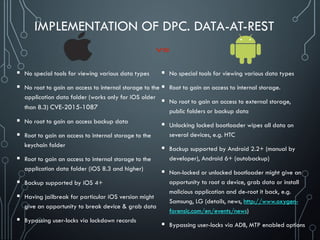
IMPLEMENTATION OF DPC. DATA-AT-REST
 No special tools for viewing various data types
 No root to gain an access to internal storage to the
application data folder (works only for iOS older
than 8.3) CVE-2015-1087
 No root to gain an access backup data
 Root to gain an access to internal storage to the
keychain folder
 Root to gain an access to internal storage to the
application data folder (iOS 8.3 and higher)
 Backup supported by iOS 4+
 Having jailbreak for particular iOS version might
give an opportunity to break device & grab data
 Bypassing user-locks via lockdown records
 No special tools for viewing various data types
 Root to gain an access to internal storage.
 No root to gain an access to external storage,
public folders or backup data
 Unlocking locked bootloader wipes all data on
several devices, e.g. HTC
 Backup supported by Android 2.2+ (manual by
developer), Android 6+ (autobackup)
 Non-locked or unlocked bootloader might give an
opportunity to root a device, grab data or install
malicious application and de-root it back, e.g.
Samsung, LG (details, news, http://www.oxygen-
forensic.com/en/events/news)
 Bypassing user-locks via ADB, MTP enabled options
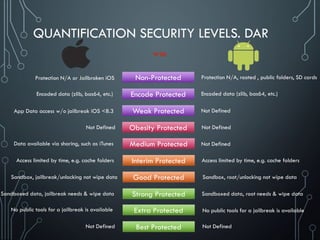
QUANTIFICATION SECURITY LEVELS. DAR
Non-Protected
Protection N/A or Jailbroken iOS
Encode Protected
Encoded data (zlib, bas64, etc.)
Weak Protected
App Data access w/o jailbreak iOS <8.3
Obesity Protected
Not Defined
Medium Protected
Data available via sharing, such as iTunes
Interim Protected
Access limited by time, e.g. cache folders
Good Protected
Sandbox, jailbreak/unlocking not wipe data
Strong Protected
Sandboxed data, jailbreak needs & wipe data
Extra Protected
No public tools for a jailbreak is available
Best Protected
Not Defined
Protection N/A, rooted , public folders, SD cards
Encoded data (zlib, bas64, etc.)
Not Defined
Not Defined
Not Defined
Access limited by time, e.g. cache folders
Sandbox, root/unlocking not wipe data
Sandboxed data, root needs & wipe data
No public tools for a jailbreak is available
Not Defined
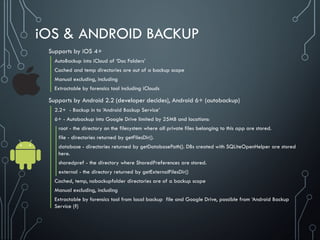
iOS & ANDROID BACKUP
Supports by iOS 4+
AutoBackup into iCloud of ‘Doc Folders’
Cached and temp directories are out of a backup scope
Manual excluding, including
Extractable by forensics tool including iClouds
Supports by Android 2.2 (developer decides), Android 6+ (autobackup)
2.2+ - Backup in to ‘Android Backup Service’
6+ - Autobackup into Google Drive limited by 25MB and locations:
root - the directory on the filesystem where all private files belonging to this app are stored.
file - directories returned by getFilesDir().
database - directories returned by getDatabasePath(). DBs created with SQLiteOpenHelper are stored
here.
sharedpref - the directory where SharedPreferences are stored.
external - the directory returned by getExternalFilesDir()
Cached, temp, nobackupfolder directories are of a backup scope
Manual excluding, including
Extractable by forensics tool from local backup file and Google Drive, possible from ‘Android Backup
Service (?)
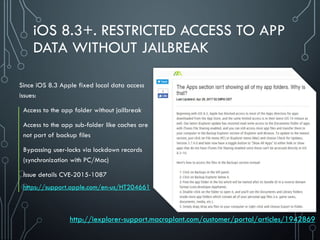
iOS 8.3+. RESTRICTED ACCESS TO APP
DATA WITHOUT JAILBREAK
Since iOS 8.3 Apple fixed local data access
issues:
Access to the app folder without jailbreak
Access to the app sub-folder like caches are
not part of backup files
Bypassing user-locks via lockdown records
(synchronization with PC/Mac)
Issue details CVE-2015-1087
https://support.apple.com/en-us/HT204661
http://iexplorer-support.macroplant.com/customer/portal/articles/1942869
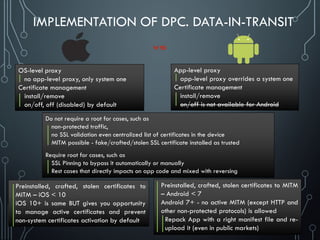
IMPLEMENTATION OF DPC. DATA-IN-TRANSIT
App-level proxy
app-level proxy overrides a system one
Certificate management
install/remove
on/off is not available for Android
OS-level proxy
no app-level proxy, only system one
Certificate management
install/remove
on/off, off (disabled) by default
Preinstalled, crafted, stolen certificates to
MITM – iOS < 10
iOS 10+ is same BUT gives you opportunity
to manage active certificates and prevent
non-system certificates activation by default
Preinstalled, crafted, stolen certificates to MITM
– Android < 7
Android 7+ - no active MITM (except HTTP and
other non-protected protocols) is allowed
Repack App with a right manifest file and re-
upload it (even in public markets)
Do not require a root for cases, such as
non-protected traffic,
no SSL validation even centralized list of certificates in the device
MITM possible - fake/crafted/stolen SSL certificate installed as trusted
Require root for cases, such as
SSL Pinning to bypass it automatically or manually
Rest cases that directly impacts on app code and mixed with reversing
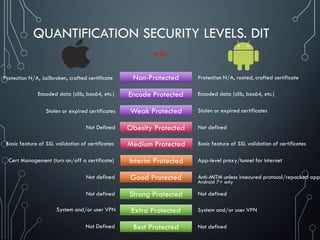
Non-Protected
Protection N/A, Jailbroken, crafted certificate Protection N/A, rooted, crafted certificate
Encode Protected
Encoded data (zlib, bas64, etc.) Encoded data (zlib, bas64, etc.)
Weak Protected
Stolen or expired certificates Stolen or expired certificates
Obesity Protected
Not Defined Not defined
Medium Protected
Basic feature of SSL validation of certificates Basic feature of SSL validation of certificates
Interim Protected
Cert Management (turn on/off a certificate) App-level proxy/tunnel for internet
Good Protected
Not defined Anti-MITM unless insecured protocol/repacked app
Strong Protected
Not defined Not defined
Extra Protected
System and/or user VPN System and/or user VPN
Best Protected
Not Defined Not defined
QUANTIFICATION SECURITY LEVELS. DIT
Android 7+ only
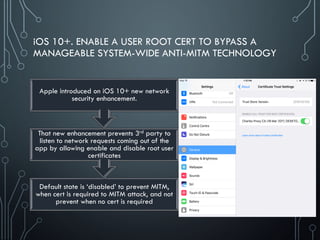
iOS 10+. ENABLE A USER ROOT CERT TO BYPASS A
MANAGEABLE SYSTEM-WIDE ANTI-MITM TECHNOLOGY
Default state is ‘disabled’ to prevent MITM,
when cert is required to MITM attack, and not
prevent when no cert is required
That new enhancement prevents 3rd party to
listen to network requests coming out of the
app by allowing enable and disable root user
certificates
Apple introduced on iOS 10+ new network
security enhancement.
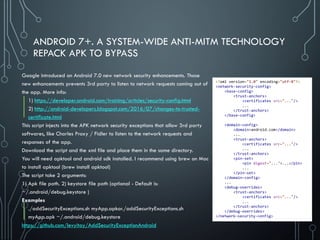
ANDROID 7+. A SYSTEM-WIDE ANTI-MITM TECHNOLOGY
REPACK APK TO BYPASS
Google introduced on Android 7.0 new network security enhancements. Those
new enhancements prevents 3rd party to listen to network requests coming out of
the app. More info:
1) https://developer.android.com/training/articles/security-config.html
2) http://android-developers.blogspot.com/2016/07/changes-to-trusted-
certificate.html
This script injects into the APK network security exceptions that allow 3rd party
softwares, like Charles Proxy / Fidler to listen to the network requests and
responses of the app.
Download the script and the xml file and place them in the same directory.
You will need apktool and android sdk installed. I recommend using brew on Mac
to install apktool (brew install apktool)
The script take 2 arguments:
1) Apk file path. 2) keystore file path (optional - Default is:
~/.android/debug.keystore )
Examples
./addSecurityExceptions.sh myApp.apkor./addSecurityExceptions.sh
myApp.apk ~/.android/debug.keystore
https://github.com/levyitay/AddSecurityExceptionAndroid
<?xml version="1.0" encoding="utf-8"?>
<network-security-config>
<base-config>
<trust-anchors>
<certificates src="..."/>
...
</trust-anchors>
</base-config>
<domain-config>
<domain>android.com</domain>
...
<trust-anchors>
<certificates src="..."/>
...
</trust-anchors>
<pin-set>
<pin digest="...">...</pin>
...
</pin-set>
</domain-config>
...
<debug-overrides>
<trust-anchors>
<certificates src="..."/>
...
</trust-anchors>
</debug-overrides>
</network-security-config>
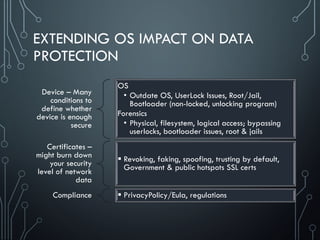
EXTENDING OS IMPACT ON DATA
PROTECTION
Device – Many
conditions to
define whether
device is enough
secure
OS
• Outdate OS, UserLock Issues, Root/Jail,
Bootloader (non-locked, unlocking program)
Forensics
• Physical, filesystem, logical access; bypassing
userlocks, bootloader issues, root & jails
Certificates –
might burn down
your security
level of network
data
 Revoking, faking, spoofing, trusting by default,
Government & public hotspots SSL certs
Compliance  PrivacyPolicy/Eula, regulations
MOBILE PROTECTION & ISSUES
1. Data 2. App 3. OS
4. Device 5. Network 6. Compliance
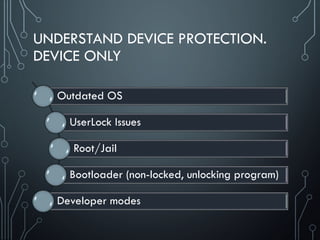
UNDERSTAND DEVICE PROTECTION.
DEVICE ONLY
Outdated OS
UserLock Issues
Root/Jail
Bootloader (non-locked, unlocking program)
Developer modes
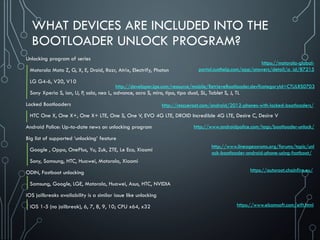
WHAT DEVICES ARE INCLUDED INTO THE
BOOTLOADER UNLOCK PROGRAM?
Unlocking program of series
Motorola Moto Z, G, X, E, Droid, Razr, Atrix, Electrify, Photon
LG G4-6, V20, V10
Sony Xperia S, ion, U, P, sola, neo L, advance, acro S, miro, tipo, tipo dual, SL, Tablet S, J, TL
Locked Bootloaders
HTC One X, One X+, One X+ LTE, One S, One V, EVO 4G LTE, DROID Incredible 4G LTE, Desire C, Desire V
Android Police: Up-to-date news on unlocking program
Big list of supported ‘unlocking’ feature
Google , Oppo, OnePlus, Yu, Zuk, ZTE, Le Eco, Xiaomi
Sony, Samsung, HTC, Huawei, Motorola, Xiaomi
ODIN, Fastboot unlocking
Samsung, Google, LGE, Motorola, Huawei, Asus, HTC, NVIDIA
iOS jailbreaks availability is a similar issue like unlocking
iOS 1-5 (no jailbreak), 6, 7, 8, 9, 10; CPU x64, x32
https://motorola-global-
portal.custhelp.com/app/answers/detail/a_id/87215
http://www.androidpolice.com/tags/bootloader-unlock/
http://developer.lge.com/resource/mobile/RetrieveBootloader.dev?categoryId=CTULRS0703
http://rescueroot.com/android/2012-phones-with-locked-bootloaders/
http://www.lineageosroms.org/forums/topic/unl
ock-bootloader-android-phone-using-fastboot/
https://www.elcomsoft.com/eift.html
https://autoroot.chainfire.eu/
MOBILE PROTECTION & ISSUES
1. Data 2. App 3. OS
4. Device.
Forensics 5. Network 6. Compliance
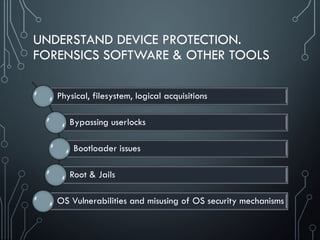
UNDERSTAND DEVICE PROTECTION.
FORENSICS SOFTWARE & OTHER TOOLS
Physical, filesystem, logical acquisitions
Bypassing userlocks
Bootloader issues
Root & Jails
OS Vulnerabilities and misusing of OS security mechanisms
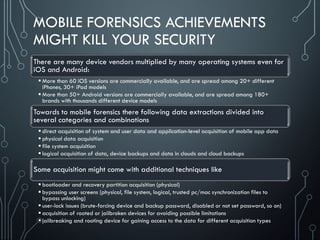
MOBILE FORENSICS ACHIEVEMENTS
MIGHT KILL YOUR SECURITY
There are many device vendors multiplied by many operating systems even for
iOS and Android:
 More than 60 iOS versions are commercially available, and are spread among 20+ different
iPhones, 30+ iPad models
 More than 50+ Android versions are commercially available, and are spread among 180+
brands with thousands different device models
Towards to mobile forensics there following data extractions divided into
several categories and combinations
 direct acquisition of system and user data and application-level acquisition of mobile app data
 physical data acquisition
 file system acquisition
 logical acquisition of data, device backups and data in clouds and cloud backups
Some acquisition might come with additional techniques like
 bootloader and recovery partition acquisition (physical)
 bypassing user screens (physical, file system, logical, trusted pc/mac synchronization files to
bypass unlocking)
 user-lock issues (brute-forcing device and backup password, disabled or not set password, so on)
 acquisition of rooted or jailbroken devices for avoiding possible limitations
 jailbreaking and rooting device for gaining access to the data for different acquisition types
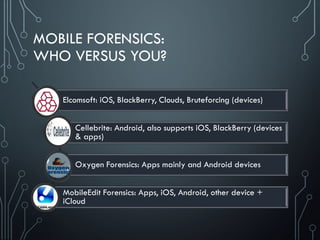
MOBILE FORENSICS:
WHO VERSUS YOU?
Elcomsoft: iOS, BlackBerry, Clouds, Bruteforcing (devices)
Cellebrite: Android, also supports iOS, BlackBerry (devices
& apps)
Oxygen Forensics: Apps mainly and Android devices
MobileEdit Forensics: Apps, iOS, Android, other device +
iCloud
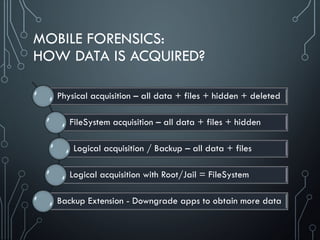
MOBILE FORENSICS:
HOW DATA IS ACQUIRED?
Physical acquisition – all data + files + hidden + deleted
FileSystem acquisition – all data + files + hidden
Logical acquisition / Backup – all data + files
Logical acquisition with Root/Jail = FileSystem
Backup Extension - Downgrade apps to obtain more data
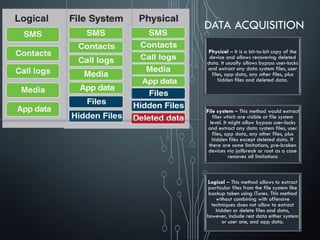
DATA ACQUISITION
Physical – It is a bit-to-bit copy of the
device and allows recovering deleted
data. It usually allows bypass user-locks
and extract any data system files, user
files, app data, any other files, plus
hidden files and deleted data.
File system – This method would extract
files which are visible at file system
level. It might allow bypass user-locks
and extract any data system files, user
files, app data, any other files, plus
hidden files except deleted data. If
there are some limitations, pre-broken
devices via jailbreak or root as a case
removes all limitations
Logical – This method allows to extract
particular files from the file system like
backup taken using iTunes. This method
without combining with offensive
techniques does not allow to extract
hidden or delete files and data,
however, include rest data either system
or user one, and app data.
ANDROID FORENSICS:
APK DOWNGRADE
The idea is behind of APK Downgrade is via Android Backup
Apps store data in backup a little or too much information
Some applications manufacturers made restrictions to what data can be acquired from
their apps – store a little info
Supported by Cellebrite, Mobiledit, Oxygen
Depends on app and Android OS (might not work)
Reinstall the older version without removing app data
MOBILE FORENSICS:
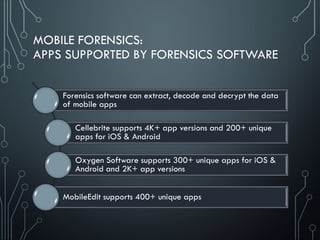
APPS SUPPORTED BY FORENSICS SOFTWARE
Forensics software can extract, decode and decrypt the data
of mobile apps
Cellebrite supports 4K+ app versions and 200+ unique
apps for iOS & Android
Oxygen Software supports 300+ unique apps for iOS &
Android and 2K+ app versions
MobileEdit supports 400+ unique apps
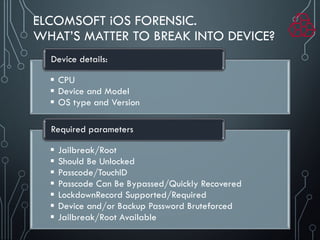
ELCOMSOFT iOS FORENSIC.
WHAT’S MATTER TO BREAK INTO DEVICE?
 CPU
 Device and Model
 OS type and Version
Device details:
 Jailbreak/Root
 Should Be Unlocked
 Passcode/TouchID
 Passcode Can Be Bypassed/Quickly Recovered
 LockdownRecord Supported/Required
 Device and/or Backup Password Bruteforced
 Jailbreak/Root Available
Required parameters
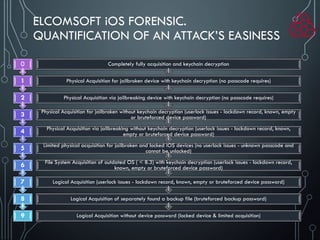
ELCOMSOFT iOS FORENSIC.
QUANTIFICATION OF AN ATTACK’S EASINESS
Logical Acquisition without device password (locked device & limited acquisition)
Logical Acquisition of separately found a backup file (bruteforced backup password)
Logical Acquisition (userlock issues - lockdown record, known, empty or bruteforced device password)
File System Acquisition of outdated OS ( < 8.3) with keychain decryption (userlock issues - lockdown record,
known, empty or bruteforced device password)
Limited physical acquisition for jailbroken and locked iOS devices (no userlock issues - unknown passcode and
cannot be unlocked)
Physical Acquisition via jailbreaking without keychain decryption (userlock issues - lockdown record, known,
empty or bruteforced device password)
Physical Acquisition for jailbroken without keychain decryption (userlock issues - lockdown record, known, empty
or bruteforced device password)
Physical Acquisition via jailbreaking device with keychain decryption (no passcode requires)
Physical Acquisition for jailbroken device with keychain decryption (no passcode requires)
Completely fully acquisition and keychain decryption
9
8
7
6
5
4
3
2
1
0
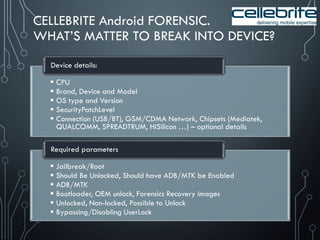
CELLEBRITE Android FORENSIC.
WHAT’S MATTER TO BREAK INTO DEVICE?
 CPU
 Brand, Device and Model
 OS type and Version
 SecurityPatchLevel
 Connection (USB/BT), GSM/CDMA Network, Chipsets (Mediatek,
QUALCOMM, SPREADTRUM, HiSilicon …) – optional details
Device details:
 Jailbreak/Root
 Should Be Unlocked, Should have ADB/MTK be Enabled
 ADB/MTK
 Bootloader, OEM unlock, Forensics Recovery images
 Unlocked, Non-locked, Possible to Unlock
 Bypassing/Disabling UserLock
Required parameters
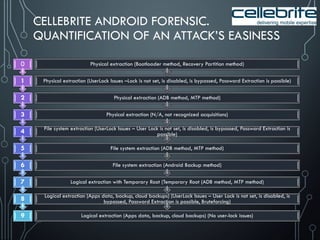
CELLEBRITE ANDROID FORENSIC.
QUANTIFICATION OF AN ATTACK’S EASINESS
Logical extraction (Apps data, backup, cloud backups) (No user-lock issues)
Logical extraction (Apps data, backup, cloud backups) (UserLock Issues – User Lock is not set, is disabled, is
bypassed, Password Extraction is possible, Bruteforcing)
Logical extraction with Temporary Root (Temporary Root (ADB method, MTP method)
File system extraction (Android Backup method)
File system extraction (ADB method, MTP method)
File system extraction (UserLock Issues – User Lock is not set, is disabled, is bypassed, Password Extraction is
possible)
Physical extraction (N/A, not recognized acquisitions)
Physical extraction (ADB method, MTP method)
Physical extraction (UserLock Issues –Lock is not set, is disabled, is bypassed, Password Extraction is possible)
Physical extraction (Bootloader method, Recovery Partition method)
9
8
7
6
5
4
3
2
1
0
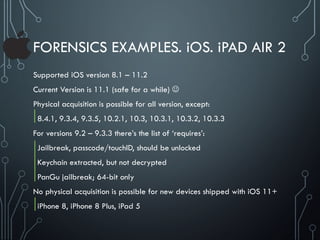
FORENSICS EXAMPLES. iOS. iPAD AIR 2
Supported iOS version 8.1 – 11.2
Current Version is 11.1 (safe for a while) 
Physical acquisition is possible for all version, except:
8.4.1, 9.3.4, 9.3.5, 10.2.1, 10.3, 10.3.1, 10.3.2, 10.3.3
For versions 9.2 – 9.3.3 there’s the list of ‘requires’:
Jailbreak, passcode/touchID, should be unlocked
Keychain extracted, but not decrypted
PanGu jailbreak; 64-bit only
No physical acquisition is possible for new devices shipped with iOS 11+
iPhone 8, iPhone 8 Plus, iPad 5
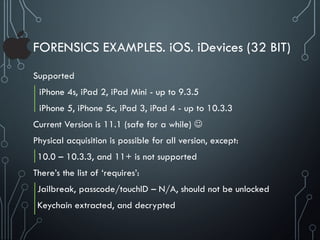
FORENSICS EXAMPLES. iOS. iDevices (32 BIT)
Supported
iPhone 4s, iPad 2, iPad Mini - up to 9.3.5
iPhone 5, iPhone 5c, iPad 3, iPad 4 - up to 10.3.3
Current Version is 11.1 (safe for a while) 
Physical acquisition is possible for all version, except:
10.0 – 10.3.3, and 11+ is not supported
There’s the list of ‘requires’:
Jailbreak, passcode/touchID – N/A, should not be unlocked
Keychain extracted, and decrypted
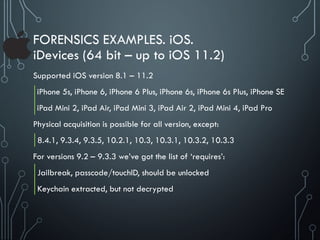
FORENSICS EXAMPLES. iOS.
iDevices (64 bit – up to iOS 11.2)
Supported iOS version 8.1 – 11.2
iPhone 5s, iPhone 6, iPhone 6 Plus, iPhone 6s, iPhone 6s Plus, iPhone SE
iPad Mini 2, iPad Air, iPad Mini 3, iPad Air 2, iPad Mini 4, iPad Pro
Physical acquisition is possible for all version, except:
8.4.1, 9.3.4, 9.3.5, 10.2.1, 10.3, 10.3.1, 10.3.2, 10.3.3
For versions 9.2 – 9.3.3 we’ve got the list of ‘requires’:
Jailbreak, passcode/touchID, should be unlocked
Keychain extracted, but not decrypted
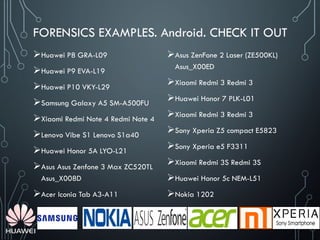
FORENSICS EXAMPLES. Android. CHECK IT OUT
Huawei P8 GRA-L09
Huawei P9 EVA-L19
Huawei P10 VKY-L29
Samsung Galaxy A5 SM-A500FU
Xiaomi Redmi Note 4 Redmi Note 4
Lenovo Vibe S1 Lenovo S1a40
Huawei Honor 5A LYO-L21
Asus Asus Zenfone 3 Max ZC520TL
Asus_X008D
Acer Iconia Tab A3-A11
Asus ZenFone 2 Laser (ZE500KL)
Asus_X00ED
Xiaomi Redmi 3 Redmi 3
Huawei Honor 7 PLK-L01
Xiaomi Redmi 3 Redmi 3
Sony Xperia Z5 compact E5823
Sony Xperia e5 F3311
Xiaomi Redmi 3S Redmi 3S
Huawei Honor 5c NEM-L51
Nokia 1202
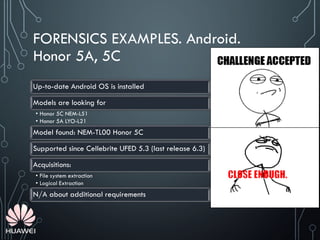
FORENSICS EXAMPLES. Android.
Honor 5A, 5C
Up-to-date Android OS is installed
Models are looking for
• Honor 5C NEM-L51
• Honor 5A LYO-L21
Model found: NEM-TL00 Honor 5C
Supported since Cellebrite UFED 5.3 (last release 6.3)
Acquisitions:
• File system extraction
• Logical Extraction
N/A about additional requirements
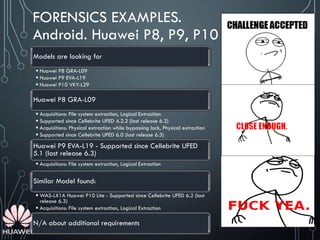
FORENSICS EXAMPLES.
Android. Huawei P8, P9, P10
Models are looking for
 Huawei P8 GRA-L09
 Huawei P9 EVA-L19
 Huawei P10 VKY-L29
Huawei P8 GRA-L09
 Acquisitions: File system extraction, Logical Extraction
 Supported since Cellebrite UFED 4.2.2 (last release 6.3)
 Acquisitions: Physical extraction while bypassing lock, Physical extraction
 Supported since Cellebrite UFED 6.0 (last release 6.3)
Huawei P9 EVA-L19 - Supported since Cellebrite UFED
5.1 (last release 6.3)
 Acquisitions: File system extraction, Logical Extraction
Similar Model found:
 WAS-LX1A Huawei P10 Lite - Supported since Cellebrite UFED 6.2 (last
release 6.3)
 Acquisitions: File system extraction, Logical Extraction
N/A about additional requirements
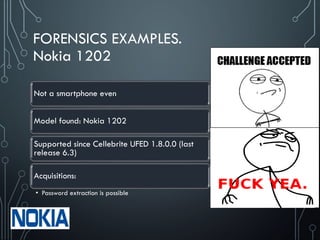
FORENSICS EXAMPLES.
Nokia 1202
Not a smartphone even
Model found: Nokia 1202
Supported since Cellebrite UFED 1.8.0.0 (last
release 6.3)
Acquisitions:
• Password extraction is possible
FORENSICS EXAMPLES. Android.
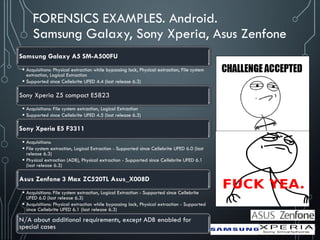
Samsung Galaxy, Sony Xperia, Asus Zenfone
Samsung Galaxy A5 SM-A500FU
 Acquisitions: Physical extraction while bypassing lock, Physical extraction, File system
extraction, Logical Extraction
 Supported since Cellebrite UFED 4.4 (last release 6.3)
Sony Xperia Z5 compact E5823
 Acquisitions: File system extraction, Logical Extraction
 Supported since Cellebrite UFED 4.5 (last release 6.3)
Sony Xperia E5 F3311
 Acquisitions:
 File system extraction, Logical Extraction - Supported since Cellebrite UFED 6.0 (last
release 6.3)
 Physical extraction (ADB), Physical extraction - Supported since Cellebrite UFED 6.1
(last release 6.3)
Asus Zenfone 3 Max ZC520TL Asus_X008D
 Acquisitions: File system extraction, Logical Extraction - Supported since Cellebrite
UFED 6.0 (last release 6.3)
 Acquisitions: Physical extraction while bypassing lock, Physical extraction - Supported
since Cellebrite UFED 6.1 (last release 6.3)
N/A about additional requirements, except ADB enabled for
special cases
FORENSICS EXAMPLES.
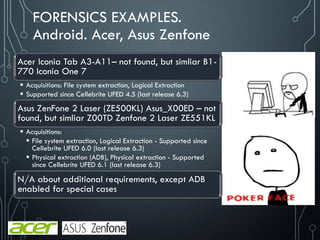
Android. Acer, Asus Zenfone
Acer Iconia Tab A3-A11– not found, but simliar B1-
770 Iconia One 7
 Acquisitions: File system extraction, Logical Extraction
 Supported since Cellebrite UFED 4.5 (last release 6.3)
Asus ZenFone 2 Laser (ZE500KL) Asus_X00ED – not
found, but simliar Z00TD Zenfone 2 Laser ZE551KL
 Acquisitions:
 File system extraction, Logical Extraction - Supported since
Cellebrite UFED 6.0 (last release 6.3)
 Physical extraction (ADB), Physical extraction - Supported
since Cellebrite UFED 6.1 (last release 6.3)
N/A about additional requirements, except ADB
enabled for special cases
FORENSICS CLOUD FEATURES
Cellebrite
UFED Cloud Analyzer provides access to more than 25 private cloud data sources to help you attain the critical case evidence that
often hides in cloud application data. See the full list below: Facebook, WhatsApp, Twitter, Gmail, Google Location History, Google
My Activity, Google Photos, Google Chrome, Google Calendar, Google Contacts, Google Drive, Google Bookmarks, Google Tasks,
Mail (IMAP), Dropbox, iCloud App, iCloud Calendar, iCloud Contacts, iCloud Drive, iCloud Photos, OneDrive, Instagram, KIK, VK,
Telegram, iCloud Notes, iCloud Reminder, iCloud Location
Oxygen Forensic® Detective
Oxygen Forensic® Detective acquires data from more than 30 cloud storages: iCloud contacts and calendar, Google Drive, Google
Location History, Live contacts and calendar, OneDrive, Dropbox and Box as well as from a wide range of social media including
Twitter and Instagram
Elcomsoft Cloud eXplorer
Acquire information from users’ Google Account with a simple all-in-one tool! Elcomsoft Cloud Explorer makes it easier to download,
view and analyze information collected by the search giant, providing convenient access to users’ search and browsing history, page
transitions, contacts, Google Keep notes, Hangouts messages, as well as images stored in the user’s Google Photos account.
Elcomsoft Phone Breaker
Cloud acquisition is an alternative way of retrieving information stored in mobile backups produced by Apple iOS, and the only
method to explore Windows Phone 8 and Windows 10 Mobile devices. Elcomsoft Phone Breaker can retrieve information from Apple
iCloud and Windows Live! services provided that original user credentials for that account are known.
The Forensic edition of Elcomsoft Phone Breaker enables over-the-air acquisition of iCloud data without having the original Apple ID
and password. Password-free access to iCloud data is made possible via the use of a binary authentication token extracted from the
user’s computer.
Elcomsoft Phone Breaker supports accounts with Apple's two-step verification as well as the new two-factor authentication. Access to
the second authentication factor such as a trusted device or recovery key is required. You will only need to use it once as Elcomsoft
Phone Breaker can save authentication credentials for future sessions.
https://www.oxygen-forensic.com/en/products/oxygen-forensic-detective/detective/cloud-data-extraction
http://www.cellebrite.com/Pages/ufed-cloud-analyzer
https://www.elcomsoft.com/ecx.html
https://www.elcomsoft.com/eppb.html
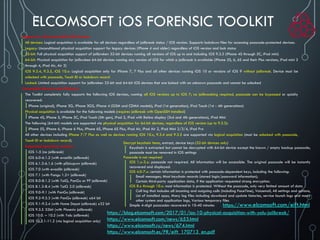
ELCOMSOFT iOS FORENSIC TOOLKIT
Support for 32-bit and 64-bit iOS Devices
All devices: Logical acquisition is available for all devices regardless of jailbreak status / iOS version. Supports lockdown files for accessing passcode-protected devices.
Legacy: Unconditional physical acquisition support for legacy devices (iPhone 4 and older) regardless of iOS version and lock status
32-bit: Full physical acquisition support of jailbroken 32-bit devices running all versions of iOS up to and including iOS 9.3.3 (iPhone 4S through 5C, iPad mini)
64-bit: Physical acquisition for jailbroken 64-bit devices running any version of iOS for which a jailbreak is available (iPhone 5S, 6, 6S and their Plus versions, iPad mini 2
through 4, iPad Air, Air 2)
iOS 9.3.4, 9.3.5, iOS 10.x: Logical acquisition only for iPhone 7, 7 Plus and all other devices running iOS 10 or versions of iOS 9 without jailbreak. Device must be
unlocked with passcode, Touch ID or lockdown record
Locked: Limited acquisition support for jailbroken 32-bit and 64-bit iOS devices that are locked with an unknown passcode and cannot be unlocked
Compatible Devices and Platforms
The Toolkit completely fully supports the following iOS devices, running all iOS versions up to iOS 7; no jailbreaking required, passcode can be bypassed or quickly
recovered:
iPhone (original), iPhone 3G, iPhone 3GS, iPhone 4 (GSM and CDMA models), iPad (1st generation), iPod Touch (1st - 4th generations)
Physical acquisition is available for the following models (requires jailbreak with OpenSSH installed)
iPhone 4S, iPhone 5, iPhone 5C, iPod Touch (5th gen), iPad 2, iPad with Retina display (3rd and 4th generations), iPad Mini
The following (64-bit) models are supported via physical acquisition for 64-bit devices, regardless of iOS version (up to 9.3.3):
iPhone 5S, iPhone 6, iPhone 6 Plus, iPhone 6S, iPhone 6S Plus, iPad Air, iPad Air 2, iPad Mini 2/3/4, iPad Pro
All other devices including iPhone 7/7 Plus as well as devices running iOS 10.x, 9.3.4 and 9.3.5 are supported via logical acquisition (must be unlocked with passcode,
Touch ID or lockdown record).
Supported operating systems:
iOS 1-5 (no jailbreak)
iOS 6.0-6.1.2 (with evasi0n jailbreak)
iOS 6.1.3-6.1.6 (with p0sixspwn jailbreak)
iOS 7.0 (with evasi0n jailbreak)
iOS 7.1 (with Pangu 1.2+ jailbreak)
iOS 8.0-8.1.2 (with TaiG, PanGu or PP jailbreak)
iOS 8.1.3-8.4 (with TaiG 2.0 jailbreak)
iOS 9.0-9.1 (with PanGu jailbreak)
iOS 9.2-9.3.3 (with PanGu jailbreak) x64 bit
iOS 9.1-9.3.4 (with Home Depot jailbreak) x32 bit
iOS 9.3.5 32bit (with Phoenix jailbreak)
iOS 10.0. – 10.2 (with Yalu jailbreak)
iOS 10.2.1-11.2 (via logical acquisition only)
https://blog.elcomsoft.com/2017/01/ios-10-physical-acquisition-with-yalu-jailbreak/
https://www.elcomsoft.com/news/653.html
https://www.elcomsoft.ru/news/674.html
https://www.elcomsoft.es/PR/eift_170713_en.pdf
Decrypt keychain items, extract, device keys (32-bit devices only)
Keychain is extracted but cannot be decrypted with 64-bit device except the known / empty backup passcode;
passcode must be removed in iOS settings
Passcode is not required
iOS 1.x-3.x: passcode not required. All information will be accessible. The original passcode will be instantly
recovered and displayed.
iOS 4.0-7.x: certain information is protected with passcode-dependent keys, including the following:
Email messages; Most keychain records (stored login/password information);
Certain third-party application data, if the application requested strong encryption.
iOS 8.x through 10.x: most information is protected. Without the passcode, only very limited amount of data
Call log that includes all incoming and outgoing calls (including FaceTime), Voicemail, All settings and options,
List of installed apps, Many log files including download and update histories, service launch logs and many
other system and application logs, Various temporary files
Simple 4-digit passcodes recovered in 10-40 minutes https://www.elcomsoft.com/eift.html
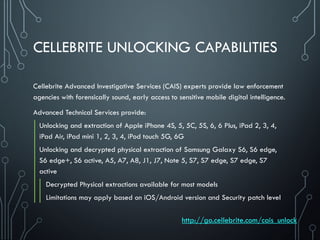
CELLEBRITE UNLOCKING CAPABILITIES
Cellebrite Advanced Investigative Services (CAIS) experts provide law enforcement
agencies with forensically sound, early access to sensitive mobile digital intelligence.
Advanced Technical Services provide:
Unlocking and extraction of Apple iPhone 4S, 5, 5C, 5S, 6, 6 Plus, iPad 2, 3, 4,
iPad Air, iPad mini 1, 2, 3, 4, iPod touch 5G, 6G
Unlocking and decrypted physical extraction of Samsung Galaxy S6, S6 edge,
S6 edge+, S6 active, A5, A7, A8, J1, J7, Note 5, S7, S7 edge, S7 edge, S7
active
Decrypted Physical extractions available for most models
Limitations may apply based on iOS/Android version and Security patch level
http://go.cellebrite.com/cais_unlock
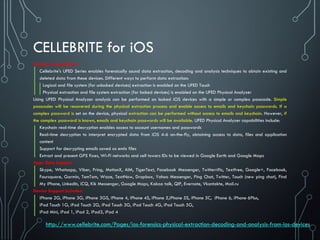
CELLEBRITE for iOS
Cellebrite capabilities:
Cellebrite's UFED Series enables forensically sound data extraction, decoding and analysis techniques to obtain existing and
deleted data from these devices. Different ways to perform data extraction:
Logical and file system (for unlocked devices) extraction is enabled on the UFED Touch
Physical extraction and file system extraction (for locked devices) is enabled on the UFED Physical Analyzer
Using UFED Physical Analyzer analysis can be performed on locked iOS devices with a simple or complex passcode. Simple
passcodes will be recovered during the physical extraction process and enable access to emails and keychain passwords. If a
complex password is set on the device, physical extraction can be performed without access to emails and keychain. However, if
the complex password is known, emails and keychain passwords will be available. UFED Physical Analyzer capabilities include:
Keychain real-time decryption enables access to account usernames and passwords
Real-time decryption to interpret encrypted data from iOS 4-6 on-the-fly, obtaining access to data, files and application
content
Support for decrypting emails saved as emlx files
Extract and present GPS fixes, Wi-Fi networks and cell towers IDs to be viewed in Google Earth and Google Maps
Apps Data Support:
Skype, Whatsapp, Viber, Fring, MotionX, AIM, TigerText, Facebook Messenger, Twitterrific, Textfree, Google+, Facebook,
Foursquare, Garmin, TomTom, Waze, TextNow, Dropbox, Yahoo Messenger, Ping Chat, Twitter, Touch (new ping chat), Find
My iPhone, LinkedIn, iCQ, Kik Messenger, Google Maps, Kakao talk, QIP, Evernote, Vkontakte, Mail.ru
Device Support Includes:
iPhone 2G, iPhone 3G, iPhone 3GS, iPhone 4, iPhone 4S, iPhone 5,iPhone 5S, iPhone 5C, iPhone 6, iPhone 6Plus,
iPod Touch 1G, iPod Touch 2G, iPod Touch 3G, iPod Touch 4G, iPod Touch 5G,
iPad Mini, iPad 1, iPad 2, iPad3, iPad 4
http://www.cellebrite.com/Pages/ios-forensics-physical-extraction-decoding-and-analysis-from-ios-devices
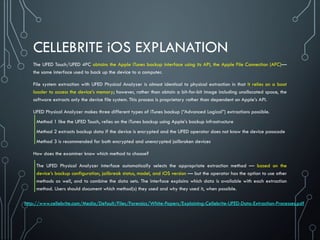
CELLEBRITE iOS EXPLANATION
The UFED Touch/UFED 4PC obtains the Apple iTunes backup interface using its API, the Apple File Connection (AFC)—
the same interface used to back up the device to a computer.
File system extraction with UFED Physical Analyzer is almost identical to physical extraction in that it relies on a boot
loader to access the device’s memory; however, rather than obtain a bit-for-bit image including unallocated space, the
software extracts only the device file system. This process is proprietary rather than dependent on Apple’s API.
UFED Physical Analyzer makes three different types of iTunes backup (“Advanced Logical”) extractions possible.
Method 1 like the UFED Touch, relies on the iTunes backup using Apple’s backup infrastructure
Method 2 extracts backup data if the device is encrypted and the UFED operator does not know the device passcode
Method 3 is recommended for both encrypted and unencrypted jailbroken devices
How does the examiner know which method to choose?
The UFED Physical Analyzer interface automatically selects the appropriate extraction method — based on the
device’s backup configuration, jailbreak status, model, and iOS version — but the operator has the option to use other
methods as well, and to combine the data sets. The interface explains which data is available with each extraction
method. Users should document which method(s) they used and why they used it, when possible.
http://www.cellebrite.com/Media/Default/Files/Forensics/White-Papers/Explaining-Cellebrite-UFED-Data-Extraction-Processes.pdf
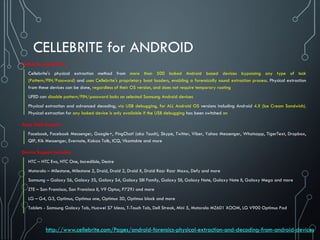
CELLEBRITE for ANDROID
Cellebrite capabilities
Cellebrite's physical extraction method from more than 500 locked Android based devices bypassing any type of lock
(Pattern/PIN/Password) and uses Cellebrite's proprietary boot loaders, enabling a forensically sound extraction process. Physical extraction
from these devices can be done, regardless of their OS version, and does not require temporary rooting
UFED can disable pattern/PIN/password locks on selected Samsung Android devices
Physical extraction and advanced decoding, via USB debugging, for ALL Android OS versions including Android 4.X (Ice Cream Sandwich).
Physical extraction for any locked device is only available if the USB debugging has been switched on
Apps Data Support:
Facebook, Facebook Messenger, Google+, PingChat! (aka Touch), Skype, Twitter, Viber, Yahoo Messenger, Whatsapp, TigerText, Dropbox,
QIP, Kik Messenger, Evernote, Kakao Talk, ICQ, Vkontakte and more
Device Support Includes:
HTC – HTC Evo, HTC One, Incredible, Desire
Motorola – Milestone, Milestone 2, Droid, Droid 2, Droid X, Droid Razr Razr Maxx, Defy and more
Samsung – Galaxy S6, Galaxy 5S, Galaxy S4, Galaxy SIII Family, Galaxy SII, Galaxy Note, Galaxy Note II, Galaxy Mega and more
ZTE – San Francisco, San Francisco II, V9 Optus, P729J and more
LG – G4, G3, Optimus, Optimus one, Optimus 3D, Optimus black and more
Tablets - Samsung Galaxy Tab, Huawei S7 Ideos, T-Touch Tab, Dell Streak, Mini 5, Motorola MZ601 XOOM, LG V900 Optimus Pad
http://www.cellebrite.com/Pages/android-forensics-physical-extraction-and-decoding-from-android-devices
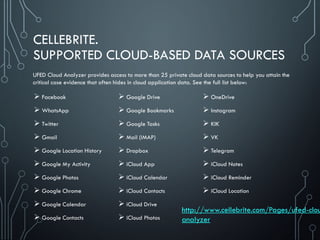
CELLEBRITE.
SUPPORTED CLOUD-BASED DATA SOURCES
 Facebook
 WhatsApp
 Twitter
 Gmail
 Google Location History
 Google My Activity
 Google Photos
 Google Chrome
 Google Calendar
 Google Contacts
 Google Drive
 Google Bookmarks
 Google Tasks
 Mail (IMAP)
 Dropbox
 iCloud App
 iCloud Calendar
 iCloud Contacts
 iCloud Drive
 iCloud Photos
 OneDrive
 Instagram
 KIK
 VK
 Telegram
 iCloud Notes
 iCloud Reminder
 iCloud Location
UFED Cloud Analyzer provides access to more than 25 private cloud data sources to help you attain the
critical case evidence that often hides in cloud application data. See the full list below:
http://www.cellebrite.com/Pages/ufed-clou
analyzer
MOBILE PROTECTION & ISSUES
1. Data 2. App 3. OS
4. Device 5. Network 6. Compliance
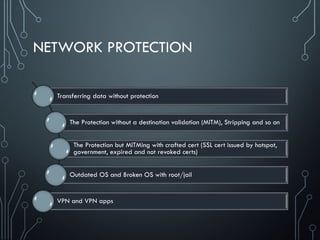
NETWORK PROTECTION
Transferring data without protection
The Protection without a destination validation (MITM), Stripping and so on
The Protection but MITMing with crafted cert (SSL cert issued by hotspot,
government, expired and not revoked certs)
Outdated OS and Broken OS with root/jail
VPN and VPN apps
HACKING PEOPLE USING PUBLIC WI-FI
http://www.downvids.net/using-public-wifi-is-not-as-safe-as-you-think-you-never-know-
who-is-watching-1110506.html
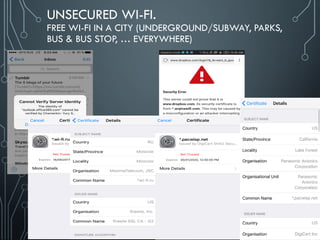
UNSECURED WI-FI.
FREE WI-FI IN A CITY (UNDERGROUND/SUBWAY, PARKS,
BUS & BUS STOP, … EVERYWHERE)
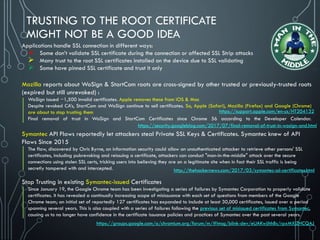
TRUSTING TO THE ROOT CERTIFICATE
MIGHT NOT BE A GOOD IDEA
Applications handle SSL connection in different ways:
 Some don’t validate SSL certificate during the connection or affected SSL Strip attacks
 Many trust to the root SSL certificates installed on the device due to SSL validating
 Some have pinned SSL certificate and trust it only
Mozilla reports about WoSign & StartCom roots are cross-signed by other trusted or previously-trusted roots
(expired but still unrevoked) :
WoSign issued ~1,500 invalid certificates. Apple removes these from iOS & Mac
Despite revoked CA’s, StartCom and WoSign continue to sell certificates. So, Apple (Safari), Mozilla (Firefox) and Google (Chrome)
are about to stop trusting them
Final removal of trust in WoSign and StartCom Certificates since Chrome 56 according to the Developer Calendar.
Symantec API Flaws reportedly let attackers steal Private SSL Keys & Certificates. Symantec knew of API
Flaws Since 2015
The flaw, discovered by Chris Byrne, an information security could allow an unauthenticated attacker to retrieve other persons' SSL
certificates, including pubrevoking and reissuing a certificate, attackers can conduct "man-in-the-middle" attack over the secure
connections using stolen SSL certs, tricking users into believing they are on a legitimate site when in fact their SSL traffic is being
secretly tampered with and intercepted.
Stop Trusting in existing Symantec-issued Certificates
Since January 19, the Google Chrome team has been investigating a series of failures by Symantec Corporation to properly validate
certificates. It has revealed a continually increasing scope of misissuance with each set of questions from members of the Google
Chrome team; an initial set of reportedly 127 certificates has expanded to include at least 30,000 certificates, issued over a period
spanning several years. This is also coupled with a series of failures following the previous set of misissued certificates from Symantec,
causing us to no longer have confidence in the certificate issuance policies and practices of Symantec over the past several years.
https://support.apple.com/en-us/HT204132
http://thehackernews.com/2017/03/symantec-ssl-certificates.html
https://security.googleblog.com/2017/07/final-removal-of-trust-in-wosign-and.html
https://groups.google.com/a/chromium.org/forum/m/#!msg/blink-dev/eUAKwjihhBs/rpxMXjZHCQAJ
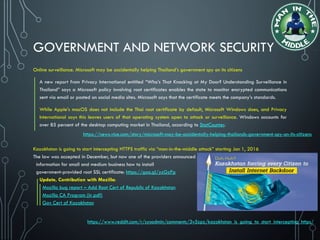
GOVERNMENT AND NETWORK SECURITY
Online surveillance. Microsoft may be accidentally helping Thailand’s government spy on its citizens
A new report from Privacy International entitled “Who’s That Knocking at My Door? Understanding Surveillance in
Thailand” says a Microsoft policy involving root certificates enables the state to monitor encrypted communications
sent via email or posted on social media sites. Microsoft says that the certificate meets the company’s standards.
While Apple’s macOS does not include the Thai root certificate by default, Microsoft Windows does, and Privacy
International says this leaves users of that operating system open to attack or surveillance. Windows accounts for
over 85 percent of the desktop computing market in Thailand, according to StatCounter.
Kazakhstan is going to start intercepting HTTPS traffic via “man-in-the-middle attack” starting Jan 1, 2016
The law was accepted in December, but now one of the providers announced
information for small and medium business how to install
government-provided root SSL certificate: https://goo.gl/yzGzPp
Update, Contribution with Mozilla:
Mozilla bug report – Add Root Cert of Republic of Kazakhstan
Mozilla CA Program (in pdf)
Gov Cert of Kazakhstan
https://news.vice.com/story/microsoft-may-be-accidentally-helping-thailands-government-spy-on-its-citizens
https://www.reddit.com/r/sysadmin/comments/3v5zpz/kazakhstan_is_going_to_start_intercepting_https/
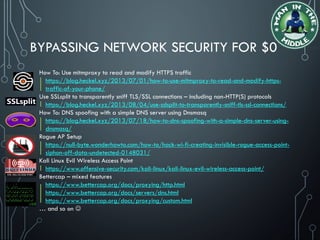
BYPASSING NETWORK SECURITY FOR $0
How To: Use mitmproxy to read and modify HTTPS traffic
https://blog.heckel.xyz/2013/07/01/how-to-use-mitmproxy-to-read-and-modify-https-
traffic-of-your-phone/
Use SSLsplit to transparently sniff TLS/SSL connections – including non-HTTP(S) protocols
https://blog.heckel.xyz/2013/08/04/use-sslsplit-to-transparently-sniff-tls-ssl-connections/
How To: DNS spoofing with a simple DNS server using Dnsmasq
https://blog.heckel.xyz/2013/07/18/how-to-dns-spoofing-with-a-simple-dns-server-using-
dnsmasq/
Rogue AP Setup
https://null-byte.wonderhowto.com/how-to/hack-wi-fi-creating-invisible-rogue-access-point-
siphon-off-data-undetected-0148031/
Kali Linux Evil Wireless Access Point
https://www.offensive-security.com/kali-linux/kali-linux-evil-wireless-access-point/
Bettercap – mixed features
https://www.bettercap.org/docs/proxying/http.html
https://www.bettercap.org/docs/servers/dns.html
https://www.bettercap.org/docs/proxying/custom.html
… and so on 
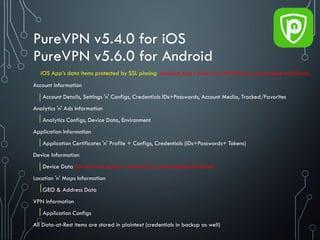
PureVPN v5.4.0 for iOS
PureVPN v5.6.0 for Android
Account Information
Account Details, Settings 'n' Configs, Credentials IDs+Passwords, Account Media, Tracked/Favorites
Analytics 'n' Ads Information
Analytics Configs, Device Data, Environment
Application Information
Application Certificates 'n' Profile + Configs, Credentials (IDs+Passwords+ Tokens)
Device Information
Device Data but network data is available by preinstalled certificate
Location 'n' Maps Information
GEO & Address Data
VPN Information
Application Configs
All Data-at-Rest items are stored in plaintext (credentials in backup as well)
iOS App’s data items protected by SSL pinning_Android App’s data item MITMed by preinstalled certificate
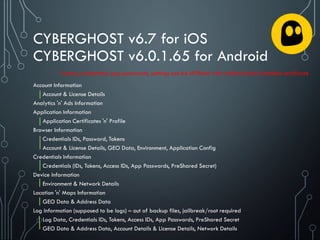
CYBERGHOST v6.7 for iOS
CYBERGHOST v6.0.1.65 for Android
Account Information
Account & License Details
Analytics 'n' Ads Information
Application Information
Application Certificates 'n' Profile
Browser Information
Credentials IDs, Password, Tokens
Account & License Details, GEO Data, Environment, Application Config
Credentials Information
Credentials (IDs, Tokens, Access IDs, App Passwords, PreShared Secret)
Device Information
Environment & Network Details
Location 'n' Maps Information
GEO Data & Address Data
Log Information (supposed to be logs) – out of backup files, jailbreak/root required
Log Data, Credentials IDs, Tokens, Access IDs, App Passwords, PreShared Secret
GEO Data & Address Data, Account Details & License Details, Network Details
License, credentials, app passwords, settings can be MITMed with crafted/stolen/installed certificate
MOBILE PROTECTION & ISSUES
1. Data 2. App 3. OS
4. Device 5. Network 6. Compliance
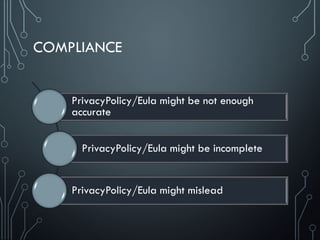
COMPLIANCE
PrivacyPolicy/Eula might be not enough
accurate
PrivacyPolicy/Eula might be incomplete
PrivacyPolicy/Eula might mislead
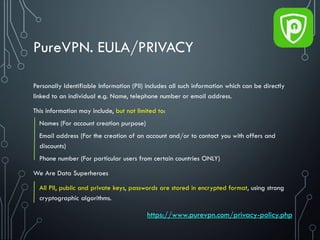
PureVPN. EULA/PRIVACY
Personally Identifiable Information (PII) includes all such information which can be directly
linked to an individual e.g. Name, telephone number or email address.
This information may include, but not limited to:
Names (For account creation purpose)
Email address (For the creation of an account and/or to contact you with offers and
discounts)
Phone number (For particular users from certain countries ONLY)
We Are Data Superheroes
All PII, public and private keys, passwords are stored in encrypted format, using strong
cryptographic algorithms.
https://www.purevpn.com/privacy-policy.php
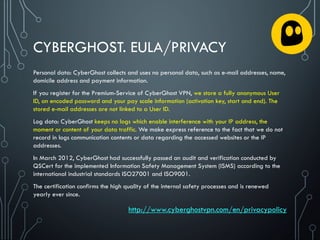
CYBERGHOST. EULA/PRIVACY
Personal data: CyberGhost collects and uses no personal data, such as e-mail addresses, name,
domicile address and payment information.
If you register for the Premium-Service of CyberGhost VPN, we store a fully anonymous User
ID, an encoded password and your pay scale information (activation key, start and end). The
stored e-mail addresses are not linked to a User ID.
Log data: CyberGhost keeps no logs which enable interference with your IP address, the
moment or content of your data traffic. We make express reference to the fact that we do not
record in logs communication contents or data regarding the accessed websites or the IP
addresses.
In March 2012, CyberGhost had successfully passed an audit and verification conducted by
QSCert for the implemented Information Safety Management System (ISMS) according to the
international industrial standards ISO27001 and ISO9001.
The certification confirms the high quality of the internal safety processes and is renewed
yearly ever since.
http://www.cyberghostvpn.com/en/privacypolicy
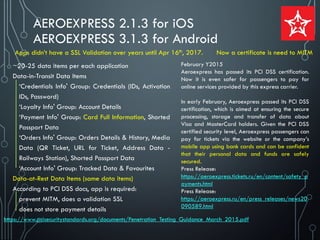
AEROEXPRESS 2.1.3 for iOS
AEROEXPRESS 3.1.3 for Android
~20-25 data items per each application
Data-in-Transit Data Items
‘Credentials Info' Group: Credentials (IDs, Activation
IDs, Password)
‘Loyalty Info' Group: Account Details
‘Payment Info' Group: Card Full Information, Shorted
Passport Data
‘Orders Info' Group: Orders Details & History, Media
Data (QR Ticket, URL for Ticket, Address Data -
Railways Station), Shorted Passport Data
‘Account Info' Group: Tracked Data & Favourites
Data-at-Rest Data Items (same data items)
According to PCI DSS docs, app is required:
prevent MITM, does a validation SSL
does not store payment details
Apps didn’t have a SSL Validation over years until Apr 16th, 2017. Now a certificate is need to MITM
https://www.pcisecuritystandards.org/documents/Penetration_Testing_Guidance_March_2015.pdf
February Y2015
Aeroexpress has passed its PCI DSS certification.
Now it is even safer for passengers to pay for
online services provided by this express carrier.
In early February, Aeroexpress passed its PCI DSS
certification, which is aimed at ensuring the secure
processing, storage and transfer of data about
Visa and MasterCard holders. Given the PCI DSS
certified security level, Aeroexpress passengers can
pay for tickets via the website or the company’s
mobile app using bank cards and can be confident
that their personal data and funds are safely
secured.
Press Release:
https://aeroexpress.tickets.ru/en/content/safety_p
ayments.html
Press Release:
https://aeroexpress.ru/en/press_releases/news20
090589.html
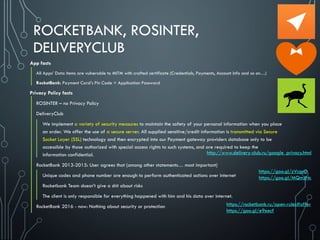
ROCKETBANK, ROSINTER,
DELIVERYCLUB
App facts
All Apps’ Data items are vulnerable to MITM with crafted certificate (Credentials, Payments, Account Info and so on…)
RocketBank: Payment Card’s Pin Code = Application Password
Privacy Policy facts
ROSINTER – no Privacy Policy
DeliveryClub
We implement a variety of security measures to maintain the safety of your personal information when you place
an order. We offer the use of a secure server. All supplied sensitive/credit information is transmitted via Secure
Socket Layer (SSL) technology and then encrypted into our Payment gateway providers database only to be
accessible by those authorized with special access rights to such systems, and are required to keep the
information confidential.
RocketBank 2013-2015: User agrees that (among other statements… most important)
Unique codes and phone number are enough to perform authenticated actions over internet
Rocketbank Team doesn’t give a shit about risks
The client is only responsible for everything happened with him and his data over internet.
RocketBank 2016 - now: Nothing about security or protection
http://www.delivery-club.ru/google_privacy.html
https://rocketbank.ru/open-rules#offer
https://goo.gl/e9eecf
https://goo.gl/zVcgnD
https://goo.gl/MQmzNc
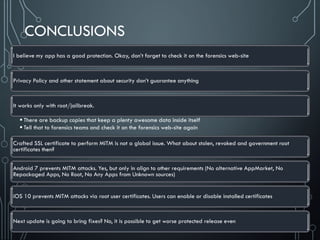
CONCLUSIONS
I believe my app has a good protection. Okay, don’t forget to check it on the forensics web-site
Privacy Policy and other statement about security don’t guarantee anything
It works only with root/jailbreak.
 There are backup copies that keep a plenty awesome data inside itself
 Tell that to forensics teams and check it on the forensics web-site again
Crafted SSL certificate to perform MITM is not a global issue. What about stolen, revoked and government root
certificates then?
Android 7 prevents MITM attacks. Yes, but only in align to other requirements (No alternative AppMarket, No
Repackaged Apps, No Root, No Any Apps from Unknown sources)
iOS 10 prevents MITM attacks via root user certificates. Users can enable or disable installed certificates
Next update is going to bring fixes? No, it is possible to get worse protected release even
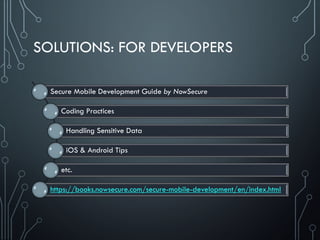
SOLUTIONS: FOR DEVELOPERS
Secure Mobile Development Guide by NowSecure
Coding Practices
Handling Sensitive Data
iOS & Android Tips
etc.
https://books.nowsecure.com/secure-mobile-development/en/index.html
SOLUTIONS: DATA PROTECTION DBs
We [as security experts] know what data is protected and not
protected despite of it’s locally stored, transferred or hardcoded
Also, we know two simple things
 not only users publish their data
 developers can’t protect data
At the same time we’re customers, right?
 I’m as a customer prefer and have a right to know where devices shouldn’t be
connected to network or plugged PC/Mac.
 Developers aren’t going to tell me if they fail. Instead they’re telling ‘everything is
OK but they're not responsible for anything’
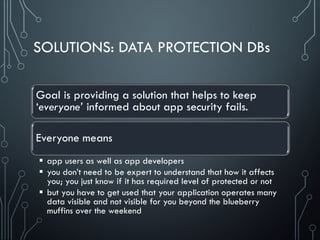
SOLUTIONS: DATA PROTECTION DBs
Goal is providing a solution that helps to keep
‘everyone’ informed about app security fails.
Everyone means
 app users as well as app developers
 you don’t need to be expert to understand that how it affects
you; you just know if it has required level of protected or not
 but you have to get used that your application operates many
data visible and not visible for you beyond the blueberry
muffins over the weekend
Vulnerabilities matter but exist over 40 years
Vulnerability is a defect/flaw in design in dev’s code or third party libraries
Lack of data protection is usually an insecurity by design and implementation fails
Even OWASP considers data protection as more important thing than vulnerabilities by now
Lack of data protection is described by 3 vulnerabilities in data protection
sensitive data leakage, storage, transmission CWE-200, CWE-312, CWE-319
PrivacyMeter gives answer about (at the moment)
list of apps and average values (Raw value, Environment value depend on OS)
list of app data items grouped by ‘protection levels/categories’
data item protection level and explanation
examination of privacy policy in regards to gained app results
Results are available on the web-site http://www.privacymeter.online/
Find the apps https://privacymeter.online/our-apps/
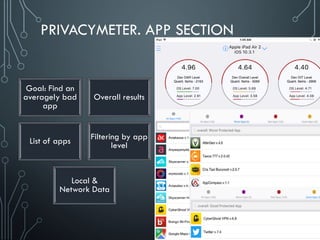
PRIVACYMETER. APP SECTION
Goal: Find an
averagely bad
app
Overall results
List of apps Filtering by app
level
Local &
Network Data
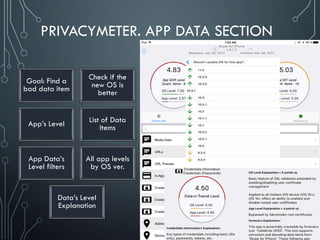
PRIVACYMETER. APP DATA SECTION
Goal: Find a
bad data item
Check if the
new OS is
better
App’s Level List of Data
Items
App Data’s
Level filters
All app levels
by OS ver.
Data’s Level
Explanation
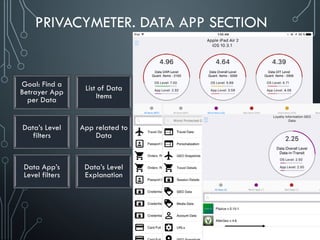
PRIVACYMETER. DATA APP SECTION
Goal: Find a
Betrayer App
per Data
List of Data
Items
Data’s Level
filters
App related to
Data
Data App’s
Level filters
Data’s Level
Explanation
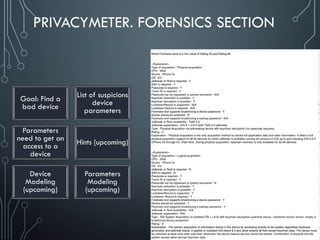
PRIVACYMETER. FORENSICS SECTION
Goal: Find a
bad device
List of suspicions
device
parameters
Parameters
need to get an
access to a
device
Hints (upcoming)
Device
Modeling
(upcoming)
Parameters
Modeling
(upcoming)
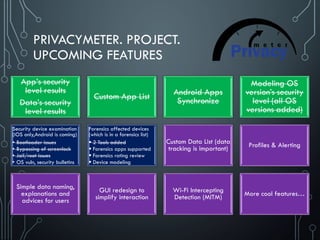
PRIVACYMETER. PROJECT.
UPCOMING FEATURES
App’s security
level results
Data’s security
level results
Custom App List Android Apps
Synchronize
Modeling OS
version’s security
level (all OS
versions added)
Security device examination
(iOS only,Android is coming)
• Bootloader issues
• Bypassing of screenlock
• Jail/root issues
• OS vuln, security bulletins
Forensics affected devices
(which is in a forensics list)
 2 Tools added
 Forensics apps supported
 Forensics rating review
 Device modeling
Custom Data List (data
tracking is important) Profiles & Alerting
Simple data naming,
explanations and
advices for users
GUI redesign to
simplify interaction
Wi-Fi Intercepting
Detection (MITM) More cool features…
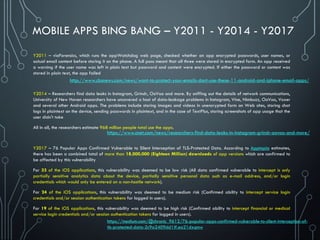
MOBILE APPS BING BANG – Y2011 - Y2014 - Y2017
Y2011 – viaForensics, which runs the appWatchdog web page, checked whether an app encrypted passwords, user names, or
actual email content before storing it on the phone. A full pass meant that all three were stored in encrypted form. An app received
a warning if the user name was left in plain text but password and content were encrypted. If either the password or content was
stored in plain text, the app failed
Y2014 – Researchers find data leaks in Instagram, Grindr, OoVoo and more. By sniffing out the details of network communications,
University of New Haven researchers have uncovered a host of data-leakage problems in Instagram, Vine, Nimbuzz, OoVoo, Voxer
and several other Android apps. The problems include storing images and videos in unencrypted form on Web sites, storing chat
logs in plaintext on the device, sending passwords in plaintext, and in the case of TextPlus, storing screenshots of app usage that the
user didn't take
All in all, the researchers estimate 968 million people total use the apps.
Y2017 – 76 Popular Apps Confirmed Vulnerable to Silent Interception of TLS-Protected Data. According to Apptopia estimates,
there has been a combined total of more than 18,000,000 (Eighteen Million) downloads of app versions which are confirmed to
be affected by this vulnerability
For 33 of the iOS applications, this vulnerability was deemed to be low risk (All data confirmed vulnerable to intercept is only
partially sensitive analytics data about the device, partially sensitive personal data such as e-mail address, and/or login
credentials which would only be entered on a non-hostile network).
For 24 of the iOS applications, this vulnerability was deemed to be medium risk (Confirmed ability to intercept service login
credentials and/or session authentication tokens for logged in users).
For 19 of the iOS applications, this vulnerability was deemed to be high risk (Confirmed ability to intercept financial or medical
service login credentials and/or session authentication tokens for logged in users).
https://www.cnet.com/news/researchers-find-data-leaks-in-instagram-grindr-oovoo-and-more/
https://medium.com/@chronic_9612/76-popular-apps-confirmed-vulnerable-to-silent-interception-of-
tls-protected-data-2c9a2409dd1#.ea21dxqmw
http://www.cbsnews.com/news/want-to-protect-your-emails-dont-use-these-11-android-and-iphone-email-apps/
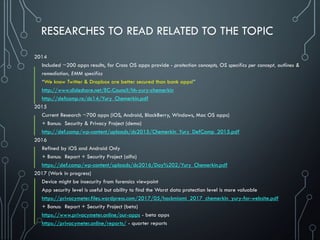
RESEARCHES TO READ RELATED TO THE TOPIC
2014
Included ~200 apps results, for Cross OS apps provide - protection concepts, OS specifics per concept, outlines &
remediation, EMM specifics
“We know Twitter & Dropbox are better secured than bank apps!”
http://www.slideshare.net/EC-Council/hh-yury-chemerkin
http://defcamp.ro/dc14/Yury_Chemerkin.pdf
2015
Current Research ~700 apps (iOS, Android, BlackBerry, Windows, Mac OS apps)
+ Bonus: Security & Privacy Project (demo)
http://def.camp/wp-content/uploads/dc2015/Chemerkin_Yury_DefCamp_2015.pdf
2016
Refined by iOS and Android Only
+ Bonus: Report + Security Project (alfa)
https://def.camp/wp-content/uploads/dc2016/Day%202/Yury_Chemerkin.pdf
2017 (Work in progress)
Device might be insecurity from forensics viewpoint
App security level is useful but ability to find the Worst data protection level is more valuable
https://privacymeter.files.wordpress.com/2017/05/hackmiami_2017_chemerkin_yury-for-website.pdf
+ Bonus: Report + Security Project (beta)
https://www.privacymeter.online/our-apps - beta apps
https://privacymeter.online/reports/ - quarter reports
THE RISE OF SECURITY ASSISTANTS
OVER SECURITY AUDIT SERVICES
HOW TO CONTACT ME ?
ADD ME IN LINKEDIN:
HTTPS://WWW.LINKEDIN.COM/IN/YURYCHEMERKIN
YURY CHEMERKIN
SEND A MAIL TO: YURY.S@CHEMERKIN.COM

DefCamp_2017_Conference_Chemerkin_Yury_-_full.pdf

  • 1.
    THE RISE OFSECURITY ASSISTANTS OVER SECURITY AUDIT SERVICES YURY CHEMERKIN MULTI-SKILLED SECURITY EXPERT
  • 2.
    YURY CHEMERKIN I haveten years of experience in information security. I‘m a multi-skilled security expert on security & compliance and mainly focused on privacy and leakage showdown. Key activity fields are EMM and Mobile &, Cloud Computing, IAM, Forensics & Compliance. I published many papers on mobile and cloud security, regularly appears at conferences such as CyberCrimeForum, HackerHalted, DefCamp, NullCon, OWASP, CONFidence, Hacktivity, Hackfest, DeepSec Intelligence, HackMiami, NotaCon, BalcCon, Intelligence-Sec, InfoSec NetSysAdmins, etc. LINKEDIN: HTTPS://WWW.LINKEDIN.COM/IN/YURYCHEMERKIN TWITTER: @YURYCHEMERKIN EMAIL: YURY.S@CHEMERKIN.COM
  • 3.
    MOBILE PROTECTION &ISSUES 1. Data 2. App 3. OS 4. Device 5. Network 6. Compliance
  • 4.
    MOBILE PROTECTION &ISSUES 1. Data 2. App 3. OS 4. Device 5. Network 6. Compliance
  • 5.
    UNDERSTANDING DATA PROTECTION Differentapps contain the same data values (same passwords, passport data, so on…) Some apps provides a worse protection level than other to protect particular data item If you use the same data (values), the worst app is your max protection level equals the minimum (worst) Valuable data is not only credentials, location, passport and bank data Valuable data is main data of app, like pics of Instagram, chats of Viber
  • 6.
    UNDERSTANDING DATA PROTECTIONOVER DIFFERENT APPS. NETWORK DATA ITEMS Travel Data, Location Data, User Profile Data No Protection SSL Pinning Meridian, Cris Taxi Bucuresti, Taxi apps (RU) Uber Taxi, Yandex Taxi
  • 7.
    UNDERSTANDING DATA PROTECTIONOVER DIFFERENT APPS. NETWORK DATA ITEMS Anywayanyday, Delta, Aeroflot, and iOS Sberbank British Airways, and Android Sberbank Any data MITM with crafted cert (trust to root certs) SSL Pinning ‘British Airways for iOS & Android’ have all data SSL Pinned, except booking data that MITMed with preinstalled/crafted CERT
  • 8.
    MOBILE PROTECTION &ISSUES 1. Data 2. App 3. OS 4. Device 5. Network 6. Compliance
  • 9.
    UNDERSTANDING APP DATAPROTECTION What is an overall security level of application (stored, transferred data) What one-time security changes were in app Tracking duplicates in same app but with different protection mechanisms AlterGeo, WeatherStreetStyle, Foursquare & Swarm, Facebook Messenger (Avatars) Plazius for iOS < 10+ Aeroexpress, Facebook (settings), FB Lite & FB Messenger Lite Foursquare & Swarm, Facebook, Facebook Messenger Plazius for iOS 10+ & Android
  • 10.
    UNDERSTANDING APP DATAPROTECTION What is an overall security level of application (stored, transferred data) What one-time security changes were in app Tracking duplicates in same app but with different protection mechanisms Own Protection: Skype SSL Pinning: Trello, eFax (media only) Trusting root certs (MITM possible): Trello, MoboMarket, eFax, Skype Plaintext: MoboMarket
  • 11.
    UNDERSTANDING APP DATAPROTECTION Decrease security level Increase security level Repeat until you’re satisfied  Bad Good Both 
  • 12.
    TRACKING APP DATAPROTECTION. EVERNOTE SSL Pinned (both) Not Pinned Android only Pinned Not Pinned (both) Before Summer/Autumn 2016 • Everything is PINNED, except • Social credentials of LinkedIn • Locally stored data • Accessible via iTunes incl. all DBs (iOS Only) Autumn 2016 – March 2017 • Everything is MITMed with preinstalled/crafted/stolen CERT • Location data is not protected (in plaintext) • Documents & Location Info: GEO Data & Address Data March 2017 – September 2017 • Android: Everything Pinned, incl. Location data (Docs & Location Info: GEO Data & Address Data) • iOS: Everything is MITMed with preinstalled/crafted/stolen CERT September 2017 – by now • iOS & Android: Everything is MITMed with preinstalled/crafted/stolen CERT
  • 13.
    Y2014 Media datatransferred as is without protection; hosted on AWS S3 Y2015 Media data transferred over HTTPS and hosted on Amazon Storage Service (AWS S3); Crafted cert to MITM needed Y2016 Media data transferred as is without protection and hosted on own Instagram storages Y2017 iOS: Media data transferred over HTTPS; Crafted cert to MITM needed Y2017 till Summer’17 Android: Media data transferred as is without protection; the rest data is SSL PINNED Y2017 since Summer Android: All data is SSL PINNED TRACKING APP DATA PROTECTION. INSTAGRAM NOT PROTECTED PROTECTED NOT PROTECTED ANDROID ~PROTECTED ANDROID PROTECTED
  • 14.
    UNDERSTANDING DATA &APP PROTECTION IN DETAILS (EXAMPLES) • Many examples were collected to go deeper • Check next slides 
  • 15.
    Powerful and Awfulapps AlterGeo – everything in plaintext, even credentials No updates since Spring Y2014 WeatherStreetStyle – everything in plaintext, even credentials Sending Credentials & Geo to the server each 30 second WeChat – own protection over HTTP, but location data related to Contact, Geo, address data, snapshots & place details incl. Messages are not protected (HTTP) MaxiTaxi (Ru), Taxi 777 (Ru), Fix Taxi (Ru), Meridian (Ro), Cris Taxi Bucuresti (Ro) Plaintext, even for credentials & payments Marriott, IHG: Booking Info is limited access by a time (no longer 180 days) IHG: Credentials encrypted (makes since for a local/backup, not for traffic) Flow & IFTTT: contains over 50% of personal data credentials/tokens, and data itself from linked services, such as Dropbox or mobile device GEO/network lists
  • 16.
    UNDERSTANDING DATA OVERAPPS PROTECTION. SAME DATA OVER DIFFERENT APPS. PASSPORT DETAILS ‘Anywayanyday for iOS & Android’ have all data MITMed with preinstalled/crafted CERT ‘Delta for iOS & Android’ have all data MITMed with preinstalled/crafted CERT ‘British Airways for iOS & Android’ have all data SSL Pinned, except booking data that MITMed with preinstalled/crafted CERT ‘Aeroflot for iOS & Android’ have all data MITMed with preinstalled/crafted CERT ‘Emirates for iOS & Android’ have all data MITMed with preinstalled/crafted CERT ‘Sberbank for iOS’ have all data MITMed with preinstalled/crafted CERT ‘Sberbank for Android’ have all data SSL Pinned
  • 17.
    TRACKING APP DATAPROTECTION. GOOGLE MAPS, TRELLO, SWARM, FOURSQUARE, PLAZIUS Google Maps: SSL Pinned to Not Pinned (MITM is available by crafted certificate) ~24-31 data items per each iOS & Android app Address Data (what you’re typing in search field) – was pinned Other items are still MITMed with crafted certificate Trello: SSL Pinned to Not Pinned (MITM is available by crafted certificate) ~25 data items per each application iOS & Android app – was pinned 'Credentials Info' Group: Credentials (IDs, Password) ‘Account Info' Group: Account Data, Media Data (Profile Images) ‘Tasks Info' Group: Tasks, Sync Docs, Doc List, URLs Foursquare & Swarm: Non-protected Media, iOS fixed – can MITMed via crafted cert ~30-40 data items per each application ‘Account Info’ Group: Media Data (Profile Images) – iOS & Android not fixed ‘Media Info’ Group: Place Details (Place & Building photos) – iOS fixed ‘Geo Info’ Group: Place Details (textual), Media Data (City photos) - iOS fixed Plazius: Random fixes ~20-25 data items per each application Apps written for iOS < 10 DO NOT HAVE a SSL validation Apps written for iOS 10+ only got fixes (MITM with crafted certificate still works) Android Apps HAVE a SSL Pinning Minor changes, something fixed, something broken
  • 18.
    TRACKING APP DATAPROTECTION. MOBOMARKET App v2 - SSL worked but MITM was possible (preinstalled cert?)  “We encrypt our services and data transmission using SSL”  “You’re responsible for privacy”. Just do it yourself  On March, 2016  Slide #48, http://goo.gl/wPfmgM Privacy Policy App v3 - Everything is in plaintext by HTTP, even APK installing  We adopt appropriate data collection, storage and processing practices and security measures to protect against unauthorized access, alteration, disclosure or destruction of your personal information, username, password, transaction information & data stored on Site  Official Website http://goo.gl/FYOXjE Privacy Policy (ANDROID ALT STORE) BEST IN CHINA & INDIA WENT TO HTTP / NO PROTECTION
  • 19.
    TRACKING APP DATAPROTECTION. AEROEXPRESS ~20-25 data items per each application Data-in-Transit Data Items ‘Credentials Info' Group: Credentials (IDs, Activation IDs, Password) ‘Loyalty Info' Group: Account Details ‘Payment Info' Group: Card Full Information, Shorted Passport Data ‘Orders Info' Group: Orders Details & History, Media Data (QR Ticket, URL for Ticket, Address Data - Railways Station), Shorted Passport Data ‘Account Info' Group: Tracked Data & Favourites Data-at-Rest Data Items (same data items) According to PCI DSS docs, app is required: prevent MITM, does a validation SSL does not store payment details No a SSL Validation over years until Apr 16th, 2017 Now a cert is needed to MITM https://www.pcisecuritystandards.org/documents/Penetration_Testing_Guidance_March_2015.pdf February Y2015 Aeroexpress has passed its PCI DSS certification. Now it is even safer for passengers to pay for online services provided by this express carrier. In early February, Aeroexpress passed its PCI DSS certification, which is aimed at ensuring the secure processing, storage and transfer of data about Visa and MasterCard holders. Given the PCI DSS certified security level, Aeroexpress passengers can pay for tickets via the website or the company’s mobile app using bank cards and can be confident that their personal data and funds are safely secured. Press Release: https://aeroexpress.tickets.ru/en/content/safety_p ayments.html Press Release: https://aeroexpress.ru/en/press_releases/news20 090589.html
  • 20.
    TRACKING APP DATAPROTECTION. eFax SSL Pinned (media files only) Not Pinned Before Summer/Autumn 2016  Media faxes are PINNED, except  Media URL of faxes, Credentials & rest data are MITMed (fake/crafted SSL Cert) Autumn 2016 – March 2017  MITM with preinstalled/crafted/stolen CERT  Applies to all data items March 2017 – September 2017  MITM with preinstalled/crafted/stolen CERT  Applies to all data items September 2017 – by now  MITM with preinstalled/crafted/stolen CERT  Applies to all data items
  • 21.
    TRACKING APP DATAPROTECTION ~60 data items per each application Application Information – MITMed, crafted cert is needed (fixed, now, SSL Pinned) Transaction History & Contact Short Profile Credentials (IDs), Credentials (Passwords) and Credentials (Tokens) Browser Information Preview Message Information GEO Data GEO Snapshots The rest Data-in-Transit data is SSL Pinned & Data-at-Rest data is in backup Account Information, Address Book 'n' Contact Information, Analytics 'n' Ads Information, Application Information, Credentials Information, Device Information, Events Information, Location 'n' Maps Information, Media Information, Social Information Media Data are in plaintext (Facebook Messenger) Cached profile images Facebook Pages Manager for Android – MITMed, crafted cert is needed (not SSL Pinned) All data items are affected May 2017 and older releases Not everything was SSL Pinned Summer and newer releases Everything is SSL Pinned
  • 22.
    MOBILE PROTECTION &ISSUES 1. Data 2. App 3. OS 4. Device 5. Network 6. Compliance
  • 23.
    UNDERSTAND OS IMPACTON DATA PROTECTION Data protection concepts (DPC) Implementation in iOS and Android Difference between OS releases/versions Quantification security issues into security levels
  • 24.
    UNDERSTAND OS IMPACTON DATA PROTECTION. ANDROID Incorrect implementation of backups Android 2.2+ (by dev), Android 6+ (autobackup) APK Downgrade Depends on supported apps & OS No backup before Android 2.2, Correct implementation of backup ‘Live’ encryption & own protection Depends on developers Network Storage Issues with SSL cert validatio n (MITM allowed) No issues with SSL certs, but no SSL Pinning SSL Pinning VPN (requires user action)
  • 25.
    UNDERSTAND OS IMPACTON DATA PROTECTION. iOS Incorrect implementation of backups iOS 4+ No jailbreak is need to access app data for iOS before iOS 8.3 Shared app data via iTunes No backup before iOS 4, Correct implementation of backup ‘Live’ encryption & own protection Depends on developers Issues with SSL cert validation (MITM allowed) No issues with SSL certs, but no SSL Pinning No system SSL Pinning; Cert Management and prevention non-system cert by default VPN (requires user action) Network Storage
  • 26.
    DATA PROTECTION CONCEPTS(DPC)  Locally stored data on internet or external storage. Data might divide into several parts, full data, backup data, and containerized data Data-at-Rest (DAR)  Data transmitted over Internet and local wireless network (as part of solid internet connection) and limited by it Data-in-Transit (DIT) Referred to data operated in internal memory (not storage) and application code, like hardcoded values Data-in-Use (DIU)
  • 27.
    COMMON WEAKNESS ORVULNERABILITIES IN DATA PROTECTION. EXCERPTs Sensitive data leakage [CWE-200]  Sensitive data leakage can be either inadvertent or side channel  Protection can be poorly implemented exposing it: Location; Owner ID info: name, number, device ID; Authentication credentials & tokens Target App Information is also sensitive (out of scope of CWE-200) Unsafe sensitive data storage [CWE-312] (Data-at-Rest)  Sensitive data should always be stored encrypted so that attackers cannot simply retrieve this data off the file system, especially on removable disk like micro SD card or public folders (out of scope of CWE-312) such as banking and payment system PIN numbers, credit card numbers, or online service passwords  There’s no excuse for sandboxing without encryption here Unsafe sensitive data transmission [CWE-319] (Data-in-Transit)  Data be encrypted in transmission lest it be eavesdropped by attackers e.g. in public Wi-Fi  If app implements SSL, it could fall victim to a downgrade attack degrading HTTPS to HTTP.  Another way SSL could be compromised is if the app does not fail on invalid certificates.  There’s no excuse for partial SSL validation here
  • 28.
    IMPLEMENTATION OF DPC.DATA-AT-REST  No special tools for viewing various data types  No root to gain an access to internal storage to the application data folder (works only for iOS older than 8.3) CVE-2015-1087  No root to gain an access backup data  Root to gain an access to internal storage to the keychain folder  Root to gain an access to internal storage to the application data folder (iOS 8.3 and higher)  Backup supported by iOS 4+  Having jailbreak for particular iOS version might give an opportunity to break device & grab data  Bypassing user-locks via lockdown records  No special tools for viewing various data types  Root to gain an access to internal storage.  No root to gain an access to external storage, public folders or backup data  Unlocking locked bootloader wipes all data on several devices, e.g. HTC  Backup supported by Android 2.2+ (manual by developer), Android 6+ (autobackup)  Non-locked or unlocked bootloader might give an opportunity to root a device, grab data or install malicious application and de-root it back, e.g. Samsung, LG (details, news, http://www.oxygen- forensic.com/en/events/news)  Bypassing user-locks via ADB, MTP enabled options
  • 29.
    QUANTIFICATION SECURITY LEVELS.DAR Non-Protected Protection N/A or Jailbroken iOS Encode Protected Encoded data (zlib, bas64, etc.) Weak Protected App Data access w/o jailbreak iOS <8.3 Obesity Protected Not Defined Medium Protected Data available via sharing, such as iTunes Interim Protected Access limited by time, e.g. cache folders Good Protected Sandbox, jailbreak/unlocking not wipe data Strong Protected Sandboxed data, jailbreak needs & wipe data Extra Protected No public tools for a jailbreak is available Best Protected Not Defined Protection N/A, rooted , public folders, SD cards Encoded data (zlib, bas64, etc.) Not Defined Not Defined Not Defined Access limited by time, e.g. cache folders Sandbox, root/unlocking not wipe data Sandboxed data, root needs & wipe data No public tools for a jailbreak is available Not Defined
  • 30.
    iOS & ANDROIDBACKUP Supports by iOS 4+ AutoBackup into iCloud of ‘Doc Folders’ Cached and temp directories are out of a backup scope Manual excluding, including Extractable by forensics tool including iClouds Supports by Android 2.2 (developer decides), Android 6+ (autobackup) 2.2+ - Backup in to ‘Android Backup Service’ 6+ - Autobackup into Google Drive limited by 25MB and locations: root - the directory on the filesystem where all private files belonging to this app are stored. file - directories returned by getFilesDir(). database - directories returned by getDatabasePath(). DBs created with SQLiteOpenHelper are stored here. sharedpref - the directory where SharedPreferences are stored. external - the directory returned by getExternalFilesDir() Cached, temp, nobackupfolder directories are of a backup scope Manual excluding, including Extractable by forensics tool from local backup file and Google Drive, possible from ‘Android Backup Service (?)
  • 31.
    iOS 8.3+. RESTRICTEDACCESS TO APP DATA WITHOUT JAILBREAK Since iOS 8.3 Apple fixed local data access issues: Access to the app folder without jailbreak Access to the app sub-folder like caches are not part of backup files Bypassing user-locks via lockdown records (synchronization with PC/Mac) Issue details CVE-2015-1087 https://support.apple.com/en-us/HT204661 http://iexplorer-support.macroplant.com/customer/portal/articles/1942869
  • 32.
    IMPLEMENTATION OF DPC.DATA-IN-TRANSIT App-level proxy app-level proxy overrides a system one Certificate management install/remove on/off is not available for Android OS-level proxy no app-level proxy, only system one Certificate management install/remove on/off, off (disabled) by default Preinstalled, crafted, stolen certificates to MITM – iOS < 10 iOS 10+ is same BUT gives you opportunity to manage active certificates and prevent non-system certificates activation by default Preinstalled, crafted, stolen certificates to MITM – Android < 7 Android 7+ - no active MITM (except HTTP and other non-protected protocols) is allowed Repack App with a right manifest file and re- upload it (even in public markets) Do not require a root for cases, such as non-protected traffic, no SSL validation even centralized list of certificates in the device MITM possible - fake/crafted/stolen SSL certificate installed as trusted Require root for cases, such as SSL Pinning to bypass it automatically or manually Rest cases that directly impacts on app code and mixed with reversing
  • 33.
    Non-Protected Protection N/A, Jailbroken,crafted certificate Protection N/A, rooted, crafted certificate Encode Protected Encoded data (zlib, bas64, etc.) Encoded data (zlib, bas64, etc.) Weak Protected Stolen or expired certificates Stolen or expired certificates Obesity Protected Not Defined Not defined Medium Protected Basic feature of SSL validation of certificates Basic feature of SSL validation of certificates Interim Protected Cert Management (turn on/off a certificate) App-level proxy/tunnel for internet Good Protected Not defined Anti-MITM unless insecured protocol/repacked app Strong Protected Not defined Not defined Extra Protected System and/or user VPN System and/or user VPN Best Protected Not Defined Not defined QUANTIFICATION SECURITY LEVELS. DIT Android 7+ only
  • 34.
    iOS 10+. ENABLEA USER ROOT CERT TO BYPASS A MANAGEABLE SYSTEM-WIDE ANTI-MITM TECHNOLOGY Default state is ‘disabled’ to prevent MITM, when cert is required to MITM attack, and not prevent when no cert is required That new enhancement prevents 3rd party to listen to network requests coming out of the app by allowing enable and disable root user certificates Apple introduced on iOS 10+ new network security enhancement.
  • 35.
    ANDROID 7+. ASYSTEM-WIDE ANTI-MITM TECHNOLOGY REPACK APK TO BYPASS Google introduced on Android 7.0 new network security enhancements. Those new enhancements prevents 3rd party to listen to network requests coming out of the app. More info: 1) https://developer.android.com/training/articles/security-config.html 2) http://android-developers.blogspot.com/2016/07/changes-to-trusted- certificate.html This script injects into the APK network security exceptions that allow 3rd party softwares, like Charles Proxy / Fidler to listen to the network requests and responses of the app. Download the script and the xml file and place them in the same directory. You will need apktool and android sdk installed. I recommend using brew on Mac to install apktool (brew install apktool) The script take 2 arguments: 1) Apk file path. 2) keystore file path (optional - Default is: ~/.android/debug.keystore ) Examples ./addSecurityExceptions.sh myApp.apkor./addSecurityExceptions.sh myApp.apk ~/.android/debug.keystore https://github.com/levyitay/AddSecurityExceptionAndroid <?xml version="1.0" encoding="utf-8"?> <network-security-config> <base-config> <trust-anchors> <certificates src="..."/> ... </trust-anchors> </base-config> <domain-config> <domain>android.com</domain> ... <trust-anchors> <certificates src="..."/> ... </trust-anchors> <pin-set> <pin digest="...">...</pin> ... </pin-set> </domain-config> ... <debug-overrides> <trust-anchors> <certificates src="..."/> ... </trust-anchors> </debug-overrides> </network-security-config>
  • 36.
    EXTENDING OS IMPACTON DATA PROTECTION Device – Many conditions to define whether device is enough secure OS • Outdate OS, UserLock Issues, Root/Jail, Bootloader (non-locked, unlocking program) Forensics • Physical, filesystem, logical access; bypassing userlocks, bootloader issues, root & jails Certificates – might burn down your security level of network data  Revoking, faking, spoofing, trusting by default, Government & public hotspots SSL certs Compliance  PrivacyPolicy/Eula, regulations
  • 37.
    MOBILE PROTECTION &ISSUES 1. Data 2. App 3. OS 4. Device 5. Network 6. Compliance
  • 38.
    UNDERSTAND DEVICE PROTECTION. DEVICEONLY Outdated OS UserLock Issues Root/Jail Bootloader (non-locked, unlocking program) Developer modes
  • 39.
    WHAT DEVICES AREINCLUDED INTO THE BOOTLOADER UNLOCK PROGRAM? Unlocking program of series Motorola Moto Z, G, X, E, Droid, Razr, Atrix, Electrify, Photon LG G4-6, V20, V10 Sony Xperia S, ion, U, P, sola, neo L, advance, acro S, miro, tipo, tipo dual, SL, Tablet S, J, TL Locked Bootloaders HTC One X, One X+, One X+ LTE, One S, One V, EVO 4G LTE, DROID Incredible 4G LTE, Desire C, Desire V Android Police: Up-to-date news on unlocking program Big list of supported ‘unlocking’ feature Google , Oppo, OnePlus, Yu, Zuk, ZTE, Le Eco, Xiaomi Sony, Samsung, HTC, Huawei, Motorola, Xiaomi ODIN, Fastboot unlocking Samsung, Google, LGE, Motorola, Huawei, Asus, HTC, NVIDIA iOS jailbreaks availability is a similar issue like unlocking iOS 1-5 (no jailbreak), 6, 7, 8, 9, 10; CPU x64, x32 https://motorola-global- portal.custhelp.com/app/answers/detail/a_id/87215 http://www.androidpolice.com/tags/bootloader-unlock/ http://developer.lge.com/resource/mobile/RetrieveBootloader.dev?categoryId=CTULRS0703 http://rescueroot.com/android/2012-phones-with-locked-bootloaders/ http://www.lineageosroms.org/forums/topic/unl ock-bootloader-android-phone-using-fastboot/ https://www.elcomsoft.com/eift.html https://autoroot.chainfire.eu/
  • 40.
    MOBILE PROTECTION &ISSUES 1. Data 2. App 3. OS 4. Device. Forensics 5. Network 6. Compliance
  • 41.
    UNDERSTAND DEVICE PROTECTION. FORENSICSSOFTWARE & OTHER TOOLS Physical, filesystem, logical acquisitions Bypassing userlocks Bootloader issues Root & Jails OS Vulnerabilities and misusing of OS security mechanisms
  • 42.
    MOBILE FORENSICS ACHIEVEMENTS MIGHTKILL YOUR SECURITY There are many device vendors multiplied by many operating systems even for iOS and Android:  More than 60 iOS versions are commercially available, and are spread among 20+ different iPhones, 30+ iPad models  More than 50+ Android versions are commercially available, and are spread among 180+ brands with thousands different device models Towards to mobile forensics there following data extractions divided into several categories and combinations  direct acquisition of system and user data and application-level acquisition of mobile app data  physical data acquisition  file system acquisition  logical acquisition of data, device backups and data in clouds and cloud backups Some acquisition might come with additional techniques like  bootloader and recovery partition acquisition (physical)  bypassing user screens (physical, file system, logical, trusted pc/mac synchronization files to bypass unlocking)  user-lock issues (brute-forcing device and backup password, disabled or not set password, so on)  acquisition of rooted or jailbroken devices for avoiding possible limitations  jailbreaking and rooting device for gaining access to the data for different acquisition types
  • 43.
    MOBILE FORENSICS: WHO VERSUSYOU? Elcomsoft: iOS, BlackBerry, Clouds, Bruteforcing (devices) Cellebrite: Android, also supports iOS, BlackBerry (devices & apps) Oxygen Forensics: Apps mainly and Android devices MobileEdit Forensics: Apps, iOS, Android, other device + iCloud
  • 44.
    MOBILE FORENSICS: HOW DATAIS ACQUIRED? Physical acquisition – all data + files + hidden + deleted FileSystem acquisition – all data + files + hidden Logical acquisition / Backup – all data + files Logical acquisition with Root/Jail = FileSystem Backup Extension - Downgrade apps to obtain more data
  • 45.
    DATA ACQUISITION Physical –It is a bit-to-bit copy of the device and allows recovering deleted data. It usually allows bypass user-locks and extract any data system files, user files, app data, any other files, plus hidden files and deleted data. File system – This method would extract files which are visible at file system level. It might allow bypass user-locks and extract any data system files, user files, app data, any other files, plus hidden files except deleted data. If there are some limitations, pre-broken devices via jailbreak or root as a case removes all limitations Logical – This method allows to extract particular files from the file system like backup taken using iTunes. This method without combining with offensive techniques does not allow to extract hidden or delete files and data, however, include rest data either system or user one, and app data.
  • 46.
    ANDROID FORENSICS: APK DOWNGRADE Theidea is behind of APK Downgrade is via Android Backup Apps store data in backup a little or too much information Some applications manufacturers made restrictions to what data can be acquired from their apps – store a little info Supported by Cellebrite, Mobiledit, Oxygen Depends on app and Android OS (might not work) Reinstall the older version without removing app data
  • 47.
    MOBILE FORENSICS: APPS SUPPORTEDBY FORENSICS SOFTWARE Forensics software can extract, decode and decrypt the data of mobile apps Cellebrite supports 4K+ app versions and 200+ unique apps for iOS & Android Oxygen Software supports 300+ unique apps for iOS & Android and 2K+ app versions MobileEdit supports 400+ unique apps
  • 48.
    ELCOMSOFT iOS FORENSIC. WHAT’SMATTER TO BREAK INTO DEVICE?  CPU  Device and Model  OS type and Version Device details:  Jailbreak/Root  Should Be Unlocked  Passcode/TouchID  Passcode Can Be Bypassed/Quickly Recovered  LockdownRecord Supported/Required  Device and/or Backup Password Bruteforced  Jailbreak/Root Available Required parameters
  • 49.
    ELCOMSOFT iOS FORENSIC. QUANTIFICATIONOF AN ATTACK’S EASINESS Logical Acquisition without device password (locked device & limited acquisition) Logical Acquisition of separately found a backup file (bruteforced backup password) Logical Acquisition (userlock issues - lockdown record, known, empty or bruteforced device password) File System Acquisition of outdated OS ( < 8.3) with keychain decryption (userlock issues - lockdown record, known, empty or bruteforced device password) Limited physical acquisition for jailbroken and locked iOS devices (no userlock issues - unknown passcode and cannot be unlocked) Physical Acquisition via jailbreaking without keychain decryption (userlock issues - lockdown record, known, empty or bruteforced device password) Physical Acquisition for jailbroken without keychain decryption (userlock issues - lockdown record, known, empty or bruteforced device password) Physical Acquisition via jailbreaking device with keychain decryption (no passcode requires) Physical Acquisition for jailbroken device with keychain decryption (no passcode requires) Completely fully acquisition and keychain decryption 9 8 7 6 5 4 3 2 1 0
  • 50.
    CELLEBRITE Android FORENSIC. WHAT’SMATTER TO BREAK INTO DEVICE?  CPU  Brand, Device and Model  OS type and Version  SecurityPatchLevel  Connection (USB/BT), GSM/CDMA Network, Chipsets (Mediatek, QUALCOMM, SPREADTRUM, HiSilicon …) – optional details Device details:  Jailbreak/Root  Should Be Unlocked, Should have ADB/MTK be Enabled  ADB/MTK  Bootloader, OEM unlock, Forensics Recovery images  Unlocked, Non-locked, Possible to Unlock  Bypassing/Disabling UserLock Required parameters
  • 51.
    CELLEBRITE ANDROID FORENSIC. QUANTIFICATIONOF AN ATTACK’S EASINESS Logical extraction (Apps data, backup, cloud backups) (No user-lock issues) Logical extraction (Apps data, backup, cloud backups) (UserLock Issues – User Lock is not set, is disabled, is bypassed, Password Extraction is possible, Bruteforcing) Logical extraction with Temporary Root (Temporary Root (ADB method, MTP method) File system extraction (Android Backup method) File system extraction (ADB method, MTP method) File system extraction (UserLock Issues – User Lock is not set, is disabled, is bypassed, Password Extraction is possible) Physical extraction (N/A, not recognized acquisitions) Physical extraction (ADB method, MTP method) Physical extraction (UserLock Issues –Lock is not set, is disabled, is bypassed, Password Extraction is possible) Physical extraction (Bootloader method, Recovery Partition method) 9 8 7 6 5 4 3 2 1 0
  • 52.
    FORENSICS EXAMPLES. iOS.iPAD AIR 2 Supported iOS version 8.1 – 11.2 Current Version is 11.1 (safe for a while)  Physical acquisition is possible for all version, except: 8.4.1, 9.3.4, 9.3.5, 10.2.1, 10.3, 10.3.1, 10.3.2, 10.3.3 For versions 9.2 – 9.3.3 there’s the list of ‘requires’: Jailbreak, passcode/touchID, should be unlocked Keychain extracted, but not decrypted PanGu jailbreak; 64-bit only No physical acquisition is possible for new devices shipped with iOS 11+ iPhone 8, iPhone 8 Plus, iPad 5
  • 53.
    FORENSICS EXAMPLES. iOS.iDevices (32 BIT) Supported iPhone 4s, iPad 2, iPad Mini - up to 9.3.5 iPhone 5, iPhone 5c, iPad 3, iPad 4 - up to 10.3.3 Current Version is 11.1 (safe for a while)  Physical acquisition is possible for all version, except: 10.0 – 10.3.3, and 11+ is not supported There’s the list of ‘requires’: Jailbreak, passcode/touchID – N/A, should not be unlocked Keychain extracted, and decrypted
  • 54.
    FORENSICS EXAMPLES. iOS. iDevices(64 bit – up to iOS 11.2) Supported iOS version 8.1 – 11.2 iPhone 5s, iPhone 6, iPhone 6 Plus, iPhone 6s, iPhone 6s Plus, iPhone SE iPad Mini 2, iPad Air, iPad Mini 3, iPad Air 2, iPad Mini 4, iPad Pro Physical acquisition is possible for all version, except: 8.4.1, 9.3.4, 9.3.5, 10.2.1, 10.3, 10.3.1, 10.3.2, 10.3.3 For versions 9.2 – 9.3.3 we’ve got the list of ‘requires’: Jailbreak, passcode/touchID, should be unlocked Keychain extracted, but not decrypted
  • 55.
    FORENSICS EXAMPLES. Android.CHECK IT OUT Huawei P8 GRA-L09 Huawei P9 EVA-L19 Huawei P10 VKY-L29 Samsung Galaxy A5 SM-A500FU Xiaomi Redmi Note 4 Redmi Note 4 Lenovo Vibe S1 Lenovo S1a40 Huawei Honor 5A LYO-L21 Asus Asus Zenfone 3 Max ZC520TL Asus_X008D Acer Iconia Tab A3-A11 Asus ZenFone 2 Laser (ZE500KL) Asus_X00ED Xiaomi Redmi 3 Redmi 3 Huawei Honor 7 PLK-L01 Xiaomi Redmi 3 Redmi 3 Sony Xperia Z5 compact E5823 Sony Xperia e5 F3311 Xiaomi Redmi 3S Redmi 3S Huawei Honor 5c NEM-L51 Nokia 1202
  • 56.
    FORENSICS EXAMPLES. Android. Honor5A, 5C Up-to-date Android OS is installed Models are looking for • Honor 5C NEM-L51 • Honor 5A LYO-L21 Model found: NEM-TL00 Honor 5C Supported since Cellebrite UFED 5.3 (last release 6.3) Acquisitions: • File system extraction • Logical Extraction N/A about additional requirements
  • 57.
    FORENSICS EXAMPLES. Android. HuaweiP8, P9, P10 Models are looking for  Huawei P8 GRA-L09  Huawei P9 EVA-L19  Huawei P10 VKY-L29 Huawei P8 GRA-L09  Acquisitions: File system extraction, Logical Extraction  Supported since Cellebrite UFED 4.2.2 (last release 6.3)  Acquisitions: Physical extraction while bypassing lock, Physical extraction  Supported since Cellebrite UFED 6.0 (last release 6.3) Huawei P9 EVA-L19 - Supported since Cellebrite UFED 5.1 (last release 6.3)  Acquisitions: File system extraction, Logical Extraction Similar Model found:  WAS-LX1A Huawei P10 Lite - Supported since Cellebrite UFED 6.2 (last release 6.3)  Acquisitions: File system extraction, Logical Extraction N/A about additional requirements
  • 58.
    FORENSICS EXAMPLES. Nokia 1202 Nota smartphone even Model found: Nokia 1202 Supported since Cellebrite UFED 1.8.0.0 (last release 6.3) Acquisitions: • Password extraction is possible
  • 59.
    FORENSICS EXAMPLES. Android. SamsungGalaxy, Sony Xperia, Asus Zenfone Samsung Galaxy A5 SM-A500FU  Acquisitions: Physical extraction while bypassing lock, Physical extraction, File system extraction, Logical Extraction  Supported since Cellebrite UFED 4.4 (last release 6.3) Sony Xperia Z5 compact E5823  Acquisitions: File system extraction, Logical Extraction  Supported since Cellebrite UFED 4.5 (last release 6.3) Sony Xperia E5 F3311  Acquisitions:  File system extraction, Logical Extraction - Supported since Cellebrite UFED 6.0 (last release 6.3)  Physical extraction (ADB), Physical extraction - Supported since Cellebrite UFED 6.1 (last release 6.3) Asus Zenfone 3 Max ZC520TL Asus_X008D  Acquisitions: File system extraction, Logical Extraction - Supported since Cellebrite UFED 6.0 (last release 6.3)  Acquisitions: Physical extraction while bypassing lock, Physical extraction - Supported since Cellebrite UFED 6.1 (last release 6.3) N/A about additional requirements, except ADB enabled for special cases
  • 60.
    FORENSICS EXAMPLES. Android. Acer,Asus Zenfone Acer Iconia Tab A3-A11– not found, but simliar B1- 770 Iconia One 7  Acquisitions: File system extraction, Logical Extraction  Supported since Cellebrite UFED 4.5 (last release 6.3) Asus ZenFone 2 Laser (ZE500KL) Asus_X00ED – not found, but simliar Z00TD Zenfone 2 Laser ZE551KL  Acquisitions:  File system extraction, Logical Extraction - Supported since Cellebrite UFED 6.0 (last release 6.3)  Physical extraction (ADB), Physical extraction - Supported since Cellebrite UFED 6.1 (last release 6.3) N/A about additional requirements, except ADB enabled for special cases
  • 61.
    FORENSICS CLOUD FEATURES Cellebrite UFEDCloud Analyzer provides access to more than 25 private cloud data sources to help you attain the critical case evidence that often hides in cloud application data. See the full list below: Facebook, WhatsApp, Twitter, Gmail, Google Location History, Google My Activity, Google Photos, Google Chrome, Google Calendar, Google Contacts, Google Drive, Google Bookmarks, Google Tasks, Mail (IMAP), Dropbox, iCloud App, iCloud Calendar, iCloud Contacts, iCloud Drive, iCloud Photos, OneDrive, Instagram, KIK, VK, Telegram, iCloud Notes, iCloud Reminder, iCloud Location Oxygen Forensic® Detective Oxygen Forensic® Detective acquires data from more than 30 cloud storages: iCloud contacts and calendar, Google Drive, Google Location History, Live contacts and calendar, OneDrive, Dropbox and Box as well as from a wide range of social media including Twitter and Instagram Elcomsoft Cloud eXplorer Acquire information from users’ Google Account with a simple all-in-one tool! Elcomsoft Cloud Explorer makes it easier to download, view and analyze information collected by the search giant, providing convenient access to users’ search and browsing history, page transitions, contacts, Google Keep notes, Hangouts messages, as well as images stored in the user’s Google Photos account. Elcomsoft Phone Breaker Cloud acquisition is an alternative way of retrieving information stored in mobile backups produced by Apple iOS, and the only method to explore Windows Phone 8 and Windows 10 Mobile devices. Elcomsoft Phone Breaker can retrieve information from Apple iCloud and Windows Live! services provided that original user credentials for that account are known. The Forensic edition of Elcomsoft Phone Breaker enables over-the-air acquisition of iCloud data without having the original Apple ID and password. Password-free access to iCloud data is made possible via the use of a binary authentication token extracted from the user’s computer. Elcomsoft Phone Breaker supports accounts with Apple's two-step verification as well as the new two-factor authentication. Access to the second authentication factor such as a trusted device or recovery key is required. You will only need to use it once as Elcomsoft Phone Breaker can save authentication credentials for future sessions. https://www.oxygen-forensic.com/en/products/oxygen-forensic-detective/detective/cloud-data-extraction http://www.cellebrite.com/Pages/ufed-cloud-analyzer https://www.elcomsoft.com/ecx.html https://www.elcomsoft.com/eppb.html
  • 62.
    ELCOMSOFT iOS FORENSICTOOLKIT Support for 32-bit and 64-bit iOS Devices All devices: Logical acquisition is available for all devices regardless of jailbreak status / iOS version. Supports lockdown files for accessing passcode-protected devices. Legacy: Unconditional physical acquisition support for legacy devices (iPhone 4 and older) regardless of iOS version and lock status 32-bit: Full physical acquisition support of jailbroken 32-bit devices running all versions of iOS up to and including iOS 9.3.3 (iPhone 4S through 5C, iPad mini) 64-bit: Physical acquisition for jailbroken 64-bit devices running any version of iOS for which a jailbreak is available (iPhone 5S, 6, 6S and their Plus versions, iPad mini 2 through 4, iPad Air, Air 2) iOS 9.3.4, 9.3.5, iOS 10.x: Logical acquisition only for iPhone 7, 7 Plus and all other devices running iOS 10 or versions of iOS 9 without jailbreak. Device must be unlocked with passcode, Touch ID or lockdown record Locked: Limited acquisition support for jailbroken 32-bit and 64-bit iOS devices that are locked with an unknown passcode and cannot be unlocked Compatible Devices and Platforms The Toolkit completely fully supports the following iOS devices, running all iOS versions up to iOS 7; no jailbreaking required, passcode can be bypassed or quickly recovered: iPhone (original), iPhone 3G, iPhone 3GS, iPhone 4 (GSM and CDMA models), iPad (1st generation), iPod Touch (1st - 4th generations) Physical acquisition is available for the following models (requires jailbreak with OpenSSH installed) iPhone 4S, iPhone 5, iPhone 5C, iPod Touch (5th gen), iPad 2, iPad with Retina display (3rd and 4th generations), iPad Mini The following (64-bit) models are supported via physical acquisition for 64-bit devices, regardless of iOS version (up to 9.3.3): iPhone 5S, iPhone 6, iPhone 6 Plus, iPhone 6S, iPhone 6S Plus, iPad Air, iPad Air 2, iPad Mini 2/3/4, iPad Pro All other devices including iPhone 7/7 Plus as well as devices running iOS 10.x, 9.3.4 and 9.3.5 are supported via logical acquisition (must be unlocked with passcode, Touch ID or lockdown record). Supported operating systems: iOS 1-5 (no jailbreak) iOS 6.0-6.1.2 (with evasi0n jailbreak) iOS 6.1.3-6.1.6 (with p0sixspwn jailbreak) iOS 7.0 (with evasi0n jailbreak) iOS 7.1 (with Pangu 1.2+ jailbreak) iOS 8.0-8.1.2 (with TaiG, PanGu or PP jailbreak) iOS 8.1.3-8.4 (with TaiG 2.0 jailbreak) iOS 9.0-9.1 (with PanGu jailbreak) iOS 9.2-9.3.3 (with PanGu jailbreak) x64 bit iOS 9.1-9.3.4 (with Home Depot jailbreak) x32 bit iOS 9.3.5 32bit (with Phoenix jailbreak) iOS 10.0. – 10.2 (with Yalu jailbreak) iOS 10.2.1-11.2 (via logical acquisition only) https://blog.elcomsoft.com/2017/01/ios-10-physical-acquisition-with-yalu-jailbreak/ https://www.elcomsoft.com/news/653.html https://www.elcomsoft.ru/news/674.html https://www.elcomsoft.es/PR/eift_170713_en.pdf Decrypt keychain items, extract, device keys (32-bit devices only) Keychain is extracted but cannot be decrypted with 64-bit device except the known / empty backup passcode; passcode must be removed in iOS settings Passcode is not required iOS 1.x-3.x: passcode not required. All information will be accessible. The original passcode will be instantly recovered and displayed. iOS 4.0-7.x: certain information is protected with passcode-dependent keys, including the following: Email messages; Most keychain records (stored login/password information); Certain third-party application data, if the application requested strong encryption. iOS 8.x through 10.x: most information is protected. Without the passcode, only very limited amount of data Call log that includes all incoming and outgoing calls (including FaceTime), Voicemail, All settings and options, List of installed apps, Many log files including download and update histories, service launch logs and many other system and application logs, Various temporary files Simple 4-digit passcodes recovered in 10-40 minutes https://www.elcomsoft.com/eift.html
  • 63.
    CELLEBRITE UNLOCKING CAPABILITIES CellebriteAdvanced Investigative Services (CAIS) experts provide law enforcement agencies with forensically sound, early access to sensitive mobile digital intelligence. Advanced Technical Services provide: Unlocking and extraction of Apple iPhone 4S, 5, 5C, 5S, 6, 6 Plus, iPad 2, 3, 4, iPad Air, iPad mini 1, 2, 3, 4, iPod touch 5G, 6G Unlocking and decrypted physical extraction of Samsung Galaxy S6, S6 edge, S6 edge+, S6 active, A5, A7, A8, J1, J7, Note 5, S7, S7 edge, S7 edge, S7 active Decrypted Physical extractions available for most models Limitations may apply based on iOS/Android version and Security patch level http://go.cellebrite.com/cais_unlock
  • 64.
    CELLEBRITE for iOS Cellebritecapabilities: Cellebrite's UFED Series enables forensically sound data extraction, decoding and analysis techniques to obtain existing and deleted data from these devices. Different ways to perform data extraction: Logical and file system (for unlocked devices) extraction is enabled on the UFED Touch Physical extraction and file system extraction (for locked devices) is enabled on the UFED Physical Analyzer Using UFED Physical Analyzer analysis can be performed on locked iOS devices with a simple or complex passcode. Simple passcodes will be recovered during the physical extraction process and enable access to emails and keychain passwords. If a complex password is set on the device, physical extraction can be performed without access to emails and keychain. However, if the complex password is known, emails and keychain passwords will be available. UFED Physical Analyzer capabilities include: Keychain real-time decryption enables access to account usernames and passwords Real-time decryption to interpret encrypted data from iOS 4-6 on-the-fly, obtaining access to data, files and application content Support for decrypting emails saved as emlx files Extract and present GPS fixes, Wi-Fi networks and cell towers IDs to be viewed in Google Earth and Google Maps Apps Data Support: Skype, Whatsapp, Viber, Fring, MotionX, AIM, TigerText, Facebook Messenger, Twitterrific, Textfree, Google+, Facebook, Foursquare, Garmin, TomTom, Waze, TextNow, Dropbox, Yahoo Messenger, Ping Chat, Twitter, Touch (new ping chat), Find My iPhone, LinkedIn, iCQ, Kik Messenger, Google Maps, Kakao talk, QIP, Evernote, Vkontakte, Mail.ru Device Support Includes: iPhone 2G, iPhone 3G, iPhone 3GS, iPhone 4, iPhone 4S, iPhone 5,iPhone 5S, iPhone 5C, iPhone 6, iPhone 6Plus, iPod Touch 1G, iPod Touch 2G, iPod Touch 3G, iPod Touch 4G, iPod Touch 5G, iPad Mini, iPad 1, iPad 2, iPad3, iPad 4 http://www.cellebrite.com/Pages/ios-forensics-physical-extraction-decoding-and-analysis-from-ios-devices
  • 65.
    CELLEBRITE iOS EXPLANATION TheUFED Touch/UFED 4PC obtains the Apple iTunes backup interface using its API, the Apple File Connection (AFC)— the same interface used to back up the device to a computer. File system extraction with UFED Physical Analyzer is almost identical to physical extraction in that it relies on a boot loader to access the device’s memory; however, rather than obtain a bit-for-bit image including unallocated space, the software extracts only the device file system. This process is proprietary rather than dependent on Apple’s API. UFED Physical Analyzer makes three different types of iTunes backup (“Advanced Logical”) extractions possible. Method 1 like the UFED Touch, relies on the iTunes backup using Apple’s backup infrastructure Method 2 extracts backup data if the device is encrypted and the UFED operator does not know the device passcode Method 3 is recommended for both encrypted and unencrypted jailbroken devices How does the examiner know which method to choose? The UFED Physical Analyzer interface automatically selects the appropriate extraction method — based on the device’s backup configuration, jailbreak status, model, and iOS version — but the operator has the option to use other methods as well, and to combine the data sets. The interface explains which data is available with each extraction method. Users should document which method(s) they used and why they used it, when possible. http://www.cellebrite.com/Media/Default/Files/Forensics/White-Papers/Explaining-Cellebrite-UFED-Data-Extraction-Processes.pdf
  • 66.
    CELLEBRITE for ANDROID Cellebritecapabilities Cellebrite's physical extraction method from more than 500 locked Android based devices bypassing any type of lock (Pattern/PIN/Password) and uses Cellebrite's proprietary boot loaders, enabling a forensically sound extraction process. Physical extraction from these devices can be done, regardless of their OS version, and does not require temporary rooting UFED can disable pattern/PIN/password locks on selected Samsung Android devices Physical extraction and advanced decoding, via USB debugging, for ALL Android OS versions including Android 4.X (Ice Cream Sandwich). Physical extraction for any locked device is only available if the USB debugging has been switched on Apps Data Support: Facebook, Facebook Messenger, Google+, PingChat! (aka Touch), Skype, Twitter, Viber, Yahoo Messenger, Whatsapp, TigerText, Dropbox, QIP, Kik Messenger, Evernote, Kakao Talk, ICQ, Vkontakte and more Device Support Includes: HTC – HTC Evo, HTC One, Incredible, Desire Motorola – Milestone, Milestone 2, Droid, Droid 2, Droid X, Droid Razr Razr Maxx, Defy and more Samsung – Galaxy S6, Galaxy 5S, Galaxy S4, Galaxy SIII Family, Galaxy SII, Galaxy Note, Galaxy Note II, Galaxy Mega and more ZTE – San Francisco, San Francisco II, V9 Optus, P729J and more LG – G4, G3, Optimus, Optimus one, Optimus 3D, Optimus black and more Tablets - Samsung Galaxy Tab, Huawei S7 Ideos, T-Touch Tab, Dell Streak, Mini 5, Motorola MZ601 XOOM, LG V900 Optimus Pad http://www.cellebrite.com/Pages/android-forensics-physical-extraction-and-decoding-from-android-devices
  • 67.
    CELLEBRITE. SUPPORTED CLOUD-BASED DATASOURCES  Facebook  WhatsApp  Twitter  Gmail  Google Location History  Google My Activity  Google Photos  Google Chrome  Google Calendar  Google Contacts  Google Drive  Google Bookmarks  Google Tasks  Mail (IMAP)  Dropbox  iCloud App  iCloud Calendar  iCloud Contacts  iCloud Drive  iCloud Photos  OneDrive  Instagram  KIK  VK  Telegram  iCloud Notes  iCloud Reminder  iCloud Location UFED Cloud Analyzer provides access to more than 25 private cloud data sources to help you attain the critical case evidence that often hides in cloud application data. See the full list below: http://www.cellebrite.com/Pages/ufed-clou analyzer
  • 68.
    MOBILE PROTECTION &ISSUES 1. Data 2. App 3. OS 4. Device 5. Network 6. Compliance
  • 69.
    NETWORK PROTECTION Transferring datawithout protection The Protection without a destination validation (MITM), Stripping and so on The Protection but MITMing with crafted cert (SSL cert issued by hotspot, government, expired and not revoked certs) Outdated OS and Broken OS with root/jail VPN and VPN apps
  • 70.
    HACKING PEOPLE USINGPUBLIC WI-FI http://www.downvids.net/using-public-wifi-is-not-as-safe-as-you-think-you-never-know- who-is-watching-1110506.html
  • 71.
    UNSECURED WI-FI. FREE WI-FIIN A CITY (UNDERGROUND/SUBWAY, PARKS, BUS & BUS STOP, … EVERYWHERE)
  • 72.
    TRUSTING TO THEROOT CERTIFICATE MIGHT NOT BE A GOOD IDEA Applications handle SSL connection in different ways:  Some don’t validate SSL certificate during the connection or affected SSL Strip attacks  Many trust to the root SSL certificates installed on the device due to SSL validating  Some have pinned SSL certificate and trust it only Mozilla reports about WoSign & StartCom roots are cross-signed by other trusted or previously-trusted roots (expired but still unrevoked) : WoSign issued ~1,500 invalid certificates. Apple removes these from iOS & Mac Despite revoked CA’s, StartCom and WoSign continue to sell certificates. So, Apple (Safari), Mozilla (Firefox) and Google (Chrome) are about to stop trusting them Final removal of trust in WoSign and StartCom Certificates since Chrome 56 according to the Developer Calendar. Symantec API Flaws reportedly let attackers steal Private SSL Keys & Certificates. Symantec knew of API Flaws Since 2015 The flaw, discovered by Chris Byrne, an information security could allow an unauthenticated attacker to retrieve other persons' SSL certificates, including pubrevoking and reissuing a certificate, attackers can conduct "man-in-the-middle" attack over the secure connections using stolen SSL certs, tricking users into believing they are on a legitimate site when in fact their SSL traffic is being secretly tampered with and intercepted. Stop Trusting in existing Symantec-issued Certificates Since January 19, the Google Chrome team has been investigating a series of failures by Symantec Corporation to properly validate certificates. It has revealed a continually increasing scope of misissuance with each set of questions from members of the Google Chrome team; an initial set of reportedly 127 certificates has expanded to include at least 30,000 certificates, issued over a period spanning several years. This is also coupled with a series of failures following the previous set of misissued certificates from Symantec, causing us to no longer have confidence in the certificate issuance policies and practices of Symantec over the past several years. https://support.apple.com/en-us/HT204132 http://thehackernews.com/2017/03/symantec-ssl-certificates.html https://security.googleblog.com/2017/07/final-removal-of-trust-in-wosign-and.html https://groups.google.com/a/chromium.org/forum/m/#!msg/blink-dev/eUAKwjihhBs/rpxMXjZHCQAJ
  • 73.
    GOVERNMENT AND NETWORKSECURITY Online surveillance. Microsoft may be accidentally helping Thailand’s government spy on its citizens A new report from Privacy International entitled “Who’s That Knocking at My Door? Understanding Surveillance in Thailand” says a Microsoft policy involving root certificates enables the state to monitor encrypted communications sent via email or posted on social media sites. Microsoft says that the certificate meets the company’s standards. While Apple’s macOS does not include the Thai root certificate by default, Microsoft Windows does, and Privacy International says this leaves users of that operating system open to attack or surveillance. Windows accounts for over 85 percent of the desktop computing market in Thailand, according to StatCounter. Kazakhstan is going to start intercepting HTTPS traffic via “man-in-the-middle attack” starting Jan 1, 2016 The law was accepted in December, but now one of the providers announced information for small and medium business how to install government-provided root SSL certificate: https://goo.gl/yzGzPp Update, Contribution with Mozilla: Mozilla bug report – Add Root Cert of Republic of Kazakhstan Mozilla CA Program (in pdf) Gov Cert of Kazakhstan https://news.vice.com/story/microsoft-may-be-accidentally-helping-thailands-government-spy-on-its-citizens https://www.reddit.com/r/sysadmin/comments/3v5zpz/kazakhstan_is_going_to_start_intercepting_https/
  • 74.
    BYPASSING NETWORK SECURITYFOR $0 How To: Use mitmproxy to read and modify HTTPS traffic https://blog.heckel.xyz/2013/07/01/how-to-use-mitmproxy-to-read-and-modify-https- traffic-of-your-phone/ Use SSLsplit to transparently sniff TLS/SSL connections – including non-HTTP(S) protocols https://blog.heckel.xyz/2013/08/04/use-sslsplit-to-transparently-sniff-tls-ssl-connections/ How To: DNS spoofing with a simple DNS server using Dnsmasq https://blog.heckel.xyz/2013/07/18/how-to-dns-spoofing-with-a-simple-dns-server-using- dnsmasq/ Rogue AP Setup https://null-byte.wonderhowto.com/how-to/hack-wi-fi-creating-invisible-rogue-access-point- siphon-off-data-undetected-0148031/ Kali Linux Evil Wireless Access Point https://www.offensive-security.com/kali-linux/kali-linux-evil-wireless-access-point/ Bettercap – mixed features https://www.bettercap.org/docs/proxying/http.html https://www.bettercap.org/docs/servers/dns.html https://www.bettercap.org/docs/proxying/custom.html … and so on 
  • 75.
    PureVPN v5.4.0 foriOS PureVPN v5.6.0 for Android Account Information Account Details, Settings 'n' Configs, Credentials IDs+Passwords, Account Media, Tracked/Favorites Analytics 'n' Ads Information Analytics Configs, Device Data, Environment Application Information Application Certificates 'n' Profile + Configs, Credentials (IDs+Passwords+ Tokens) Device Information Device Data but network data is available by preinstalled certificate Location 'n' Maps Information GEO & Address Data VPN Information Application Configs All Data-at-Rest items are stored in plaintext (credentials in backup as well) iOS App’s data items protected by SSL pinning_Android App’s data item MITMed by preinstalled certificate
  • 76.
    CYBERGHOST v6.7 foriOS CYBERGHOST v6.0.1.65 for Android Account Information Account & License Details Analytics 'n' Ads Information Application Information Application Certificates 'n' Profile Browser Information Credentials IDs, Password, Tokens Account & License Details, GEO Data, Environment, Application Config Credentials Information Credentials (IDs, Tokens, Access IDs, App Passwords, PreShared Secret) Device Information Environment & Network Details Location 'n' Maps Information GEO Data & Address Data Log Information (supposed to be logs) – out of backup files, jailbreak/root required Log Data, Credentials IDs, Tokens, Access IDs, App Passwords, PreShared Secret GEO Data & Address Data, Account Details & License Details, Network Details License, credentials, app passwords, settings can be MITMed with crafted/stolen/installed certificate
  • 77.
    MOBILE PROTECTION &ISSUES 1. Data 2. App 3. OS 4. Device 5. Network 6. Compliance
  • 78.
    COMPLIANCE PrivacyPolicy/Eula might benot enough accurate PrivacyPolicy/Eula might be incomplete PrivacyPolicy/Eula might mislead
  • 79.
    PureVPN. EULA/PRIVACY Personally IdentifiableInformation (PII) includes all such information which can be directly linked to an individual e.g. Name, telephone number or email address. This information may include, but not limited to: Names (For account creation purpose) Email address (For the creation of an account and/or to contact you with offers and discounts) Phone number (For particular users from certain countries ONLY) We Are Data Superheroes All PII, public and private keys, passwords are stored in encrypted format, using strong cryptographic algorithms. https://www.purevpn.com/privacy-policy.php
  • 80.
    CYBERGHOST. EULA/PRIVACY Personal data:CyberGhost collects and uses no personal data, such as e-mail addresses, name, domicile address and payment information. If you register for the Premium-Service of CyberGhost VPN, we store a fully anonymous User ID, an encoded password and your pay scale information (activation key, start and end). The stored e-mail addresses are not linked to a User ID. Log data: CyberGhost keeps no logs which enable interference with your IP address, the moment or content of your data traffic. We make express reference to the fact that we do not record in logs communication contents or data regarding the accessed websites or the IP addresses. In March 2012, CyberGhost had successfully passed an audit and verification conducted by QSCert for the implemented Information Safety Management System (ISMS) according to the international industrial standards ISO27001 and ISO9001. The certification confirms the high quality of the internal safety processes and is renewed yearly ever since. http://www.cyberghostvpn.com/en/privacypolicy
  • 81.
    AEROEXPRESS 2.1.3 foriOS AEROEXPRESS 3.1.3 for Android ~20-25 data items per each application Data-in-Transit Data Items ‘Credentials Info' Group: Credentials (IDs, Activation IDs, Password) ‘Loyalty Info' Group: Account Details ‘Payment Info' Group: Card Full Information, Shorted Passport Data ‘Orders Info' Group: Orders Details & History, Media Data (QR Ticket, URL for Ticket, Address Data - Railways Station), Shorted Passport Data ‘Account Info' Group: Tracked Data & Favourites Data-at-Rest Data Items (same data items) According to PCI DSS docs, app is required: prevent MITM, does a validation SSL does not store payment details Apps didn’t have a SSL Validation over years until Apr 16th, 2017. Now a certificate is need to MITM https://www.pcisecuritystandards.org/documents/Penetration_Testing_Guidance_March_2015.pdf February Y2015 Aeroexpress has passed its PCI DSS certification. Now it is even safer for passengers to pay for online services provided by this express carrier. In early February, Aeroexpress passed its PCI DSS certification, which is aimed at ensuring the secure processing, storage and transfer of data about Visa and MasterCard holders. Given the PCI DSS certified security level, Aeroexpress passengers can pay for tickets via the website or the company’s mobile app using bank cards and can be confident that their personal data and funds are safely secured. Press Release: https://aeroexpress.tickets.ru/en/content/safety_p ayments.html Press Release: https://aeroexpress.ru/en/press_releases/news20 090589.html
  • 82.
    ROCKETBANK, ROSINTER, DELIVERYCLUB App facts AllApps’ Data items are vulnerable to MITM with crafted certificate (Credentials, Payments, Account Info and so on…) RocketBank: Payment Card’s Pin Code = Application Password Privacy Policy facts ROSINTER – no Privacy Policy DeliveryClub We implement a variety of security measures to maintain the safety of your personal information when you place an order. We offer the use of a secure server. All supplied sensitive/credit information is transmitted via Secure Socket Layer (SSL) technology and then encrypted into our Payment gateway providers database only to be accessible by those authorized with special access rights to such systems, and are required to keep the information confidential. RocketBank 2013-2015: User agrees that (among other statements… most important) Unique codes and phone number are enough to perform authenticated actions over internet Rocketbank Team doesn’t give a shit about risks The client is only responsible for everything happened with him and his data over internet. RocketBank 2016 - now: Nothing about security or protection http://www.delivery-club.ru/google_privacy.html https://rocketbank.ru/open-rules#offer https://goo.gl/e9eecf https://goo.gl/zVcgnD https://goo.gl/MQmzNc
  • 83.
    CONCLUSIONS I believe myapp has a good protection. Okay, don’t forget to check it on the forensics web-site Privacy Policy and other statement about security don’t guarantee anything It works only with root/jailbreak.  There are backup copies that keep a plenty awesome data inside itself  Tell that to forensics teams and check it on the forensics web-site again Crafted SSL certificate to perform MITM is not a global issue. What about stolen, revoked and government root certificates then? Android 7 prevents MITM attacks. Yes, but only in align to other requirements (No alternative AppMarket, No Repackaged Apps, No Root, No Any Apps from Unknown sources) iOS 10 prevents MITM attacks via root user certificates. Users can enable or disable installed certificates Next update is going to bring fixes? No, it is possible to get worse protected release even
  • 84.
    SOLUTIONS: FOR DEVELOPERS SecureMobile Development Guide by NowSecure Coding Practices Handling Sensitive Data iOS & Android Tips etc. https://books.nowsecure.com/secure-mobile-development/en/index.html
  • 85.
    SOLUTIONS: DATA PROTECTIONDBs We [as security experts] know what data is protected and not protected despite of it’s locally stored, transferred or hardcoded Also, we know two simple things  not only users publish their data  developers can’t protect data At the same time we’re customers, right?  I’m as a customer prefer and have a right to know where devices shouldn’t be connected to network or plugged PC/Mac.  Developers aren’t going to tell me if they fail. Instead they’re telling ‘everything is OK but they're not responsible for anything’
  • 86.
    SOLUTIONS: DATA PROTECTIONDBs Goal is providing a solution that helps to keep ‘everyone’ informed about app security fails. Everyone means  app users as well as app developers  you don’t need to be expert to understand that how it affects you; you just know if it has required level of protected or not  but you have to get used that your application operates many data visible and not visible for you beyond the blueberry muffins over the weekend
  • 87.
    Vulnerabilities matter butexist over 40 years Vulnerability is a defect/flaw in design in dev’s code or third party libraries Lack of data protection is usually an insecurity by design and implementation fails Even OWASP considers data protection as more important thing than vulnerabilities by now Lack of data protection is described by 3 vulnerabilities in data protection sensitive data leakage, storage, transmission CWE-200, CWE-312, CWE-319 PrivacyMeter gives answer about (at the moment) list of apps and average values (Raw value, Environment value depend on OS) list of app data items grouped by ‘protection levels/categories’ data item protection level and explanation examination of privacy policy in regards to gained app results Results are available on the web-site http://www.privacymeter.online/ Find the apps https://privacymeter.online/our-apps/
  • 88.
    PRIVACYMETER. APP SECTION Goal:Find an averagely bad app Overall results List of apps Filtering by app level Local & Network Data
  • 89.
    PRIVACYMETER. APP DATASECTION Goal: Find a bad data item Check if the new OS is better App’s Level List of Data Items App Data’s Level filters All app levels by OS ver. Data’s Level Explanation
  • 90.
    PRIVACYMETER. DATA APPSECTION Goal: Find a Betrayer App per Data List of Data Items Data’s Level filters App related to Data Data App’s Level filters Data’s Level Explanation
  • 91.
    PRIVACYMETER. FORENSICS SECTION Goal:Find a bad device List of suspicions device parameters Parameters need to get an access to a device Hints (upcoming) Device Modeling (upcoming) Parameters Modeling (upcoming)
  • 92.
    PRIVACYMETER. PROJECT. UPCOMING FEATURES App’ssecurity level results Data’s security level results Custom App List Android Apps Synchronize Modeling OS version’s security level (all OS versions added) Security device examination (iOS only,Android is coming) • Bootloader issues • Bypassing of screenlock • Jail/root issues • OS vuln, security bulletins Forensics affected devices (which is in a forensics list)  2 Tools added  Forensics apps supported  Forensics rating review  Device modeling Custom Data List (data tracking is important) Profiles & Alerting Simple data naming, explanations and advices for users GUI redesign to simplify interaction Wi-Fi Intercepting Detection (MITM) More cool features…
  • 93.
    MOBILE APPS BINGBANG – Y2011 - Y2014 - Y2017 Y2011 – viaForensics, which runs the appWatchdog web page, checked whether an app encrypted passwords, user names, or actual email content before storing it on the phone. A full pass meant that all three were stored in encrypted form. An app received a warning if the user name was left in plain text but password and content were encrypted. If either the password or content was stored in plain text, the app failed Y2014 – Researchers find data leaks in Instagram, Grindr, OoVoo and more. By sniffing out the details of network communications, University of New Haven researchers have uncovered a host of data-leakage problems in Instagram, Vine, Nimbuzz, OoVoo, Voxer and several other Android apps. The problems include storing images and videos in unencrypted form on Web sites, storing chat logs in plaintext on the device, sending passwords in plaintext, and in the case of TextPlus, storing screenshots of app usage that the user didn't take All in all, the researchers estimate 968 million people total use the apps. Y2017 – 76 Popular Apps Confirmed Vulnerable to Silent Interception of TLS-Protected Data. According to Apptopia estimates, there has been a combined total of more than 18,000,000 (Eighteen Million) downloads of app versions which are confirmed to be affected by this vulnerability For 33 of the iOS applications, this vulnerability was deemed to be low risk (All data confirmed vulnerable to intercept is only partially sensitive analytics data about the device, partially sensitive personal data such as e-mail address, and/or login credentials which would only be entered on a non-hostile network). For 24 of the iOS applications, this vulnerability was deemed to be medium risk (Confirmed ability to intercept service login credentials and/or session authentication tokens for logged in users). For 19 of the iOS applications, this vulnerability was deemed to be high risk (Confirmed ability to intercept financial or medical service login credentials and/or session authentication tokens for logged in users). https://www.cnet.com/news/researchers-find-data-leaks-in-instagram-grindr-oovoo-and-more/ https://medium.com/@chronic_9612/76-popular-apps-confirmed-vulnerable-to-silent-interception-of- tls-protected-data-2c9a2409dd1#.ea21dxqmw http://www.cbsnews.com/news/want-to-protect-your-emails-dont-use-these-11-android-and-iphone-email-apps/
  • 94.
    RESEARCHES TO READRELATED TO THE TOPIC 2014 Included ~200 apps results, for Cross OS apps provide - protection concepts, OS specifics per concept, outlines & remediation, EMM specifics “We know Twitter & Dropbox are better secured than bank apps!” http://www.slideshare.net/EC-Council/hh-yury-chemerkin http://defcamp.ro/dc14/Yury_Chemerkin.pdf 2015 Current Research ~700 apps (iOS, Android, BlackBerry, Windows, Mac OS apps) + Bonus: Security & Privacy Project (demo) http://def.camp/wp-content/uploads/dc2015/Chemerkin_Yury_DefCamp_2015.pdf 2016 Refined by iOS and Android Only + Bonus: Report + Security Project (alfa) https://def.camp/wp-content/uploads/dc2016/Day%202/Yury_Chemerkin.pdf 2017 (Work in progress) Device might be insecurity from forensics viewpoint App security level is useful but ability to find the Worst data protection level is more valuable https://privacymeter.files.wordpress.com/2017/05/hackmiami_2017_chemerkin_yury-for-website.pdf + Bonus: Report + Security Project (beta) https://www.privacymeter.online/our-apps - beta apps https://privacymeter.online/reports/ - quarter reports
  • 95.
    THE RISE OFSECURITY ASSISTANTS OVER SECURITY AUDIT SERVICES HOW TO CONTACT ME ? ADD ME IN LINKEDIN: HTTPS://WWW.LINKEDIN.COM/IN/YURYCHEMERKIN YURY CHEMERKIN SEND A MAIL TO: YURY.S@CHEMERKIN.COM