1415
ELECTRIC COMPACT DECK OVEN
INSTALLATION - OPERATION - MAINTENANCE
BLODGETT OVEN COMPANY
www.blodgett.com
44 Lakeside Avenue, Burlington, Vermont 05401 USA Telephone: (802) 658-6600 Fax: (802)864-0183
PN 23326 Rev K (11/13)
© 2013 - G.S. Blodgett Corporation
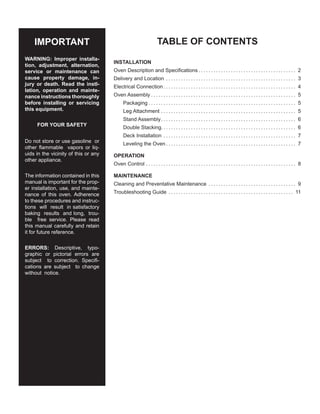
Your Service Agency’s Address:
Model
Serial number
Oven installed by
Installation checked by
TABLE OF CONTENTS
INSTALLATION
Oven Description and Specifications. . . . . . . . . . . . . . . . . . . . . . . . . . . . . . . . . . . . . . . . 2
Delivery and Location. . . . . . . . . . . . . . . . . . . . . . . . . . . . . . . . . . . . . . . . . . . . . . . . . . . . . 3
Electrical Connection. . . . . . . . . . . . . . . . . . . . . . . . . . . . . . . . . . . . . . . . . . . . . . . . . . . . . . 4
Oven Assembly. . . . . . . . . . . . . . . . . . . . . . . . . . . . . . . . . . . . . . . . . . . . . . . . . . . . . . . . . . . 5
Packaging. . . . . . . . . . . . . . . . . . . . . . . . . . . . . . . . . . . . . . . . . . . . . . . . . . . . . . . . . . . . 5
Leg Attachment. . . . . . . . . . . . . . . . . . . . . . . . . . . . . . . . . . . . . . . . . . . . . . . . . . . . . . . 5
Stand Assembly.. . . . . . . . . . . . . . . . . . . . . . . . . . . . . . . . . . . . . . . . . . . . . . . . . . . . . . 6
Double Stacking. . . . . . . . . . . . . . . . . . . . . . . . . . . . . . . . . . . . . . . . . . . . . . . . . . . . . . 6
Deck Installation. . . . . . . . . . . . . . . . . . . . . . . . . . . . . . . . . . . . . . . . . . . . . . . . . . . . . . 7
Leveling the Oven. . . . . . . . . . . . . . . . . . . . . . . . . . . . . . . . . . . . . . . . . . . . . . . . . . . . . 7
OPERATION
Oven Control. . . . . . . . . . . . . . . . . . . . . . . . . . . . . . . . . . . . . . . . . . . . . . . . . . . . . . . . . . . . . 8
MAINTENANCE
Cleaning and Preventative Maintenance. . . . . . . . . . . . . . . . . . . . . . . . . . . . . . . . . . . . 9
Troubleshooting Guide. . . . . . . . . . . . . . . . . . . . . . . . . . . . . . . . . . . . . . . . . . . . . . . . . . . 11
IMPORTANT
WARNING: Improper installa-
tion, adjustment, alternation,
service or maintenance can
cause property damage, in-
jury or death. Read the instl-
lation, operation and mainte-
nance instructions thoroughly
before installing or servicing
this equipment.
FOR YOUR SAFETY
Do not store or use gasoline or
other flammable vapors or liq-
uids in the vicinity of this or any
other appliance.
The information contained in this
manual is important for the prop-
er installation, use, and mainte-
nance of this oven. Adherence
to these procedures and instruc-
tions will result in satisfactory
baking results and long, trou-
ble free service. Please read
this manual carefully and retain
it for future reference.
ERRORS: Descriptive, typo-
graphic or pictorial errors are
subject to correction. Specifi-
cations are subject to change
without notice.
2
Installation
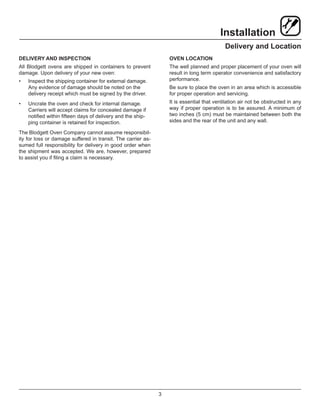
Oven Description and Specifications
ELECTRICAL RATINGS- 1415
VOLTAGE KW/SECTION PHASE
MAX LOAD (AMPS)
ELECTRICAL CONNECTION AWG*
L1 L2 L3
60 HZ
208 3.75 1 18 0 18 12
208 3.75 3 11 11 11 14
220-240 3.75 1 17 0 17 12
220-240 3.75 3 10 10 10 14
50 HZ
220-240 3.75 1 17 — 17 Size per local codes
NOTE:	 Double units can have phase loads partially equalized by matching lines during hook-up. Otherwise, load ratings are
double the above data.
Blodgett Deck ovens have set industry wide standards of
excellence for baking characteristics, performance and
reliability. They remain unsurpassed for product quality.
Simplicity of design and quality construction throughout
assure years of trouble free service when the equipment
is properly installed and maintained.
Features include a full angle iron frame, all welded radius
corners and stainless steel exteriors.
3
Installation
Delivery and Location
DELIVERY AND INSPECTION
All Blodgett ovens are shipped in containers to prevent
damage. Upon delivery of your new oven:
•	 Inspect the shipping container for external damage.
Any evidence of damage should be noted on the
delivery receipt which must be signed by the driver.
•	 Uncrate the oven and check for internal damage.
Carriers will accept claims for concealed damage if
notified within fifteen days of delivery and the ship-
ping container is retained for inspection.
The Blodgett Oven Company cannot assume responsibil-
ity for loss or damage suffered in transit. The carrier as-
sumed full responsibility for delivery in good order when
the shipment was accepted. We are, however, prepared
to assist you if filing a claim is necessary.
OVEN LOCATION
The well planned and proper placement of your oven will
result in long term operator convenience and satisfactory
performance.
Be sure to place the oven in an area which is accessible
for proper operation and servicing.
It is essential that ventilation air not be obstructed in any
way if proper operation is to be assured. A minimum of
two inches (5 cm) must be maintained between both the
sides and the rear of the unit and any wall.
4
Installation
Electrical Connection
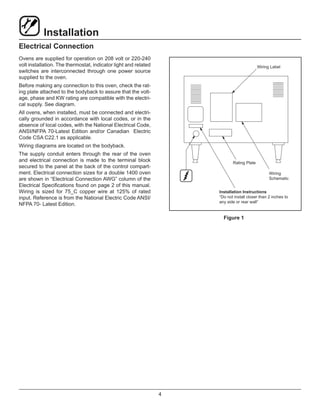
Ovens are supplied for operation on 208 volt or 220-240
volt installation. The thermostat, indicator light and related
switches are interconnected through one power source
supplied to the oven.
Before making any connection to this oven, check the rat-
ing plate attached to the bodyback to assure that the volt-
age, phase and KW rating are compatible with the electri-
cal supply. See diagram.
All ovens, when installed, must be connected and electri-
cally grounded in accordance with local codes, or in the
absence of local codes, with the National Electrical Code,
ANSI/NFPA 70-Latest Edition and/or Canadian Electric
Code CSA C22.1 as applicable.
Wiring diagrams are located on the bodyback.
The supply conduit enters through the rear of the oven
and electrical connection is made to the terminal block
secured to the panel at the back of the control compart-
ment. Electrical connection sizes for a double 1400 oven
are shown in “Electrical Connection AWG” column of the
Electrical Specifications found on page 2 of this manual.
Wiring is sized for 75_C copper wire at 125% of rated
input. Reference is from the National Electric Code ANSI/
NFPA 70- Latest Edition.
Wiring Label
Rating Plate
Wiring
Schematic
Installation Instructions
“Do not install closer than 2 inches to
any side or rear wall”
Figure 1
5
Installation
Oven Assembly
PACKAGING
Before assembly and installation of the oven, check that
all components have been received. In addition to the
oven, legs, decks and/or other accessories may be re-
quired.
Single Sections
•	 4” (10 cm) legs are shipped inside the oven, packed
in a separate carton.
•	 The decks are individually packaged and secured to
the oven back.
Double Sections
•	 4” (10 cm) legs are packed in lower sections.
•	 Spacer is shipped attached to the upper section.
•	 Securing plate to attach units together is located in
the upper section.
•	 The decks are packaged with each section.
LEG ATTACHMENT
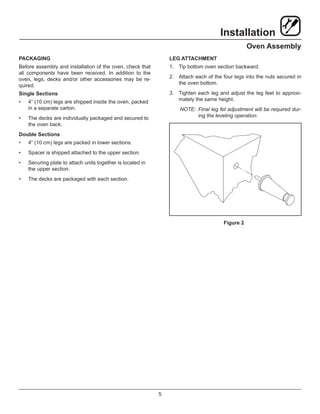
1.	 Tip bottom oven section backward.
2.	 Attach each of the four legs into the nuts secured in
the oven bottom.
3.	 Tighten each leg and adjust the leg feet to approxi-
mately the same height.
NOTE:	Final leg fet adjustment will be required dur-
ing the leveling operation.
Figure 2
6
Installation
Oven Assembly
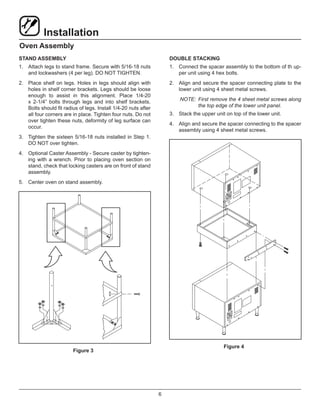
STAND ASSEMBLY
1.	 Attach legs to stand frame. Secure with 5/16-18 nuts
and lockwashers (4 per leg). DO NOT TIGHTEN.
2.	 Place shelf on legs. Holes in legs should align with
holes in shelf corner brackets. Legs should be loose
enough to assist in this alignment. Place 1/4-20
x 2-1/4” bolts through legs and into shelf brackets.
Bolts should fit radius of legs. Install 1/4-20 nuts after
all four corners are in place. Tighten four nuts. Do not
over tighten these nuts, deformity of leg surface can
occur.
3.	 Tighten the sixteen 5/16-18 nuts installed in Step 1.
DO NOT over tighten.
4.	 Optional Caster Assembly - Secure caster by tighten-
ing with a wrench. Prior to placing oven section on
stand, check that locking casters are on front of stand
assembly.
5.	 Center oven on stand assembly.
Figure 3
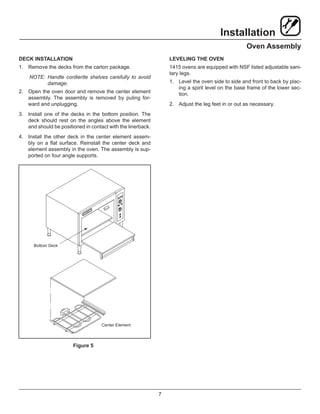
DOUBLE STACKING
1.	 Connect the spacer assembly to the bottom of th up-
per unit using 4 hex bolts.
2.	 Align and secure the spacer connecting plate to the
lower unit using 4 sheet metal screws.
NOTE:	 First remove the 4 sheet metal screws along
the top edge of the lower unit panel.
3.	 Stack the upper unit on top of the lower unit.
4.	 Align and secure the spacer connecting to the spacer
assembly using 4 sheet metal screws.
Figure 4
7
Installation
Oven Assembly
DECK INSTALLATION
1.	 Remove the decks from the carton package.
NOTE:	Handle cordierite shelves carefully to avoid
damage.
2.	 Open the oven door and remove the center element
assembly. The assembly is removed by puling for-
ward and unplugging.
3.	 Install one of the decks in the bottom position. The
deck should rest on the angles above the element
and should be positioned in contact with the linerback.
4.	 Install the other deck in the center element assem-
bly on a flat surface. Reinstall the center deck and
element assembly in the oven. The assembly is sup-
ported on four angle supports.
Bottom Deck
Center Element
Figure 5
LEVELING THE OVEN
1415 ovens are equipped with NSF listed adjustable sani-
tary legs.
1.	 Level the oven side to side and front to back by plac-
ing a spirit level on the base frame of the lower sec-
tion.
2.	 Adjust the leg feet in or out as necessary.
8
Operation
Oven Control
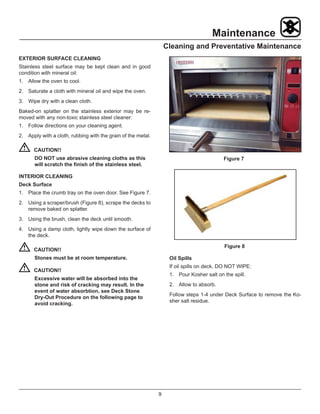
COMPONENT DESCRIPTION
1.	 POWER SWITCH - Controls the power to the oven.
2.	 DIGITAL DISPLAY - Displays the time, temperature
and controller related information.
3.	 DIAL - Turn to set the cook time and temperature.
4.	 START/STOP KEY - Press to start and stop the tim-
ing cycle.
5.	 TIME KEY - Press to enter the cook time.
6.	 TEMP KEY - Press to enter the cook temperature.
OPERATION
1.	 Toggle the POWER SWITCH (1) to OVEN ON.
2.	 Press the TEMP KEY (6) and turn the DIAL (3) to se-
lect the desired cook temperature.
3.	 When the display reads LOAD, press the TIME KEY
(5) and turn the DIAL (3) to select the desired cook
time.
4.	 Load product into the oven.
5.	 Press START/STOP KEY (4). The timer counts down
the set time. Upon completion of the set time, the
buzzer sounds and the display reads DONE.
6.	 Press the START/STOP KEY (4) to silence the buzz-
er.
7.	 To shut the oven off, toggle the POWER SWITCH (1)
to OFF.
OFF ON
HEAT
START
STOP
TIME TEMP
DISCONNECT THIS UNIT FROM THE SOURCE
OF SUPPLY BEFORE SERVICING
www.blodgett.com
1
2
3
4
5
6
Figure 6
9
Maintenance
Cleaning and Preventative Maintenance
EXTERIOR SURFACE CLEANING
Stainless steel surface may be kept clean and in good
condition with mineral oil:
1.	 Allow the oven to cool.
2.	 Saturate a cloth with mineral oil and wipe the oven.
3.	 Wipe dry with a clean cloth.
Baked-on splatter on the stainless exterior may be re-
moved with any non-toxic stainless steel cleaner:
1.	 Follow directions on your cleaning agent.
2.	 Apply with a cloth, rubbing with the grain of the metal.
	CAUTION!!
DO NOT use abrasive cleaning cloths as this
will scratch the finish of the stainless steel.
INTERIOR CLEANING
Deck Surface
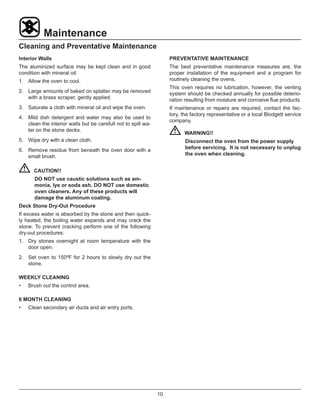
1.	 Place the crumb tray on the oven door. See Figure 7.
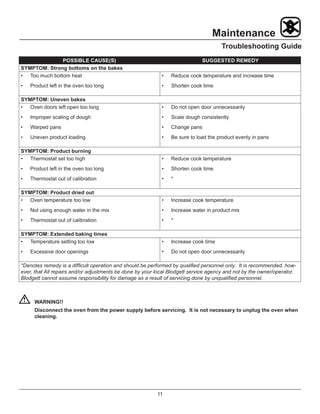
2.	 Using a scraper/brush (Figure 8), scrape the decks to
remove baked on splatter.
3.	 Using the brush, clean the deck until smooth.
4.	 Using a damp cloth, lightly wipe down the surface of
the deck.
	CAUTION!!
Stones must be at room temperature.
	CAUTION!!
Excessive water will be absorbed into the
stone and risk of cracking may result. In the
event of water absorbtion, see Deck Stone
Dry-Out Procedure on the following page to
avoid cracking.
Figure 7
Figure 8
Oil Spills
If oil spills on deck, DO NOT WIPE:
1.	 Pour Kosher salt on the spill.
2.	 Allow to absorb.
Follow steps 1-4 under Deck Surface to remove the Ko-
sher salt residue.
10
Maintenance
Cleaning and Preventative Maintenance
Interior Walls
The aluminized surface may be kept clean and in good
condition with mineral oil:
1.	 Allow the oven to cool.
2.	 Large amounts of baked on splatter may be removed
with a brass scraper, gently applied.
3.	 Saturate a cloth with mineral oil and wipe the oven.
4.	 Mild dish detergent and water may also be used to
clean the interior walls but be carefull not to spill wa-
ter on the stone decks.
5.	 Wipe dry with a clean cloth.
6.	 Remove residue from beneath the oven door with a
small brush.
	CAUTION!!
DO NOT use caustic solutions such as am-
monia, lye or soda ash. DO NOT use domestic
oven cleaners. Any of these products will
damage the aluminum coating.
Deck Stone Dry-Out Procedure
If excess water is absorbed by the stone and then quick-
ly heated, the boiling water expands and may crack the
stone. To prevent cracking perform one of the following
dry-out procedures:
1.	 Dry stones overnight at room temperature with the
door open.
2.	 Set oven to 150ºF for 2 hours to slowly dry out the
stone.
WEEKLY CLEANING
•	 Brush out the control area.
6 MONTH CLEANING
•	 Clean secondary air ducts and air entry ports.
PREVENTATIVE MAINTENANCE
The best preventative maintenance measures are, the
proper installation of the equipment and a program for
routinely cleaning the ovens.
This oven requires no lubrication, however, the venting
system should be checked annually for possible deterio-
ration resulting from moisture and corrosive flue products.
If maintenance or repairs are required, contact the fac-
tory, the factory representative or a local Blodgett service
company.
	WARNING!!
Disconnect the oven from the power supply
before servicing. It is not necessary to unplug
the oven when cleaning.
11
Maintenance
Troubleshooting Guide
POSSIBLE CAUSE(S) SUGGESTED REMEDY
SYMPTOM: Strong bottoms on the bakes
•	 Too much bottom heat
•	 Product left in the oven too long
•	 Reduce cook temperature and increase time
•	 Shorten cook time
SYMPTOM: Uneven bakes
•	 Oven doors left open too long
•	 Improper scaling of dough
•	 Warped pans
•	 Uneven product loading
•	 Do not open door unnecessarily
•	 Scale dough consistently
•	 Change pans
•	 Be sure to load the product evenly in pans
SYMPTOM: Product burning
•	 Thermostat set too high
•	 Product left in the oven too long
•	 Thermostat out of calibration
•	 Reduce cook temperature
•	 Shorten cook time
•	 *
SYMPTOM: Product dried out
•	 Oven temperature too low
•	 Not using enough water in the mix
•	 Thermostat out of calibration
•	 Increase cook temperature
•	 Increase water in product mix
•	 *
SYMPTOM: Extended baking times
•	 Temperature setting too low
•	 Excessive door openings
•	 Increase cook time
•	 Do not open door unnecessarily
*Denotes remedy is a difficult operation and should be performed by qualified personnel only. It is recommended, how-
ever, that All repairs and/or adjustments be done by your local Blodgett service agency and not by the owner/operator.
Blodgett cannot assume responsibility for damage as a result of servicing done by unqualified personnel.
		WARNING!!
Disconnect the oven from the power supply before servicing. It is not necessary to unplug the oven when
cleaning.

Deck oven

  • 1.
    1415 ELECTRIC COMPACT DECKOVEN INSTALLATION - OPERATION - MAINTENANCE BLODGETT OVEN COMPANY www.blodgett.com 44 Lakeside Avenue, Burlington, Vermont 05401 USA Telephone: (802) 658-6600 Fax: (802)864-0183 PN 23326 Rev K (11/13) © 2013 - G.S. Blodgett Corporation
  • 2.
    Your Service Agency’sAddress: Model Serial number Oven installed by Installation checked by
  • 3.
    TABLE OF CONTENTS INSTALLATION OvenDescription and Specifications. . . . . . . . . . . . . . . . . . . . . . . . . . . . . . . . . . . . . . . . 2 Delivery and Location. . . . . . . . . . . . . . . . . . . . . . . . . . . . . . . . . . . . . . . . . . . . . . . . . . . . . 3 Electrical Connection. . . . . . . . . . . . . . . . . . . . . . . . . . . . . . . . . . . . . . . . . . . . . . . . . . . . . . 4 Oven Assembly. . . . . . . . . . . . . . . . . . . . . . . . . . . . . . . . . . . . . . . . . . . . . . . . . . . . . . . . . . . 5 Packaging. . . . . . . . . . . . . . . . . . . . . . . . . . . . . . . . . . . . . . . . . . . . . . . . . . . . . . . . . . . . 5 Leg Attachment. . . . . . . . . . . . . . . . . . . . . . . . . . . . . . . . . . . . . . . . . . . . . . . . . . . . . . . 5 Stand Assembly.. . . . . . . . . . . . . . . . . . . . . . . . . . . . . . . . . . . . . . . . . . . . . . . . . . . . . . 6 Double Stacking. . . . . . . . . . . . . . . . . . . . . . . . . . . . . . . . . . . . . . . . . . . . . . . . . . . . . . 6 Deck Installation. . . . . . . . . . . . . . . . . . . . . . . . . . . . . . . . . . . . . . . . . . . . . . . . . . . . . . 7 Leveling the Oven. . . . . . . . . . . . . . . . . . . . . . . . . . . . . . . . . . . . . . . . . . . . . . . . . . . . . 7 OPERATION Oven Control. . . . . . . . . . . . . . . . . . . . . . . . . . . . . . . . . . . . . . . . . . . . . . . . . . . . . . . . . . . . . 8 MAINTENANCE Cleaning and Preventative Maintenance. . . . . . . . . . . . . . . . . . . . . . . . . . . . . . . . . . . . 9 Troubleshooting Guide. . . . . . . . . . . . . . . . . . . . . . . . . . . . . . . . . . . . . . . . . . . . . . . . . . . 11 IMPORTANT WARNING: Improper installa- tion, adjustment, alternation, service or maintenance can cause property damage, in- jury or death. Read the instl- lation, operation and mainte- nance instructions thoroughly before installing or servicing this equipment. FOR YOUR SAFETY Do not store or use gasoline or other flammable vapors or liq- uids in the vicinity of this or any other appliance. The information contained in this manual is important for the prop- er installation, use, and mainte- nance of this oven. Adherence to these procedures and instruc- tions will result in satisfactory baking results and long, trou- ble free service. Please read this manual carefully and retain it for future reference. ERRORS: Descriptive, typo- graphic or pictorial errors are subject to correction. Specifi- cations are subject to change without notice.
  • 4.
    2 Installation Oven Description andSpecifications ELECTRICAL RATINGS- 1415 VOLTAGE KW/SECTION PHASE MAX LOAD (AMPS) ELECTRICAL CONNECTION AWG* L1 L2 L3 60 HZ 208 3.75 1 18 0 18 12 208 3.75 3 11 11 11 14 220-240 3.75 1 17 0 17 12 220-240 3.75 3 10 10 10 14 50 HZ 220-240 3.75 1 17 — 17 Size per local codes NOTE: Double units can have phase loads partially equalized by matching lines during hook-up. Otherwise, load ratings are double the above data. Blodgett Deck ovens have set industry wide standards of excellence for baking characteristics, performance and reliability. They remain unsurpassed for product quality. Simplicity of design and quality construction throughout assure years of trouble free service when the equipment is properly installed and maintained. Features include a full angle iron frame, all welded radius corners and stainless steel exteriors.
  • 5.
    3 Installation Delivery and Location DELIVERYAND INSPECTION All Blodgett ovens are shipped in containers to prevent damage. Upon delivery of your new oven: • Inspect the shipping container for external damage. Any evidence of damage should be noted on the delivery receipt which must be signed by the driver. • Uncrate the oven and check for internal damage. Carriers will accept claims for concealed damage if notified within fifteen days of delivery and the ship- ping container is retained for inspection. The Blodgett Oven Company cannot assume responsibil- ity for loss or damage suffered in transit. The carrier as- sumed full responsibility for delivery in good order when the shipment was accepted. We are, however, prepared to assist you if filing a claim is necessary. OVEN LOCATION The well planned and proper placement of your oven will result in long term operator convenience and satisfactory performance. Be sure to place the oven in an area which is accessible for proper operation and servicing. It is essential that ventilation air not be obstructed in any way if proper operation is to be assured. A minimum of two inches (5 cm) must be maintained between both the sides and the rear of the unit and any wall.
  • 6.
    4 Installation Electrical Connection Ovens aresupplied for operation on 208 volt or 220-240 volt installation. The thermostat, indicator light and related switches are interconnected through one power source supplied to the oven. Before making any connection to this oven, check the rat- ing plate attached to the bodyback to assure that the volt- age, phase and KW rating are compatible with the electri- cal supply. See diagram. All ovens, when installed, must be connected and electri- cally grounded in accordance with local codes, or in the absence of local codes, with the National Electrical Code, ANSI/NFPA 70-Latest Edition and/or Canadian Electric Code CSA C22.1 as applicable. Wiring diagrams are located on the bodyback. The supply conduit enters through the rear of the oven and electrical connection is made to the terminal block secured to the panel at the back of the control compart- ment. Electrical connection sizes for a double 1400 oven are shown in “Electrical Connection AWG” column of the Electrical Specifications found on page 2 of this manual. Wiring is sized for 75_C copper wire at 125% of rated input. Reference is from the National Electric Code ANSI/ NFPA 70- Latest Edition. Wiring Label Rating Plate Wiring Schematic Installation Instructions “Do not install closer than 2 inches to any side or rear wall” Figure 1
  • 7.
    5 Installation Oven Assembly PACKAGING Before assemblyand installation of the oven, check that all components have been received. In addition to the oven, legs, decks and/or other accessories may be re- quired. Single Sections • 4” (10 cm) legs are shipped inside the oven, packed in a separate carton. • The decks are individually packaged and secured to the oven back. Double Sections • 4” (10 cm) legs are packed in lower sections. • Spacer is shipped attached to the upper section. • Securing plate to attach units together is located in the upper section. • The decks are packaged with each section. LEG ATTACHMENT 1. Tip bottom oven section backward. 2. Attach each of the four legs into the nuts secured in the oven bottom. 3. Tighten each leg and adjust the leg feet to approxi- mately the same height. NOTE: Final leg fet adjustment will be required dur- ing the leveling operation. Figure 2
  • 8.
    6 Installation Oven Assembly STAND ASSEMBLY 1. Attach legs to stand frame. Secure with 5/16-18 nuts and lockwashers (4 per leg). DO NOT TIGHTEN. 2. Place shelf on legs. Holes in legs should align with holes in shelf corner brackets. Legs should be loose enough to assist in this alignment. Place 1/4-20 x 2-1/4” bolts through legs and into shelf brackets. Bolts should fit radius of legs. Install 1/4-20 nuts after all four corners are in place. Tighten four nuts. Do not over tighten these nuts, deformity of leg surface can occur. 3. Tighten the sixteen 5/16-18 nuts installed in Step 1. DO NOT over tighten. 4. Optional Caster Assembly - Secure caster by tighten- ing with a wrench. Prior to placing oven section on stand, check that locking casters are on front of stand assembly. 5. Center oven on stand assembly. Figure 3 DOUBLE STACKING 1. Connect the spacer assembly to the bottom of th up- per unit using 4 hex bolts. 2. Align and secure the spacer connecting plate to the lower unit using 4 sheet metal screws. NOTE: First remove the 4 sheet metal screws along the top edge of the lower unit panel. 3. Stack the upper unit on top of the lower unit. 4. Align and secure the spacer connecting to the spacer assembly using 4 sheet metal screws. Figure 4
  • 9.
    7 Installation Oven Assembly DECK INSTALLATION 1. Remove the decks from the carton package. NOTE: Handle cordierite shelves carefully to avoid damage. 2. Open the oven door and remove the center element assembly. The assembly is removed by puling for- ward and unplugging. 3. Install one of the decks in the bottom position. The deck should rest on the angles above the element and should be positioned in contact with the linerback. 4. Install the other deck in the center element assem- bly on a flat surface. Reinstall the center deck and element assembly in the oven. The assembly is sup- ported on four angle supports. Bottom Deck Center Element Figure 5 LEVELING THE OVEN 1415 ovens are equipped with NSF listed adjustable sani- tary legs. 1. Level the oven side to side and front to back by plac- ing a spirit level on the base frame of the lower sec- tion. 2. Adjust the leg feet in or out as necessary.
  • 10.
    8 Operation Oven Control COMPONENT DESCRIPTION 1. POWER SWITCH - Controls the power to the oven. 2. DIGITAL DISPLAY - Displays the time, temperature and controller related information. 3. DIAL - Turn to set the cook time and temperature. 4. START/STOP KEY - Press to start and stop the tim- ing cycle. 5. TIME KEY - Press to enter the cook time. 6. TEMP KEY - Press to enter the cook temperature. OPERATION 1. Toggle the POWER SWITCH (1) to OVEN ON. 2. Press the TEMP KEY (6) and turn the DIAL (3) to se- lect the desired cook temperature. 3. When the display reads LOAD, press the TIME KEY (5) and turn the DIAL (3) to select the desired cook time. 4. Load product into the oven. 5. Press START/STOP KEY (4). The timer counts down the set time. Upon completion of the set time, the buzzer sounds and the display reads DONE. 6. Press the START/STOP KEY (4) to silence the buzz- er. 7. To shut the oven off, toggle the POWER SWITCH (1) to OFF. OFF ON HEAT START STOP TIME TEMP DISCONNECT THIS UNIT FROM THE SOURCE OF SUPPLY BEFORE SERVICING www.blodgett.com 1 2 3 4 5 6 Figure 6
  • 11.
    9 Maintenance Cleaning and PreventativeMaintenance EXTERIOR SURFACE CLEANING Stainless steel surface may be kept clean and in good condition with mineral oil: 1. Allow the oven to cool. 2. Saturate a cloth with mineral oil and wipe the oven. 3. Wipe dry with a clean cloth. Baked-on splatter on the stainless exterior may be re- moved with any non-toxic stainless steel cleaner: 1. Follow directions on your cleaning agent. 2. Apply with a cloth, rubbing with the grain of the metal. CAUTION!! DO NOT use abrasive cleaning cloths as this will scratch the finish of the stainless steel. INTERIOR CLEANING Deck Surface 1. Place the crumb tray on the oven door. See Figure 7. 2. Using a scraper/brush (Figure 8), scrape the decks to remove baked on splatter. 3. Using the brush, clean the deck until smooth. 4. Using a damp cloth, lightly wipe down the surface of the deck. CAUTION!! Stones must be at room temperature. CAUTION!! Excessive water will be absorbed into the stone and risk of cracking may result. In the event of water absorbtion, see Deck Stone Dry-Out Procedure on the following page to avoid cracking. Figure 7 Figure 8 Oil Spills If oil spills on deck, DO NOT WIPE: 1. Pour Kosher salt on the spill. 2. Allow to absorb. Follow steps 1-4 under Deck Surface to remove the Ko- sher salt residue.
  • 12.
    10 Maintenance Cleaning and PreventativeMaintenance Interior Walls The aluminized surface may be kept clean and in good condition with mineral oil: 1. Allow the oven to cool. 2. Large amounts of baked on splatter may be removed with a brass scraper, gently applied. 3. Saturate a cloth with mineral oil and wipe the oven. 4. Mild dish detergent and water may also be used to clean the interior walls but be carefull not to spill wa- ter on the stone decks. 5. Wipe dry with a clean cloth. 6. Remove residue from beneath the oven door with a small brush. CAUTION!! DO NOT use caustic solutions such as am- monia, lye or soda ash. DO NOT use domestic oven cleaners. Any of these products will damage the aluminum coating. Deck Stone Dry-Out Procedure If excess water is absorbed by the stone and then quick- ly heated, the boiling water expands and may crack the stone. To prevent cracking perform one of the following dry-out procedures: 1. Dry stones overnight at room temperature with the door open. 2. Set oven to 150ºF for 2 hours to slowly dry out the stone. WEEKLY CLEANING • Brush out the control area. 6 MONTH CLEANING • Clean secondary air ducts and air entry ports. PREVENTATIVE MAINTENANCE The best preventative maintenance measures are, the proper installation of the equipment and a program for routinely cleaning the ovens. This oven requires no lubrication, however, the venting system should be checked annually for possible deterio- ration resulting from moisture and corrosive flue products. If maintenance or repairs are required, contact the fac- tory, the factory representative or a local Blodgett service company. WARNING!! Disconnect the oven from the power supply before servicing. It is not necessary to unplug the oven when cleaning.
  • 13.
    11 Maintenance Troubleshooting Guide POSSIBLE CAUSE(S)SUGGESTED REMEDY SYMPTOM: Strong bottoms on the bakes • Too much bottom heat • Product left in the oven too long • Reduce cook temperature and increase time • Shorten cook time SYMPTOM: Uneven bakes • Oven doors left open too long • Improper scaling of dough • Warped pans • Uneven product loading • Do not open door unnecessarily • Scale dough consistently • Change pans • Be sure to load the product evenly in pans SYMPTOM: Product burning • Thermostat set too high • Product left in the oven too long • Thermostat out of calibration • Reduce cook temperature • Shorten cook time • * SYMPTOM: Product dried out • Oven temperature too low • Not using enough water in the mix • Thermostat out of calibration • Increase cook temperature • Increase water in product mix • * SYMPTOM: Extended baking times • Temperature setting too low • Excessive door openings • Increase cook time • Do not open door unnecessarily *Denotes remedy is a difficult operation and should be performed by qualified personnel only. It is recommended, how- ever, that All repairs and/or adjustments be done by your local Blodgett service agency and not by the owner/operator. Blodgett cannot assume responsibility for damage as a result of servicing done by unqualified personnel. WARNING!! Disconnect the oven from the power supply before servicing. It is not necessary to unplug the oven when cleaning.