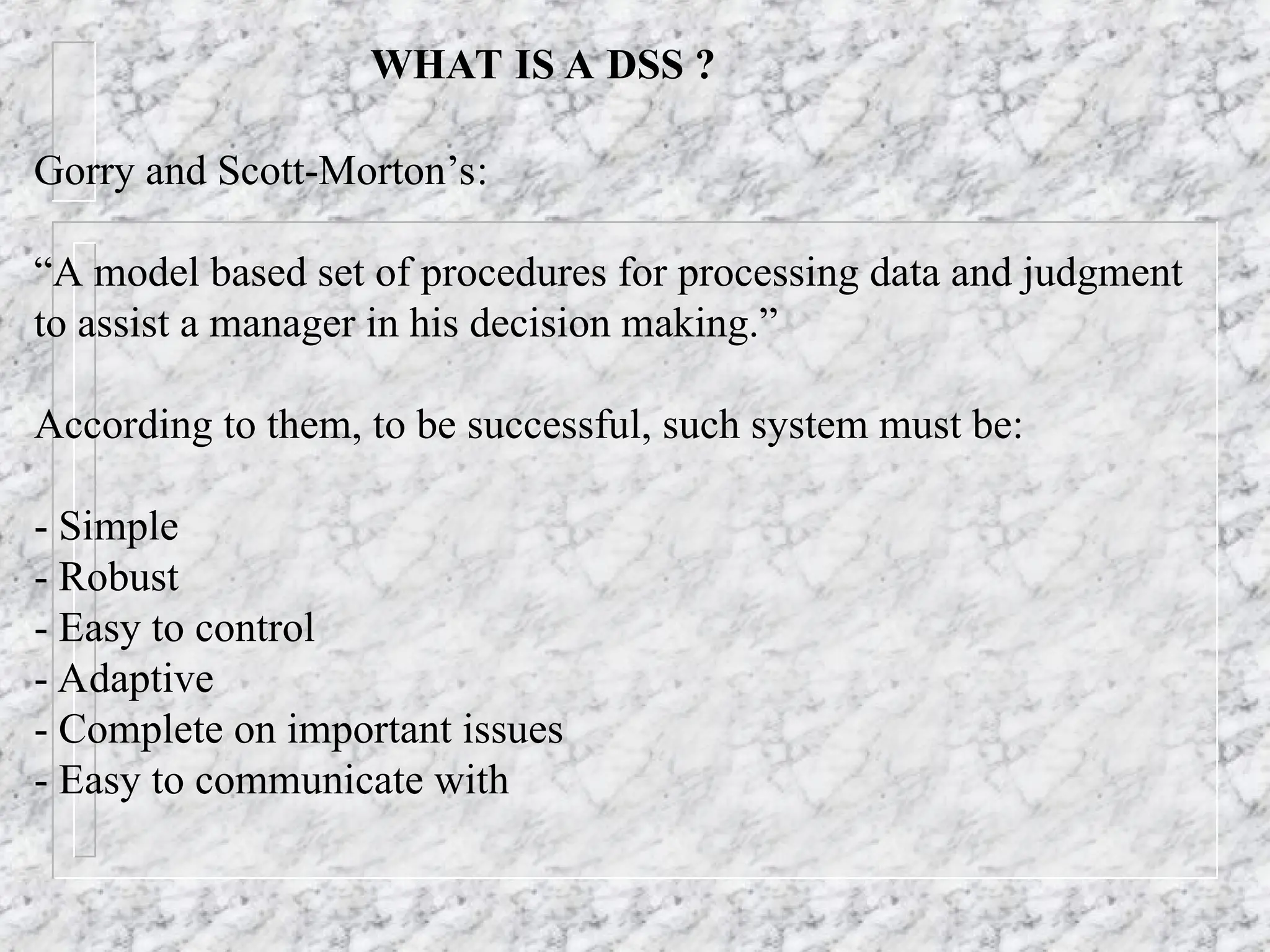
WHAT IS A DSS ?
Gorry and Scott-Morton’s:
“A model based set of procedures for processing data and judgment
to assist a manager in his decision making.”
According to them, to be successful, such system must be:
- Simple
- Robust
- Easy to control
- Adaptive
- Complete on important issues
- Easy to communicate with
Implicit in the definition is the assumption that :
- The system is computer-based.
- The system serves as an extension of the user’s problem solving
capabilities.
Gorry and Scott-Morton’s definition was accepted throughout most
of the 1970’s by practitioners and researchers.
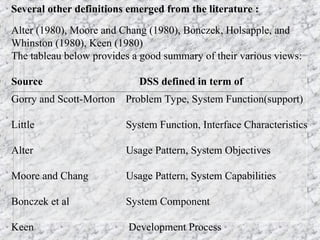
Several other definitions emerged from the literature :
Alter (1980), Moore and Chang (1980), Bonczek, Holsapple, and
Whinston (1980), Keen (1980)
The tableau below provides a good summary of their various views:
Source DSS defined in term of
________________________________________________________________________________________________________________________________________
Gorry and Scott-Morton Problem Type, System Function(support)
Little System Function, Interface Characteristics
Alter Usage Pattern, System Objectives
Moore and Chang Usage Pattern, System Capabilities
Bonczek et al System Component
Keen Development Process
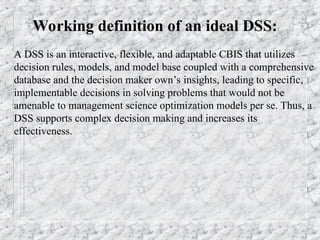
Working definition of an ideal DSS:
A DSS is an interactive, flexible, and adaptable CBIS that utilizes
decision rules, models, and model base coupled with a comprehensive
database and the decision maker own’s insights, leading to specific,
implementable decisions in solving problems that would not be
amenable to management science optimization models per se. Thus, a
DSS supports complex decision making and increases its
effectiveness.
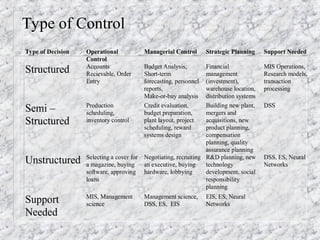
Type of Control
Type of Decision Operational
Control
Managerial Control Strategic Planning Support Needed
Structured Accounts
Recievable, Order
Entry
Budget Analysis,
Short-term
forecasting, personnel
reports,
Make-or-buy analysis
Financial
management
(investment),
warehouse location,
distribution systems
MIS Operations,
Research models,
transaction
processing
Semi –
Structured
Production
scheduling,
inventory control
Credit evaluation,
budget preparation,
plant layout, project
scheduling, reward
systems design
Building new plant,
mergers and
acquisitions, new
product planning,
compensation
planning, quality
assurance planning
DSS
Unstructured Selecting a cover for
a magazine, buying
software, approving
loans
Negotiating, recruiting
an executive, buying
hardware, lobbying
R&D planning, new
technology
development, social
responsibility
planning
DSS, ES, Neural
Networks
Support
Needed
MIS, Management
science
Management science,
DSS, ES, EIS
EIS, ES, Neural
Networks
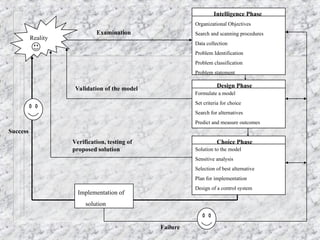
Reality
Intelligence Phase
Organizational Objectives
Search and scanning procedures
Data collection
Problem Identification
Problem classification
Problem statement
Design Phase
Formulate a model
Set criteria for choice
Search for alternatives
Predict and measure outcomes
Choice Phase
Solution to the model
Sensitive analysis
Selection of best alternative
Plan for implementation
Design of a control system
Examination
Validation of the model
Implementation of
solution
Failure
Verification, testing of
proposed solution
Success
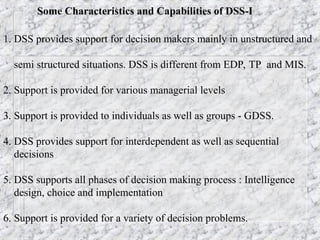
Some Characteristics and Capabilities of DSS-I
1. DSS provides support for decision makers mainly in unstructured and
semi structured situations. DSS is different from EDP, TP and MIS.
2. Support is provided for various managerial levels
3. Support is provided to individuals as well as groups - GDSS.
4. DSS provides support for interdependent as well as sequential
decisions
5. DSS supports all phases of decision making process : Intelligence
design, choice and implementation
6. Support is provided for a variety of decision problems.
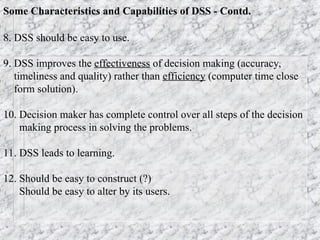
Some Characteristics and Capabilities of DSS - Contd.
8. DSS should be easy to use.
9. DSS improves the effectiveness of decision making (accuracy,
timeliness and quality) rather than efficiency (computer time close
form solution).
10. Decision maker has complete control over all steps of the decision
making process in solving the problems.
11. DSS leads to learning.
12. Should be easy to construct (?)
Should be easy to alter by its users.
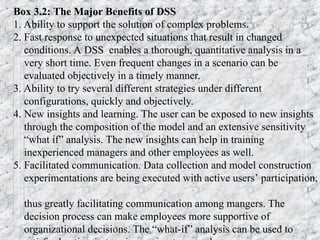
Box 3.2: The Major Benefits of DSS
1. Ability to support the solution of complex problems.
2. Fast response to unexpected situations that result in changed
conditions. A DSS enables a thorough, quantitative analysis in a
very short time. Even frequent changes in a scenario can be
evaluated objectively in a timely manner.
3. Ability to try several different strategies under different
configurations, quickly and objectively.
4. New insights and learning. The user can be exposed to new insights
through the composition of the model and an extensive sensitivity
“what if” analysis. The new insights can help in training
inexperienced managers and other employees as well.
5. Facilitated communication. Data collection and model construction
experimentations are being executed with active users’ participation,
thus greatly facilitating communication among mangers. The
decision process can make employees more supportive of
organizational decisions. The “what-if” analysis can be used to
Box 3.2: The Major Benefits of DSS-continued
6. Improved management control and performance. DSS can increase
management control over expenditures and improve performance of
the organization.
7. Cost savings. Routine applications of a DSS may result in
considerable cost reduction, or in reducing (eliminating) the cost of
wrong decisions.
8. Objective decisions. The decisions derived from DSS are more
consistent and objective than decisions made intuitively.
9. Improving managerial effectiveness, allowing managers to perform a
task in less time and/or with less effort. The DSS provides managers
with more “quality” time for analysis, planning, and implementation.
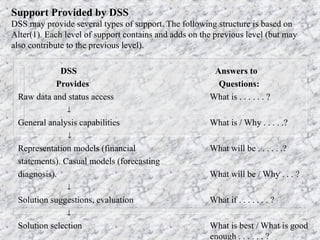
Support Provided by DSS
DSS may provide several types of support. The following structure is based on
Alter(1). Each level of support contains and adds on the previous level (but may
also contribute to the previous level).
DSS Answers to
Provides Questions:
Raw data and status access What is . . . . . . ?

General analysis capabilities What is / Why . . . . .?

Representation models (financial What will be . . . . . .?
statements). Casual models (forecasting
diagnosis). What will be / Why . . . ?

Solution suggestions, evaluation What if . . . . . . . ?

Solution selection What is best / What is good
enough . . . . . . ?
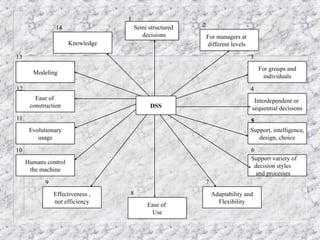
DSS
Semi structured
decisions For managers at
different levels
For groups and
individuals
Interdependent or
sequential decisions
Support, intelligence,
design, choice
Support variety of
decision styles
and processes
Adaptability and
Flexibility
Evolutionary
usage
Humans control
the machine
Effectiveness ,
not efficiency
Ease of
Use
Modeling
Ease of
construction
Knowledge
1
2
3
4
5
6
7
5
8
9
10
11
12
13
14
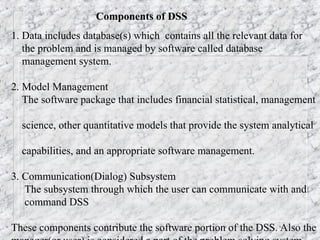
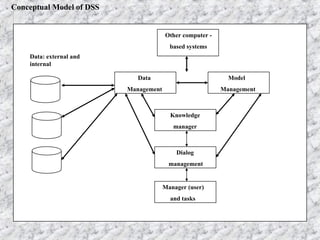
Components of DSS
1. Data includes database(s) which contains all the relevant data for
the problem and is managed by software called database
management system.
2. Model Management
The software package that includes financial statistical, management
science, other quantitative models that provide the system analytical
capabilities, and an appropriate software management.
3. Communication(Dialog) Subsystem
The subsystem through which the user can communicate with and
command DSS
These components contribute the software portion of the DSS. Also the
Conceptual Model of DSS
Data: external and
internal
Other computer -
based systems
Data
Management
Model
Management
Knowledge
manager
Dialog
management
Manager (user)
and tasks
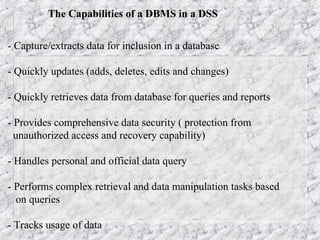
The Capabilities of a DBMS in a DSS
- Capture/extracts data for inclusion in a database
- Quickly updates (adds, deletes, edits and changes)
- Quickly retrieves data from database for queries and reports
- Provides comprehensive data security ( protection from
unauthorized access and recovery capability)
- Handles personal and official data query
- Performs complex retrieval and data manipulation tasks based
on queries
- Tracks usage of data
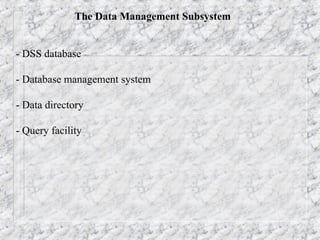
The Data Management Subsystem
- DSS database
- Database management system
- Data directory
- Query facility
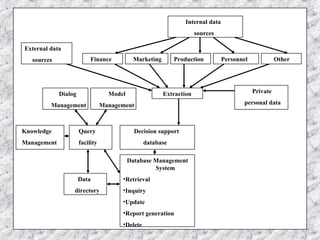
Database Management
System
•Retrieval
•Inquiry
•Update
•Report generation
•Delete
Internal data
sources
Other
Personnel
Production
Marketing
Finance
Private
personal data
Extraction
Model
Management
Dialog
Management
External data
sources
Decision support
database
Knowledge
Management
Query
facility
Data
directory
On Data And Database System-I
- Data external, internal and personal sources
- External data are a available on thousands of online commercial
databases, dictionaries, directories, reports, etc.
- Data for DSS needs to be frequently in the field using one of the
several methods
- Data for DSS may have problems such as: incorrect data, non timely
data poorly measured and indexed data, too many data or no data
- Large online databases such as CompuServe and Dow Jones
Information service can be a major source of DSS data.
- DSS can be programmed with third-generation languages , but it is
usually programmed with fourth-generation languages.
- Fourth-generation system include many integrated features for data
management
- Data are organized either in a relational, hierarchical or network
architecture. For many MSS relational type is preferable.
On Data And Database System - Contd.
- SQL is a standard access to relational database
- There is a trend to have DSS (and other MSS) distributed via
networks
- Distributed DSS provide the benefit of a PC and the power of a
mainframe
- Many DSS are being offered on client/server systems
- Object-oriented databases are especially suitable for complex DSS
such as those in computer integrated manufacturing
- Object-oriented databases are easy to use and fast to access. They are
especially useful in distributed DSS
- Many companies are developing an enterprise-wide approach to data
management. IBM’s Information Warehouse is an example
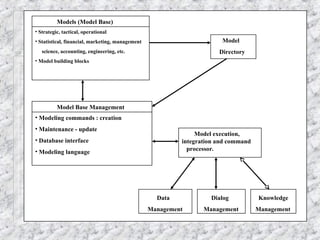
The model management subsystem
- Model base
- Model base management system
- Model execution , Integration and command
The ability to invoke run, change, combine and inspect models is
a key capability of DSS which differentiates it from other CBIS.
The model base management system (MBMS)
MBMS is a software system with the following functions :
- Model creation
- Using subroutines and other building block
- Generation of new routines and reports
- Model updating and changing
- Data manipulation
The MBMS is capable of interrelating models with appropriate
linkages through a database.
Data
Management
Dialog
Management
Knowledge
Management
Model execution,
integration and command
processor.
Model
Directory
Models (Model Base)
• Strategic, tactical, operational
• Statistical, financial, marketing, management
science, accounting, engineering, etc.
• Model building blocks
Model Base Management
• Modeling commands : creation
• Maintenance - update
• Database interface
• Modeling language
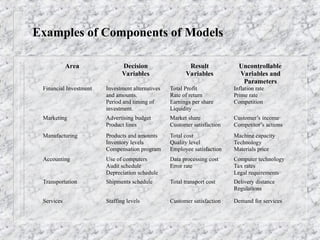
Examples of Components of Models
Area Decision
Variables
Result
Variables
Uncontrollable
Variables and
Parameters
Financial Investment Investment alternatives
and amounts.
Period and timing of
investment.
Total Profit
Rate of return
Earnings per share
Liquidity
Inflation rate
Prime rate
Competition
Marketing Advertising budget
Product lines
Market share
Customer satisfaction
Customer’s income
Competitor’s actions
Manufacturing Products and amounts
Inventory levels
Compensation program
Total cost
Quality level
Employee satisfaction
Machine capacity
Technology
Materials price
Accounting Use of computers
Audit schedule
Depreciation schedule
Data processing cost
Error rate
Computer technology
Tax rates
Legal requirements
Transportation Shipments schedule Total transport cost Delivery distance
Regulations
Services Staffing levels Customer satisfaction Demand for services
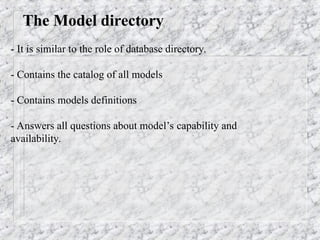
The Model directory
- It is similar to the role of database directory.
- Contains the catalog of all models
- Contains models definitions
- Answers all questions about model’s capability and
availability.
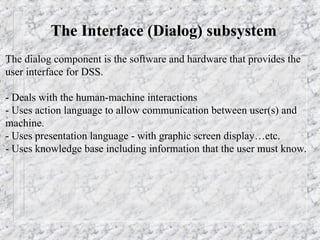
The Interface (Dialog) subsystem
The dialog component is the software and hardware that provides the
user interface for DSS.
- Deals with the human-machine interactions
- Uses action language to allow communication between user(s) and
machine.
- Uses presentation language - with graphic screen display…etc.
- Uses knowledge base including information that the user must know.
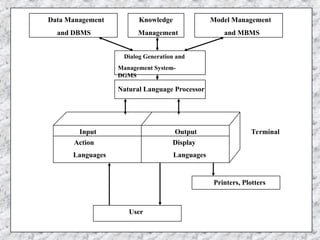
Data Management
and DBMS
Knowledge
Management
Model Management
and MBMS
Dialog Generation and
Management System-
DGMS
Natural Language Processor
Input Output
Action Display
Languages Languages
Terminal
Printers, Plotters
User
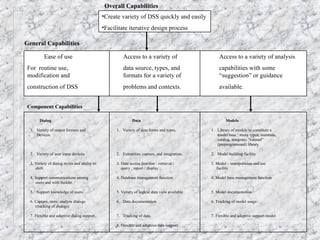
Dialog
1. Variety of output formats and
Devices.
2. Variety of user input devices.
3. Variety of dialog styles and ability to
shift.
4. Support communications among
users and with builder.
5. Support knowledge of users.
6. Capture, store, analyze dialogs
(tracking of dialogs)
7. Flexible and adaptive dialog support.
Data
1. Variety of data forms and types.
2. Extraction, capture, and integration.
3. Data access function : retrieval /
query ; report / display ;
4. Database management function
5. Variety of logical data view available
6. Data documentation
7. Tracking of data
8. Flexible and adaptive data support
Models
1. Library of models to constitute a
model base : many types; maintain,
catalog, integrate; “canned”
(preprogrammed) library.
2. Model building facility
3. Model – manipulation and use
facility
4. Model base management function
5. Model documentation
6. Tracking of model usage
7. Flexible and adaptive support model
•Create variety of DSS quickly and easily
•Facilitate iterative design process
Overall Capabilities
General Capabilities
Ease of use Access to a variety of Access to a variety of analysis
For routine use, data source, types, and capabilities with some
modification and formats for a variety of “suggestion” or guidance
construction of DSS problems and contexts. available.
Component Capabilities

Decision support system an overview in word

  • 1.
    WHAT IS ADSS ? Gorry and Scott-Morton’s: “A model based set of procedures for processing data and judgment to assist a manager in his decision making.” According to them, to be successful, such system must be: - Simple - Robust - Easy to control - Adaptive - Complete on important issues - Easy to communicate with
  • 2.
    Implicit in thedefinition is the assumption that : - The system is computer-based. - The system serves as an extension of the user’s problem solving capabilities. Gorry and Scott-Morton’s definition was accepted throughout most of the 1970’s by practitioners and researchers.
  • 3.
    Several other definitionsemerged from the literature : Alter (1980), Moore and Chang (1980), Bonczek, Holsapple, and Whinston (1980), Keen (1980) The tableau below provides a good summary of their various views: Source DSS defined in term of ________________________________________________________________________________________________________________________________________ Gorry and Scott-Morton Problem Type, System Function(support) Little System Function, Interface Characteristics Alter Usage Pattern, System Objectives Moore and Chang Usage Pattern, System Capabilities Bonczek et al System Component Keen Development Process
  • 4.
    Working definition ofan ideal DSS: A DSS is an interactive, flexible, and adaptable CBIS that utilizes decision rules, models, and model base coupled with a comprehensive database and the decision maker own’s insights, leading to specific, implementable decisions in solving problems that would not be amenable to management science optimization models per se. Thus, a DSS supports complex decision making and increases its effectiveness.
  • 5.
    Type of Control Typeof Decision Operational Control Managerial Control Strategic Planning Support Needed Structured Accounts Recievable, Order Entry Budget Analysis, Short-term forecasting, personnel reports, Make-or-buy analysis Financial management (investment), warehouse location, distribution systems MIS Operations, Research models, transaction processing Semi – Structured Production scheduling, inventory control Credit evaluation, budget preparation, plant layout, project scheduling, reward systems design Building new plant, mergers and acquisitions, new product planning, compensation planning, quality assurance planning DSS Unstructured Selecting a cover for a magazine, buying software, approving loans Negotiating, recruiting an executive, buying hardware, lobbying R&D planning, new technology development, social responsibility planning DSS, ES, Neural Networks Support Needed MIS, Management science Management science, DSS, ES, EIS EIS, ES, Neural Networks
  • 6.
    Reality Intelligence Phase Organizational Objectives Searchand scanning procedures Data collection Problem Identification Problem classification Problem statement Design Phase Formulate a model Set criteria for choice Search for alternatives Predict and measure outcomes Choice Phase Solution to the model Sensitive analysis Selection of best alternative Plan for implementation Design of a control system Examination Validation of the model Implementation of solution Failure Verification, testing of proposed solution Success
  • 7.
    Some Characteristics andCapabilities of DSS-I 1. DSS provides support for decision makers mainly in unstructured and semi structured situations. DSS is different from EDP, TP and MIS. 2. Support is provided for various managerial levels 3. Support is provided to individuals as well as groups - GDSS. 4. DSS provides support for interdependent as well as sequential decisions 5. DSS supports all phases of decision making process : Intelligence design, choice and implementation 6. Support is provided for a variety of decision problems.
  • 8.
    Some Characteristics andCapabilities of DSS - Contd. 8. DSS should be easy to use. 9. DSS improves the effectiveness of decision making (accuracy, timeliness and quality) rather than efficiency (computer time close form solution). 10. Decision maker has complete control over all steps of the decision making process in solving the problems. 11. DSS leads to learning. 12. Should be easy to construct (?) Should be easy to alter by its users.
  • 9.
    Box 3.2: TheMajor Benefits of DSS 1. Ability to support the solution of complex problems. 2. Fast response to unexpected situations that result in changed conditions. A DSS enables a thorough, quantitative analysis in a very short time. Even frequent changes in a scenario can be evaluated objectively in a timely manner. 3. Ability to try several different strategies under different configurations, quickly and objectively. 4. New insights and learning. The user can be exposed to new insights through the composition of the model and an extensive sensitivity “what if” analysis. The new insights can help in training inexperienced managers and other employees as well. 5. Facilitated communication. Data collection and model construction experimentations are being executed with active users’ participation, thus greatly facilitating communication among mangers. The decision process can make employees more supportive of organizational decisions. The “what-if” analysis can be used to
  • 10.
    Box 3.2: TheMajor Benefits of DSS-continued 6. Improved management control and performance. DSS can increase management control over expenditures and improve performance of the organization. 7. Cost savings. Routine applications of a DSS may result in considerable cost reduction, or in reducing (eliminating) the cost of wrong decisions. 8. Objective decisions. The decisions derived from DSS are more consistent and objective than decisions made intuitively. 9. Improving managerial effectiveness, allowing managers to perform a task in less time and/or with less effort. The DSS provides managers with more “quality” time for analysis, planning, and implementation.
  • 11.
    Support Provided byDSS DSS may provide several types of support. The following structure is based on Alter(1). Each level of support contains and adds on the previous level (but may also contribute to the previous level). DSS Answers to Provides Questions: Raw data and status access What is . . . . . . ?  General analysis capabilities What is / Why . . . . .?  Representation models (financial What will be . . . . . .? statements). Casual models (forecasting diagnosis). What will be / Why . . . ?  Solution suggestions, evaluation What if . . . . . . . ?  Solution selection What is best / What is good enough . . . . . . ?
  • 12.
    DSS Semi structured decisions Formanagers at different levels For groups and individuals Interdependent or sequential decisions Support, intelligence, design, choice Support variety of decision styles and processes Adaptability and Flexibility Evolutionary usage Humans control the machine Effectiveness , not efficiency Ease of Use Modeling Ease of construction Knowledge 1 2 3 4 5 6 7 5 8 9 10 11 12 13 14
  • 13.
    Components of DSS 1.Data includes database(s) which contains all the relevant data for the problem and is managed by software called database management system. 2. Model Management The software package that includes financial statistical, management science, other quantitative models that provide the system analytical capabilities, and an appropriate software management. 3. Communication(Dialog) Subsystem The subsystem through which the user can communicate with and command DSS These components contribute the software portion of the DSS. Also the
  • 14.
    Conceptual Model ofDSS Data: external and internal Other computer - based systems Data Management Model Management Knowledge manager Dialog management Manager (user) and tasks
  • 15.
    The Capabilities ofa DBMS in a DSS - Capture/extracts data for inclusion in a database - Quickly updates (adds, deletes, edits and changes) - Quickly retrieves data from database for queries and reports - Provides comprehensive data security ( protection from unauthorized access and recovery capability) - Handles personal and official data query - Performs complex retrieval and data manipulation tasks based on queries - Tracks usage of data
  • 16.
    The Data ManagementSubsystem - DSS database - Database management system - Data directory - Query facility
  • 17.
    Database Management System •Retrieval •Inquiry •Update •Report generation •Delete Internaldata sources Other Personnel Production Marketing Finance Private personal data Extraction Model Management Dialog Management External data sources Decision support database Knowledge Management Query facility Data directory
  • 18.
    On Data AndDatabase System-I - Data external, internal and personal sources - External data are a available on thousands of online commercial databases, dictionaries, directories, reports, etc. - Data for DSS needs to be frequently in the field using one of the several methods - Data for DSS may have problems such as: incorrect data, non timely data poorly measured and indexed data, too many data or no data - Large online databases such as CompuServe and Dow Jones Information service can be a major source of DSS data. - DSS can be programmed with third-generation languages , but it is usually programmed with fourth-generation languages. - Fourth-generation system include many integrated features for data management - Data are organized either in a relational, hierarchical or network architecture. For many MSS relational type is preferable.
  • 19.
    On Data AndDatabase System - Contd. - SQL is a standard access to relational database - There is a trend to have DSS (and other MSS) distributed via networks - Distributed DSS provide the benefit of a PC and the power of a mainframe - Many DSS are being offered on client/server systems - Object-oriented databases are especially suitable for complex DSS such as those in computer integrated manufacturing - Object-oriented databases are easy to use and fast to access. They are especially useful in distributed DSS - Many companies are developing an enterprise-wide approach to data management. IBM’s Information Warehouse is an example
  • 20.
    The model managementsubsystem - Model base - Model base management system - Model execution , Integration and command The ability to invoke run, change, combine and inspect models is a key capability of DSS which differentiates it from other CBIS.
  • 21.
    The model basemanagement system (MBMS) MBMS is a software system with the following functions : - Model creation - Using subroutines and other building block - Generation of new routines and reports - Model updating and changing - Data manipulation The MBMS is capable of interrelating models with appropriate linkages through a database.
  • 22.
    Data Management Dialog Management Knowledge Management Model execution, integration andcommand processor. Model Directory Models (Model Base) • Strategic, tactical, operational • Statistical, financial, marketing, management science, accounting, engineering, etc. • Model building blocks Model Base Management • Modeling commands : creation • Maintenance - update • Database interface • Modeling language
  • 23.
    Examples of Componentsof Models Area Decision Variables Result Variables Uncontrollable Variables and Parameters Financial Investment Investment alternatives and amounts. Period and timing of investment. Total Profit Rate of return Earnings per share Liquidity Inflation rate Prime rate Competition Marketing Advertising budget Product lines Market share Customer satisfaction Customer’s income Competitor’s actions Manufacturing Products and amounts Inventory levels Compensation program Total cost Quality level Employee satisfaction Machine capacity Technology Materials price Accounting Use of computers Audit schedule Depreciation schedule Data processing cost Error rate Computer technology Tax rates Legal requirements Transportation Shipments schedule Total transport cost Delivery distance Regulations Services Staffing levels Customer satisfaction Demand for services
  • 24.
    The Model directory -It is similar to the role of database directory. - Contains the catalog of all models - Contains models definitions - Answers all questions about model’s capability and availability.
  • 25.
    The Interface (Dialog)subsystem The dialog component is the software and hardware that provides the user interface for DSS. - Deals with the human-machine interactions - Uses action language to allow communication between user(s) and machine. - Uses presentation language - with graphic screen display…etc. - Uses knowledge base including information that the user must know.
  • 26.
    Data Management and DBMS Knowledge Management ModelManagement and MBMS Dialog Generation and Management System- DGMS Natural Language Processor Input Output Action Display Languages Languages Terminal Printers, Plotters User
  • 27.
    Dialog 1. Variety ofoutput formats and Devices. 2. Variety of user input devices. 3. Variety of dialog styles and ability to shift. 4. Support communications among users and with builder. 5. Support knowledge of users. 6. Capture, store, analyze dialogs (tracking of dialogs) 7. Flexible and adaptive dialog support. Data 1. Variety of data forms and types. 2. Extraction, capture, and integration. 3. Data access function : retrieval / query ; report / display ; 4. Database management function 5. Variety of logical data view available 6. Data documentation 7. Tracking of data 8. Flexible and adaptive data support Models 1. Library of models to constitute a model base : many types; maintain, catalog, integrate; “canned” (preprogrammed) library. 2. Model building facility 3. Model – manipulation and use facility 4. Model base management function 5. Model documentation 6. Tracking of model usage 7. Flexible and adaptive support model •Create variety of DSS quickly and easily •Facilitate iterative design process Overall Capabilities General Capabilities Ease of use Access to a variety of Access to a variety of analysis For routine use, data source, types, and capabilities with some modification and formats for a variety of “suggestion” or guidance construction of DSS problems and contexts. available. Component Capabilities