Download to read offline
![JSON Files
This lesson focuses on JSON type les. It gives a complete explanation about how to read data from JSON les
using the Pandas library of Python.
W E ' L L C O V E R T H E F O L L O W I N G
• Introduction to JSON le
• Reading JSON le with Python
Introduction to JSON le #
JSON (JavaScript Object Notation) is a popular format allowing for a more
flexible schema. It is also easy for humans to read and write. A lot of the data
sent around the web is transmitted as JSON. Here is an example:
{
"glossary": {
"title": "example glossary",
"GlossDiv": {
"title": "S",
"GlossList": {
"GlossEntry": {
"ID": "SGML",
"SortAs": "SGML",
"GlossTerm": "Standard Generalized Markup Language",
"Acronym": "SGML",
"Abbrev": "ISO 8879:1986",
"GlossDef": {
"para": "A meta-markup language, used to create ma
rkup languages such as DocBook.",
"GlossSeeAlso": ["GML", "XML"]
},
"GlossSee": "markup"
}
}
}](https://image.slidesharecdn.com/11jsonfiles-240312172515-f3bb13d9/85/Dealing-with-JSON-files-in-python-with-illustrations-1-320.jpg)
![JSON Files
This lesson focuses on JSON type les. It gives a complete explanation about how to read data from JSON les
using the Pandas library of Python.
W E ' L L C O V E R T H E F O L L O W I N G
• Introduction to JSON le
• Reading JSON le with Python
Introduction to JSON le #
JSON (JavaScript Object Notation) is a popular format allowing for a more
flexible schema. It is also easy for humans to read and write. A lot of the data
sent around the web is transmitted as JSON. Here is an example:
{
"glossary": {
"title": "example glossary",
"GlossDiv": {
"title": "S",
"GlossList": {
"GlossEntry": {
"ID": "SGML",
"SortAs": "SGML",
"GlossTerm": "Standard Generalized Markup Language",
"Acronym": "SGML",
"Abbrev": "ISO 8879:1986",
"GlossDef": {
"para": "A meta-markup language, used to create ma
rkup languages such as DocBook.",
"GlossSeeAlso": ["GML", "XML"]
},
"GlossSee": "markup"
}
}
}](https://image.slidesharecdn.com/11jsonfiles-240312172515-f3bb13d9/75/Dealing-with-JSON-files-in-python-with-illustrations-1-2048.jpg)
![}
}
Reading JSON le with Python #
Python can easily read these data from strings into dictionaries using the
built-in json library:
import json
## Define the JSON object as a string
json_string = """{
"glossary": {
"title": "example glossary",
"GlossDiv": {
"title": "S",
"GlossList": {
"GlossEntry": {
"ID": "SGML",
"SortAs": "SGML",
"GlossTerm": "Standard Generalized Markup Language",
"Acronym": "SGML",
"Abbrev": "ISO 8879:1986",
"GlossDef": {
"para": "A meta-markup language, used to create markup languages such
"GlossSeeAlso": ["GML", "XML"]
},
"GlossSee": "markup"
}
}
}
}
}"""
# Read the JSON data into Python
json_data = json.loads(json_string)
print(json_data)
When your JSON data are in a string, you can use the loads() function to read
it into a Python dictionary (line 29). JSON is the same format as a dictionary in
that it consists of key, value pairs of various types. Our JSON object above has
a key for title and the value is example glossary. It also has a key of
GlossList that has a dictionary object for a value that contains its own key-
value pairs. You can see how JSON can represent any type of nested schema
you would want to have.](https://image.slidesharecdn.com/11jsonfiles-240312172515-f3bb13d9/85/Dealing-with-JSON-files-in-python-with-illustrations-2-320.jpg)
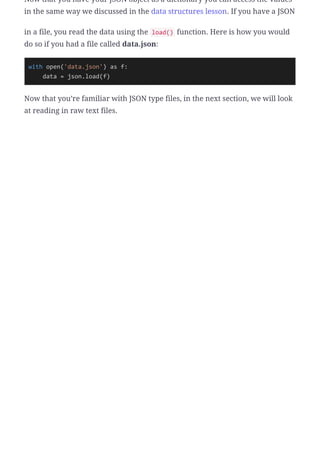

This document discusses JSON files and how to read them into Python using the Pandas library. It first introduces JSON files and their flexible schema that allows for easy human readability. It then explains how to read a JSON file string into a Python dictionary using the json library and the loads() function. It also covers using json.load() to read a JSON file directly and access the values like a standard Python dictionary.


