Sébastien Varoteaux
Senior Program Architect @ Salesforce
linkedin.com/in/sébastien-varoteaux-48476b
Vincent Finet
Senior Program Architect @ Salesforce
linkedin.com/in/vincentfinet
I II
Tableau CRM,
nice to meet
you!
Demo &
Examples
III
Resources
Part I
Tableau CRM,
nice to meet you!
Tableau CRM, nice to meet you!
Step 1: Create a developer edition org including Tableau CRM
● Because unfortunately, Tableau CRM
is not included in:
○ standard Developer Edition orgs
○ trailhead playground orgs
● You need to create a specific Org for
training
○ developer.salesforce.com/promotions/orgs/
analytics-de
Tableau CRM, nice to meet you!
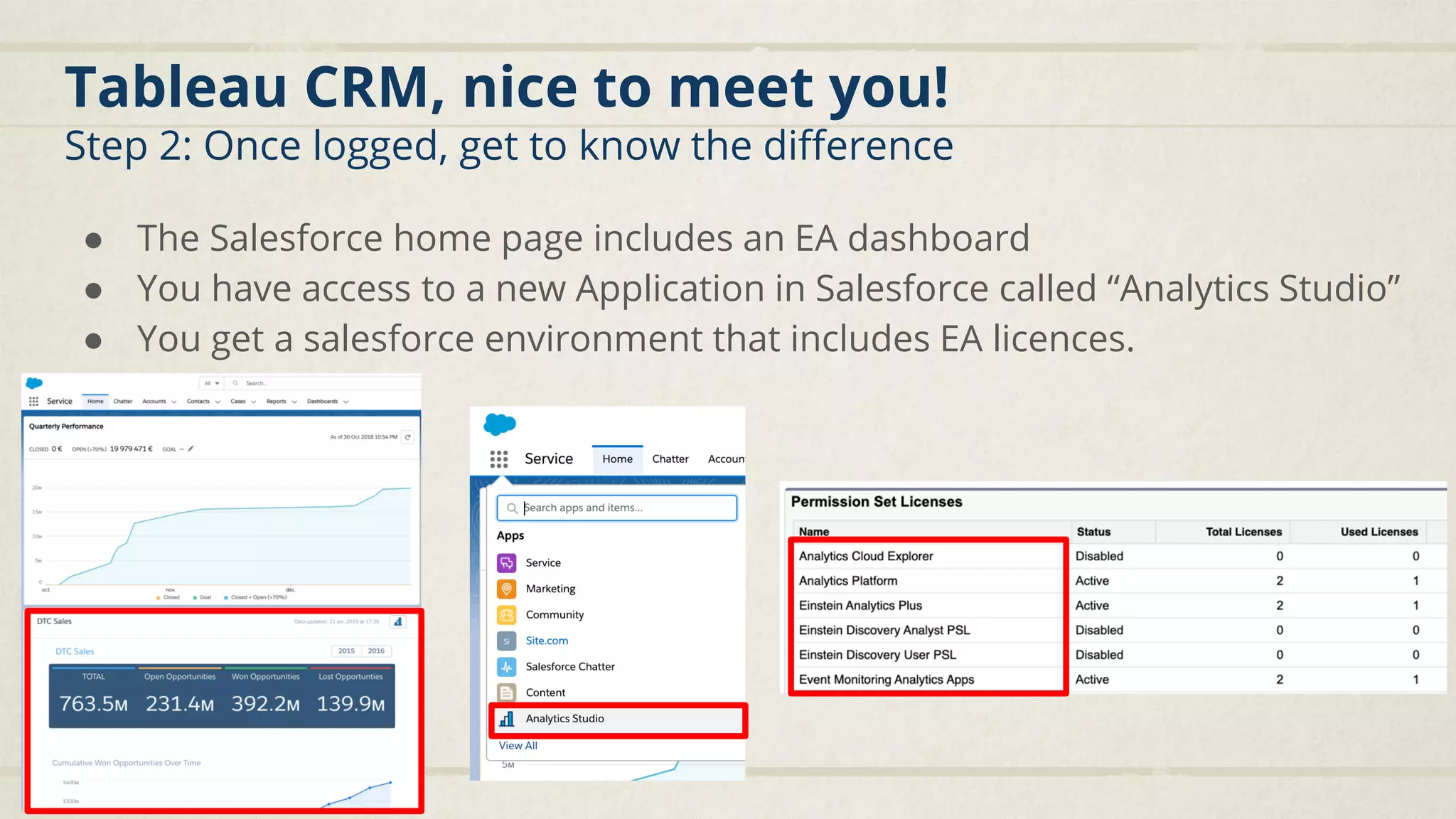
Step 2: Once logged, get to know the difference
● The Salesforce home page includes an EA dashboard
● You have access to a new Application in Salesforce called “Analytics Studio”
● You get a salesforce environment that includes EA licences.
Tableau CRM, nice to meet you!
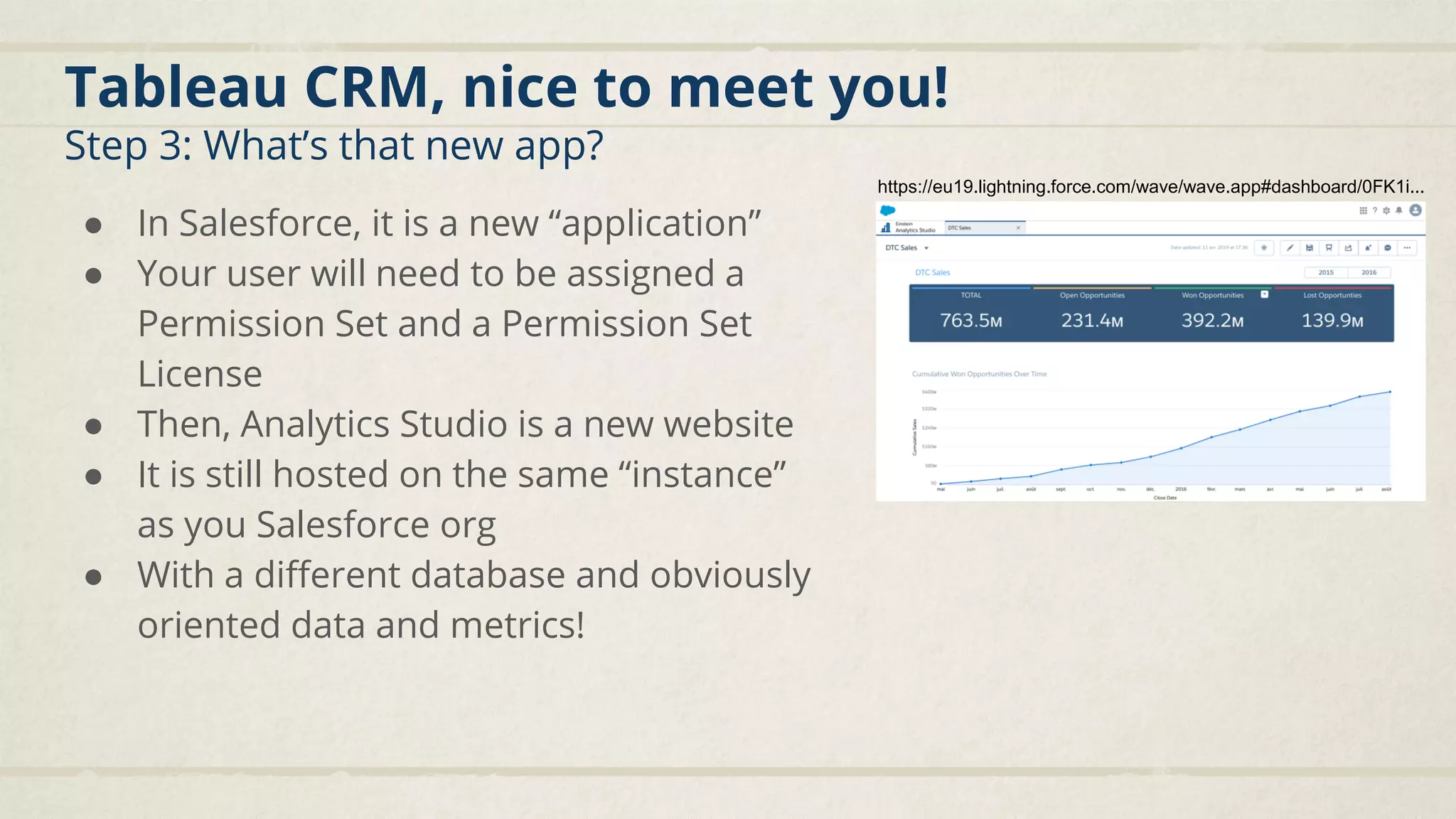
Step 3: What’s that new app?
● In Salesforce, it is a new “application”
● Your user will need to be assigned a
Permission Set and a Permission Set
License
● Then, Analytics Studio is a new website
● It is still hosted on the same “instance”
as you Salesforce org
● With a different database and obviously
oriented data and metrics!
https://eu19.lightning.force.com/wave/wave.app#dashboard/0FK1i...
Tableau CRM, nice to meet you!
Step 4: It all about DATA ;)
● Data sources
○ Definition of where you get the data you
want to manipulate
○ By default, you have access to the
SFDC_LOCAL source (your SF org)
○ Other sources types are available
● Data replications
○ Each sources will be replicate in
Tableau CRM’s own database
○ Which elements will be synchronized
(for SFDC_LOCAL: objects and fields)
○ The frequency (each week, day...)
○ The method (full, incremental or hybrid)
● Data stored
○ Dataset: tables with rows & fields (dimensions/measures)
● Data transformation
○ Recipe: simple transformation between sources and/or
existing datasets (for starting point)
○ Dataflow: complex transformation between sources
and/or existing datasets (for more advanced users)
○ SAQL: Analytics Query Language that can include
transformation but not only...
● Data visualization
○ Dashboards: global visualization
○ Lens: play with the data “locally”
● Data packaging/categorization
○ Applications: shareable, template
Tableau CRM, nice to meet you!
Step 5: Let’s start with your data sources and replications
1
2
3
4
Tableau CRM, nice to meet you!
Step 6: Then let’s get some data rows into datasets!
How to create a
dataset?
1. Download a csv file
(blue button)
1. Based on existing
datasets and/or data
sources:
- Recipe
- Dataflow
1. API (for advanced
users)
1
2 3
4
5
Tableau CRM, nice to meet you!
Step 7: I feel like creating a recipe today!
1
2
3
Tableau CRM, nice to meet you!
Step 7: I feel like creating a recipe today!
Recipe VS
Dataflow
Tableau CRM, nice to meet you!
Step 8: Ho no-no, I REALLY feel like creating a dataflow!
2
3
4
Input OutputProcessing
Tableau CRM, nice to meet you!
Step 8: Dataflow common tools
SfdcDigest To load internal datasource
Digest To load external datasource
Edgemart To load existing dataset
Only select the fields you need
Think about default values
Source loaders
Append To add rows to a target
With the same column or not
Augment To complement rows on a common data
Single value (1-1) add data
Multiple values (1-*) aggregates
Rows manipulation
Tableau CRM, nice to meet you!
Step 8: Dataflow common tools
Column manipulation
Compute
Expression
Calculation based on fields within the same row
Code transformation, difference between 2 dates...
Compute
Relative
Calculation based on the same field in other rows
ordered within a partition
Current, first, previous, next
% improvement, average amount...
Dim2Mea Transform a dimension to a measure
From “100” to 100 to be able to perform calculations in dashboards
Flatten Aggregate hierarchical data in a single column
User’s chain of management...
Tableau CRM, nice to meet you!
Step 8: Dataflow common tools
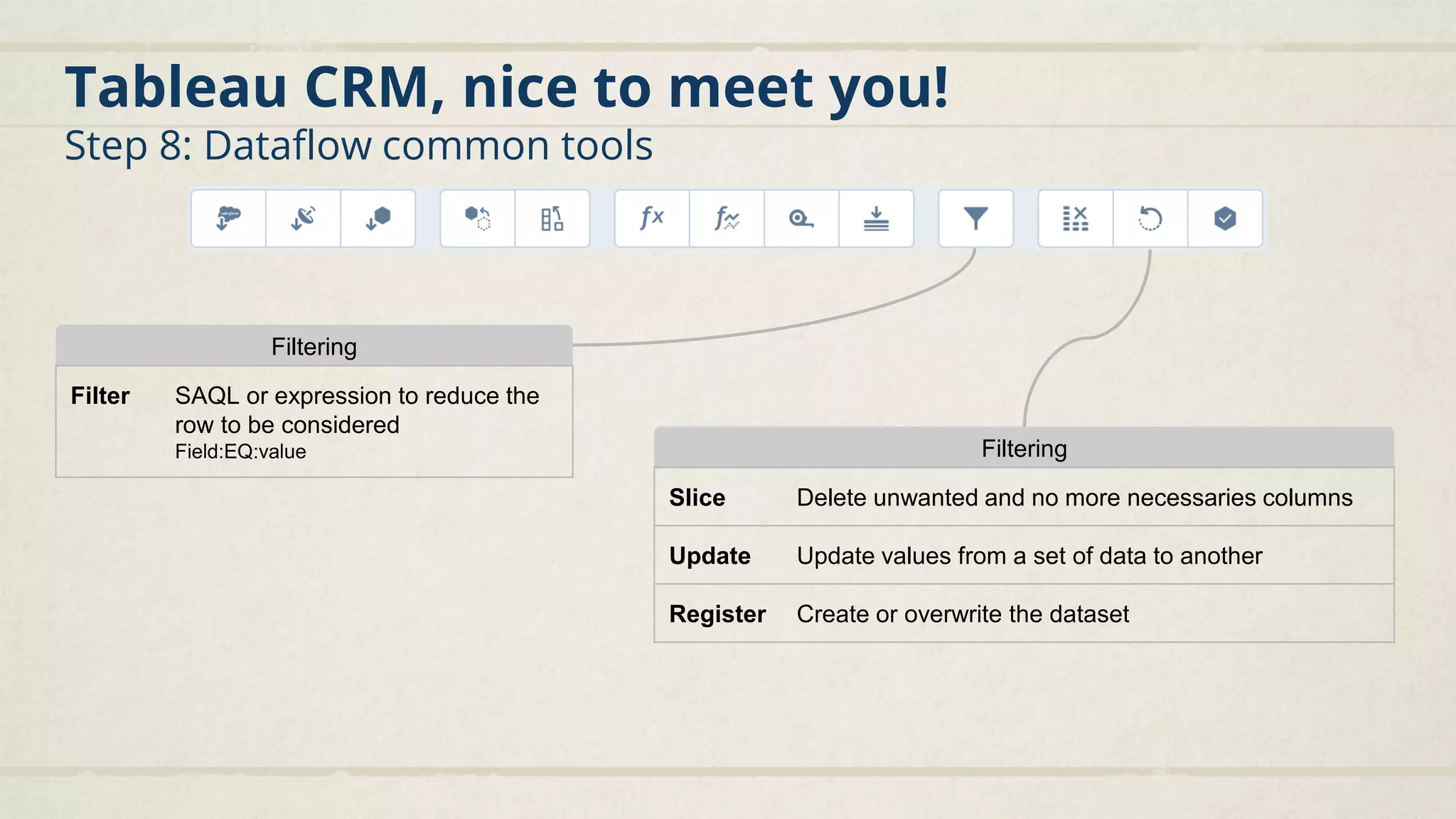
Filtering
Filter SAQL or expression to reduce the
row to be considered
Field:EQ:value Filtering
Slice Delete unwanted and no more necessaries columns
Update Update values from a set of data to another
Register Create or overwrite the dataset
Tableau CRM, nice to meet you!
Step 9: Dataset coloring, formating, labelling, ...
You can manage labels and colors globally for a Dataset: Explore a Dataset
Tableau CRM, nice to meet you!
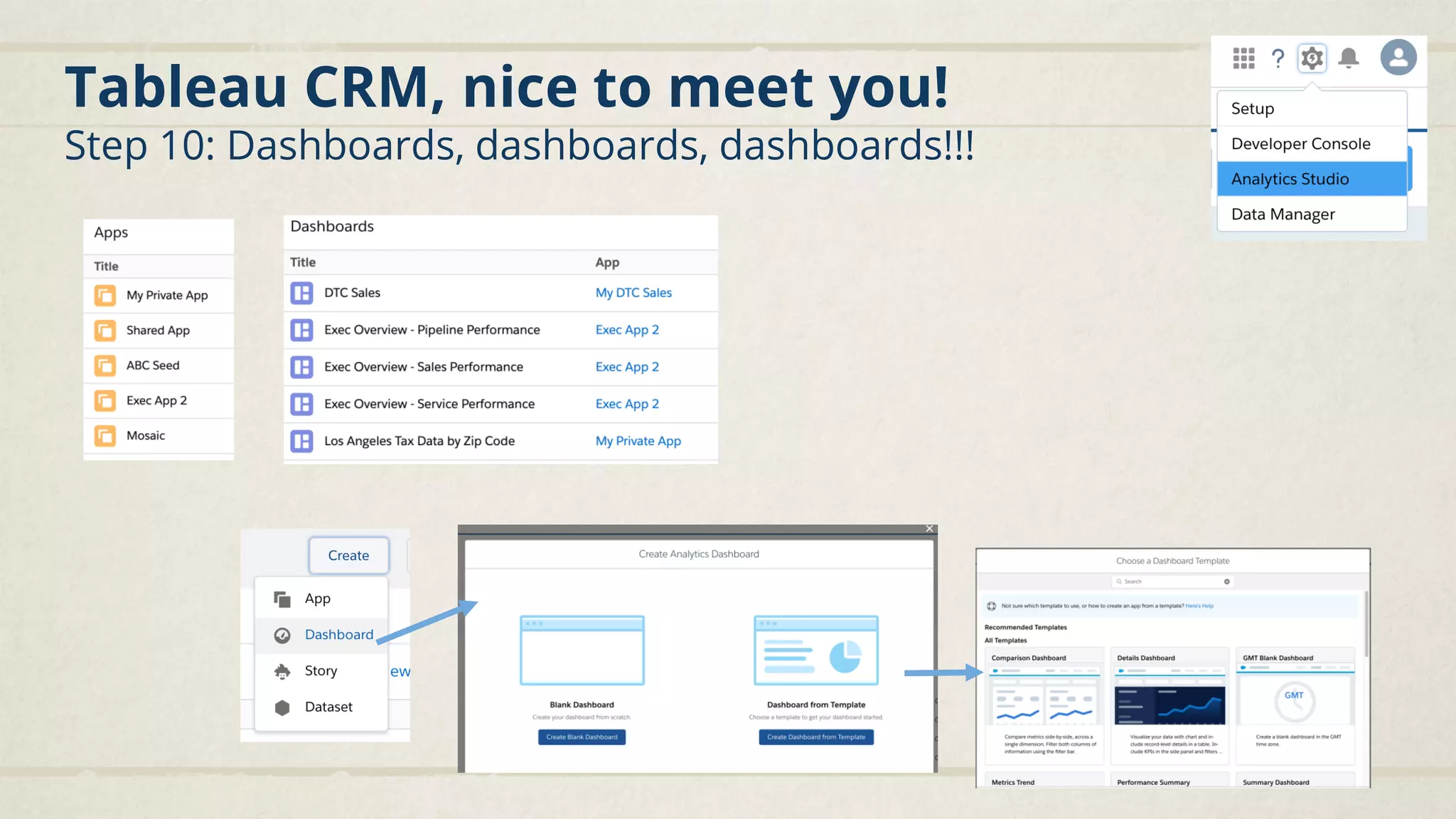
Step 10: Dashboards, dashboards, dashboards!!!
Tableau CRM, nice to meet you!
Step 10: Dashboards, dashboards, dashboards!!!
Magic Shortcut:
Ctrl+E to get the JSON
of the dashboard, for
mass updates!!
Tableau CRM, nice to meet you!
Step 10: Dashboards, dashboards, dashboards!!!
Chart 6 bars, 4 lines, 4 Date & times, 5 gauges, 4 circles & dots, 3 grids, 3 maps, 5 pipelines
Table 1 simple, 2 with aggregates
Global filter To filter on any field. 1 or all global filters
Container Zone which contains other elements
Date selector Simple filter on a date field
Link To create a link to a dashboard, a page of a dashboard or any URL
Image Display an image stored on Einstein Analytics
List selector Simple filter on a dimension in the form of a list
Number Display a number
Range selector Simple selector on a measure in the form of a slider and min/max fields
Text Display a text
Toggle Display dimension values of a fields in the form of buttons
Navigation bar Display the list of pages of the dashboard in the form of buttons
Tableau CRM, nice to meet you!
Step 10: Dashboards, dashboards, dashboards!!!
Use the Bar or Column chart to provide a quick visual
comparison of related values
Use a pyramid chart to visually highlight relative sizes of stacked
dimension values
Use a timeline chart to show how a value changes over time
Use an origami chart for easily identifying high- and low-value
data
Use a funnel chart to visualize sequential data that can be
broken up into stages
Use treemaps to visualize hierarchical quantitative data
Use a waterfall chart to show the cumulative effect of
sequentially introduced positive or negative values with
breakdowns of value totals
Use a map if you have data with a geographical information
Use gauge charts to track progress along a single measure
All charts can be customized using their properties
Tableau CRM, nice to meet you!
Step 10: Dashboards, dashboards, dashboards!!!
Track the performance of your dashboards to be sure
it would be usable for your users.
The more query you do, the longer the response is
The more SAQL you do, the longer the response is
The more rows there are, the longer the response is
Tableau CRM, nice to meet you!
Step 11: Before you start...
● Technical users
○ Integration User
■ Define which objects and fields can be
extracted from Salesforce to Tableau
CRM (View All Data access)
■ Profile: Analytics Cloud Integration User
○ Security User
■ Used when a row data security is set up
on a dataset. The Security User must
have at least read permission on each
User object field included in a
predicate.
■ Profile: Analytics Cloud Security User
● Security
○ Security Predicate
■ Allow to display to the user only a
subset of rows
■ It compares a column of the dataset to
a field on the user record
○ Sharing Inheritance
■ Synchronize sharing configured in
Salesforce - Account, Case, Contact,
Lead and Opportunity
■ Always set a Security Predicates to
take over in situation the sharing can’t
be honored
■ Use the Sharing Inheritance Coverage
Assessment tool (setup)Do not inactive them
Do not modify profiles, clone them!
Tableau CRM, nice to meet you!
End so much more...
Part II
Examples
Examples
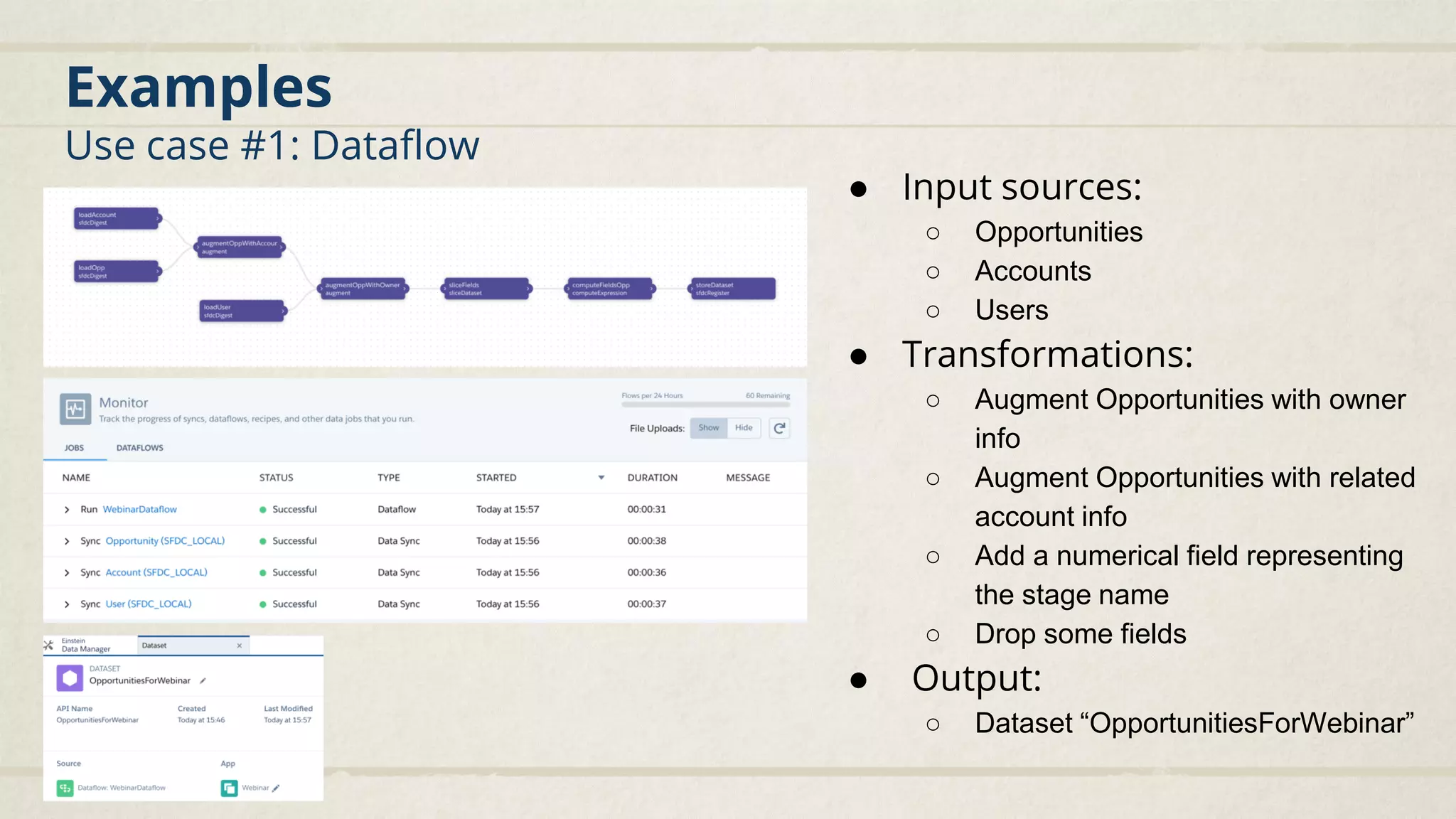
Use case #1: Dataflow
● Input sources:
○ Opportunities
○ Accounts
○ Users
● Transformations:
○ Augment Opportunities with owner
info
○ Augment Opportunities with related
account info
○ Add a numerical field representing
the stage name
○ Drop some fields
● Output:
○ Dataset “OpportunitiesForWebinar”
Examples
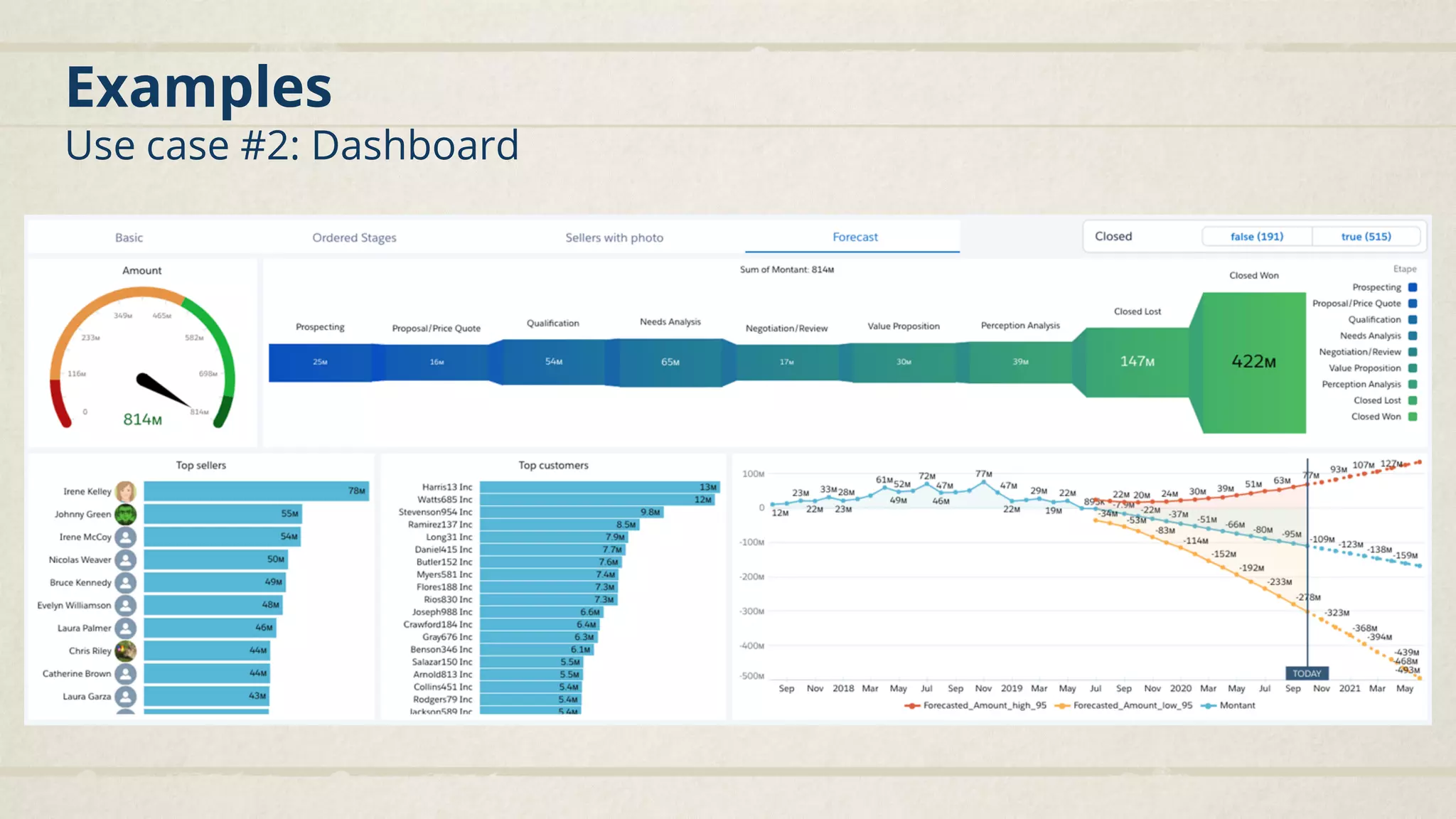
Use case #2: Dashboard
Examples
Use case #2: Dashboard
Part III
Resources around
Tableau CRM
Resources around Tableau CRM
Trailhead
● Create a Developer Edition org with Tableau CRM!
○ developer.salesforce.com/promotions/orgs/analytics-de
● Beginners:
○ https://trailhead.salesforce.com/en/content/learn/modules/wave_analytics_basics
○ https://trailhead.salesforce.com/en/content/learn/trails/wave_analytics_enable_and_produce
● Projects:
○ https://trailhead.salesforce.com/en/content/learn/projects/quick-start-einstein-analytics
● Superbadges:
○ https://trailhead.salesforce.com/en/content/learn/superbadges/superbadge_analytics_integration_spe
cialist
○ https://trailhead.salesforce.com/en/content/learn/superbadges/superbadge_analytics_insights_specia
list
● Trailmix for the Einstein Analytics and Discovery Consultant certification
○ https://trailhead.salesforce.com/users/ea-trails/trailmixes/learn-einstein-analytics-plus
Resources around Tableau CRM
Great additional stuff (out of Trailhead)
● Main article about Tableau CRM on Salesforce help:
https://help.salesforce.com/articleView?id=bi.htm&type=5
● Blogs by the famous Rikke Hovgaard about SAQL, Dashboards, Bindings:
https://www.salesforceblogger.com/author/rikkehovgaard-org/
● Group on the success community:
https://trailblazers.salesforce.com/_ui/core/chatter/groups/GroupProfileP
age?g=0F9300000009MBPCA2
● List if unsupported objects and fields on Help
https://help.salesforce.com/articleView?id=bi_integrate_salesforce_extract
_transformation_unsupported_objects_fields.htm&type=5
Prochains Events
Quiz time !

Découverte d'Einstein Analytics (Tableau CRM)

  • 2.
    Sébastien Varoteaux Senior ProgramArchitect @ Salesforce linkedin.com/in/sébastien-varoteaux-48476b Vincent Finet Senior Program Architect @ Salesforce linkedin.com/in/vincentfinet
  • 3.
    I II Tableau CRM, niceto meet you! Demo & Examples III Resources
  • 4.
  • 5.
    Tableau CRM, niceto meet you! Step 1: Create a developer edition org including Tableau CRM ● Because unfortunately, Tableau CRM is not included in: ○ standard Developer Edition orgs ○ trailhead playground orgs ● You need to create a specific Org for training ○ developer.salesforce.com/promotions/orgs/ analytics-de
  • 6.
    Tableau CRM, niceto meet you! Step 2: Once logged, get to know the difference ● The Salesforce home page includes an EA dashboard ● You have access to a new Application in Salesforce called “Analytics Studio” ● You get a salesforce environment that includes EA licences.
  • 7.
    Tableau CRM, niceto meet you! Step 3: What’s that new app? ● In Salesforce, it is a new “application” ● Your user will need to be assigned a Permission Set and a Permission Set License ● Then, Analytics Studio is a new website ● It is still hosted on the same “instance” as you Salesforce org ● With a different database and obviously oriented data and metrics! https://eu19.lightning.force.com/wave/wave.app#dashboard/0FK1i...
  • 8.
    Tableau CRM, niceto meet you! Step 4: It all about DATA ;) ● Data sources ○ Definition of where you get the data you want to manipulate ○ By default, you have access to the SFDC_LOCAL source (your SF org) ○ Other sources types are available ● Data replications ○ Each sources will be replicate in Tableau CRM’s own database ○ Which elements will be synchronized (for SFDC_LOCAL: objects and fields) ○ The frequency (each week, day...) ○ The method (full, incremental or hybrid) ● Data stored ○ Dataset: tables with rows & fields (dimensions/measures) ● Data transformation ○ Recipe: simple transformation between sources and/or existing datasets (for starting point) ○ Dataflow: complex transformation between sources and/or existing datasets (for more advanced users) ○ SAQL: Analytics Query Language that can include transformation but not only... ● Data visualization ○ Dashboards: global visualization ○ Lens: play with the data “locally” ● Data packaging/categorization ○ Applications: shareable, template
  • 9.
    Tableau CRM, niceto meet you! Step 5: Let’s start with your data sources and replications 1 2 3 4
  • 10.
    Tableau CRM, niceto meet you! Step 6: Then let’s get some data rows into datasets! How to create a dataset? 1. Download a csv file (blue button) 1. Based on existing datasets and/or data sources: - Recipe - Dataflow 1. API (for advanced users) 1 2 3 4 5
  • 11.
    Tableau CRM, niceto meet you! Step 7: I feel like creating a recipe today! 1 2 3
  • 12.
    Tableau CRM, niceto meet you! Step 7: I feel like creating a recipe today! Recipe VS Dataflow
  • 13.
    Tableau CRM, niceto meet you! Step 8: Ho no-no, I REALLY feel like creating a dataflow! 2 3 4 Input OutputProcessing
  • 14.
    Tableau CRM, niceto meet you! Step 8: Dataflow common tools SfdcDigest To load internal datasource Digest To load external datasource Edgemart To load existing dataset Only select the fields you need Think about default values Source loaders Append To add rows to a target With the same column or not Augment To complement rows on a common data Single value (1-1) add data Multiple values (1-*) aggregates Rows manipulation
  • 15.
    Tableau CRM, niceto meet you! Step 8: Dataflow common tools Column manipulation Compute Expression Calculation based on fields within the same row Code transformation, difference between 2 dates... Compute Relative Calculation based on the same field in other rows ordered within a partition Current, first, previous, next % improvement, average amount... Dim2Mea Transform a dimension to a measure From “100” to 100 to be able to perform calculations in dashboards Flatten Aggregate hierarchical data in a single column User’s chain of management...
  • 16.
    Tableau CRM, niceto meet you! Step 8: Dataflow common tools Filtering Filter SAQL or expression to reduce the row to be considered Field:EQ:value Filtering Slice Delete unwanted and no more necessaries columns Update Update values from a set of data to another Register Create or overwrite the dataset
  • 17.
    Tableau CRM, niceto meet you! Step 9: Dataset coloring, formating, labelling, ... You can manage labels and colors globally for a Dataset: Explore a Dataset
  • 18.
    Tableau CRM, niceto meet you! Step 10: Dashboards, dashboards, dashboards!!!
  • 19.
    Tableau CRM, niceto meet you! Step 10: Dashboards, dashboards, dashboards!!! Magic Shortcut: Ctrl+E to get the JSON of the dashboard, for mass updates!!
  • 20.
    Tableau CRM, niceto meet you! Step 10: Dashboards, dashboards, dashboards!!! Chart 6 bars, 4 lines, 4 Date & times, 5 gauges, 4 circles & dots, 3 grids, 3 maps, 5 pipelines Table 1 simple, 2 with aggregates Global filter To filter on any field. 1 or all global filters Container Zone which contains other elements Date selector Simple filter on a date field Link To create a link to a dashboard, a page of a dashboard or any URL Image Display an image stored on Einstein Analytics List selector Simple filter on a dimension in the form of a list Number Display a number Range selector Simple selector on a measure in the form of a slider and min/max fields Text Display a text Toggle Display dimension values of a fields in the form of buttons Navigation bar Display the list of pages of the dashboard in the form of buttons
  • 21.
    Tableau CRM, niceto meet you! Step 10: Dashboards, dashboards, dashboards!!! Use the Bar or Column chart to provide a quick visual comparison of related values Use a pyramid chart to visually highlight relative sizes of stacked dimension values Use a timeline chart to show how a value changes over time Use an origami chart for easily identifying high- and low-value data Use a funnel chart to visualize sequential data that can be broken up into stages Use treemaps to visualize hierarchical quantitative data Use a waterfall chart to show the cumulative effect of sequentially introduced positive or negative values with breakdowns of value totals Use a map if you have data with a geographical information Use gauge charts to track progress along a single measure All charts can be customized using their properties
  • 22.
    Tableau CRM, niceto meet you! Step 10: Dashboards, dashboards, dashboards!!! Track the performance of your dashboards to be sure it would be usable for your users. The more query you do, the longer the response is The more SAQL you do, the longer the response is The more rows there are, the longer the response is
  • 23.
    Tableau CRM, niceto meet you! Step 11: Before you start... ● Technical users ○ Integration User ■ Define which objects and fields can be extracted from Salesforce to Tableau CRM (View All Data access) ■ Profile: Analytics Cloud Integration User ○ Security User ■ Used when a row data security is set up on a dataset. The Security User must have at least read permission on each User object field included in a predicate. ■ Profile: Analytics Cloud Security User ● Security ○ Security Predicate ■ Allow to display to the user only a subset of rows ■ It compares a column of the dataset to a field on the user record ○ Sharing Inheritance ■ Synchronize sharing configured in Salesforce - Account, Case, Contact, Lead and Opportunity ■ Always set a Security Predicates to take over in situation the sharing can’t be honored ■ Use the Sharing Inheritance Coverage Assessment tool (setup)Do not inactive them Do not modify profiles, clone them!
  • 24.
    Tableau CRM, niceto meet you! End so much more...
  • 25.
  • 26.
    Examples Use case #1:Dataflow ● Input sources: ○ Opportunities ○ Accounts ○ Users ● Transformations: ○ Augment Opportunities with owner info ○ Augment Opportunities with related account info ○ Add a numerical field representing the stage name ○ Drop some fields ● Output: ○ Dataset “OpportunitiesForWebinar”
  • 27.
  • 28.
  • 29.
  • 30.
    Resources around TableauCRM Trailhead ● Create a Developer Edition org with Tableau CRM! ○ developer.salesforce.com/promotions/orgs/analytics-de ● Beginners: ○ https://trailhead.salesforce.com/en/content/learn/modules/wave_analytics_basics ○ https://trailhead.salesforce.com/en/content/learn/trails/wave_analytics_enable_and_produce ● Projects: ○ https://trailhead.salesforce.com/en/content/learn/projects/quick-start-einstein-analytics ● Superbadges: ○ https://trailhead.salesforce.com/en/content/learn/superbadges/superbadge_analytics_integration_spe cialist ○ https://trailhead.salesforce.com/en/content/learn/superbadges/superbadge_analytics_insights_specia list ● Trailmix for the Einstein Analytics and Discovery Consultant certification ○ https://trailhead.salesforce.com/users/ea-trails/trailmixes/learn-einstein-analytics-plus
  • 31.
    Resources around TableauCRM Great additional stuff (out of Trailhead) ● Main article about Tableau CRM on Salesforce help: https://help.salesforce.com/articleView?id=bi.htm&type=5 ● Blogs by the famous Rikke Hovgaard about SAQL, Dashboards, Bindings: https://www.salesforceblogger.com/author/rikkehovgaard-org/ ● Group on the success community: https://trailblazers.salesforce.com/_ui/core/chatter/groups/GroupProfileP age?g=0F9300000009MBPCA2 ● List if unsupported objects and fields on Help https://help.salesforce.com/articleView?id=bi_integrate_salesforce_extract _transformation_unsupported_objects_fields.htm&type=5
  • 34.
  • 35.