©Silberschatz, Korth and Sudarshan
19.1
Database System Concepts - 7th
Edition
DATABASE MANAGEMENT SYSTEMS
Module - V
Recovery System
©Silberschatz, Korth and Sudarshan
19.2
Database System Concepts - 7th
Edition
Outline
 Failure Classification
 Storage Structure
 Recovery and Atomicity
 Log-Based Recovery
Recovery System
©Silberschatz, Korth and Sudarshan
19.3
Database System Concepts - 7th
Edition
Failure Classification
 Transaction failure :
• Logical errors: transaction cannot complete due to some
internal error condition
• System errors: the database system must terminate an
active transaction due to an error condition (e.g., deadlock)
 System crash: a power failure or other hardware or software
failure causes the system to crash.
• Fail-stop assumption: non-volatile storage contents are
assumed to not be corrupted by system crash
 Database systems have numerous integrity checks to
prevent corruption of disk data
 Disk failure: a head crash or similar disk failure destroys all or
part of disk storage
• Destruction is assumed to be detectable: disk drives use
checksums to detect failures
Recovery System
©Silberschatz, Korth and Sudarshan
19.4
Database System Concepts - 7th
Edition
Recovery Algorithms
 Suppose transaction Ti transfers $50 from account A to account B
• Two updates: subtract 50 from A and add 50 to B
 Transaction Ti requires updates to A and B to be output to the
database.
• A failure may occur after one of these modifications have been
made but before both of them are made.
• Modifying the database without ensuring that the transaction
will commit may leave the database in an inconsistent state
• Not modifying the database may result in lost updates if failure
occurs just after transaction commits
 Recovery algorithms have two parts
1. Actions taken during normal transaction processing to ensure
enough information exists to recover from failures
2. Actions taken after a failure to recover the database contents to
a state that ensures atomicity, consistency and durability
Recovery System
©Silberschatz, Korth and Sudarshan
19.5
Database System Concepts - 7th
Edition
Storage Structure
 Volatile storage:
• Does not survive system crashes
• Examples: main memory, cache memory
 Nonvolatile storage:
• Survives system crashes
• Examples: disk, tape, flash memory, non-volatile RAM
• But may still fail, losing data
 Stable storage:
• A mythical form of storage that survives all failures
• Approximated by maintaining multiple copies on distinct
nonvolatile media
• See book for more details on how to implement stable
storage
Recovery System
©Silberschatz, Korth and Sudarshan
19.6
Database System Concepts - 7th
Edition
Stable-Storage Implementation
 Maintain multiple copies of each block on separate disks
• copies can be at remote sites to protect against disasters such as
fire or flooding.
 Failure during data transfer can still result in inconsistent copies: Block
transfer can result in
• Successful completion
• Partial failure: destination block has incorrect information
• Total failure: destination block was never updated
 Protecting storage media from failure during data transfer (one
solution):
• Execute output operation as follows (assuming two copies of each
block):
1. Write the information onto the first physical block.
2. When the first write successfully completes, write the same
information onto the second physical block.
3. The output is completed only after the second write
successfully completes.
Recovery System
©Silberschatz, Korth and Sudarshan
19.7
Database System Concepts - 7th
Edition
Protecting storage media from failure (Cont.)
 Copies of a block may differ due to failure during output operation.
 To recover from failure:
1. First find inconsistent blocks:
1. Expensive solution: Compare the two copies of every disk
block.
2. Better solution:
• Record in-progress disk writes on non-volatile storage
(Flash, Non-volatile RAM or special area of disk).
• Use this information during recovery to find blocks that
may be inconsistent, and only compare copies of these.
• Used in hardware RAID systems
2. If either copy of an inconsistent block is detected to have an error
(bad checksum), overwrite it by the other copy. If both have no
error,
but are different, overwrite the second block by the first block.
Recovery System
©Silberschatz, Korth and Sudarshan
19.8
Database System Concepts - 7th
Edition
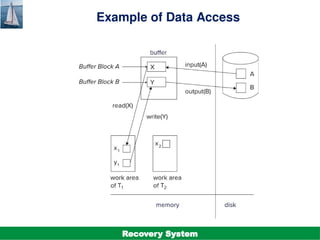
Data Access
 Physical blocks are those blocks residing on the disk.
 Buffer blocks are the blocks residing temporarily in main
memory.
 Block movements between disk and main memory are initiated
through the following two operations:
• input (B) transfers the physical block B to main memory.
• output (B) transfers the buffer block B to the disk, and
replaces the appropriate physical block there.
 We assume, for simplicity, that each data item fits in, and is
stored inside, a single block.
Recovery System
©Silberschatz, Korth and Sudarshan
19.9
Database System Concepts - 7th
Edition
Data Access (Cont.)
 Each transaction Ti has its private work-area in which local copies of all
data items accessed and updated by it are kept.
• Ti 's local copy of a data item X is called xi.
 Transferring data items between system buffer blocks and its private
work-area done by:
• read(X) assigns the value of data item X to the local variable xi.
• write(X) assigns the value of local variable xi to data item {X} in the
buffer block.
• Note: output(BX) need not immediately follow write(X). System can
perform the output operation when it deems fit.
 Transactions
• Must perform read(X) before accessing X for the first time
(subsequent reads can be from local copy)
• write(X) can be executed at any time before the transaction
commits
Recovery System
©Silberschatz, Korth and Sudarshan
19.10
Database System Concepts - 7th
Edition
Example of Data Access
Recovery System
©Silberschatz, Korth and Sudarshan
19.11
Database System Concepts - 7th
Edition
Recovery and Atomicity
 To ensure atomicity despite failures, we first output information
describing the modifications to stable storage without modifying
the database itself.
 We study log-based recovery mechanisms in detail
• We first present key concepts
• And then present the actual recovery algorithm
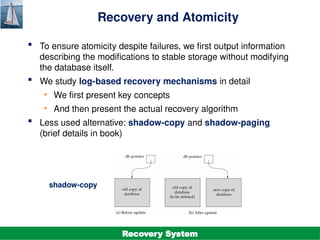
 Less used alternative: shadow-copy and shadow-paging
(brief details in book)
shadow-copy
Recovery System
©Silberschatz, Korth and Sudarshan
19.12
Database System Concepts - 7th
Edition
Log-Based Recovery
 A log is a sequence of log records. The records keep information
about update activities on the database.
• The log is kept on stable storage
 When transaction Ti starts, it registers itself by writing a
<Ti start> log record
 Before Ti executes write(X), a log record
<Ti, X, V1, V2>
is written, where V1 is the value of X before the write (the old
value), and V2 is the value to be written to X (the new value).
 When Ti finishes it last statement, the log record <Ti commit> is written.
 Two approaches using logs
• Immediate database modification
• Deferred database modification.
Recovery System
©Silberschatz, Korth and Sudarshan
19.13
Database System Concepts - 7th
Edition
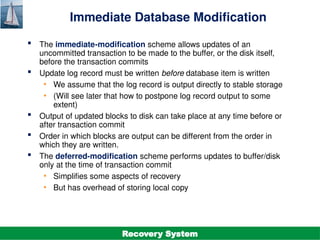
Immediate Database Modification
 The immediate-modification scheme allows updates of an
uncommitted transaction to be made to the buffer, or the disk itself,
before the transaction commits
 Update log record must be written before database item is written
• We assume that the log record is output directly to stable storage
• (Will see later that how to postpone log record output to some
extent)
 Output of updated blocks to disk can take place at any time before or
after transaction commit
 Order in which blocks are output can be different from the order in
which they are written.
 The deferred-modification scheme performs updates to buffer/disk
only at the time of transaction commit
• Simplifies some aspects of recovery
• But has overhead of storing local copy
Recovery System
©Silberschatz, Korth and Sudarshan
19.14
Database System Concepts - 7th
Edition
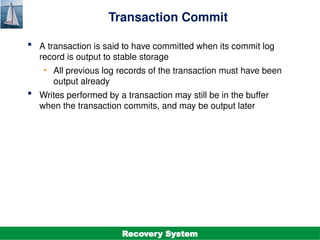
Transaction Commit
 A transaction is said to have committed when its commit log
record is output to stable storage
• All previous log records of the transaction must have been
output already
 Writes performed by a transaction may still be in the buffer
when the transaction commits, and may be output later
Recovery System
©Silberschatz, Korth and Sudarshan
19.15
Database System Concepts - 7th
Edition
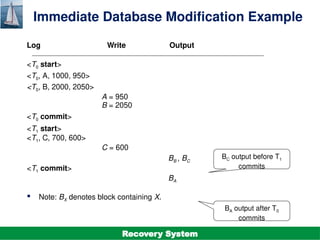
Immediate Database Modification Example
Log Write Output
<T0 start>
<T0, A, 1000, 950>
<T0, B, 2000, 2050>
A = 950
B = 2050
<T0 commit>
<T1 start>
<T1, C, 700, 600>
C = 600
BB , BC
<T1 commit>
BA
 Note: BX denotes block containing X.
BC output before T1
commits
BA output after T0
commits
Recovery System
©Silberschatz, Korth and Sudarshan
19.16
Database System Concepts - 7th
Edition
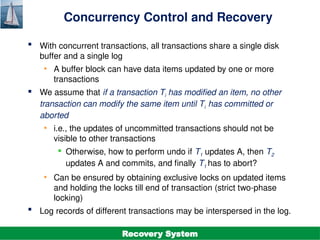
Concurrency Control and Recovery
 With concurrent transactions, all transactions share a single disk
buffer and a single log
• A buffer block can have data items updated by one or more
transactions
 We assume that if a transaction Ti has modified an item, no other
transaction can modify the same item until Ti has committed or
aborted
• i.e., the updates of uncommitted transactions should not be
visible to other transactions
 Otherwise, how to perform undo if T1 updates A, then T2
updates A and commits, and finally T1 has to abort?
• Can be ensured by obtaining exclusive locks on updated items
and holding the locks till end of transaction (strict two-phase
locking)
 Log records of different transactions may be interspersed in the log.
Recovery System
©Silberschatz, Korth and Sudarshan
19.17
Database System Concepts - 7th
Edition
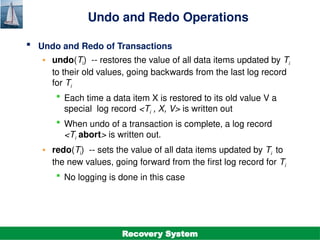
Undo and Redo Operations
 Undo and Redo of Transactions
• undo(Ti) -- restores the value of all data items updated by Ti
to their old values, going backwards from the last log record
for Ti
 Each time a data item X is restored to its old value V a
special log record <Ti , X, V> is written out
 When undo of a transaction is complete, a log record
<Ti abort> is written out.
• redo(Ti) -- sets the value of all data items updated by Ti to
the new values, going forward from the first log record for Ti
 No logging is done in this case
Recovery System
©Silberschatz, Korth and Sudarshan
19.18
Database System Concepts - 7th
Edition
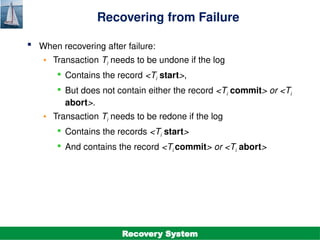
Recovering from Failure
 When recovering after failure:
• Transaction Ti needs to be undone if the log
 Contains the record <Ti start>,
 But does not contain either the record <Ti commit> or <Ti
abort>.
• Transaction Ti needs to be redone if the log
 Contains the records <Ti start>
 And contains the record <Ti commit> or <Ti abort>
Recovery System
©Silberschatz, Korth and Sudarshan
19.19
Database System Concepts - 7th
Edition
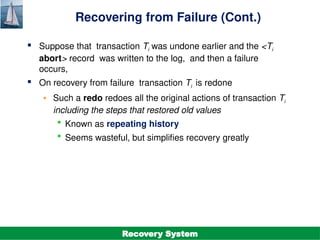
Recovering from Failure (Cont.)
 Suppose that transaction Ti was undone earlier and the <Ti
abort> record was written to the log, and then a failure
occurs,
 On recovery from failure transaction Ti is redone
• Such a redo redoes all the original actions of transaction Ti
including the steps that restored old values
 Known as repeating history
 Seems wasteful, but simplifies recovery greatly
Recovery System
©Silberschatz, Korth and Sudarshan
19.20
Database System Concepts - 7th
Edition
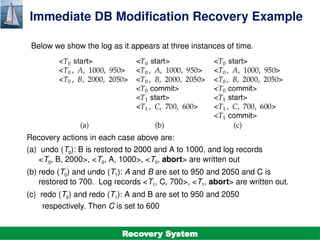
Immediate DB Modification Recovery Example
Below we show the log as it appears at three instances of time.
Recovery actions in each case above are:
(a) undo (T0): B is restored to 2000 and A to 1000, and log records
<T0, B, 2000>, <T0, A, 1000>, <T0, abort> are written out
(b) redo (T0) and undo (T1): A and B are set to 950 and 2050 and C is
restored to 700. Log records <T1, C, 700>, <T1, abort> are written out.
(c) redo (T0) and redo (T1): A and B are set to 950 and 2050
respectively. Then C is set to 600
Recovery System
©Silberschatz, Korth and Sudarshan
19.21
Database System Concepts - 7th
Edition
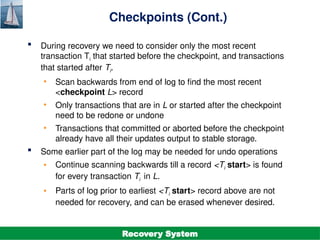
Checkpoints
 Redoing/undoing all transactions recorded in the log can be very slow
• Processing the entire log is time-consuming if the system has run
for a long time
• We might unnecessarily redo transactions which have already
output their updates to the database.
 Streamline recovery procedure by periodically performing
checkpointing
1. Output all log records currently residing in main memory onto
stable
storage.
2. Output all modified buffer blocks to the disk.
3. Write a log record < checkpoint L> onto stable storage where L is
a
list of all transactions active at the time of checkpoint.
4. All updates are stopped while doing checkpointing
Recovery System
©Silberschatz, Korth and Sudarshan
19.22
Database System Concepts - 7th
Edition
Checkpoints (Cont.)
 During recovery we need to consider only the most recent
transaction Ti that started before the checkpoint, and transactions
that started after Ti.
• Scan backwards from end of log to find the most recent
<checkpoint L> record
• Only transactions that are in L or started after the checkpoint
need to be redone or undone
• Transactions that committed or aborted before the checkpoint
already have all their updates output to stable storage.
 Some earlier part of the log may be needed for undo operations
• Continue scanning backwards till a record <Ti start> is found
for every transaction Ti in L.
• Parts of log prior to earliest <Ti start> record above are not
needed for recovery, and can be erased whenever desired.
Recovery System
©Silberschatz, Korth and Sudarshan
19.23
Database System Concepts - 7th
Edition
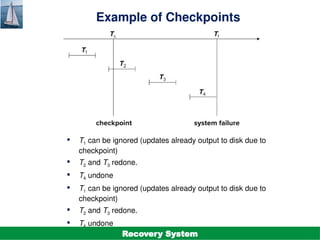
Example of Checkpoints
 T1 can be ignored (updates already output to disk due to
checkpoint)
 T2 and T3 redone.
 T4 undone
 T1 can be ignored (updates already output to disk due to
checkpoint)
 T2 and T3 redone.
 T4 undone
Recovery System
©Silberschatz, Korth and Sudarshan
19.24
Database System Concepts - 7th
Edition
Recovery Algorithm
Recovery System
©Silberschatz, Korth and Sudarshan
19.25
Database System Concepts - 7th
Edition
Recovery Algorithm
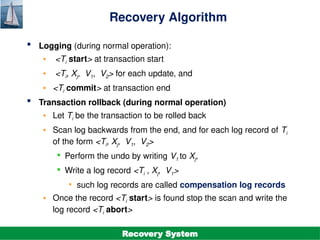
 Logging (during normal operation):
• <Ti start> at transaction start
• <Ti, Xj, V1, V2> for each update, and
• <Ti commit> at transaction end
 Transaction rollback (during normal operation)
• Let Ti be the transaction to be rolled back
• Scan log backwards from the end, and for each log record of Ti
of the form <Ti, Xj, V1, V2>
 Perform the undo by writing V1 to Xj,
 Write a log record <Ti , Xj, V1>
• such log records are called compensation log records
• Once the record <Ti start> is found stop the scan and write the
log record <Ti abort>
Recovery System
©Silberschatz, Korth and Sudarshan
19.26
Database System Concepts - 7th
Edition
Recovery Algorithm (Cont.)
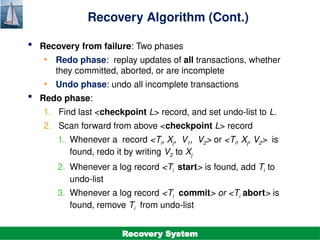
 Recovery from failure: Two phases
• Redo phase: replay updates of all transactions, whether
they committed, aborted, or are incomplete
• Undo phase: undo all incomplete transactions
 Redo phase:
1. Find last <checkpoint L> record, and set undo-list to L.
2. Scan forward from above <checkpoint L> record
1. Whenever a record <Ti, Xj, V1, V2> or <Ti, Xj, V2> is
found, redo it by writing V2 to Xj
2. Whenever a log record <Ti start> is found, add Ti to
undo-list
3. Whenever a log record <Ti commit> or <Ti abort> is
found, remove Ti from undo-list
Recovery System
©Silberschatz, Korth and Sudarshan
19.27
Database System Concepts - 7th
Edition
Recovery Algorithm (Cont.)
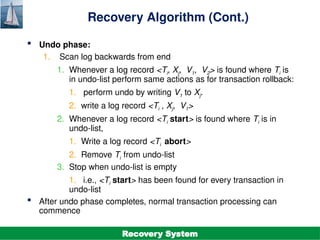
 Undo phase:
1. Scan log backwards from end
1. Whenever a log record <Ti, Xj, V1, V2> is found where Ti is
in undo-list perform same actions as for transaction rollback:
1. perform undo by writing V1 to Xj.
2. write a log record <Ti , Xj, V1>
2. Whenever a log record <Ti start> is found where Ti is in
undo-list,
1. Write a log record <Ti abort>
2. Remove Ti from undo-list
3. Stop when undo-list is empty
1. i.e., <Ti start> has been found for every transaction in
undo-list
 After undo phase completes, normal transaction processing can
commence
Recovery System
©Silberschatz, Korth and Sudarshan
19.28
Database System Concepts - 7th
Edition
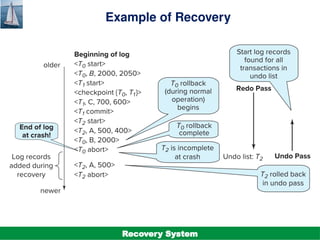
Example of Recovery
Recovery System
©Silberschatz, Korth and Sudarshan
19.29
Database System Concepts - 7th
Edition
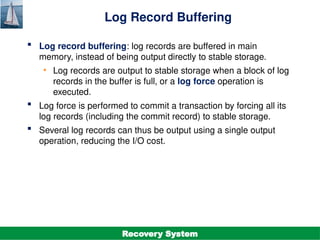
Log Record Buffering
 Log record buffering: log records are buffered in main
memory, instead of being output directly to stable storage.
• Log records are output to stable storage when a block of log
records in the buffer is full, or a log force operation is
executed.
 Log force is performed to commit a transaction by forcing all its
log records (including the commit record) to stable storage.
 Several log records can thus be output using a single output
operation, reducing the I/O cost.
Recovery System
©Silberschatz, Korth and Sudarshan
19.30
Database System Concepts - 7th
Edition
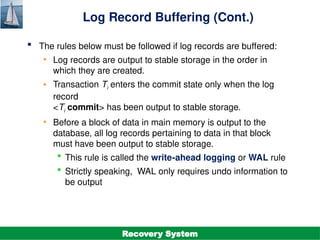
Log Record Buffering (Cont.)
 The rules below must be followed if log records are buffered:
• Log records are output to stable storage in the order in
which they are created.
• Transaction Ti enters the commit state only when the log
record
<Ti commit> has been output to stable storage.
• Before a block of data in main memory is output to the
database, all log records pertaining to data in that block
must have been output to stable storage.
 This rule is called the write-ahead logging or WAL rule
 Strictly speaking, WAL only requires undo information to
be output
Recovery System
©Silberschatz, Korth and Sudarshan
19.31
Database System Concepts - 7th
Edition
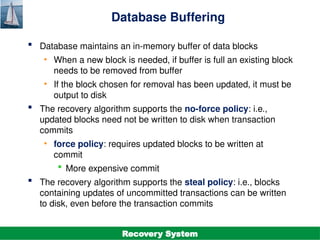
Database Buffering
 Database maintains an in-memory buffer of data blocks
• When a new block is needed, if buffer is full an existing block
needs to be removed from buffer
• If the block chosen for removal has been updated, it must be
output to disk
 The recovery algorithm supports the no-force policy: i.e.,
updated blocks need not be written to disk when transaction
commits
• force policy: requires updated blocks to be written at
commit
 More expensive commit
 The recovery algorithm supports the steal policy: i.e., blocks
containing updates of uncommitted transactions can be written
to disk, even before the transaction commits
Recovery System
©Silberschatz, Korth and Sudarshan
19.32
Database System Concepts - 7th
Edition
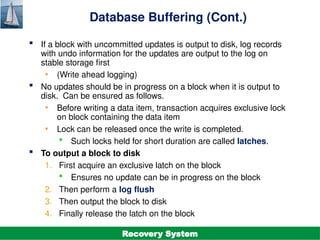
Database Buffering (Cont.)
 If a block with uncommitted updates is output to disk, log records
with undo information for the updates are output to the log on
stable storage first
• (Write ahead logging)
 No updates should be in progress on a block when it is output to
disk. Can be ensured as follows.
• Before writing a data item, transaction acquires exclusive lock
on block containing the data item
• Lock can be released once the write is completed.
 Such locks held for short duration are called latches.
 To output a block to disk
1. First acquire an exclusive latch on the block
 Ensures no update can be in progress on the block
2. Then perform a log flush
3. Then output the block to disk
4. Finally release the latch on the block
Recovery System
©Silberschatz, Korth and Sudarshan
19.33
Database System Concepts - 7th
Edition
Buffer Management (Cont.)
 Database buffer can be implemented either
• In an area of real main-memory reserved for the database,
or
• In virtual memory
 Implementing buffer in reserved main-memory has drawbacks:
• Memory is partitioned before-hand between database
buffer and applications, limiting flexibility.
• Needs may change, and although operating system knows
best how memory should be divided up at any time, it
cannot change the partitioning of memory.
Recovery System
©Silberschatz, Korth and Sudarshan
19.34
Database System Concepts - 7th
Edition
Buffer Management (Cont.)
 Database buffers are generally implemented in virtual memory
in spite of some drawbacks:
• When operating system needs to evict a page that has
been modified, the page is written to swap space on disk.
• When database decides to write buffer page to disk, buffer
page may be in swap space, and may have to be read
from swap space on disk and output to the database on
disk, resulting in extra I/O!
 Known as dual paging problem.
• Ideally when OS needs to evict a page from the buffer, it
should pass control to database, which in turn should
1. Output the page to database instead of to swap space
(making sure to output log records first), if it is modified
2. Release the page from the buffer, for the OS to use
• Dual paging can thus be avoided, but common operating
systems do not support such functionality.
Recovery System
©Silberschatz, Korth and Sudarshan
19.35
Database System Concepts - 7th
Edition
Fuzzy Checkpointing
 To avoid long interruption of normal processing during
checkpointing, allow updates to happen during checkpointing
 Fuzzy checkpointing is done as follows:
1. Temporarily stop all updates by transactions
2. Write a <checkpoint L> log record and force log to stable
storage
3. Note list M of modified buffer blocks
4. Now permit transactions to proceed with their actions
5. Output to disk all modified buffer blocks in list M
 blocks should not be updated while being output
 Follow WAL: all log records pertaining to a block must be
output before the block is output
6. Store a pointer to the checkpoint record in a fixed position
last_checkpoint on disk
Recovery System
©Silberschatz, Korth and Sudarshan
19.36
Database System Concepts - 7th
Edition
Fuzzy Checkpointing (Cont.)
 When recovering using a fuzzy checkpoint, start scan from the
checkpoint record pointed to by last_checkpoint
• Log records before last_checkpoint have their updates
reflected in database on disk, and need not be redone.
• Incomplete checkpoints, where system had crashed while
performing checkpoint, are handled safely
Recovery System
©Silberschatz, Korth and Sudarshan
19.37
Database System Concepts - 7th
Edition
Failure with Loss of Nonvolatile Storage
 So far we assumed no loss of non-volatile storage
 Technique similar to checkpointing used to deal with loss of
non-volatile storage
• Periodically dump the entire content of the database to
stable storage
• No transaction may be active during the dump procedure; a
procedure similar to checkpointing must take place
 Output all log records currently residing in main memory
onto stable storage.
 Output all buffer blocks onto the disk.
 Copy the contents of the database to stable storage.
 Output a record <dump> to log on stable storage.
Recovery System
©Silberschatz, Korth and Sudarshan
19.38
Database System Concepts - 7th
Edition
Recovering from Failure of Non-Volatile Storage
 To recover from disk failure
• restore database from most recent dump.
• Consult the log and redo all transactions that committed after
the dump
 Can be extended to allow transactions to be active during dump;
known as fuzzy dump or online dump
• Similar to fuzzy checkpointing
Recovery System

DBMS Unit-5.5. Recovery System.pptx it is PPT

  • 1.
    ©Silberschatz, Korth andSudarshan 19.1 Database System Concepts - 7th Edition DATABASE MANAGEMENT SYSTEMS Module - V Recovery System
  • 2.
    ©Silberschatz, Korth andSudarshan 19.2 Database System Concepts - 7th Edition Outline  Failure Classification  Storage Structure  Recovery and Atomicity  Log-Based Recovery Recovery System
  • 3.
    ©Silberschatz, Korth andSudarshan 19.3 Database System Concepts - 7th Edition Failure Classification  Transaction failure : • Logical errors: transaction cannot complete due to some internal error condition • System errors: the database system must terminate an active transaction due to an error condition (e.g., deadlock)  System crash: a power failure or other hardware or software failure causes the system to crash. • Fail-stop assumption: non-volatile storage contents are assumed to not be corrupted by system crash  Database systems have numerous integrity checks to prevent corruption of disk data  Disk failure: a head crash or similar disk failure destroys all or part of disk storage • Destruction is assumed to be detectable: disk drives use checksums to detect failures Recovery System
  • 4.
    ©Silberschatz, Korth andSudarshan 19.4 Database System Concepts - 7th Edition Recovery Algorithms  Suppose transaction Ti transfers $50 from account A to account B • Two updates: subtract 50 from A and add 50 to B  Transaction Ti requires updates to A and B to be output to the database. • A failure may occur after one of these modifications have been made but before both of them are made. • Modifying the database without ensuring that the transaction will commit may leave the database in an inconsistent state • Not modifying the database may result in lost updates if failure occurs just after transaction commits  Recovery algorithms have two parts 1. Actions taken during normal transaction processing to ensure enough information exists to recover from failures 2. Actions taken after a failure to recover the database contents to a state that ensures atomicity, consistency and durability Recovery System
  • 5.
    ©Silberschatz, Korth andSudarshan 19.5 Database System Concepts - 7th Edition Storage Structure  Volatile storage: • Does not survive system crashes • Examples: main memory, cache memory  Nonvolatile storage: • Survives system crashes • Examples: disk, tape, flash memory, non-volatile RAM • But may still fail, losing data  Stable storage: • A mythical form of storage that survives all failures • Approximated by maintaining multiple copies on distinct nonvolatile media • See book for more details on how to implement stable storage Recovery System
  • 6.
    ©Silberschatz, Korth andSudarshan 19.6 Database System Concepts - 7th Edition Stable-Storage Implementation  Maintain multiple copies of each block on separate disks • copies can be at remote sites to protect against disasters such as fire or flooding.  Failure during data transfer can still result in inconsistent copies: Block transfer can result in • Successful completion • Partial failure: destination block has incorrect information • Total failure: destination block was never updated  Protecting storage media from failure during data transfer (one solution): • Execute output operation as follows (assuming two copies of each block): 1. Write the information onto the first physical block. 2. When the first write successfully completes, write the same information onto the second physical block. 3. The output is completed only after the second write successfully completes. Recovery System
  • 7.
    ©Silberschatz, Korth andSudarshan 19.7 Database System Concepts - 7th Edition Protecting storage media from failure (Cont.)  Copies of a block may differ due to failure during output operation.  To recover from failure: 1. First find inconsistent blocks: 1. Expensive solution: Compare the two copies of every disk block. 2. Better solution: • Record in-progress disk writes on non-volatile storage (Flash, Non-volatile RAM or special area of disk). • Use this information during recovery to find blocks that may be inconsistent, and only compare copies of these. • Used in hardware RAID systems 2. If either copy of an inconsistent block is detected to have an error (bad checksum), overwrite it by the other copy. If both have no error, but are different, overwrite the second block by the first block. Recovery System
  • 8.
    ©Silberschatz, Korth andSudarshan 19.8 Database System Concepts - 7th Edition Data Access  Physical blocks are those blocks residing on the disk.  Buffer blocks are the blocks residing temporarily in main memory.  Block movements between disk and main memory are initiated through the following two operations: • input (B) transfers the physical block B to main memory. • output (B) transfers the buffer block B to the disk, and replaces the appropriate physical block there.  We assume, for simplicity, that each data item fits in, and is stored inside, a single block. Recovery System
  • 9.
    ©Silberschatz, Korth andSudarshan 19.9 Database System Concepts - 7th Edition Data Access (Cont.)  Each transaction Ti has its private work-area in which local copies of all data items accessed and updated by it are kept. • Ti 's local copy of a data item X is called xi.  Transferring data items between system buffer blocks and its private work-area done by: • read(X) assigns the value of data item X to the local variable xi. • write(X) assigns the value of local variable xi to data item {X} in the buffer block. • Note: output(BX) need not immediately follow write(X). System can perform the output operation when it deems fit.  Transactions • Must perform read(X) before accessing X for the first time (subsequent reads can be from local copy) • write(X) can be executed at any time before the transaction commits Recovery System
  • 10.
    ©Silberschatz, Korth andSudarshan 19.10 Database System Concepts - 7th Edition Example of Data Access Recovery System
  • 11.
    ©Silberschatz, Korth andSudarshan 19.11 Database System Concepts - 7th Edition Recovery and Atomicity  To ensure atomicity despite failures, we first output information describing the modifications to stable storage without modifying the database itself.  We study log-based recovery mechanisms in detail • We first present key concepts • And then present the actual recovery algorithm  Less used alternative: shadow-copy and shadow-paging (brief details in book) shadow-copy Recovery System
  • 12.
    ©Silberschatz, Korth andSudarshan 19.12 Database System Concepts - 7th Edition Log-Based Recovery  A log is a sequence of log records. The records keep information about update activities on the database. • The log is kept on stable storage  When transaction Ti starts, it registers itself by writing a <Ti start> log record  Before Ti executes write(X), a log record <Ti, X, V1, V2> is written, where V1 is the value of X before the write (the old value), and V2 is the value to be written to X (the new value).  When Ti finishes it last statement, the log record <Ti commit> is written.  Two approaches using logs • Immediate database modification • Deferred database modification. Recovery System
  • 13.
    ©Silberschatz, Korth andSudarshan 19.13 Database System Concepts - 7th Edition Immediate Database Modification  The immediate-modification scheme allows updates of an uncommitted transaction to be made to the buffer, or the disk itself, before the transaction commits  Update log record must be written before database item is written • We assume that the log record is output directly to stable storage • (Will see later that how to postpone log record output to some extent)  Output of updated blocks to disk can take place at any time before or after transaction commit  Order in which blocks are output can be different from the order in which they are written.  The deferred-modification scheme performs updates to buffer/disk only at the time of transaction commit • Simplifies some aspects of recovery • But has overhead of storing local copy Recovery System
  • 14.
    ©Silberschatz, Korth andSudarshan 19.14 Database System Concepts - 7th Edition Transaction Commit  A transaction is said to have committed when its commit log record is output to stable storage • All previous log records of the transaction must have been output already  Writes performed by a transaction may still be in the buffer when the transaction commits, and may be output later Recovery System
  • 15.
    ©Silberschatz, Korth andSudarshan 19.15 Database System Concepts - 7th Edition Immediate Database Modification Example Log Write Output <T0 start> <T0, A, 1000, 950> <T0, B, 2000, 2050> A = 950 B = 2050 <T0 commit> <T1 start> <T1, C, 700, 600> C = 600 BB , BC <T1 commit> BA  Note: BX denotes block containing X. BC output before T1 commits BA output after T0 commits Recovery System
  • 16.
    ©Silberschatz, Korth andSudarshan 19.16 Database System Concepts - 7th Edition Concurrency Control and Recovery  With concurrent transactions, all transactions share a single disk buffer and a single log • A buffer block can have data items updated by one or more transactions  We assume that if a transaction Ti has modified an item, no other transaction can modify the same item until Ti has committed or aborted • i.e., the updates of uncommitted transactions should not be visible to other transactions  Otherwise, how to perform undo if T1 updates A, then T2 updates A and commits, and finally T1 has to abort? • Can be ensured by obtaining exclusive locks on updated items and holding the locks till end of transaction (strict two-phase locking)  Log records of different transactions may be interspersed in the log. Recovery System
  • 17.
    ©Silberschatz, Korth andSudarshan 19.17 Database System Concepts - 7th Edition Undo and Redo Operations  Undo and Redo of Transactions • undo(Ti) -- restores the value of all data items updated by Ti to their old values, going backwards from the last log record for Ti  Each time a data item X is restored to its old value V a special log record <Ti , X, V> is written out  When undo of a transaction is complete, a log record <Ti abort> is written out. • redo(Ti) -- sets the value of all data items updated by Ti to the new values, going forward from the first log record for Ti  No logging is done in this case Recovery System
  • 18.
    ©Silberschatz, Korth andSudarshan 19.18 Database System Concepts - 7th Edition Recovering from Failure  When recovering after failure: • Transaction Ti needs to be undone if the log  Contains the record <Ti start>,  But does not contain either the record <Ti commit> or <Ti abort>. • Transaction Ti needs to be redone if the log  Contains the records <Ti start>  And contains the record <Ti commit> or <Ti abort> Recovery System
  • 19.
    ©Silberschatz, Korth andSudarshan 19.19 Database System Concepts - 7th Edition Recovering from Failure (Cont.)  Suppose that transaction Ti was undone earlier and the <Ti abort> record was written to the log, and then a failure occurs,  On recovery from failure transaction Ti is redone • Such a redo redoes all the original actions of transaction Ti including the steps that restored old values  Known as repeating history  Seems wasteful, but simplifies recovery greatly Recovery System
  • 20.
    ©Silberschatz, Korth andSudarshan 19.20 Database System Concepts - 7th Edition Immediate DB Modification Recovery Example Below we show the log as it appears at three instances of time. Recovery actions in each case above are: (a) undo (T0): B is restored to 2000 and A to 1000, and log records <T0, B, 2000>, <T0, A, 1000>, <T0, abort> are written out (b) redo (T0) and undo (T1): A and B are set to 950 and 2050 and C is restored to 700. Log records <T1, C, 700>, <T1, abort> are written out. (c) redo (T0) and redo (T1): A and B are set to 950 and 2050 respectively. Then C is set to 600 Recovery System
  • 21.
    ©Silberschatz, Korth andSudarshan 19.21 Database System Concepts - 7th Edition Checkpoints  Redoing/undoing all transactions recorded in the log can be very slow • Processing the entire log is time-consuming if the system has run for a long time • We might unnecessarily redo transactions which have already output their updates to the database.  Streamline recovery procedure by periodically performing checkpointing 1. Output all log records currently residing in main memory onto stable storage. 2. Output all modified buffer blocks to the disk. 3. Write a log record < checkpoint L> onto stable storage where L is a list of all transactions active at the time of checkpoint. 4. All updates are stopped while doing checkpointing Recovery System
  • 22.
    ©Silberschatz, Korth andSudarshan 19.22 Database System Concepts - 7th Edition Checkpoints (Cont.)  During recovery we need to consider only the most recent transaction Ti that started before the checkpoint, and transactions that started after Ti. • Scan backwards from end of log to find the most recent <checkpoint L> record • Only transactions that are in L or started after the checkpoint need to be redone or undone • Transactions that committed or aborted before the checkpoint already have all their updates output to stable storage.  Some earlier part of the log may be needed for undo operations • Continue scanning backwards till a record <Ti start> is found for every transaction Ti in L. • Parts of log prior to earliest <Ti start> record above are not needed for recovery, and can be erased whenever desired. Recovery System
  • 23.
    ©Silberschatz, Korth andSudarshan 19.23 Database System Concepts - 7th Edition Example of Checkpoints  T1 can be ignored (updates already output to disk due to checkpoint)  T2 and T3 redone.  T4 undone  T1 can be ignored (updates already output to disk due to checkpoint)  T2 and T3 redone.  T4 undone Recovery System
  • 24.
    ©Silberschatz, Korth andSudarshan 19.24 Database System Concepts - 7th Edition Recovery Algorithm Recovery System
  • 25.
    ©Silberschatz, Korth andSudarshan 19.25 Database System Concepts - 7th Edition Recovery Algorithm  Logging (during normal operation): • <Ti start> at transaction start • <Ti, Xj, V1, V2> for each update, and • <Ti commit> at transaction end  Transaction rollback (during normal operation) • Let Ti be the transaction to be rolled back • Scan log backwards from the end, and for each log record of Ti of the form <Ti, Xj, V1, V2>  Perform the undo by writing V1 to Xj,  Write a log record <Ti , Xj, V1> • such log records are called compensation log records • Once the record <Ti start> is found stop the scan and write the log record <Ti abort> Recovery System
  • 26.
    ©Silberschatz, Korth andSudarshan 19.26 Database System Concepts - 7th Edition Recovery Algorithm (Cont.)  Recovery from failure: Two phases • Redo phase: replay updates of all transactions, whether they committed, aborted, or are incomplete • Undo phase: undo all incomplete transactions  Redo phase: 1. Find last <checkpoint L> record, and set undo-list to L. 2. Scan forward from above <checkpoint L> record 1. Whenever a record <Ti, Xj, V1, V2> or <Ti, Xj, V2> is found, redo it by writing V2 to Xj 2. Whenever a log record <Ti start> is found, add Ti to undo-list 3. Whenever a log record <Ti commit> or <Ti abort> is found, remove Ti from undo-list Recovery System
  • 27.
    ©Silberschatz, Korth andSudarshan 19.27 Database System Concepts - 7th Edition Recovery Algorithm (Cont.)  Undo phase: 1. Scan log backwards from end 1. Whenever a log record <Ti, Xj, V1, V2> is found where Ti is in undo-list perform same actions as for transaction rollback: 1. perform undo by writing V1 to Xj. 2. write a log record <Ti , Xj, V1> 2. Whenever a log record <Ti start> is found where Ti is in undo-list, 1. Write a log record <Ti abort> 2. Remove Ti from undo-list 3. Stop when undo-list is empty 1. i.e., <Ti start> has been found for every transaction in undo-list  After undo phase completes, normal transaction processing can commence Recovery System
  • 28.
    ©Silberschatz, Korth andSudarshan 19.28 Database System Concepts - 7th Edition Example of Recovery Recovery System
  • 29.
    ©Silberschatz, Korth andSudarshan 19.29 Database System Concepts - 7th Edition Log Record Buffering  Log record buffering: log records are buffered in main memory, instead of being output directly to stable storage. • Log records are output to stable storage when a block of log records in the buffer is full, or a log force operation is executed.  Log force is performed to commit a transaction by forcing all its log records (including the commit record) to stable storage.  Several log records can thus be output using a single output operation, reducing the I/O cost. Recovery System
  • 30.
    ©Silberschatz, Korth andSudarshan 19.30 Database System Concepts - 7th Edition Log Record Buffering (Cont.)  The rules below must be followed if log records are buffered: • Log records are output to stable storage in the order in which they are created. • Transaction Ti enters the commit state only when the log record <Ti commit> has been output to stable storage. • Before a block of data in main memory is output to the database, all log records pertaining to data in that block must have been output to stable storage.  This rule is called the write-ahead logging or WAL rule  Strictly speaking, WAL only requires undo information to be output Recovery System
  • 31.
    ©Silberschatz, Korth andSudarshan 19.31 Database System Concepts - 7th Edition Database Buffering  Database maintains an in-memory buffer of data blocks • When a new block is needed, if buffer is full an existing block needs to be removed from buffer • If the block chosen for removal has been updated, it must be output to disk  The recovery algorithm supports the no-force policy: i.e., updated blocks need not be written to disk when transaction commits • force policy: requires updated blocks to be written at commit  More expensive commit  The recovery algorithm supports the steal policy: i.e., blocks containing updates of uncommitted transactions can be written to disk, even before the transaction commits Recovery System
  • 32.
    ©Silberschatz, Korth andSudarshan 19.32 Database System Concepts - 7th Edition Database Buffering (Cont.)  If a block with uncommitted updates is output to disk, log records with undo information for the updates are output to the log on stable storage first • (Write ahead logging)  No updates should be in progress on a block when it is output to disk. Can be ensured as follows. • Before writing a data item, transaction acquires exclusive lock on block containing the data item • Lock can be released once the write is completed.  Such locks held for short duration are called latches.  To output a block to disk 1. First acquire an exclusive latch on the block  Ensures no update can be in progress on the block 2. Then perform a log flush 3. Then output the block to disk 4. Finally release the latch on the block Recovery System
  • 33.
    ©Silberschatz, Korth andSudarshan 19.33 Database System Concepts - 7th Edition Buffer Management (Cont.)  Database buffer can be implemented either • In an area of real main-memory reserved for the database, or • In virtual memory  Implementing buffer in reserved main-memory has drawbacks: • Memory is partitioned before-hand between database buffer and applications, limiting flexibility. • Needs may change, and although operating system knows best how memory should be divided up at any time, it cannot change the partitioning of memory. Recovery System
  • 34.
    ©Silberschatz, Korth andSudarshan 19.34 Database System Concepts - 7th Edition Buffer Management (Cont.)  Database buffers are generally implemented in virtual memory in spite of some drawbacks: • When operating system needs to evict a page that has been modified, the page is written to swap space on disk. • When database decides to write buffer page to disk, buffer page may be in swap space, and may have to be read from swap space on disk and output to the database on disk, resulting in extra I/O!  Known as dual paging problem. • Ideally when OS needs to evict a page from the buffer, it should pass control to database, which in turn should 1. Output the page to database instead of to swap space (making sure to output log records first), if it is modified 2. Release the page from the buffer, for the OS to use • Dual paging can thus be avoided, but common operating systems do not support such functionality. Recovery System
  • 35.
    ©Silberschatz, Korth andSudarshan 19.35 Database System Concepts - 7th Edition Fuzzy Checkpointing  To avoid long interruption of normal processing during checkpointing, allow updates to happen during checkpointing  Fuzzy checkpointing is done as follows: 1. Temporarily stop all updates by transactions 2. Write a <checkpoint L> log record and force log to stable storage 3. Note list M of modified buffer blocks 4. Now permit transactions to proceed with their actions 5. Output to disk all modified buffer blocks in list M  blocks should not be updated while being output  Follow WAL: all log records pertaining to a block must be output before the block is output 6. Store a pointer to the checkpoint record in a fixed position last_checkpoint on disk Recovery System
  • 36.
    ©Silberschatz, Korth andSudarshan 19.36 Database System Concepts - 7th Edition Fuzzy Checkpointing (Cont.)  When recovering using a fuzzy checkpoint, start scan from the checkpoint record pointed to by last_checkpoint • Log records before last_checkpoint have their updates reflected in database on disk, and need not be redone. • Incomplete checkpoints, where system had crashed while performing checkpoint, are handled safely Recovery System
  • 37.
    ©Silberschatz, Korth andSudarshan 19.37 Database System Concepts - 7th Edition Failure with Loss of Nonvolatile Storage  So far we assumed no loss of non-volatile storage  Technique similar to checkpointing used to deal with loss of non-volatile storage • Periodically dump the entire content of the database to stable storage • No transaction may be active during the dump procedure; a procedure similar to checkpointing must take place  Output all log records currently residing in main memory onto stable storage.  Output all buffer blocks onto the disk.  Copy the contents of the database to stable storage.  Output a record <dump> to log on stable storage. Recovery System
  • 38.
    ©Silberschatz, Korth andSudarshan 19.38 Database System Concepts - 7th Edition Recovering from Failure of Non-Volatile Storage  To recover from disk failure • restore database from most recent dump. • Consult the log and redo all transactions that committed after the dump  Can be extended to allow transactions to be active during dump; known as fuzzy dump or online dump • Similar to fuzzy checkpointing Recovery System