Database Management Systems
Session 3
Databases Development Life Cycle
Lecturer: Ms. Esther Kimani
1
Outline
• Relationship between the information systems
lifecycle and the Database system
development lifecycle.
• The stages of the database system
development lifecycle.
• The activities associated with each stage of
the database system development lifecycle.
2
Overall System Life Cycle
Development Business
Need
Installation
Operation
Obsolescence
3
Overall System Life Cycle
1. Business Need; changing business condition
prompting request for a new or improved
computer system.
2. System Development; analyze, design and
implement a system to meet the business need.
3. System Installation; move new system into
production.
4. System Operation; period of active use.
5. System Obsolescence; when system no longer
reflects changed business needs. 4
Information System
The resources that enable the collection,
management, control, and dissemination of
data/information throughout an organization.
• An information system not only collects, manages,
and controls data used and generated by an
organization but enables the transformation of the
data into information.
• An information system also provides the
infrastructure to facilitate the dissemination of
information to those who make the decisions critical
to the success of an organization. 5
SDLC Vs. Database system development life
cycle.
• Typically, the stages of the information systems
lifecycle include: planning, requirements
collection and analysis, design (including database
design), prototyping, implementation, testing,
conversion, and operational maintenance.
• As a database is a fundamental component of the
larger organization-wide information system, the
database system development lifecycle is
inherently linked with the information systems
lifecycle.
6
DB Development Lifecycle.
1. Database planning
2. System definition
3. Requirement collection and analysis
4. Database design
5. DBMS selection
6. Application design
7. Prototyping
8. Implementation
9. Data conversion and loading
10.Testing
11.Operational maintenance 7
1. Database Planning
The management activities that allow the stages of
the database system development lifecycle to be
realized as efficiently and effectively as possible.
• Creation of a mission statement and mission
objectives for the database system.
• The mission statement defines the major aims of
the database system, while each mission
objective identifies a particular task that the
database must support.
8
1. Database Planning
• Estimation of the work to be done, the
resources with which to do it, and the money
to pay for it all.
• Database planning may also include the
development of standards that govern;
– how data will be collected and analyzed.
– how the format should be specified.
– what necessary documentation will be needed
– how design and implementation should proceed.
9
1. Database Planning
• Also plan for;
– Time; identify phases and activities in each phase
– Identify resources; human, equipment, HR and
give costs of resources.
– Quality; how do you ensure quality of the process
and of final system.
– Equipment to handle transaction of the DB system.
– Mitigation; of eventualities not on your side.
Consider to deliver the job on Time, of Quality
and at minimal Cost.
10
2. System Definition
Identification of the scope and boundary of the
database system, including its major user views.
• Determine how new system interfaces with
other parts of the organization’s information
system (present & future systems).
• When defining the system boundary for a
database system we include not only the
current user views but also any known future
user views.
11
2. System Definition
12
2. System Definition
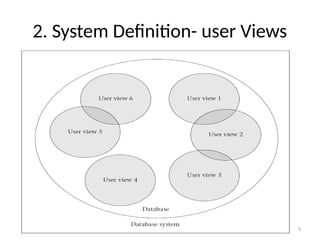
• User view; Defines what is required of a database
system from the perspective of a particular job (such
as Manager or Supervisor) or business application
area (such as marketing, personnel, or stock control).
• Identifying views helps to ensure that no major
users of the database are forgotten when developing
the requirements for the new application.
• User views are also helpful in the development of
complex database system by allowing the
requirements to be broken down into manageable
pieces. 13
2. System Definition
• User view defines what is required of a
database system in terms of the data to be
held and the transactions to be performed on
the data (in other words, what the users will
do with the data).
• The requirements of a user view may be
distinct to that view or overlap with other
views.
14
2. System Definition- user Views
15
3. Requirements Collection and Analysis
The process of collecting and analyzing
information about the organization to be
supported by the database system, and using
this information to identify the requirements for
the new database system.
• There are many techniques for gathering this
information, called fact-finding techniques e.g.
observation.
16
3. Requirements Collection and Analysis
• We gather information for each major user
view (that is, job role or business application
area), including:
– a description of the data used or generated,
– the details of how data is to be used or generated,
– any additional requirements for the new database
system.
17
3. Requirements Collection and Analysis
• Decide how to deal with the situation where
there is more than one user view. There are
three approaches to dealing with multiple
user views:
– the centralized approach, Requirements for each
user view are merged into a single list of
requirements for the new database system
18
3. Requirements Collection and Analysis
– the view integration approach; Requirements for
each user view remain as separate lists. Data
models representing each user view are created and
then merged later during the database design stage.
– a combination of both approaches.
A data model that represents a single user view is
called a local logical data model. We then merge
the local data models to create a global logical
data model representing all user views of the
organization.
19
4. Database Design
The process of creating a design that will support
the organization’s mission statement and mission
objectives for the required database system. Aims
to;
• Represent data and relationships between data
required by all major areas & user groups
• Provide data models that support transactions
required on the data.
• Specify design appropriately structured to achieve
stated performance requirements of the system.
20
4. Database Design
Purpose of data modeling;
• Understand meaning (semantics) of the data
• Facilitate communication about the
information requirements and answer queries
on entities, relationships and attributes.
• Understand users perspective of the data
• Understand nature of the data independent of
physical representation.
• Understand use of data across user views.
21
4. Database Design
Database design is made up of three main
phases
Conceptual Design; constructing a model of
information used in the organisation
independent of all physical consideration.
• Build local conceptual data model for each
user view.
22
4. Database Design
Logical database design, the process of constructing
a model of the info used in an organization based on
a specific data model, but independent of a
particular DBMS and other physical considerations
• we try to identify the important objects that need
to be represented in the database and the
relationships between these objects.
• Build and validate local data model for each user
view
• Build and validate global logical data model
23
4. Database Design
Physical database design, the process of producing a
description of the implementation of the database
on secondary storage.
• We decide how the logical design is to be
physically implemented in the target DBMS.
• Translate global data model for target DBMS
• Design physical representation
• Design security mechanisms
• Monitor and tune the operational system
24
5. DBMS Selection (Optional)
The selection of an appropriate DBMS to support
the database system.
• If no relational DBMS currently exists in the
organization.
• A selection is made between the logical and
physical database design phases. Why?
• Shortlist 2 or 3 products
• Evaluate products, make recommendations and
produce a report on the same.
25
6. Application design
The design of the user interface and the application
programs that use and process the database.
• In most cases, we cannot complete the application
design until the design of the database itself has
taken place. On the other hand, the database exists
to support the applications, and so there must be a
flow of information between application design and
database design thus they are parallel activities.
26
6. Application design
• Ensure that all the functionality stated in the
requirements specifications is present. This
involves designing the interaction between the
user and the data, which we call transaction
design.
• Design an appropriate user interface to the
database system.
• Transaction; An action, or series of actions, carried
out by a single user or application program that
accesses or changes the content of the database.
27
6. Application design
The purpose of transaction design is to define and
document the high-level characteristics of the
transactions required on the database, including:
• data to be used by the transaction;
• functional characteristics of the transaction (what
the transaction will do);
• output of the transaction;
• importance to the users;
• expected rate of usage.
28
6. Application design
There are three main types of transactions:
• Retrieval transactions; used to retrieve data
for display on the screen
• Update transactions; used to insert new
records, delete old records, or modify existing
records in the database.
• Mixed transactions; involve both the retrieval
and updating of data.
29
7. Prototyping
Building a working model of a database system
with minimal functionalities.
• Should be agreed on beforehand with owners.
• The purpose of developing a prototype;
– To allow users to identify the features of the
system that work well, or are inadequate.
– To suggest improvements or even new features for
the database system.
– To clarify user requirements
– Evaluate feasibility of a particular project. 30
7. Prototyping
There are two prototyping strategies in common
use today:
• Requirements prototyping; used to determine
the requirements of a proposed database system
and once the requirements are complete the
prototype is discarded. (aka. throw away proto)
• Evolutionary prototyping; is used for the same
purposes, difference is that the prototype is not
discarded but with further development
becomes the working database system.
31
8. Implementation
The physical realization of the database and
application designs.
• The database implementation is achieved
using the Data Definition Language (DDL) of
the selected DBMS or a graphical user
interface (GUI), which provides the same
functionality while hiding the low-level DDL
statements.
32
8. Implementation
• DDL statements are used to create the
database structures and empty database files.
Any specified user views are also implemented
at this stage.
33
9. Data conversion and loading
• Loading; Transferring any existing data into the
new database and
• Conversion; converting any existing
applications to run on the new database.
• Its an optional phase only required when a
new system is replacing an old one.
34
10. Testing
The process of running the database system with
the intent of finding programming errors.
• This is achieved using carefully planned test
strategies and realistic data so that the entire
testing process is methodically and rigorously
carried out.
• Testing demonstrates that the database and the
application programs appear to be working
according to their specifications and that
performance requirements appear to be
satisfactory. 35
10. Testing
Testing should also cover usability of the database
system. Ideally, an evaluation should be conducted
against a usability specification i.e.
– Learnability – How long does it take a new user to
become productive with the system?
– Performance – How well does the system response
match the user’s work practice?
– Robustness – How tolerant is the system of user error?
– Recoverability – How good is the system at recovering
from user errors?
– Adaptability – How closely is the system tied to a single
model of work? 36
11. Operational Maintenance
The process of monitoring and maintaining the
database system following installation.
It involves the following activities:
• Monitoring the performance of the database
system. If the performance falls below an acceptable
level, the database may need to be tuned or
reorganized.
• Maintaining and upgrading the database system
(when required). New requirements are
incorporated into the database system through the
preceding stages of the lifecycle. 37
References
1. Connolly, T. and Begg, C. (2005).
Database Systems; A Practical
Approach to Design, Implementation
and Management 4th
edn. Delhi, India:
Dorling Kindersley.
2. Elmasri, R and Navathe, S. (2000).
Fundamentals of database Systems.
38

DBMS Session 3 DB Development Life Cycle.pptx

  • 1.
    Database Management Systems Session3 Databases Development Life Cycle Lecturer: Ms. Esther Kimani 1
  • 2.
    Outline • Relationship betweenthe information systems lifecycle and the Database system development lifecycle. • The stages of the database system development lifecycle. • The activities associated with each stage of the database system development lifecycle. 2
  • 3.
    Overall System LifeCycle Development Business Need Installation Operation Obsolescence 3
  • 4.
    Overall System LifeCycle 1. Business Need; changing business condition prompting request for a new or improved computer system. 2. System Development; analyze, design and implement a system to meet the business need. 3. System Installation; move new system into production. 4. System Operation; period of active use. 5. System Obsolescence; when system no longer reflects changed business needs. 4
  • 5.
    Information System The resourcesthat enable the collection, management, control, and dissemination of data/information throughout an organization. • An information system not only collects, manages, and controls data used and generated by an organization but enables the transformation of the data into information. • An information system also provides the infrastructure to facilitate the dissemination of information to those who make the decisions critical to the success of an organization. 5
  • 6.
    SDLC Vs. Databasesystem development life cycle. • Typically, the stages of the information systems lifecycle include: planning, requirements collection and analysis, design (including database design), prototyping, implementation, testing, conversion, and operational maintenance. • As a database is a fundamental component of the larger organization-wide information system, the database system development lifecycle is inherently linked with the information systems lifecycle. 6
  • 7.
    DB Development Lifecycle. 1.Database planning 2. System definition 3. Requirement collection and analysis 4. Database design 5. DBMS selection 6. Application design 7. Prototyping 8. Implementation 9. Data conversion and loading 10.Testing 11.Operational maintenance 7
  • 8.
    1. Database Planning Themanagement activities that allow the stages of the database system development lifecycle to be realized as efficiently and effectively as possible. • Creation of a mission statement and mission objectives for the database system. • The mission statement defines the major aims of the database system, while each mission objective identifies a particular task that the database must support. 8
  • 9.
    1. Database Planning •Estimation of the work to be done, the resources with which to do it, and the money to pay for it all. • Database planning may also include the development of standards that govern; – how data will be collected and analyzed. – how the format should be specified. – what necessary documentation will be needed – how design and implementation should proceed. 9
  • 10.
    1. Database Planning •Also plan for; – Time; identify phases and activities in each phase – Identify resources; human, equipment, HR and give costs of resources. – Quality; how do you ensure quality of the process and of final system. – Equipment to handle transaction of the DB system. – Mitigation; of eventualities not on your side. Consider to deliver the job on Time, of Quality and at minimal Cost. 10
  • 11.
    2. System Definition Identificationof the scope and boundary of the database system, including its major user views. • Determine how new system interfaces with other parts of the organization’s information system (present & future systems). • When defining the system boundary for a database system we include not only the current user views but also any known future user views. 11
  • 12.
  • 13.
    2. System Definition •User view; Defines what is required of a database system from the perspective of a particular job (such as Manager or Supervisor) or business application area (such as marketing, personnel, or stock control). • Identifying views helps to ensure that no major users of the database are forgotten when developing the requirements for the new application. • User views are also helpful in the development of complex database system by allowing the requirements to be broken down into manageable pieces. 13
  • 14.
    2. System Definition •User view defines what is required of a database system in terms of the data to be held and the transactions to be performed on the data (in other words, what the users will do with the data). • The requirements of a user view may be distinct to that view or overlap with other views. 14
  • 15.
    2. System Definition-user Views 15
  • 16.
    3. Requirements Collectionand Analysis The process of collecting and analyzing information about the organization to be supported by the database system, and using this information to identify the requirements for the new database system. • There are many techniques for gathering this information, called fact-finding techniques e.g. observation. 16
  • 17.
    3. Requirements Collectionand Analysis • We gather information for each major user view (that is, job role or business application area), including: – a description of the data used or generated, – the details of how data is to be used or generated, – any additional requirements for the new database system. 17
  • 18.
    3. Requirements Collectionand Analysis • Decide how to deal with the situation where there is more than one user view. There are three approaches to dealing with multiple user views: – the centralized approach, Requirements for each user view are merged into a single list of requirements for the new database system 18
  • 19.
    3. Requirements Collectionand Analysis – the view integration approach; Requirements for each user view remain as separate lists. Data models representing each user view are created and then merged later during the database design stage. – a combination of both approaches. A data model that represents a single user view is called a local logical data model. We then merge the local data models to create a global logical data model representing all user views of the organization. 19
  • 20.
    4. Database Design Theprocess of creating a design that will support the organization’s mission statement and mission objectives for the required database system. Aims to; • Represent data and relationships between data required by all major areas & user groups • Provide data models that support transactions required on the data. • Specify design appropriately structured to achieve stated performance requirements of the system. 20
  • 21.
    4. Database Design Purposeof data modeling; • Understand meaning (semantics) of the data • Facilitate communication about the information requirements and answer queries on entities, relationships and attributes. • Understand users perspective of the data • Understand nature of the data independent of physical representation. • Understand use of data across user views. 21
  • 22.
    4. Database Design Databasedesign is made up of three main phases Conceptual Design; constructing a model of information used in the organisation independent of all physical consideration. • Build local conceptual data model for each user view. 22
  • 23.
    4. Database Design Logicaldatabase design, the process of constructing a model of the info used in an organization based on a specific data model, but independent of a particular DBMS and other physical considerations • we try to identify the important objects that need to be represented in the database and the relationships between these objects. • Build and validate local data model for each user view • Build and validate global logical data model 23
  • 24.
    4. Database Design Physicaldatabase design, the process of producing a description of the implementation of the database on secondary storage. • We decide how the logical design is to be physically implemented in the target DBMS. • Translate global data model for target DBMS • Design physical representation • Design security mechanisms • Monitor and tune the operational system 24
  • 25.
    5. DBMS Selection(Optional) The selection of an appropriate DBMS to support the database system. • If no relational DBMS currently exists in the organization. • A selection is made between the logical and physical database design phases. Why? • Shortlist 2 or 3 products • Evaluate products, make recommendations and produce a report on the same. 25
  • 26.
    6. Application design Thedesign of the user interface and the application programs that use and process the database. • In most cases, we cannot complete the application design until the design of the database itself has taken place. On the other hand, the database exists to support the applications, and so there must be a flow of information between application design and database design thus they are parallel activities. 26
  • 27.
    6. Application design •Ensure that all the functionality stated in the requirements specifications is present. This involves designing the interaction between the user and the data, which we call transaction design. • Design an appropriate user interface to the database system. • Transaction; An action, or series of actions, carried out by a single user or application program that accesses or changes the content of the database. 27
  • 28.
    6. Application design Thepurpose of transaction design is to define and document the high-level characteristics of the transactions required on the database, including: • data to be used by the transaction; • functional characteristics of the transaction (what the transaction will do); • output of the transaction; • importance to the users; • expected rate of usage. 28
  • 29.
    6. Application design Thereare three main types of transactions: • Retrieval transactions; used to retrieve data for display on the screen • Update transactions; used to insert new records, delete old records, or modify existing records in the database. • Mixed transactions; involve both the retrieval and updating of data. 29
  • 30.
    7. Prototyping Building aworking model of a database system with minimal functionalities. • Should be agreed on beforehand with owners. • The purpose of developing a prototype; – To allow users to identify the features of the system that work well, or are inadequate. – To suggest improvements or even new features for the database system. – To clarify user requirements – Evaluate feasibility of a particular project. 30
  • 31.
    7. Prototyping There aretwo prototyping strategies in common use today: • Requirements prototyping; used to determine the requirements of a proposed database system and once the requirements are complete the prototype is discarded. (aka. throw away proto) • Evolutionary prototyping; is used for the same purposes, difference is that the prototype is not discarded but with further development becomes the working database system. 31
  • 32.
    8. Implementation The physicalrealization of the database and application designs. • The database implementation is achieved using the Data Definition Language (DDL) of the selected DBMS or a graphical user interface (GUI), which provides the same functionality while hiding the low-level DDL statements. 32
  • 33.
    8. Implementation • DDLstatements are used to create the database structures and empty database files. Any specified user views are also implemented at this stage. 33
  • 34.
    9. Data conversionand loading • Loading; Transferring any existing data into the new database and • Conversion; converting any existing applications to run on the new database. • Its an optional phase only required when a new system is replacing an old one. 34
  • 35.
    10. Testing The processof running the database system with the intent of finding programming errors. • This is achieved using carefully planned test strategies and realistic data so that the entire testing process is methodically and rigorously carried out. • Testing demonstrates that the database and the application programs appear to be working according to their specifications and that performance requirements appear to be satisfactory. 35
  • 36.
    10. Testing Testing shouldalso cover usability of the database system. Ideally, an evaluation should be conducted against a usability specification i.e. – Learnability – How long does it take a new user to become productive with the system? – Performance – How well does the system response match the user’s work practice? – Robustness – How tolerant is the system of user error? – Recoverability – How good is the system at recovering from user errors? – Adaptability – How closely is the system tied to a single model of work? 36
  • 37.
    11. Operational Maintenance Theprocess of monitoring and maintaining the database system following installation. It involves the following activities: • Monitoring the performance of the database system. If the performance falls below an acceptable level, the database may need to be tuned or reorganized. • Maintaining and upgrading the database system (when required). New requirements are incorporated into the database system through the preceding stages of the lifecycle. 37
  • 38.
    References 1. Connolly, T.and Begg, C. (2005). Database Systems; A Practical Approach to Design, Implementation and Management 4th edn. Delhi, India: Dorling Kindersley. 2. Elmasri, R and Navathe, S. (2000). Fundamentals of database Systems. 38

Editor's Notes

  • #15 A diagram representing a database system with multiple user views: user view 4 is distinct; the others have some element of overlap.